
keep it burning
-Navin
https://github.com/rogerclarkmelbourne/Arduino_STM32
expand the zip under ~/sketchbook_stm32/hardware
i have separate sketchbook directories for avr and stm32; ./.arduino15 is another matter….
https://github.com/rogerclarkmelbourne/ … bootloader
pull the zip & expand at the ~/sketchbook_stm32/hardware/Arduino_STM32/STM32duino-bootloader/ level
should give you a README.md file and a STM32F1 directory
cd ~/sketchbook/hardware/Arduino_STM32/STM32duino-bootloader/STM32F1
add a section into config.h as/if required, following the template in config.h
add a target into the Makefile again following the template in there
make clean && make generic-pz4 
or for all on a linux platform
for i in a1 a9 b9 c13 d1 d2 e2 e5 g15;do make clean && make generic-p$i;done
no doubt this will corrected as required:-)
wiki?? has more details??
stephen
On windows you need to install Make? I have WinAVR installed, which installed Make. This may be the easiest way to get Make.
For new targets you need to change the Makefile, there is a line you need to add for your new target and you also need a new rules section to tell Make how to build the new target.
But if you look at the Makefile, its pretty simple to see what you need to add, i.e just copy and change one line for the target and copy and change the last block of runs for another target.
Then you just need to add another ifdef block in config.
Note. Button is optional, and also note you ca configure if the button pressed state is Logic High or Low
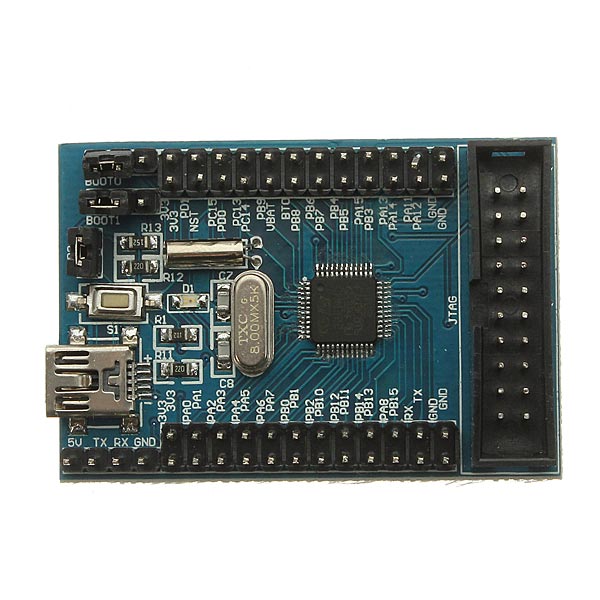
It has only one LED “D1” which is connected between Vcc and GND through a resistor. Just wanted to put it out. Any info regarding this is welcomed.
I think it does not have the 1.5k pullup resistor on USB D+, also it seems to have some startup issues.
Most of these boards, you can upload via serial and run the sketch, but if you change to boot link and try to run straight after powerup, it doesnt work.
Well, some boards run the code straight after booting, but most dont.
I suspect faulty manufacturing or bad hardware design
Looking at the schematic, I cant see any obvious reasons why these boards dont seem to work.
Perhaps the crystals or the oscillator caps are defective.
All I know is that several people have these boards, but quite often they dont work correctly and seem to have startup problems, even after pressing reset
Can anyone give me a run down on setting up a minimal toolchain? From the bat scripts I assume the intention is that it builds under Windows. I have read the README on the github page but there isn’t any info I can see on actually getting the toolchain installed.
Currently I get:
The system cannot find the path specified.
mkdir -p build/stm32_lib
The syntax of the command is incorrect.
make: *** [begin] Error 1
EDIT:
As far as I can seen mkdir on windows does not support a -p flag, which implies the makefile has to be run under linux, but then the presence of the .bat files confuses me…
export PATH=$PATH:~/opt/gcc-arm-none-eabi-4_8-2014q3/bin

make generic-pc13
You need to have gcc-arm installed and in your path.
The binaries that are in github were compiled using gcc 5.4 2016q2, but older versions of the compiled used to work OK (as I originally use the same compiler that the Arduino IDE uses i.e 4.8.4-2014q1
You could try using the windows power shell
No worries, I’m all set up to compile it under Linux now and it seems to work OK
I’ve not double checked, but your hex value looks wrong
The value I get is
0x0050400
How did you calculate the value you are using ?
Did you merge the bit pattern (0x1 << 18) so that no other bits apart from those from bits 18 to 22 were affected ?
I plan to make custom bootloader for STM32 which will read winbond flash.
The starting problem is building STM32 bootloader.
I have long read for this https://github.com/rogerclarkmelbourne/ … bootloader and discussion here https://www.stm32duino.com/viewtopic.php?p=33961.
But I still can’t find out how to build the bootloader.
I am on Windows 10 OS.
Where I should download the GCC ? Maybe here https://launchpad.net/gcc-arm-embedded/ … -q2-update ? or maybe here https://gcc.gnu.org/releases.html ?
Or maybe the GCC is part of Eclipse MCU https://github.com/gnu-mcu-eclipse/arm- … c/releases ?
And then where also should download the Make ?
Or is it automatically exist when I install the GCC ?
I have downloaded GCC 4.8.1 from https://gcc.gnu.org/releases.html, but all of content is C code, I don’t know how to execute.
I also have downloaded the Eclipse and all of its build toolchain, but I think this is not the correct method used to compile the bootloader.
I am now downloading https://launchpad.net/gcc-arm-embedded/ … -q2-update, but not yet completed since my home internet connection is very poor.
Anyone please help me.
thank you.
http://wiki.stm32duino.com/index.php?title=Bootloader
![[Pending Enhancement] RTC values resetting](https://sparklogic.ru/wp-content/uploads/2019/11/nucleo-l476rg-zestaw-startowy-z-mikrokontrolerem-z-rodziny-stm32-stm32l476-90x90.jpg)