
last year I adopted the Arduino environment as closely as possible for the STM8. Now user Kenjutsu suggested to link the STM8 board of this forum from my project website as a place for general discussions about my project. I hope that is ok? So far I didn’t post any links.
Michael
I know several other people were investigating how Arduino could be run on the STM8.
AFIK no one has written a complete core that is C++ compatible for the STM8, but I think work is still ongoing
Or perhaps the best that is achievable is a C based system, with workarounds for classes
Yes, that’s what I did. Use pure C, but thanks to some preprocessor magic it almost looks like C++. In many cases you get away with a simple search-and-replace to exchange all class-dots with underscores. Converting an existing Arduino library is harder, though.
It would be great if somebody would find a way to use SDCC for real C++ input. There are some ideas around, but AFAIK none is working so far.
Is you system integrated into the IDE ?
I looked at the github link, and it looks like its standalone.
We are a bit luckly with the SM32 because the ARM compiler gets installed if you install the Arduino Due or Zero, but I know that other compilers can be used with the IDE because the ESP8266 uses a completely different compiler.
So I presume it would be possible to integrate into the IDE
Is it from here
I would love to integrate it into the IDE. I tried that at the beginning, but I never got it to work without having at least one C++ input file. I don’t remember the full details anymore, but it was something about a hardwired assumption about filename extentions in this build program, that is distributed as an exe only.
If somebody would find a way to make it work with C only would be great! Right now I am using a Makefile based on the Arduino.mk makefile https://github.com/sudar/Arduino-Makefile.
That works great on Linux and MacOS and is my favorite working style, but unfortunately, windows is not suited very well for this and things get slow there. Really slow. This happens because make heavenly relies on forking the current process which is not supported on Windows and is internally emulated by starting new processes from scratch. And that takes time. A lot of time. Compiling-the-blink-example-takes-40-seconds kind of time. Time wasted just to needlessly starting and killing subprocesses. I guess this is why the Arduino guys came up with their proprietary build system in the first place.
Somebody came up with a python implementation of a simple build system. That might be an improvement, but using the stock Arduino one would be the best.
No worries
I have looked at the directory structure and its similar to Arduino STM32 but not quite the same
I’m also not sure how the Arduino IDE creates the list of files it needs to send to the compiler.
On the use of SPL: when I ported STM8Sduino, I actually used a middle layer (of mine) that is built on SPL. The overhead is about 2kb (using IAR). As my target was small STM8s (STM8S003F), I thought that was too costly and went to a middle layer that doesn’t rely on the SPL and then completely wrote out the middle layer – the overhead now is about 0.5 – 0.75kb.
It may be helpful if you look into your code and see which functions are taking up the most space and gradually replace them with your own code to save space.
Just my 2cents.
Yes, the SPL is a memory hog and quite complicated to use. The only advantage I can see in using it would be to be prepared for an easier migration to the STM32.
That’s why I don’t use it for Sduino anymore. It is still part of the source code, but the only function still used is the serial initialization code – and this is on it’s way out as well. But so far I am still planning to keep the SPL related to Sduino to allow for easy integration of SPL-based example programs by the user.
To avoid the 2kB penalty of linking dead code I wrote a Makefile that breaks up the SPL source files into single-function source files and compiles them separately. This way only the functions that are actually used get linked into the project and no dead code is left. So it is possible to use SPL, but it doesn’t cost anything if you don’t.
it seemed with stm8s one of the main problem seem to be debug as stm8s don’t do swd
https://www.cnx-software.com/2015/04/13 … -in-linux/
any one figured out more than the above? which seem to suggest debug for stm8s is probably hitting a wall with open sourced tools.
[ag123 – Sat Oct 21, 2017 4:49 pm] –
any one figured out more than the above? which seem to suggest debug for stm8s is probably hitting a wall with open sourced tools.
Having fallen deep down the eForth rabbit hole, I haven’t got around to trying it out, but there is an STM8 into GDB project here since earlier this year: https://sourceforge.net/projects/stm8-b … gdb/files/
I really love the very direct access to the inner workings of the compilation stages, especially the extremely useful assembler listings. That is much better than for any other compiler I have used so far.
The simulator is progressing as well, but it is not yet for production use.
STM8 supports debugging via ST-Link. Are you aware of this project: https://stm8-binutils-gdb.sourceforge.io/ ? OpenOCD and gdb support for the STM8 via ST-Link. I didn’t try it myself yet, but it sounds very interesting.
On linux terminal, it is:
echo “00 00 ff 00 ff 00 ff 00 ff 00 ff” | xxd -r -p > factory_defaults.bin
stm8flash -c stlinkv2 -p stm8s103f3 -s opt -w factory_defaults.bin
What exactly are you trying to do?
[gungsukma – Mon Nov 27, 2017 7:31 am] –
Please add a menu or something to unlock the protected chip
Good suggestion, thank you. I set up a feature request: https://github.com/tenbaht/sduino/issues/37
I am little busy right now, but I will look into it as soon as time permits.
[tenbaht – Wed Dec 06, 2017 12:31 pm] –
What exactly are you trying to do?
Just compiling a simple sweep program using the servo library is failing due to not finding Servo.h unless I copy it and the rest of the library directory into my sketch.
If it is supposed to work I think I’m going to have to try a fresh install due to how many cores I have cluttering things up.
It did take me about 20 minutes to figure out how to get my STLink gadget working. And figuring out which pins to connect to the serial adapter, and how to convert the Serial.print() to Serial_print_s() calls took a little bit longer. I wish there were a couple of sample programs somewhere I could have looked at. They could have saved me some time.
I really like the 5v tolerance of these things. Why do they even have a voltage regulator? I ripped the voltage regulator and power indicator LED off one of them so I could kick it into power saving mode. It still runs off one 18650 or three AAA batteries. It sure makes it easier to figure out how to power it.
simply what you’ve got would help us all.
srp
[Jimmus – Thu Jan 04, 2018 9:33 pm] –
I love these things!
<…>
Just curious as I used to get some kicks from the ATtiny85… (cheap, used to buy ’em in 25x qty.)
I get the $1 each approx. board price, but can you share your use cases for the STM8?
The STM32-bit blue boards are at $2 or 100% cost premium for 20x SRAM
The 8-bit ATmega328P mini is a 70% cost premium* and has 2x SRAM and is 100% Arduino compatible (higher Isink and Isource, too)
* An ATmega328P mini is $1.70 qty 10x from Aliexpress)
Ray
Key Features
Core
16 MHz advanced STM8 core with Harvard architecture and 3-stage pipeline
Extended instruction set
Memories
Program memory: 8 Kbyte Flash; data retention 20 years at 55 °C after 10 kcycle
Data memory: 640 byte true data EEPROM; endurance 300 kcycle
RAM: 1 Kbyte
Clock, reset and supply management
2.95 to 5.5 V operating voltage
Flexible clock control, 4 master clock sources
Low power crystal resonator oscillator
External clock input
Internal, user-trimmable 16 MHz RC
Internal low-power 128 kHz RC
Clock security system with clock monitor
Power management:
Low-power modes (wait, active-halt, halt)
Switch-off peripheral clocks individually
Permanently active, low-consumption power-on and power-down reset
Interrupt management
Nested interrupt controller with 32 interrupts
Up to 27 external interrupts on 6 vectors
Timers
Advanced control timer: 16-bit, 4 CAPCOM channels, 3 complementary outputs, dead-time insertion and flexible synchronization
16-bit general purpose timer, with 3 CAPCOM channels (IC, OC or PWM)
8-bit basic timer with 8-bit prescaler
Auto wake-up timer
Window watchdog and independent watchdog timers
Communication interfaces
UART with clock output for synchronous operation, SmartCard, IrDA, LIN master mode
SPI interface up to 8 Mbit/s
I2C interface up to 400 kbit/s
Analog to digital converter (ADC)
10-bit, ±1 LSB ADC with up to 5 multiplexed channels, scan mode and analog watchdog
I/Os
Up to 28 I/Os on a 32-pin package including 21 high sink outputs
Highly robust I/O design, immune against current injection
[Jimmus – Thu Jan 04, 2018 9:33 pm] –
It did take me about 20 minutes to figure out how to get my STLink gadget working. And figuring out which pins to connect to the serial adapter, and how to convert the Serial.print() to Serial_print_s() calls took a little bit longer. I wish there were a couple of sample programs somewhere I could have looked at. They could have saved me some time.
I am happy to hear that this project helped you a little bit!
A step-by-step beginner tutorial clearly would be a useful addition to the project website. Unfortunatly, I am pretty busy right now and won’t be able to push things forward until April or May. Would you maybe willing to summarize your steps and add some useful pictures? I would be very happy to add it to the documentation.
[mrburnette – Fri Jan 05, 2018 12:56 am] –
Just curious as I used to get some kicks from the ATtiny85… (cheap, used to buy ’em in 25x qty.)I get the $1 each approx. board price, but can you share your use cases for the STM8?
Minor point, but for cost comparison the STM8s103f3p6 minimum development boards can be found on AliExpress for around $0.70 shipped.
Because absolutely minimizing recurring cost matter more to volume manufacturing than it does to electronic hobbyists, the various STM8-based products that can be hacked for one’s own purposes are arguably more compelling than the simple development boards and some are available very inexpensively.
https://github.com/TG9541/stm8ef/wiki/S … ne-Gadgets
For example the W1209 thermostat as a “development board” is under $2.00 complete with 3 digit display, 3 user defined buttons, a relay, a NTC sensor, and STLink programming pins brought out on the PCB (through holes to the left of the display in this case).
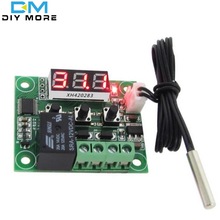
https://www.ebay.com/itm/1PCS-Red-W1209 … Sw8zdaAeff
Cheap STM8 products tend to use the STM8S003f3p6 device which is identical to the STM8S103F3P6 except for less EEPROM (128 vs 640 bytes) and a lower guaranteed number of flash cycles. As with the STM32 EEPROM, the 003 devices actually have more EEPROM than specified more often than not.
The obvious downside of STM8 at the hobbyist level is that entry level support is severely lacking compared to Arduino. tenbaht’s efforts toward a near Arduino environment are a big step in lowering this barrier to entry. I think Roger has mentioned that ST is working on Arduino support for STM8 as well. The STM8 eForth project from the link above is also very well done, though one will likely be cracking open the programming manual sooner to use peripherals in that environment. The eForth project has work arounds (one (multiplexed in/out) and two pin software serial ) for the fact that many of the STM8 based devices use the serial pins.
A lot if those USB current / voltage metering dongles with OLED display, seem to use the STM8
Also I have a panel mounted 4 digit, voltage and current meter , which also uses an STM8
I bought the panel mounted meter with the intention of reflashing it, and writing my own firmware, but have never got around to it.
There are probably STM8s embedded in more consumer devices around the house that I am not aware of.
So I agree with Mark, that the “use case” for these devices, as not to build projects from scratch using those cheap dev boards, but to hack/repurpose/enhance existing devices
I recently got into Sous Vide cooking. The commercial devices you can get at Walmart for like $65, and they let you connect with your cell phone and control and monitor the cooking. I don’t need that, but I did want to try it out. I pulled out my old crock pot and wired up my Arduino Uno to a DS1B20 temperature sensor and a sugar cube relay board, and ran some tests. I wondered what kind of temperature accuracy I could get. I was pleasantly surprised. I thought I might have to do some sort of PID algorithm or hysteresis, but with just a simple “< threshold turn on, > threshold turn off” algorithm it kept the water within 1.5 degrees F. That was good enough for me, so I seasoned up some steaks, stuck them in ziploc bags, and tossed them into the water. Oh my GOSH! It was almost trivial to cook that way, and it was some of the best steak I’ve eaten ever. I’m not even a connoisseur of fine steak, but I’m sold! I liked it so much I have cooked similar stuff several times a week for the last few weeks, and I don’t see myself cutting back anytime soon. It’s hogging my Arduino Uno, and I want it back. I need to figure out how to do oneWire on the STM8, and then build a circuit with an opto-isolator and triac instead of the relay board, and I’ll be good to go.
The project I’m currently working on is a mailbox door open detector. It simply signals me when the mailman comes. Eventually I plan to have it actually alert me via text or Wifi or something, but phase one is just an LED on the mailbox pointed at my house that blinks after the mailman has come. The STM8 board is perfect because it will be battery powered, and spend the vast majority of the time in Low Power mode. I had planned to use an Arduino Pro Mini, and build a circuit with a couple of MOSFETs that would power me up when the switch was activated and allow me to power down from software after sending the signal. But I have already ripped the voltage regulator and power indicator LED off one of my STM8 boards and tested it, and it will work fine just in Low Power mode.
Ray, I find that the vast majority of my projects don’t need even 32KB of flash. I have done projects with AtTiny85s, or even AtTiny13s that are still in use. I even did one with an AtTiny9. But I got tired of how inconvenient it was to write in Assembler and hook up the wires to download the programs. I expect there will be some learning curve with each new sensor and actuator but since I have already found where the core files are hidden, it won’t be as bad. Grep is my friend. I also found the example sketches, by the way. It would have been nice to know they existed. And where to find them.
First, when I plugged my STLink device in, somehow Linux didn’t recognize it. I don’t know why, because I was messing with it and watching dmesg, and it started working. I think unplugging it and plugging it back in may have done it. Anyway, I had to mess with it a little bit.
Second, there was a link on the installation page that said something about a flash program. The link was broken, but I looked up the stm8flash program and downloaded it and built it anyway. My Arduino IDE wasn’t downloading correctly at that point, but it successfully built a .hex file, which I was able to flash using the stm8flash program from the command line. I had to use sudo. I didn’t know if this was how I was going to have to do it all the time. Thankfully, I eventually got the IDE to flash using its copy of the stm8flash program.
I had to mess with the IDE in order to get it to flash. I remember getting a strange error that I fixed by going into preferences and unchecking the “aggressively cache compiled core” box. The STLink V2 device never showed up on any menu or anything in the IDE. It just worked.
The hardware serial pins are D5 and D6. I had to make sure my serial device had the right permissions.
It’s pretty easy to see how to use the Serial_begin() and Serial_print_s() sort of functions by looking at the defines in HardwareSerial.h. Once you find that the cores and stuff are in a subdirectory of hidden folder .arduino15 which is in the ~/ directory.
The example sketches are somewhere in the .arduino15 branch as well. ~/.arduino15/packages/sduino/hardware/stm8/0.3.3/libraries/Generic_Examples/examples
[MarkB – Fri Jan 05, 2018 5:11 pm] –
<…>
the various STM8-based products that can be hacked for one’s own purposes are arguably more compelling than the simple development boards and some are available very inexpensively.
https://github.com/TG9541/stm8ef/wiki/S … ne-Gadgets
Makes sense from a hacking perspective; especially for some uncommon devices.
Ray
[Jimmus – Sat Jan 06, 2018 5:47 am] –
First, when I plugged my STLink device in, somehow Linux didn’t recognize it. I don’t know why, because I was messing with it and watching dmesg, and it started working. I think unplugging it and plugging it back in may have done it. Anyway, I had to mess with it a little bit.Second, there was a link on the installation page that said something about a flash program. The link was broken, but I looked up the stm8flash program and downloaded it and built it anyway. My Arduino IDE wasn’t downloading correctly at that point, but it successfully built a .hex file, which I was able to flash using the stm8flash program from the command line. I had to use sudo. I didn’t know if this was how I was going to have to do it all the time. Thankfully, I eventually got the IDE to flash using its copy of the stm8flash program.
There is something about the needed permissions and the well known driver problem with the ST-Link/v1 interface on the STM8S-Discovery boards on https://tenbaht.github.io/sduino/hardware/flashtool/ Maybe a better link on the start page?
[Jimmus – Sat Jan 06, 2018 5:47 am] –
I had to mess with the IDE in order to get it to flash. I remember getting a strange error that I fixed by going into preferences and unchecking the “aggressively cache compiled core” box. The STLink V2 device never showed up on any menu or anything in the IDE. It just worked.
Thank for that feedback! That’s all problems that wouldn’t happen here, because I already set it up a long time ago. But of cause this is important to know for a first time user. I added this to my todo list:
- A menu entry for the ST-Link devices is on my todo-list.
- mention that you still need to grant permissions manually, even for an automatic install.
- explain how to set permissions for the serial device
- a brief tutorial mentioning at least some of the print “methods” like print_s, print_u etc.
But it will take a while before I will be able to find time to work on this.
