
#include "USBDevice.h"

#include "usbd_hid.h"
#define BUTTON_PIN 32
void setup() {

pinMode(LED_BUILTIN, OUTPUT);

pinMode(BUTTON_PIN, INPUT);
USBDevice.beginSerialHID();

}
uint8_t hidreport[4] = {0, 0, 0, 0};
int previous_buttons = 0;
void loop() {
if (previous_buttons != digitalRead(BUTTON_PIN)) {

hidreport[0] = digitalRead(BUTTON_PIN) ? 1 : 0;

previous_buttons = hidreport[0];

USBD_HID_SendReport(&hUsbDeviceFS, hidreport, 4);

digitalWrite(LED_BUILTIN, hidreport[0]);
Serial.println("Button pressed");

}
}
Compiles OK now.
But I can’t get it to upload to my Maple mini as its got the old bootloader
I’ll have to look tomorrow as its getting too late today.
I run the code but it seems to initially completely crash Java on Windows.
The Arduino IDE crashed straight after upload, and when I tried to restart the IDE it just crashed, so I ran the debug version and I get
#

# A fatal error has been detected by the Java Runtime Environment:

#

#  EXCEPTION_ACCESS_VIOLATION (0xc0000005) at pc=0x617493cd, pid=516, tid=0x00000d18

#

# JRE version: Java(TM) SE Runtime Environment (8.0_92-b14) (build 1.8.0_92-b14)

# Java VM: Java HotSpot(TM) Client VM (25.92-b14 mixed mode windows-x86 )

# Problematic frame:

# C  [listSerialsj.dll+0x93cd]
#

# Failed to write core dump. Minidumps are not enabled by default on client versions of Windows

#

# An error report file with more information is saved as:

# C:\Users\rclark\AppData\Local\Temp\\hs_err_pid516.log

#

# If you would like to submit a bug report, please visit:

#   http://bugreport.java.com/bugreport/crash.jsp

# The crash happened outside the Java Virtual Machine in native code.

# See problematic frame for where to report the bug.

#
I don’t know what you changed, but it completely crashes the IDE when I plug the Maple mini into my W7 PC.
If I comment out
USBDevice.beginSerialHID();
I am using windows 10 (and tried on a linux). git diff shows empty so it should be uploaded.
Could you try changing usbd_desc.c #define USBD_PID_FS 22336 (which is 0x5740 by the way) to for example 0x5750, then recompile the static lib. It might try to use a previous driver with the new “device”.
OK.
I’ll try that.
Yes. Changing the PID stops it crashing, but it then won’t install the driver for the Serial device (because the PID is wrong)
So I use the libwdi driver installer exe to install the serial driver, but the IDE immediately crashed again 
I have some other installations of W7 that I can try it on, which don’t have the STM drivers installed.
I’ll also try rebooting my machine, but I don’t think rebooting will fix it
Than I used the libmaple driver Arduino\hardware\Arduino_STM32\drivers\win\install_drivers.bat , with the following line:
"%~dp0wdi-simple" --vid 0x0483 --pid 0x5750 --iid 0 --type 3 --name "Maple Serial" --dest "%~dp0maple-serial"
I could not get it to work as it kept crashing the Arduino IDE.
I will try uninstalling and then using libwdi with the interface setting you used.
Did it crash for you.
All I have to do to make the IDE crash is plug in the Maple mini with the SerialHID sketch uploaded.
At one point Windows displayed a popup to say it was installing the composite and HID device, but could not install the Serial because of the PID, but as soon as I used libwdi to install the Serial driver, it crashed the IDE again
What version of the IDE and Java are you running.
I just tried updating my Java (I had to update it for something else recently, but I thought I’d update it again, but it was actually the same version.
V 8.0_92-b14 on
Actually, it may be my IDE installation. As its crashing in listserials.dll and I recall trying an update for that to resolve some other problem.
I’ll re-install the IDE and let you know if that resolves the problem.
Edit.
I just noticed that the latest release of the IDE is 6.13 and I’m running 6.12, so it will be an upgrade for me 
It seems I do not have to use libwdi, as Win10 takes care of the serial driver automatically, in the event manager:
Driver Management concluded the process to install driver usbser.inf_amd64_5de2576d6f02918e\usbser.inf for Device Instance ID USB\VID_0483&PID_5750&MI_00\6&2B048C5C&0&0000 with the following status: 0x0.

Driver Management has concluded the process to add Service usbser for Device Instance ID USB\VID_0483&PID_5750&MI_00\6&2B048C5C&0&0000 with the following status: 0.
Installing the latest IDE fixed it. I think I may have had a custom version of listports.dll installed, but I can’t remember why I did that .
Anyway….
When I push the button I just get a message via Serial USB, but I don’t seem to get a real button push on the mouse.
And if I push the button a few times it seems to crash after the 4th push
As all I get is
Button pressed

Button pressed

Button pressed

Button pressed
I tried
int c=0;

int previous_buttons = 0;

unsigned long m=0;

void loop() {
if (millis() - m>1000)
{
Serial.println(c++*2);
m=millis();
}
if (previous_buttons != digitalRead(BUTTON_PIN))
{
hidreport[0] = digitalRead(BUTTON_PIN) ? 1 : 0;
previous_buttons = hidreport[0];
USBD_HID_SendReport(&hUsbDeviceFS, hidreport, 4);
digitalWrite(LED_BUILTIN, hidreport[0]);
Serial.println("Button pressed");
}
}
I would still try to install with –iid 0 so only the serial interface part gets the serial driver (and uninstall the previous from 0x5750, or use differen PID usbd_desc.c).
I’ll move it to –pid 0x5751 and let you know what happens
HID is now working but Serial driver won’t load
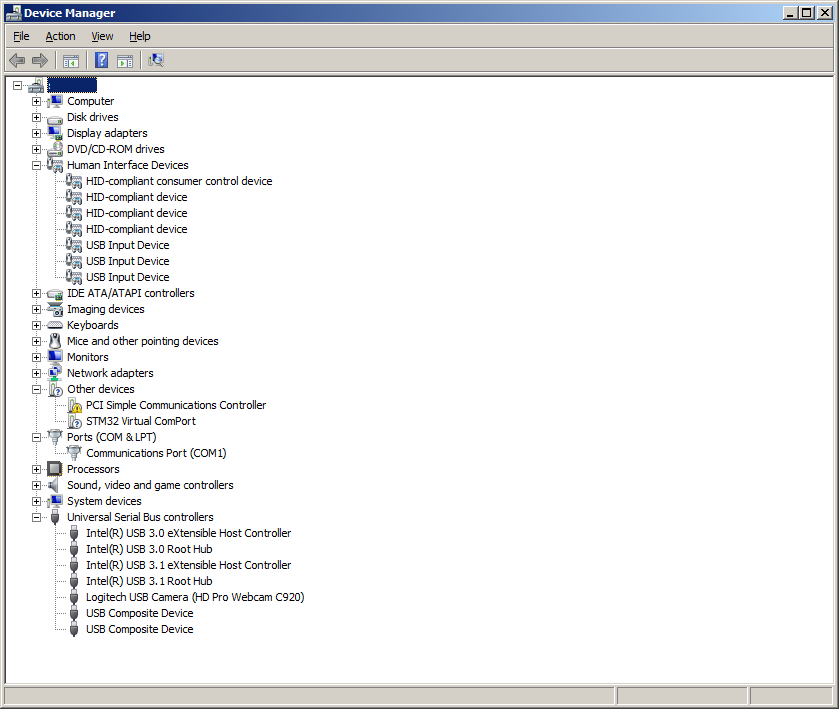
- serial_driver_not_recognised.png (54.9 KiB) Viewed 842 times
*EDIT sorry for the additional installed drivers. Do you know how to remove them from a PID (when the device is not plugged in)?

I’ll recompile for 0x5760, and 51 and 50 and see if I can remove them manually after loading each version into the Maple mini
BTW.
I tried using this http://www.nirsoft.net/utils/usb_devices_view.html it didnt seem to remove the drivers, even though it claimed it could
BTW. It would be better if you updated your makefile from the one in the WIP branch as you makefile has a problem with the VL Discovery build unless I do “make clean” first.
I’m sure this has been fixed
I tied connecting to a different machine, albeit one that had a Maple Mini connected before (but not the new STM repo and STM Virtual serial port etc.
And I got this USB installation popup (Sorry for the low quality, I had screengrab on one machine and email it to another and it didnt come out of the email in high quality.
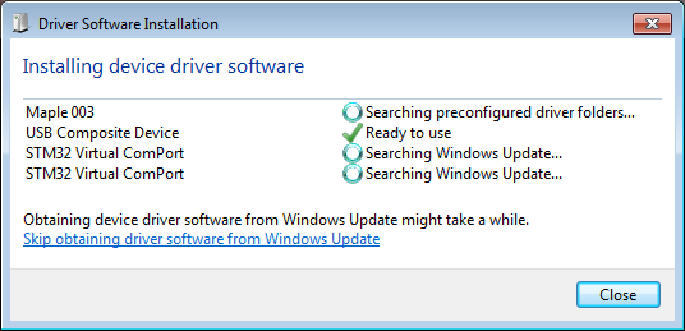
- too_many_devices.png (25.02 KiB) Viewed 822 times
Here is my compile maple mini binary
(see attached)
Edit
BTW
I tried on Windows 10, and the Com port shows even before I load the driver and I see the HID devices
But I don’t have the IDE installed on that machine, and I don’t have a terminal program either, so I don’t know if it actually works – though I presume it does
Perhaps Windows 7 has a bug with composite devices – I know that Windows XP had problems with composite devices, which is why Leaflabs decided that the Bootloader was only DFU and did not include Serial.
But I hoped that Windows 7 didnt have the same problem (but perhaps it does)
PID: 0x5740 is used for Serial.begin(), 0x5741 for composite with Serial on interface 0, and 0x5742 where no driver is needed (HID, later MSC/audio…).
Added Mouse (set/press/release/click/move) and Keyboard(just experimental) files.
Current example code:
#include "USBDevice.h"

#include "Mouse.h"

#include "Keyboard.h"
#define BUTTON_PIN 32
void setup() {
pinMode(LED_BUILTIN, OUTPUT);
pinMode(BUTTON_PIN, INPUT);
USBDevice.beginSerialHID(&Mouse, &Keyboard);
}
int previous_buttons = 0;
void loop() {
if (previous_buttons != digitalRead(BUTTON_PIN)) {
previous_buttons = digitalRead(BUTTON_PIN) ? 1 : 0;
Mouse.setButton(digitalRead(BUTTON_PIN));
Keyboard.println("Hello!");
digitalWrite(LED_BUILTIN, previous_buttons);
Serial.println("Button pressed");
}
}
I will test when I get some free time
Cheers
Roger
Tested on stm32f103c with 1.6.13 arduino ide on W10 x64, work very well.
Can’t wait for it to have Joystick library (passing pot value from ADC) 
Thanks.
It does seem to work OK for me now on Windows 7.
In the WIndows device manager, the Serial port becomes “Maple Serial Interface 0 (COMxx)”
and another “USB Input Device” appears in the “Human Interface Devices” section
I guess we need to work out how to merge all this into the stm32duino F1 repo
I’m a bit concerned that some of this stuff could impact on the original Nucleo codebase
I think I asked Frederic @ STM a similar question a month ago, so I will need to find his answer, as the changes we need to make to the official repo are getting more and more invasive as we need to change a high proportion of their code (not just for this but for the I2C and the RAM usage, and the USB support, etc etc etc
While trying to upload anything to a maple mini with this branch, I keep getting “Cannot set alternate interface: usb_set_altinterface: could not set alt interface 0/2: win error: No more data is available.”
Do you have any idea why ?
While trying to upload anything to a maple mini with this branch, I keep getting “Cannot set alternate interface: usb_set_altinterface: could not set alt interface 0/2: win error: No more data is available.”
Do you have any idea why ?
Tested on stm32f103c with 1.6.13 arduino ide on W10 x64, work very well.
Can’t wait for it to have Joystick library (passing pot value from ADC)
Or copy the joystick library, and modify it. Its copy-paste duplicate.
Or copy the joystick library, and modify it. Its copy-paste duplicate.
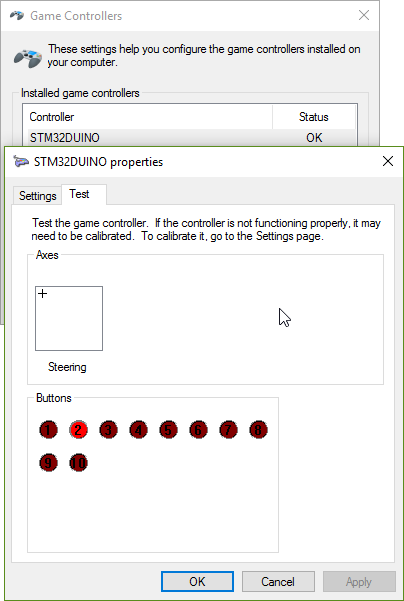
Update:
Did not manage to check axis, since cannot read adc value (INPUT_ANALOG is not declared to turn on adc pin), tried to set bits manually, but it’s too different in comparison with maple core definitions on original arduino_stm32 repo.
Did not manage to check axis, since cannot read adc value (INPUT_ANALOG is not declared to turn on adc pin), tried to set bits manually, but it’s too different in comparison with maple core definitions on original arduino_stm32 repo.
danieleff wrote:
Are you using bluepill or maple mini?
#include "USBDevice.h"

#include "Joystick.h"
#define BUTTON_PIN 32
#define LED_BUILTIN PC13
Joystick_ Joystick(0x01, 0x04, 10, 0, true, false, false, false, false, false, false, false, false, false, false);
int val = 0;
void setup() {
pinMode(LED_BUILTIN, OUTPUT);
pinMode(BUTTON_PIN, INPUT);
USBDevice.beginSerialHID(&Joystick);
Joystick.begin();
}
int previous_buttons = 0;
void loop() {
if (previous_buttons != digitalRead(BUTTON_PIN)) {
previous_buttons = digitalRead(BUTTON_PIN) ? 1 : 0;
Joystick.setButton(1, previous_buttons);
digitalWrite(LED_BUILTIN, !previous_buttons);
val = analogRead(PB0);
Serial.println(val);
Joystick.setXAxis(val);
}
}
I think Frederic @ STM is happy to have the new code in the master branch.
I think one of Frederic’s PRs effectively moves the changes in the WIP branch into master, but I have not had time to test the PR, so those changes have not been made to the master yet.
Sorry. I have been very busy with commerical work, as I have pre-christmas deadlines and also deadlines due to Chinese New Year, ( my contacts in China start their holiday on 12th Jan, for about 3 weeks).
So I have not had time to test and pull the PRs from Frederic.
As I do not derive any income from STM etc, my work has to come first.
I’ve managed to get my board to boot as a USB Serial Device (thanks to Roger’s FAQ), but I don’t fully understand how to “turn” it in to a USB HID.
Is the code presented in this thread supposed to be the “bootloader” of the board, or do you just upload the code as a “sketch” and when plugged into the PC it’s operates as a USB HID?
Can some provide a step by step guide on how I could get this running on my board?
I’ve managed to get my board to boot as a USB Serial Device (thanks to Roger’s FAQ), but I don’t fully understand how to “turn” it in to a USB HID.
Is the code presented in this thread supposed to be the “bootloader” of the board, or do you just upload the code as a “sketch” and when plugged into the PC it’s operates as a USB HID?
Can some provide a step by step guide on how I could get this running on my board?
I’ve managed to get my board to boot as a USB Serial Device (thanks to Roger’s FAQ), but I don’t fully understand how to “turn” it in to a USB HID.
Is the code presented in this thread supposed to be the “bootloader” of the board, or do you just upload the code as a “sketch” and when plugged into the PC it’s operates as a USB HID?
Can some provide a step by step guide on how I could get this running on my board?
Searching “HID” in this forum and ends up here.
Well, will be very nice to have Keyboard/Mouse, and on the same time, serial.

So I install STM32Duino, here what I was done, if I remember correctly:
1. Extract Arduino-1.8.0 IDE
2. Make Arduino-1.8.0\Portable folder (I use external hard drive)
3. Install Arduino Zero board
4. Extract Arduino-1.8.0\hardware\Arduino_STM32-master (Arduino_STM32-master.zip)
5. Run Arduino-1.8.0\hardware\Arduino_STM32-master\drivers\win\install_drivers.bat
7. Test “blink”, success.
And for the HID:
1. Make Arduino-1.8.0\hardware\STM32_official folder
2. Extract Arduino-1.8.0\hardware\STM32_official\STM32F1 (Arduino_Core_STM32F1-USB_HID_Composite.zip)
3. Remove Arduino-1.8.0\hardware\Arduino_STM32-master\STM32F1
4. Extract Arduino-1.8.0\hardware\STM32_official\Tools (Arduino_Tools-master.zip)
5. Remove Arduino-1.8.0\hardware\Arduino_STM32-master\Tools
6. Try to compile this code:
#include "USBDevice.h"

#include "Mouse.h"

#include "Keyboard.h"

#define BUTTON_PIN 32

void setup() {

pinMode(LED_BUILTIN, OUTPUT);

pinMode(BUTTON_PIN, INPUT);

USBDevice.beginSerialHID(&Mouse, &Keyboard);

}
Try the “Stm32duino bootloader” upload option, otherwise is not guarantied that the serial USB is compiled.
If you really want to upload via Serial, you can workaround by adding `BluePill_F103C8.menu.upload_method.serialMethod.build.upload_flags=-DSERIAL_USB` to the `boards.txt`, although this will change `Serial` to USB , and `Serial1` will be the UART1.
I will have to modify the code so that USB is included if the chip has USB, and not only if Serial-is-USBSerial based on menu settings. Or something.
2. Boot0: LOW
3. Use the USB cable data.
4. Upload method: STM32duino bootloader
5. serial-hid.ino as below
#include "USBDevice.h"

#include "Mouse.h"

#include "Keyboard.h"
void setup() {
pinMode(PC13, OUTPUT); // PC13 and LED_BUILTIN
pinMode(LED_BUILTIN, OUTPUT);
USBDevice.beginSerialHID(&Mouse, &Keyboard);
}
void loop(){
digitalWrite(PC13, HIGH);
delay(1000);
digitalWrite(PC13, LOW);
Keyboard.write('a');
Keyboard.write('b');
Keyboard.write('c');
Keyboard.write('d');
Keyboard.write('e');
Keyboard.write('f');
Keyboard.write('g');
delay(5000);
}
D: \ Arduino \ hardware \ Arduino_STM32-master \ STM32F1 \ cores \ maple \ USBDevice.cpp: 2: 22: fatal error: usbd_hid.h: No such file or directory
  #include "usbd_hid.h"
                       ^
Compilation terminated
Exit status 1

Compiler error for development board Generic STM32F103C series.
D: \ Arduino \ hardware \ Arduino_STM32-master \ STM32F1 \ cores \ maple \ USBDevice.cpp: 2: 22: fatal error: usbd_hid.h: No such file or directory
  #include "usbd_hid.h"
                       ^
Compilation terminated
Exit status 1

Compiler error for development board Generic STM32F103C series.
I want to use the Keyboard function.
Thank you.
C:\Users\weslley.mata\Documents\Arduino\libraries\Mouse\src/Mouse.h:25:17: fatal error: HID.h: No such file or directory
#include "HID.h"
I want interface USB Keyborad to stm32f407 black, Please help.
I have done USB serial using SerialUSB.begin(): and works fine.
I followed your post and got a success to usb keyboard.
I’m thinking to make a ir-usb cordless keyboard.
I tried to use timer in my code in addition to the codes you showed.
But, with the way library included, the code below is not working showing
void setup() {

USBDevice.beginSerialHID(&Mouse, &Keyboard);

Timer2.setPrescaleFactor(1024);

}
#include <USBHID.h>
void setup() {

USBHID.begin(HID_KEYBOARD_MOUSE);

Timer2.setPrescaleFactor(1024);

}
