
I’m trying to start with STM32 (already I have some experience with AVR/Arduino/ESP8266), but now I’m totally stuck and have to ask for help. Believe me, before asking I tried to read forum and it seems that I have typical problem, but can’t fix it by own.
So:
1. I have STM32F103C8T6 “blue pillow”, Arduino 1.8.4, via board manager uploaded “STM32F1xx/GD32F1xx board v. 1.0.10.
2. Using USB/RS232 adapter and UART I’m able to load my STM, I tried any “blink example”, it was working ok.
3. I downloaded generic_boot20_pc13.bin and burned it into my STM using stm32flash software.
4. When I’m connecting USB cable, I see a new COM port in Device Manager (Windows 7, 64bit) as working well:
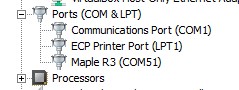
- Device_Manager_2018-04-19_16-25-15.jpg (10.34 KiB) Viewed 959 times
Have you tried a different usb cable. That fixed my issue. Not all usb cables are build the same it seems.
@edogaldo – it is interesting: when I connected STM to PC first time, I had a message “USB device is not recognized”, then I installed maple driver and now is better, STM is visible in device manager and it looks well. BUT, when I’m connecting it, connection sound generated by the Windows is not the same as with any other USB device (characteristic “bom-bim”), but it sounds like “error sound” (bom bom). When IDE is reseting STM (during try to download code), sound is first “disconnection” (bim-bom) and next – again error “bom bom”. So it is strange: I see this COM port as good working, in properties it is also shown as healthy, also I’m able to see messages “congratulations…” sent by STM bootloader, so why I hear error sound?
I have no other not properly connected devices in my devices tree.
PS: maybe this resistor for pulling up D+ is still too high? I have 1k8 in parallel with originally mounted 10k on PCB, it gives 1.5kohm. Should I try to decrease it, e.g. to 1k?
Its possible your system is not enumerating fast enough to see that the bootloader is running as a DFU device.
This is a know problem on some Mac’s but Windows and Linux seem to normal be able to enumerate fast enough
Unfortunately at the moment the bootloader does not have a pin which you can pull high to force it to hold in the bootloader.
However I think the consensus that the Boot1 pin should be used as the method to lock in DFU mode, as hardly anyone tries using that pin on their Blue PIll etc
I’ll try changing that in a minute, and there is also another change I intend to make to the core so that the Core can tell the bootloader to hold in DFU and wait for upload. (this feature is already in the bootloader but was never added to the Core)
https://github.com/AiFrame/Maple-Window … x64_driver
and installed “serial” only by updating driver, is it not enough, as I see?
Now I uninstalled it, and installed again follows this instruction:
https://github.com/rogerclarkmelbourne/ … stallation
and… problem solved, many thanks for prompt, big beer for this guy, please! 
I’m able to download code into my pillow, but results reported by console are the results are vary, depending on the number of resets, the phases of the moon, my mood, and I do not know what else. Some examples:
maple_loader v0.1

Resetting to bootloader via DTR pulse

Searching for DFU device [1EAF:0003]...

Found it!
Opening USB Device 0x1eaf:0x0003...
Found Runtime: [0x1eaf:0x0003] devnum=1, cfg=0, intf=0, alt=2, name="STM32duino bootloader v1.0 Upload to Flash 0x8002000"
Setting Configuration 1...
Claiming USB DFU Interface...
Setting Alternate Setting ...
Determining device status: state = dfuIDLE, status = 0
dfuIDLE, continuing
Transfer Size = 0x0400
bytes_per_hash=248
Starting download: [##################################################] finished!
error resetting after download: usb_reset: could not reset device, win error: The device is not connected.
state(8) = dfuMANIFEST-WAIT-RESET, status(0) = No error condition is present
Done!
Resetting USB to switch back to runtime mode
processing.app.SerialException: Błąd otwarcia portu szeregowego 'COM51'.
at processing.app.Serial.<init>(Serial.java:147)
at processing.app.Serial.<init>(Serial.java:82)
at processing.app.SerialMonitor$4.<init>(SerialMonitor.java:101)
at processing.app.SerialMonitor.open(SerialMonitor.java:101)
at processing.app.AbstractMonitor.resume(AbstractMonitor.java:104)
at processing.app.Editor.resumeOrCloseSerialMonitor(Editor.java:2218)
at processing.app.Editor.access$2200(Editor.java:79)
at processing.app.Editor$DefaultExportHandler.run(Editor.java:2196)
at java.lang.Thread.run(Thread.java:748)
Caused by: jssc.SerialPortException: Port name - COM51; Method name - openPort(); Exception type - Port not found.
at jssc.SerialPort.openPort(SerialPort.java:167)
at processing.app.Serial.<init>(Serial.java:136)
... 8 more
Błąd otwarcia portu szeregowego 'COM51'.
And what with this serial.print? Is it possible witch this connection via USB? Maybe should I define first (how?) which port will be used for this?
If you have the Serial monitor open in the IDE when you press upload, I think it actually closes the serial connection before the upload process, or possibly as soon as you press the upload button, and re-opens it afterwards
However sometimes it seems to get confused and you get those errors
The safest thing is to close the monitor yourself, but most of the time its OK, so I just live with the error if I see it and close the monitor and then unplug and reconnect the board.
From what I understand Windows 10 handles this better, but W10 has so many other negative points, I won’t be updating to use it.
The DFU reset error, is something different. I am not sure why sometimes it has this error.
Just ignore that one, it makes no difference.
More interesting at now is for me, if there is a way to use maple serial interface as serial port for using with commands serial.print, etc, e.g. for debugging a code?
Per default, Serial is mapped to USB serial.
Have you tried something and didn’t work?
Note that Win PCs need 5 seconds to re-enumerate the USB COM port after an upload or reset.
Serial.begin(115200); // optional for USB serial

while ( !Serial ); // wait for host serial monitor

Serial.println("This should be visible in serial monitor");
For serial USB you don’t need to call serial.begin because the core has to call this it’s self otherwise serial USB does not run and the IDE has no way to tell the core to reboot prior to uploading
Also..
I find adding code to wait for Serial is OK but means you wile you debug, but the code will not run without connection to the PC and the terminal being open.
I sometimes add a 1 sec delay at the start of setup() and the USB Serial on my PC is always working by then
Something like this:
#define DEBUGTIME 2000

long waittime=millis();

while ( !Serial && millis()-waittime <DEBUGTIME ); // wait for host serial monitor

Serial.println("This should be visible in serial monitor");+1
That’s the best solution.
