
i’ve published a event loop for stm32duino (based on libmaple core)
(updated this post in the readme.md on github, formatted with markdown)
https://github.com/ag88/stm32duino-eventloop
if you have program windows, java, and other similar (gui?) apps before, you’d be familiar with an event loop, i.e. your app handles events and the event loop dispatches events e.g. mouse clicks, button presses etc to your event handler
try the demo:
in the bin directory on github i’ve uploaded a pre-compiled stm32duino flash image: bin/STM32duinoEventloop.bin
this is targetted for the maple mini (and clones) (i.e. the led pin on pin 33) and should use the stm32duino bootloader (i.e. code at 0x8002000)
you can install it to maple mini using
dfu-util -a 2 -RD STM32duinoEventloop.bin
Have you ever considered the Arduino Task scheduler?

event handlers seemed a little different from plain tasks, schedulers. The notion is using an event queue / loop makes the setup event driven
this would make it similar to ‘windowing’ gui designs which are largely event driven
i’ve initially tried rtos, but i’d think rtos has some drawbacks in that the tasks are not ordinary functions and hence you can’t literally callback to them directly. the other issue with rtos is that the design somewhat fragment the very limited 20k sram, hence mm/bp runs out of memory all too soon.
while using an event loop or perhaps the co-operative task scheduler allows one to use ordinary functions in which variables are placed on the stack and unrolled before the next task runs. each of the task only keeps the state in specific global variables. this saves a lot of memory and allow more elaborate apps to run on mm/bp in the 20k sram

arkhipenko/TaskScheduler is still my choice for now, especially when I get my pull request in, so we can have that idle 1 ms sleep feature for free.
I like your approach for events, where you pass a nice and efficient enum for an ID. Gonna look around a bit more.
i’d imagine for the hardcore, one may take an ILI9341 lcd, program the xpt2046 touch screen controller as a device handler sending touch events.
then build the gui layer, there you have it a responsive touch screen Gui on stm32 (duino), menus, buttons, and all

 .. with GEM and PalmOS
Your event loop seems nice, I’m gonna steal that someday. But take a look at this lovely efficient callback library that allows you to use both static and object methods as callback functions.
the ringbuffer implemention used in my eventloop is from https://github.com/AndersKaloer/Ring-Buffer
the callback library is nice and may find some good uses.
as for my event loop, i developed this after i run out of 20k memory on MM using rtos, the memory is fragmented due the structure of the vTasks, context switches and various rtos issues. it happens that an event loop is a concept i’m familiar with rather than an os replacement, i made an attempt to develop it and here is it
i think this is probably part of the ‘engine’ of the various gui displays (windows etc) and which probably means it may be possible to develop this into an interactive widget based gui system on stm32 (duino), i.e. those panels, buttons, menus etc. i’m not yet ready to explore that but in the mean time this event loop has been a useful thing i’ve played with.
note that you can post an event to the event queue from a interrupt handler routine
just 2 cents
/**

* Returns whether a ring buffer is full.

* @param buffer The buffer for which it should be returned whether it is full.

* @return 1 if full; 0 otherwise.

*/

inline uint8_t ring_buffer_is_full(ring_buffer_t *buffer) {

return ((buffer->head_index - buffer->tail_index) & RING_BUFFER_MASK) == RING_BUFFER_MASK;

}
Maybe of interest: a signal/slot implementation based on Don Clugston’s Fastest Possible C++ Delegates.
https://github.com/ag88/stm32duino-even … op.cpp#L61
int8_t CEventLoop::post(Event& event) {

noInterrupts();
if(m_eventbuffer->is_full()) return -1;

m_eventbuffer->push(event);
//	Serial.print("post:");

//	uint16_t ev = static_cast<uint16_t>(event.event);

//	Serial.println(ev);
interrupts();

return 0;

}
[Rick Kimball – Thu Nov 08, 2018 4:24 pm] – (…)with the MoDu mentioned one I don’t see any atomic calls. How do these things work properly when used inside of an interrupt?
Very good point! In the case of Wizard97’s library, the magic sauce is a portable atomic operations library.
[MoDu – Thu Nov 08, 2018 5:36 pm] –[Rick Kimball – Thu Nov 08, 2018 4:24 pm] – (…)with the MoDu mentioned one I don’t see any atomic calls. How do these things work properly when used inside of an interrupt?Very good point! In the case of Wizard97’s library, the magic sauce is a portable atomic operations library.
out of curiosity, i looked at the secret sauce,i saw
https://github.com/wizard97/SimplyAtomi … ster/arm.h
__asm__ __volatile__ ("cpsie i" ::);
[MoDu – Thu Nov 08, 2018 5:36 pm] –
Very good point! In the case of Wizard97’s library, the magic sauce is a portable atomic operations library.
Unless you modified the ringbuffer header it isn’t using that:
https://github.com/wizard97/ArduinoRing … gBuf.h#L48
And this warning is also ominous:
https://community.arm.com/iot/embedded/ … priorities
as we are dealing with shared variables in the ringbuffer implementation that’s not thread safe
my thoughts are to use masks and such so that only the interrupts that calls the ringbuffer manipulation codes are disabled.
other interrupts which do not meddle in the (same) ringbuffer could be spared
for now noInterrupts(); and Interrupts() are blanket enable and disable all interrupts mechanisms which would hit performance.
to do fine grain control may take more than the existing codes available in the core but would improve performance while still keeping some level of thread safety in dealing with the ring buffer
just 2 cents
may look at it another time
https://gist.github.com/RickKimball/8f6 … 44b83d96d0
My approach is to use a union that allows you to access both the head and tail in one asm instruction or access each independently. I load using the both union member into a temp work register and only write back either the head or tail. This approach seems to working without disabling interrupts when you have one reader and one writer.
[Rick Kimball – Thu Nov 08, 2018 6:03 pm] –
Unless you modified the ringbuffer header it isn’t using that:https://github.com/wizard97/ArduinoRing … gBuf.h#L48
And this warning is also ominous:
You are right, I forgot that I’ve been using the Dev branch for so long. The main branch doesn’t support all boards, only the ones addressed in the #defines. The point of using the Atomic library is to remove all that #ifdef cruft.
https://github.com/wizard97/ArduinoRing … gBuf.c#L65
Still, gonna check out your solution.
[ag123 – Wed Nov 07, 2018 7:21 pm] –
hi all,i’ve published a event loop for stm32duino (based on libmaple core)
(updated this post in the readme.md on github, formatted with markdown)
https://github.com/ag88/stm32duino-eventloop
…
Nice.
But there is some overhead associated with the implementation… I have not fired-up a session to look into the specifics, but for forum members that are scratching their heads and are somewhat lost, my recommendations are to just stay with your comfortable inline coding: use the IDE tabs to separate your functions from the main code to keep your thoughts straight. Your loop() will then look something like:
void loop( void) {

function1();

function2();

function3();

}
The main loop looks like this:
if(millis() - LastUpdated1)

{

LastUpdated1 = millis();

Update1();

}

else if(millis() - LastUpdated2)

{

LastUpdated2 = millis();

Update2();

}else

{

SleepFor1Millisecond();

}
though i agree that calling one function after another and basically keeping state in each function would lead to leaner implementations and hence saving memory.
in arduino forum, someone posted this demonstration code for several things at the same time
https://forum.arduino.cc/index.php?topic=223286.0
which i’d think would lead to a much leaner implementation while keeping state in each function
an event loop is an abstraction sort of that’s modelled after a message queue, in an attempt to search for a nice diagram, i stumbled into node.js, which i do not know about as well but it features an event loop.
https://www.tutorialspoint.com/nodejs/n … t_loop.htm
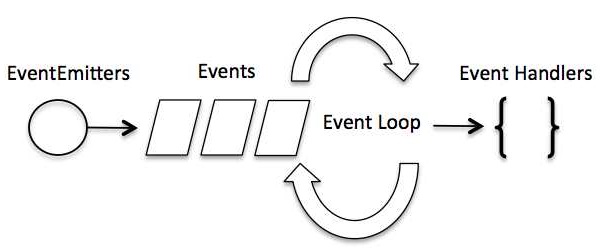
https://en.wikipedia.org/wiki/Event_loop
i think the event loop abstraction is nevertheless useful, in a certain sense due to the use of an event queue, the events become sequential rather than concurrent. this may help simplify some scenarios, e.g. interrupts could ‘post events’ to the queue as well so that things are handled sequentially.
but as it goes, this is ‘async’ i.e. not real time, in part due to the use of an event queue etc
[ag123 – Fri Nov 09, 2018 5:34 pm] –
thanks Ray, imho an event loop is a little different from say calling a function after another.
…
i think the event loop abstraction is nevertheless useful, in a certain sense due to the use of an event queue, the events become sequential rather than concurrent. this may help simplify some scenarios, e.g. interrupts could ‘post events’ to the queue as well so that things are handled sequentially.
but as it goes, this is ‘async’ i.e. not real time, in part due to the use of an event queue etc
I’m familiar with event loops, callbacks, Lambda functions, and 30 years worth of OOP ideas. But there is an 80% – 20% rule that most problems in computer science can be handled with straight forward inline function coding. My guess is that only 10% of this forum’s members actually understand your implementation. 20% is a great reason to continue down your logical thinking path.
But, it is fun to play around with the ideas and concepts and create working examples.
My point is, if readers do not understand what you are doing and why, then they should not feel that they are being left out; most of their projects can be implemented with straight inline function calls.
Ray
i’d think with this event loop, things are probably just a few hops away from a Gui, just that i do not know how to put that together yet.
in a sense say that lets divide a 320×240 lcd into a display section and maybe on the right a few ‘buttons’ (that would look like a menu) that would make a simple Gui.
then i’d still need to figure out how to translate taps on the ‘rectangles’ representing the buttons into events, and perhaps even animate the buttons.
and users can extend that Gui with their own event handler by responding to events.
it seemed this is quite close to making that possible
but the thing is STM32F103C{8,B} still has only that 20k sram, it feels a little too ambitious to build responsive Gui around BP/MM
[ag123 – Sat Nov 10, 2018 11:24 am] –
…
but the thing is STM32F103C{8,B} still has only that 20k sram, it feels a little too ambitious to build responsive Gui around BP/MM
You can always store objects in flash and swap to SRAM which contains the video buffer. Memory moves are efficient and object placement is just a matter of offsets… this is how GUI text is displayed: just bitmaps.
But, that is not the point: even at 72 MHz, you only have one (1) processing unit and there is no OS to create pseudo-threads. The finite processing bandwidth of a uC quickly succumbs to higher level software architecture. As there is no dedicated GPU with video RAM, modern GUI techniques are not applicable. But, Adafruit’s Arduino GUI display libraries do support touch panels, so rudimentary objects and an event queue are possible.
Software creativeness can take a remarkable quantum leap sometimes. Who would have thought a web-browser could be written and hosted by an Arduino UNO?
https://hackaday.io/project/3116-pip-ar … eb-browser
Ray
[mrburnette – Sat Nov 10, 2018 5:13 pm] –
But, that is not the point: even at 72 MHz, you only have one (1) processing unit and there is no OS to create pseudo-threads. …
This was the point I was trying to make with my early post talking about recreating state of the art early 1980’s.
Early Windows was built like this. Most pc machines back then only had one cpu and Windows used an event queue to do everything. It was basically cooperative multi-tasking. One errant program could lock up the machine if it hogged the CPU.
Palm OS, Digtial Research GEM, and all those windowed systems on 6502s, and classic Mac OS. They all used event queues fed by external events in a cooperative multi-tasking non preemptive interrupt world.
It is surely possible to do this, but why ? The best use of a 72MHz small mcu is to do real-time stuff. Unless this project is one of those, I’m doing this because I can, you might leave windowing systems to something like a raspberry pi or its clones. The real power comes when you augment those linux systems with a bluepill to do the real-time stuff to pick up where the rpi struggles.
[Rick Kimball – Sat Nov 10, 2018 5:37 pm] –
…
The real power comes when you augment those linux systems with a bluepill to do the real-time stuff to pick up where the rpi struggles.
And as an example, I recently posted an RPi 3B Internet Radio using the Google AIY board. The Maple Mini “talks” to the serial console over 115KB serial and provides instructions to MPC: a frontend to MPD. MPC then echos metadata over the serial link to the Maple Mini which then parses it and displays the Song and the Artist on a Nokia Mono LCD (because I have too many of these darn things laying around.)
https://www.hackster.io/rayburne/joysti … y-pi-radio
Notice the “event” loop:
void loop(void)

{

IsMute();

AdjustVolume();

ChangeChannel();

SerialInput();

ForceUpdate();

}
for instance the key sender task actually use an event to pass keystrokes to other event handlers
https://github.com/ag88/stm32duino-even … sk.cpp#L49
event.handle_id = EHandleID::BroadCast;

event.event = EventID::KeyEvent;

event.param1 = c;

EventLoop.post(event);[ag123 – Sun Nov 11, 2018 8:24 am] –
…
imho an event loop is useful if you are mostly waiting for things
+1
You nailed it on that last statement and I agree with the summary. In the ESP world, delay() releases the Arduino pseudo-thread and returns control to the main (RF) thread… this is implemented into the loop() automatically so that at the end of each loop() control is transferred. Of course, in ESP8266, these pseudo threads are instantiated by non-OS proprietary task switcher. In the ESP32 world, FreeRTOS manages the overall task processes as the ESP32 is a dual-core architecture.
There are numerous ways to implement non-blocking functions. Just like in real-life, the tool you need is often the very tool you do not own.
All the above being said, the proper technique distills to the task at hand.
Ray
[mrburnette – Fri Nov 09, 2018 4:51 pm] –
With a reather complex, dual-OLED displays monitoring system for a Rotax with cylinder head temp (2), exhaust gas temp (2), coolant temp, Volts, Amps, etc. the loop time is still under a 1000mS using a 16MHz AVR Mega.
OT: Is this a project of yours you are referring to Ray? Would love to see the code (read that as steal ideas) as it sounds very similar to what I’m doing.
[BennehBoy – Tue Dec 18, 2018 12:04 pm] –[mrburnette – Fri Nov 09, 2018 4:51 pm] –
With a reather complex, dual-OLED displays monitoring system for a Rotax with cylinder head temp (2), exhaust gas temp (2), coolant temp, Volts, Amps, etc. the loop time is still under a 1000mS using a 16MHz AVR Mega.OT: Is this a project of yours you are referring to Ray? Would love to see the code (read that as steal ideas) as it sounds very similar to what I’m doing.

- Europa_MultiTab.png (14.02 KiB) Viewed 223 times
[BennehBoy – Tue Dec 18, 2018 11:26 pm] –
BTW, check this out -> http://chocoos.org/
Reminds me of Java or the old Microsoft pre-compiled BASIC overlay. Or, maybe even PICAXE BASIC. Ummmm,
Maybe Bitlash
I’m not opposed to the technique, but not a real fan, either.
Ray
[mrburnette – Wed Dec 19, 2018 1:36 am] –
I’m not opposed to the technique, but not a real fan, either.
Yep, it does seem like an exercise in ‘because we can’ for such small systems. Still interesting though, and I guess in a similar context to this thread (sorry ag123!).
![[Pending Enhancement] RTC values resetting](https://sparklogic.ru/wp-content/uploads/2019/11/nucleo-l476rg-zestaw-startowy-z-mikrokontrolerem-z-rodziny-stm32-stm32l476-90x90.jpg)