
First sorry if my question is stupid.
I’m newbie.
I want to move from arduino to stm
I have the same board described here by Roger:
http://www.rogerclark.net/stm32f103-and … 1-5-x-ide/
Environment
Windows 10
Arduino IDE 1.7.7.
I can not upload simple program from this link
I tried to prepare my environment cccording to Rogers’s description.
I see some diferences and I have small questions
Using Arduino IDE 1.7.7 I dont have “STM32 to FLASH – no bootloadrer” board.
I used “Generic STM32F103RB”.
In this tutorial there is step 12:
“On the Maple mini, press and hold the “Button” then tap and release “reset”. This puts the board into serial flash upload mode”
My question is :
Where id “Button” on this board ?
I just pressed reset and click upload my program.
Unfortunately I got error:
Failed to init device.
stm32flash 0.4
http://stm32flash.googlecode.com/
Using Parser : Raw BINARY
Interface serial_w32: 230400 8E1
Any hel please ?
You may need to plug in a serial to USB cable to program the board if it does not have a bootloader installed by the supplier. Some of the board I have received simply had a blink example pre-programmed, others had the maple bootloader pre-loaded.
If you need to go down the line of using an external programmer to get a boot loader flashed to the board, I would suggest you pick up one of the cheap ST-Link clones on ebay, thiese will allow you to program the thing even if like me, you have a habit of completely scrambling its brains. These only cost a couple of bucks, and they are really useful. Armed with one of the ST-Link V2 clones, you can then flash a bootloader on to your board, then put the ST-Link to one side, and program using the bootloader. If the worst happens and you appear to have bricked the board, grab the ST-Link, erase the flash with it, re-install the bootloader and start again.
One other point, STFlash states “Open source cross platform flash program for the STM32 ARM microcontrollers using the built-in ST serial bootloader over UART or I2C” in other words, you need a usb to serial adapter to use stflash, and you need to connect the correct pins *and* set the correct BOOT jumpers for this to work.
So, as Andy said, you need
a) a Serial USB Converter or
b) a ST Link 2 dongle
(both are for less than 3-4 USD on aliexpress)
With this devices you can upload a bootloader to your board and then you can upload sketches directly via USB.
If you own an Arduino UNO you can hijack it as serial converter. (Just must get the DIP-ATMega328 out first then you can use “0” as RX and “1” as TX)
There is also an optional USB bootloader, but this is written to the board using the serial boot loader, or using the JTAG /ST-Link method.
If you search this forum, and Rogers Wiki, you will find all of the details there.
Now I can upload using serial.
I will try do upload bootloader and use USB .
I’ve downloaded maple_mini_boot20.bin from https://github.com/rogerclarkmelbourne/ … 1/binaries
Then I’ve executed :
serial_upload.bat COM3 {upload.altID} {upload.usbID} D:\temp\maple_mini_boot20.bin
After that I’ve received error below:
http://stm32flash.googlecode.com/
Using Parser : Raw BINARY
Interface serial_w32: 230400 8E1
Version : 0x22
Option 1 : 0x00
Option 2 : 0x00
– RAM : 20KiB (512b reserved by bootloader)
– Flash : 128KiB (sector size: 4×1024)
– Option RAM : 16b
– System RAM : 2KiB
Write to memory
Erasing memory
Wrote address 0x08007200 (99.70%) Error: WRITE address and length must be 4 byte aligned
Failed to write memory at address 0x08007200
Wrote address 0x08007200 (99.64%) Error: WRITE address and length must be 4 byte aligned
Failed to write memory at address 0x08007200
After fourth download I could install bootloader.
Now dfu works fine.
Do you know why with first 3 attempts I couldn’t do it. Why I had to redownload the file ?
I have latest version of Arduino_STM32-master.
The F103 doesnt have a USB bootloader it only had a hardware serial bootloader, which means that you need external hardware to flash the F103 using its own internal bootloader,
where as with the USB bootloader code you can flash via DFU and USB and dont need any additional hardware
https://www.adafruit.com/products/70?gc … vAodxpYO8g
or
http://www.ebay.com/itm/New-USB-to-TTL- … 1101529602 (if 3.3V)
or
etc., etc.
JAC
“Just another cable!”
https://www.adafruit.com/products/70?gc … vAodxpYO8g
or
http://www.ebay.com/itm/New-USB-to-TTL- … 1101529602 (if 3.3V)
or
etc., etc.
JAC
“Just another cable!”
I uploaded bootloader to my second blue pill
Now I have problem with serial port.
On first device after every uploading using dfu or after reconnecting “maple serial port” device disappears from device manager and I can not upload another program. To solve it I have to install drivers again.
On second device “maple serial port” disappeared permanently. Installing drivers doesn’t help here.
Is it deviceid problem or something?
Am I doing something wrong ?
On second device “maple serial port” disappeared permanently. Installing drivers doesn’t help here.
Is it deviceid problem or something?
Am I doing something wrong ?
I’m using official Arduino_stm32 .
I’ve installed bootloader on both devices.
I can see that on both devices I can upload program using DFU.
Problem is that I would like to see UART messages generated by my code . I need com port to connect to.
Like I said I can connect to one device after reinstalling drivers. I can see com port using windows device management. every upload and reconnecting deletes com port from windows deveice management.
I can upload program but I can not connect to my second device. There is no com port in my windows device management.
Upload outut:
Opening USB Device 0x1eaf:0x0003…
Found Runtime: [0x1eaf:0x0003] devnum=1, cfg=0, intf=0, alt=2, name=”STM32duino bootloader v1.0 Upload to Flash 0x8002000″
Setting Configuration 1…
Claiming USB DFU Interface…
Setting Alternate Setting …
Determining device status: state = dfuIDLE, status = 0
dfuIDLE, continuing
Transfer Size = 0x0400
bytes_per_hash=258
Starting download: [##################################################] finished!
state(8) = dfuMANIFEST-WAIT-RESET, status(0) = No error condition is present
error resetting after download: usb_reset: could not reset device, win error: Nie można odnaleźć określonego pliku -> can not find file.
Done!
Resetting USB to switch back to runtime mode
Don’t worry about “error resetting after download: usb_reset: could not reset device”, this just happens.
The drivers must be installed with the correct order to be functional.
At first, you must fist delete (uninstall) the maple mini drivers you have already installed and start the driver installation from the beginning.
I dont remember the driver installation order (first the serial driver and then the maple driver or the oposite).
Do some tests.
The drivers must be installed with the correct order to be functional.
I can do that in a few hours when I go home.
Start address: 0x08000000
Bin file size: 0x501B
The modified bootloader contains a blinking led example starting from the 0x08002000-0x0800501B
http://support.microsoft.com/kb/315539
Once you make them visible, you can “delete” the registry enumeration for Plug’nPlay.
To make things go away, you need to note the files and paths and after deleting in Device Manager, physically delete the file. Plug ‘n Play is a 2-edged sword and blood is often let.
For tools, in addition to Rick’s suggestion, you may also want to look at some oldies (I have ’em on Win8.1 Professional):
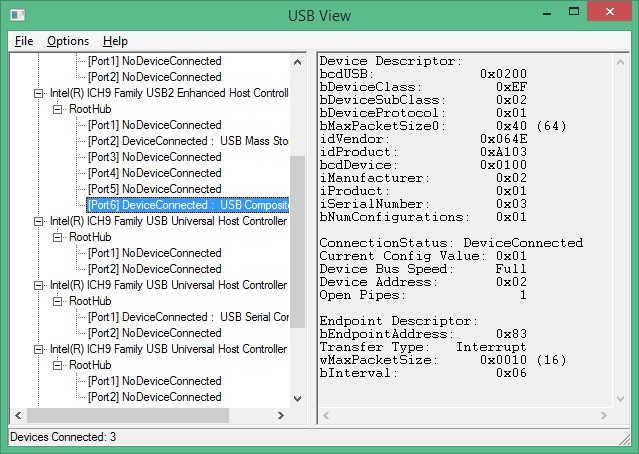
- USBView.jpg (127.6 KiB) Viewed 784 times
Start address: 0x08000000
Bin file size: 0x501B
The modified bootloader contains a blinking led example starting from the 0x08002000-0x0800501B
