
the snail way via sections and headers seems ok’ish
seems i can still post and edit <edit>
stephen
I noticed that the unanswered posts works properly without kicking me to the login screen.
I too the &sid=xxxxxxx number and added to the end of the unreadposts .. and it seemed to work
http://www.stm32duino.com/search.php?se … bexxxxxxxx
Are sid keys getting messed up?
of course this post may also never appear
i suspect also that PM’s are an issue as mine to roger is still in my outbox 
stephen

this thread is seeming to appear and disappear, i had to search this forum ‘playing with’ to get to a post i could ‘see’
stephen
I have not made any setup changes to the bbs or the hosting in general.
Is everyone still having problems ?
Absolutely fine for me on my very old ipad
I will try it in Chrome and Firefox on my W7 machine
I noticed this behavior since yesterday.
Something strange is happening.
The only thing I did yesterday was to add a new section.
I have a backup from the previous day, but I don’t really want to re-instate that at the moment, because we’ll loose 2 days worth of postings, and I’m not even sure that would fix the problem.
One thing I noticed is that the time that the site displays was incorrect when I first looked at it.
Times are set in my local TZ for UTC +10, and initially it displayed the time as if TZ was UTC (or somewhere else)
I wonder if the hosting company (Hostgator) has changed PHP version, which is causing these problems.
There is a new version of PHPBB that I could upgrade to, but I normally don’t continually update the site unless there is a critical security bug in PHPBB.
And last time I tried to do a cosmetic upgrade (over a year ago), the update failed, so I had to revert back.
I only have hosting with one provider, but I do have multiple domains, so I could restore the DB to a different domain.
However if the issue is PHP version or something else with the hosting, this would not fix the problem
But what I could do is copy the whole forum and DB to another domain, and see if I can upgrade to the latest PHPBB.
If that seems to solve the issue, I’d need to do the same thing on this domain, but I suspect the site would need to go offline for several hours, and I’d need to do it at the weekend not a work day
I’ve gone into the admin and purged all the caches and regenerated all the statistics etc, but it doesnt seem to have helped 
I’m not even sure I can post
If you logout and look at the time at the top, it was reading.
It is currently Wed Feb 01, 2017 10:46 pm
But this is wrong as the site is supposed to be on UTC +10 and that time is UTC +0
I really think the hosting has some stuff up going on at the moment
I guess I could set the time zone to UTC, its worth a try
i have no problem on an ipad using safari.
i have no problem with a tablet running android 4.4 and chrome.
i have no problem on an android phone with chrome.
That explained why my old iPad was OK.
I will try running up Safari on Mac OSX El Capitan
I read somewhere that Chome made some changes to speed up web site loading by changing the way things were cached, but I wasn’t sure if that had been deployed.
I know Firefox has updated several times recently, but I didnt see this issue yesterday and I don’t think FF updated today
So it doesn’t look like a browser thing, as I only do Windows updates manually, and have not done any for several days
I don’t get kicked out, I just get the problem with notifications and PM’s showing numbers when there are none
It looks like I’ll have to load a fresh copy of the original install files onto a different domain and try the backups from a few different dates (well mainly today and from 2 days ago, prior to the last change – to add the new section)
Strangely, now my PM count has dropped to zero, when it was stubbornly sitting at [1] all morning despite there not being any unread PM’s
Currently there has been no new activity (which isnt unusual, as most of the world is asleep during my work day), so the unread posts is correctly showing nothing.
Cheers
Roger
Edit.
No. Its still paying up, I had to refresh to get this page to show this post, after logging out and in again.
This is very strange, it smacks of some sort of network caching issue.
https://www.phpbb.com/community/viewtop … 3&start=15
Unfortunately no solution was suggested
I also suspect to be some caching issue, as Roger said.
Maybe you could change the override the Cache-Control response to prevent caching. Right now it is setting the
max-age=604800 .. a week. If i append some random argument to the end of the url query say ‘&random=1234’ it
forces it to rerun the search.php on the server and I get the latest posts
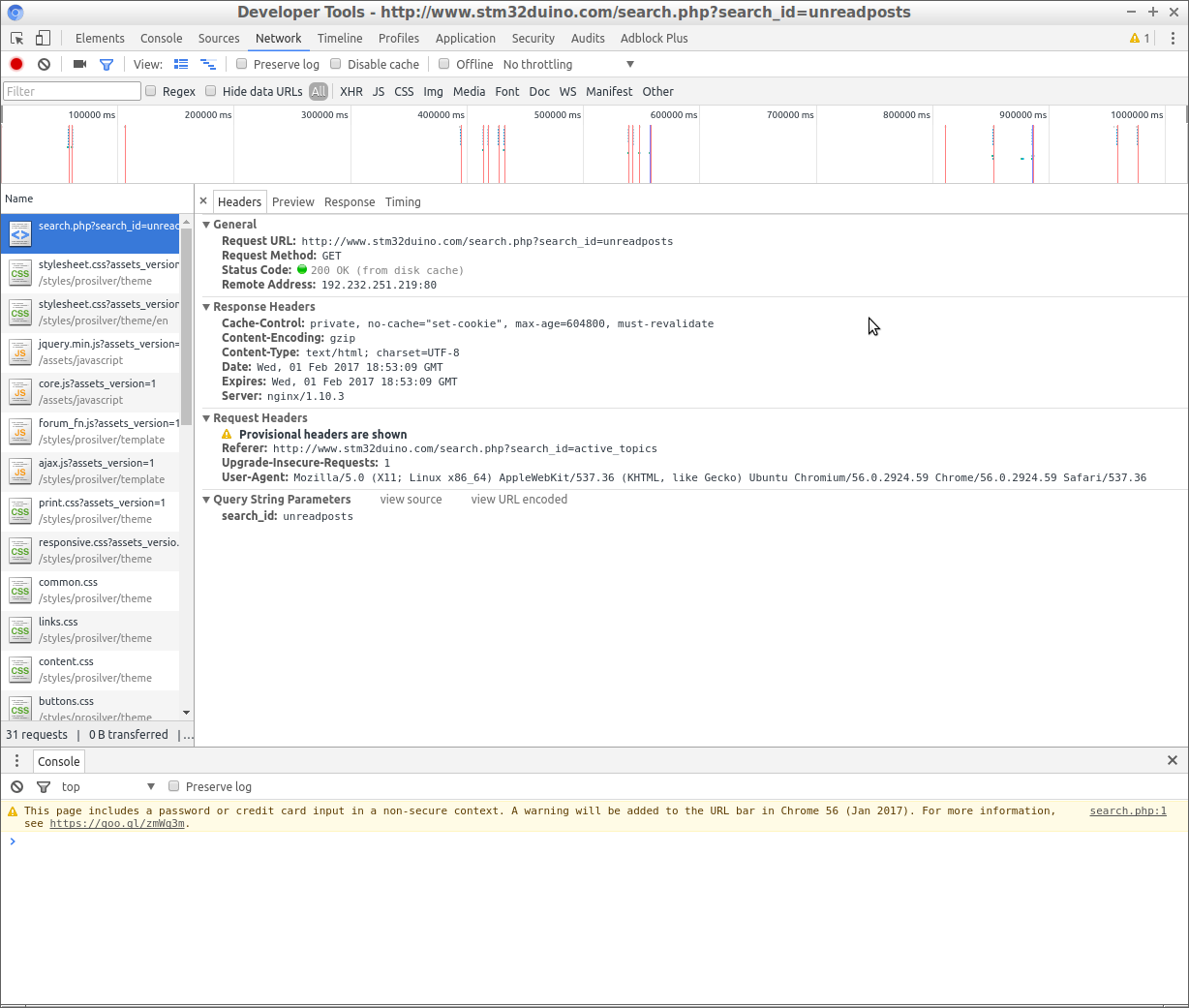
- cache_p02.png (190.06 KiB) Viewed 388 times
(Click the (i) next to the URL, Site name ->More information -> cookies ->Select cookies -> remove the (three?!) cookies. )
This appears to (temporarily?) fix the issue. Let me do a bit more testing, but I think this is a time/date/ttl issue.
The thread I posted on PHPBB’s site has several other people now reporting the same problem at HostGator.
See.
My old iPad 2 still works absolutely fine 
(Still running iOS6, jailbroken.)
My old iPad 2 still works absolutely fine
(Still running iOS6, jailbroken.)
Is this still broken??
It looks like HostGator may have fixed it already
Is this still broken??
It looks like HostGator may have fixed it already
Is this still broken??
It looks like HostGator may have fixed it already
apart from that, it’s embrassing that firefox on win-xp from a virtualbox on a debian jessie box is almost normal 
stephen
Resynced my time and it didnt fix it
apart from that, it’s embrassing that firefox on win-xp from a virtualbox on a debian jessie box is almost normal
stephen
They seem to have an active issue with their Varnish HTTP cache, which may be the cause of this
I tried changing some of the cache settings in the site admin, but it looks like the http headers get overwritten my the ISP’s cacheing proxy’s etc.
So I don’t even know if there is a work around by changing some of the PHP.
As there are a load of other HG customers who have the same issue, some of whom have raised support tickets as well, I think sooner or later this issue will be resolved by HG but it may be a while before this reaches critical mass with HG.
i.e if this issue effects all PHPBB instances on HG it would be thousands of sites that were effected.
In the mean time, I’m afraid, you’ll need to keep pressing the refresh buttons, just to see the latest posts
 just returned to unread posts via hot spot
Sounds like HostGator has gone to the dogs, and I will need to find a new hosting company.
But as I have 6 domains, and multiple email accounts to move, its a massive job, so I hope that HG bow to pressure of numbers and fix this.
I guess the other option is that PHPBB release a workaround, but I would most likely need to upgrade to PHPBB 3.2 which could also cause problems
I’m going some more testing now
See https://www.phpbb.com/community/viewtop … #p14644856
However everyone will need to clear their browser history for this to take effect

