
https://microtechnics.ru/en/stm32-i-usb … e-sd-card/
This might be from interest building up a USB mass storage (SD card) for any HAL core. (now the good news ends).
About the sub optimal reading/writing speed (for me on blue pill about 300-500kB/s – 32GB SDHC with SdFatEX (SPI) – but the SDFat library is NOT the problem!) I found this thread somewhere in the middle of the comments of the side above:
Thank You for your effort, I made the project and it works very well.
The problem now is the speed, how can I increase the speed of read/write, and I wounder why the speed is very low it’s about 200KB/s write and 600KB/s read ?
Thanks
Aveal
on 27.04.2017 at 19:09 said:
It’s common problem that Mass Storage Class in STM32 has slow speed… The best speed I saw I got with NAND memory and 16 bit FSMC and it was near 500 KB/s for writing.
Ahmed
on 27.04.2017 at 20:12 said:
I wounder if I Use High-speed core will the speed much increase or it will be a little bit different ?
John_R
on 28.04.2017 at 13:50 said:
I have the same problem, I try to transfer 1GB file and I got 350 KB/s during a
write and 500 KB/s during a read. But I think DMA will be increase that speed.
Ahmed
on 28.04.2017 at 14:05 said:
The problem is that DMA is Memory -> peripheral, So how can I configure it to work with USB and SDIO ?
Aveal
on 28.04.2017 at 21:35 said:
You can use DMA just for SD card. But I’m not sure that the speed will increase…
So it seems there is no really range upwards for increasing the reading/writing speed. (At least for the F1)
just thinking ahead in terms of speeds, there is still an issue of the usb turn around, i.e.:
host (send scsi command ) -> usb -> stm32 (bp/mm) (sd command)-> spi -> sd card
host (receive data) (data, ack received) <- usb <- stm32 (bp/mm) (data, ack) <- spi <- sd card (data, ack)
in between this sequential turn around
host (receive data) (received ack) <- usb <-stm32 speak to usb (data, ack) <- stm32 speak to sd card (data, ack) <- spi <= sd card (data, ack)
this turn around for stm32 would waste some time, i.e. that stm32 can’t speak to both the usb and spi interface at a same time.
i’m not too sure if usb or spi is dma enabled, e.g. if the data received from the sd card could be handled by dma, then stm32 could focus on pushing the data out over usb to the host which has a limit of 10 mbps full speed (about 1 mb per sec)
but nevertheless reducing time wasted in this turnaround is one place to optimise it
DMA transfers r always faster than CPU transfers.
These SD cards can be interfaced is several different modes. SPI is the slowest, it is 1 bit serial at max speed of 25Mhz. There is also SDIO 1_line mode that is also 1 bit serial but at a speed of 50Mhz and uses 1 less line that SPI as it doesn’t use a CS line, and there is also SDIO 4_line which is 4 bits wide and also at 50Mhz speed.
I am not sure of what SD libraries are available for Arduino as I have only used SD with MX cube setup with FATFS or with Micro-Python
i.e. read from sd card – send to host via usb
each of this activity occupies some time and won’t occur simultaneously, hence the time is ‘wasted’ as the time spend on one end e.g. reading from card couldn’t be simultaneously used for usb handling
out of curiosity i took a look at some documents about usb-mass storage, i stumbled into this article from microsoft
https://blogs.msdn.microsoft.com/usbcor … ompliance/
hence usb-mass storage is basically scsi over usb
there is this thing called scsi tagged command queueing
https://en.wikipedia.org/wiki/Tagged_Command_Queuing
https://docs.microsoft.com/en-us/window … e-requests
i’m not too sure if this is part of a supported setup in the windows / linux and mac usb-mass storage drivers
but that if some such thing is available, it would be necessary to make dma over spi to sd card work and even possibly we’d need to use ‘double buffers’
e.g. we tell dma to fill buffer a from spi while we send buffer b (which has data from a previous read) to the host over usb
all these programming could be complicated and tricky but if all these is possible we could pretty much get closer to 1 MBps with usb mass storage
we may not even need ‘tagged’ command queueing if we found that after all the host (i.e. windows, linux, mac) say sends multiple sequential read commands, so we issue the same sd commands to the sd card and let dma fill the spi buffer. if this is possible, it would be pretty much the same as above that we’d be able to use the full 10mbps bandwidth usb full speed offers. and if i remembered correctly, every frame of usb bulk transfers is 64 bytes so the usb handling would be pretty busy as well.
in a way this scheme is pipelining
[flyboy74 – Thu Sep 13, 2018 3:26 am] – DMA transfers r always faster than CPU transfers.
That is a rather poor generalisation. Unless you have a high interrupt load, CPU transfers are faster than DMA. The only advantage of DMA is that the CPU/peripherals can do something else while a DMA transfer is happening – but the application must be specifically written to do this.
[heisan – Thu Sep 13, 2018 7:28 am] –[flyboy74 – Thu Sep 13, 2018 3:26 am] – DMA transfers r always faster than CPU transfers.That is a rather poor generalisation. Unless you have a high interrupt load, CPU transfers are faster than DMA. The only advantage of DMA is that the CPU/peripherals can do something else while a DMA transfer is happening – but the application must be specifically written to do this.
I am a noob and learning new stuff each day but it was my understanding that DMA was faster than CPU for transfers see https://embedds.com/using-direct-memory … -projects/
ag123 hit the point:
host (send scsi command ) -> usb -> stm32 (bp/mm) (sd command)-> spi -> sd card
host (receive data) (data, ack received) <- usb <- stm32 (bp/mm) (data, ack) <- spi <- sd card (data, ack)
in between this sequential turn around
host (receive data) (received ack) <- usb <-stm32 speak to usb (data, ack) <- stm32 speak to sd card (data, ack) <- spi <= sd card (data, ack)
this turn around for stm32 would waste some time, i.e. that stm32 can’t speak to both the usb and spi interface at a same time.
Beside that, we must respect our hardware limits – for example – a blue pill: 20kB RAM, 72MHZ and the limit of 10mbps. I didn’t researched if a F107 or F4xx would have a better performance
Example F107:
USB 2.0 full-speed device/host/OTG controller with on-chip PHY that supports HNP/SRP/ID with 1.25 Kbytes of dedicated SRAM
vs F103:
USB 2.0 full-speed interface
But I guess the only difference is the OTG feature and as a slave there is no benefit with the “on-chip PHY”
Edit: I played a little bit with the buffers (there are many  ): Even they are on their limit (SCSI…) or raising them wouldn’t result in a better performance.
But we whine at a high level: 300-400kB/s is not too bad for such a little MCU. If there is a need of transfering xx of GB in a short time it’s better to pull out the SD card and using an USB 3.0 adapter for PC.
[flyboy74 – Thu Sep 13, 2018 8:06 am] –[heisan – Thu Sep 13, 2018 7:28 am] –[flyboy74 – Thu Sep 13, 2018 3:26 am] – DMA transfers r always faster than CPU transfers.That is a rather poor generalisation. Unless you have a high interrupt load, CPU transfers are faster than DMA. The only advantage of DMA is that the CPU/peripherals can do something else while a DMA transfer is happening – but the application must be specifically written to do this.
I am a noob and learning new stuff each day but it was my understanding that DMA was faster than CPU for transfers see https://embedds.com/using-direct-memory … -projects/
Memory to memory DMA is indeed faster, but with SPI/SDIO/USB/etc the CPU is fast enough to keep the hardware buffers full, so you can achieve the full hardware speed without the overhead of setting up DMA.
[heisan – Thu Sep 13, 2018 11:31 am] –
Memory to memory DMA is indeed faster, but with SPI/SDIO/USB/etc the CPU is fast enough to keep the hardware buffers full, so you can achieve the full hardware speed without the overhead of setting up DMA.
This depends on the number of bytes to access and on the sw. My experience in SPI shows that for more than ~200 bytes the DMA overhead pays off (@36/42MHz).
The CPU can (will) be interrupted by IRQs, so that on long term you cannot come close to DMA performance when using high clock frequencies.
[stevestrong – Thu Sep 13, 2018 11:40 am] –[heisan – Thu Sep 13, 2018 11:31 am] –
Memory to memory DMA is indeed faster, but with SPI/SDIO/USB/etc the CPU is fast enough to keep the hardware buffers full, so you can achieve the full hardware speed without the overhead of setting up DMA.This depends on the number of bytes to access and on the sw. My experience in SPI shows that for more than ~200 bytes the DMA overhead pays off (@36/42MHz).
The CPU can (will) be interrupted by IRQs, so that on long term you cannot come close to DMA performance when using high clock frequencies.
OK – I only have systick IRQ going. CPU transfers were faster for full frame (~150kB) updates than DMA, running SPI at 36MHz (sysclock/2). Difference is small though ~10ms for 1000 frames.
My experience reduces to transfer data from memory to ILI9341, and to transfer data from/to SD cards over SPI using libmaple core, wherein I have mayself optimized both DMA and non-DMA SPI transfers. The ~200 byte threshold where DMA is faster is an empirically determined value, valid for SPI clock rate @36MHz(F1)/42MHz(F4).
Any other example involving other additional interfaces to transfer data may not unambiguously indicate faster data transfer in non-DMA mode.
Also, sometimes you may have two DMA processes running in parallel which could interfere, thereby reducing performance in part for each.
[stevestrong – Thu Sep 13, 2018 1:16 pm] –
@heisan, which core do u use? Can you show me a simple example where DMA transfer is slower than non-DMA?
Standard Blue Pill with Roger’s core and included Adafruit_ILI9341_STM library. Only had the display and STLINK hooked up. I first noticed it when computed pixels (direct SPI with no DMA) were rendering faster than fillRect(). Commented out the DMA path in fillRect() and the speeds were the same.
[heisan – Thu Sep 13, 2018 1:47 pm] –
and the speeds were the same
Ah, this can happen because that lib uses SPI in 16 bit mode and, as I told, I have optimized the SPI transfer routines pretty much I could.
In 16 bit mode the CPU manages to provide next data to write when the interface finishes the current transfer (DR register empty) within 16 SPI clocks. The DMA overhead may count in this case, adding extra time compared to non-DMA version.
The CPU will not manage constantly the same thing in 8 clocks (8bit mode @36MHz), where the DMA overhead is quickly consumed (transfer time of ~200 bytes). This is visible in case of SD card accesses, just try to run the SD benchmark sketch with and without DMA.
You will see the difference, although it uses the same SPI functions as the ILI9341 lib, just that in 8 bit mode this time.
[stevestrong – Thu Sep 13, 2018 9:13 am] –
You have to live with that performance, unless you implement double buffering to at least one of the processes (SdFat or USB comm) and make it asynchronous to allow to (e.g) read from sd card into one buffer while the USB is sending the previous buffer.
i think steve is right about this i’d first try to make my setup work and i’d explore that, but i’m yet to understand more about the usb or dma on sfm32f103 if hardware could take care of those buffers
One could adapt the SdFat lib to make async transfers (e.g. start the write process and return immediately, let the DMA work, not waiting for the end), but this is only possible if no other device is connected to (or gets activated on) that SPI port.
Hm, actually it should work as of today, if one replace the dmaSend() function with dmaSendAsync(). The SPI lib will take care that no other transfer will be initiated on the SPI bus as long the previous is still running.
[stevestrong – Thu Sep 13, 2018 2:14 pm] –[heisan – Thu Sep 13, 2018 1:47 pm] –
and the speeds were the sameAh, this can happen because that lib uses SPI in 16 bit mode and, as I told, I have optimized the SPI transfer routines pretty much I could.
In 16 bit mode the CPU manages to provide next data to write when the interface finishes the current transfer (DR register empty) within 16 SPI clocks. The DMA overhead may count in this case, adding extra time compared to non-DMA version.The CPU will not manage constantly the same thing in 8 clocks (8bit mode @36MHz), where the DMA overhead is quickly consumed (transfer time of ~200 bytes). This is visible in case of SD card accesses, just try to run the SD benchmark sketch with and without DMA.
You will see the difference, although it uses the same SPI functions as the ILI9341 lib, just that in 8 bit mode this time.
I must do some more testing… But looking at it logically, 8 bit should not be a problem. SPI runs at most 1/2 CPU clock, so for 8 bits, you have 16 CPU clocks. The loop should be four instructions:
1) LD (post index)
2) STR (immediate)
3) compare
4) branch
Even with worst case wait states and prefetch misses, that should fit in 16 clocks?
[stevestrong – Thu Sep 13, 2018 2:31 pm] –
One could adapt the SdFat lib to make async transfers (e.g. start the write process and return immediately, let the DMA work, not waiting for the end), but this is only possible if no other device is connected to (or gets activated on) that SPI port.
I was commenting on this in a previous thread… In an ideal world, the SPI library would check/wait for completion of the previous operation on entry into the next… In this way all applications would be able to use/share the SPI bus efficiently. BUT as you pointed out, it may break some applications (if they expect the SPI device to start doing something immediately before the call returns). It is such a pity that so many of the original Arduino APIs were so badly thought out.
No, 16 CPU clocks are not (always) enough. There are 2 wait states for flash. And you also need the global interrupt enabling/disabling instructions.
I doubt you can make it more efficient (in C), unless you code it in ASM, which I would definitely welcome, the whole community could benefit of that.
i think steve’s point really isn’t about spi (alone), i did a little google and stumbled into this article
https://www.micron.com/~/media/document … ueuing.pdf
implementing double buffering would be quite similar to implement a pipelining scheme similar to page 8 figure 9
where instead of
send-read command - wait for spi read - send to usb host, send-read command - wait for spi read - send to usb host , send-read command - wait for spi read - send to usb host

[ag123 – Thu Sep 13, 2018 4:31 pm] –
incidentally aren’t there many *slow* cheapo sd card readers? let alone stm32
…just wait for a minute, I*ll open my chepo SD-Card Reader (but runs fast) in front of me 
Edit:
OK, only a single chip:
CP8121N
1729-H
Quick google (as expected): only a few chinese results not even one datasheet.
Honestly: I’m not going to rebuild a SD-Card reader But the STM32Fxxx could be a very potential audio/wav/mp3/ogg/FLAC device (playing AND recording) so a decent SD-Card<>USB speed would be a fine thing (But even 1MBs would be rather slow).
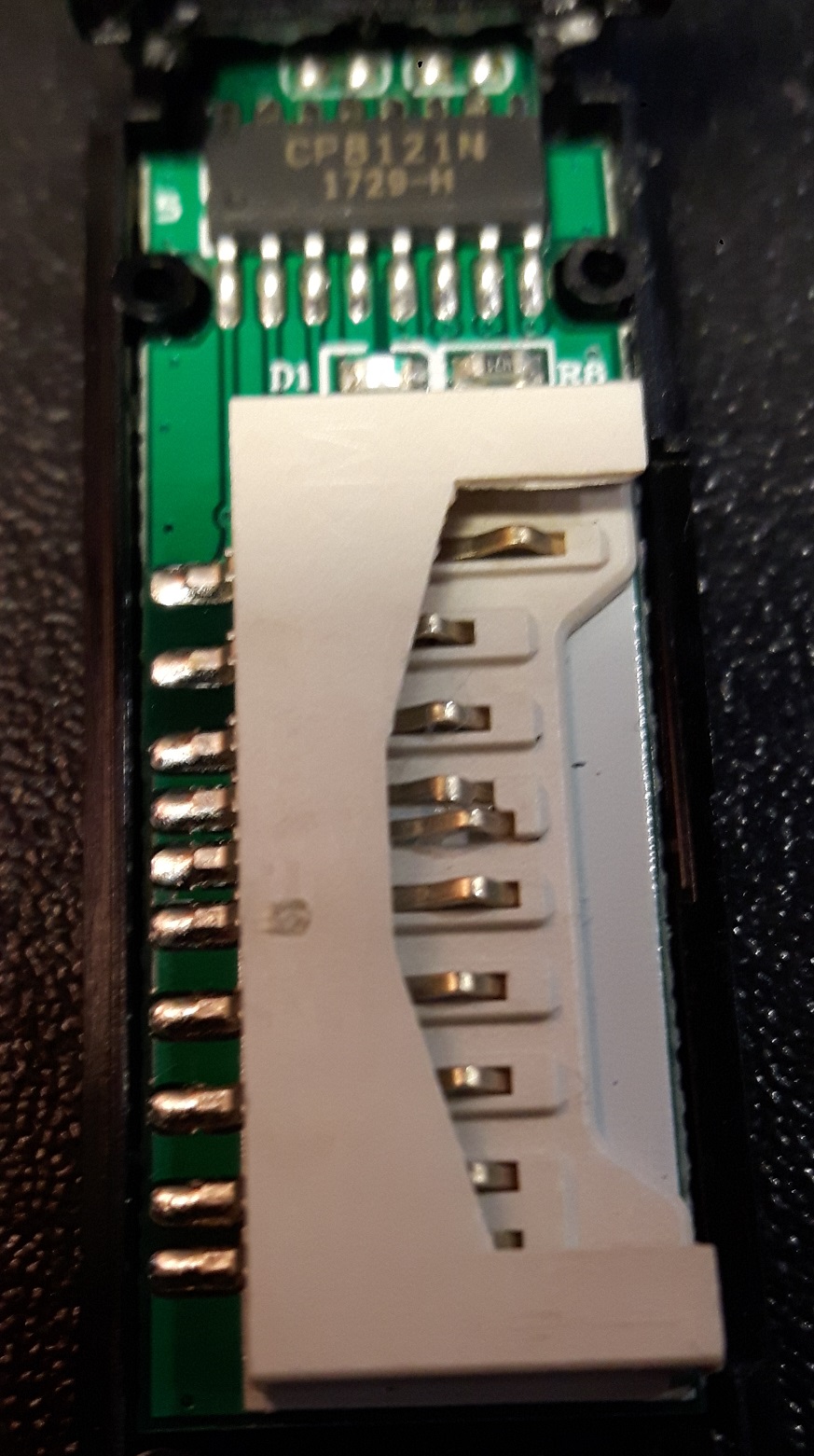
Edit: Here we go! Just 0.35 EUR for one chip (with some addons to remove):
https://www.aliexpress.com/item/high-qu … 10436.html
i think these days there are quite a number of asics which are usb2.0 high speed devices
some of the examples, which didn’t happen to be st devices like
Cypress CY7C68013A-56LTXC
https://sigrok.org/wiki/ARMFLY_Mini-Logic
happened to be popular with use as sigrok logic analyzers
these boards are pretty cheap
https://www.aliexpress.com/wholesale?ca … CY7C68013A
i’m not too sure if some of these could be programmed as sdcard readers
as for a stm32 usb2.0 high speed device, i couldn’t find something ‘cheap’
a close one is to use ulpi usb 2.0 high speed phy like the usb3300
https://www.aliexpress.com/wholesale?ca … xt=usb3300
but those prices are anything but ‘cheap’ (the module that is, which cost around usd 7 on ebay/aliexpress)
some of the sd card readers could after all be asics that is purpose built for that sd card to usb interfacing (usb 2.0 high speed) and the firmware preprogrammed.
but there are also some sd card readers loitering around which are only usb full speed devices 10 mbps max, i think for those the performance may be comparable to an ‘unoptimised’ stm32 bp/mm sd card reader. the difference this time is, we could optimise it if we really want to
but that leaves us with usb 2.0 full speed as the limit (10mbps)
As i’m working in eclipse rather than Arduino IDE, integrating them would hit problems as alll the includes, defines, every single one of them has to be manually configured in the eclipse IDE. the benefits of doing so is the support of CDT (code completion, syntax highlights, jumping to references) and various tools. i’m also using the gnu arm eclipse ide plugins https://gnu-mcu-eclipse.github.io/
i’ve not actually assembled the ‘hardware’ yet hence, it is just a successful compile.
i took a look at some of the usb composite codes and realise just how extensive it is, i’d like to thank apruss, libarra, greiman, et.al.
viewtopic.php?f=13&t=2926
viewtopic.php?f=13&t=576
for having put all these things together
it is somewhat unfortunate that stm32f103 do not bundle usb2.0 high speed connectivity and that the higher series which supports it e.g. stm32f40x requires a ulpi usb 2.0 high speed phy hooked up to get usb2.0 high speed connectivity
edit: found an interesting web explaining in a simple way the differences between usb 2.0 full speed vs usb 2.0 high speed 480 mbps
https://www.renesas.com/us/en/solutions … sb2-0.html
according to wikipedia, effective throughput is lower at 280 Mbit/s or 35 MB/s
https://en.wikipedia.org/wiki/USB#USB_2.0
my guess is stm32f103 bp/mm may have issues coping with those speeds even with ulpi and stm32f405/407 would quite likely fit the bill
just that using an f4 still requires an external ulpi usb 2.0 high speed phy transceiver, i think part of the reason is the electrical differences 400mv (high speed) vs 3.3v (full speed) and the signalling speeds