
A while ago I got a couple of these boards http://www.stm32duino.com/viewtopic.php?t=1503&start=10 and had been playing around with getting them configured as USB HIDs for a project I’m working on.
I admit I’m a novice to programming controller boards and I was last looking at changing the Changing HID FriendlyName but without luck.
viewtopic.php?f=3&t=1672
Now I obviously did something wrong along the way as both boards can still accept sketches via Arduino via ST-Link but when I plug them in via UDB they’re not recognised as USB devices anymore …
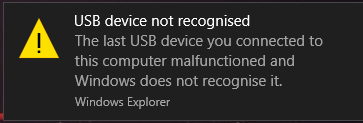
The trouble is I had to rebuild my PC shortly after that last thread and it’s been a long while since I last look at them. I can’t seem to re-trace the steps in how I got to this point.
So for the last couple of days I’ve been trying wipe these boards and uplaod a generic bootloader generic_boot20_pc13.bin that Roger pointed me to using ST-Link but I can’t work out why it’s not working.
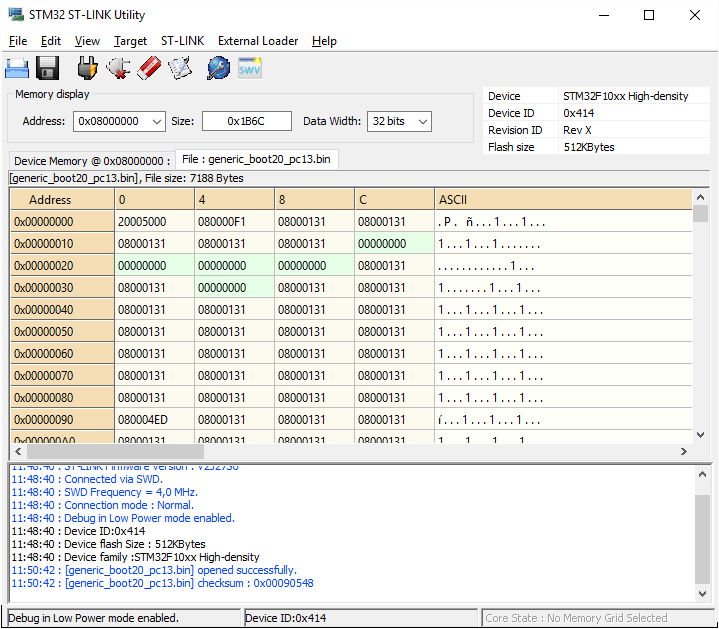
Is there a way I can reset / wipe these boards clean to be able to start over?
A while ago I got a couple of these boards http://www.stm32duino.com/viewtopic.php?t=1503&start=10 and had been playing around with getting them configured as USB HIDs for a project I’m working on.
I admit I’m a novice to programming controller boards and I was last looking at changing the Changing HID FriendlyName but without luck.
viewtopic.php?f=3&t=1672
Now I obviously did something wrong along the way as both boards can still accept sketches via Arduino via ST-Link but when I plug them in via UDB they’re not recognised as USB devices anymore …
The trouble is I had to rebuild my PC shortly after that last thread and it’s been a long while since I last look at them. I can’t seem to re-trace the steps in how I got to this point.
So for the last couple of days I’ve been trying wipe these boards and uplaod a generic bootloader generic_boot20_pc13.bin that Roger pointed me to using ST-Link but I can’t work out why it’s not working.
Is there a way I can reset / wipe these boards clean to be able to start over?
I can wipe the chips memory using the ST Link Utility where both blocks 0x0000000 and 0x8000000 are wiped
But every time I try to upload the bootloader it “appears” to write to 0x8000000 and not 0x0000000. If I tell the utility to write the bootloader to 0x0000000 it returns an error. Or is it supposed to do that? I’m confused 
You should be able to flash the bootloader (*_20.bin”).
Then the USB device should be recognized as “DFU device”, no serial COM port.
In this case you should be able to upload your code when you select “STM32duino bootloader” as upload method in Arduino IDE.
If you upload your code over ST-Link, it may happen that the serial USB code is not built together with your sketch.
Serial USB is conditioned by the flag “-DSERIAL_USB”. If this is defined, then it is ok.
You should be able to flash the bootloader (*_20.bin”).
Then the USB device should be recognized as “DFU device”, no serial COM port.
In this case you should be able to upload your code when you select “STM32duino bootloader” as upload method in Arduino IDE.
If you upload your code over ST-Link, it may happen that the serial USB code is not built together with your sketch.
Serial USB is conditioned by the flag “-DSERIAL_USB”. If this is defined, then it is ok.
Have you installed the drivers?
http://wiki.stm32duino.com/index.php?ti … on_Windows
Have you installed the drivers?
http://wiki.stm32duino.com/index.php?ti … on_Windows
http://www.stm32duino.com/viewtopic.php?f=16&t=1927
Other options:
– not correctly soldered USB pins
– look for other bootloader binary in this forum.
I’ll try this on the weekend.
http://zadig.akeo.ie/
http://www.stm32duino.com/viewtopic.php?f=16&t=1927
Other options:
– not correctly soldered USB pins
– look for other bootloader binary in this forum.

So I have spent the evening working on my project and found a video from STMicroelectronics that has helped me achieve what I set out to do …
https://www.youtube.com/watch?v=XRocqTfUxbo
I’m happy to report that I now have one of the boards behaving like a HID device – specifically a mouse that only moves to the right as per the video example. 
So releaved to have finally made progress, looking forward to building on this towards making a set flight simulation contollers.
No doubt I’ll have more questions as I progress 
![[Pending Enhancement] RTC values resetting](https://sparklogic.ru/wp-content/uploads/2019/11/nucleo-l476rg-zestaw-startowy-z-mikrokontrolerem-z-rodziny-stm32-stm32l476-90x90.jpg)