
Device USB\VID_0483&PID_3748\6&418b671&0&3 was not migrated due to partial or ambiguous match.
Last Device Instance Id: USB\VID_1C4F&PID_0034\6&271a58ce&0&3
Class Guid: {745A17A0-74D3-11D0-B6FE-00A0C90F57DA}
Location Path: PCIROOT(0)#PCI(1A00)#USBROOT(0)#USB(1)#USB(3)
Migration Rank: 0xF000FFFFFFFF0023
Present: false
Status: 0xC0000719
http://www.st.com/en/development-tools/ … nk007.html
What could be the problem with ST-Link utility in my case?
http://www.st.com/content/st_com/en/pro … nk009.html
so lsub gives
Bus 003 Device 015: ID 0483:3748 STMicroelectronics ST-LINK/V2

Bus 003 Device 014: ID 04d8:fc92 Microchip Technology, Inc. Open Bench Logic Sniffer

Bus 003 Device 013: ID 0bda:2838 Realtek Semiconductor Corp. RTL2838 DVB-T

Bus 003 Device 012: ID 1a86:7523 QinHeng Electronics HL-340 USB-Serial adapter

Bus 003 Device 011: ID 0483:3748 STMicroelectronics ST-LINK/V2
– which core do you use (Arduino_STM32, STM32DUINO, or STM32GENERIC)?
– which board do you use?
– which IDE do you use? Arduino? Which version?
[Iguita – Wed Jan 03, 2018 5:48 pm] –
I’ve previously understood that I can flash microcontroller, not from STM32 ST-LINK Utility but from STVP
– What is STVP?
– if you can flash with STLink utility it means you have the right drivers installed, so it must be something wrong with the flashing utility of the used core. So go back and answer question 1. And post here the full message you get from Arduino IDE, if you use it.
– STLink DOES NOT WORK AS SERIAL PORT !!!
You have to connect a USB cable to the micro USB slot (blue pill) in order to have USB serial port.
it depends. some v1 and all v2 and newer ones support serial comm: https://dannyelectronics.wordpress.com/ … link-v2-1/
stvp is a st standalone programmer.
[dannyf – Wed Jan 03, 2018 5:59 pm] –
You have a vid/pid mismatch. 3748 vs 374B.
how to solve that?
[stevestrong – Thu Jan 04, 2018 3:10 pm] –
Missing infos:
– which core do you use (Arduino_STM32, STM32DUINO, or STM32GENERIC)?
– which board do you use?
– which IDE do you use? Arduino? Which version?
1. answered below
2. Blue Pill. Tried also with StM8 board
3, I’ve created some code from Arduino IDE but also from CxSTM32
– What is STVP?
STLink Visual Programmer
– if you can flash with STLink utility it means you have the right drivers installed, so it must be something wrong with the flashing utility of the used core. So go back and answer question 1. And post here the full message you get from Arduino IDE, if you use it.
I am using hex file, not uploading code from Arduino IDE.
– STLink DOES NOT WORK AS SERIAL PORT !!!
You have to connect a USB cable to the micro USB slot (blue pill) in order to have USB serial port.
I didn’t use it as serial port. Thank you for advice.
As you may know, this forum is mainly dealing with Arduino for STM32.
If you use your own tool chain, you are on your own.
You could still get some help if you tell us more how exactly your toolchain does look like.
And maybe you give us some example files to reproduce your problem.

Plugged in the stlink cheapo dongle (USB3.0).
Win10 found the stlink device, tried to install the driver, no driver found, I saw st-link icon with yellow triangle in the dev manager.
Dongle left plugged in.
Took a short nap.
Downloaded ST_Link Utility v 4.1.0.
Installed the ST_Link Utility, it installed the driver as well, no problem.
I get (PID is 3748 – eight at the end):
.
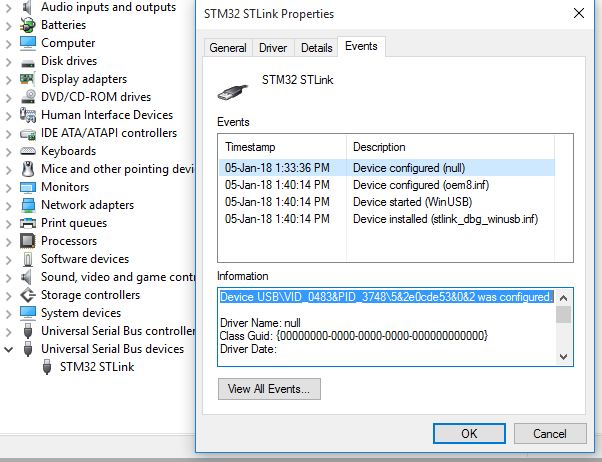
- stlink_win10.JPG (69.16 KiB) Viewed 194 times
[stevestrong – Thu Jan 04, 2018 9:59 pm] –
You could still get some help if you tell us more how exactly your toolchain does look like.
And maybe you give us some example files to reproduce your problem.
I use Arduino on Win 10 x64, and have no problems with STLink V2 (clone).
How do you build your project? Which utility/file/script do u use to upload?
[Iguita – Fri Jan 05, 2018 12:22 pm] –
In any case it is not bad to learn something new and useful even it isn’t directly related with Arduino, right?
I agree, but if don’t show us this “something new and useful” we are not able to help you.

