
I’ve been banging my head against the keyboard for a few days because I am literally STUCK and can’t find a good way to get started on STM32s. I am a complete noob in the world of STM32s but I’ve done a lot of C/C++ and Arduino programming before. Do anyone have any suggestions about which development board to start with, how to program an STM32, or where to find a good tutorial?
ANY help would be greatly appreciated!

Richard
https://github.com/OliviliK/STM32F103/wiki
Cheers, Ollie
I’ve been banging my head against the keyboard for a few days because I am literally STUCK and can’t find a good way to get started on STM32s
@Rick: Yes I would like to use the Arduino IDE to program STM32s. Do you know any tutorials that teaches you how to do that? (P.S. I’m running Mac OS X.)
@Slammer, Ollie: I will check the tutorials/books suggested by you guys in the near future. Although I would like to learn STM32s by using the Arduino IDE, I think learning some lower-level programming to control a micro controller would still be really useful for me in the future.

thanks!
Richard
If you mean what ARM board should you use, then you should also think about the offerings from Arduino.cc and Arduino.org e.g. Arduino Zero, and include the Teensy etc
Your highest level of support is going to be via an Arduino branded board or a Teensy.
There is really only community support for the STM32.
(Although STM have released an “core” for some Nucleo boards, they will not be doing an official support for this release)
You choice depends on your own requirements.
Note. You may also want to add the Cypress PSoC devices to the list as well, as although they are not programmed via the Arduino IDE, I think they are ARM devices, and are supported by Cypress via their own IDE.
(Although STM have released an “core” for some Nucleo boards, they will not be doing an official support for this release)
sorry Roger, but I don’t get what do you mean by “core” for some Nucleo boards.
I didn’t get what do you mean by “an official support for this release”, too. What is “this release”?
Could you please kindly explain to me?
thanks
The “core” / board code we have been using for well over a year is not an official STM product, is effectively abandon-ware + community updates
STM have announced they have produced a “core” ie official code to support some Nucleo boards
See this thread
http://www.stm32duino.com/viewtopic.php?f=16&t=1398
However, the term “support” is used sparingly in this case, as STM are doing a one off delivery of the code to the open source community, but there will not be any on-going support by STM as they do not have anyone in-house providing “support”
Unlike Teensy, where if something doesnt work, you can contact Paul, who designed and manufactures the Teensy, as he will provide ongoing support for both his hardware and his libraries.
Now, let’s say I’ve decided to use the Arduino IDE for using the Nucleo STM32 boards.
First, which Nucleo board should I start with? (I briefly looked at all the Nucleo products, and I guess the “Nucleo-32” boards is for the beginner…)
Second, what “core” should I add to my Arduino IDE to get this Nucleo STM32 board up and running?
Third, what other things should I prepare (software, hardware, programmer, etc) to properly program an STM32 board with the Arduino IDE?
thanks
- buy a maple mini clone (also two) from ebay or aliexpress
- install the stm32duino sw from Roger’s github repository (maple core)
- start playing with arduino examples
For details on all above you can search the forum which is full of info.
This is from my pov the simplest, fastest and also cheapest starting path.
Then you’ll be ready for the next levels.
Best, E.
At the moment, your best hardware choice is the Maple Mini rather than the Nucleo
STM have only just released the “core” for 2 of their Nucleo boards, and it has not been extensively tested, and hardly anyone on the forum actually has a Nucleo board (or actively uses one)
Hence you will have most community support if you buy a Maple mini (or Perhaps the “BluePill”) but the BluePill often needs hardware changes to make it work correctly and you’d also need a USB to Serial adaptor to Flash the bootloader onto it, because none of the eBay or AliExpress sell them with the bootloader installed.
See wiki.stm32duino.com
I’ve decided to start out with the Maple board (not the Mini version) because I have a few Arduino shields and I think it would be easier to get things started and carry out tests quicker with the help of the shields.
I have another question that have been bugging for sometime:
Can other similar STM32 chips that have the proper Maple bootloader installed be programmed by the Maple IDE through the USB/Serial interface? I want to know this because I think I will need to build standalone STM32 systems just like how I did with AVRs.
Also, how am I supposed to burn a bootloader onto a new STM32? As I don’t see a “burn bootloader” button in the Maple IDE…
thanks
Richard
The bootloader appears as a DFU device when the board is reset.
The USB Serial is actually compiled into the sketch by default, so that when the bootloader finishes and the sketch code runs instead, the USB bus is reset and the board appears as USB Serial.
Re:Shields
All STM32 boards are 3.3V devices. Only shields compatible with 3.3V signals will work.
I think this may be a very limited selections.
Actually, most peripherals now operate at 3.3V not 5V, and shields often have 5V to 3.3V converters on them ( or resistor divider networks etc).
So some shields could be converted if you are willing to get out your soldering iron etc.
However what most people normally use is a Maple Mini or a BluePill, plugged into a breadboard, and then buy individual modules, which also plug into the breadboard.
You then just need some of those male to male connector pin wires to wire the module to the Maple Mini.
Sorry for not replying for so long, I was quite busy doing some other work

I still have some question that I don’t know the answer to it yet:
1. Is using the Arduino framework the best for working with STM32s? Is there any other libraries/frameworks to use to program it? (what is the original library that ST developed for working with STM32s? is it good to use compared to Arduino?)
2. What other STM32 microcontrollers is programmable with the Arduino framework except the STM32F103xxxx series that is used on the Maple boards?
3. Do you need a special programmer (like ST-LINK? I don’t even know what is it) to program a STM32? or can you just do it over Serial?
thank you
Richard
I think you would be better off posting your questions to STMs own forum, as they have a greater knowledge of all possible ways to develop and program STM32 devices.
This forum is about using STM32 devices with the Arduino IDE.
Whether this is best for you, is a decision which ultimately only you can make
1. Is using the Arduino framework the best for working with STM32s? Is there any other libraries/frameworks to use to program it? (what is the original library that ST developed for working with STM32s? is it good to use compared to Arduino?)
There is no perfect framework or method. Arduino framework with Arduino IDE is a very fast and easy way to program the MCU. Arduino framework does not require knowledge of the specific MCU (IMO an overall knowledge of hardware always helps) all are hidden by API. But there are some limitations as the arduino framework was created for a small 8bit MCU with limited capabilities, and the STM32 is much more powerful and complex. Another option is the mbed framework, it follows the same logic with arduino (no knowledge of hardware required) but it is much wider and a bit more difficult for beginners, it is also much bigger and requires much more memory than arduino API, this is a problem for small devices. There is also the Chibios which is a RTOS and a HAL in one package, this is really much harder to manage. All others like SPL, HALMX, OPENCM3 are libraries to help you with MCU operations and peripherals and require deeper knowledge of hardware.
2. What other STM32 microcontrollers is programmable with the Arduino framework except the STM32F103xxxx series that is used on the Maple boards?
Only STM32F103 MCUs are supported officially by libmaple, the F4 support is good but not so widely tested. There are some other arduino cores like Dragonfly’s L4 core, the experimental HALMX core, and the ST core for F1 and L4 but this is a very recent development.
Do you need a special programmer (like ST-LINK? I don’t even know what is it) to program a STM32? or can you just do it over Serial?
Almost all widely known F103 boards with USB are supported by stm32duino bootloader (thanks to Roger), with this you can download the program to target board by USB without any other equipment, as a bonus you get a USB-Serial interface for your application. ST-LInk is a dowload/debug interface created by ST (end cloned illegally by Chinese) for all members of STM32 family. With ST-Link you can download the program to MCU without any bootloader, but it is not only that, with the proper software you can debug your program (watch variables, define breakpoints, step execution) on your board in realtime during execution. Finally, always, in every STM32 you can also use the embedded bootloader through UART (or other ports in various MCUs), but this is not automatic, requires some manipulation with the pins BOOT0/1 of MCU (not very handy but it works)
This forum is about using STM32 devices with the Arduino IDE.
Whether this is best for you, is a decision which ultimately only you can make
Arduino framework with Arduino IDE is a very fast and easy way to program the MCU.
I guess I’m going to start out with using the Arduino IDE then since it looks pretty easy to get on with
Another option is the mbed framework, it follows the same logic with arduino (no knowledge of hardware required) but it is much wider and a bit more difficult for beginners,
I might move to the mbed framework in the future after I got familiar with STM32s.
Almost all widely known F103 boards with USB are supported by stm32duino bootloader (thanks to Roger), with this you can download the program to target board by USB without any other equipment, as a bonus you get a USB-Serial interface for your application.
Where can I get the stm32duino bootloader made by Roger? Is there any instructions on how to “burn” it onto new stm32f103xxx chips?
P.S. Do I need to officially “close” or “end” a forum after I’m satisfied with what I’ve got or do I just leave it without doing anything?
thanks
https://github.com/rogerclarkmelbourne/ … er/STM32F1
I suspect you just want to flash a precompiled binary (if you have a board for which we already compiled a binary) – see
https://github.com/rogerclarkmelbourne/ … 1/binaries
You need a USB to Serial converter or STLInk or similar hardware programmer to put the bootloader onto a blank board,
Or just buy a Maple mini board, as they come pre-flashed with the old version of the bootloader (which sill works fine – though you can update via the “updated sketch”)
Re: Closing the thread
No need.
Yours isn’t a specific problem or bug, so there is no need to change the title to add – Resolved
BTW. Please read the FAQ in the Welcome section, I suspect it will answer a lot of questions
Re:mbed
Its really not a lot different from the Arduino system. Its just different. Its not low level programming, its just a different high level API, and it uses an online compiler etc.
The Mini is a simplified version of the original Maple Mini (according to its descriptions)
I checked and all the pinouts and microprocessors are the same.
The big Maple board looks somewhat authentic.
P.S. I think the “breadboard friendly” development boards are not actually quite breadboard friendly.
Although that their pins can be plugged onto a breadboard, but it’s actually quite hard to plug it in/
pull it. The more pins the dev board have, the harder this is.
When I’m trying to unplug the Maple Mini, I can see that the PCB is already bending in the middle.
pull it. The more pins the dev board have, the harder this is.
pull it. The more pins the dev board have, the harder this is.
Your right, it’s time for me to get some more breadboards
http://hackaday.com/2012/02/09/the-ulti … as-it-all/
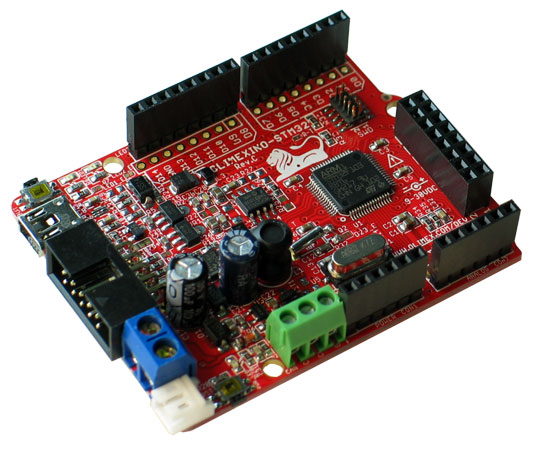
Olimexino-STM32
viewtopic.php?f=38&t=1138
https://www.olimex.com/Products/Duino/S … e-hardware
and actually started with the original maple IDE as i found the documentations from leaflabs pretty well written and relatively simple to get started
http://docs.leaflabs.com/docs.leaflabs.com/index.html
i’m working on a linux platform (opensuse). Accordingly with windows (e.g. 7, 8, 10) there may be various challenges getting the driver to work.
however as pointed out by many here, it’s probably better to use the Arduino IDE which now support ‘maple’ boards in addition to Arduino boards which are more updated and has more (perhaps better) features
the Olimexino-STM32 i received comes with the *boot loader* pre-installed as firmware in its flash
the good thing about that would be that the ‘maple’ board can be programmed simply through a normal USB cable (mini usb connector) with the IDE.
‘internally’ the programming is done via DFU (device firmware update) which is actually handled by the boot loader itself
(and this is some of my initial struggles getting started programming the board via dfu using a USB cable: https://www.olimex.com/forum/index.php?topic=5416.0)
the usual ‘hello world’ tutorial would be to try to blink leds on the board itself
however, should you be starting with a board that do not have the *boot loader* it would likely be necessary to program the board through a JTAG / SWD programmer such as https://www.olimex.com/Products/ARM/JTA … SB-TINY-H/ (accordingly this is not the only way)
i’m personally not familiar with this aspects (i.e. installing/programming the bootloader via JTAG/SWD programmer) but roger et.al has written up quite a lot about Arduino_STM32, the boot loader etc
https://github.com/rogerclarkmelbourne/ … STM32/wiki
I’d guess the initial stumbling blocks is partly due to ‘information overload’ and that there are a large amount / pieces of information scattered in various places. some of the starting points which i found useful when i got started happens to be
the leaflabs maple web site iteslf
http://docs.leaflabs.com/docs.leaflabs.com/index.html
the wiki by roger et.al.
https://github.com/rogerclarkmelbourne/ … STM32/wiki
http://wiki.stm32duino.com/index.php?ti … 103_boards
documents from STM website itself
http://www.st.com/en/microcontrollers/s … tId=LN1565
as well as even olimex the manufacturer from which i bought the board
https://www.olimex.com/Products/Duino/S … e-hardware
https://www.olimex.com/Products/Duino/S … -STM32.pdf
(^^i’d think olimex did pretty decent documentation if u review their manual above )
this would take 1 off the ‘arduino’ track towards the more ‘hard core’ STM32-Library track
http://www.emcu.it/STM32/STM32VLDiscove … brary.html
dfu still works and i could simply ‘upload’ the compiled program from gnu arm eclipse into the board using dfu-util -d 1eaf:0003 -D file
and the same simple usb cable
http://dfu-util.sourceforge.net/
http://wiki.stm32duino.com/index.php?title=Main_Page

