
If anyone wants to help, he/she test that .bin file and report if it works properly on his/her computer system.
Please report the operating system and CPU you have used during the tests .
For example: Win 10 64-bit – i3 4360 @ 3.7GHz, Ubuntu 17.10 – i3 4360 @ 3.7GHz etc.
That is really important to check the compatibility of the HID bootloader on multiple operating systems an hardwares.
EDIT
How to make the tests
* Full erase your Bluepill before burn the bootloader.
* Burn the HID bootloader bin file to your Bluepill or Maple mini by using a programmer like ST-link.
On Windows machine
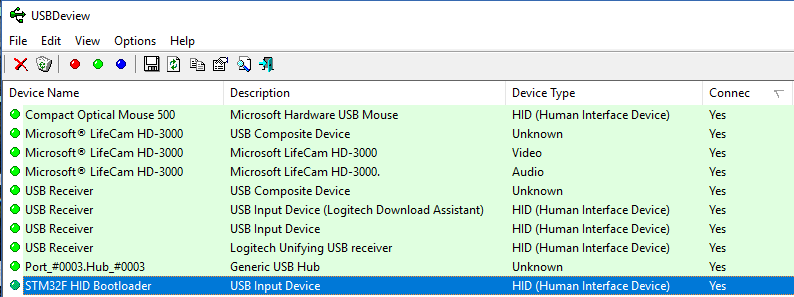
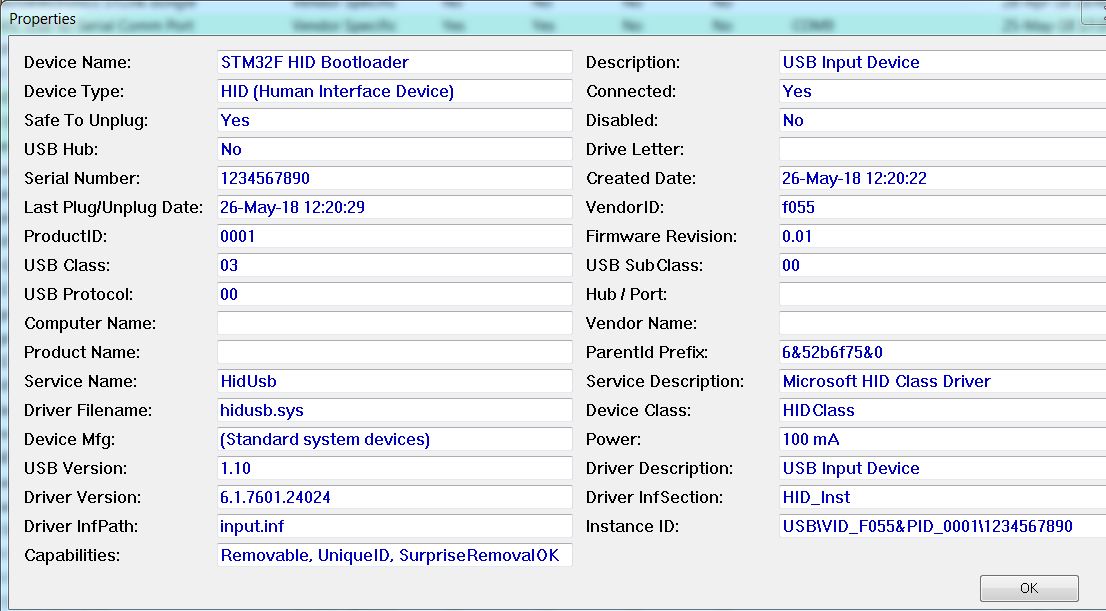
- Use the USBDeview to see if the HID bootloader device is properly recognized from your Windows. Double click on the device to see the Properties.
- usbdeview_1.PNG (22.92 KiB) Viewed 1901 times
Maple mini or BluePill?
[zoomx – Fri May 25, 2018 9:40 am] –
hid_generic_pc13.zip
Maple mini or BluePill?
You are right. I have uploaded both files.
(I think I’m running a SkyLake based motherboard)
I tried on a Core i3 Laptop (WIndows 7 x64) and it didnt work either.
I think it may work on my Linux Mint (Core i5) machine, as lsusb detects the VID/PID, but I’ve not tested it
It was however recognised on a laptop running Windows 10 (Core i3)
On the Windows machines where it didn’t work, Windows does not report the VID/PID, it just shows up as “Unkown device” in the device manager
[Pito – Fri May 25, 2018 4:05 pm] –
What needs to be done after the flashing the bootloader in?
Does your computer see it as a valid HID device ?
.
- HID bootloader in BluePill.JPG (134.27 KiB) Viewed 1891 times
CPU=Intel(R) Pentium(R) CPU G3258 @ 3.20GHz
Board=Blue Pill
I flashed the bootloader successfully using a TTL serial/USB adapter. The LED blinks rapidly, probably 10x per second.
dmesg

[Sat May 26 18:20:33 2018] usb 3-5: new full-speed USB device number 47 using xhci_hcd

[Sat May 26 18:20:33 2018] usb 3-5: New USB device found, idVendor=f055, idProduct=0001

[Sat May 26 18:20:33 2018] usb 3-5: New USB device strings: Mfr=1, Product=2, SerialNumber=3

[Sat May 26 18:20:33 2018] usb 3-5: Product: STM32F HID Bootloader

[Sat May 26 18:20:33 2018] usb 3-5: Manufacturer: www.brunofreitas.com

[Sat May 26 18:20:33 2018] usb 3-5: SerialNumber: 1234567890

[Sat May 26 18:20:33 2018] usb 3-5: ep 0x81 - rounding interval to 32 microframes, ep desc says 40 microframes

[Sat May 26 18:20:33 2018] hid-generic 0003:F055:0001.13A7: hiddev0,hidraw4: USB HID v1.11 Device [www.brunofreitas.com STM32F HID Bootloader] on usb-0000:00:14.0-5/input0
An error occurred while uploading the sketchI choose that speed to make it differs from the 1 second Blink sketch. In that way I know with one glance if the mcu is at bootloader mode or at the user code (Blink sketch)
I want to fork it to make some changes…
[Slammer – Sun May 27, 2018 10:02 am] –
@Vassilis, have you changed anything in bootloader from your github version?
I want to fork it to make some changes…
I have changed some source code parts in my local (my PC) HID bootloader files. You can fork the latest Github version.
sudo ./hid_upload /tmp/arduino_build_750454/Blink.ino.bin ttyS0

+----------------------------------------------------------------------+

|         HID-Flash v1.4e - STM32 HID Bootloader Flash Tool            |

|     (c) 04/2018 - Bruno Freitas - http://www.brunofreitas.com/       |

|     (c) 04/2018 - Vassilis Serasidis - http://www.serasidis.gr/      |

|   Customized for STM32duino ecosystem - http://www.stm32duino.com/   |

+----------------------------------------------------------------------+
Trying to open the comport...

Toggling DTR...

Sending <reset pages> command...

Flashing firmware...

.......................................................................

.................................

Done!

Sending <reboot mcu> command...
Sketch uses 15828 bytes (24%) of program storage space. Maximum is 65536 bytes.

Global variables use 3088 bytes (15%) of dynamic memory, leaving 17392 bytes for local variables. Maximum is 20480 bytes.
+----------------------------------------------------------------------+
| HID-Flash v1.4e - STM32 HID Bootloader Flash Tool |
| (c) 04/2018 - Bruno Freitas - http://www.brunofreitas.com/ |
| (c) 04/2018 - Vassilis Serasidis - http://www.serasidis.gr/ |
| Customized for STM32duino ecosystem - http://www.stm32duino.com/ |
+----------------------------------------------------------------------+
Trying to open the comport...
Toggling DTR...
Sending <reset pages> command...
Flashing firmware...
.......................................................................
.........................................................
Done!
Sending <reboot mcu> command...
sudo watch -n 1 lsusbWith Boot0=0 and Boot1=1, the upload succeeds using sudo after unplugging and re-plugging the USB cable. Performing a second upload fails. Once the USB is unplugged and re-plugged again, the upload succeeds.
With Boot0=0 and Boot1=0 and the user code running, I can see the led blink briefly if I try to upload while the led is off. I can also see the maple device temporarily disappear from lsusb using the watch command suggested by Slammer. The only way to get a successful upload with these jumper settings is to reflash the bootloader.
It also seems odd that the Arduino environment reports the full 64 or 128K instead of subtracting out the 4k for the bootloader.
Sketch uses 13044 bytes (19%) of program storage space. Maximum is 65536 bytes.

Sketch uses 13044 bytes (9%) of program storage space. Maximum is 131072 bytes.
It takes over the flash sizes from the boards.txt:
## STM32F103C8 -------------------------

genericSTM32F103C.menu.device_variant.STM32F103C8=STM32F103C8 (20k RAM. 64k Flash)

genericSTM32F103C.menu.device_variant.STM32F103C8.build.cpu_flags=-DMCU_STM32F103C8

genericSTM32F103C.menu.device_variant.STM32F103C8.build.ldscript=ld/jtag_c8.ld

genericSTM32F103C.menu.device_variant.STM32F103C8.upload.maximum_size=65536

genericSTM32F103C.menu.device_variant.STM32F103C8.upload.maximum_data_size=20480
## STM32F103CB -------------------------
genericSTM32F103C.menu.device_variant.STM32F103CB=STM32F103CB (20k RAM. 128k Flash)
genericSTM32F103C.menu.device_variant.STM32F103CB.build.cpu_flags=-DMCU_STM32F103CB
genericSTM32F103C.menu.device_variant.STM32F103CB.build.ldscript=ld/jtag.ld
genericSTM32F103C.menu.device_variant.STM32F103CB.upload.maximum_size=131072
genericSTM32F103C.menu.device_variant.STM32F103CB.upload.maximum_data_size=20480
Arduino_STM32/tools/linux[Mon May 28 10:09:40 2018] usb 3-6: USB disconnect, device number 46
[Mon May 28 10:09:41 2018] usb 3-6: new full-speed USB device number 47 using xhci_hcd
[Mon May 28 10:09:41 2018] usb 3-6: New USB device found, idVendor=1eaf, idProduct=0004
1. freshly flashed the hid_bootloader into BPill
2. Win7 installed the HID device “properly”, I can see the device in usbdeview with correct properties [the “good HID”] 3. uploaded a sketch via hid uploader from the cmd
C:\Users\pito\Desktop>hid-flash.exe INTR_Pulser.bin COM6
+----------------------------------------------------------------------+

|         HID-Flash v1.4e - STM32 HID Bootloader Flash Tool            |

|     (c) 04/2018 - Bruno Freitas - http://www.brunofreitas.com/       |

|     (c) 04/2018 - Vassilis Serasidis - http://www.serasidis.gr/      |

|   Customized for STM32duino ecosystem - http://www.stm32duino.com/   |

+----------------------------------------------------------------------+
Trying to open the comport...

unable to open comport

Sending <reset pages> command...

Flashing firmware...

.......................................................................

.................................................................

Done!

Sending <reboot mcu> command...
C:\Users\pito\Desktop>
1. Is your Linux mint 64-bit or 32-bit ?
2. Do you connect your bluepill in a USB-3 port ?
3. Does the DFU bootloader (bootloader 2.0) for Bluepill works ok on your PC with the same Bluepill board ?
4. If yes, Is it enumerates correct when you try to program it from Arduino IDE ?
5. Could you please use a USB hub, if it is available of course, between your PC and Bluepill board to see if the bluepill + HID bootloader enumerates ok ?
EDIT
The hid_bootloader_180529_01.zip is removed
My confusion is with the goodHid/badHid/cameras drivers interference.

- Situation.JPG (105.87 KiB) Viewed 816 times
[Vassilis – Tue May 29, 2018 1:05 pm] –
1. Is your Linux mint 64-bit or 32-bit ? 64 bit
2. Do you connect your bluepill in a USB-3 port ? No, USB 2.0 port
3. Does the DFU bootloader (bootloader 2.0) for Bluepill works ok on your PC with the same Bluepill board ? Yes
4. If yes, Is it enumerates correct when you try to program it from Arduino IDE ? Yes
5. Could you please use a USB hub, if it is available of course, between your PC and Bluepill board to see if the bluepill + HID bootloader enumerates ok ? I have several USB 2.0 hubs, I will try one to see if it makes a difference.
I also tried the last release of the bootsector version (1.3b).
Using that version with boot0=0 and boot1=1, the upload is successful 10 times in a row. I noticed that the id is changing on that version to 1209/BABE. The one I tested still used F055/0001.
I will test the new version you published later today.
Then:
1. I removed the camera from usb port, and uninstalled all – goodHID, badHid and camera drivers via usbdeview.
2. inserted BluePill (with flashed new bootloader and my sketch in, both yellow boot switches = 0), Maple COM6 appeared active
3. first upload – failed and subsequently it installed the goodHID driver, I can see goodHID inactive
4. second upload – ok, the goodHID active during the upload, Maple COM6 disconnected during the upload
5. after the upload finished – goodHID disconnected, Maple6 connected, I see my data
6. no camera and no badHID drivers have been installed, I see only Maple COM6 and goodHID.

- Situation – new bootloader no camera plugged in.JPG (47.04 KiB) Viewed 814 times
I noticed that the USBDeview does not always work ok. Some times it doesn’t show the USB enumerations.
Pito, use the usbtreeview alternative program. It is much better than USBDeview
Except chasing the right moment when HID active and do “Copy the report from here” as fast as I can do ..

[fredbox – Tue May 29, 2018 4:29 pm] –
I also tried the last release of the bootsector version (1.3b).
Using that version with boot0=0 and boot1=1, the upload is successful 10 times in a row. I noticed that the id is changing on that version to 1209/BABE. The one I tested still used F055/0001.
That is because Bootsector has got his own VID:PID from http://pid.codes. That is a nice idea ! I sent a PR to get my own VID:PID for our HID Bootloader.
[fredbox – Tue May 29, 2018 4:29 pm] –
I will test the new version you published later today.
I am waiting for your news
There is about 0.2 seconds (from dmesg -d) between usb disconnect and ttyACM0 reappearing. It seems to be jumping back into the user code before the HID device can enumerate.
I included the following in my blink sketch:
  bkp_init()

Serial.print("Magic number: ");

Serial.println(bkp_read(10), HEX);
[Wed May 30 17:44:41 2018] usb 3-5: USB disconnect, device number 93

[Wed May 30 17:44:41 2018] usb 3-5: new full-speed USB device number 94 using xhci_hcd

[Wed May 30 17:44:41 2018] usb 3-5: New USB device found, idVendor=f055, idProduct=0001

[Wed May 30 17:44:41 2018] usb 3-5: New USB device strings: Mfr=1, Product=2, SerialNumber=3

[Wed May 30 17:44:41 2018] usb 3-5: Product: STM32F HID Bootloader

[Wed May 30 17:44:41 2018] usb 3-5: Manufacturer: www.brunofreitas.com

[Wed May 30 17:44:41 2018] usb 3-5: SerialNumber: 1234567890

[Wed May 30 17:44:41 2018] usb 3-5: ep 0x81 - rounding interval to 32 microframes, ep desc says 40 microframes

[Wed May 30 17:44:41 2018] hid-generic 0003:F055:0001.142A: hiddev0,hidraw4: USB HID v1.11 Device [www.brunofreitas.com STM32F HID Bootloader] on usb-0000:00:14.0-5/input0

[Wed May 30 17:44:44 2018] usb 3-5: USB disconnect, device number 94

[Wed May 30 17:44:44 2018] usb 3-5: new full-speed USB device number 95 using xhci_hcd

[Wed May 30 17:44:44 2018] usb 3-5: New USB device found, idVendor=1eaf, idProduct=0004

[Wed May 30 17:44:44 2018] usb 3-5: New USB device strings: Mfr=1, Product=2, SerialNumber=0

[Wed May 30 17:44:44 2018] usb 3-5: Product: Maple

[Wed May 30 17:44:44 2018] usb 3-5: Manufacturer: LeafLabs

[Wed May 30 17:44:44 2018] usb 3-5: ep 0x82 - rounding interval to 1024 microframes, ep desc says 2040 microframes

[Wed May 30 17:44:44 2018] cdc_acm 3-5:1.0: ttyACM0: USB ACM device
[fredbox – Wed May 30, 2018 10:50 pm] –
The remaining issue is how to allow a regular user to use the hid bootloader.
I still have to use sudo to upload.
Strange, I can upload as regular user, and I didn’t change anything in permissions, user groups, etc…. These settings are configured in my system for long time as I remember.
Create /etc/udev/49-hidbootloader.rules with these lines:#allow non-root access to hid bootloader
SUBSYSTEM=="usb", ATTRS{idVendor}=="f055", ATTRS{idProduct}=="0001", MODE="0666" GROUP="plugdev"
[Slammer – Wed May 30, 2018 7:41 pm] –
@Vassilis will you update the github code?
Ok, I will update the github code as soon as I can.
[fredbox – Wed May 30, 2018 4:42 pm] –
After further troubleshooting, my issue seems to be related to the magic word missing in backup register 10.I included the following in my blink sketch:
  bkp_init()

Serial.print("Magic number: ");

Serial.println(bkp_read(10), HEX);
Yes, I copied usb_serial.cpp
~/Arduino/hardware/Arduino_STM32/STM32F1/cores/maple $ ls -la usb*

-rw-r--r-- 9467 May 15 16:20 usb_serial.cpp

-rw-r--r-- 2822 Jul 10  2017 usb_serial.h
- Arduino IDE 1.8.5
- Arduino SAM Boards (32-bits ARM Cortex-M3) v 1.6.11 (Tools->Board->Boards manager)
- The latest Arduino_STM32 repo (hardware/Arduino_STM32 folder)
- Arduino_STM32_patch_180517_01.zip patch file
I have successfully tested the HID bootloader on the following systems:
- Intel i3-4360 @ 3.7 GHz, Windows 10 , 64 bit (Dual boot computer)
- Intel i3-4360 @ 3.7 GHz, Ubuntu 17.1 , 64-bit (Dual boot computer)
- AMD Fx 6300 Six Core @ 3.5 GHz, Windows 10, 64-bit (Dual boot computer)
- AMD Fx 6300 Six Core @ 3.5 GHz, Mint 18.3, 64-bit (Dual boot computer)
- Intel Celeron Quad Core J3455 @ 1.50 GHz, Windows 10, 64-bit
- Intel Celeron Dual Core 1007U @ 1.50 GHz, Windows 7, 64-bit
- Intel Dual Core Atom D510 @1.66GHz, Windows 7, 32-bit
So far, All tests were successful.
Why CPU? It has nothing to do with it imho.
Even the OS should have nothing to do with it.
There are megatons of HW and SW layers between the CPU and the USB connector.
There are say thousands variants of current PC hardware and OSes and USB hubs – nobody does such testing.
BillG and co. would tell you: “We spent 40 years and dozens of billions dollars developing this stuff such you must not do it..”
Its success is related to a proper implementation of the USB mechanism inside the HID bootloader and STM32 itself, I think. What people, who know the stuff better, told me in past is the USB is tricky as the implementators rarely follow the mechanism in very detail, such the OSes are happy.

Modern CPUs work with more complex Chipsets that are controlling the USB too. I had in the past problem with USB devices that are working ok on USB 2.0 ports but they didn’t work on USB 3.0 ports. Normally, there is backward compatibility between USB 3.0 and USB 2.0
Even the OS should have nothing to do with it.
Even though HID devices, use generic drivers. These drivers maybe have signal timing difference on each OS. Besides, the HID bootloader uses a generic driver but the main sketch uses a CDC driver for SerialUSB device. The switching from HID to CDC and vice versa might be a problem on some OS’ .
I don’t know where is the problem and the HID bootloader works perfect on some PCs and not to other PCs. I am trying to figure it out.
1. there is a lot of data and processes required to be supplied related to USB enumeration and subsequent processes
2. the detailed documentation is hard to get, especially the Win related
3. the Linux is less picky and does not require all the data and processes be implemented
4. the Win is much more picky, when something is missing it may/may not crash
I believe fully the types of CPU, types of north/south bridges, types of USB2.0/USB3.0 chipsets have little (or nothing) to do with a proper functioning of any USB “dongles” you insert into the USB socket. I would not put my finger into the fire when talking OS, but I am pretty prone to believe an OS is also not a bad guy in this game.
It is always about strict compliance with the required data structures and processes.
There is maybe 200000 various types of USB gadgets people world wide daily insert into 5000 combinations of CPU/chipsets/OS_varieties/USB2/USB3_sockets, and it simply works.
[stevestrong – Fri Jun 01, 2018 11:59 am] –
Vassilis, can you please describe the test procedure?
I will write the whole procedure in detail.
On each PC (Linux or Windows)
- Download the portable version of the Arduino IDE 1.8.5
- Extract the zip file in a directory of your choice (in windows for example, C:\electronics\Arduino_IDE)
- Download the Arduino_STM32 repo and extract the file in to the folder you extracted the arduino ide
(C:\electronics\Arduino_IDE\hardware) - A new folder will be created inside the hardware folder (Arduino_STM32-master)
- Rename that folder to “Arduino_STM32”
- Download my STM32_HID_Bootloader and extract the Arduino_STM32_patch_180601_01.zip file into the Arduino_STM32 folder
- Burn the hid_generic_pc13.bin firmware to your Bluepill board by using an ST-Link or a Serial programmer (Address 0x08000000).
- Run the Arduino IDE (with sudo or gksu in Linux) or just double click on arduino.exe on windows, and select “Tools->Board->Generic STM32F103C series”
- Select Tools->Upload Method->HID bootloader
- At this point, there is no need to select the serial port.
- Open the Blink example sketch and click on “Upload”
- after burning the blink example, select the serial port from Tools->Port
- Change the Blink Delay time from 1000 to 500 or any value you want and click again on “Upload”
- Repeat 2-3 times the step 13 and check if the new Blink sketch is programed to the Bluepill correctly.
I am a full supporter of this activity and I will help you as much as I can.
Here is another test:
OS: Ubuntu 18.04
Board: BluePill
Instructions used: viewtopic.php?f=32&t=3661&start=40#p45885
I also needed to add the udev rules as pointed out by @fredbox earlier.
Results:
– Performed several flashes, each was succesfull.
– Small concern: when plugging in the BluePill the first time, dmesg shows 2 read errors and then continues without issues:
[327851.741783] usb 1-11: device descriptor read/64, error -71
[327851.977822] usb 1-11: device descriptor read/64, error -71
[327852.213807] usb 1-11: new full-speed USB device number 45 using xhci_hcd
[327852.363319] usb 1-11: New USB device found, idVendor=f055, idProduct=0001
[327852.363325] usb 1-11: New USB device strings: Mfr=1, Product=2, SerialNumber=0
[327852.363329] usb 1-11: Product: STM32F HID Bootloader
[327852.363333] usb 1-11: Manufacturer: www.brunofreitas.com
[327852.365196] hid-generic 0003:F055:0001.000C: hiddev1,hidraw5: USB HID v1.11 Device [www.brunofreitas.com STM32F HID Bootloader] on usb-0000:00:14.0-11/input0
+----------------------------------------------------------------------+

|         HID-Flash v1.4f - STM32 HID Bootloader Flash Tool            |

|     (c) 04/2018 - Bruno Freitas - http://www.brunofreitas.com/       |

|     (c) 04/2018 - Vassilis Serasidis - http://www.serasidis.gr/      |

|   Customized for STM32duino ecosystem - http://www.stm32duino.com/   |

+----------------------------------------------------------------------+
> Trying to open the comport...

> unable to open comport

> Searching for F055:0001 HID device...

> F055:0001 device is found !

> Sending <reset pages> command...

> Flashing firmware...

.......................................................................

........................................................................

.................................

> Done!

> Sending <reboot mcu> command...
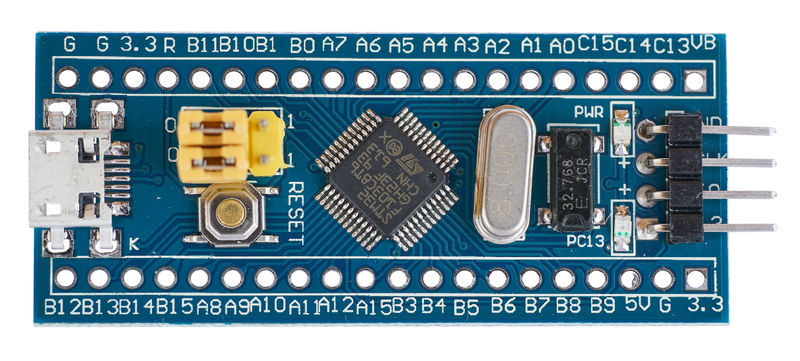
After flashing the LED blinks fast.
After first upload and reinserting the BPill it installed the HID driver.
In usbdeview I’ve found 2 HID drivers – one with serial number 1234567890 and the second without (otherwise both with hid_bootloader’s VIP PID).
I uninstalled the one without ser number.
Upload worked fine.
My sketch runs fine.
Plz. indicate whether it is required to reinstall all the stuff, or it is enough to reflash the bootloader only..
PS: When I uninstall this driver (the one without the serial number):
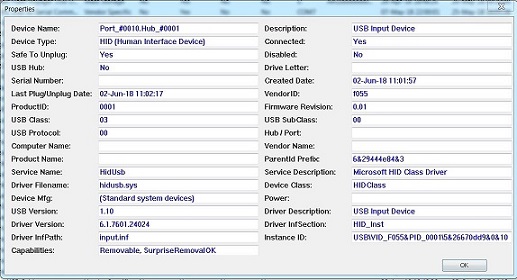
- HID bootloader no SerialNum.jpg (58.82 KiB) Viewed 401 times
[Pito – Sat Jun 02, 2018 8:53 am] –
Plz. indicate whether it is required to reinstall all the stuff, or it is enough to reflash the bootloader only..
Ok
The Serial Number Description was not initially enabled (bootsector’s code). I had enabled it, a few updates ago. It’s better for now to keep the SN Description disabled for simplifying the code.
I uninstalled from USBDeview all HID devices had been installed with VID:PID F055:0001 and then I re-plugged the HID-BL to the USB port. Windows recognized the new device and installed the drivers only one time.
There is 2 bytes at the USB_DEVICE_DESC that set the bootloader firmware revision (bcdDevice 0.01). Currently is set to v0.01
I will increase that number to avoid confusion with the bootloader .bin files.
hid_generic_pc13.bin
usb_serial.cpp
hid-flash.exe
After flashing in the BL into BP the LED blinks fast.
I removed all HID drivers with usbdeview.
After first sketch upload it said it cannot find HID.
After repluging BPill it showed “USB device not recognised”. After maybe 1-2 replugins and after a few secs it installed the driver (no SN).
Afterwards it works fine. I can see the HID driver (no SN) and Maple COM6. HID driver connects itself during the sketch upload, then disconnects.
Maple COM6 disconnects itself during the sketch upload, then connects.
I can see my data from the uploaded sketch coming fine in TT.
+----------------------------------------------------------------------+

|         HID-Flash v1.4f - STM32 HID Bootloader Flash Tool            |

|     (c) 04/2018 - Bruno Freitas - http://www.brunofreitas.com/       |

|     (c) 04/2018 - Vassilis Serasidis - http://www.serasidis.gr/      |

|   Customized for STM32duino ecosystem - http://www.stm32duino.com/   |

+----------------------------------------------------------------------+
> Trying to open the comport...
> Toggling DTR...
> Searching for F055:0001 HID device...
> F055:0001 device is found !
> Sending <reset pages> command...
> Flashing firmware...
.......................................................................
.................................................................
> Done!
> Sending <reboot mcu> command...
COM6 is Ready !
[Pito – Sat Jun 02, 2018 12:01 pm] –
So, I’ve taken your latest (June 1st)
hid_generic_pc13.bin
usb_serial.cpp
hid-flash.exeAfter flashing in the BL into BP the LED blinks fast.
I removed all HID drivers with usbdeview.After first sketch upload it said it cannot find HID.
After repluging BPill it showed “USB device not recognised”. After maybe 1-2 replugins and after a few secs it installed the driver (no SN).Afterwards it works fine. I can see the HID driver (no SN) and Maple COM6. HID driver connects itself during the sketch upload, then disconnects.
Maple COM6 disconnects itself during the upload, then connects.
I can see my data from the uploaded sketch coming fine in TT.
+----------------------------------------------------------------------+

|         HID-Flash v1.4f - STM32 HID Bootloader Flash Tool            |

|     (c) 04/2018 - Bruno Freitas - http://www.brunofreitas.com/       |

|     (c) 04/2018 - Vassilis Serasidis - http://www.serasidis.gr/      |

|   Customized for STM32duino ecosystem - http://www.stm32duino.com/   |

+----------------------------------------------------------------------+
> Trying to open the comport...
> Toggling DTR...
> Searching for F055:0001 HID device...
> F055:0001 device is found !
> Sending <reset pages> command...
> Flashing firmware...
.......................................................................
.................................................................
> Done!
> Sending <reboot mcu> command...
COM6 is Ready !
After several attempts (say 1-5) it finally enumerates and I can upload.
Sometimes it enumerates immediately. Sometimes not.
It may come from the 10k resistor there..
I have a BPill with pmos 1k5 usbswitch, that would require a BL rebuild, however.
[Vassilis – Sat Jun 02, 2018 8:31 am] –
Steve, are the BOOT-0 and BOOT-1 jumbers at 0 position ?
OK, it seems it was it.
After putting a jumper to BOOT1 it works many consecutive times on my Win10 home 64bit, I5-4460T, [email protected].
+----------------------------------------------------------------------+

|         HID-Flash v1.4f - STM32 HID Bootloader Flash Tool            |

|     (c) 04/2018 - Bruno Freitas - http://www.brunofreitas.com/       |

|     (c) 04/2018 - Vassilis Serasidis - http://www.serasidis.gr/      |

|   Customized for STM32duino ecosystem - http://www.stm32duino.com/   |

+----------------------------------------------------------------------+
> Trying to open the comport...
> Toggling DTR...
> Searching for F055:0001 HID device...
> F055:0001 device is found !
> Sending <reset pages> command...
> Flashing firmware...
.......................................................................
........................................................................
.................................
> Done!
> Sending <reboot mcu> command...
That was Roger’s idea in case of something goes wrong during programming the mcu. In the case the SerialUSB is lost. In that case, the mcu will jump to the user code but the SerialUSB code will never be ran. The SerialUSB is needed to put the mcu in HID mode.
If you put the BOOT-1 at logic ‘1’ you force the mcu to stay in bootloader and you can re-upload your sketch.
— EDIT —
What I can do is to enable the internal pull-down resistor on PB2 pin (BOOT-1) when the bootloader runs. So, the jumper is needed (logic ‘1’) only in case you want to force the mcu stay in bootloader.
Reflash the hid bootloader.
Set BKP10 in the setup portion of your code.
  bkp_init();

bkp_enable_writes();

bkp_write(10, 0x424C);

bkp_disable_writes();[Vassilis – Sat Jun 02, 2018 3:24 pm] –
What I can do is to enable the internal pull-down resistor on PB2 pin (BOOT-1) when the bootloader runs. So, the jumper is needed (logic ‘1’) only in case you want to force the mcu stay in bootloader.
Yeeesss! That would be great!
Curiously, if I print the value of BKP 10 from inside the blink sketch, it now reports 0. Previously, I could comment out my code that set the BKP register to 0x424C and it would only work once. Whatever you changed on the last revision seems to have resolved my issue.
Linux Mint 17.3, 64 bit, Intel G3248 @ 3.2Ghz.
I have more black pills than blue ones, I will see if I can recompile so the LED is on PB12.
Thanks for doing this project.
[fredbox – Sat Jun 02, 2018 4:51 pm] –
I downloaded the June 1st zip file and updated everything in all the folders and reflashed the hid bootloader. Now it is working perfectly.Curiously, if I print the value of BKP 10 from inside the blink sketch, it now reports 0. Previously, I could comment out my code that set the BKP register to 0x424C and it would only work once. Whatever you changed on the last revision seems to have resolved my issue.
Linux Mint 17.3, 64 bit, Intel G3248 @ 3.2Ghz.
I have more black pills than blue ones, I will see if I can recompile so the LED is on PB12.
Thanks for doing this project.
Perfect !
I added these lines to config.h:#elif defined TARGET_GENERIC_F103_PB12
#define HAS_LED1_PIN
#define LED1_CLOCK_EN (RCC->APB2ENR |= RCC_APB2ENR_IOPBEN)
#define LED1_CLOCK_DIS (RCC->APB2ENR &= ~RCC_APB2ENR_IOPBEN)
#define LED1_BIT_0 (GPIOB->CRH |= GPIO_CRH_CNF12_0)
#define LED1_BIT_1 (GPIOB->CRH &= ~GPIO_CRH_CNF12_1)
#define LED1_MODE (GPIOB->CRH |= GPIO_CRH_MODE12)
#define LED1_OFF (GPIOB->BSRR = GPIO_BSRR_BS12)
#define LED1_ON (GPIOB->BRR = GPIO_BRR_BR12)
I’ve got 6 free ports to test, 3xUSB2 and 3xUSB3. All these look equivalent with other devices. Good.
Now, with both latest versions of HID BLoader I see following:
1. when inserting BPill it always installs Maple COMx, where x increments upon each port used. When all known Maple COMx’es devices are uninstalled in usbdeview, it still increments the x with a new inserted one 
2. It rarely recognizes the BLoader HID. I get
> Trying to open the comport...
> unable to open comport
> Searching for F055:0001 HID device...
> Unable to open the HID device.
Error: COM6 not found
(this method doesn’t work on Win10 64-bit)
Just select the Maple from the drop down menu and click on “Downgrade Driver/Replace driver”
You can uninstall this driver from Control panel -> Device manager
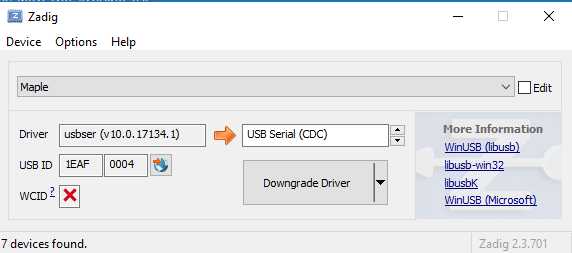
- zadig.PNG (17.11 KiB) Viewed 374 times
ps. Did you read my PM ?
[fredbox – Sat Jun 02, 2018 11:29 pm] –
I managed to trick the compiler that comes with Arduino 1.8.5 into recompiling the hid bootloader for a black pill.I added these lines to config.h:
#elif defined TARGET_GENERIC_F103_PB12

#define HAS_LED1_PIN

#define LED1_CLOCK_EN	(RCC->APB2ENR |= RCC_APB2ENR_IOPBEN)

#define LED1_CLOCK_DIS	(RCC->APB2ENR &= ~RCC_APB2ENR_IOPBEN)

#define LED1_BIT_0	(GPIOB->CRH |= GPIO_CRH_CNF12_0)

#define LED1_BIT_1	(GPIOB->CRH &= ~GPIO_CRH_CNF12_1)

#define LED1_MODE	(GPIOB->CRH |= GPIO_CRH_MODE12)

#define LED1_OFF	(GPIOB->BSRR = GPIO_BSRR_BS12)

#define LED1_ON		(GPIOB->BRR = GPIO_BRR_BR12)
Windows hid-flash.exe v1.4g is also included in the zip file.
The HID-BL has the Serial number enabled. I changed the Firmware revision to v0.02. It can be viewed on USBDeview.
–
- hid_bootloader_180603_01.rar
- (29.82 KiB) Downloaded 16 times
[stevestrong – Mon Jun 04, 2018 3:51 pm] –
Vassilis, the RAR file posted above (hid_bootloader_180603_01.rar) seems to be wrong (“Cannot open file…”), can you please attach a good one again?
–
- hid_bootloader_180603_01.zip
- (32.05 KiB) Downloaded 16 times
Test
0) no jumper on PB2, user code available in flash
1) board reset -> LED blinks very fast, no user code executed
When tried to flash new user code, the hid-flash utility does not wait anything, it gives at once the error message:
+----------------------------------------------------------------------+

|         HID-Flash v1.4g - STM32 HID Bootloader Flash Tool            |

|     (c) 04/2018 - Bruno Freitas - http://www.brunofreitas.com/       |

|     (c) 04/2018 - Vassilis Serasidis - http://www.serasidis.gr/      |

|   Customized for STM32duino ecosystem - http://www.stm32duino.com/   |

+----------------------------------------------------------------------+
> Trying to open the comport...
> unable to set comport cfg settings
> Searching for F055:0001 HID device...
> Unable to open the HID device.
An error occurred while uploading the sketch
I’ve spotted a bug in the original HID bootloader USB_Init() code and fixed it:
https://github.com/bootsector/stm32-hid … 6025496937
You might want to replicate this over your fork.
[bootsector – Mon Jun 04, 2018 5:36 pm] –
@Vassilis,I’ve spotted a bug in the original HID bootloader USB_Init() code and fixed it:
https://github.com/bootsector/stm32-hid … 6025496937
You might want to replicate this over your fork.
Thanks, I will test if that bug fix
Changes
1. I applied the Bootsector’s bug fix to the usb.c file (new bootloader .bin files).
2. I removed the 3 seconds delay between the Serial port initiallization and USB HID device search. Instead of that delay, the hid-flash.exe is trying 6 times to find the hid device (every 1 second). That speeds up the searching process.
–
- hid_bootloader_180605_01.zip
- (31.75 KiB) Downloaded 17 times
1. after flashing in the bootloader the LED13 flashes fast
2. I unplug/plugin the BPill
3. I get the HID device and Maple COM(x), it does upload fine, with 10 repeated uploads (10x clicking Upload icon) while in the same usb port as it was during install it threw 3x “Error while sending reboot mcu command..”
+----------------------------------------------------------------------+

|         HID-Flash v1.4h - STM32 HID Bootloader Flash Tool            |

|     (c) 04/2018 - Bruno Freitas - http://www.brunofreitas.com/       |

|     (c) 04/2018 - Vassilis Serasidis - http://www.serasidis.gr/      |

|   Customized for STM32duino ecosystem - http://www.stm32duino.com/   |

+----------------------------------------------------------------------+
> Trying to open the comport...

> Toggling DTR...

> Searching for F055:0001 HID device...

##

> F055:0001 device is found !

> Sending <reset pages> command...

> Flashing firmware...

.......................................................................

.................................................................

> Done!

> Sending <reboot mcu> command...

> Error while sending <reboot mcu> command.

COM33 is Ready !
When user code is flashed, the HID device keeps only for miliseconds, that is why to install the HID driver you have to stay in bootloader mode by setting BOOT1 to 1.
+----------------------------------------------------------------------+

|         HID-Flash v1.4h - STM32 HID Bootloader Flash Tool            |

|     (c) 04/2018 - Bruno Freitas - http://www.brunofreitas.com/       |

|     (c) 04/2018 - Vassilis Serasidis - http://www.serasidis.gr/      |

|   Customized for STM32duino ecosystem - http://www.stm32duino.com/   |

+----------------------------------------------------------------------+
> Trying to open the comport...

> Toggling DTR...

> Searching for F055:0001 HID device...

##

> F055:0001 device is found !

> Sending <reset pages> command...

> Flashing firmware...

.......................................................................

........................................................................

.................................

> Done!

> Sending <reboot mcu> command...
0. when the HID BL device has been removed from Win7, I have to install HID BL device back by setting the boot1=1 and replugging
After plugging in BP into a port:
1. when set boot1=1 it installs the HID BL device, it does not install the Maple COMx
After next replugging the BP:
2. when set boot1=0 it installs the Maple COMx
3. when I do upload it works as described above.
Vassilis, please correct me if I’m wrong.
For me it was something “like biz as usual”, therefore I tested what happens when the HID BL device is removed from Win7..
It seems to work as before. I flashed blink 10x on both boards with no failures.
[Pito – Tue Jun 05, 2018 7:29 pm] –
Would be great if it installs the HID BL device automatically, with boot0/1=0, when the HID BL device not installed. Why such a complication?
For me it was something “like biz as usual”, therefore I tested what happens when the HID BL device is removed form Win7..
I think it is a good compromise between fast starting up user code (after each upload) and installing HID driver (once).
It takes 4 seconds between
> Sending <reboot mcu> command...
@echo off

rem: Note %~dp0 get path of this batch file

rem: Need to change drive if My Documents is on a drive other than C:

set driverLetter=%~dp0

set driverLetter=%driverLetter:~0,2%

%driverLetter%

cd %~dp0

rem: the two line below are needed to fix path issues with incorrect slashes before the bin file name

set str=%1

set str=%str:/=\%

set comport=%2
rem: ------------- use hid_flash CLI
hid_flash\hid-flash.exe %str% %comport%
for /l %%x in (1, 1, 10) do (
ping -w 50 -n 1 192.0.2.1 > nul
)
mode %comport% | find "RTS" > nul
if errorlevel 1 (
echo Error: %comport% not found
) else (
echo %comport% is Ready !
)
- Insure that the platform.txt file includes the following code
# HID upload

tools.hid_upload.cmd=hid_upload

tools.hid_upload.cmd.windows=hid-flash.exe

tools.hid_upload.cmd.macosx=hid_flash

tools.hid_upload.path={runtime.hardware.path}/tools/win

tools.hid_upload.path.macosx={runtime.hardware.path}/tools/macosx

tools.hid_upload.path.linux={runtime.hardware.path}/tools/linux

tools.hid_upload.path.linux64={runtime.hardware.path}/tools/linux64

tools.hid_upload.upload.params.verbose=-d

tools.hid_upload.upload.params.quiet=n

tools.hid_upload.upload.pattern="{path}/{cmd}" "{build.path}/{build.project_name}.bin" {serial.port.file}
Replaced..
I’ve done 25 uploads fine.
4 times I’ve got
> Done!

> Sending <reboot mcu> command...

> Error while sending <reboot mcu> command.I could rebuild the bootloader with PB2 set to input pulldown and it works now for me without any BOOT1 jumper set (R10 bridged).
I love the quick COM availability (within 1 sec after reset)!!!
+10 
From nowon, officially, the HID-BL will use its own registered PID.
VID: 1209
PID: BEBA
I updated /etc/udev/rules.d/49-hidbootloader.rules to
#allow non-root access to hid bootloader

SUBSYSTEM=="usb", ATTRS{idVendor}=="1209", ATTRS{idProduct}=="beba", MODE="0666" GROUP="plugdev"
I forked your bootloader project, I am able to build the bootloader, but I don’t want to download the tools needed to build the flash tool.
https://github.com/Serasidis/STM32_HID_ … 610_01.zip
----------------------------------------------------------------------+

|         HID-Flash v1.4f - STM32 HID Bootloader Flash Tool            |

|     (c) 04/2018 - Bruno Freitas - http://www.brunofreitas.com/       |

|     (c) 04/2018 - Vassilis Serasidis - http://www.serasidis.gr/      |

|   Customized for STM32duino ecosystem - http://www.stm32duino.com/   |

+----------------------------------------------------------------------+
> Trying to open the comport...
> unable to open comport
> Searching for 1209:BEBA HID device...
> 1209:BEBA device is found !
> Sending <reset pages> command...
> Flashing firmware...
.......................................................................
........................................................................
.........................................................
> Done!
> Sending <reboot mcu> command...
#elif defined TARGET_GENERIC_F103_PC13

#define HAS_LED1_PIN

#define LED1_CLOCK_EN		(RCC->APB2ENR |= RCC_APB2ENR_IOPCEN)

#define LED1_CLOCK_DIS	(RCC->APB2ENR &= ~RCC_APB2ENR_IOPCEN)

#define LED1_BIT_0			(GPIOC->CRH |= GPIO_CRH_CNF13_0)

#define LED1_BIT_1			(GPIOC->CRH &= ~GPIO_CRH_CNF13_1)

#define LED1_MODE				(GPIOC->CRH |= GPIO_CRH_MODE13)

#define LED1_OFF				(GPIOC->BSRR = GPIO_BSRR_BS13)

#define LED1_ON (GPIOC->BRR = GPIO_BRR_BR13)My steps video here: https://asciinema.org/a/mUveIIWGZcL67LX1kw57Dq5Jd
1. Apply the zip patch to the Arduino_stm32 folder
2. Connect BOOT-1 pin (not BOOT-0) to 3.3v through a resistor (1 – 10k for safety)
3. Compile and Flash a blink sketch to maple mini, from arduino ide by selecting HID-bootloader” from the menu
4. Disconnect the BOOT-1 pin from 3.3v
So I erased, flashed the bootloader to 0x8000000 and the blue led starts blinking fast, then I connected a wire from boot1 to vcc and connected usb cable.
Then selected on Arduino chip:

Then I tried to upload sketch, it fails, no serial port .. Am I missing something?
Users/paulo/Documents/Arduino/hardware/Arduino_STM32/tools/macosx/hid_flash /var/folders/73/85msrtvj4_j99ncvssd7qn7r0000gn/T/arduino_build_328508/Blink.ino.bin cu.SLAB_USBtoUART
error, counldn't open comport /dev/cu.SLAB_USBtoUART
+----------------------------------------------------------------------+
| HID-Flash v1.4e - STM32 HID Bootloader Flash Tool |
| (c) 04/2018 - Bruno Freitas - http://www.brunofreitas.com/ |
| (c) 04/2018 - Vassilis Serasidis - http://www.serasidis.gr/ |
| Customized for STM32duino ecosystem - http://www.stm32duino.com/ |
+----------------------------------------------------------------------+
Trying to open the comport...
Unable to open the HID device.
a porta série Unable to open the HID device.
selecionada não existe ou a placa não está ligada.
STM32F HID Bootloader:
Product ID: 0xbeba

Vendor ID: 0x1209

Version: 0.01

Speed: Up to 12 Mb/sec

Manufacturer: www.serasidis.gr

Location ID: 0xfa120000 / 5

Current Available (mA): 500

Current Required (mA): 100

Extra Operating Current (mA): 0
 )
)
Now I understand. The Boot 1 PIN on MM is floating and you need to put it 1 to HID bootloader and 0 to normal run mode or you’ll have awkward results.
Now I think I need to put serial working in the sketch to fire the HID without having to change pins, isn’t it?
I tried:
Stm32duino + hid BL 1.4f + Serial.begin() does not work
Stm32duino + dfu BL 2.0 + Serial.begin() Works!
Mbed + Stlink + UsbSerial Works!
Do I need to implement a specific lib?
ps: I also tried a crazy thing: uploaded a bin compiled with mbed and usbserial with the HID BL and it uploaded, but it doesn’t run , that would be so neat if you can use the BL for both frameworks. mbed with the online compiler and a little script to detect the bin file and upload via hid.
Solution: I had to put PB9 to LOW!! That was the reason, it was that simple.

I think you don’t need it on the DFU Bootloader ?!
 pinMode(PB9,OUTPUT);

digitalWrite(PB9,LOW);

Serial.begin();
hid-flash ~/blink_serial_mm.bin /dev/cu.usbmodem411
+----------------------------------------------------------------------+

|         HID-Flash v1.4f - STM32 HID Bootloader Flash Tool            |

|     (c) 04/2018 - Bruno Freitas - http://www.brunofreitas.com/       |

|     (c) 04/2018 - Vassilis Serasidis - http://www.serasidis.gr/      |

|   Customized for STM32duino ecosystem - http://www.stm32duino.com/   |

+----------------------------------------------------------------------+
> Trying to open the comport...
error, counldn't open comport /dev//dev/cu.usbmodem411
> Searching for 1209:BEBA HID device...
> Unable to open the HID device.
#ifdef HAS_MAPLE_HARDWARE

/* Setup USB DISC pin as output open drain */

SET_REG(GPIO_CR(USB_DISC_BANK,USB_DISC_PIN),(GET_REG(GPIO_CR(USB_DISC_BANK,USB_DISC_PIN)) & crMask(USB_DISC_PIN)) | CR_OUTPUT_OD << CR_SHITF(USB_DISC_PIN));

gpio_write_bit(USB_DISC_BANK,USB_DISC_PIN,1);
/* turn on the USB clock */

//pRCC->APB1ENR |= RCC_APB1ENR_USB_CLK;// done in setupCLK()
gpio_write_bit(USB_DISC_BANK,USB_DISC_PIN,0);  /* present ourselves to the host */
I’ve created some python code to aid in creating the LED definitions for different port pins.
It also creates modifications necessary for the makefile.
I also created a make_all.bat like the one Roger uses in the standard bootloader.
See zip file for examples. The example pin numbers are mostly taken from the standard bootloader.
[fredbox – Sat Jun 30, 2018 3:48 pm] –
Vassilis,I’ve created some python code to aid in creating the LED definitions for different port pins.
It also creates modifications necessary for the makefile.
I also created a make_all.bat like the one Roger uses in the standard bootloader.
See zip file for examples. The example pin numbers are mostly taken from the standard bootloader.
Thanks !
, I will edit above , LOLBut the binary must be compiled to that start address.
2. I added a definition in case you want to enable the internal Pull-down on PB2 pin. Just add the following line to the variant you want. See Maple Mini variant in config.h file. By default, the floating input mode is enabled on PB2 (BOOT-1 pin).
#define PB2_PULLDOWN[peek – Sat Jun 30, 2018 5:01 pm] –
I just noticed I put digitalWrite(PB9,OUTPUT) in the code instead of LOW
Hold on, I saw on your video that you flashed the hid_maple_mini.bin bootloader on your board. That firmware is for Maple Mini boards. In your next post I read that you set the Arduino IDE for Generic STM32F103 series boards. That is not correct. Additionally, the maple mini does not have PB9 available to set it from the sketch.
If you have Maple mini board flash the hid_maple_mini.bin firmware and select Board: Maple Mini from Arduino IDE.
If you have BluePill board flash the hid_generic_pc13.bin firmware and select Board: Generic STM32F103 series from Arduino IDE.
[Vassilis – Sun Jul 01, 2018 6:31 am] –[peek – Sat Jun 30, 2018 5:01 pm] –
I just noticed I put digitalWrite(PB9,OUTPUT) in the code instead of LOWHold on, I saw on your video that you flashed the hid_maple_mini.bin bootloader on your board. That firmware is for Maple Mini boards. In your next post I read that you set the Arduino IDE for Generic STM32F103 series boards. That is not correct. Additionally, the maple mini does not have PB9 available to set it from the sketch.
If you have Maple mini board flash the hid_maple_mini.bin firmware and select Board: Maple Mini from Arduino IDE.
If you have BluePill board flash the hid_generic_pc13.bin firmware and select Board: Generic STM32F103 series from Arduino IDE.
Argghhh! I followed the first page tutorial and selected the wrong board, there’s so much variants I got confused easily, that’s why the Serial DISC pin wasn’t working without me having to set it to LOW!
Omg, thank you so much for helping me out!
So in a nutshell, to activate BL you need Boot1=VCC to run program Boot1=GND. Then if your Sketch has Serial enabled, the hid-flash is able to reset to the BL serial port keeping Boot1 = GND. One thing I noticed, you must have Boot1=GND you can not leave it floating or you have random reset results.
> Done!

> Sending <reboot mcu> command...

> Error while sending <reboot mcu> command.
1. Please verify that the yellow jumpers are connected to ‘0’ just like the following picture (it is very important).
2. Please verify that you have applied the following patch to your RPi3 Arduino IDE
https://github.com/Serasidis/STM32_HID_ … 809_02.zip
One thing that I noticed that error on windows gone after I stopped using a usb hub and connected the board directly on a pc usb port.
On rpi I don’t use any hubs but the usb ports on rpi3 are a hub isn’t?

[stevestrong – Wed Sep 19, 2018 8:30 am] –
The mini F4vet6 board has 25MHz xtal instead of 8MHz of the black F4 board, so I think the same bootloader will not work.
Correct. I just realized the same thing. I’ll try to come up with a change for that.
RCC_OscInitStruct.PLL.PLLM = 25;
RCC_OscInitStruct.PLL.PLLN =336;
But now after flashing board stays in the bootloader mode.

[stevestrong – Wed Sep 19, 2018 9:37 am] –
Set PE0 to GND (pull-down)?
That did not help, stays at bootloader mode. PE0 is originally set as LED in the code, I changed it to PB9 for this board, but no change.
Does this blue mini board has also PD15 routed to BOOT1 like black board?
EDIT: added some debugging data
Seems that BOOT1 is LOW and magic number is 0. That’s why it stays at bootloader mode.

	/* In case of incoming magic number or <BOOT_1_PIN> is LOW, jump to HID bootloader */

if((magic_val != 0x424C)&&(HAL_GPIO_ReadPin(BOOT_1_PORT, BOOT_1_PIN))){
[Vassilis – Sun Aug 26, 2018 5:06 am] –
I will test the HID-BL on my RPi3
FYI
There is currently an issue with the RPI 3B+ where the old DFU bootloader does not work correctly
The problem seems to be that the reset pulse needs to be much longer on the 3B+ than the 3B or older boards
I know someone has tried to make the reset pulse much much longer , e.g. 1 mS and this makes it work Ok on the 3B+ and also other RPi boards, however it the bootloader no longer works on all PCs , especially newer faster PCs
There is probably a compromise value for reset pulse length that will work on the RPi 3B+ but since this board seems to be the anomaly, it may be better to build a version that is specifically for that board.
Note. The LibMaple Core also has issues with reset pulse length on the 3B+, but I am not intending to change it, as it’s likely to break some PCs and Macs if I change the reset pulse length
Then the hook in the USB serial Rx code is writing to BKP registers here another (second) magic number:
https://github.com/rogerclarkmelbourne/ … l.cpp#L315
For this to work you have to update the repo because the address was fixed by Vassilis a couple of months ago: https://github.com/rogerclarkmelbourne/ … /533/files
And the read out of the second magic number is here:
https://github.com/Serasidis/STM32_HID_ … ain.c#L141:
magic_val = *(__IO uint32_t *)(BKPSRAM_BASE); // Read the magic number 0x0x424C an Backup SRAM address 0x40024000
BluePill:
Flashed the prebuilt binary from github. Shows up as an HID device under windows, LED flashes as expected, upload via Arduino fails as below:
+----------------------------------------------------------------------+

|         HID-Flash v1.4f - STM32 HID Bootloader Flash Tool            |

|     (c) 04/2018 - Bruno Freitas - http://www.brunofreitas.com/       |

|     (c) 04/2018 - Vassilis Serasidis - http://www.serasidis.gr/      |

|   Customized for STM32duino ecosystem - http://www.stm32duino.com/   |

+----------------------------------------------------------------------+
> Trying to open the comport...
> unable to open comport
> Searching for 1209:BEBA HID device...
> 1209:BEBA device is found !
> Sending <reset pages> command...
> Error while sending <reset pages> command.
> Error while sending <reset pages> command.
If you post here the compiled HID bootloader for mini F4 board I will check it later today.
[C_D – Thu Sep 20, 2018 12:07 am] –
F407VET6 mini:
Modified the oscillator settings as given by michael_l above and changed the #defines in main.h for BOOT1 (PB2) and LED (PB9). Added the following in boards.txt to get the HID Bootloader 2.0 menu:
Just curious how did you find out that PB2 is BOOT1 ? . I tried to search this also but no luck, this is currently wrong in my code.
EDIT: it WAS in the schema. I’m getting blind… 
I made the change in the bootloader for PB2 – BOOT1 and for LED PIN.
Using Steve’s F4 repo.. About Vassilis’s patch. Needed to add #define APP_RX_DATA_SIZE 2048
[michael_l – Thu Sep 20, 2018 7:57 pm] –
Just curious how did you find out that PB2 is BOOT1 ? . I tried to search this also but no luck, this is currently wrong in my code.
F407 datasheet and then multimeter to double check
Can you post the changes you made to compile the bootloader for your F407 mini? We must have each done something slightly different as my results dont quite match yours.
What does BOOT1 actually do in the bootloader? From the sketch upload instructions it looks like its meant to be pulled low anyway?
Didn’t have any time to play today, but ill have another crack at it this evening and see where I get to.
[RogerClark – Wed Sep 19, 2018 12:00 pm] –[Vassilis – Sun Aug 26, 2018 5:06 am] –
I will test the HID-BL on my RPi3FYI
There is currently an issue with the RPI 3B+ where the old DFU bootloader does not work correctly
The problem seems to be that the reset pulse needs to be much longer on the 3B+ than the 3B or older boards
I know someone has tried to make the reset pulse much much longer , e.g. 1 mS and this makes it work Ok on the 3B+ and also other RPi boards, however it the bootloader no longer works on all PCs , especially newer faster PCs
There is probably a compromise value for reset pulse length that will work on the RPi 3B+ but since this board seems to be the anomaly, it may be better to build a version that is specifically for that board.
Note. The LibMaple Core also has issues with reset pulse length on the 3B+, but I am not intending to change it, as it’s likely to break some PCs and Macs if I change the reset pulse length
Thanks Roger !
No worries.
So you don’t need the patch files.
I just tried using your latest version and I still get the ‘java.lang.NullPointerException’ in Arduino. But my bootloader doesnt blink its LED so I’m pretty sure something else is wrong.
I’ve attached my bootloader binary if anyone wants to try it.
Edit:
With Stevstrongs latest core this bootloader binary works with the HID bootloader.
@C_D: Did you remember to full erase your board memory before burn the bootloader? as said in the instructions.. I did not do this but I suspect this is not the problem.
AFAICS, the LED will only blink during the flashing process (search the code for “LED_1_PIN”).
=> No incoming data, no blink.
To stay in bootloader mode the BOOT1 pin should be set low (!).
https://github.com/Serasidis/STM32_HID_ … ain.c#L143:
/* In case of incoming magic number or <BOOT_1_PIN> is LOW, jump to HID bootloader */
So to run the user code BOOT1 must be set high !
Alternatively you could activate the built-in pull-up resistor here: https://github.com/Serasidis/STM32_HID_ … ain.c#L305.
The Java error code may be because the user code do not use the USB serial, so the flasher cannot send the (first) magic sequence over the (non-existing) USB COM port.
Or you need to update your Java version.
When I use hid-flash manually from cmdline. MCU goes to hardfault..
+----------------------------------------------------------------------+

|         HID-Flash v2.0 - STM32 HID Bootloader Flash Tool            |

|     (c) 04/2018 - Bruno Freitas - http://www.brunofreitas.com/       |

|     (c) 04/2018 - Vassilis Serasidis - http://www.serasidis.gr/      |

|   Customized for STM32duino ecosystem - http://www.stm32duino.com/   |

+----------------------------------------------------------------------+
> Trying to open the comport...
> unable to open comport
> Searching for 1209:BEBA HID device...
#
> 1209:BEBA device is found !
> Sending <reset pages> command...
> Flashing firmware...
. 1024 Bytes
Is it maybe a stack problem?
https://github.com/Serasidis/STM32_HID_ … #L344-L345
To get bootloader mode the dip switch in this blue mini board BOOT1 has to be changed to 0. If you want to boot the program change again it to 1. So that takes a bit of extra time to do.
This is where it currently hangs, when the blink is running and COM12 is enumerated.
D:\DL\STM32_HID_Bootloader-master\cli>hid-flash.exe C:\Users\Michael\AppData\Local\Temp\arduino_build_642902\Blink.in

o.bin com12
+----------------------------------------------------------------------+
| HID-Flash v2.0 - STM32 HID Bootloader Flash Tool |
| (c) 04/2018 - Bruno Freitas - http://www.brunofreitas.com/ |
| (c) 04/2018 - Vassilis Serasidis - http://www.serasidis.gr/ |
| Customized for STM32duino ecosystem - http://www.stm32duino.com/ |
+----------------------------------------------------------------------+
> Trying to open the comport...
> Toggling DTR...
But by uploading with Arduino IDE I get the same error as @michael :
Sketch uses 63212 bytes (12%) of program storage space. Maximum is 514288 bytes.

Global variables use 18688 bytes (14%) of dynamic memory, leaving 112384 bytes for local variables. Maximum is 131072 bytes.

java.lang.NullPointerException

at cc.arduino.packages.uploaders.SerialUploader.uploadUsingProgrammer(SerialUploader.java:314)

at cc.arduino.packages.uploaders.SerialUploader.uploadUsingPreferences(SerialUploader.java:89)

at cc.arduino.UploaderUtils.upload(UploaderUtils.java:78)

at processing.app.SketchController.upload(SketchController.java:732)

at processing.app.SketchController.exportApplet(SketchController.java:703)

at processing.app.Editor$DefaultExportHandler.run(Editor.java:2030)

at java.lang.Thread.run(Thread.java:748)
generic_f407v.menu.upload_method.HIDUploadMethod.upload.protocol=hid_boot
So that bootloader binary I attached a few posts back is actually fine.
Is it just me or is the BOOT1 pin setting backwards? Surely your sketch should run when its LOW and then you pull it HIGH to enable the bootloader?
[C_D – Mon Sep 24, 2018 9:37 am] –
IIs it just me or is the BOOT1 pin setting backwards? Surely your sketch should run when its LOW and then you pull it HIGH to enable the bootloader?
Yea, I thought so, too. One can change this in code.
But I was thinking further, I would give the bootloader 1 second time to detect any HID communication before jumping to user code, so that the upload can be done even without the first magic sequence, in case USB serial is not used, without the need to switch any jumper or press any button.
Successfully uploaded ‘blink’. The sketch is there and works. But now the bootloader shows up in Windows with ‘device descriptor failed’ and I cant seem to get it back.
Agree a time based boot sequence would be best. I dont usually put BOOT1/BOOT0 jumpers on my boards, they take up valuable space.
However with some boards, I’ve noticed that they have a 10k pullup on Boot1 which is a problem, becuase its much stronger than the 30k – 50k internal resistor inside the STM32
I’ve not checked the HID bootloader, but it would be easy to enable pulldown on Boot1
If your blink sketch (user code) does not use USB serial, it is normal that the board does not get recognized, because USB is first set shortly to HID by the bootloader but then it is abandoned and not reprogrammed for CDC (serial) in user code, so the OS gets confused.
Forcing the bootloader mode before upload would be easy to program on the black F4 board as it has another push button (PA0/WK_UP floating, tied to 3.3V when pressed) next to the reset button , so one can push both buttons simultaneously with one finger and release the reset before releasing the other one.
On the F4 mini board there is a 10k pull-down on BOOT1, so that enabling in general the internal pull-down on the BOOT1, as Roger suggested, or another selected pin would not harm.
So there is something more to improve there.
I already upload my sketach using this in maple_upload.bat:
dfu-util-0.9-win64\dfu-util -a 0 -s %5 -D %4
I guess you use that board: https://eleccelerator.com/stm32f4stamp-breakout-board/
The STM32F405RGT does not have the PD15 pin available.
Try to burn the MCU with the bootloader_F4/bootloader_only_binaries/generic_407_pb3.hex and connect a pull-up resistor to PB4 pin or enable the internal pull-up on that pin and recompile the source code to produce the new hex file.
When you burn the first sketch to the MCU will reboot and a new Serial COM will be available (USB Serial). Select that serial com from your Arduino IDE to auto-reboot the MCU during programming.
I also do not understand why I should pullup PB4 while file says PB3?
here is by board – currently I do not have any matching schematic  :
:
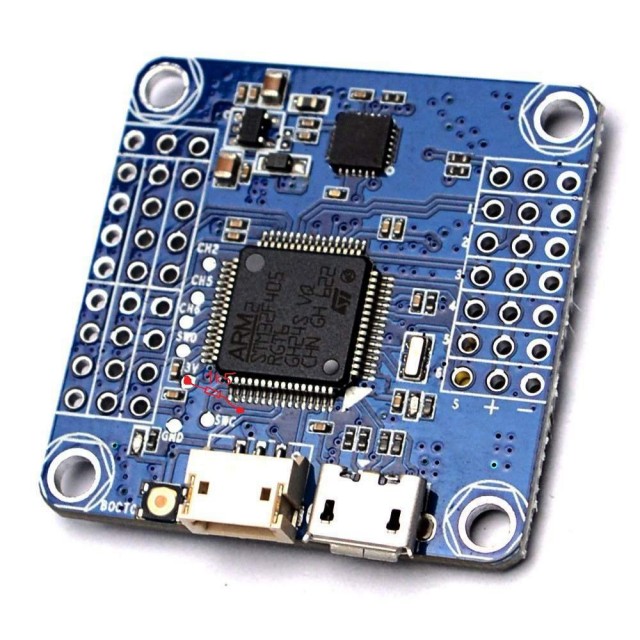
The on-board LED is connected to PB3 and the switch (or jumper) is connected to PB4, to force the MCU in programming mode.
When you connect the USB to PC does the mcu stay in programming mode ?
I mean, when you run the “USB Deview” do you always see the device is attached as “STM32 bootloader” ?
In any case, you tried to make a new variant (f405). Maybe you forgot to add some parameter in boards.txt file for this variant.
I dont have an F405 mcu so I cannot verify that your setup works or not.
#define BOOT_1_PIN	GPIO_PIN_0 // OUT#1 - temporarily not used

#define BOOT_1_PORT	GPIOB

#define LED_1_PIN	GPIO_PIN_5 // BUILDIN_LED

#define LED_1_PORT GPIOB[smarq8 – Tue Nov 27, 2018 9:29 am] –
So I recompile bootloader using this:
#define BOOT_1_PIN	GPIO_PIN_0 // OUT#1 - temporarily not used

#define BOOT_1_PORT	GPIOB

#define LED_1_PIN	GPIO_PIN_5 // BUILDIN_LED

#define LED_1_PORT	GPIOB
Szkic używa 26296 bajtów (5%) pamięci programu. Maksimum to 514288 bajtów.

Zmienne globalne używają 12272 bajtów (9%) pamięci dynamicznej, pozostawiając 118800 bajtów dla zmiennych lokalnych. Maksimum to 131072 bajtów.
+----------------------------------------------------------------------+
| HID-Flash v2.0 - STM32 HID Bootloader Flash Tool |
| (c) 04/2018 - Bruno Freitas - http://www.brunofreitas.com/ |
| (c) 04/2018 - Vassilis Serasidis - http://www.serasidis.gr/ |
| Customized for STM32duino ecosystem - http://www.stm32duino.com/ |
+----------------------------------------------------------------------+
> Trying to open the comport...
> Toggling DTR...
> Searching for 1209:BEBA HID device...
##
> 1209:BEBA device is found !
> Sending <reset pages> command...
> Flashing firmware...
. 1024 Bytes
. 2048 Bytes
. 3072 Bytes
. 4096 Bytes
. 5120 Bytes
. 6144 Bytes
. 7168 Bytes
. 8192 Bytes
. 9216 Bytes
. 10240 Bytes
. 11264 Bytes
. 12288 Bytes
. 13312 Bytes
. 14336 Bytes
. 15360 Bytes
. 16384 Bytes
. 17408 Bytes
. 18432 Bytes
. 19456 Bytes
. 20480 Bytes
. 21504 Bytes
. 22528 Bytes
. 23552 Bytes
. 24576 Bytes
. 25600 Bytes
. 26624 Bytes
. 27648 Bytes
. 28672 Bytes
. 29696 Bytes
. 30720 Bytes
. 31744 Bytes
processing.app.SerialException: Błąd otwarcia portu szeregowego 'COM19'.
at processing.app.Serial.<init>(Serial.java:147)
at processing.app.Serial.<init>(Serial.java:82)
at processing.app.SerialMonitor$4.<init>(SerialMonitor.java:101)
at processing.app.SerialMonitor.open(SerialMonitor.java:101)
at processing.app.AbstractMonitor.resume(AbstractMonitor.java:104)
at processing.app.Editor.resumeOrCloseSerialMonitor(Editor.java:2078)
at processing.app.Editor.access$1400(Editor.java:114)
at processing.app.Editor$DefaultExportHandler.run(Editor.java:2056)
at java.lang.Thread.run(Thread.java:748)
Caused by: jssc.SerialPortException: Port name - COM19; Method name - openPort(); Exception type - Port not found.
at jssc.SerialPort.openPort(SerialPort.java:167)
at processing.app.Serial.<init>(Serial.java:136)
... 8 more
Błąd otwarcia portu szeregowego 'COM19'.
. 32768 Bytes
> Done!
> Sending <reboot mcu> command...
![[Pending Enhancement] RTC values resetting](https://sparklogic.ru/wp-content/uploads/2019/11/nucleo-l476rg-zestaw-startowy-z-mikrokontrolerem-z-rodziny-stm32-stm32l476-90x90.jpg)