
I wonder how to use all those PWM pins in my Arduino project. Should I use exactly those names? I.e.: `pinMode(PA_2_ALT0, OUTPUT);`
You should be using this Arduino “core”:
https://github.com/stm32duino/Arduino_Core_STM32
Much of the forum discussions around Roger’s core, GENERIC core, Blue_Pill, Maple_Mini will not be directly applicable to you.
However, your specific F4 board is not shown as up ported by default (yet) but new boards are added often. It is straight forward to build a variant for your board. See the WiKi:
https://github.com/stm32duino/wiki/wiki
Specifically:
https://github.com/stm32duino/wiki/wiki … nt-(board)
Ray
[mrburnette – Wed Dec 05, 2018 4:09 pm] –
You should be using this Arduino “core”:
https://github.com/stm32duino/Arduino_Core_STM32
Yes, I’ve already added that repository to Arduino IDE and I found my board among the available models.
However, your specific F4 board is not shown as up ported by default (yet) but new boards are added often.
I’m not sure to understand: here a screenshot of my IDE with this model selected.
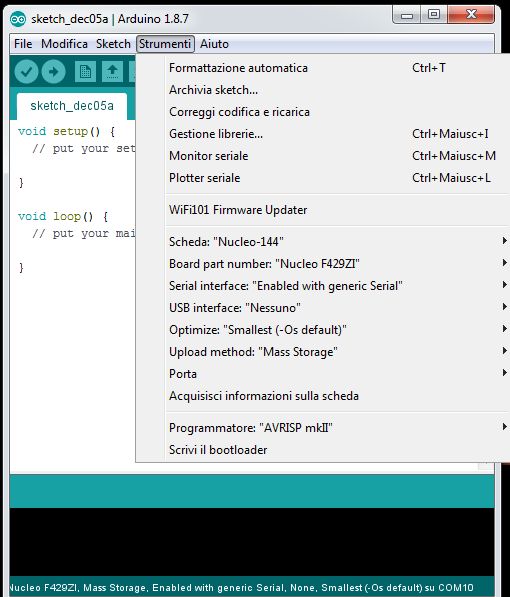
- F429ZI
- Clipboard 3.jpg (55.54 KiB) Viewed 259 times
[Mark81 – Wed Dec 05, 2018 4:15 pm] –
…
However, your specific F4 board is not shown as up ported by default (yet) but new boards are added often.
I’m not sure to understand: here a screenshot of my IDE with this model selected.
…
My bad. Things change quickly in this forum… 
[Mark81 – Wed Dec 05, 2018 4:23 pm] –
No problem! Hence, I can use all that PWM pins with their names? I don’t want to use any other peripheral.
Consult your board schematic as STM often pre-configure hardware on some select pins. If the uC pin is “free”, you should be able to use as the pin map shows.
Ray
Simplest example:
void setup()

{

analogWrite(PA_0, 180);

}
https://github.com/stm32duino/Arduino_C … ins.c#L131
simply do a:
pinMode(PXy, OUTPUT);
analogWrite(PXy, <0 to 255>);
Warning: Use the pin number (PXy) not the pin name (PX_y).
analogWrite(PA0, 180);

I got a stable 3,3V on pin 28 of CN11 with:
//pinMode(PA0, OUTPUT);

analogWrite(PA0, 180);
Which core version you used 1.4.0?
Did you try Pin 29 of CN10 for PA0 ?

Updated to the latest (1.4.0) and rebuilt, now it works!
Thanks!
Well one other unexplained behaviour…
