
http://www.hotmcu.com/stm32f103tb-arm-c … cPath=1_20
(nice schematic URL is given)
As AtMega328P-PU, only 128kB memory instead 32, and 72MHz instead 16.
And FAQ:
1. Connect PA0 to GND.
2. Go to Programm Mode:
ISP Button Press, Reset Button Press.
3. Load from USB to Serial adapter (3V3 – 3V3, GND – GND, RXD – PA9, TXD – PA10) generic_boot20_pa1.bin:
stm32flash.exe -w generic_boot20_pa1.bin COMXX
4. Reset
And you have full-speed USB 2.0 Arduino device…
Don’t all ST Cortex have that boot in ROM?
The Hy-Tiny also makes it easy to use the SWD pins for doing ST-LInk flash and breakpoint-debugging.
It was added by @jcw a few months ago.
I was going to buy one or two but never got around to it, and I don’t really need any more STM32’s as I have loads of them already 
In the link provided by stevech, there is a rather large download:
Documents
Dimensions
Development Board Schematic
Software and Example Code CDROM
Which totals 1,318,862KB !!!
The contents of this download contains two “cracked” development environments. Before you download, please make certain that you do not run afoul with the laws in your country/jurisdiction. Additionally, I would have concerns about trojans and other nasty security issues if you run the code on your local PC.
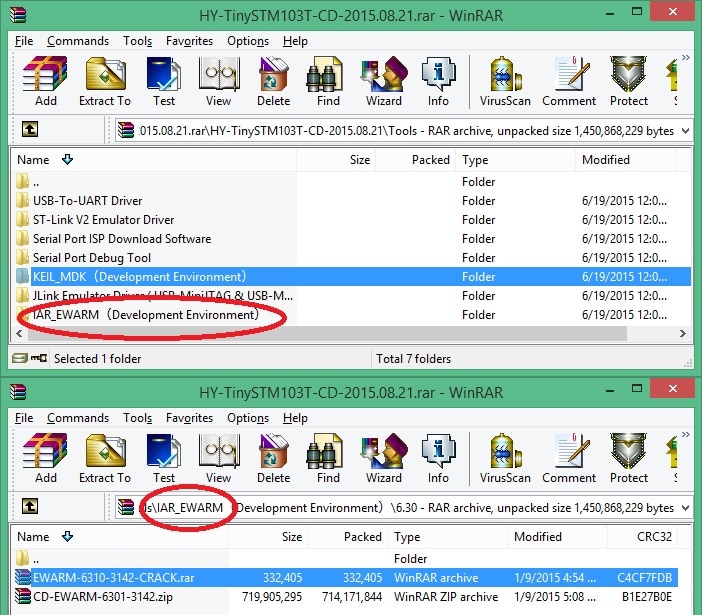
- STM32_Tools_CD.jpg (194.27 KiB) Viewed 2573 times
I just downloaded and do see a very old EWARM version and a crack file for it.
How dare they! No ethics in China businesses.
I’ll not buy from them!
(I have EWARM licenses as IAR USB dongles – purchased from IAR for use on professional projects, and I use EWARM a great deal. Legitimate.)
Dear moderators: Please delete this entire thread if possible.
I looked at the thread and thought that stevech must have removed the link to the software, because I couldnt see a direct link to download the said software.
But I now see that the company selling the board has a link to software.
I think this board has possibly been linked to previously, and someone may want to buy that board (I considered it myself)
So I’m not sure its valid to delete the whole thread just because a site that was linked to happens to an illegal download on it.
I’d not be surprised if we looked through all the links to AliExpress, that we would find multiple links to downloads which would not be legal outside China.
I think as long as we have Ray’s comment about the software, I think we have done due diligence here, without throwing the baby out with the bathwater (as the old saying goes…)
PS. Steve, if you are concerned about this, you can edit your own post.
A tip-off is that the email address for contacting the seller is a gmail domain, not a commercial domain name.
My disdain for China’s lack of ethics grows. Doing so for geek stuff pales by comparison to selling intentionally-tainted baby food as has happened. Anything goes in China. IMO, we should not patronize those sellers for the sake of saving $5.
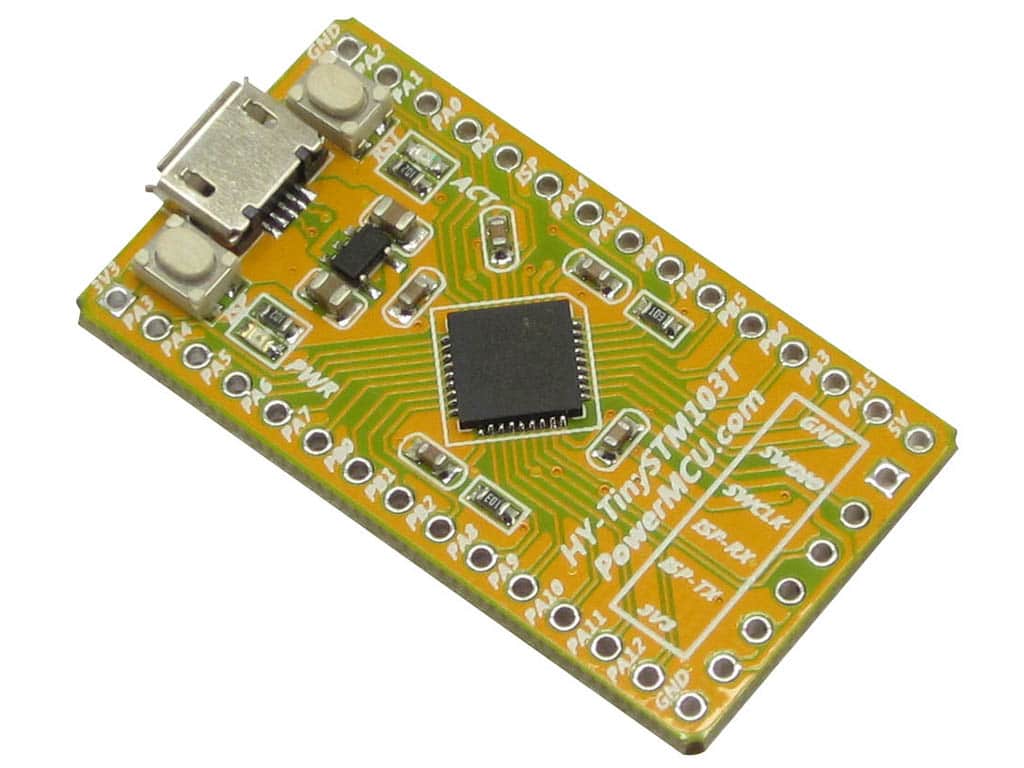
I know that @jcw at Jeelabs seems to use them a lot, and I was interested to see how well they were made and how small they are
Anyway, they arrived today, and seem to be quite a good board.
Whats puzzling me however at the moment, is that the board has some software pre-flashed onto it, which behaves as a 64k USB mass storage device.
I suspect that as the device is a STM32F103TB, and has 128K, that perhaps this 64k mass storage device is mapped to the upper 64k
But whether its intended to be used as an upload method I don’t know yet as I need to solder on a header and connect my STLink and see if I can read back the entire flash (or just the bits that are not protected) and see if I can find where its putting the uploaded files.
I know I can just load the bootloader, but if possible I’ll try to read out whatever code there is already in the device in case it comes in handy. But I suspect perhaps its going to be read protected, or perhaps its just got a mass storage demo loaded…
It looks like its the complete file system and not just that an uploaded binary file is written at the 64k point.
i.e 0x80010000 contains data like “<MSDOS5.0”
The firmware is not read protected, so I have read it out, but I cant see any strings in the binary. But they could be chinese strings, in which case viewing them in ASCII will be meaningless.
Anyway. Now that I’ve read the binary, I’ll probably just flash with the bootloader, as it seems pointless messing around with the mass storage device.
I just downloaded and do see a very old EWARM version and a crack file for it.
How dare they! No ethics in China businesses…
I just downloaded and do see a very old EWARM version and a crack file for it.
How dare they! No ethics in China businesses…
Out of the bag, Windows appears to recognise these as USB storage and requests to format the drive -didn’t do that.
STLink reveal that the full 128kb contain data (no idea what, the ASCII viewer don’t seem to recognise the character set).
I performed a full chip erase, then used STLink to flash generic_boot_20Ppa1.bin (has LED on PA1 and pull-up transistor on D+).
It seems that the reset hardware performs as expected (LED flashed 6xfast then slow when I press the RST btn, perform STLink reset, or connect USB). But it never shows up in the device manager, and flashing the blink sketch with arduino IDE (generic STMF103T8 128 k FLASH, STM32duino bootloader) fails with the message below.
maple_loader v0.1

Resetting to bootloader via DTR pulse

Reset via USB Serial Failed! Did you select the right serial port?

Searching for DFU device [1EAF:0003]...

Assuming the board is in perpetual bootloader mode and continuing to attempt dfu programming...

dfu-util - (C) 2007-2008 by OpenMoko Inc.

Couldn't find the DFU device: [1EAF:0003]
But I can’t remember if it needed a special version.
Can you post a link to the schematic
LED colours are wrong (User/PA1 is blue; Power is red).
Would be great if we could sort it out!!
None of the existing bootloader versions will work, because it uses PA0 to reset via a PNP transistor, a bit like the Maple mini does (well the Maple mini uses two NPN transistors)
I’ll need to do a custom version of the bootloader for this board
I am using generic_boot20_pa1.bin with PA0 to GND connection.
I have 25 this boards and 10 working now with generic_boot20_pa1.bin .
Regards
1) flashed generic_boot20_pa1.bin with STlink
2) connect PA0 to GND
3) connect USB -> ‘MapleDFU’ appears as ‘libusb-win32 device’ in W10 Device Manager
4) flash blink example (PA1) with STMduino32bootloader -> WORKS!!!
5) Now shows up a MapleSerial COM port
Even the SerialMonitor works !
Many thanks to both of you!
I will need to investigate why
There is now a bootloader for it
https://raw.githubusercontent.com/roger … hytiny.bin
I’ve also had to add a new variant (board) to the repo to support it, because it has extra hardware to handle the USB reset (disconnect), but its controlled by pin PA0 which isn’t the same pin as the Maple mini.
It also has less pins available and hence only 2 USARTS and only 1 SPI channel.
Enjoy
Played with the Maple minis which have been great and now have some HY-Tinys going just fine.
Had a bit of work to do as far as understanding how to get the bootloader on, but as I had an ST-Link available to me and some details here, I pulled it together slowly.
In the end it was quite simple really, and the Tiny worked straight away in the Arduino environment.
Pin1 STLink to Tiny 3V3
Pin3 STLink to Tiny GND
Pin7 STLink to Tiny SWDIO
Pin9 STLink to Tiny SWCLK
Pin15 STLink to Tiny RST
Got STLink Utility from ST.com site, and the bootloader from your link here.
Connect Link and Tiny. Power Tiny and Link via USB’s. Open ST link utility. Hit Connect. Load up bootloader binary.
Select Prog & Verify. Addresses etc default correctly (0x08000000), so hit Start and 3 seconds later all is done.
Disconnect, reset and load Blink file, use generic STM32F103T, change pin to PA1 (as mentioned previously), and bang.. all done.
I only include the above here just in case it may be of help to someone
Thanks again …..
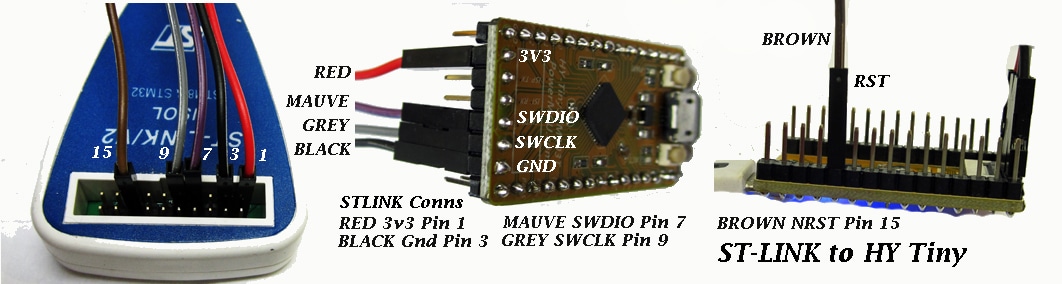
- STLINK_HYTINY2.jpg (252.99 KiB) Viewed 1048 times
I did one specifically for that board, which does not require external pullups
https://raw.githubusercontent.com/roger … hytiny.bin
Loaded and ran like clockwork ….. making life easy for me! Hence the thanks!!

