
The simple oscilloscope demo has an auto-trigger which gives a fast responsive and stable graphic when sampling for e.g. a sine wave.
The mandelbrot set example is quite nice and the MCU fast the only trade off is the flickering display when calculation the mandelbrot set.
This is due to missing double buffering of the graphics.
The data sheet says it is connected to I2C3
I tried to see if the I2C3 is responding with the I2C scanner, but it is not:
#include <Wire.h>
TwoWire I2Cinterface(I2C3);
#define SERIALINTERFACE Serial
void enableDevices()
{
//on certain boards the I2C devices have to be enabled first
// please put here your code to enable the devices
// e.g. for the STM32F4 Discovery enabling the I2C codec is
// pinMode(PD4,OUTPUT);
// digitalWrite(PD4,HIGH);
}
void setup()
{
I2Cinterface.begin();
enableDevices();
SERIALINTERFACE.begin(115200);
delay(5000);
SERIALINTERFACE.println("\nI2C Scanner");
}
void loop()
{
byte error, address;
int nDevices;
SERIALINTERFACE.println("Scanning...");
delay(2000);
nDevices = 0;
for (address = 1; address < 127; address++ )
{
// The i2c_scanner uses the return value of
// the Write.endTransmisstion to see if
// a device did acknowledge to the address.
I2Cinterface.beginTransmission(address);
I2Cinterface.write(0);
error = I2Cinterface.endTransmission();
if (error == 0)
{
SERIALINTERFACE.print("I2C device found at address 0x");
if (address < 16) SERIALINTERFACE.print("0");
SERIALINTERFACE.print(address, HEX);
SERIALINTERFACE.println(" !");
nDevices++;
}
else if (error == 4)
{
SERIALINTERFACE.print("no device found at address 0x");
if (address < 16) SERIALINTERFACE.print("0");
SERIALINTERFACE.println(address, HEX);
}
}
if (nDevices == 0)
{
SERIALINTERFACE.println("No I2C devices found\n");
SERIALINTERFACE.println("Did you configure the chip select for your device?\n");
}
else
SERIALINTERFACE.println("done\n");
delay(5000); // wait 5 seconds for next scan
}
..

Wire.begin();
Wire.stm32SetInstance(I2C3);

Wire.stm32SetSDA(Pxxx);

Wire.stm32SetSCL(Pyyy);

..
I tried this one:
  Wire.begin();
Wire.stm32SetInstance(I2C3);

Wire.stm32SetSDA(PH8);

Wire.stm32SetSCL(PH7);
Edit: Actually the constructor also can take pins, so alternatively modify your first version: TwoWire I2Cinterface(I2C3, PH8, PH7);
I just found it myself in parallel. Now the scanner is working with:
  Wire.stm32SetInstance(I2C3);

Wire.stm32SetSDA(PH8);

Wire.stm32SetSCL(PH7);
Wire.begin();
We should discuss how to handle the sharing of the I2C3 between the codec and the touch controller.
It cost me some hours this morning to find out how to use the this other library. The question is: would it be necessary to use Adafruits Lib?
The next question is: Did you also find a library for the codec? Ehernet would be good also ….
What are you working on?
#include "Wire.h"

#include "Adafruit_FT6206.h" // library manager, search for FT6206
Adafruit_FT6206 touch = Adafruit_FT6206();
void setup() {

Serial.begin(115200);
Wire.stm32SetInstance(I2C3);

Wire.stm32SetSDA(PH8);

Wire.stm32SetSCL(PH7);
touch.begin();

}
void loop() {

if (touch.touched()) {

TS_Point p = touch.getPoint();

Serial.print(p.x);

Serial.print(" ");

Serial.println(p.y);

}

}
Just some minutes before I beautified and updated the touch example with the old driver.
It has one advantage: you don’t need too install the additional Adafruit driver. I like it somehow if it is running out of the box.
During my tries I discovered the following: You display driver does not draw cricles and some other figures. Do you plan to implement it?
Another question is: Are there some commonly used libraries which have touch-buttons, sliders and graphs?
Are there some sprite drivers for gaming?
And the final question: Are we the only two people in this forum using a STM32F746 Discovery?
That is one of my main issues: Having a I2S DMA. My sound examples can only play blocking sounds from a buffer because there is neither an I2S interrupt nor a DMA.
I found that there is a call back routine for I2S in the HAL but I couldn’t get it running ( i tried it with the the STM32F407 black )
extern "C" void HAL_I2S_TxCpltCallback(  I2S_HandleTypeDef *   handle)

{

digitalWrite( LED_GREEN, !digitalRead(LED_GREEN) );

}
..
HAL_NVIC_SetPriority( SPI3_IRQn, 0, 0 );
HAL_NVIC_EnableIRQ ( SPI3_IRQn );
..
I simplified the sinewave example, it now no longer needs its own buffer.
Changed the srite(sample) to int16_t instead of uint16_t, so zero amplitude is 0 now. (I2S samples are two’s complement anyway, which matches the signed 16 bit.)
Yes, I think only we use the F746 discovery. I bet its 90% F103, 9% F407, 1% other.
Thank you very much.
>And the final question: Are we the only two people in this forum using a STM32F746 Discovery?
Yes, I think only we use the F746 discovery. I bet its 90% F103, 9% F407, 1% other.
Yes, the STM32F746 Discovery is quite expensive compared to the other solutions. But it is very convenient to have all the components on board.
Probably we should make some games for it. That is always interesting for many people.
This Pacman could be a simple starting point.
I’m thinking of writing a simple “blitter” function with point to point copy but it is probably slow.
I have sometimes a strange behaviour of the STM32F746 Discovery:
Sometimes the board seems not to start. Even when pressing reset, the display remains white.
I did not have this behaviour with the Mandelbrot example but with both examples in my repository here.
I went to a friend which has the same board and we had the same behaviour there.
We tried to supply the board with a USB-Hub which has a separated power supply to exclude the possibility that it is coming from a to weak power supply. But the same behaviour there: sometimes it starts and sometimes not.
Can you confirm it on your board?
Any idea how to enhance it for 1024 for example?
the colorWheel is from Adafruit.
But you can try just this quick hack here:
/*

Adafruit NeoPixelColorWheel extented to range of 1024

RGB_Color=Wheel(colorNumber)

converts a colorNumber on a color wheel from 0 to 1024 into a RGB color.

https://color.adobe.com/de/create/color-wheel/?base=2&rule=Analogous

*/

uint16_t colorWheel( uint16_t WheelPos )

{

uint32_t r,g,b;
WheelPos = 1024 - WheelPos;
if (WheelPos < 85*4) {
r = 255 - WheelPos * 3 / 4;
g = 0;
b = WheelPos * 3 / 4;
}else
if (WheelPos < 170 * 4) {
WheelPos -= 85 * 4;
r = 0;
g = WheelPos * 3 / 4;
b = 255 - WheelPos * 3 / 4;
}else
{
WheelPos -= 170 * 4;
r = WheelPos * 3 / 4;
g = 255 - WheelPos * 3 / 4;
b = 0;
}
uint16_t LTDC_color=tft.color565(r,g,b);
return LTDC_color;
}
127 for b&w ?

srp
Yes, i think so.
>127 for b&w ?
The colorWheel colors are on the radius. There is no black and white
( If I understand your question correct ? )
I have sometimes a strange behaviour of the STM32F746 Discovery:
Sometimes the board seems not to start. Even when pressing reset, the display remains white.
I did not have this behaviour with the Mandelbrot example but with both examples in my repository here.
I went to a friend which has the same board and we had the same behaviour there.
We tried to supply the board with a USB-Hub which has a separated power supply to exclude the possibility that it is coming from a to weak power supply. But the same behaviour there: sometimes it starts and sometimes not.
Can you confirm it on your board?
Thanks for trying.
Changing to Upload Method: STLink works. If you can confirm, I will just set the default to STLink
It is somehow difficult. Yesterday I worked the whole day without a problem.
This morning It didn’t work with the same software.
Now I can’t reproduce the error even with many times unplugging/plugging the device.
I have to wait until the problem occurs again …
Probably anyone of the other users ( Pito? ) can confirm it also.
As a first test I adapted UGUI. But I think this library is much too complicated and very old fashioned.
Does anybody know a better library?
The strange thing: If there is no SD-card plugged in, sd.begin() seems to hang up.
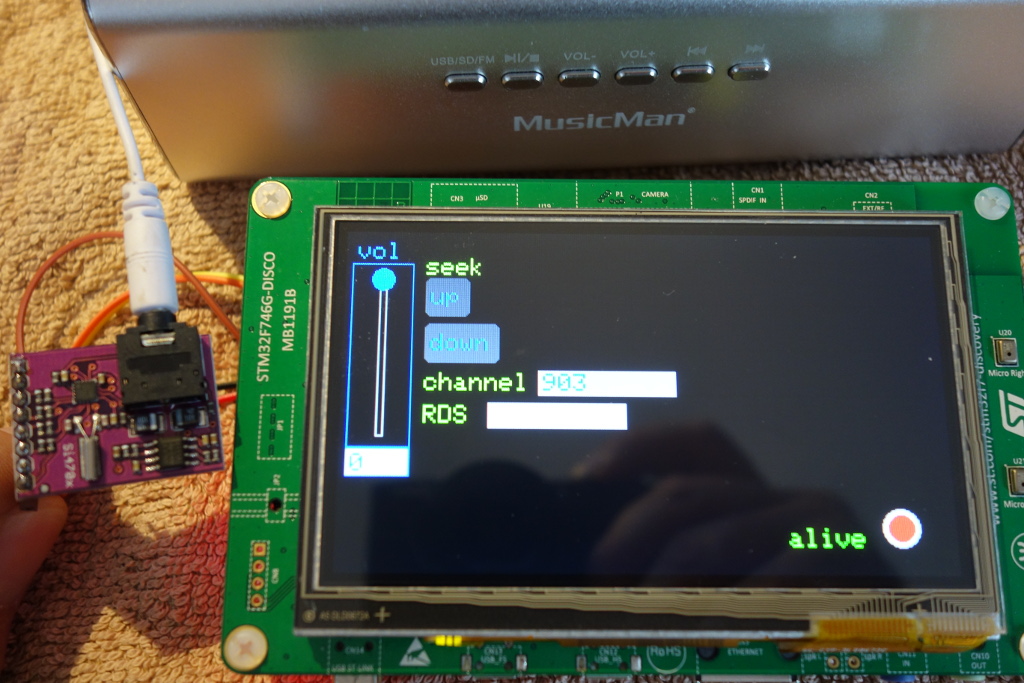
With this wrapper it is easy to use the STM32F746 capacitive touch display with the ILI examples.
Here is the preliminary wrapper example.
Please give me a response how we could/ should integrate this into the framework.
stephen
The cheapest I found was on ebay for 2,59€
stephen
For the channel channels A1 (PF10) to A5 (PF6) I get incorrect analog values.
Please help me so these channels work properly.
thanks
F746-disco
when I made the example I tested only the input PA0 which is A0 and is working.
Now I just cross checked the channels you mentioned and you are right: they seem not to work.
But this is a core issue and danieleff is its maintainer.
Sometimes he is reading this post and reacts quite soon. If not, it is probably the best you directly place the issue in his github-repository.
Just place an issue here:
https://github.com/danieleff/STM32GENERIC/issues
Cheers,
ChrisMicro
[jopelabln – Wed Jul 12, 2017 2:13 pm] –
I have not yet succeeded with the example TFT-Voltmeter a different ADC channel than A0 (PA0) successfully to use.
For the channel channels A1 (PF10) to A5 (PF6) I get incorrect analog values.
Please help me so these channels work properly.
thanks
F746-disco
This is because I thought ADC1 can covers all analog input channels, but PF10..PF6 are on ADC3. I will check on the weekend.
#define A0 PA0
#define A1 PF10
…
I think the F7 is quite fast calculation all the cells on the screen
I could watch the evolving cells for hours 
USART6 – I cannot for the life of me find how to initialize the port.
I know it’ll be “USART6.begin(115200);” but that will not take.
What am I missing?
Thank you in advance.
void setup() {

SerialUART6.begin(115200);

}
void loop() {

SerialUART6.println(millis());

delay(1000);

}
I tried your suggestion and it landed me with:
“exit status 1
‘SerialUART6’ was not declared in this scope”
That said, after updating my STM32GENERIC file to the latest variants, the sketch compiles with no issues.
EDIT – The sketch compiles and uploads, but the serial tx does not tx any logical data. Everything I sniffed the serial output with returned gibberish. I will continue playing with this.
Thank you for getting me on my feet with this!

click on button down to the bottom right
better – locate Setup procedure/function in your sketch, in it you should see a line with “.begin(9600)” in it
it might be 19200, 38400, 57600, 115200
Baud rate was the first thing I checked. Everything is set to 115200.
I used an Arduino Uno initially as a serial receiver, but no luck there.
I also used an FTDI Basic with both the Arduino serial monitor, as well as PuTTY.
It’s gotta be something I’m doing wrong, can’t imagine its the board or repository.
I have an xbee explorer which works well as a serial monitor. TeraTerm might be another alternative.
Looking forward to getting home to tinker with it a bit more.
so having Serial.begin(115200); AND “SerialUART6.begin(115200);” was causing issues. As soon as I commented out the Serial.begin line, UART6 worked perfectly.
That said, I am over the moon happy!
Thanks everyone for the help!
https://github.com/danieleff/STM32GENER … G/Ethernet
But unfortunately it is not working for 2 reasons:
1. The file ending of the example is *.txt insteat of *.ino which prevents the Arduino IDE from loading the example
2. The driver is not found when the example is named correctly.
They are still under pull request. The top of the example file has comments on how to install. They are in a different repo + branch, so you cannot just download it from github as zip.
I saw you put a lot of drivers in the repo. In my opinion that is a good idea to get a complete working environment even it is a little bit cumbersome to keep the libraries up to date. As far as I know Roger does this in his repo too.
From time to time I’m looking on the new things you did, pull it and try it. This time I realized that the ethernet example was not working and my old example for the SD-card is also not working. Probably for this cases it would be the best to have a development branch where this preliminary versions reside.
What are your plans for the ethernet? Will the driver be included?
Cheers,
Chris
Does this mean the Generic-repo and the STM-repo is merging to one repo?
[danieleff – Wed Aug 09, 2017 1:30 pm] –
It uses drivers the official drivers Frederic talked about here: viewtopic.php?f=51&t=2220&start=10#p31084They are still under pull request. The top of the example file has comments on how to install. They are in a different repo + branch, so you cannot just download it from github as zip.
I installed all the libs but some paths seem to be missing:
In file included from C:\Tools\Arduino\Arduino1_8\hardware\STM32GENERIC\STM32\libraries\STM32Ethernet\src/EthernetClient.h:7:0,
from C:\Tools\Arduino\Arduino1_8\hardware\STM32GENERIC\STM32\libraries\STM32Ethernet\src/STM32Ethernet.h:6,
from C:\Tools\Arduino\Arduino1_8\hardware\STM32GENERIC\STM32\libraries\BoardExamples\examples\Discovery746NG\Ethernet\Ethernet.ino:20:
C:\Tools\Arduino\Arduino1_8\hardware\STM32GENERIC\STM32\libraries\STM32Ethernet\src/utility/stm32_eth.h:47:26: fatal error: lwip/ip_addr.h: No such file or directory
#include “lwip/ip_addr.h”
Install them in the
libraries In file included from C:\Tools\Arduino\Arduino1_8\libraries\STM32Ethernet\src/EthernetClient.h:7:0,
from C:\Tools\Arduino\Arduino1_8\libraries\STM32Ethernet\src/STM32Ethernet.h:6,
from C:\Tools\Arduino\Arduino1_8\hardware\STM32GENERIC\STM32\libraries\BoardExamples\examples\Discovery746NG\Ethernet\Ethernet.ino:20:
C:\Tools\Arduino\Arduino1_8\libraries\STM32Ethernet\src/utility/stm32_eth.h:47:26: fatal error: lwip/ip_addr.h: No such file or directory
#include “lwip/ip_addr.h”
The missing file is located in
C:\Tools\Arduino\Arduino1_8\libraries\LwIP\src\lwip
I use Eclipse with sloeber and always hand pick the libraries, did not realize Arduino IDE will not include it automatically.
As for how how to keep the drivers with the core: Frederic, did you think about putting it into the board manager package? When creating the zip file, include the extra STM32 libraries. That is what Teensy does. The core is one repo, and all the libraries are their own repositories. And when you install it, everything is packed into one.
I tried to read the “www.stm32duino.com” number of users line. It works when I use only the serial port.
When I include the tft-display it does not work. So there seems to be a conflict between ethernet and tft.
What can it be? Is it memory? Is it timing?
// Example for the onboard ethernet connector

//

// Install https://github.com/stm32duino/LwIP

//     and https://github.com/stm32duino/STM32Ethernet

//

// If they are empty, install the work in progress versions using git:

//    cd <your arduino library folder>

//    git clone https://github.com/fprwi6labs/LwIP.git

//    cd LwIP

//    git checkout LwIP_src

//

//    cd ..

//    git clone https://github.com/fprwi6labs/STM32Ethernet.git

//    cd STM32Ethernet

//    git checkout add_src

//

//

// For more examples, check the STM32Ethernet examples folder
#include <LwIP.h>
#include <STM32Ethernet.h>
#include "LTDC_F746_Discovery.h"
LTDC_F746_Discovery tft;
EthernetClient client;
// random MAC address
byte mac[] = { 0xDE, 0xAD, 0xBE, 0xEF, 0xFE, 0xED };
void setup() {
// The buffer is memory mapped
// You can directly draw on the display by writing to the buffer
uint16_t *buffer = (uint16_t *)malloc(LTDC_F746_ROKOTECH.width * LTDC_F746_ROKOTECH.height);
tft.begin((uint16_t *)buffer);
tft.fillScreen(LTDC_BLACK);
tft.setCursor(0, 0);
tft.setTextColor(LTDC_GREEN); tft.setTextSize(3);
tft.println("STM32F746 Discovery");
tft.setTextColor(LTDC_YELLOW); tft.setTextSize(2);
Serial.begin(115200);
Serial.println("Connecting to Ethernet");
delay(1000);
if (!Ethernet.begin(mac)) {
Serial.println("ERROR: Could not connect to ethernet!");
while (1);
}
Serial.println("Connecting to www.stm32duino.com");
//if (!client.connect("example.com", 80)) {
if (!client.connect("www.stm32duino.com", 80)) {
Serial.println("ERROR: Could not connect to www.stm32duino.com!");
while (1);
}
Serial.println("Connected, sending request");
client.println("GET / HTTP/1.1");
client.println("Host: www.stm32duino.com");
client.println("User-Agent: Mozilla//5.0 (X11; Ubuntu; Linux x86_64; rv:54.0) Gecko//20100101 Firefox//54.0");
client.println("Accept: text//html,application//xhtml+xml,application//xml;q=0.9,*//*;q=0.8");
client.println("Accept-Language: en-US,en;q=0.5");
//client.println("Accept-Encoding: gzip, deflate");
client.println("Cookie: phpbb3_4im1j_u=1; phpbb3_4im1j_k=; ");
client.println("DNT: 1");
client.println("Connection: keep-alive");
client.println("Upgrade-Insecure-Requests: 1");
client.println();
client.flush();
Serial.println("Request sent, printing response");
}
String str;
boolean flag = false;
void loop() {
if (client.available()) {
char c = client.read();
if (c != '>')str += c;
else
{
if (str.indexOf("users online") > 0)
{
flag=true;
Serial.print("====> ");
Serial.println(str);
tft.println(str);
}
str = "";
}
}
if (!client.connected()) {
Serial.println();
Serial.println("disconnecting.");
client.stop();
while (1);
}
}
https://github.com/stm32duino/STM32Ethe … 2eec7d8R21
An Idle task is required by the LwIP stack to handle timer and data reception.
This idle task is called inside the main loop in background by the function
stm32_eth_scheduler(). Be careful to not lock the system inside the function
loop() where LwIP could never be updated. Call EthernetUDP::parsePacket() or
EthernetClient::available() performs an update of the LwIP stack.
Call done in the main loop:
https://github.com/stm32duino/Arduino_C … fc7dda4R49
Edit: Seems no call of the stm32_eth_scheduler is made, so probably it’s the root cause.
[fpiSTM – Sun Aug 13, 2017 5:42 pm] –
I do not know/check how Daniel integrated it but it could be a clue:https://github.com/stm32duino/STM32Ethe … 2eec7d8R21
An Idle task is required by the LwIP stack to handle timer and data reception.
This idle task is called inside the main loop in background by the function
stm32_eth_scheduler(). Be careful to not lock the system inside the function
loop() where LwIP could never be updated. Call EthernetUDP::parsePacket() or
EthernetClient::available() performs an update of the LwIP stack.Call done in the main loop:
https://github.com/stm32duino/Arduino_C … fc7dda4R49Edit: Seems no call of the stm32_eth_scheduler is made, so probably it’s the root cause.
if (client.available()) {
But the code actually sometimes works (prints users online to display), sometimes fails to client.connect(“www.stm32duino.com“, 80)
Thanks. I have corrected all TFT-examples.
But the code actually sometimes works (prints users online to display), sometimes fails to client.connect(“www.stm32duino.com“, 80)
I’m not sure if this is a matter how fast the stm32duino-website is responding. Hopefully Roger’s server does not get a DDS attack from some STM32F746 discoveries 
Let’s call it a “ethernet” test:
// Example for the onboard ethernet connector

//

// Install https://github.com/stm32duino/LwIP

//     and https://github.com/stm32duino/STM32Ethernet

//

// If they are empty, install the work in progress versions using git:

//    cd <your arduino library folder>

//    git clone https://github.com/fprwi6labs/LwIP.git

//    cd LwIP

//    git checkout LwIP_src

//

//    cd ..

//    git clone https://github.com/fprwi6labs/STM32Ethernet.git

//    cd STM32Ethernet

//    git checkout add_src

//

//

// For more examples, check the STM32Ethernet examples folder
#include <LwIP.h>
#include <STM32Ethernet.h>
#include "LTDC_F746_Discovery.h"
LTDC_F746_Discovery tft;
EthernetClient client;
// random MAC address
byte mac[] = { 0xDE, 0xAD, 0xBE, 0xEF, 0xFE, 0xED };
void requestSTM32duino()
{
Serial.println("Connected, sending request");
client.println("GET / HTTP/1.1");
client.println("Host: www.stm32duino.com");
client.println("User-Agent: Mozilla//5.0 (X11; Ubuntu; Linux x86_64; rv:54.0) Gecko//20100101 Firefox//54.0");
client.println("Accept: text//html,application//xhtml+xml,application//xml;q=0.9,*//*;q=0.8");
client.println("Accept-Language: en-US,en;q=0.5");
//client.println("Accept-Encoding: gzip, deflate");
client.println("Cookie: phpbb3_4im1j_u=1; phpbb3_4im1j_k=; ");
client.println("DNT: 1");
client.println("Connection: keep-alive");
client.println("Upgrade-Insecure-Requests: 1");
client.println();
client.flush();
Serial.println("Request sent, waiting for response");
}
uint32_t startTime;
void setup() {
// The buffer is memory mapped
// You can directly draw on the display by writing to the buffer
uint16_t *buffer = (uint16_t *)malloc(2*LTDC_F746_ROKOTECH.width * LTDC_F746_ROKOTECH.height);
tft.begin((uint16_t *)buffer);
tft.fillScreen(LTDC_BLACK);
tft.setCursor(0, 0);
tft.setTextColor(LTDC_GREEN); tft.setTextSize(3);
tft.println("STM32F746 Discovery");
tft.setTextColor(LTDC_YELLOW); tft.setTextSize(2);
Serial.begin(115200);
Serial.println("Connecting to Ethernet");
tft.println("Connecting to Ethernet");
delay(1000);
if (!Ethernet.begin(mac)) {
Serial.println("ERROR: Could not connect to ethernet!");
tft.println("ERROR: Could not connect to ethernet!");
tft.println("program stopped, press reset to restart");
while (1);
}
Serial.println("Connecting to www.stm32duino.com");
tft.println("Connecting to www.stm32duino.com");
if (!client.connect("www.stm32duino.com", 80)) {
Serial.println("ERROR: Could not connect to www.stm32duino.com!");
tft.println("ERROR: Could not connect to www.stm32duino.com!");
tft.println("program stopped, press reset to restart");
while (1);
}
requestSTM32duino();
startTime=millis();
}
// Freestack is found here
// https://github.com/greiman/SdFat-beta/blob/master/SdFat/src/FreeStack.h#L45
// from William Greiman
#if defined(__arm__)
extern "C" char* sbrk(int incr);
static int FreeStack() {
char top = 't';
return &top - reinterpret_cast<char*>(sbrk(0));
}
#endif
String str;
int FailedCounter=0;
void loop()
{
if (client.available())
{
FailedCounter=0;
char c = client.read();
if (c != '>')str += c;
else
{
if (str.indexOf("users online") > 0)
{
Serial.print("====> ");
Serial.println(str);
tft.println("");
tft.println(str);
}
str = "";
}
//if(str.length()>10000) str="";
}else
{
tft.print(".");
if(tft.getCursorY()>260)
{
tft.fillScreen(LTDC_BLACK); // cls
tft.setCursor(0,0);
}
delay(1000);
FailedCounter++;
if ( FailedCounter > 30 )
{
requestSTM32duino(); // send new request on timeout
FailedCounter=0;
}
}
if (!client.connected()) {
Serial.println();
Serial.println("disconnecting.");
tft.println("disconnecting.");
client.stop();
while (1);
}
if(millis()-startTime>10000)
{
//tft.println("alive");
tft.print("stack: ");tft.println(FreeStack());
startTime=millis();
}
}
Now your can see the UTC-internet time on the TFT.
My hope was to achieve something close to “video speed” but than I realized that the Arduino-UDP only supports packet lengths up to 24 bytes. This results more like a speed like in the teletype-era.
I’ve put the picture in the ethernet thread:
http://www.stm32duino.com/viewtopic.php … 447#p33151
I can fix by disabling heap in external ram (by commenting out `setHeap` in variant.cpp)
So I guess there is some problem with it (but the display uses it, internal ram is not enough).
The external ram setup is in STM32\system\STM32F7\HAL_Src\system_stm32f7xx.c , but it is basically a copy of STM32Cube_FW_F7_V1.7.0\Projects\STM32746G-Discovery\Examples\FMC\FMC_SDRAM\Src\system_stm32f7xx.c so I’m not sure.
Dowload with ethernet?
During my experiments with UDP today I realized that the system crashes when the PC sends a UDP packet larger than 24bytes.
I didn’t expect that there is such a small UDP payload buffer in the driver.
Possibly the reason of the crashes is somewhere in the ethernet drivers. I don’t know.
The field size sets a theoretical limit of 65,535 bytes (8 byte header + 65,527 bytes of data) for a UDP datagram. However the actual limit for the data length, which is imposed by the underlying IPv4 protocol, is 65,507 bytes (65,535 − 8 byte UDP header − 20 byte IP header).
srp
#define UDP_TX_PACKET_MAX_SIZE 24
and on a Arduino Uno with its 2K-Ram it can probably not be any longer.
from
https://github.com/arduino-libraries/Et … ernetUdp.h
in line 42:
It is not compiling.
Chris your Core working fine with STM32F429ZI-DISCO and the libraries: SdFat, AT24CXX, SPI, Wire and our GD23STM32 library for tft like FT80X and FT81X, based on gameduino 2 library.
Your last update for the library SPI runs great!
MCU: STM32F429ZI-DISCO
Peripherals: FT813 5″ Riverdi, breakout-20 (Riverdi), SD reader (with SanDisk Extreme 32 Gb), DS3231
Upload method: ST-Link V2 (of the board)
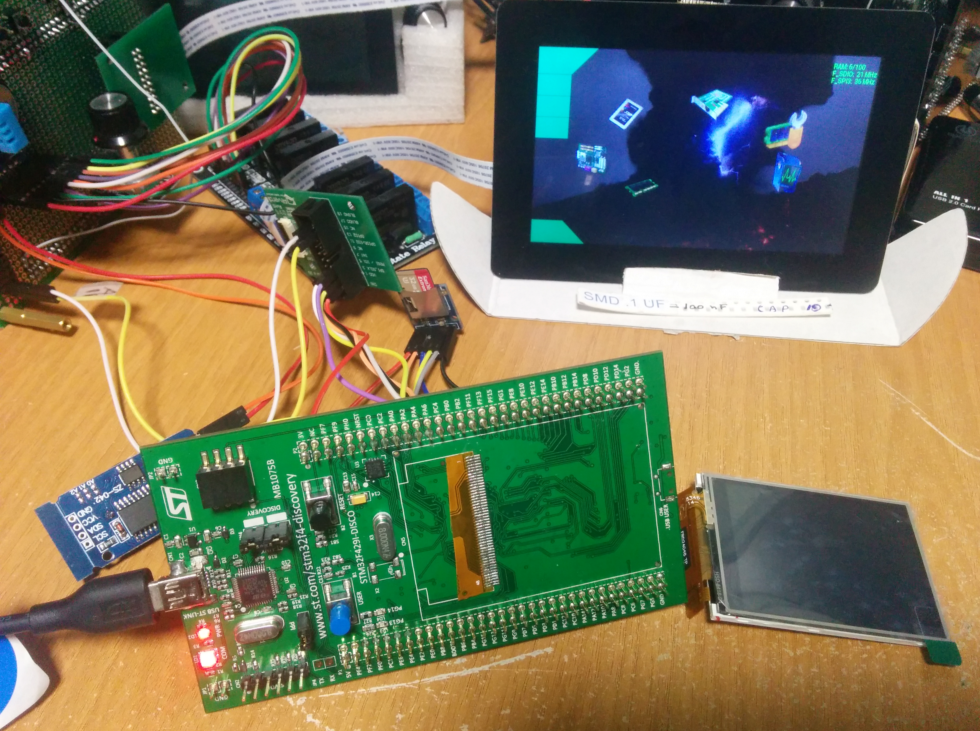
Thx for your efforts and enthusiasm
PD: Sorry for the shock!  I had to cut the ILI9341 just for release some miliampers for the TFT (on SPI1) and the SD reader (on SPI3)
Stay tuned!
========================================================
Team FT81X ( @TFTLCDCyg, @lightcalamar and @RndMnkIII )
========================================================
What to do if they only live for the shits of the ili9341 screens. They live for them, they do not know that they waste time.
Not knowing what we have achieved and we are going every day to more. . .
Infinite thanks for seeing that garbage of the screen to scrap, thank you very much, my friend!
Already have space
Chris your Core working fine with STM32F429ZI-DISCO and the libraries
Thank you very much
But I don’t exactly know what your screen is showing.
All credits relating the core go to danieleff because he is the main developer of the core.
I only did some examples in the repo to simplify the life for people which makes only a very minor part compared to Daniel’s work.
Probably you would like your work relating the STM32F429ZI-Disco here because this is the thread for the F7 board.
I have a question about the F746 MCU.
I try to verify a simple blink sketch, but I get this error
arm-none-eabi-g++: error: unrecognized argument in option '-mcpu=cortex-m7'
arm-none-eabi-g++: note: valid arguments to '-mcpu=' are: arm1020e arm1020t arm1022e arm1026ej-s arm10e arm10tdmi arm1136j-s arm1136jf-s arm1156t2-s arm1156t2f-s arm1176jz-s arm1176jzf-s arm2 arm250 arm3 arm6 arm60 arm600 arm610 arm620 arm7 arm70 arm700 arm700i arm710 arm7100 arm710c arm710t arm720 arm720t arm740t arm7500 arm7500fe arm7d arm7di arm7dm arm7dmi arm7m arm7tdmi arm7tdmi-s arm8 arm810 arm9 arm920 arm920t arm922t arm926ej-s arm940t arm946e-s arm966e-s arm968e-s arm9e arm9tdmi cortex-a15 cortex-a5 cortex-a7 cortex-a8 cortex-a9 cortex-m0 cortex-m0plus cortex-m1 cortex-m3 cortex-m4 cortex-r4 cortex-r4f cortex-r5 cortex-r7 ep9312 fa526 fa606te fa626 fa626te fa726te fmp626 generic-armv7-a iwmmxt iwmmxt2 marvell-pj4 mpcore mpcorenovfp native strongarm strongarm110 strongarm1100 strongarm1110 xscale
exit status 1
Error compilando para la tarjeta Discovery F746NG.
2. Change compiler.path in platform.txt to point to that you downloaded. https://github.com/danieleff/STM32GENER … rm.txt#L21
Im new to STM32. While compiling the basic blink program im getting the below error.
“exec: “/hardware/STM32GENERIC/STM32/gccarm-none-eabi-g++”: file does not exist
Error compiling for board Discovery F746NG.”
Can someone help me to fix this error.
Thanks.
“compiler.path=hardware/tool/gcc-arm-none-eabi-7-2017-q4-major-win32/bin/”
And i have my arm gcc tool chain in this location “C:\Users\sla\Documents\Arduino\hardware\tools”.
Am i followed the correct procedure to point out the new compiler or not? Please help me i need to finish my project in 2 weeks.
Note:
The basic blinking program is working fine with stm32f407 bt facing problem in compiling for STM32f7.
compiler.path=C:\Users\sla\Documents\Arduino\hardware/tool/gcc-arm-none-eabi-7-2017-q4-major-win32/bin/now its showing the following error
“exec: “C:\\Users\\sla\\AppData\\Local\\Arduino15\\packages\\arduino\\tools\\arm-none-eabi-gcc\\4.8.3-2014q1hardware/tools/gcc-arm-none-eabi-7-2017-q4-major-win32/bin/arm-none-eabi-g++”: file does not exist
Error compiling for board Discovery F746NG.”
And what do you think about your issue?
It seems it concatenate 2 path:
C:\\Users\\sla\\AppData\\Local\\Arduino15\\packages\\arduino\\tools\\arm-none-eabi-gcc\\4.8.3-2014q1hardware/tools/gcc-arm-none-eabi-7-2017-q4-major-win32/bin/arm-none-eabi-g++
So I don’t know how you manage to update the file but I think you could try to understand what you’ve made before requesting support.
Is it the good file used by the core I used.
Maybe I need to use the same directory separator? \\ or / ?
Why it concatenate 2 path?
….
Do i need to delete it?
could you give us your platform.txt.
[fpiSTM – Thu Apr 19, 2018 1:00 pm] –
Is it the good file used by the core I used.
Maybe I need to use the same directory separator? \\ or / ?
Thanks for the assist. The mistake i made was keeping the arm tool chain in exe format. But actually the exe file need to be run and “we have to point to that folder after we extract the files” from exe.
Its just a suggestion: I didnt seen anything like this in the installation sticky file. If u update this point and how to edit the platform file with example then it will be very useful for the beginners like me. So we can avoid these issues in future.
Thank you.
[ykciv – Thu Apr 19, 2018 2:36 pm] –
Its just a suggestion: I didnt seen anything like this in the installation sticky file. If u update this point and how to edit the platform file with example then it will be very useful for the beginners like me. So we can avoid these issues in future.Thank you.
Welcome.
In fact I maintain the Official STM core which provides all the packages needed with the right arm version to support cortex M7 (currently v6 update q2)
https://github.com/stm32duino
https://github.com/stm32duino/wiki/wiki/Getting-Started
So, this kind of issue not happened with this core.
It seems you used STM32GENERIC core, daniel explain how to deal with that for F7:
Additional instructions for F7 boards:
Download the latest GNU ARM Embedded Toolchain
Change compiler.path in platform.txt to point to that you downloaded.
do not hesitate to submit a PR to its github to extend his comment.
