
Over the weekend I got dhrystone and whetstone benchmarks to run both on a 16MHz ATmega2560 (there’s not enough RAM on an ATmega328P) and on my Baite Electronics Maple clone.
First the integer maths Dhrystone:
ATmega2560 16MHz
Dhrystone Benchmark, Version 2.1 (Language: C)
Execution starts, 300000 runs through Dhrystone
Execution ends
Microseconds for one run through Dhrystone: 78.67
Dhrystones per Second: 12711.22
VAX MIPS rating = 7.23
STM32F103 72MHz
Dhrystone Benchmark, Version 2.1 (Language: C)
Execution starts, 300000 runs through Dhrystone
Execution ends
Microseconds for one run through Dhrystone: 11.66
Dhrystones per Second: 85762.68
VAX MIPS rating = 48.81
The STM32F103 is executing Dhrystones at approximately 6.75 times the speed of the ATmega2560. This will mostly be down to the faster clock plus the fact that 16 bit arithmetic is quicker on a 32bit machine than and 8 bit one.
The traditional dhrystone code has been modified to use Arduino’s Serial.print() function rather than printf
The code be downloaded from here as a zip file http://www.saanlima.com/download/dhry21a.zip
The Whetstone is the classic floating point benchmark
The Whetstone test code adapted for Arduino by Thomas Kirchner is https://developer.mbed.org/users/kirchn … peed_Test/
When run on a standard Arduino 16MHz Duemillenove the Whetstone produced the following result
Starting Whetstone benchmark…
Loops: 1000 Iterations: 1 Duration: 81740 millisec.
C Converted Double Precision Whetstones: 1.22 MIPS
On the STM32F103 board with a 72MHz clock
Starting Whetstone benchmark…
Loops: 1000 Iterations: 1 Duration: 19691 millisec.
C Converted Double Precision Whetstones: 5.08 MIPS
So the STM32F103 appears to be running Whetstone at approximately four times the speed of the Arduino.
Dhrystone and Whetstone are the classic benchmarks – but not generally representative of real applications. Take the figures for guidance purposes only.
Ken
Avoid floating points on every costs on both platforms, since you switch to STM32F4xxx

BUT:
This benchmarks would be interesting for all FPU-devices (Cortex M4, like the STM32F4 line), I know this, because on the TIVA-tm4c-123 there were some problems at the beginning of energia support (FPU wasn’t enabled per default or something).
Avoid floating points on every costs on both platforms, since you switch to STM32F4xxx
However it does basically work.
I know GPIO works, and if you look in the STM32F4 section of this site, someone is getting on with using their STM32F407 discovery board
Unfortunately I’ve not had time to do any of the changes / restructuring I did to the F103 folder, in the F4 folder – as its probably one or two days work.
But at least these is something to play at the moment
I have a STM Discovery F407GVT but I think that the Nucleo boards are probably better than the Discovery ones as the STLink on them has (I presume) Virtual Serial as well as just the STLink thats on the Discovery boards
On an unrelated subject reallly..
Actually, I wonder if anyone has a the Nucleo firmware as a bin file, as it could probably be flashed onto the Discovery. But from what I”ve read STM don’t release the firmware for this stuff, except as an encrypted binary via their special uploader program, which is a shame, and pointless really..
Because there is a STLink binary file on a Russian website hat you can download and flash onto any STM32F103 – Note. If you do find it and try it, please take care because apparently, it marks you flash as read only, which is a bit worrying to start with, however you can change the setting via STLInk (and I think also by Serial upload), but of course this erases the flash.
http://www.taylorkillian.com/2013/01/re … -from.html
There are two nucleo boards with Cortex M4:
STM32F401RET6 and STM32F411RET6
I think, I’ll wait a little bit, because lack of time for a new toy…
I had read that article. It does look possible to extract an unencrypted binary, I suspect there are some out on the web somewhere, but they would probably be hard to track down
I agree about the F4, there are so many other things, there is no point in buying one at the moment
I tried my F407 discovery today, and the STM32F4 code is a long way behind the F103
I noticed a mistake in the port, where the mcu was set to cortex-m3 instead of cortex-m4, and also it was missing the pin number enums, so I’ve fixed that.
Also I think that on the F4 the code is compiling in an OTG USB port on the pins for the HW Serial 1, as HW Serial 1 is not working, and there is an OTG lib being compiled that needs that port.
With F4, its a difficult decision about how to bring it to the level of the F103, I think I have 3 main options
1. Modify the existing F4 code like I did with the F103
2. Duplicate the F103 code and copy over the F4 specific parts
3. Use something else entirely, e.g. another core.
I have looked again at Avik’s repo, and compiled a test program for the F373 board (which is the only one he supports), but even the basics don’t compile, e.g. digitalWrite(PA0,!digitalRead(PA0)); doesn’t compile. digitalWrite is defined, but the argument types don’t match with the Arduino data types.
Also Serial is not defined, only Serial1 – so even if we used Aviks code, I think a reasonable amount of work would need to be done to make all the examples compile , like they do with libmaple
BTW. I did try to compile the Dhrystone test on the F4 but its missing a load of functions and also a load of type def’s, and its pointless just fixing the repo to run the Dhrysone test. Its better to do a full port when there is enough interest
// mbed online - F411RE

// Loops: 1000, Iterations: 1, Duration: 25 sec.

// C Converted Double Precision Whetstones: 4.0 MIPS
// gcc4mbed - F411RE
// Loops: 1000, Iterations: 1, Duration: 17 sec.
// C Converted Double Precision Whetstones: 5.9 MIPS
// gcc4mbed - F103RE (Blue Pill)
// Loops: 1000, Iterations: 1, Duration: 34 sec.
// C Converted Double Precision Whetstones: 2.9 MIPS
// STM32duino Blue Pill
// Loops: 1000 Iterations: 1 Duration: 19838 millisec.
// C Converted Double Precision Whetstones: 5.04 MIPS
Even with gcc4mbed the 411 is not much ahead. Are those using the FPU?
That being said, I couldn’t get the tests to compile at all on the F4, as it was lacking a load of functions that the test sketch required
F411
GCC_DEFINES += -D__CORTEX_M4 -DARM_MATH_CM4 -D__FPU_PRESENT=1
C_FLAGS := -mcpu=cortex-m4 -mthumb -mfpu=fpv4-sp-d16 -mfloat-abi=softfp -mthumb-interwork
ASM_FLAGS := -mcpu=cortex-m4 -mthumb -mfpu=fpv4-sp-d16 -mfloat-abi=softfp
LD_FLAGS := -mcpu=cortex-m4 -mthumb -mfpu=fpv4-sp-d16 -mfloat-abi=softfp
Even with gcc4mbed the 411 is not much ahead. Are those using the FPU?
I used the same sketch on a Stellaris Launchpad LM4F120 and the Energia IDE 15 using 300000 runs
Dhrystone Benchmark, Version 2.1 (Language: C on Arduino UNO 16MHz

Execution starts, 30000 runs through Dhrystone
Execution ends
Microseconds for one run through Dhrystone: 90.63
Dhrystones per Second: 11034.28
VAX MIPS rating = 6.28
Dhrystone Benchmark, Version 2.1 (Language: C on Launchpad LM4F120 80MHz
Execution starts, 300000 runs through Dhrystone
Execution ends
Microseconds for one run through Dhrystone: 10.65
Dhrystones per Second: 93933.32
VAX MIPS rating = 53.46
Even with gcc4mbed the 411 is not much ahead. Are those using the FPU?
gcc4mbed:
Loops: 1000, Iterations: 1, Duration: 11 sec.

C Converted Double Precision Whetstones: 9.1 MIPS
gcc4mbed:
Loops: 1000, Iterations: 1, Duration: 11 sec.

C Converted Double Precision Whetstones: 9.1 MIPS
gcc4mbed:
Loops: 1000, Iterations: 1, Duration: 19 sec.

C Converted Double Precision Whetstones: 5.3 MIPSI just got the Dhrystone integer benchmark to run on my STM32F7 “BOB” board. Here are the preliminary and not fully confirmed results
STM32F746VGT6 216MHz
Dhrystone Benchmark, Version 2.1 (Language: C)
Execution starts, 300000 runs through Dhrystone
Execution ends
Microseconds for one run through Dhrystone: 3.33
Dhrystones per Second: 300000
VAX MIPS rating = 170.74
You may recall that the STM32F103 was as follows
STM32F103 72MHz
Dhrystone Benchmark, Version 2.1 (Language: C)
Execution starts, 300000 runs through Dhrystone
Execution ends
Microseconds for one run through Dhrystone: 11.66
Dhrystones per Second: 85762.68
VAX MIPS rating = 48.81
So a quick reality check is to compare the relative clock frequencies and the relative numbers of VAX MIPS
216/72 = 3
170.74/48.81 = 3.49
So this shows that the increase in performance is more than just a clock scaling alone, as the Cortex M7 has improved pipelining and extra instructions to support it.
I am using the free 32K code limited version of the Keil ARM-MDK compiler at optimisation level 3 (-O3). Optimisation, however did not appear to change the overall timings.
In the grand scheme of things – we have the makings of a board 24 times faster than the Arduino 
Dhrystone Benchmark, Version 2.1 (Language: C)
Execution starts, 300000 runs through Dhrystone
Execution ends
Microseconds for one run through Dhrystone: 8.80
Dhrystones per Second: 113666.59
VAX MIPS rating = 64.69
Dhrystone Benchmark, Version 2.1 (Language: C)
Execution starts, 300000 runs through Dhrystone
Execution ends
Microseconds for one run through Dhrystone: 8.80
Dhrystones per Second: 113666.59
VAX MIPS rating = 64.69
All I’ve done is change the master clock PLL to 10 x the Crystal frequency ( as the board uses a 12Mhz crystal)
I also set the USB clock divider to 2.5 so that the USB would be running at 48Mhz ( but I have not managed to get the USB to work in the sketch yet – though it does work Ok in the bootloader, and the upload appears to be faster than on the STM32, but I’ve not done any upload time comparisons yet).
I still need to go through the codebase and find all the references to 72000000 and 36000000 and replace them with 120000000 and 60000000 etc.
but i suspect it wont make any difference to those speed figures.
The GD32 is not spec’t to run at 120MHz, but I suspect the original intention was for 120. Otherwise its pointless having a USB divider option of 2.5
I also set the USB clock divider to 2.5 so that the USB would be running at 48Mhz ( but I have not managed to get the USB to work in the sketch yet – though it does work Ok in the bootloader, and the upload appears to be faster than on the STM32, but I’ve not done any upload time comparisons yet).
I cant recall if Drystone is integer only and hence how this would stack uo against the Teensy as it has maths coprocessor in its M4 core.
I cant recall if Drystone is integer only and hence how this would stack uo against the Teensy as it has maths coprocessor in its M4 core.
Thanks.
I was just curious.
I did take a look on the Teensy site, but I couldnt see anything about running the Arduino Dhrystone test. The posting about performance were mainly centred around speeding up the LCD display.
Again, “time-ingredient” is missing, so, I don’t know when.
No worries..
I was just curious.
Could you provide your sketch ?
I will also run it on F4 …

Its a sketch I downloaded from a link in this thread I think.
I’ll dig it out an attach it.
BTW. Don’t waste any time on it… Unless you want to do comparisons on the F4.
Dhrystone Benchmark, Version 2.1 (Language: C
Execution starts, 3000000 runs through Dhrystone
Execution ends
Microseconds for one run through Dhrystone: 4.24
Dhrystones per Second: 235837.88
VAX MIPS rating = 134.23
Dhrystone Benchmark, Version 2.1 (Language: C
Execution starts, 3000000 runs through Dhrystone
Execution ends
Microseconds for one run through Dhrystone: 10.83
Dhrystones per Second: 92364.89
VAX MIPS rating = 52.57
That sounds about right for a 80MHz processor
I think I screwed up my initial drystone results and they may be even better than I initially published.
When I initially ran the tests, at 108Mhz, the systick reload value was wrong.
Now, I hope I’ve got the value correct and I have re-run the same test, and at 72Mhz I see
Dhrystone Benchmark, Version 2.1 (Language: C)
Execution starts, 600000 runs through Dhrystone
Execution ends
Microseconds for one run through Dhrystone: 8.84
Dhrystones per Second: 113166.53
VAX MIPS rating = 64.41
I had to raise the number of tests to 60000 as the program indicated that the time to process was too short at 30000 runs.
I have checked using a stopwatch, that it takes around 5.5 seconds for it run do 600,000 runs, which would seem to indicate that the millis() is working correctly and this new test is a better represntation of the speed of the processor.
However this is quite a lot faster than the STM32 at the same clock frequency, so I could have made a mistake in the timers
120Mhz now gives these figures
Dhrystone Benchmark, Version 2.1 (Language: C)
Execution starts, 600000 runs through Dhrystone
Execution ends
Microseconds for one run through Dhrystone: 5.29
Dhrystones per Second: 188860.38
VAX MIPS rating = 107.49
And by my stopwatch, the test took a bit over 3 secs to run, so that seems about right.
But I now take these with a pinch of salt in case I did something else wrong 
Edit.
I’ve done a video which included running the tests at 72Mhz and 120Mhz on the GD32 if anyone wants to take a look and validate or tell me what I’m doing wrong
Dhrystone Benchmark, Version 2.1 (Language: C
Execution starts, 3000000 runs through Dhrystone
Execution ends
Microseconds for one run through Dhrystone: 7.06
Dhrystones per Second: 141704.14
VAX MIPS rating = 80.65
Did you try selecting its overclocked mode, or normal mode ?
Thats really interesting.
I’ll run the G32 @ 96Mhz and get a comparative test (I think I only posted the 72Mhz and 120Mhz speeds but 96Mhz is a good speed for the GD32 as it supports USB @ 96Mhz using the 2 x USB Prescaler and its within its 108Mhz spec)
Edit.
I just ran the GD32 @ 96Mhz and I get these results
Dhrystone Benchmark, Version 2.1 (Language: C)
Execution starts, 2000000 runs through Dhrystone
Execution ends
Microseconds for one run through Dhrystone: 6.62
Dhrystones per Second: 151005.64
VAX MIPS rating = 85.95
Note. I changed runs to 2000000 a while ago as at 120Mhz the Drystone test won’t let you run only 300000 runs as it reports the time to run is too short to give an accurate result
Anyway. It looks like for integer performance the GD32 operating well within spec at 96Mhz is at least, on paper, faster than an overclocked Teensy.
Yes, I had to change Number_Of_Runs to 3 millions too on all my tests, otherwise it was giving the “too short” error.
At least, the F405 is giving good results.
I will receive my F746 next week, I will do the same test, although @monsonite already did it :
STM32F746VGT6 216MHz
Dhrystone Benchmark, Version 2.1 (Language: C)
Execution starts, 300000 runs through Dhrystone
Execution ends
Microseconds for one run through Dhrystone: 3.33
Dhrystones per Second: 300000
VAX MIPS rating = 170.74
I agree. I don’t think it does the Teensy justice, as it has a lot of good features that the STM32F103 don’t have e.g. the DMA fifo stuff etc etc
But I can see the Teensy starting to get a bit left behind if the Chinese would bring out a decent 96Mhz GD32 board (and we had a more supportable core )
STM32F415 at 168MHz. IAR compiler. STM32F4 HAL libraries (though I have some wrappers for ‘wiring’ APIs)
In two test cases, I inserted commas in the big numbers to make it easier to read.
The compiler, even with NONE for optimization, seems to be tossing out lots of loops and code. Often, because the results aren’t used in subsequent code.
I had to increase the number of iterations, a bit (!) to get it to run for 2 seconds.
Anyone know how to diddle the code to prevent this code-pruning by the compiler? (other than volatile, as that stops the optimizer from using registers properly).
Below, compiler options were: Maximum speed code
Dhrystone Benchmark, Version 2.1 (Language: C

MCU:STM32F415, System PLL Clock:168MHz
Execution starts, 1,000,000 runs through Dhrystone
Execution ends start 12801 end 2,364,679 micros
Microseconds for one run through Dhrystone: 1,080,967,159
Dhrystones per Second: 536,968,336
VAX MIPS rating = 536,968,336
Those VAX MIPS values look far to high. Someone posted some STM32F7 @ 200+MHz and they were only a few hundred MIPS, not millions of mips
I think there is something going wrong in the compile etc
I think IAR et al (maybe not GCC) to that sort of code pruning.
Optimization: NONE
Dhrystone Benchmark, Version 2.1 (Language: C
MCU:STM32F415, System PLL Clock:168MHz
Execution starts, 1,000,000 runs through Dhrystone
Execution ends start 12,805 end 4,571,212 micros
User_Time=4,558,407 microseconds
Microseconds for one run through Dhrystone: 4.558407
Dhrystones per Second: 219,374.882497
VAX MIPS rating = 124.857645
Optimization: SPEED
Dhrystone Benchmark, Version 2.1 (Language: C
MCU:STM32F415, System PLL Clock:168MHz
Execution starts, 1,000,000 runs through Dhrystone
Execution ends start 12,802 end 2,203,923 micros
User_Time=2,191,121 microseconds
Microseconds for one run through Dhrystone: 2.191121
Dhrystones per Second: 456,387.392572
VAX MIPS rating = 259.753781
Using IAR, not GCC. Well, tools are part of the equation, unless we’re looking at same OBJECT code, different hardware. But where does this end?
Different processor, different compiler. For sure.
Well, such tests are just general guidance.
For the GD32 and also the F4 using the Arduino IDE i.e same GCC compiler and settings, I think its a reasonable comparison.
When we start to compare with other platforms eg. the Teensy3.1, even using the Arduino IDE, the comparison becomes less valid.
ESP8266 is also different, because its not even the same core technology i.e ESP8266 does not have an ARM core – (but nevertheless we seem to get relatively sensible figures for the ESP8266 running at 80Mhz compare with the STM32 @ 72MHz)
The numbers I posted surprised me in that with optimize-for-speed, the results improved two-fold.
The numbers I posted surprised me in that with optimize-for-speed, the results improved two-fold.
The numbers I posted surprised me in that with optimize-for-speed, the results improved two-fold.
Some of the main reasons:
Efficient string instructions are a huge advantage (unbalanced workload).
Algorithmic complexity is very low so easily analysed by compiler (too simplistic).
Source code is not modular enough (too easy to apply global optimisations).
Memory footprints are too trivial (caches work far too well when present).
And far far too old, so most compilers have paths well crafted to make them work.
Of course its a functional *micro*benchmark, for comparing say raw instruction issue rate using the same binary, but not much else.
Optimisation is always a touch subject with embedded work, as I am sure most of you well know. There are a lot of tradeoffs in size, speed, debugibility, etc. IMHO it is an oversight for arduino that there is no control because sometimes it can make a big difference, and a needed one – however I suspect they are just too afraid of unexpected side effects.
In the end, dhrystone is quite trivial to implement in assembler directly, which is a pretty good sign that it is not much of a useful benchmark..
I have always thought that a good rule for embedded development is that you need to understand your hardware well enough to mean that benchmarking wasnt telling you anything new anyway
What expletives can I use to describe it?
It’s been a while since I dipped into this forum, but I caught Roger’s Youtube videos about the “supercharged” GD32F103 boards and the various benchmarks he ran.
I realise that the Dhrystone and Whetstone come into a fair bit of criticism – but right now they are convenient chunks of code that can give an estimate of the relative performance of these microcontrollers.
This got me thinking about other benchmarks that might be useful to the hobbyist
1. Speed of digitalWrite – max frequency you can toggle a pin
2. Speed of analogRead – how fast you can read the ADC
3. FFT – this exercises the ability to do FP maths using sin and cos lookup tables
4. LCD Display – using say Adafruit graphics library and TFT LCD – frame update frequency
5. SPI – datarate
6. DMA
7. Low power current whilst running an RTC
8. Code size
9. Whet – floating point math
10. Dhry – Integer math
11. Strings
12. Calculate and synthesise a SIN wave – max frequency/min period for 1 cycle
You probably get the picture.
So in order to open this up to the forum, I suggest a competition to submit code modules that can be compiled into a benchmark test – more representative of the sort of stuff we do here – and less prone to compiler optimisation.
I’ll call it the Whet’n’Dhry Challenge (for now).
Some rules
Must compile & run on an Arduino UNO (32K Flash, 2K RAM) and all usual members of ‘Duino family
Should use millis() for timing
Should output a 1mS squarewave – so that timing can be checked on a scope
Should toggle the LED pin – so that overall time can be checked on the scope.
115200 baud for result notification
Other than that – Open to suggestions…..
Ken
Often, as with the SPI s/w verses h/w using the ILI9341, for example, the benchmark test was executrd to compare the bit-bang against the hardware SPI implementation.
As the AVR-8 and STM-32 are radically different cores and architectures, such a comparison is like comparing velocity of a 22-short with a 223 round fired from AR-15. Yep, the 223 has a faster muzzle velocity.
So, IMO, the benchmarks should be against a (Maple Mini) STM32F103RCBT6 clocked at 72 MHz. All tests would then equate the STM32F103RCBT6 to a normalized 1.0 reference.
Ray
Ray – That’s a good suggestion as a starting point.
Ken
Dhrystone Benchmark, Version 2.1 (Language: C)

Execution starts, 200000 runs through Dhrystone
Execution ends
Microseconds for one run through Dhrystone: 67.84
Dhrystones per Second: 14740.04
VAX MIPS rating = 8.39
Dhrystone Benchmark, Version 2.1 (Language: C)

Execution starts, 200000 runs through Dhrystone
Execution ends
Microseconds for one run through Dhrystone: 67.84
Dhrystones per Second: 14740.04
VAX MIPS rating = 8.39
That’s a good point.
At least for this test, it’s faster than the AVR at the same clock rate.
It’s hard to say quite why it’s faster, perhaps someone has done a comparison of AVR vs Cortex-M0. I thought the AVR instruction set was fairly optimised, but perhaps the ARM does more clever look-ahead stuff.
However one thing this does not take into consideration is whether the BLE code is running.
I’m not an expert on how the BLE on these devices is handled, but there is only one core in the device, so if it has to maintain the BLE Services, it will definitely slow down any other processing
A quick simple test of math speed.
A loop of 512 operations. Notice that for ints the F103 is faster than the F303 as it has faster access to flash.
Also notice the float speed for FPU enabled F303.
All versions are the same ( apart from different serial settings ) using IDE 1.6.5.
Comments , suggestions , holes to pick.
MEGA
FUNCTION DOUBLE SINGLE INT
Time – ADD : 11724 11721 387
Time – SUB : 11708 11707 388
Time – MUL : 11731 11731 452
Time – DIV : 21824 21823 755
DUE
FUNCTION DOUBLE SINGLE INT
Time – ADD : 2102 1471 84
Time – SUB : 2124 1501 87
Time – MUL : 2169 1334 68
Time – DIV : 1952 1366 140
F103
FUNCTION DOUBLE SINGLE INT
Time – ADD : 2136 1438 50
Time – SUB : 2264 1445 64
Time – MUL : 1264 816 71
Time – DIV : 1002 768 64
F303
FUNCTION DOUBLE SINGLE INT
Time – ADD : 2271 1722 121
Time – SUB : 2334 1709 142
Time – MUL : 2097 1544 142
Time – DIV : 2067 1603 142
F303 FPU
FUNCTION DOUBLE SINGLE INT
Time – ADD : 2382 164 121
Time – SUB : 2451 178 121
Time – MUL : 2198 185 164
Time – DIV : 2138 192 142
void math_add ( void )

{

Serial.print ("Time - ADD :\t ");

t = micros ();

for ( c = 0 ; c < max_c ; c ++ )

{

for ( l = 0 ; l < 512 ; l ++ )

{

MyDoubles [ l ] = double ( a_d + b_d * double ( l ) );

}

}

t = micros () - t;

Serial.print( t / max_c );

Serial.print("\t\t ");
t = micros ();
for ( c = 0 ; c < max_c ; c ++ )
{
for ( l = 0 ; l < 512 ; l ++ )
{
MyFloats [ l ] = float ( a_f + b_f * float ( l ) );
}
}
t = micros () - t;
Serial.print( t / max_c );
Serial.print("\t\t ");
t = micros ();
for ( c = 0 ; c < max_c ; c ++ )
{
for ( l = 0 ; l < 512 ; l ++ )
{
Myints [ l ] = a_i + b_i * l;
}
}
t = micros () - t;
Serial.println ( t / max_c );
}
void math_sub ( void )
{
Serial.print ("Time - SUB :\t ");
t = micros ();
for ( c = 0 ; c < max_c ; c ++ )
{
for ( l = 0 ; l < 512 ; l ++ )
{
MyDoubles [ l ] = double ( a_d - b_d * double ( l ) );
}
}
t = micros () - t;
Serial.print( t / max_c );
Serial.print("\t\t ");
t = micros ();
for ( c = 0 ; c < max_c ; c ++ )
{
for ( l = 0 ; l < 512 ; l ++ )
{
MyFloats [ l ] = float ( a_f - b_f * float ( l ) );
}
}
t = micros () - t;
Serial.print( t / max_c );
Serial.print("\t\t ");
t = micros ();
for ( c = 0 ; c < max_c ; c ++ )
{
for ( l = 0 ; l < 512 ; l ++ )
{
Myints [ l ] = a_i - b_i * l;
}
}
t = micros () - t;
Serial.println ( t / max_c );
}
void math_mul ( void )
{
Serial.print ("Time - MUL :\t ");
t = micros ();
for ( c = 0 ; c < max_c ; c ++ )
{
for ( l = 0 ; l < 512 ; l ++ )
{
MyDoubles [ l ] = double ( a_d * b_d * double ( l ) );
}
}
t = micros () - t;
Serial.print( t / max_c );
Serial.print("\t\t ");
t = micros ();
for ( c = 0 ; c < max_c ; c ++ )
{
for ( l = 0 ; l < 512 ; l ++ )
{
MyFloats [ l ] = float ( a_f * b_f * float ( l ) );
}
}
t = micros () - t;
Serial.print( t / max_c );
Serial.print("\t\t ");
t = micros ();
for ( c = 0 ; c < max_c ; c ++ )
{
for ( l = 0 ; l < 512 ; l ++ )
{
Myints [ l ] = a_i * b_i * l;
}
}
t = micros () - t;
Serial.println ( t / max_c );
}
void math_div ( void )
{
Serial.print ("Time - DIV :\t ");
t = micros ();
for ( c = 0 ; c < max_c ; c ++ )
{
for ( l = 0 ; l < 512 ; l ++ )
{
MyDoubles [ l ] = double ( a_d / b_d * double ( l ) );
}
}
t = micros () - t;
Serial.print( t / max_c );
Serial.print("\t\t ");
t = micros ();
for ( c = 0 ; c < max_c ; c ++ )
{
for ( l = 0 ; l < 512 ; l ++ )
{
MyFloats [ l ] = float ( a_f / b_f * float ( l ) );
}
}
t = micros () - t;
Serial.print( t / max_c );
Serial.print("\t\t ");
t = micros ();
for ( c = 0 ; c < max_c ; c ++ )
{
for ( l = 0 ; l < 512 ; l ++ )
{
Myints [ l ] = a_i / b_i * l;
}
}
t = micros () - t;
Serial.println ( t / max_c );
}
mrburnette wrote:
…
As the AVR-8 and STM-32 are radically different cores and architectures …
So, IMO, the benchmarks should be against a (Maple Mini) STM32F103RCBT6 clocked at 72 MHz. All tests would then equate the STM32F103RCBT6 to a normalized 1.0 reference.
Ray
void math_... ( void )

{

Serial.print ("Time - ... :\t ");

t = micros ();

...

t = micros () - t;

Serial.print( t / max_c );

Serial.print("\t\t ");
t = micros ();

...

t = micros () - t;

Serial.print( t / max_c );

Serial.print("\t\t ");
t = micros ();

...

t = micros () - t;

Serial.println ( t / max_c );

}
t = micros ();
…
t = micros () – t;
so Serial.print() is not involved in timing , just the math function.
t = micros ();
…
t = micros () – t;
so Serial.print() is not involved in timing , just the math function.
You, and the program, are assuming that Serial.print blocks until all of the text has been sent.
…
Save the result of t = micros () – t, in some extra variables, and print the results after the test. It could be either at the very end, or after each operation test, with a delay to allow the output characters to ‘drain’.
Here’s my stab at doing this: https://gist.github.com/ddrown/3c6de60a … 4ec350a9ca
…
I can’t explain why my math is slower. Maybe the part of the code that I guessed at is different somehow?
Dhrystone Benchmark, Version 2.1 (Language: C)

Execution starts, 300000 runs through Dhrystone
Execution ends
Microseconds for one run through Dhrystone: 12.20
Dhrystones per Second: 81949.97
VAX MIPS rating = 46.64
So, I presume the system clock still at 8MHz without PLL been started …
The spec says this board runs at 80MHz
I don’t think the Nucleo have an external 8MHz clock, but someone posted saying that they L4 has some new internal clock which is better than the old RC internal OSC.
I thought I would try SPI on this board, and it did work, but I looked on my logic analyser and the clock was only running at 1MHz , when I just called SPI.begin() .
But I have not checked what the default SPI divider is. I will need to check.
However I see what you mean, as this should be faster than the F103
I’ve not touched the L4 core or variant code at all.
So its running at whatever multipler STM (Wi6Labs set up for it)
I’ve just taken a quick look at the code in the library (system folder) but I’d need to read the doc’s to understand what PLL etc they have setup for this board
But looking at the SPI. If I set DIV64 I get 1Mhz, so this seems to agree with the Dhrystone test which indicate that its probably runing at 64Mhz instead of 80Mhz, I’ll see if they have set a 8 x PLL multiplier instead of a 10 x PLL multiplier
Edit
I presume its setup in here
https://github.com/stm32duino/Arduino_C … tm32l4xx.c
It makes reference to PLL_N being 8, but I can’t see where in the code its setting the value of 8. It would be better if they had used Defines or enums for the clock setup stuff, as all I can see are arbitary numbers and various shifting being done
I will email Wi6Labs and STM to find out if they really intended to run this board at what appears to be 64Mhz as the normal spec for the board is 80Mhz
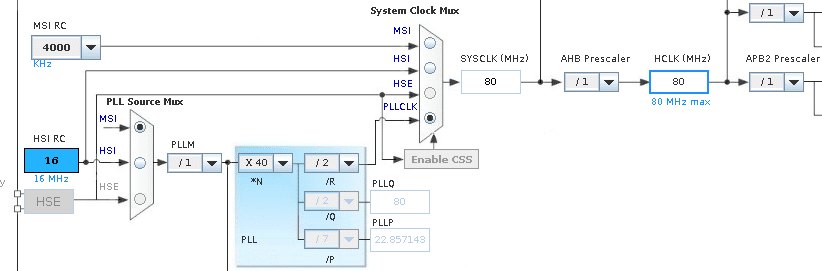
- l4-clock.png (37.3 KiB) Viewed 562 times
OK.
I just looked in https://github.com/stm32duino/Arduino_C … w_config.c and I suspect that
ENABLE_HIGH_SPEED
I presume its setup in here
@roger and @martinayotte, your notice is correct. The setup of pll is done in hw_config.c file, if the ENABLE_HIGH_SPEED is defined the PLL runs at 4*40/2 =80 MHz else at 4*32/2 = 64 MHz. The functions in system_stm32l4xx.c does not alter anything about clock, there is the SystemCoreClockUpdate function for reading and calculating the frequency of the clock.
Roger try to add the ENABLE_HIGH_SPEED define in building system and test the result, or better the SystemCoreClock variable.
Anyway, I cant see the reason to select the clock between 64MHz and 80MHz, I can understand the selection of a really slow speed (eg 8MHz) for power sensitive applications.
Edit.
I recompiled with ENABLE_HIGH_SPEED defined and it actually made it worse
Dhrystone Benchmark, Version 2.1 (Language: C)

Execution starts, 300000 runs through Dhrystone
Execution ends
Microseconds for one run through Dhrystone: 9.75
Dhrystones per Second: 102609.18
VAX MIPS rating = 58.40
this is much probably an issue about setting up clock pathes during init phase
As a reference, you can find the MBED clock initialization code here:
https://github.com/ARMmbed/mbed-os/blob … tm32l4xx.c
In the function SetSysClock_PLL_HSE you can indeed find the setting for deriving 80MHz system clock from the 8MHz VCO input (which is what you get on the NUCLEO boards). Let me know if this helps
Laurent
I didn’t realise the code was based on mbed.
Has anyone confirmed that the mbed code runs at 80Mhz, I suspect there may be a mistake in the mbed code is Wi6Labs just made an exact copy
The Nucleo L476 board does not use HSE clock, only the MSI clock, is not the same like all other nucleo boards!!!
Nucleo 64 manual (UM1724) page 24 states:
Note: For NUCLEO-L476RG the ST-LINK MCO output is not connected to OSCIN to reduce
power consumption in low power mode. Consequently NUCLEO-L476RG configuration
corresponds to HSE not used.
EDIT: @Roger I think that your results are correct:
F103@72 : 48.81 VAX MIPS
L476@64 : 46.64 VAX MIPS
L476@80 : 58.40 VAX MIPS
Am I missing something?
I was also going thru Roger measurements, and this sounds consistent (i.e. 46.64 * 80 / 64 ~= 58.4) and Dhrystone results are linear to cpu frequency.
This all sounds reasonable.
And yes clock setting clock comes from cubeMX.
Thanks also for sharing the right and complete information about MSI / HSE clock selection.
Also I am surprised a 80mhz processor performs worse than a 72mhz processor.
Also, The recompiled library with ENABLE HIGH SPEED showed lower Drystone test speeds.
I still think their may be a problem.
I will try that
HAL_RCC_MCOConfig(RCC_MCO, RCC_MCO1SOURCE_SYSCLK, RCC_MCODIV_1); // PA8 shows clock
I have a 100MHz scope, so I will give that a try.
PS. sounds like there is an issue with I2C when the clock is 80mhz, so this board may be limited to 64MHz after all.
But it would be good to sort out this mystery
Ran some more tests before and after recompiling the lib
I used the HAL_RCC_GetSysClockFreq() macro, which Fabien (Wi6Labs) emailed me about, to show the clock freq in these tests
Nucleo L476 using STM’s core
Dhrystone Benchmark, Version 2.1 (Language: C)

Clock speed is 80000000

Execution starts, 300000 runs through Dhrystone
Execution ends
Microseconds for one run through Dhrystone: 9.56
Dhrystones per Second: 104628.52
VAX MIPS rating = 59.55
Dhrystone Benchmark, Version 2.1 (Language: C)
Clock speed is 64000000
Execution starts, 300000 runs through Dhrystone
Execution ends
Microseconds for one run through Dhrystone: 11.97
Dhrystones per Second: 83549.77
VAX MIPS rating = 47.55
I have emailed Wi6Labs and STM to say that I think as this board is sold as 80Mhz that the library needs to be compiled so that it does operate at 80MHz, and that the SPI should be 4Mhz (not 1MHz as it is now) and also I2C should be 100kHz when at 80Mhz clock.
I don’t know why they chose to use 64Mhz instead of 80Mhz or why SPI is set to 1Mhz when this is not standard even for AVR Arduino boards (Uno etc)
I think STM asked Wi6Labs to make the board run at 80Mhz but perhaps there was a technical reason Wi6Labs decided to use 64MHz
Perhaps Wi6Labs and STM will agree to either use 64 or 80Mhz , as really this is an issue for them to decide.
I had to test some nRF51822 code, so thought I may as well run the Drystone test on my nRF51 board, and I got these results
Dhrystone Benchmark, Version 2.1 (Language: C)

Execution starts, 300000 runs through Dhrystone
Execution ends
Microseconds for one run through Dhrystone: 68.66
Dhrystones per Second: 14564.68
VAX MIPS rating = 8.29
Most probably the L4 at 80MHz is off the marketing’s people expectation (ie. power consumption), or it does not run reliably at 80MHz. Otherwise they will set it to 80MHz, I bet. What errata does say?
The specification of the Nucle L476 definitely says 80Mhz
I think I will recompile the library and 80Mhz and change the SPI default to DIV 32 which would give 2.5mhz rather than the exiting speed of 1mhz as it should really be 4mhz, but dont think there is a DIV 20 setting. DIV 16 is probably too fast as it would result in 5MHz SPI.
I2C will also need to be adjusted
I thought I answered to you by email on october 3rd – sorry if I was not clear: yes L476RG will run at 80MHz, This needs to be fixed.
About SPI, why do you think that 5MHz would be too fast vs. 2,5MHz ?
Do we expect issue with some devices if running too fast ?
Cheers
Lauretn
Wi6Labs have posted to another thread saying they will fix the issues, and make the board run at the correct speed, 80MHz
I think they said they will make the SPI speed default to 5MHz,which is higher than the AVR Arduino but I think this will be OK, as most devices will run at greater than 5MHz.
SPI speed is often set in the library for a specific peripheral eg. LCD screen, but these are often written for AVR, so need to be modified to support any other boards, even other Arduino ARM boards , like the Due.
But this is becoming less of a problem as more people use higher speed devices and libraries are modified to work with a wider variety of processors.
https://github.com/stm32duino/Arduino_C … its/master
L476 core runs now at its default 80MHz speed
SPI speed has been udpated to 5MHz
Also other settings like I2C have been updated accordingly
Enjoy
Laurent
Dhrystone Benchmark, Version 2.1 (Language: C)

Execution starts, 3000000 runs through Dhrystone
Execution ends
Microseconds for one run through Dhrystone: 3.66
Dhrystones per Second: 273545.90
VAX MIPS rating = 155.69
VAX MIPS rating = 134.23
I just picked the F407 from the boards menu, and I think it sets the clock to 168MHz
So, I don’t understand where the differences comes from since F405/F407 should be the same (except for ETH and Camera I/F)
Did someone change the wait states in the core ?
I want to run it on my new BlueZEX board to see how it performs
But it is actually only Dhrystone …
103ZET6 running in flash.
Starting Whetstone benchmark...

Loops: 1000Iterations: 1Duration: 20366 millisec.

C Converted Double Precision Whetstones: 4.91 MIPS <<< 72MHz
Loops: 1000Iterations: 1Duration: 15250 millisec.
C Converted Double Precision Whetstones: 6.56 MIPS <<< 96MHz
Loops: 1000Iterations: 1Duration: 12201 millisec.
C Converted Double Precision Whetstones: 8.20 MIPS <<< 120MHz
Loops: 1000Iterations: 1Duration: 11438 millisec.
C Converted Double Precision Whetstones: 8.74 MIPS <<< 128MHz
Dhrystone Benchmark, Version 2.1 (Language: C) <<< 128MHz
Execution starts, 300000 runs through Dhrystone
Execution ends
Microseconds for one run through Dhrystone: 7.28
Dhrystones per Second: 137397.93
VAX MIPS rating = 78.20
Dhrystone Benchmark, Version 2.1 (Language: C)

Execution starts, 300000 runs through Dhrystone
Execution ends

Microseconds for one run through Dhrystone: 57.35

Dhrystones per Second: 17437.22

VAX MIPS rating = 9.92

***
Whetstone
Loops: 1000Iterations: 1Duration: 6251 millisec.

C Converted Double Precision Whetstones: 16.00 MIPS
note that i’m using -O2 optimization and on arm-gcc 6
Dhrystone Benchmark, Version 2.1 (Language: C)

Execution starts, 3000000 runs through Dhrystone
Execution ends

Microseconds for one run through Dhrystone: 2.46

Dhrystones per Second: 407225.93

VAX MIPS rating = 231.77
Did you overclocked your F407 ?
https://github.com/stevstrong/Arduino_S … F4_variant
currently F_CPU=168000000L
i’ve not really examine the clock setting codes literally and i’m not too sure if even this setting could have resulted in the f4 actually running at a higher speed than stock maximum
the few things that i’m doing are compiling with -O2, turning off all debug settings
and i’m using the arm gcc toolchain 6-2017-q1-update February 23, 2017
https://developer.arm.com/open-source/g … /downloads
but i’ve read on a separate boinc forum that gcc optimizations could actually remove code sections that are not referenced, i’m not too sure if -O2 or some sort could have removed those codes
e.g. if there is a statement c = a + b and that c is not referenced, gcc could literally remove that statement while doing the compiles
i just repeated the compile with -O0 – no optimization
Dhrystone Benchmark, Version 2.1 (Language: C)

Execution starts, 3000000 runs through Dhrystone
Execution ends
Microseconds for one run through Dhrystone: 10.16
Dhrystones per Second: 98448.63
VAX MIPS rating = 56.03

It would be interesting to see the result using “O3”.
again this is based on -O2 optimizations, debug flags off
Dhrystone Benchmark, Version 2.1 (Language: C)

Execution starts, 3000000 runs through Dhrystone
Execution ends

Microseconds for one run through Dhrystone: 9.21

Dhrystones per Second: 108569.65

VAX MIPS rating = 61.79
The 48/62=1.29 with F103, and 160/232=1.45 with F407 is a difference, though..
http://infocenter.arm.com/help/index.js … GJICF.html
^^ if as this link suggest f3 and f4 would probably have a similar pipe line, but what is notable is that the cpu pipeline is capable of dual instruction fetch
simply unrolling the loops (e.g. -O2) and having a possibly better memory controller internally may account for the jump in performance, in effect on the fetch side, it may literally be doubled just for the fetch if the loops are unrolled
i’ve posted my codes in the initial post on the benchmarks (in the attached zip file)
http://www.stm32duino.com/viewtopic.php … 110#p26557
Dhrystone Benchmark, Version 2.1 (Language: C)

Execution starts, 3000000 runs through Dhrystone
Execution ends

Microseconds for one run through Dhrystone: 2.16

Dhrystones per Second: 462753.58

VAX MIPS rating = 263.38
oh, btw how do i do that, can i simply change F_CPU=168000000L? oh wait a minute, would usb still work it is usb-serial?
surprisingly, F_CPU don’t seem to be referenced in c/c++ source codes
ok give up for now, needs to study the rcc codes
oh, btw how do i do that, can i simply change F_CPU=168000000L? oh wait a minute, would usb still work it is usb-serial?
surprisingly, F_CPU don’t seem to be referenced in c/c++ source codes
meanwhile, coming up …
found various codes in STM32F4/cores/maple/libmaple/rccF4.c
would examine how those pll variables are defined
well, interrupts certainly matter, but i’d guess this is mainly just a casual test to see what is practically achievable (e.g. without needing to over clock) and just how ‘fast’ it is
the notion that f4 is reaching those old pentium speeds e.g. the first pentiums 133 mhz lets us guess what would be the good applications to run on the platform. i remembered that when those pentiums 133 mhz are around, windows 95 is just about the common desktop os back then
hence the f4 is a mini pc of that ‘class’, just that it doesn’t do mmu and anyway the internal sram is pretty limited assuming that we’d not bother with external sram or sdram as those would be ‘hard to connect’ given the number of parallel pins to setup and possibly costly as well.
these mcus are effectively a ‘computer on a chip’ and it has reach those old desktop performance just that with very limited ram
8MHz /4(PLLM) *240(PLLN) /2(PLLP) this gives you 240MHz clock.
Then set USB divider to 10(PLLQ).
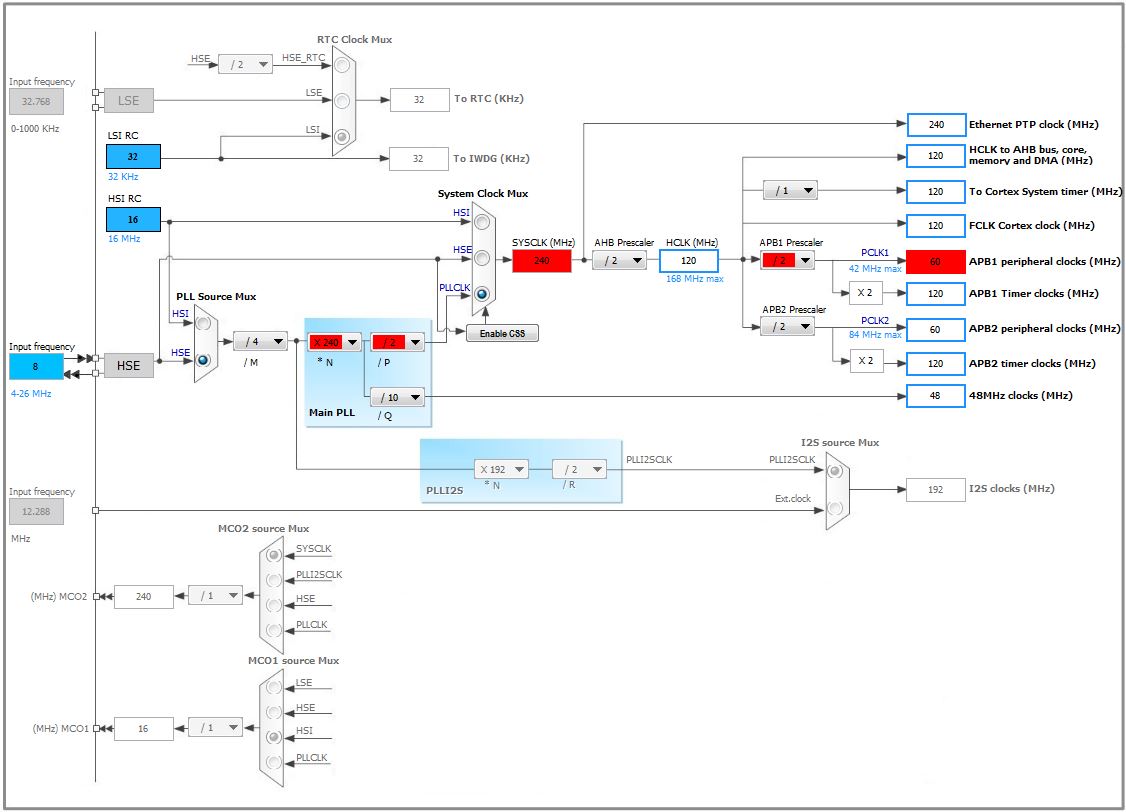
- 407 240MHz.JPG (91.16 KiB) Viewed 255 times
oops i’d need to setup cube-mx, i’m running somewhat low on disk space, i’d guess i’d try reading up rm0009 and looking at the source codes first
but the suggestion of 240mhz, makes me wonder if i’d need to standby a fire extinguisher, i possbly need to see what is the lower ‘safe’ speed bump
instead of usb, i may try with a uart so that keeping the usb working is less of a problem
oh, i think those -O flags are a ‘good thing’, it is ‘free’ performance gains so long as the app can live in flash, we don’t necessarily need to limit ourselves to the -Os defaults. even maple mini and various blue pills have 128k flash, that’s plenty for small apps
You must not install CubeMX, just follow the picture and hints above
When everything properly set you have to see ~374 VAXMIPS (-O3).. EDIT:
About the memory controller, I understand the F1 just has a prefectch buffer, while the F407 has a largest buffer + branch prediction or other perks that increase the speed further.
The F4 includes “ART” accelerator, which claims to get the 5 flash waitstates down to 0. That maybe makes the F4 more efficient when optimizing with -O3..
-Os, -g, eabi-4.8.3-2014q1, 240MHz clock
Dhrystone Benchmark, Version 2.1 (Language: C)

Execution starts, 3000000 runs through Dhrystone
Execution ends
Microseconds for one run through Dhrystone: 2.50
Dhrystones per Second: 399236.18
VAX MIPS rating = 227.23
-Os, -g, eabi-4.8.3-2014q1, 240MHz clock
Loops: 1000Iterations: 1Duration: 4375 millisec.

C Converted Double Precision Whetstones: 22.86 MIPS
on a side note:
http://www.st.com/resource/en/datasheet/stm32f407ve.pdf
2.2.2 Adaptive real-time memory accelerator (ART AcceleratorTM)
The ART AcceleratorTM is a memory accelerator which is optimized for STM32 industry-
standard ARM® Cortex®-M4 with FPU processors. It balances the inherent performance
advantage of the ARM Cortex-M4 with FPU over Flash memory technologies, which
normally requires the processor to wait for the Flash memory at higher frequencies.
To release the processor full 210 DMIPS performance at this frequency, the accelerator
implements an instruction prefetch queue and branch cache, which increases program
execution speed from the 128-bit Flash memory. Based on CoreMark benchmark, the
performance achieved thanks to the ART accelerator is equivalent to 0 wait state program
execution from Flash memory at a CPU frequency up to 168 MHz.
and oh our tests with -O3 1 VAX MIPS on stm32f103
http://www.stm32duino.com/viewtopic.php … 120#p26581
also puts the maple mini / blue pill at 70x DMIPS than the much bulkier VAX-11/780 or IBM System/360
https://en.wikipedia.org/wiki/VAX
For a while the VAX-11/780 was used as a standard in CPU benchmarks. It was initially described as a one-MIPS machine, because its performance was equivalent to an IBM System/360 that ran at one MIPS
-Os
Loops: 1000Iterations: 10Duration: 28744 millisec.

C Converted Single Precision Whetstones: 34.79 MIPSfailed to merge target specific data of file /opt4/opt/gcc-arm-none-eabi-6-2017-q1-update/bin/../lib/gcc/arm-none-eabi/6.3.1/thumb/v7e-m/fpv4-sp/hard/libgcc.a(_udivmoddi4.o)software floating point, double precision
Beginning Whetstone benchmark at 168 MHz ...
Loops:1000, Iterations:1, Duration:10356.75 millisec

C Converted Double Precision Whetstones:9.66 mflops
 , leave debug for another day, think pito is right, not easy (at least not ‘automatic’) – need codes to enable the fpu
stm32f407vet, compile -Os (optimise size), no debug
hardware floating point, single precision
Beginning Whetstone benchmark at 168 MHz ...
Loops:1000, Iterations:1, Duration:1558.46 millisec
C Converted Single Precision Whetstones:64.17 mflops
http://www.stm32duino.com/viewtopic.php?f=39&t=2001
i’d think we can circle back on fpu another time
oh the whetstone code has a dangling double local variable in one subroutine, fixed, attached a few posts back
surprisingly the -O2 and -O3 optimization results remained unchanged
the -Os (optimise size) improved
Did you see ansver 3 from above
you must enable FPU (a few lines of asm when not using systeminit from CMSIS)
Example
https://www.mikrocontroller.net/topic/261021#3959896
Doc
http://www.st.com/resource/en/applicati … 047230.pdf
Some more info about hw-float
https://visualgdb.com/tutorials/arm/stm32/fpu/
/Bingo
the first benchmarks on hardware fpu, updating a couple of posts back …
Double check your source.. HINT: sin() and sinf() is not the same..There is a special thread on the FPU. The FPU Enable functions are already there, but it is not enough, it seems.
would check it again
the enable fpu codes is as follows
http://infocenter.arm.com/help/topic/co … BJHIG.html
//enable the fpu (cortex-m4 - stm32f4* and above)

void enablefpu()

{

__asm volatile

(

"  ldr.w r0, =0xE000ED88    \n"  /* The FPU enable bits are in the CPACR. */

"  ldr r1, [r0]             \n"  /* read CAPCR */

"  orr r1, r1, #( 0xf << 20 )\n" /* Set bits 20-23 to enable CP10 and CP11 coprocessors */

"  str r1, [r0]              \n" /* Write back the modified value to the CPACR */

"  dsb                       \n" /* wait for store to complete */

"  isb"                          /* reset pipeline now the FPU is enabled */
);
}
hardware floating point additional tests with -fsingle-precision-constant compilation flag
stm32f407vet
compiled optimization -Os (optimise size), no debug, -fsingle-precision-constant
hardware floating point, single precision
Loops:1000, Iterations:1, Duration:1111.43 millisec

C Converted Single Precision Whetstones:89.97 mflops
Loops: 1000Iterations: 10Duration: 19638 millisec.

C Converted Single Precision Whetstones: 50.92 MIPSif the mflops, or vax mips gets much faster than this, i’d think intel & the rest of the chip giants may start coming in to scrutinize the results for an emerging ‘new competitor’
i doubt these benchmarks reflects the accurate technical boundaries given the gcc -O optimizations, i’d think even without optimizations stated, it would be quite difficult to tell if the compiler may ‘optimise away’ codes as part of its build process
but nevertheless it reflects that -O2 can make codes run faster on the stm32f1 and stm32f4 as the benchmarks reflects this. this is good as it simply means using more flash. e.g. for the oscilloscope project, i’m not too sure if -O2 may actually help as other than doing analog reads, it is drawing up the graph on the lcd, hence those drawing codes may be accelerated simply specifying -O2
and this won’t consume sram as codes executes directly off flash
oh and the f4 is a pretty fast chip at least as these benchmarks show, i’d think it probably beat the old cray 1 or even close in on cray 2 supercomputers, and on top of that it is no less an mcu, pretty much a single chip computer. the dhrystone tests shows the ‘power’ of the ART accelerator
Settings are:
Libmaple-based core.
407VET
No serial or USB, using SWO, so no interrupts hopefully going on.
168Mhz
no fpu
-Os
Beginning Whetstone benchmark at 168 MHz …
Loops:1000, Iterations:1, Duration:6205.83 millisec
C Converted Double Precision Whetstones:16.11 mflops
the results u’ve shown are for double precision, for single precision edit whetstone.cpp
/* default is double precision, define this for single precision */

#undef SINGLE_PRECISIONthe results u’ve shown are for double precision, for single precision edit whetstone.cpp
/* default is double precision, define this for single precision */

#undef SINGLE_PRECISIONnote that i compiled with -mfloat-abi=hard when i’m doing the fpu benchmark tests, this probably pushed up the benchmark scores as well
—
oh wow 120 mflops that last result
note that i compiled with -mfloat-abi=hard when i’m doing the fpu benchmark tests, this probably pushed up the benchmark scores as well
168Mhz
Hard FPU with Hard calls
Single precission
-O0
Starting test

Beginning Whetstone benchmark at 168 MHz ...

Loops:2000, Iterations:1, Duration:3946.32 millisec

C Converted Single Precision Whetstones:50.68 mflopsold repo, classic source in 1 file.
Loops: 1000Iterations: 10Duration: 9984 millisec.   1677419955 clocks

C Converted Single Precision Whetstones: 100.16 MIPSLoops: 1000Iterations: 10Duration: 9985 millisec. 1677420928 clocks
C Converted Single Precision Whetstones: 100.15 MIPSLoops: 1000Iterations: 10Duration: 6988 millisec. 1677248483 clocks
C Converted Single Precision Whetstones: 143.10 MIPSLoops: 1000Iterations: 10Duration: 6988 millisec. 1677248483 clocks
C Converted Single Precision Whetstones: 143.10 MIPS )
) i’ve read somewhere that USB needs to keep checking the host for messages, i’d guess that may be a lot of *interrupts* and hence slower (with SerialUSB), just a guess
I messed yesterday solving following issue:
1. in CMSIS DSP FFT example I generated 3 sinus tones with diff freqs and ampls
2. in a loop I sum up 3 sins to get the signal
3. while I worked with 1 file, it accepted only 1 (one) sinf in the loop, and that with special care on params – adding another sinf/cosf or any other math function crashed
4. I messed with it all day yesterday, debugging crashed almost randomly in rcc (!!!)
5. then I split it in 3 files (ino, h, cpp) and it works without any issue with absolutely everything I put inside.
Beginning Whetstone benchmark at 240 MHz ...
Loops:1000, Iterations:10, Duration:13510.15 millisec

C Converted Single Precision Whetstones:74.02 mflops
A little late to the party, but now testing 80MHz STM32L433 which is now available on the Arduino IDE.
Microseconds for one run through Dhrystone: 9.00
Dhrystones per Second: 111163.81
VAX MIPS rating = 63.27
You can find the board core for this STM32 here and here
https://github.com/GrumpyOldPizza/arduino-STM32L4
https://github.com/millerresearch/arduino-mystorm
We use the STM32L433 as a suport chip for our open source ICE40 FPGA board – BlackIce
mystorm.uk
Cheers
Ken
This one?:
https://www.fpgarelated.com/thread/799/ … -dev-board
Its written: ICE40HX4K and an STM32F103 Cortex M3
Microseconds for one run through Dhrystone: 9.00
I didn’t see your code but in general, the use of arduino timing function millis() for benchmarking can lead to significant errors -> the standard code under-estimates time elapsed.
It is better to use systick, or dwt.
You can borrow the systick / dwt (coreticks()) code here: https://dannyelectronics.wordpress.com/ … k-on-mcus/
I also wrote extensively about dhrystone / whetstone performance across multitudes of mcus. they are generally in line with what one would expect, with two exceptions:
1. PIC24 is exceptional in integer performance;
2. MSP432 is terrible in integer math with TI’s own compiler.
Do you have an evidence of such failing of millis() to support the statement?
[ChrisMicro – Sat Sep 23, 2017 4:10 am] –
We use the STM32L433 as a suport chip for our open source ICE40 FPGA board – BlackIce
This one?:
https://www.fpgarelated.com/thread/799/ … -dev-board
Its written: ICE40HX4K and an STM32F103 Cortex M3
I suspect it may be a new version of the board, since he called it BlackIce, and the one in the link is ICE40.
it was pointed out to me that I actually didn’t provide the whetstone benchmark code there -> since corrected,
The usage is quite simple:
#include "dhry.h"  //use dhrystone benchmark

#include "whetstone.h" //use whetstone benchmark
...
time0=time_now(); //time stamp time0. time_now() is whatever timing function you prefer. For short duration execution, don't use the stock millis()
//put your benchmark here
dhrystone(); //dhrystone benchmark, or
whetstone(); //whetstone benchmark
time1=time_now() - time0; //calcualte time elapsed
...
viewtopic.php?f=39&t=2001
the results are interesting.
In addition, I have the code in a set of .h/.c files and can post them if anyone is interested.
[victor_pv – Sat Sep 23, 2017 11:34 pm] –[ChrisMicro – Sat Sep 23, 2017 4:10 am] –
We use the STM32L433 as a suport chip for our open source ICE40 FPGA board – BlackIce
This one?:
https://www.fpgarelated.com/thread/799/ … -dev-board
Its written: ICE40HX4K and an STM32F103 Cortex M3I suspect it may be a new version of the board, since he called it BlackIce, and the one in the link is ICE40.
Today there is something on Hackaday with this board:
https://hackaday.com/2017/09/24/a-very- … bbc-micro/
It is even mentioned that the board can now be programmed with the Arduino-IDE.
I think this is due to the work of the people in this forum.
I like the combination of STM32 and FPGA. There are much more applications with this configuration.
