
Now, my F407 board doesn’t have an SDcard slot so I haven’t tested yet the current SDIO.
Can someone confirm if everything is working fine with the current SDIO with an F4 and the SdFat library?
If so, what changes are necessary to make it work with the current SDIO library?
I would like to set it up so I can add DMA to the SDIO and test it.
Update:
Daniel already pointed to the example in this post:
viewtopic.php?f=42&t=1966&p=27197&hilit=sdfat#p27197
Adding it here for anyone wondering if SDIO works with SdFat. The folder in question has 2 files needed, and the comments in the .ino file explain what needs to be done in the sdFat library.
I’ll see if I can get it working later today, and if so, turn to DMA and see what happens. I’ll post back the results.
Update2:
This branch contains my latest SDIO files. The rest of the core in that branch is not in sync with Daniel’s so I would recommend to just download the SDIO files:
https://github.com/victorpv/STM32GENERI … DMA-Latest
Update 05/19/17:
New bin using the latest F4 HAL.
F407VET, DMA, SDIO 4b, 512bytes buffer bench test.
download/file.php?id=1611
Update 05/25/17:
My latest working version + Daniel’s latest HAL core
https://github.com/victorpv/STM32GENERIC/tree/FW-Update
did a little google and found the following links
https://community.st.com/thread/30654
https://github.com/hexanaft/stm32f4-dis … sdio-fatfs
http://www.st.com/resource/en/product_t … _sdmmc.pdf
http://www.digitalspirit.org/file/index … icrosd.pdf
hopefully we could find the HAL implementation for the ‘physical’ sdio layer, i.e. hardware do all that interfacing
then we’d need to find the hooks to link sdfat or rather fatfs into the sdio hal interface
I need to still test and bugfix it, we will see where we get…
If that works, next is adding DMA capability.
I got the SDIO working with DMA in an F4, haven’t tried an F1 yet.
The performance right now is the same as without DMA (disappointing, but could be due to the sdcard).
Next come:
Trying to find out why 4bit wide mode is not actually happening.
Since there is an SDIOEX mode for the SdFat library, finding if that improves performance in the same degree as it does in SPI.
Testing on other series.
Sandisk 16GB Ultra
Manufacturing date: 5/2134

File size 5 MB

Buffer size 512 bytes

Starting write test, please wait.

write speed and latency

speed,max,min,avg

KB/Sec,usec,usec,usec

413.44,18504,943,1237

413.27,18861,942,1238

Starting read test, please wait.

read speed and latency

speed,max,min,avg

KB/Sec,usec,usec,usec

1999.07,540,252,255

1999.87,516,252,255Sandisk 16GB Ultra
Manufacturing date: 5/2134

File size 5 MB

Buffer size 512 bytes

Starting write test, please wait.

write speed and latency

speed,max,min,avg

KB/Sec,usec,usec,usec

413.44,18504,943,1237

413.27,18861,942,1238

Starting read test, please wait.

read speed and latency

speed,max,min,avg

KB/Sec,usec,usec,usec

1999.07,540,252,255

1999.87,516,252,255I do expect 8-10MB/sec with SDIO and F407 and 32kB large buffer.
5-6y back I did test SDIO with chibios – I got around 6MB/s with 32kB buffer, and about 400kB/s with 512b, afik.
BTW, the SDIO is the native interface for sdcards since ever, the SPI is just an “option” all vendors support luckily

I do expect 8-10MB/sec with SDIO and F407 and 32kB large buffer.
BTW, the SDIO is the native interface for sdcards since ever, the SPI is just an “option” all vendors support luckily
Use a freshly formatted SD for best performance.
Type any character to start

FreeStack: 93351
..On Teensy 3.6 an errata prevented use of DMA in EX mode.
Teensy 3.6 has a 512 byte FIFO in the SDIO controller so I used program I/O.
Notice Teensy 3.6 results for 512 byte buffer size. Write: DMA 598 KB/sec, EX mode FIFO 18820 KB/sec..
..On Teensy 3.6 an errata prevented use of DMA in EX mode.
Teensy 3.6 has a 512 byte FIFO in the SDIO controller so I used program I/O.
Notice Teensy 3.6 results for 512 byte buffer size. Write: DMA 598 KB/sec, EX mode FIFO 18820 KB/sec..
So with a good card it could be 68/10MB/s. That is close to the expected max at 24MHz SDIO clock.
But there is still a mess with the reading the Sdcard’s info data, so maybe that should be fixed first.
The EX mode might not be easy to get working, and the gain will not be high with 24MHz SDIO clock. EDIT: it might be “high” when you get 8/10MB/s with 512b large buffer
The above Bill’s results are with 50MHz SDIO clock, sure.
Update: Here after a few more runs with the old CL4 Sandisk 4GB:
File size 5 MB

Buffer size 32768 bytes

Starting write test, please wait.

write speed and latency

speed,max,min,avg

KB/Sec,usec,usec,usec

8662.15,9753,3554,3767

8165.14,13336,3555,3995

Starting read test, please wait.

read speed and latency

speed,max,min,avg

KB/Sec,usec,usec,usec

10333.48,3523,3143,3169

10333.48,3524,3140,3168So with a good card it could be 68/10MB/s. That is close to the expected max at 24MHz SDIO clock.
But there is still a mess with the reading the Sdcard’s info data, so maybe that should be fixed first.
The EX mode might not be easy to get working, and the gain will not be high with 24MHz SDIO clock. EDIT: it might be “high” when you get 8/10MB/s with 512b large buffer
The above Bill’s results are with 50MHz SDIO clock, sure.
Update: Here after a few more runs with the old CL4 Sandisk 4GB:
File size 5 MB

Buffer size 32768 bytes

Starting write test, please wait.

write speed and latency

speed,max,min,avg

KB/Sec,usec,usec,usec

8662.15,9753,3554,3767

8165.14,13336,3555,3995

Starting read test, please wait.

read speed and latency

speed,max,min,avg

KB/Sec,usec,usec,usec

10333.48,3523,3143,3169

10333.48,3524,3140,3168
http://www.ebay.com/sch/i.html?_odkw=ul … 0&_sacat=0
at the rate we’re going 1 day we’d stream HD videos on HDMI connector (gbps)
I’ve tried with Samsung 8GB and 16GB, both EVO CL10, UHS-I. Info is a garbage and it does not start the bench.
With Sandisk CL4 the card info is garbage too, but it performs the benchmark as above.
    hsd.Init.ClockDiv = 0;  //  <<<<< should be max 400kHz
error = HAL_SD_Init(&hsd, &SDCardInfo);

if (error != SD_OK) {

return false;

}
    hsd.Init.ClockDiv = 0;  //  <<<<< should be max 400kHz
error = HAL_SD_Init(&hsd, &SDCardInfo);

if (error != SD_OK) {

return false;

}
The “info” inside this “SDCardInfo.SD_cid” structure is identical to the cid info printed out by SdFat bench run with SPI for the given card.
It seems to me the “conversion/mapping” between your SD_cid structure and SdFat’s “cid” table in SDIO.cpp has got a bug, however..
bool SDIOClass::readCID(void* cid) {

memcpy(cid, &SDCardInfo.SD_cid, 16);

return true;

}bool SDIOClass::readCID(void* cid) {
memcpy(cid, &hsd.CID, 16); //&SDCardInfo.SD_cid, 16);
Serial.println(hsd.CID[0], HEX);
Serial.println(hsd.CID[1], HEX);
Serial.println(hsd.CID[2], HEX);
Serial.println(hsd.CID[3], HEX);
return true;
}bool SDIOClass::readCID(void* cid) {
memcpy(cid, &hsd.CID, 16); //&SDCardInfo.SD_cid, 16);
Serial.println(hsd.CID[0], HEX);
Serial.println(hsd.CID[1], HEX);
Serial.println(hsd.CID[2], HEX);
Serial.println(hsd.CID[3], HEX);
return true;
}Isn’t this a mismatch?
OEMID is “SD” for Sandisk
REV is 0x80 = 8.0
ProdName = ProdName1 + ProdName2 = 5bytes = “SU04G”
ManufactDate is 0xC7 = 12 + 7 = July/2012
@Victor: I watched the CSD and it showed 50 the max speed. The card is Sandisk CL4 4GB (it does 8MB/s write! while max is 4). And because the Samsung CL10 cards do not pass the init yet, it seems we have got the card types reversed somehow.
Just check the sizes of those arrays.
http://bunniefoo.com/bunnie/sdcard-30c3-pub.pdf
Isn’t this a mismatch?
The tables are packed without any padding.
SdFat maps a “cid” structure onto the CID table such the information is available via cid.xyz.
HAL does the same via “SD_cid” structure.
The HAL’s “internal types setup” of the CID/CSD mapping structure differs from the SdFat’s one, but the resulting “extracted” information is the same as the underlying 16bytes long CID/CSD table is the same.
So the memcpy should work.
As you may see above it seems like the SdFat’s “cid” structure gets broken somehow.
Just check the sizes of those arrays.
http://www.stm32duino.com/viewtopic.php … =20#p28025
I memcopied “hsd.CID”, which is the raw CID table, into the SdFat’s “cid”.
I printed out hsd.CID content as well.
The Sdfat’s “cid” is still broken (but in different pattern).
PS: mind some of the SdFat’s cid table elements are mapped to CID’s nibbles.
/** read CID or CSR register */

bool SdSpiCard::readRegister(uint8_t cmd, void* buf) {

..

if (!readData(dst, 16)) {

goto fail;

}

// ##Pito - printing out the CID/CSD

int i;

for (i=0; i<16; i++){

Serial.print(dst[i],HEX);

Serial.print("-");

}

Serial.println();

..bool SDIOClass::readCID(void* cid) {
memcpy(cid, &hsd.CID, 16); //&SDCardInfo.SD_cid, 16);
Serial.println(hsd.CID[0], HEX);
Serial.println(hsd.CID[1], HEX);
Serial.println(hsd.CID[2], HEX);
Serial.println(hsd.CID[3], HEX);
return true;
}bool SDIOClass::readCID(void* cid) {
memcpy(cid, &SDCardInfo.SD_cid, 16);
// ##Pito - printing out the CID/CSD
int i;
char *buf = (char*)(cid);
for (i=0; i<16; i++){
Serial.print(buf[i],HEX);
Serial.print("-");
}
Serial.println();
return true;
}3-53-44-53-55-30-34-47-80-2-F1-B6-DF-0-C7-69- <<<<<<< CIDAlso, be aware of endianess when transforming uin32_t to array[n].
You can easily check the structure mismatch by printing out the “sizeof(cid_struct)” for both SPI and SDIO.
ool SDIOClass::readCID(void* cid) {
memcpy(cid, &hsd.CID, 16);
// ##Pito - printing out the CID/CSD
int i;
char *bufs = (char*) hsd.CID;
for (i=0; i<16; i++){
Serial.print(bufs[i],HEX);
Serial.print("-");
}
Serial.println();
char *bufd = (char*)(cid);
for (i=0; i<16; i++){
Serial.print(bufd[i],HEX);
Serial.print("-");
}
Serial.println();
return true;
}But the issue is which parameter you use with the SDIO::readCID() function.
If the structure, of which pointer is passed, is not “packed” and has different byte distribution than the SPI cid structure, then you have this problem.
To have the input parameter a void pointer can be dangerous when the pointers point to different data structures.
void * memcpy ( void * destination, const void * source, size_t num );/** @defgroup SD_Exported_Types_Group3 Card Identification Data: CID Register
* @{
*/
typedef struct
{
__IO uint8_t ManufacturerID; /*!< Manufacturer ID */
__IO uint16_t OEM_AppliID; /*!< OEM/Application ID */
__IO uint32_t ProdName1; /*!< Product Name part1 */
__IO uint8_t ProdName2; /*!< Product Name part2 */
__IO uint8_t ProdRev; /*!< Product Revision */
__IO uint32_t ProdSN; /*!< Product Serial Number */
__IO uint8_t Reserved1; /*!< Reserved1 */
__IO uint16_t ManufactDate; /*!< Manufacturing Date */
__IO uint8_t CID_CRC; /*!< CID CRC */
__IO uint8_t Reserved2; /*!< Always 1 */
} __attribute__((packed)) HAL_SD_CIDTypedef;
uint32_t to char[4] and
uint32_t+uint8 to char[5]
In the HAL or in the SdFat??
Or, we may use an item by item copy instead of memcpy..
The same issue might be we other tables, ie. CSD.
Also the HAL_SD_CSDTypedef is about 60bytes large..
bool SDIOClass::readCID(void* cid) {

memcpy(cid, &SDCardInfo.SD_cid, 16);

// ##Pito - printing out the CID/CSD

int i;

char *buf = (char*)(cid);

for (i=0; i<16; i++){

Serial.print(buf[i],HEX);

Serial.print("-");

}

Serial.println();

return true;

}a. the HAL table is not packed
b. “endianess” – or better to say the Sdfat interprets/prints out uint16/32/strings from the other end
2. csd – I have not elaborated it yet, but
a. the HAL table is not packed
b. the HAL table is about 41bytes
c. “endianess” – or better to say the Sdfat may interpret/print out uints16/32/strings from the other end
It seems to me the copy with a transformation would be needed in SDIO.h 
The raw data is available in hsd.CID[] and probably hsd.CSD[] in SDIO.
a. the HAL table is not packed
b. “endianess” – or better to say the Sdfat interprets/prints out uint16/32/strings from the other end
2. csd – I have not elaborated it yet, but
a. the HAL table is not packed
b. the HAL table is about 41bytes
c. “endianess” – or better to say the Sdfat may interpret/print out uints16/32/strings from the other end
It seems to me the copy with a transformation would be needed in SDIO.h
The raw data is available in hsd.CID[] and probably hsd.CSD[] in SDIO.
#define SWAP_UINT32(x) (((x)>>24) | (((x) & 0x00FF0000)>>8) | (((x) & 0x0000FF00)<<8) | ((x)<<24))
bool SDIOClass::readCID(void* cid) {

// Pito 5/2017

cid_t* cidi  = reinterpret_cast<cid_t *>(cid);

cidi->mid    = SDCardInfo.SD_cid.ManufacturerID;

cidi->oid[0] = SDCardInfo.SD_cid.OEM_AppliID >> 8;

cidi->oid[1] = SDCardInfo.SD_cid.OEM_AppliID;

cidi->pnm[0] = SDCardInfo.SD_cid.ProdName1 >> 24;

cidi->pnm[1] = SDCardInfo.SD_cid.ProdName1 >> 16;

cidi->pnm[2] = SDCardInfo.SD_cid.ProdName1 >> 8;

cidi->pnm[3] = SDCardInfo.SD_cid.ProdName1;

cidi->pnm[4] = SDCardInfo.SD_cid.ProdName2;

cidi->prv_n = (SDCardInfo.SD_cid.ProdRev >> 4) & 0xF;

cidi->prv_m = (SDCardInfo.SD_cid.ProdRev) & 0xF;

cidi->psn = SWAP_UINT32(SDCardInfo.SD_cid.ProdSN);

cidi->mdt_year_high = (SDCardInfo.SD_cid.Reserved1) & 0xF;

cidi->mdt_year_low = (SDCardInfo.SD_cid.ManufactDate >> 4) & 0xF;

cidi->mdt_month = (SDCardInfo.SD_cid.ManufactDate) & 0xF;

cidi->crc = (SDCardInfo.SD_cid.CID_CRC >> 7) & 0x7F;

return true;

}
//-----------------------------------------------------------------------------

// Read 16 byte CID or CSD register.

static bool readReg16(uint32_t xfertyp, void* data) {

uint8_t* d = reinterpret_cast<uint8_t*>(data);

if (!cardCommand(xfertyp, m_rca)) {

return false;  // Caller will set errorCode.

}

uint32_t sr[] = {SDHC_CMDRSP0, SDHC_CMDRSP1, SDHC_CMDRSP2, SDHC_CMDRSP3};

for (int i = 0; i < 15; i++) {

d[14 - i] = sr[i/4] >> 8*(i%4);

}

d[15] = 0;

return true;

} version which works as well: #define SWAP_UINT32(x) (((x)>>24) | (((x) & 0x00FF0000)>>8) | (((x) & 0x0000FF00)<<8) | ((x)<<24))
bool SDIOClass::readCID(void* cid) {
// Pito 5/2017
uint32_t s[4];
s[0] = SWAP_UINT32(hsd.CID[0]);
s[1] = SWAP_UINT32(hsd.CID[1]);
s[2] = SWAP_UINT32(hsd.CID[2]);
s[3] = SWAP_UINT32(hsd.CID[3]);
//Serial.println(s[0], HEX);
//Serial.println(s[1], HEX);
//Serial.println(s[2], HEX);
//Serial.println(s[3], HEX);
memcpy(cid, &s, 16); //&SDCardInfo.SD_cid, 16);
return true;
}
bool SDIOClass::readCSD(void* csd) {
// Pito 5/2017
uint32_t s[4];
s[0] = SWAP_UINT32(hsd.CSD[0]);
s[1] = SWAP_UINT32(hsd.CSD[1]);
s[2] = SWAP_UINT32(hsd.CSD[2]);
s[3] = SWAP_UINT32(hsd.CSD[3]);
//Serial.println(hsd.CSD[0], HEX);
//Serial.println(hsd.CSD[1], HEX);
//Serial.println(hsd.CSD[2], HEX);
//Serial.println(hsd.CSD[3], HEX);
memcpy(csd, &s, 16); //&SDCardInfo.SD_csd, 16);
return true;
}
version which works as well: #define SWAP_UINT32(x) (((x)>>24) | (((x) & 0x00FF0000)>>8) | (((x) & 0x0000FF00)<<8) | ((x)<<24))
bool SDIOClass::readCID(void* cid) {
// Pito 5/2017
uint32_t s[4];
s[0] = SWAP_UINT32(hsd.CID[0]);
s[1] = SWAP_UINT32(hsd.CID[1]);
s[2] = SWAP_UINT32(hsd.CID[2]);
s[3] = SWAP_UINT32(hsd.CID[3]);
//Serial.println(s[0], HEX);
//Serial.println(s[1], HEX);
//Serial.println(s[2], HEX);
//Serial.println(s[3], HEX);
memcpy(cid, &s, 16); //&SDCardInfo.SD_cid, 16);
return true;
}
bool SDIOClass::readCSD(void* csd) {
// Pito 5/2017
uint32_t s[4];
s[0] = SWAP_UINT32(hsd.CSD[0]);
s[1] = SWAP_UINT32(hsd.CSD[1]);
s[2] = SWAP_UINT32(hsd.CSD[2]);
s[3] = SWAP_UINT32(hsd.CSD[3]);
//Serial.println(hsd.CSD[0], HEX);
//Serial.println(hsd.CSD[1], HEX);
//Serial.println(hsd.CSD[2], HEX);
//Serial.println(hsd.CSD[3], HEX);
memcpy(csd, &s, 16); //&SDCardInfo.SD_csd, 16);
return true;
}
I can try with 1bit mode, sure.
As of today my two Sammies CL10 UHS-I either freeze at sd.begin() or throw an error “card not formatted” with 4bit mode.
File size 5 MB

Buffer size 65536 bytes

Starting write test, please wait.
write speed and latency

speed,max,min,avg

KB/Sec,usec,usec,usec

2666.35,51553,23531,24512

2720.23,34257,23539,24020
Starting read test, please wait.
read speed and latency

speed,max,min,avg

KB/Sec,usec,usec,usec

2889.06,24517,22623,22687

2890.73,23701,22624,22666
File size 5 MB

Buffer size 65536 bytes

Starting write test, please wait.
write speed and latency

speed,max,min,avg

KB/Sec,usec,usec,usec

2666.35,51553,23531,24512

2720.23,34257,23539,24020
Starting read test, please wait.
read speed and latency

speed,max,min,avg

KB/Sec,usec,usec,usec

2889.06,24517,22623,22687

2890.73,23701,22624,22666
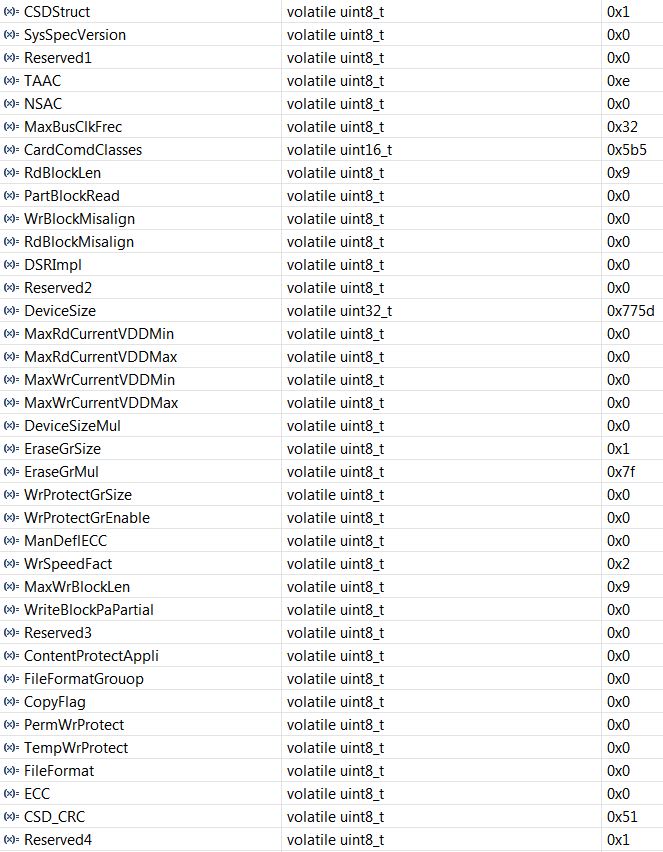
- CSD Sammy 16GB.JPG (130.95 KiB) Viewed 279 times
    /* In case of single block transfer, no need of stop transfer at all */

#ifdef SDIO_STA_STBITERR

while(!__HAL_SD_SDIO_GET_FLAG(hsd, SDIO_FLAG_RXOVERR | SDIO_FLAG_DCRCFAIL | SDIO_FLAG_DTIMEOUT | SDIO_FLAG_DBCKEND | SDIO_FLAG_STBITERR))

#else /* SDIO_STA_STBITERR not defined */

while(!__HAL_SD_SDIO_GET_FLAG(hsd, SDIO_FLAG_RXOVERR | SDIO_FLAG_DCRCFAIL | SDIO_FLAG_DTIMEOUT | SDIO_FLAG_DBCKEND))

#endif /* SDIO_STA_STBITERR */

{

if (__HAL_SD_SDIO_GET_FLAG(hsd, SDIO_FLAG_RXFIFOHF)) <<<<<<<<<<<<<< line 572 ..hal_cd.c
10MB A copied in 6.1secs, worked 3 times ok, the hashes matched.
100MB A copied in 45.6secs, worked only once out of 3 attempts, but the hash did not match
    /* In case of single block transfer, no need of stop transfer at all */

#ifdef SDIO_STA_STBITERR

while(!__HAL_SD_SDIO_GET_FLAG(hsd, SDIO_FLAG_RXOVERR | SDIO_FLAG_DCRCFAIL | SDIO_FLAG_DTIMEOUT | SDIO_FLAG_DBCKEND | SDIO_FLAG_STBITERR))

#else /* SDIO_STA_STBITERR not defined */

while(!__HAL_SD_SDIO_GET_FLAG(hsd, SDIO_FLAG_RXOVERR | SDIO_FLAG_DCRCFAIL | SDIO_FLAG_DTIMEOUT | SDIO_FLAG_DBCKEND))

#endif /* SDIO_STA_STBITERR */

{

if (__HAL_SD_SDIO_GET_FLAG(hsd, SDIO_FLAG_RXFIFOHF)) <<<<<<<<<<<<<< line 572 ..hal_cd.c
Type any character to start

FreeStack: 60211

Invalid format, reformat SD.Type any character to start
FreeStack: 60211
Invalid format, reformat SD.In thumb assemble in REV, in gcc there is a builtin instruction that will translate to the right assembler instruction:
a = __builtin_bswap32(a);Now why the 4bit mode fails?
anyother way could be to see if there is a way to call the HAL sdio say from sdfat, presumbly it would be faster and if it is a bug (in sdfat), that may diagnose it. i’ve gone around the webs and find that there are indeed some codes in which it provide rather simple hooks to connect ST’s usb mass storage middle ware stack to stm32 sdio hardware via hal. hence, there may possibly be a way for sdfat to use it as well
Now why the 4bit mode fails?
2.12 SDIO peripheral limitations

2.12.1 SDIO HW flow control

Description

When enabling the HW flow control by setting bit 14 of the SDIO_CLKCR register to ‘1’,

glitches can occur on the SDIOCLK output clock resulting in wrong data to be written into

the SD/MMC card or into the SDIO device. As a consequence, a CRC error will be reported

to the SD/SDIO MMC host interface (DCRCFAIL bit set to ‘1’ in SDIO_STA register).

Workaround

None.

Note: Do not use the HW flow control. Overrun errors (Rx mode) and FIFO underrun (Tx mode)

should be managed by the application software.Now why the 4bit mode fails?
..
Conclusion: Do not use the HW flow control.
Black F407ZET board: http://www.stm32duino.com/viewtopic.php … =30#p22456
error = HAL_SD_WideBusOperation_Config(&hsd, SDIO_BUS_WIDE_4B);
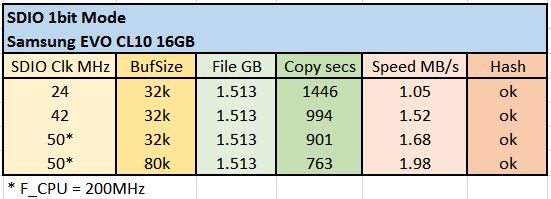
- SDIO 1bit Copy.JPG (32.87 KiB) Viewed 278 times
error = HAL_SD_WideBusOperation_Config(&hsd, SDIO_BUS_WIDE_4B);
Instead of a generic “error: open failed”
Here is the error I get with 2x CL10 Samsungs when the 4bit mode is enabled (HW flow ctrl disabled) :
Use a freshly formatted SD for best performance.

Type any character to start
HAL_SD_ReadBlocks Error: 2

Invalid format, reformat SD.
Use a freshly formatted SD for best performance.

Type any character to start
Loop: 0

Loop: 1

Opening the read file..

Loop: 2

HAL_SD_ReadBlocks Error: 2

error: opening test_in.bin for Read failed
Use a freshly formatted SD for best performance.

Type any character to start
HAL_SD_Init Error: 3

Can't access SD card. Do not reformat.

SD errorCode: 0X64,0X0
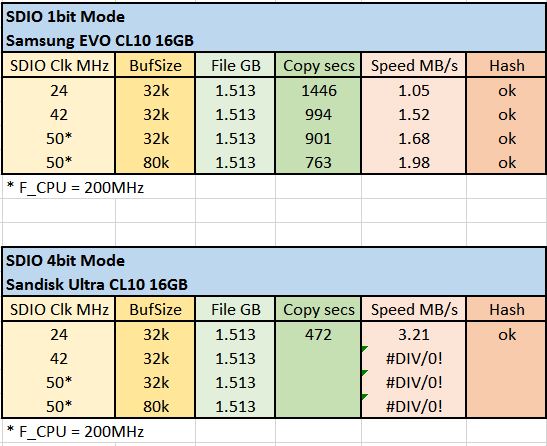
- SDIO 1bit and 4bit Copy.JPG (59.61 KiB) Viewed 781 times
2.12 SDIO peripheral limitations

2.12.1 SDIO HW flow control

Description

When enabling the HW flow control by setting bit 14 of the SDIO_CLKCR register to ‘1’,

glitches can occur on the SDIOCLK output clock resulting in wrong data to be written into

the SD/MMC card or into the SDIO device. As a consequence, a CRC error will be reported

to the SD/SDIO MMC host interface (DCRCFAIL bit set to ‘1’ in SDIO_STA register).

Workaround

None.

Note: Do not use the HW flow control. Overrun errors (Rx mode) and FIFO underrun (Tx mode)

should be managed by the application software.With 42MHz SDIO clk it throws errors:
Use a freshly formatted SD for best performance.

Type any character to start
Opening the read file..

Opening the write file..

Reading and Writing..

HAL_SD_WriteBlocks Error: 5

HAL_SD_WriteBlocks Error: 3

HAL_SD_WriteBlocks Error: 16

HAL_SD_WriteBlocks Error: 5

HAL_SD_WriteBlocks Error: 3

HAL_SD_WriteBlocks Error: 16

HAL_SD_WriteBlocks Error: 3

HAL_SD_WriteBlocks Error: 3

..

HAL_SD_WriteBlocks Error: 3
But perhaps SDFat already provides for some retry. It’s kind of complicated to track it all with so many layers.
But perhaps SDFat already provides for some retry. It’s kind of complicated to track it all with so many layers.
But first concentrate on the error.
Here is the “COPY TEST” I published on this forum a year back – here the version with SDIO.
Simply copy a file of “any size” to the Sdcard, rename it to “test_in.bin”. After the running the sketch it copies the test_in.bin into the “test_out.bin”.
Compare the hashes to check whether the copy went well.
Note: you want Victor’s SDIO lib files from here
https://github.com/victorpv/STM32GENERI … s/SDIO/src
https://github.com/victorpv/STM32GENERI … 07VE/Bench
Also you need SdFat lib too.
/*

SDcard SDIO example - Copy Test - copy binaries

Buffer of BUFSIZE bytes is used for writing.

You have to place a binary called "test_in.bin" on the SDcard and run the sketch.

You will get the "test_out.bin" after the copy finishes.

Pito 5/2016, no warranties of any kind

Pito 5/2017, no warranties of any kind

*/

#include "SDIO.h"

#include "STM32SdFatSdio.h"
STM32SdFatSdio sd;
SdFile myFileIn;
SdFile myFileOut;
#define BUFSIZE 32*1024
// Serial output stream
ArduinoOutStream cout(Serial);
void setup() {
Serial.begin(115200);
delay(1000);
cout << F("\nUse a freshly formatted SD for best performance.\n");
// Discard any input.
do {
delay(10);
} while (Serial.available() && Serial.read() >= 0);
Serial.println("Type any character to start\n");
while (!Serial.available()) {
SysCall::yield();
}
if (!sd.begin()) {
sd.initErrorHalt();
}
Serial.println("*************************************************");
Serial.println("Opening the read file..");
// open the file for Read
if (!myFileIn.open("test_in.bin", O_RDONLY)) {
sd.errorHalt("opening test_in.bin for Read failed");
}
Serial.println("Opening the write file..");
// open the file for Write
if (!myFileOut.open("test_out.bin", O_WRITE | O_CREAT)) {
sd.errorHalt("opening test_out.bin for Write failed");
}
// Read from myFileIn and write to myFileOut via a Buffer
Serial.println("Reading and Writing..");
uint8_t buf[BUFSIZE];
uint32_t nr;
uint32_t t = millis();
while ((nr = myFileIn.read(buf, BUFSIZE)) > 0) {
if (nr < BUFSIZE){
myFileOut.write(buf, nr); }
else {
myFileOut.write(buf, BUFSIZE); }
}
t = millis() - t;
// close the files
myFileIn.close();
myFileOut.close();
Serial.println("*************************************************");
Serial.print("Done in ");
Serial.print(t);
Serial.print(" msecs");
}
void loop() {
}
Workaround

The CCRCFAIL bit in the SDIO_STA register shall be ignored by the software. CCRCFAIL

must be cleared by setting CCRCFAILC bit of the SDIO_ICR register after reception of the

response to the CMD5 command.Which reminds me, there are actually newer HAL firmware versions for the series, so I will upgrade them when I get home; that may help too.
The error codes are defined as HAL_SD_ErrorTypedef, which is in f4xx_hal_sd.h
I have been doing some testing, but bench doesn’t fail on me.
Now, I have been going thru the HAL calls to see what checks and timeouts are there.
Once the DMA transfer has started, the next thing is wait on this to return ok or an error: HAL_SD_CheckWriteOperation
On that function the valid outcomes are a timeout, an error, or OK. I suspect the timeouts are probably reported by that one.
The one called before that, so start the DMA, may error out before starting the actual transfer if the card is not in a valid state for it.
So I suspect when a transfer goes wrong because it takes too long or something, you may be getting the timeout, and next the illegal command.
I have run the bench a bunch of times, but it just doesn’t fail with my cl4 card, so I can’t see where any error comes from. I need to find a cl10 so I can repeat the tests.
The new test sketch from Pito should help. I will post my current code to github so we are all in sync for a start.
Regarding the HAL updates. The core F4 HAL is from 2016. The new HAL from April 2017 has a lot of changes. Different functions, function names, returns. There must be a reason for such major changes. Most likely will result in breaking compatibility with the F1 or others that have not been updated in a while, but if we need to write 2 libraries to get them stable, then better than a single one with issues.
I have some F3 chips waiting for bluepills to arrive to do a transplant, once done I can test F3.
I have run the bench a bunch of times, but it just doesn’t fail with my cl4 card, so I can’t see where any error comes from. I need to find a cl10 so I can repeat the tests…
I have run the bench a bunch of times, but it just doesn’t fail with my cl4 card, so I can’t see where any error comes from. I need to find a cl10 so I can repeat the tests…
Regarding the HAL updates. The core F4 HAL is from 2016. The new HAL from April 2017 has a lot of changes. Different functions, function names, returns. There must be a reason for such major changes. Most likely will result in breaking compatibility with the F1 or others that have not been updated in a while, but if we need to write 2 libraries to get them stable, then better than a single one with issues.
Regarding the HAL updates. The core F4 HAL is from 2016. The new HAL from April 2017 has a lot of changes. Different functions, function names, returns. There must be a reason for such major changes. Most likely will result in breaking compatibility with the F1 or others that have not been updated in a while, but if we need to write 2 libraries to get them stable, then better than a single one with issues.
I have run the bench a bunch of times, but it just doesn’t fail with my cl4 card, so I can’t see where any error comes from. I need to find a cl10 so I can repeat the tests…
https://blog.frankvh.com/2011/09/04/stm … interface/
that black f407vet6 has a nice uSD slot that has a spring in it, click in & click out, using that slot for the test

http://i.ebayimg.com/images/g/58cAAOSw4 … -l1600.jpg
using pito’s binary, black f407vet6, 5 MB test_in.bin file,
SD card is a 16GB Strongtium brand card class 10
http://www.strontium.biz/products/memor … ory-cards/
Use a freshly formatted SD for best performance.

Type any character to start
*************************************************

Opening the read file..

Opening the write file..

Reading and Writing..

*************************************************

Done in 1922 msecs
Currently DMA reads working fine, but some errors in writes, I believe timeouts due to the card taking its sweet time to write the blocks. I’m trying to add code to wait until the card is at least past the programming stage.
I think the way the HAL manages the sdcard makes more sense in the new API, we will see if it helps with reliability.

some scraps of info may be found in various places
http://www.digitalspirit.org/file/index … 33-001.pdf
https://yannik520.github.io/sdio.html
some scraps of info may be found in various places
http://www.digitalspirit.org/file/index … 33-001.pdf
https://yannik520.github.io/sdio.html
i think one of the better sites about the 4 pin sdio is this
https://yannik520.github.io/sdio.html
i’m yet to find any better resource for it on google
FreeStack: 125615

Type is FAT32

Card size: 15.93 GB (GB = 1E9 bytes)
Manufacturer ID: 0X3

OEM ID: SD

Product: SL16G

Version: 8.0

Serial number: 0X72F2CA43

Manufacturing date: 8/2015
File size 5 MB

Buffer size 512 bytes

Starting write test, please wait.
write speed and latency

speed,max,min,avg

KB/Sec,usec,usec,usec

336.72,58116,888,1519

425.03,76534,888,1203
Starting read test, please wait.
read speed and latency

speed,max,min,avg

KB/Sec,usec,usec,usec

2187.09,3711,216,233

2190.92,442,216,233
Done

Type any character to start
FreeStack: 125615

Type is FAT32

Card size: 15.93 GB (GB = 1E9 bytes)
Manufacturer ID: 0X3

OEM ID: SD

Product: SL16G

Version: 8.0

Serial number: 0X72F2CA43

Manufacturing date: 8/2015
File size 5 MB

Buffer size 512 bytes

Starting write test, please wait.
write speed and latency

speed,max,min,avg

KB/Sec,usec,usec,usec

336.72,58116,888,1519

425.03,76534,888,1203
Starting read test, please wait.
read speed and latency

speed,max,min,avg

KB/Sec,usec,usec,usec

2187.09,3711,216,233

2190.92,442,216,233
Done

Type any character to start
Use a freshly formatted SD for best performance.
Type any character to start

FreeStack: 125615

Can't access SD card. Do not reformat.

SD errorCode: 0X64,0X0
Use a freshly formatted SD for best performance.
Type any character to start

FreeStack: 125615

Can't access SD card. Do not reformat.

SD errorCode: 0X64,0X0
http://www.stm32duino.com/viewtopic.php … =90#p28184
http://www.stm32duino.com/viewtopic.php … =90#p28184
with _useDMA = false;, I get write errors:
FreeStack: 125619

Type is FAT32

Card size: 7.78 GB (GB = 1E9 bytes)
Manufacturer ID: 0X2
OEM ID: TM
Product: SA08G
Version: 2.2
Serial number: 0XD1C17F26
Manufacturing date: 6/2010
File size 5 MB
Buffer size 512 bytes
Starting write test, please wait.
write speed and latency
speed,max,min,avg
KB/Sec,usec,usec,usec
HAL_SD_WriteBlocks error, hsd.ErrorCode: 4
error: write failed
HAL_SD_WriteBlocks error, hsd.ErrorCode: 4
Type any character to start
http://www.stm32duino.com/viewtopic.php … =90#p28184
FreeStack: 93359

Type is FAT32

Card size: 7.78 GB (GB = 1E9 bytes)
Manufacturer ID: 0X2
OEM ID: TM
Product: SA08G
Version: 2.2
Serial number: 0XD1C17F26
Manufacturing date: 6/2010
File size 5 MB
Buffer size 32768 bytes
Starting write test, please wait.
write speed and latency
speed,max,min,avg
KB/Sec,usec,usec,usec
4552.77,295514,4348,6926
6623.32,12115,4344,4685
Starting read test, please wait.
read speed and latency
speed,max,min,avg
KB/Sec,usec,usec,usec
8617.19,4376,3763,3803
8602.31,4372,3673,3804
Done
Type any character to start
Use a freshly formatted SD for best performance.
Type any character to start

FreeStack: 60907

Invalid format, reformat SD.
Use a freshly formatted SD for best performance.
Type any character to start

FreeStack: 60907

HAL_SD_WideBusOperation_Config Error: 1

Can't access SD card. Do not reformat.

SD errorCode: 0X64,0X0
Use a freshly formatted SD for best performance.
Type any character to start

FreeStack: 60907

Invalid format, reformat SD.
Use a freshly formatted SD for best performance.
Type any character to start

FreeStack: 60907

HAL_SD_WideBusOperation_Config Error: 1

Can't access SD card. Do not reformat.

SD errorCode: 0X64,0X0
Daniel, if you want to merge the SDIO files to your branch we can do that too. I haven’t sent a PR because I have not looked yet and what you did for the F7, so I din’t want to overwrite anything with my changes that may be needed for the F7, and I’m working off the version that was not split in series yet.
Daniel, if you want to merge the SDIO files to your branch we can do that too. I haven’t sent a PR because I have not looked yet and what you did for the F7, so I din’t want to overwrite anything with my changes that may be needed for the F7, and I’m working off the version that was not split in series yet.
Daniel, if you want to merge the SDIO files to your branch we can do that too. I haven’t sent a PR because I have not looked yet and what you did for the F7, so I din’t want to overwrite anything with my changes that may be needed for the F7, and I’m working off the version that was not split in series yet.
Can we check in begin() whether the card is already in the right state before trying? either that, or send the go_idle command at the start, which is the closest to a rest that I find in the specifications.
Can we check in begin() whether the card is already in the right state before trying? either that, or send the go_idle command at the start, which is the closest to a rest that I find in the specifications.
It also runs in a loop now, so if you dont get an error, you can run it again and again.
I took the serial read out, to let the test repeat over and over and run about 10 times in a 15MB file with no errors.
Would be great if anyone that had errors so far gave it a shot.
The files are in my branch, in the first post of the thread.
The files are in my branch, in the first post of the thread.
https://github.com/greiman/SdFat
instead of the SdFat-beta. The beta is old and has been merged to SdFat a month ago.
The files are in my branch, in the first post of the thread.
https://blog.frankvh.com/2011/09/04/stm … interface/
https://blog.frankvh.com/2011/12/30/stm … ce-part-2/
https://blog.frankvh.com/2011/09/04/stm … interface/
https://blog.frankvh.com/2011/12/30/stm … ce-part-2/
Otherwise, 100mb test_in.bin seems ok:
*************************************************

Opening the read file..

Opening the write file..

Reading and Writing..

*************************************************

Done in 45406 msecs

*************************************************

Running CRC calculations...

File in CRC:  DE9D6BE7

File out CRC: DE9D6BE7

*************************************************

Done in 74235 msecsType any character to start
*************************************************
Opening the read file..
Opening the write file..
Reading and Writing..
*************************************************
Done in 44892 msecs
*************************************************
Running CRC calculations...
File in CRC: DE9D6BE7
File out CRC: DE9D6BE7
*************************************************
Done in 74235 msecsType any character to start
*************************************************
Opening the read file..
Opening the write file..
Reading and Writing..
*************************************************
Done in 44843 msecs
*************************************************
Running CRC calculations...
File in CRC: DE9D6BE7
File out CRC: DE9D6BE7
*************************************************
Done in 74209 msecsType any character to start
*************************************************
Opening the read file..
Opening the write file..
Reading and Writing..
*************************************************
Done in 44571 msecs
*************************************************
Running CRC calculations...
File in CRC: DE9D6BE7
File out CRC: DE9D6BE7
*************************************************
Done in 74208 msecsType any character to start
*************************************************
Opening the read file..
Opening the write file..
Reading and Writing..
*************************************************
Done in 44603 msecs
*************************************************
Running CRC calculations...
File in CRC: DE9D6BE7
File out CRC: DE9D6BE7
*************************************************
Done in 74210 msecsType any character to start
*************************************************
Opening the read file..
Opening the write file..
Reading and Writing..
*************************************************
Done in 44601 msecs
*************************************************
Running CRC calculations...
File in CRC: DE9D6BE7
File out CRC: DE9D6BE7
*************************************************
Done in 74211 msecsType any character to start
*************************************************
Opening the read file..
Opening the write file..
Reading and Writing..
*************************************************
Done in 44545 msecs
*************************************************
Running CRC calculations...
File in CRC: DE9D6BE7
File out CRC: DE9D6BE7
*************************************************
Done in 74210 msecsType any character to start
*************************************************
Opening the read file..
Opening the write file..
Reading and Writing..
*************************************************
Done in 44616 msecs
*************************************************
Running CRC calculations...
File in CRC: DE9D6BE7
File out CRC: DE9D6BE7
*************************************************
Done in 74214 msecsType any character to start
*************************************************
Opening the read file..
Opening the write file..
Reading and Writing..
*************************************************
Done in 44626 msecs
*************************************************
Running CRC calculations...
Otherwise, 100mb test_in.bin seems ok:
*************************************************

Opening the read file..

Opening the write file..

Reading and Writing..

*************************************************

Done in 45406 msecs

*************************************************

Running CRC calculations...

File in CRC:  DE9D6BE7

File out CRC: DE9D6BE7

*************************************************

Done in 74235 msecsType any character to start
*************************************************
Opening the read file..
Opening the write file..
Reading and Writing..
*************************************************
Done in 44892 msecs
*************************************************
Running CRC calculations...
File in CRC: DE9D6BE7
File out CRC: DE9D6BE7
*************************************************
Done in 74235 msecsType any character to start
*************************************************
Opening the read file..
Opening the write file..
Reading and Writing..
*************************************************
Done in 44843 msecs
*************************************************
Running CRC calculations...
File in CRC: DE9D6BE7
File out CRC: DE9D6BE7
*************************************************
Done in 74209 msecsType any character to start
*************************************************
Opening the read file..
Opening the write file..
Reading and Writing..
*************************************************
Done in 44571 msecs
*************************************************
Running CRC calculations...
File in CRC: DE9D6BE7
File out CRC: DE9D6BE7
*************************************************
Done in 74208 msecsType any character to start
*************************************************
Opening the read file..
Opening the write file..
Reading and Writing..
*************************************************
Done in 44603 msecs
*************************************************
Running CRC calculations...
File in CRC: DE9D6BE7
File out CRC: DE9D6BE7
*************************************************
Done in 74210 msecsType any character to start
*************************************************
Opening the read file..
Opening the write file..
Reading and Writing..
*************************************************
Done in 44601 msecs
*************************************************
Running CRC calculations...
File in CRC: DE9D6BE7
File out CRC: DE9D6BE7
*************************************************
Done in 74211 msecsType any character to start
*************************************************
Opening the read file..
Opening the write file..
Reading and Writing..
*************************************************
Done in 44545 msecs
*************************************************
Running CRC calculations...
File in CRC: DE9D6BE7
File out CRC: DE9D6BE7
*************************************************
Done in 74210 msecsType any character to start
*************************************************
Opening the read file..
Opening the write file..
Reading and Writing..
*************************************************
Done in 44616 msecs
*************************************************
Running CRC calculations...
File in CRC: DE9D6BE7
File out CRC: DE9D6BE7
*************************************************
Done in 74214 msecsType any character to start
*************************************************
Opening the read file..
Opening the write file..
Reading and Writing..
*************************************************
Done in 44626 msecs
*************************************************
Running CRC calculations...
If you press a key it will run, and at the end you can press a key again and run another pass.
In each pass will delete the output file and create a new one.
- sdio_bin_test.zip
- (22.42 KiB) Downloaded 13 times
100 megs (102400000 bytes) test_in.bin
strontium branded uSD card class 10 16GB
http://www.strontium.biz/products/memor … ory-cards/
Reading, Writing and calculating CRC of In file...

*************************************************

Done in 61185 msecs

*************************************************

Running CRC calculation on Out file...

File in CRC:  638C64C3

File out CRC: 638C64C3

*************************************************

Done in 33304 msecs
100 megs (102400000 bytes) test_in.bin
strontium branded uSD card class 10 16GB
http://www.strontium.biz/products/memor … ory-cards/
Reading, Writing and calculating CRC of In file...

*************************************************

Done in 61185 msecs

*************************************************

Running CRC calculation on Out file...

File in CRC:  638C64C3

File out CRC: 638C64C3

*************************************************

Done in 33304 msecs
[ 4085.713867]  sdc: sdc1

[ 4087.396831] FAT-fs (sdc1): error, invalid access to FAT (entry 0x0f006300)

[ 4087.396837] FAT-fs (sdc1): Filesystem has been set read-only

[ 4098.257323] FAT-fs (sdc1): error, invalid access to FAT (entry 0x0f006300)

[ 4098.257327] FAT-fs (sdc1): Filesystem has been set read-only

[ 4104.627274] FAT-fs (sdc1): error, invalid access to FAT (entry 0x0f006300)

[ 4104.627277] FAT-fs (sdc1): Filesystem has been set read-only

[ 4117.426892] sd 6:0:0:0: [sdc] 31211520 512-byte logical blocks: (15.9 GB/14.8 GiB)

[ 4117.430519]  sdc: sdc1

[ 4119.329292] FAT-fs (sdc1): error, invalid access to FAT (entry 0x0f006300)

[ 4119.329295] FAT-fs (sdc1): Filesystem has been set read-only
[ 4085.713867]  sdc: sdc1

[ 4087.396831] FAT-fs (sdc1): error, invalid access to FAT (entry 0x0f006300)

[ 4087.396837] FAT-fs (sdc1): Filesystem has been set read-only

[ 4098.257323] FAT-fs (sdc1): error, invalid access to FAT (entry 0x0f006300)

[ 4098.257327] FAT-fs (sdc1): Filesystem has been set read-only

[ 4104.627274] FAT-fs (sdc1): error, invalid access to FAT (entry 0x0f006300)

[ 4104.627277] FAT-fs (sdc1): Filesystem has been set read-only

[ 4117.426892] sd 6:0:0:0: [sdc] 31211520 512-byte logical blocks: (15.9 GB/14.8 GiB)

[ 4117.430519]  sdc: sdc1

[ 4119.329292] FAT-fs (sdc1): error, invalid access to FAT (entry 0x0f006300)

[ 4119.329295] FAT-fs (sdc1): Filesystem has been set read-only
100 megs (102400000 bytes) test_in.bin
strontium branded uSD card class 10 16GB
*************************************************

Opening the read file..

Opening the write file..

Reading, Writing and calculating CRC of In file...

*************************************************

Done in 60094 msecs

*************************************************

Running CRC calculation on Out file...

File in CRC:  94130507

File out CRC: 94130507

*************************************************

Done in 33315 msecsCan you run it a few times in a row to see if it fails any time?
I have also discovered that if I let the sketch waiting for a few minutes, the card seems to go to idle, which would need another command to get it in transfer mode again. If you could test that, would be good to confirm it is normal behavior. Just leave the sketch waiting for a key for a while, maybe 10-15 minutes, then press a key and see if it throws error messages.
BTW, Copy speed is double that, since it’s reading from a file, calculating the CRC of that block, and writing it to the other file.
Since reading and calculating take 33seconds in the second file, we can subtract that from the first time to estimate the time spent writing, so about 102,400,000 /28 ~ 3.67 MB writing speed
Can you run it a few times in a row to see if it fails any time?
I have also discovered that if I let the sketch waiting for a few minutes, the card seems to go to idle, which would need another command to get it in transfer mode again. If you could test that, would be good to confirm it is normal behavior. Just leave the sketch waiting for a key for a while, maybe 10-15 minutes, then press a key and see if it throws error messages.
BTW, Copy speed is double that, since it’s reading from a file, calculating the CRC of that block, and writing it to the other file.
Since reading and calculating take 33seconds in the second file, we can subtract that from the first time to estimate the time spent writing, so about 102,400,000 /28 ~ 3.67 MB writing speed
Use a freshly formatted SD for best performance.

Type any character to start
State value (HAL_SD_STATE...): 1

Errorcode value (HAL_SD_ERROR...): 2

R1 value: 100100000000

HAL Return value (HAL_...): 0

C:\Users\Victor\Documents\Arduino\Hardware\STM32GENERIC\STM32\libraries\SDIO\src\SDIO.cpp

168

readBlocks

Timeout on Read, over 100ms

Invalid format, reformat SD.

i waited for a while between runs but did not reproduce the error i got earlier.
Use a freshly formatted SD for best performance.

Type any character to start
*************************************************

Opening the read file..

error: opening test_in.bin for Read failed

*************************************************

Opening the read file..

Opening the write file..

Reading, Writing and calculating CRC of In file...

*************************************************

Done in 19895 msecs

*************************************************

Running CRC calculation on Out file...

File in CRC:  9D29D540

File out CRC: 9D29D540

*************************************************

Done in 10897 msecs

Type any character to start
*************************************************

Opening the read file..

Opening the write file..

Reading, Writing and calculating CRC of In file...

*************************************************

Done in 19139 msecs

*************************************************

Running CRC calculation on Out file...

File in CRC:  9D29D540

File out CRC: 9D29D540

*************************************************

Done in 10885 msecs
#define SDMMC_ERROR_NONE                     0x00000000U   /*!< No error                                                      */

#define SDMMC_ERROR_CMD_CRC_FAIL             0x00000001U   /*!< Command response received (but CRC check failed)              */

#define SDMMC_ERROR_DATA_CRC_FAIL            0x00000002U   /*!< Data block sent/received (CRC check failed)                   */

#define SDMMC_ERROR_CMD_RSP_TIMEOUT          0x00000004U   /*!< Command response timeout                                      */

#define SDMMC_ERROR_DATA_TIMEOUT             0x00000008U   /*!< Data timeout                                                  */

#define SDMMC_ERROR_TX_UNDERRUN              0x00000010U   /*!< Transmit FIFO underrun                                        */

#define SDMMC_ERROR_RX_OVERRUN               0x00000020U   /*!< Receive FIFO overrun                                          */

#define SDMMC_ERROR_ADDR_MISALIGNED          0x00000040U   /*!< Misaligned address                                            */

#define SDMMC_ERROR_BLOCK_LEN_ERR            0x00000080U   /*!< Transferred block length is not allowed for the card or the

number of transferred bytes does not match the block length   */

#define SDMMC_ERROR_ERASE_SEQ_ERR            0x00000100U   /*!< An error in the sequence of erase command occurs              */

#define SDMMC_ERROR_BAD_ERASE_PARAM          0x00000200U   /*!< An invalid selection for erase groups                         */

#define SDMMC_ERROR_WRITE_PROT_VIOLATION     0x00000400U   /*!< Attempt to program a write protect block                      */

#define SDMMC_ERROR_LOCK_UNLOCK_FAILED       0x00000800U   /*!< Sequence or password error has been detected in unlock

command or if there was an attempt to access a locked card    */

#define SDMMC_ERROR_COM_CRC_FAILED           0x00001000U   /*!< CRC check of the previous command failed                      */

#define SDMMC_ERROR_ILLEGAL_CMD              0x00002000U   /*!< Command is not legal for the card state                       */

#define SDMMC_ERROR_CARD_ECC_FAILED          0x00004000U   /*!< Card internal ECC was applied but failed to correct the data  */

#define SDMMC_ERROR_CC_ERR                   0x00008000U   /*!< Internal card controller error                                */

#define SDMMC_ERROR_GENERAL_UNKNOWN_ERR      0x00010000U   /*!< General or unknown error                                      */

#define SDMMC_ERROR_STREAM_READ_UNDERRUN     0x00020000U   /*!< The card could not sustain data reading in stream rmode       */

#define SDMMC_ERROR_STREAM_WRITE_OVERRUN     0x00040000U   /*!< The card could not sustain data programming in stream mode    */

#define SDMMC_ERROR_CID_CSD_OVERWRITE        0x00080000U   /*!< CID/CSD overwrite error                                       */

#define SDMMC_ERROR_WP_ERASE_SKIP            0x00100000U   /*!< Only partial address space was erased                         */

#define SDMMC_ERROR_CARD_ECC_DISABLED        0x00200000U   /*!< Command has been executed without using internal ECC          */

#define SDMMC_ERROR_ERASE_RESET              0x00400000U   /*!< Erase sequence was cleared before executing because an out

of erase sequence command was received                        */

#define SDMMC_ERROR_AKE_SEQ_ERR              0x00800000U   /*!< Error in sequence of authentication                           */

#define SDMMC_ERROR_INVALID_VOLTRANGE        0x01000000U   /*!< Error in case of invalid voltage range                        */

#define SDMMC_ERROR_ADDR_OUT_OF_RANGE        0x02000000U   /*!< Error when addressed block is out of range                    */

#define SDMMC_ERROR_REQUEST_NOT_APPLICABLE   0x04000000U   /*!< Error when command request is not applicable                  */

#define SDMMC_ERROR_INVALID_PARAMETER        0x08000000U   /*!< the used parameter is not valid                               */

#define SDMMC_ERROR_UNSUPPORTED_FEATURE      0x10000000U   /*!< Error when feature is not insupported                         */

#define SDMMC_ERROR_BUSY                     0x20000000U   /*!< Error when transfer process is busy                           */

#define SDMMC_ERROR_DMA                      0x40000000U   /*!< Error while DMA transfer                                      */

#define SDMMC_ERROR_TIMEOUT                  0x80000000U   /*!< Timeout error                                                 */

i took a look at pito’s last post, it seem there isn’t CRC errors in those copies
the command timeouts seemed somewhat harder to solve and some of the logics may seem to be needed in the sketch/app itself. e.g. i’m not sure if there may be some commands to probe if the card is idle and redo initialization. but i’d guess that’d need to be done by the sketch/app itself
For example it may happen the Sammy requires CMD6 speed mode to be set properly, while Sandisk maybe not.
So let us compare with other working implementation first, to avoid try-and-error-approach..
R1 value: 110000000000The gpio settings must be the highest speed.
I would follow the voltage settings and CMD6 as well, even 50MHz speed is max for 3.3V signalling. The High Speed mode also sets the i/o of the sdcard to a faster setting. Moreover, it seems the 24MHz is high speed already (SDR25).
Here is the quick hack how to put the card into high speed mode via CMD6:
http://www.stm32duino.com/viewtopic.php?t=1053#p12809
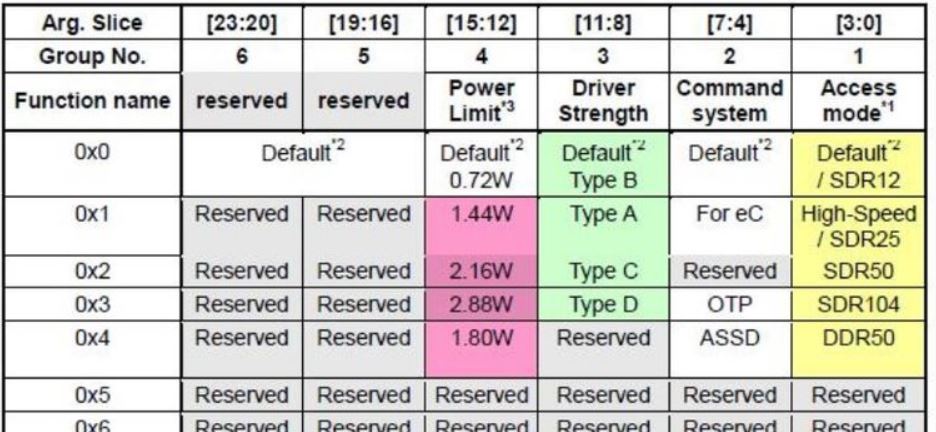
- CMD6.JPG (85.48 KiB) Viewed 813 times
The gpio settings must be the highest speed.
I would follow the voltage settings and CMD6 as well, even 50MHz speed is max for 3.3V signalling. The High Speed mode also sets the i/o of the sdcard to a faster setting. Moreover, it seems the 24MHz is high speed already (SDR25).
http://bunniefoo.com/bunnie/sdcard-30c3-pub.pdf
surprisingly u could actually get those nand flash & even some proprietary programmers on ebay
http://www.ebay.com/sch/i.html?_from=R4 … +&_sacat=0
Max speed – you can set here is 50MHz, as the 25 and 50 are the only supported with 3.3V signalling (we do not have 1.8V signalling with stm32f407).
Power – it is the max power the card may take out of the socket – 0.36W – 2.88Watt, basically it is the current taken from the sdcard’s Vcc source, measured at 3.6V. The SD Spec says the speeds 50MHz and above may require higher max power settings to be set (default for our typical cards is 0.36W/0.72W =100mA/200mA).
Driver strength – the driver strength is applicable for 1.8V signalling only.
Max speed – you can set here is 50MHz, as the 25 and 50 are the only supported with 3.3V signalling (we do not have 1.8V signalling with stm32f407).
Power – it is the max power the card may take out of the socket – 0.36W – 2.88Watt, basically it is the current taken from the sdcard’s Vcc source, measured at 3.6V. The SD Spec says the speeds 50MHz and above may require higher max power settings to be set (default for our typical cards is 0.36W/0.72W =100mA/200mA).
Driver strength – the driver strength is applicable for 1.8V signalling only.
My activity during SPI test with SD cards showed that the results are much more stable if you use a separate 5V power supply for the board, not the one from USB host. Or, you connect to a USB hub supplied by an external adapter. Feeding with external 3.3V (200mA) directly can also improve stability.
that would still be ok.
but if the crc errors result in data loss, something is wrong in the protocol / algorithm perhaps.
crc errors can happen if either the sd card is ‘too slow’ or that stm32 gets interrupted while some data has overrun the buffer. there could be stalls between interrupts. and issue is that detailed specs of ‘high speed’ sdio is apparently not publicly published. hence, we can only make do and make a best guess based on available info and the HAL implementation
in terms of command timeout, it could perhaps mean that the app need to ‘ping’ the card periodically perhaps? or perhaps do a check if the card is idle and if needed restart initialization
Use a freshly formatted SD for best performance.

Type any character to start
*************************************************

Opening the read file..

Opening the write file..

Reading, Writing and calculating CRC of In file...

State value (HAL_SD_STATE...): 1

Errorcode value (HAL_SD_ERROR...): 0

R1 value: 101100000000

HAL Return value (HAL_...): 0

C:\Users\Victor\Documents\Arduino\Hardware\STM32GENERIC\STM32\libraries\SDIO\src\SDIO.cpp

168

readBlocks

Timeout on Read, over 6400ms
Type any character to start
State value (HAL_SD_STATE...): 1

Errorcode value (HAL_SD_ERROR...): 4

R1 value: 100100000000

HAL Return value (HAL_...): 1

C:\Users\Victor\Documents\Arduino\Hardware\STM32GENERIC\STM32\libraries\SDIO\src\SDIO.cpp

158

readBlocks

error: opening test_out.bin for delete failed
Use a freshly formatted SD for best performance.

Type any character to start
*************************************************

Opening the read file..

Opening the write file..

Reading and Writing..

State value (HAL_SD_STATE...): 1

Errorcode value (HAL_SD_ERROR...): 0

R1 value: 101100000000

HAL Return value (HAL_...): 0

C:\Users\pito\MyCode\Arduino\hardware\Arduino_STM32\STM32DE\libraries\SDIO\src\SDIO.cpp

199

readBlocks

Timeout on Read, over 12800ms
Use a freshly formatted SD for best performance.

Type any character to start
State value (HAL_SD_STATE...): 1

Errorcode value (HAL_SD_ERROR...): 2

R1 value: 100100000000

HAL Return value (HAL_...): 0

C:\Users\pito\MyCode\Arduino\hardware\Arduino_STM32\STM32DE\libraries\SDIO\src\SDIO.cpp

199

readBlocks

Timeout on Read, over 200ms

Invalid format, reformat SD.
#define sdRdTimeout 2000

#define sdWrTimeout 5000

#define sdBsyTimeout 5000

#define sdErTimeout 2500

#define sd_timeout 2500 // timeout in ms in the new HAL APIUse a freshly formatted SD for best performance.
Type any character to start
*************************************************
Opening the read file..
Opening the write file..
Reading and Writing..
*************************************************
Done in 47545 msecs
*************************************************
Running CRC calculations...
File in CRC: 22483A52
File out CRC: 22483A52
*************************************************
Done in 68002 msecs
GPIO_InitTypeDef GPIO_InitStruct;
GPIO_InitStruct.Pin = pin;
GPIO_InitStruct.Mode = mode;
GPIO_InitStruct.Pull = pull;
GPIO_InitStruct.Speed = GPIO_SPEED_FREQ_MEDIUM; //GPIO_SPEED_FREQ_VERY_HIGH; <<<<<<<<<<< THE PROBLEM
GPIO_InitStruct.Alternate = stm32AfGet(list, size, instance, port, pin);
HAL_GPIO_Init(port, &GPIO_InitStruct);File size 5 MB
Buffer size 65536 bytes
Starting write test, please wait.
write speed and latency
speed,max,min,avg
KB/Sec,usec,usec,usec
10574.81,27066,5642,6140
10574.81,21555,5642,6140
Starting read test, please wait.
read speed and latency
speed,max,min,avg
KB/Sec,usec,usec,usec
14030.24,6463,4629,4671
14069.88,5345,4627,4655
Done
Type any character to start
Use a freshly formatted SD for best performance.

Type any character to start
*************************************************

Opening the read file..

Opening the write file..

Reading and Writing..

*************************************************

Done in 47545 msecs

*************************************************

Running CRC calculations...

File in CRC:  22483A52

File out CRC: 22483A52

*************************************************

Done in 68002 msecs
Yes, I did, see my above post about the slew rate.
^^^ btw is GPIO_SPEED_FREQ_MEDIUM the speed that’s working to use with the current SDIO driver?
^^^ btw is GPIO_SPEED_FREQ_MEDIUM the speed that’s working to use with the current SDIO driver?
Given that in current master the SDIO does not even compile, I would be happy to pull the current state. And create a SdFat/src/SdCard/SdioSTM32.cpp, so that the current STM32SdFatSdio.h can be deleted from everywhere, and I will make sure that the included SdFat will compile whether the chip has SDIO or not.
(BTW there is no need to create different code for F1, as I think that F1 HAL will also be updated to new style SDIO)
I do not know whether the slew rate is the only cause of the issue. When browsing sdio stuff with F4 you may see the most recommended setting is the MEDIUM. And that is the only setting which works with Samsung at 24-33MHz here.
The clocks above 33MHz do not work here either, so still it might be a different issue there as well..
http://www.stm32duino.com/viewtopic.php … 160#p26942
I do not know whether the slew rate is the only cause of the issue. When browsing sdio stuff with F4 you may see the most recommended setting is the MEDIUM. And that is the only setting which works with Samsung at 24-33MHz here.
The clocks above 33MHz do not work here either, so still it might be a different issue there as well..
File size 5 MB

Buffer size 65536 bytes

Starting write test, please wait.
write speed and latency

speed,max,min,avg

KB/Sec,usec,usec,usec

10376.53,27872,5529,6249

10851.28,17714,5529,5971
Starting read test, please wait.
read speed and latency

speed,max,min,avg

KB/Sec,usec,usec,usec

14395.19,6292,4515,4557

14395.19,5229,4515,4543
Done

Type any character to start
Use a freshly formatted SD for best performance..

*************************************************

Opening the read file..

Opening the write file..

Reading and Writing..

*************************************************

Done in 493254 msecs

*************************************************

Running CRC calculations...

File in CRC:  6172C89

File out CRC: 6172C89

*************************************************

Done in 715025 msecsanother – for us plodders with 8MHz and/or 25MHz boards, any chance of a bullet proof slower/much slower set of files ?
some of us don’t have the go faster stripes, just your basic blue cz ministm32 f103vet/zet, black 407vet/zet/zgt 
srp
1. issue the CMD6 with the argument 0x80000001
SDMMC_CmdSwitchFunction(SDIO, 0x80000001);I spent last night messing with following issue – Black F407ZET with 512kB External Sram, Heap in the External Sram, SdCard via SDIO, SdFat, basic frequencies.
The “mbmp” allocated in the Heap via malloc(), allocation went fine.
This does not work, it hangs inside the write:
if (myFile.write(mbmp.data, mbmp.size) != mbmp.size) {

Serial.println(F("### Error writing the file.."));

return 1;

}
uint8_t SDIOClass::writeBlocks(uint32_t block, const uint8_t* src, size_t nb) {

if (((uint32_t)src & 0x3) !=0){

// Serial.println("### Not aligned src in SDIO.cpp line 221");  // Added by Pito

while (1); //Hang here, src was not aligned to word, this is a problem

}
Changed gpio skew speed to medium. Fixed SdFat, examples etc… (unrelated: F407 SPI is now on PA5/PA6/PA7)
malloc is alignign to 8, so probably the data in mbmp struct is not the first member. (Can you print the adress of mbmp, and show the structure of mbmp)
typedef struct tagBitmap {

size_t width;

size_t height;

size_t size;

unsigned char *data;

} Bitmap;is this something similar ?
my syntax is all wrong, i read about it awhile back and thought it might be useful ( how?)
void fred ( int a=0, int b=1, int c=2);
fred ( 2,3,4);
fred ( c=5);
fred ( b=2, 5);
Bitmap mbmp __attribute__((aligned(4)));It could be the myFile.write() or STM32SdFatSdio.h supplies wrong params to the SDIO driver.
The block=20289, src=0x680001d2, nb=63 .. that is weird, isn’t it?
Anyhow when not aligned we can just do a regular write instead of dma write.
http://www.stm32duino.com/viewtopic.php … 140#p22415
 Writing the .bmp to SDcard..

### Not aligned SDIO.cpp writeBlocks line 221  20289 680001D2 63

### Not aligned SDIO.cpp writeBlocks line 221  20352 68007FD2 64

### Not aligned SDIO.cpp writeBlocks line 221  20416 6800FFD2 64

### Not aligned SDIO.cpp writeBlocks line 221  20480 68017FD2 64

### Not aligned SDIO.cpp writeBlocks line 221  20544 6801FFD2 64

### Not aligned SDIO.cpp writeBlocks line 221  20608 68027FD2 64

### Not aligned SDIO.cpp writeBlocks line 221  20672 6802FFD2 64

### Not aligned SDIO.cpp writeBlocks line 221  20736 68037FD2 64

### Not aligned SDIO.cpp writeBlocks line 221  20800 6803FFD2 64

### Not aligned SDIO.cpp writeBlocks line 221  20864 68047FD2 64

### Not aligned SDIO.cpp writeBlocks line 221  20928 6804FFD2 64

### Not aligned SDIO.cpp writeBlocks line 221  20992 68057FD2 64

### Not aligned SDIO.cpp writeBlocks line 221  21056 6805FFD2 64

### Not aligned SDIO.cpp writeBlocks line 221  21120 68067FD2 64

### Not aligned SDIO.cpp writeBlocks line 221  21184 6806FFD2 41

Done..int FatFile::write(const void* buf, size_t nbyte) {
// convert void* to uint8_t* - must be before goto statements
const uint8_t* src = reinterpret_cast<const uint8_t*>(buf);
cache_t* pc;
uint8_t cacheOption;
// number of bytes left to write - must be before goto statements
size_t nToWrite = nbyte;
size_t n; Writing the .bmp to SDcard..
### Aligned SDIO.cpp writeBlocks line 221 20288 68000008 64
### Aligned SDIO.cpp writeBlocks line 221 20352 68008008 64
### Aligned SDIO.cpp writeBlocks line 221 20416 68010008 64
### Aligned SDIO.cpp writeBlocks line 221 20480 68018008 64
### Aligned SDIO.cpp writeBlocks line 221 20544 68020008 64
### Aligned SDIO.cpp writeBlocks line 221 20608 68028008 64
### Aligned SDIO.cpp writeBlocks line 221 20672 68030008 64
### Aligned SDIO.cpp writeBlocks line 221 20736 68038008 64
### Aligned SDIO.cpp writeBlocks line 221 20800 68040008 64
### Aligned SDIO.cpp writeBlocks line 221 20864 68048008 64
### Aligned SDIO.cpp writeBlocks line 221 20928 68050008 64
### Aligned SDIO.cpp writeBlocks line 221 20992 68058008 64
### Aligned SDIO.cpp writeBlocks line 221 21056 68060008 64
### Aligned SDIO.cpp writeBlocks line 221 21120 68068008 64
### Aligned SDIO.cpp writeBlocks line 221 21184 68070008 41
Close file:
### Aligned SDIO.cpp writeBlocks line 221 21225 200000F8 1
### Aligned SDIO.cpp writeBlocks line 221 16384 200000F8 1
### Aligned SDIO.cpp writeBlocks line 221 8790 20000304 1
### Aligned SDIO.cpp writeBlocks line 221 12587 20000304 1
Done..uint8_t SDIOClass::readBlocks(uint32_t block, uint8_t* dst, size_t nb) {
if (((uint32_t)dst & 0x3U) != 0){
// while (1); //Hang here, dst was not aligned to word, this is a problem
_useDMA = false;
} else {
_useDMA = true;
}
As you can see, just like with SPI, blocking SDIO DMA is not that faster than blocking SDIO non-DMA, so I would not worry about performance.
at Seahorse Valley
UPDATE: with a Rainbow ColorWheel
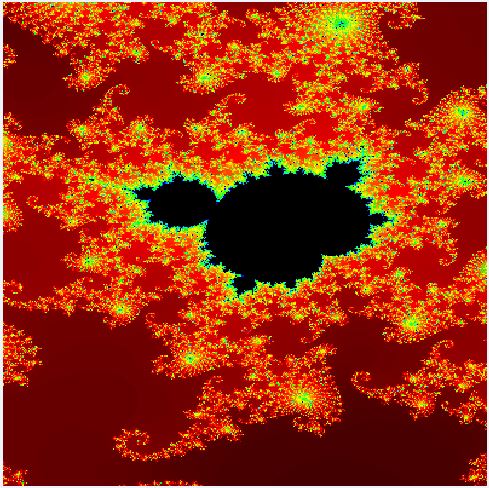
- Mandel 400x400x1024col SingleP FPU 7secs.JPG (102.26 KiB) Viewed 273 times
Anyhow when not aligned we can just do a regular write instead of dma write.
 Opening the SDcard's bmp file..

State value (HAL_SD_STATE...): 1

Errorcode value (HAL_SD_ERROR...): 80000000

R1 value: 0

HAL Return value (HAL_...): 1

C:\Users\pito\MyCode\Arduino\hardware\Arduino_STM32\STM32DE\libraries\SDIO\src\SDIO.cpp

121

begin

### Error opening the SDcard's file..It seems to be stuck in:
HAL_SD_Init -> HAL_SD_InitCard -> SD_PowerON -> SDMMC_CmdGoIdleState -> SDMMC_GetCmdError
Basically it sends CMD0, and then timeouts there, waiting for SDIO_FLAG_CMDSENT (The problem is already there in HAL_SD_Init, and not in HAL_SD_ConfigWideBusOperation)
while ( (SDIO->STA&SDIO_STA_CMDACT) ) ; // wait for actual command to be sentIf you have SdFat, can you just use the bench example?
If I put `HAL_Delay(1);` between `SDIO_PowerState_ON` and `__HAL_SD_ENABLE`, I get way better results (seems to always initialize): https://github.com/danieleff/STM32GENER … _sd.c#L379
It writes byte X and the first 511 bytes from the block into the cache and onto the card, then it starts to write the block via DMA from block’s address 511 (misaligned). There is now the fix in SDIO.cpp such you will not see an error, it will write without DMA instead. You have to uncomment the while(1) there such it Hangs with misaligned (see above).
I will prepare the Mandelbrot demo soon.
@Daniel: I’ve done some reading on “sdio problem stm32f407” and found a lot of desperate topics at community.st.com. Frankly, I am quite surprised our SDIO works so well
I’ve seen somewhere in that forum they inserted delay(10) somewhere in init and then before CMD55 and before CMD10, as I can remember. I have to find that discussion again
It writes byte X and the first 511 bytes from the block into the cache and onto the card, then it starts to write the block via DMA from block’s address 511 (misaligned).
State value (HAL_SD_STATE...): 1

Errorcode value (HAL_SD_ERROR...): 10

R1 value: 100100000000

HAL Return value (HAL_...): 1

C:\Users\pito\MyCode\Arduino\hardware\Arduino_STM32\STM32DE\libraries\SDIO\src\SDIO.cpp

270

writeBlocks

