
I’ve finally succeed in installing Sloeber on windows and made running the bluepill board fine though this was not the case at the first time.
Unfortunatly I’m not sure what fixed my building compilation problem. In fact in the project folder on sloeber I got an error in the Release folder like “sloeber. ino.ccp.o failed”. It could have been what Victor stated that I had to add arduino library in the arduino/preference…
So here my wish is to make sloeber works on my linux lunbutu 32bit old laptop to being able to enjoy the bluepill implementation.
Unfortunatly here again I got problemes but this time can’t fix it just by adding libraries and platforms (hardware) in the arduino/preferences.
I can’t make it build. Still the same error like ” sloeber. ino.ccp.o failed”:
Starting C++ compile

"/home/lewis/sloeber//arduinoPlugin/packages/arduino/tools/arm-none-eabi-gcc/4.8.3-2014q1/bin/arm-none-eabi-g++" -c -g -Os -Wall -Wextra -DDEBUG_LEVEL=DEBUG_ALL -std=gnu++11 -ffunction-sections -fdata-sections -nostdlib --param max-inline-insns-single=500 -fno-rtti -fno-exceptions -DBOARD_generic_stm32f103c -DVECT_TAB_ADDR=0x8002000 -DERROR_LED_PORT=GPIOC -DERROR_LED_PIN=13 -mcpu=cortex-m3 -DF_CPU=72000000L -DARDUINO=10802 -DARDUINO_GENERIC_STM32F103C -DARDUINO_ARCH_STM32F1 -DSERIAL_USB -DGENERIC_BOOTLOADER -DMCU_STM32F103C8 -mthumb -march=armv7-m -D__STM32F1__ -DMCU_STM32F103C8 -mthumb -march=armv7-m -D__STM32F1__ "-I/home/lewis/sloeber//arduinoPlugin/packages/stm32duino/hardware/STM32F1/2018.3.18/system/libmaple" "-I/home/lewis/sloeber//arduinoPlugin/packages/stm32duino/hardware/STM32F1/2018.3.18/system/libmaple/include" "-I/home/lewis/sloeber//arduinoPlugin/packages/stm32duino/hardware/STM32F1/2018.3.18/system/libmaple/stm32f1/include"                              "-I/home/lewis/sloeber//arduinoPlugin/packages/stm32duino/hardware/STM32F1/2018.3.18/system/libmaple/usb/stm32f1" "-I/home/lewis/sloeber//arduinoPlugin/packages/stm32duino/hardware/STM32F1/2018.3.18/system/libmaple/usb/usb_lib"  -I"/home/lewis/sloeber/arduinoPlugin/packages/stm32duino/hardware/STM32F1/2018.3.18/cores/maple" -I"/home/lewis/sloeber/arduinoPlugin/packages/stm32duino/hardware/STM32F1/2018.3.18/variants/generic_stm32f103c" -MMD -MP -MF"sloeber.ino.cpp.d" -MT"sloeber.ino.cpp.o" -D__IN_ECLIPSE__=1 -x c++ "../sloeber.ino.cpp"  -o  "sloeber.ino.cpp.o"

/bin/sh: 1: /home/lewis/sloeber//arduinoPlugin/packages/arduino/tools/arm-none-eabi-gcc/4.8.3-2014q1/bin/arm-none-eabi-g++: not found

subdir.mk:31

: recipe for target 'sloeber.ino.cpp.o' failed

make: *** [sloeber.ino.cpp.o] Error 127
And there you probably missed the step to install the package for SAM boards (Cortex-M3).
[lewiss66 – Mon Mar 26, 2018 7:30 am] –
…
So here my wish is to make sloeber works on my linux lunbutu 32bit old laptop to being able to enjoy the bluepill implementation.
Unfortunatly here again I got problemes but this time can’t fix it just by adding libraries and platforms (hardware) in the arduino/preferences.
I can’t make it build. Still the same error like ” sloeber. ino.ccp.o failed”:
…
Please reference http://stm32duino.com/viewtopic.php?f=41&t=2584
Sloeber is not supported in the forum. You can go off-topic to dialog with other members but resources are just too thin to support beyond the current version of ArduinoIDE on Windows, Linux, and OS-X.
If one of our existing members is up to the quasi-support of Slober, please create a WiKi section for Q/A of same.
Ray
Global Moderator
Here I got the arduino path : /home/lewis/Arduino/librairies but if I look in it there is only one file : readme.txt.
hmm
Where can I find the arduino Ide working environnement in the arduino IDE menu itself?
It seems I need to match it either to arduino IDE and sloeber as well.
[mrburnette – Mon Mar 26, 2018 2:14 pm] –[lewiss66 – Mon Mar 26, 2018 7:30 am] –
…
So here my wish is to make sloeber works on my linux lunbutu 32bit old laptop to being able to enjoy the bluepill implementation.
Unfortunatly here again I got problemes but this time can’t fix it just by adding libraries and platforms (hardware) in the arduino/preferences.
I can’t make it build. Still the same error like ” sloeber. ino.ccp.o failed”:
…Please reference http://stm32duino.com/viewtopic.php?f=41&t=2584
Sloeber is not supported in the forum. You can go off-topic to dialog with other members but resources are just too thin to support beyond the current version of ArduinoIDE on Windows, Linux, and OS-X.
If one of our existing members is up to the quasi-support of Slober, please create a WiKi section for Q/A of same.
Ray
Global Moderator
Ok
Here is one
viewtopic.php?f=41&t=655&hilit=sloeber&start=40#p25805
Search in this forum for “Sloeber libmaple” or “Sloeber Jantje”.
I use Sloeber 4.0 with Win7, not with linux. Me and a few users published a lot of info on a few issues, it seems it works nice today.
“Sloeber” is nothing esoteric per se – it is an Arduino plugin for Eclipse. There are other IDEs discussed here as well, and those are not suggested by GM to be put off topic.. 
[Pito – Mon Mar 26, 2018 6:28 pm] –
…
“Sloeber” is nothing esoteric per se – it is an Arduino plugin for Eclipse. There are other IDEs discussed here as well, and are not suggested by GM to be put off topic..
Agreed. Users that stray from the “-duino” are free to post their success or post inquiries as long as they do not expect support. It is an off-topic kind of area, IMO, but I do believe in free speech.
Ray
An advanced user knowing Eclipse who wants a much better environment with a debugger may go, for example, with Jantje’s Eclipse plugin (aka Sloeber). There is the version 4.2 out there (I still work with 4.0, btw) claiming to support more than 400 boards out of the box.
I mess with Win7, using linux only when necessary (in VBox). Sloeber on linux may induce more issues, however..
PS: stm32duino’s wiki on Eclipse and Sloeber:
http://wiki.stm32duino.com/index.php?ti … th_Eclipse
Needs some refresh however..
As steve wrote above you need first to install Arduino IDE (the latest, do not use spaces in the path). In the Arduino IDE you have to import an CortexM board – that installs the arm-..gcc compiler). Also you have to download the Roger’s Arduino STM32 core files. For how to install the Arduino IDE with stm32 see the stm32duino wiki/guide on install.
Then you have to install Sloeber (you will get Eclipse with the Arduino IDE plugin installed). Try with the latest 4.2. Try with 4.1 first.
You have to install a CortexM board in order to get the arm’s gcc installed as well.
Then you have to set (while in Sloeber) the paths to your Arduino IDE.
In Project->Properties->Platform Folder you choose the stm32’s folder with Roger’s F1libmaple. By selecting that you get more selections to choose (Sloeber simply imports the stm32duino’s config files like boards.txt etc., the path to the arm-eabi-gcc is hard-coded in platform. txt).
..STM32F1\variants\generic_stm32f103c" -MMD -MP -MF"sloeber.ino.cpp.d" -MT"sloeber.ino.cpp.o" -D__IN_ECLIPSE__=1 -x c++ "..\sloeber.ino.cpp"  -o  "sloeber.ino.cpp.o"

The system cannot find the path specified.

subdir.mk:31: recipe for target 'sloeber.ino.cpp.o' failed

make: *** [sloeber.ino.cpp.o] Error 1In Sloeber 4.2 I had installed the OTTO Star F4 board (from the Window->Preferences->Arduino->Platforms and Boards->Arduino->Arduino STM32F4 boards->1.0.1).
That had installed the arm gcc compiler into the Sloeber 4.2 into the folder:
..\sloeber42\/arduinoPlugin/packages/arduino/tools/arm-none-eabi-gcc/4.8.3-2014q1/bin..Still talking about my problem uploading bluepill sketch on sloeber in Linux:
I think I’ve done about everything stated above and still remanes that the arm-none-eabi-gcc folder doesn’t show up in the “sloeber/arduinoPlugin/packages/arduino/tool” directory.
I don’t know if it’s related my arduinoIDE setup since my blue pill refuse to upload correctly in the arduinoIDE.
showing the error:
user/Arduino/hardware/Arduino_STM32-master/tools/linux/dfu-util/dfu-util: cannot execute binary file: Exec format error
…(which Has been reported on this thread : viewtopic.php?f=28&t=3344)
I decided to reinstall the arduinoIDE but it didn’t help much.
Though I can upload a sketch with the STlink upload method on arduinoIDE but can’t do that on sloeber.
There might be a different way to install this arm-none-eabi-gcc folder in sloeber.
Just for information sloeber V4.2 on Windows 10 worked for me with the Bluepill board without having the need to installed the OTTO Star F4 board neither the SAM boards!
Strange!
Be careful with compiling the source, as it might be a source for BluePill, but you actually compile it for the atmega328 for UNO (when you do not set the stm32F1 platform and then do not click Apply and Close in the project properties)..
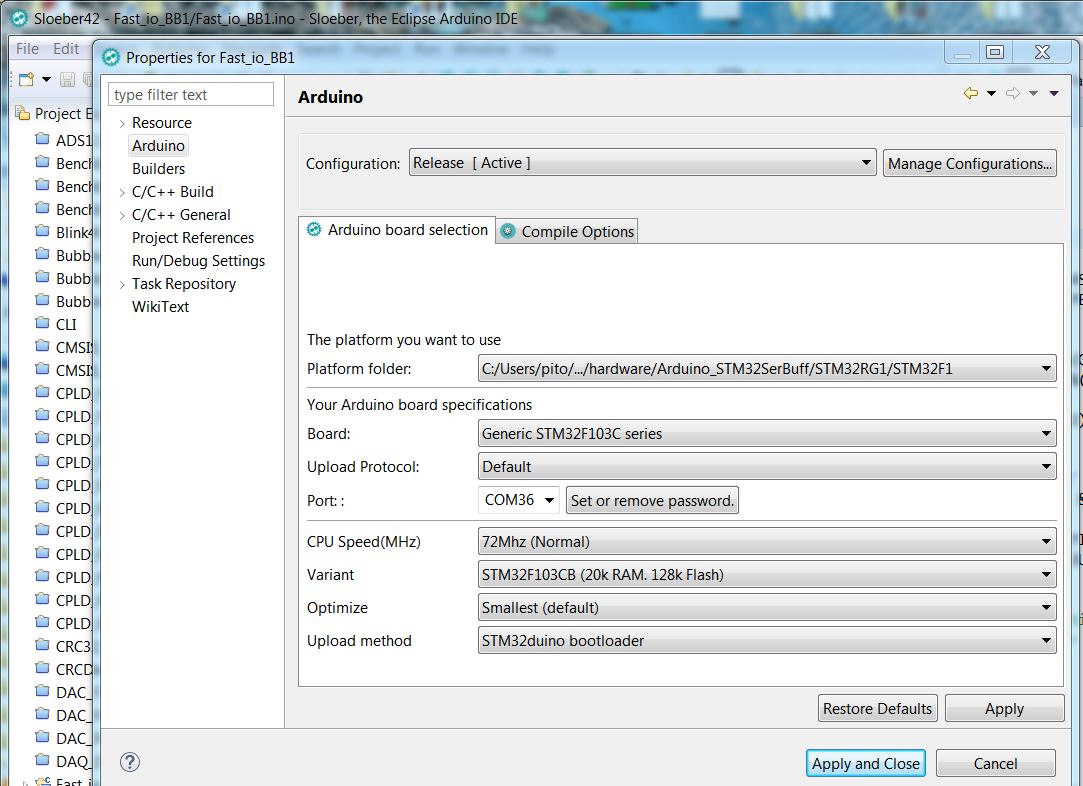
- F1 settings.JPG (146.32 KiB) Viewed 369 times
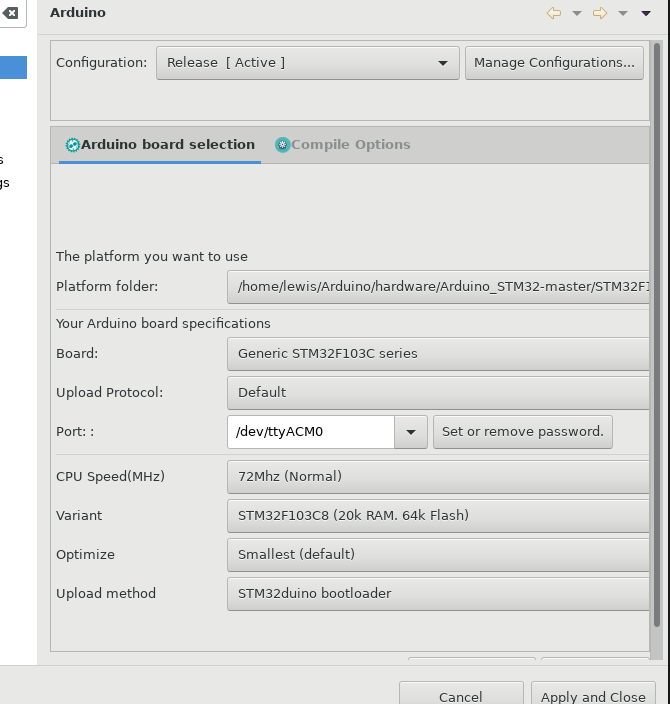
- Selection_004.png (52.53 KiB) Viewed 351 times
for the bluepill (being the same path used by the arduinoIDE for the sketchs):
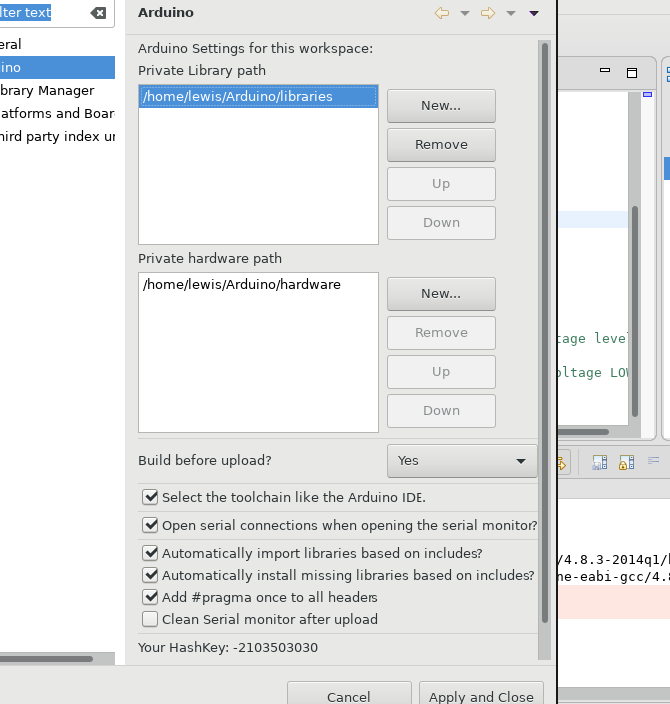
- Selection_006.png (56.13 KiB) Viewed 351 times
Under directory “user/sloeber/arduinoPlugin/” removed the folders “Download” and “arm-none-eabi-gcc”. In sloeber deinstalled “Arduino SAM Boards (32-bits ARM Cortex-M3)” platform and reinstall it. But then again I got the error “Problem Occured” windows saying:
‘Adopting Arduino Board Platforms’ has encountered a problem. Installing Aduino Board PLatfroms.
Then I reopened Sloeber but still problem for the project build. Checked the arm-none-eabi-gcc directory which was not present!
So then I got back to the Arduino/preferences/ platforms and press again apply & close. and now I could see the folder arm-none-eabi-gcc in the ardhuino-plugin directory!
Project Build is working now!
For reference to sloeber Github here is the link:
https://github.com/Sloeber/arduino-ecli … -container
user/Arduino/hardware/Arduino_STM32-master/tools/linux/dfu-util/dfu-util: cannot execute binary file: Exec format erro]
But that’s on the other thread: viewtopic.php?f=41&t=3408&start=10
I guess it’s the end of the storry for me.
Special thanks to Pito and steevestrong and victor as well!
