
I bought an STM32F103CBT6 board from aliexpress because I found it on a quick search to be Arduino compatible.
As it arrived I followed all the steups on Rogers instrutions in my Win7 x64 PC.
After that was done I chose in the Arduino IDE the board “Generic STM32F103C series”, as variant “STM32F103CB”, changed the CPU frequency and the upload method for all cases.
I tried to Upload just with an USB-cable (no FTDI Adapter involved because some Instructions I found with that didnt work)
I always got the Error:
============================
Failed to init device.
stm32flash 0.4
http://stm32flash.googlecode.com/
Using Parser : Raw BINARY
Interface serial_w32: 230400 8E1
============================
As Port I had chosen something like “Com32 (Maple Serial)” – I’m not sure what it was exactly called.
After I found someone with a similar issue and it was given the advice to select “Maple (Rev 3)” as board I tried that.
It compiled and loaded the sketch (blink) to the board and it worked.
BUT: Since then the Port (Com32 (Maple Serial) ) is gone and I have no option to do any serial communication to the board via the Serial Monitor of the Arduino IDE.
I also found this “device” (something with maple or DFU) in the hardware manager of my Windows PC.
Now I cant see anything anymore.
I can still upload sketches, but there is NO Port selected in the IDE.
It seems to chose a “hidden” Port that I cant find and not communicate with.
If I upload another blink sketch, I get:
============================
maple_loader v0.1
Resetting to bootloader via DTR pulse
Reset via USB Serial Failed! Did you select the right serial port?
Searching for DFU device [1EAF:0003]…
Assuming the board is in perpetual bootloader mode and continuing to attempt dfu programming…
============================
It stops here and I have to manually push the reboot button on the board. Then it keeps going on with:
============================
Found it!
Opening USB Device 0x1eaf:0x0003…
Found Runtime: [0x1eaf:0x0003] devnum=1, cfg=0, intf=0, alt=1, name=”DFU Program FLASH 0x08005000″
Setting Configuration 1…
Claiming USB DFU Interface…
Setting Alternate Setting …
Determining device status: state = dfuIDLE, status = 0
dfuIDLE, continuing
Transfer Size = 0x0400
bytes_per_hash=258
Starting download: [##################################################] finished!
error resetting after download: usb_reset: could not reset device, win error: Das System kann die angegebene Datei nicht finden.
state(8) = dfuMANIFEST-WAIT-RESET, status(0) = No error condition is present
Done!
Resetting USB to switch back to runtime mode
============================
Can you tell me what I am doing wrong and what I could do to get also the serial communication working for debugging stuff and so on?
Thanks a lot!
This worked with 72MHz and the Original Bootloader to show the COM Port (COM32 (Maple Mini) again.
What is the 48MHz (Slow – with USB) and the Booloader for?
I flashed the 72MHz also with USB.
After flashing this, I can not flash the Bootloader 2.0 sketch.
I get this message:
===================================
maple_loader v0.1
Resetting to bootloader via DTR pulse
Searching for DFU device [1EAF:0003]…
Found it!
Cannot set alternate interface: usb_set_altinterface: could not set alt interface 0/2: win error: Es sind keine Daten mehr verfügbar.
Opening USB Device 0x1eaf:0x0003…
Found Runtime: [0x1eaf:0x0003] devnum=1, cfg=0, intf=0, alt=2, name=”UNDEFINED”
Setting Configuration 1…
Claiming USB DFU Interface…
Setting Alternate Setting …
===================================
So simply upload the Bootloader by choosing it at the IDE doesnt work?
Should I then use this Sketch and upload it via the “Original” bootloader and then let it “update” using the Serial commands?
Or will I destroy the board then 

I gave it a try and ended with:
**************************************************************************************************
*** This sketch will update the bootloader in the Maple Mini to the STM32duino bootloader ****
*** With this you can use up to 120KB of Flash and 20KB of RAM for a Sketch ****
*** Uploading is also considerably faster on OSX (and possibly faster on Linux) ****
*** ****
*** Only use with Maple mini boards ****
*** ****
*** WARNING. If the update fails your Maple mini may not have a functional bootloder. ****
*** ****
*** YOU UPDATE AT YOUR OWN RISK ****
*** ****
*** ****
*** ****
*** ****
**************************************************************************************************
*** ****
*** ****
*** To confirm and proceed, enter Y ****
*** ****
*** ****
WARNING, Update Failed!! The sketch will restart in 3 seconds and you can try to flash again
any ideas?
But, the sketch always worked for me. But perhaps some vendors started to lock the bootloader flash pages.
It even better should have been “setup of Maple Mini”.
I tried the Sketch a couple of times and always get the same error.
I also the method posted on this site, but the stm32flash.exe just puts out a cmd window for 100ms and is not working on my PC.
I also downloaded “STM’s own Serial uploader” that Roger liked on that site.
I had no idea how to connect it so I connected it firstly via USB and tried with 115200 baud and even parity but the flash_loader_demo_v2.8.0 gave me a “No response from target” message.
Then I put the board into serial bootloader mode, by pressing and hold reset and but=32, release reset, and then release but=32.
Same message from the Tool.
I then connected everythink with a USB<=>Serial bridge like in the blog I posted.
On both, the normal mode and the serial bootloader mode I get “no response from target” messages.
Is there anywhere a good guide how to flash the bootloader 2.0 ?
Note, that on the maple mini, beside connecting BOOT0 (PB8) to “high”, you have to connect BOOT1 pin (PB2) to GND in order to work.
See here the maple mini pinout.
Additionally, you need to open the CMD window (to execute the flash executable) as admin.
But, the sketch always worked for me. But perhaps some vendors started to lock the bootloader flash pages.
I gave it a try and ended with:
**************************************************************************************************
*** This sketch will update the bootloader in the Maple Mini to the STM32duino bootloader ****
*** With this you can use up to 120KB of Flash and 20KB of RAM for a Sketch ****
*** Uploading is also considerably faster on OSX (and possibly faster on Linux) ****
*** ****
*** Only use with Maple mini boards ****
*** ****
*** WARNING. If the update fails your Maple mini may not have a functional bootloder. ****
*** ****
*** YOU UPDATE AT YOUR OWN RISK ****
*** ****
*** ****
*** ****
*** ****
**************************************************************************************************
*** ****
*** ****
*** To confirm and proceed, enter Y ****
*** ****
*** ****
WARNING, Update Failed!! The sketch will restart in 3 seconds and you can try to flash again
any ideas?
I wonder how easy it would be to add an unlock instruction to the sketch (Roger?!)
I didn’t write the updater sketch. I think perhaps @victor_pv wrote it.
I’d have to add this to the bottom of a very long To Do list, so in reality I doubt I’d ever have time to do make that change
After you get the normal error, it will give you an option to clear the option bytes, which clears the write protection.
After that, you need to reboot and run it again, and the second time should be able to program the bootloader.
/**

*

* Maple Mini bootloader updater sketch.

* Based on sketch from Gregwar for Robotis OpenCM9.04, which is based on Maple bootloader code.

*

* WARNING WARNING WARNING WARNING WARNING WARNING WARNING WARNING WARNING WARNING

* WARNING                                                                 WARNING

* WARNING  This comes with NO WARRANTY, you use it at your own risk       WARNING

* WARNING                                                                 WARNING

* WARNING  Please read this warning text and the instructions below       WARNING

* WARNING                                                                 WARNING

* WARNING  Running this sketch will erase your bootloader replace it      WARNING

* WARNING  with the new STM32duino bootloader                             WARNING

* WARNING                                                                 WARNING

* WARNING  Only use this sketch with Maple mini boards.                   WARNING

* WARNING                                                                 WARNING

* WARNING  Note. If your bootloader does get messed up, it is possible    WARNING

* WARNING  to reflash using an external USB to Serial adaptor or another  WARNING

* WARNING  Arduino board (to act as a USB to Serial device)               WARNING

* WARNING                                                                 WARNING

* WARNING  For more information see www.stm32duino.com                    WARNING

* WARNING                                                                 WARNING

* WARNING WARNING WARNING WARNING WARNING WARNING WARNING WARNING WARNING WARNING

*

*

* Instructions.

*

* Upload this sketch onto your Maple mini.

*

* After upload the LED on the board should start to flash slowly (on for 1 sec off for 1 sec)

*

* Open the Serial Monitor and follow the on screen instructions

*

* If the version of the bootloader that is contained in this sketch is already installed,

* a message is displayed and you will not be prompted to update.

*

* If prompted to update, press Y to agree and reflash the bootloader

*

* After the update has finished, the sketch will wait for you to manually reset the board

* or to upload a new sketch

*

* If you just reset the board. This sketch will run again, as it will not be touched by the bootloader update

* However it will display the message to indicate that this bootloader has already been installed

*

* For support please register to www.stm32duino.com

*

* Credit goes to Victor PV, Matthis, Ray.

*

* For source code and binaries for the bootloader see

* www.github.com/rogerclarkmelbourne/stm32duino-bootloader

*

* See also www.rogerclark.net

*

*/
// Data of bootloader
const char maple_mini_boot20[]={
0x00,0x50,0x00,0x20,0xf1,0x00,0x00,0x08,0x31,0x01,0x00,0x08,0x31,0x01,0x00,0x08,0x31,0x01,0x00,0x08,0x31,0x01,0x00,0x08,0x31,0x01,0x00,0x08,0x00,0x00,0x00,0x00,0x00
,0x00,0x00,0x00,0x00,0x00,0x00,0x00,0x00,0x00,0x00,0x00,0x31,0x01,0x00,0x08,0x31,0x01,0x00,0x08,0x00,0x00,0x00,0x00,0x31,0x01,0x00,0x08,0x31,0x01,0x00,0x08,0x31
,0x01,0x00,0x08,0x31,0x01,0x00,0x08,0x31,0x01,0x00,0x08,0x31,0x01,0x00,0x08,0x31,0x01,0x00,0x08,0x31,0x01,0x00,0x08,0x31,0x01,0x00,0x08,0x31,0x01,0x00,0x08,0x31
,0x01,0x00,0x08,0x31,0x01,0x00,0x08,0x31,0x01,0x00,0x08,0x31,0x01,0x00,0x08,0x31,0x01,0x00,0x08,0x31,0x01,0x00,0x08,0x31,0x01,0x00,0x08,0x31,0x01,0x00,0x08,0x31
,0x01,0x00,0x08,0x31,0x01,0x00,0x08,0x31,0x01,0x00,0x08,0x31,0x01,0x00,0x08,0xb5,0x04,0x00,0x08,0x31,0x01,0x00,0x08,0x31,0x01,0x00,0x08,0x31,0x01,0x00,0x08,0x31
,0x01,0x00,0x08,0x31,0x01,0x00,0x08,0x31,0x01,0x00,0x08,0x31,0x01,0x00,0x08,0x31,0x01,0x00,0x08,0x31,0x01,0x00,0x08,0x31,0x01,0x00,0x08,0x31,0x01,0x00,0x08,0x31
,0x01,0x00,0x08,0x31,0x01,0x00,0x08,0x31,0x01,0x00,0x08,0x31,0x01,0x00,0x08,0x31,0x01,0x00,0x08,0x31,0x01,0x00,0x08,0x31,0x01,0x00,0x08,0x31,0x01,0x00,0x08,0x31
,0x01,0x00,0x08,0x31,0x01,0x00,0x08,0x31,0x01,0x00,0x08,0x5f,0xf8,0x08,0xf1,0x00,0x21,0x03,0xe0,0x09,0x4b,0x5b,0x58,0x43,0x50,0x04,0x31,0x08,0x48,0x09,0x4b,0x42
,0x18,0x9a,0x42,0xf6,0xd3,0x08,0x4a,0x02,0xe0,0x00,0x23,0x42,0xf8,0x04,0x3b,0x06,0x4b,0x9a,0x42,0xf9,0xd3,0x00,0xf0,0x27,0xfa,0x70,0x47,0x0c,0x19,0x00,0x08,0x00
,0x00,0x00,0x20,0xc8,0x02,0x00,0x20,0xc8,0x02,0x00,0x20,0x0c,0x03,0x00,0x20,0xfe,0xe7,0x03,0x28,0x8c,0xbf,0x02,0x20,0x00,0x20,0x70,0x47,0x03,0x4b,0x1b,0x68,0x9b
,0x7a,0x13,0xb1,0x02,0x4b,0x05,0x22,0x1a,0x60,0x70,0x47,0x04,0x03,0x00,0x20,0x10,0x03,0x00,0x20,0x70,0x47,0x00,0x00,0x01,0x4b,0x04,0x22,0x1a,0x60,0x70,0x47,0x10
,0x03,0x00,0x20,0x10,0xb5,0x00,0xf0,0x6f,0xfc,0x21,0x4b,0x21,0x4a,0x1b,0x68,0x00,0x24,0x12,0x68,0x9c,0x72,0xd2,0x79,0x1f,0x49,0x5a,0x72,0x1f,0x4a,0x0c,0x60,0x13
,0x68,0x20,0x46,0x23,0xf4,0xec,0x43,0x23,0xf0,0x70,0x03,0x43,0xf4,0x00,0x73,0x9b,0xb2,0x13,0x60,0x13,0x68,0x23,0xf4,0xe0,0x43,0x23,0xf0,0x40,0x03,0x9b,0xb2,0x83
,0xf0,0x10,0x03,0x13,0x60,0x0a,0x68,0x15,0x4b,0x92,0xb2,0x13,0x44,0x5b,0x00,0x40,0x22,0x1a,0x60,0x0b,0x68,0x80,0x22,0x9b,0xb2,0x03,0xf1,0x00,0x53,0x03,0xf5,0x40
,0x53,0x5b,0x00,0x1a,0x60,0x00,0xf0,0x2f,0xfe,0x0e,0x4b,0x20,0x46,0x1b,0x68,0x93,0xf8,0x30,0x10,0x00,0xf0,0x58,0xfe,0x20,0x46,0x00,0xf0,0x08,0xfe,0x0a,0x4b,0x01
,0x22,0x20,0x46,0xbd,0xe8,0x10,0x40,0x1a,0x60,0x01,0xf0,0x21,0xbb,0x00,0xbf,0x04,0x03,0x00,0x20,0xb8,0x02,0x00,0x20,0x50,0x5c,0x00,0x40,0x00,0x5c,0x00,0x40,0x04
,0x30,0x00,0x20,0xdc,0x02,0x00,0x20,0x10,0x03,0x00,0x20,0x38,0xb5,0x12,0x4b,0x05,0x46,0x1a,0x68,0x1c,0x46,0x12,0x78,0x02,0xf0,0x7f,0x02,0x21,0x2a,0x19,0xd1,0x00
,0xf0,0xac,0xfc,0xb0,0xb1,0x68,0x1e,0x04,0x28,0x13,0xd8,0xdf,0xe8,0x00,0xf0,0x09,0x05,0x07,0x12,0x03,0x00,0x09,0x4b,0x04,0xe0,0x09,0x4b,0x02,0xe0,0x09,0x4b,0x00
,0xe0,0x09,0x4b,0x22,0x68,0x00,0x24,0x93,0x61,0x54,0x82,0x20,0x46,0x98,0x47,0x20,0x46,0x38,0xbd,0x02,0x20,0x38,0xbd,0x04,0x03,0x00,0x20,0x8d,0x0a,0x00,0x08,0xe5
,0x0a,0x00,0x08,0xa5,0x0a,0x00,0x08,0xbd,0x0a,0x00,0x08,0x01,0x49,0x01,0xf0,0xd3,0xb8,0x00,0xbf,0x44,0x01,0x00,0x20,0x01,0x49,0x01,0xf0,0xcd,0xb8,0x00,0xbf,0xb8
,0x02,0x00,0x20,0x05,0x4b,0x1b,0x68,0x9b,0x78,0x07,0x2b,0x04,0xd8,0x04,0x49,0x01,0xeb,0xc3,0x01,0x01,0xf0,0xc0,0xb8,0x00,0x20,0x70,0x47,0x04,0x03,0x00,0x20,0x94
,0x00,0x00,0x20,0x01,0x49,0x01,0xf0,0xb7,0xb8,0x00,0xbf,0xe0,0x00,0x00,0x20,0x08,0xb5,0x07,0x4b,0x1b,0x68,0x1b,0x78,0x03,0xf0,0x7f,0x03,0x21,0x2b,0x02,0xd1,0x00
,0xf0,0x5c,0xfc,0x08,0xb9,0x02,0x20,0x08,0xbd,0x00,0x20,0x08,0xbd,0x00,0xbf,0x04,0x03,0x00,0x20,0x70,0x47,0x70,0x47,0x70,0x47,0x70,0x47,0x70,0x47,0x70,0x47,0x70
,0x47,0x70,0x47,0x70,0x47,0x00,0x00,0x38,0xb5,0x13,0x4d,0x09,0x20,0x2c,0x68,0x00,0xf0,0x5e,0xfb,0x20,0x40,0x11,0x4c,0x40,0xf0,0x50,0x00,0x28,0x60,0x01,0x22,0x20
,0x46,0x09,0x21,0x00,0xf0,0x9c,0xf9,0x00,0x22,0x20,0x46,0x09,0x21,0x00,0xf0,0x97,0xf9,0x00,0xf0,0x5f,0xfb,0x0a,0x4b,0xc2,0xb2,0x18,0x60,0x09,0x4b,0xc0,0xf3,0x07
,0x20,0x83,0xf8,0x29,0x20,0x83,0xf8,0x2a,0x00,0x07,0x4b,0x5a,0x71,0x98,0x71,0xbd,0xe8,0x38,0x40,0x00,0xf0,0x9a,0xbe,0x04,0x0c,0x01,0x40,0x00,0x0c,0x01,0x40,0xc8
,0x02,0x00,0x20,0xec,0x00,0x00,0x20,0x29,0x01,0x00,0x20,0x04,0x4a,0x13,0x68,0x9b,0xb2,0x43,0xf0,0x0c,0x03,0x13,0x60,0x02,0x4b,0x03,0x22,0x1a,0x60,0x70,0x47,0x40
,0x5c,0x00,0x40,0x10,0x03,0x00,0x20,0x4f,0xf6,0xfb,0x72,0x03,0x4b,0x19,0x68,0x0a,0x40,0x1a,0x60,0x4f,0xf4,0x3f,0x42,0x1a,0x60,0x70,0x47,0x40,0x5c,0x00,0x40,0x10
,0xb5,0x1e,0x4c,0x07,0x28,0x18,0xbf,0x20,0x70,0x23,0x78,0x05,0x2b,0x32,0xd8,0xdf,0xe8,0x03,0xf0,0x03,0x06,0x0a,0x0e,0x16,0x21,0xff,0xf7,0xe5,0xff,0x2a,0xe0,0xff
,0xf7,0xe2,0xff,0x04,0x23,0x27,0xe0,0x02,0x23,0x63,0x70,0x03,0x23,0x23,0xe0,0x63,0x78,0x01,0x3b,0xdb,0xb2,0x63,0x70,0x63,0x78,0xf3,0xb9,0x04,0x22,0x17,0xe0,0x0f
,0x4a,0x13,0x68,0x9b,0xb2,0x43,0xf0,0x10,0x03,0x13,0x60,0x05,0x23,0x23,0x70,0x0a,0x23,0x63,0x70,0x10,0xbd,0x63,0x78,0x01,0x3b,0xdb,0xb2,0x63,0x70,0x63,0x78,0x5b
,0xb9,0x4f,0xf6,0xef,0x73,0x06,0x4a,0x11,0x68,0x0b,0x40,0x13,0x60,0x06,0x22,0x02,0x4b,0x1a,0x70,0x10,0xbd,0x06,0x23,0x23,0x70,0x10,0xbd,0xce,0x02,0x00,0x20,0x40
,0x5c,0x00,0x40,0x06,0x4b,0x01,0x22,0x1a,0x60,0x06,0x4a,0x00,0x20,0x06,0x49,0x18,0x60,0x10,0x60,0x4f,0xf4,0xe0,0x52,0x0a,0x80,0x1a,0x60,0x70,0x47,0x00,0xbf,0x40
,0x5c,0x00,0x40,0x44,0x5c,0x00,0x40,0x08,0x03,0x00,0x20,0x07,0xb5,0x14,0x23,0x8d,0xf8,0x04,0x30,0x00,0x23,0x8d,0xf8,0x05,0x30,0x8d,0xf8,0x06,0x30,0x01,0xa8,0x01
,0x23,0x8d,0xf8,0x07,0x30,0x00,0xf0,0xfb,0xf9,0x03,0xb0,0x5d,0xf8,0x04,0xfb,0x10,0xb5,0x00,0xf0,0xcb,0xfa,0x09,0x4b,0x00,0x24,0x1b,0x68,0x9c,0x72,0xff,0xf7,0xd1
,0xff,0x07,0x4b,0x07,0x4a,0x1c,0x60,0x4f,0xf4,0x3f,0x43,0x13,0x80,0x06,0x4a,0x13,0x60,0xff,0xf7,0xdb,0xff,0x05,0x4b,0x1c,0x60,0x10,0xbd,0x04,0x03,0x00,0x20,0x44
,0x5c,0x00,0x40,0x08,0x03,0x00,0x20,0x40,0x5c,0x00,0x40,0x10,0x03,0x00,0x20,0x07,0xb5,0x14,0x23,0x8d,0xf8,0x04,0x30,0x01,0xa8,0x00,0x23,0x8d,0xf8,0x05,0x30,0x8d
,0xf8,0x06,0x30,0x8d,0xf8,0x07,0x30,0x00,0xf0,0xca,0xf9,0x03,0xb0,0x5d,0xf8,0x04,0xfb,0x00,0x00,0x70,0xb5,0x27,0x4d,0x27,0x4c,0x2b,0x68,0x27,0x4e,0x9b,0xb2,0x23
,0x80,0x22,0x88,0x33,0x88,0x13,0x40,0x5b,0x05,0x05,0xd5,0x4f,0xf6,0xff,0x33,0x2b,0x60,0x23,0x4b,0x5b,0x68,0x98,0x47,0x22,0x88,0x31,0x88,0x0a,0x40,0x90,0x04,0x44
,0xbf,0x4d,0xf6,0xff,0x73,0x2b,0x60,0x23,0x88,0x0b,0x40,0xda,0x04,0x05,0xd5,0x4e,0xf6,0xff,0x73,0x00,0x20,0x2b,0x60,0xff,0xf7,0x42,0xff,0x22,0x88,0x33,0x88,0x13
,0x40,0x1b,0x05,0x04,0xd5,0xff,0xf7,0x21,0xff,0x4f,0xf2,0xff,0x73,0x2b,0x60,0x22,0x88,0x31,0x88,0x0a,0x40,0x90,0x05,0x07,0xd5,0x4f,0xf6,0xff,0x53,0x11,0x4a,0x2b
,0x60,0x13,0x78,0x01,0x33,0xdb,0xb2,0x13,0x70,0x23,0x88,0x0b,0x40,0xda,0x05,0x05,0xd5,0x4f,0xf6,0xff,0x63,0x07,0x20,0x2b,0x60,0xff,0xf7,0x21,0xff,0x22,0x88,0x33
,0x88,0x13,0x40,0x1b,0x04,0x03,0xd5,0xbd,0xe8,0x70,0x40,0x00,0xf0,0xdc,0xbc,0x70,0xbd,0x00,0xbf,0x44,0x5c,0x00,0x40,0xcc,0x02,0x00,0x20,0x08,0x03,0x00,0x20,0x00
,0x00,0x00,0x20,0x0c,0x03,0x00,0x20,0x73,0xb5,0x00,0xf0,0xa3,0xf8,0x00,0xf0,0xc5,0xf8,0x00,0xf0,0xf3,0xf8,0xff,0xf7,0xb7,0xfe,0x00,0xf0,0x03,0xf9,0x00,0xf0,0x3b
,0xf9,0x01,0x28,0x04,0x46,0x02,0xd0,0x02,0x28,0x33,0xd0,0x08,0xe0,0x00,0x90,0x01,0x46,0x4f,0xf4,0xa0,0x23,0x05,0x22,0x26,0x48,0x00,0xf0,0x63,0xf8,0x42,0xe0,0x01
,0x24,0x24,0x48,0x00,0x94,0x4f,0xf4,0xa0,0x23,0x05,0x22,0x21,0x46,0x00,0xf0,0x59,0xf8,0x21,0x48,0x00,0xf0,0xf4,0xf8,0x28,0xb1,0x00,0xf0,0x4b,0xf8,0x04,0x1c,0x18
,0xbf,0x01,0x24,0x2f,0xe0,0x1d,0x48,0x00,0xf0,0xea,0xf8,0x58,0xb3,0xf4,0xe7,0x01,0x22,0x4f,0xf4,0x80,0x13,0x11,0x46,0x16,0x48,0x00,0x96,0x00,0xf0,0x42,0xf8,0x00
,0xf0,0xe8,0xfb,0x08,0xb1,0x00,0xf0,0xeb,0xfb,0x01,0x35,0x05,0x2d,0xef,0xd9,0x00,0x2c,0xed,0xd1,0x11,0x48,0x00,0xf0,0xd3,0xf8,0x08,0xb1,0x0f,0x48,0x04,0xe0,0x0d
,0x48,0x00,0xf0,0xcd,0xf8,0x18,0xb1,0x0b,0x48,0x00,0xf0,0x5f,0xf9,0x0d,0xe0,0x01,0x21,0x00,0x91,0x4f,0xf4,0xa0,0x23,0x05,0x22,0x06,0x48,0x00,0xf0,0x22,0xf8,0x00
,0xf0,0x66,0xf9,0x02,0xe0,0x00,0x25,0x01,0x26,0xdf,0xe7,0x00,0x20,0x02,0xb0,0x70,0xbd,0x00,0xbf,0x00,0x0c,0x01,0x40,0x00,0x50,0x00,0x08,0x00,0x20,0x00,0x08,0xb2
,0xfa,0x82,0xf2,0x01,0x23,0x52,0x09,0x03,0xfa,0x01,0xf1,0x12,0x01,0x91,0x40,0x01,0x61,0x70,0x47,0x02,0x4b,0x18,0x68,0xc0,0xf3,0x00,0x20,0x70,0x47,0x00,0xbf,0x08
,0x0c,0x01,0x40,0x2d,0xe9,0xf8,0x43,0x9d,0xf8,0x20,0x90,0x14,0x46,0xc9,0xf1,0x01,0x05,0xed,0xb2,0x2a,0x46,0x07,0x46,0x88,0x46,0x1e,0x46,0xff,0xf7,0xe0,0xff,0xb4
,0xb1,0x33,0x46,0x13,0xb1,0x00,0xbf,0x01,0x3b,0xfb,0xe7,0x4a,0x46,0x41,0x46,0x38,0x46,0xff,0xf7,0xd5,0xff,0x33,0x46,0x13,0xb1,0x00,0xbf,0x01,0x3b,0xfb,0xe7,0x2a
,0x46,0x41,0x46,0x38,0x46,0x01,0x3c,0xff,0xf7,0xca,0xff,0xe4,0xb2,0xe7,0xe7,0xbd,0xe8,0xf8,0x83,0x0d,0x4b,0x0e,0x49,0x1a,0x68,0x42,0xf0,0x01,0x02,0x1a,0x60,0x08
,0x68,0x0c,0x4a,0x02,0x40,0x0a,0x60,0x1a,0x68,0x22,0xf0,0x84,0x72,0x22,0xf4,0x80,0x32,0x1a,0x60,0x1a,0x68,0x22,0xf4,0x80,0x22,0x1a,0x60,0x0b,0x68,0x00,0x22,0x23
,0xf4,0xfe,0x03,0x0b,0x60,0x04,0x4b,0x1a,0x60,0x70,0x47,0x00,0x10,0x02,0x40,0x04,0x10,0x02,0x40,0x00,0x00,0xff,0xf8,0x08,0x10,0x02,0x40,0x15,0x4b,0x1a,0x68,0x42
,0xf0,0x01,0x12,0x1a,0x60,0x1a,0x68,0x12,0x48,0x92,0x03,0xfb,0xd5,0x12,0x4a,0x12,0x21,0x11,0x60,0xa2,0xf6,0xfc,0x72,0x11,0x68,0x41,0xf4,0xe8,0x11,0x41,0xf4,0x80
,0x61,0x11,0x60,0x01,0x68,0x41,0xf0,0x80,0x71,0x01,0x60,0x19,0x68,0x11,0xf0,0x40,0x7f,0xfb,0xd0,0x11,0x68,0x41,0xf0,0x02,0x01,0x11,0x60,0x11,0x68,0x09,0x07,0xfc
,0xd5,0x9a,0x69,0x42,0xf4,0xfe,0x72,0x9a,0x61,0xda,0x69,0x42,0xf4,0x00,0x02,0xda,0x61,0x70,0x47,0x00,0x10,0x02,0x40,0x00,0x20,0x02,0x40,0x06,0x4b,0x07,0x4a,0x1a
,0x60,0x4f,0xf0,0x80,0x72,0xda,0x60,0x05,0x4a,0x13,0x68,0x23,0xf0,0xf0,0x03,0x43,0xf0,0x10,0x03,0x13,0x60,0x70,0x47,0x04,0x0c,0x01,0x40,0x08,0x0c,0x01,0x40,0x00
,0x0c,0x01,0x40,0x05,0x4b,0x1a,0x68,0xd1,0x07,0x5e,0xbf,0x1a,0x68,0x42,0xf0,0x01,0x02,0x1a,0x60,0x1a,0x68,0x92,0x07,0xfc,0xd5,0x70,0x47,0x00,0x10,0x02,0x40,0x03
,0x68,0x03,0x48,0x18,0x40,0x00,0xf1,0x60,0x43,0x58,0x42,0x58,0x41,0x70,0x47,0x00,0x00,0xfe,0x2f,0x03,0x4a,0x43,0x68,0x10,0x60,0x02,0x68,0x82,0xf3,0x08,0x88,0x18
,0x47,0x00,0xbf,0x08,0xed,0x00,0xe0,0x08,0x4a,0xd3,0x69,0x43,0xf0,0xc0,0x53,0xd3,0x61,0x07,0x4b,0x1a,0x68,0x42,0xf4,0x80,0x72,0x1a,0x60,0x05,0x4a,0x10,0x85,0x1a
,0x68,0x22,0xf4,0x80,0x72,0x1a,0x60,0x70,0x47,0x00,0xbf,0x00,0x10,0x02,0x40,0x00,0x70,0x00,0x40,0x00,0x6c,0x00,0x40,0x44,0xf2,0x4c,0x21,0x0e,0x4b,0x10,0xb5,0xda
,0x69,0x42,0xf0,0xc0,0x52,0xda,0x61,0x0c,0x4a,0x12,0x8d,0x92,0xb2,0x8a,0x42,0x19,0x46,0x07,0xd0,0x44,0xf2,0x4d,0x23,0x9a,0x42,0x01,0xd1,0x02,0x24,0x02,0xe0,0x00
,0x24,0x07,0xe0,0x01,0x24,0x00,0x20,0xff,0xf7,0xce,0xff,0xcb,0x69,0x23,0xf0,0xc0,0x53,0xcb,0x61,0x20,0x46,0x10,0xbd,0x00,0x10,0x02,0x40,0x00,0x6c,0x00,0x40,0x17
,0x4b,0x30,0xb5,0xda,0x68,0x43,0x78,0xd2,0x43,0xc2,0xf3,0x02,0x22,0xc2,0xf1,0x04,0x01,0x03,0xfa,0x01,0xf1,0x0f,0x23,0xd3,0x40,0x82,0x78,0x13,0x40,0x02,0x78,0x0b
,0x43,0x02,0xf0,0x03,0x01,0x02,0xf0,0xfc,0x02,0x02,0xf1,0x60,0x42,0x02,0xf5,0x61,0x42,0xd2,0xf8,0x00,0x43,0xcd,0x00,0x1b,0x01,0xab,0x40,0xff,0x21,0xa9,0x40,0x63
,0x40,0x0b,0x40,0x63,0x40,0xc2,0xf8,0x00,0x33,0x03,0x78,0x01,0x22,0x59,0x09,0x03,0xf0,0x1f,0x03,0x02,0xfa,0x03,0xf3,0x02,0x4a,0x42,0xf8,0x21,0x30,0x30,0xbd,0x00
,0xed,0x00,0xe0,0x00,0xe1,0x00,0xe0,0x07,0x4b,0x4f,0xf0,0xff,0x32,0xc3,0xf8,0x80,0x20,0xc3,0xf8,0x84,0x20,0xc3,0xf8,0x80,0x21,0xc3,0xf8,0x84,0x21,0x04,0x22,0x43
,0xf8,0xf0,0x2c,0x70,0x47,0x00,0xbf,0x00,0xe1,0x00,0xe0,0x10,0xb5,0x04,0x46,0x06,0x4b,0x80,0x22,0x1a,0x60,0xff,0xf7,0xdb,0xfd,0xff,0xf7,0xe5,0xff,0xff,0xf7,0xe9
,0xfe,0x20,0x46,0xbd,0xe8,0x10,0x40,0xff,0xf7,0x64,0xbf,0x10,0x20,0x02,0x40,0x02,0x4a,0x03,0x4b,0xda,0x60,0x00,0xbf,0xfd,0xe7,0x00,0xbf,0x04,0x00,0xfa,0x05,0x00
,0xed,0x00,0xe0,0x0a,0x4b,0x10,0xb5,0x1a,0x68,0x0a,0x4c,0x02,0x22,0x1a,0x60,0x22,0x68,0x08,0x49,0x12,0xf0,0x01,0x0f,0xfa,0xd1,0x07,0x4a,0x10,0x60,0x42,0x22,0x1a
,0x60,0x0a,0x68,0x12,0xf0,0x01,0x02,0xfb,0xd1,0x1a,0x60,0x01,0x20,0x10,0xbd,0x10,0x20,0x02,0x40,0x0c,0x20,0x02,0x40,0x14,0x20,0x02,0x40,0x73,0xb5,0x8b,0xb2,0x00
,0x93,0x0b,0x0c,0x01,0x93,0x0f,0x4b,0x01,0x24,0x0f,0x4e,0x1a,0x68,0x1c,0x60,0x34,0x68,0x0d,0x4d,0x14,0xf0,0x01,0x0f,0xfa,0xd1,0x01,0x9c,0xa4,0xb2,0x44,0x80,0x2c
,0x68,0xe6,0x07,0xfc,0xd4,0x00,0x9c,0xa4,0xb2,0x04,0x80,0x2c,0x68,0xe4,0x07,0xfc,0xd4,0x22,0xf0,0x01,0x02,0x1a,0x60,0x00,0x68,0x0b,0x1a,0x58,0x42,0x58,0x41,0x02
,0xb0,0x70,0xbd,0x10,0x20,0x02,0x40,0x0c,0x20,0x02,0x40,0x01,0x4b,0x80,0x22,0x1a,0x60,0x70,0x47,0x10,0x20,0x02,0x40,0x03,0x4b,0x04,0x4a,0x1a,0x60,0x02,0xf1,0x88
,0x32,0x1a,0x60,0x70,0x47,0x00,0xbf,0x04,0x20,0x02,0x40,0x23,0x01,0x67,0x45,0x07,0x28,0xc8,0xbf,0x08,0x38,0x0f,0x23,0x80,0x00,0x03,0xfa,0x00,0xf0,0xc0,0x43,0x70
,0x47,0x00,0x00,0x02,0x4b,0x18,0x88,0x00,0xf5,0x00,0x30,0x80,0x02,0x70,0x47,0xe0,0xf7,0xff,0x1f,0x04,0x4b,0x1b,0x88,0x80,0x2b,0x8c,0xbf,0x4f,0xf4,0x00,0x60,0x4f
,0xf4,0x80,0x60,0x70,0x47,0x00,0xbf,0xe0,0xf7,0xff,0x1f,0x0d,0x4a,0x00,0x23,0x02,0x21,0x13,0x70,0x53,0x70,0x93,0x70,0xd3,0x70,0x11,0x71,0x53,0x71,0x0a,0x4a,0x0a
,0x49,0x13,0x60,0x0a,0x4a,0x13,0x80,0x0a,0x4a,0x11,0x60,0x0a,0x4a,0x01,0xf5,0x88,0x41,0x11,0x60,0x09,0x4a,0x03,0x21,0x13,0x70,0x09,0x4a,0x11,0x70,0x09,0x4a,0x13
,0x70,0x70,0x47,0x1d,0x0b,0x00,0x20,0x18,0x0b,0x00,0x20,0x00,0x0c,0x00,0x20,0x16,0x0b,0x00,0x20,0xc4,0x02,0x00,0x20,0xc0,0x02,0x00,0x20,0x1c,0x0b,0x00,0x20,0xd0
,0x02,0x00,0x20,0x23,0x0b,0x00,0x20,0x08,0xb5,0x0e,0x4b,0x0e,0x48,0x1a,0x79,0x00,0x21,0xd2,0xb2,0x01,0x2a,0x01,0x60,0x08,0xd1,0x02,0x22,0x1a,0x71,0x19,0x70,0xff
,0xf7,0x22,0xff,0xbd,0xe8,0x08,0x40,0xff,0xf7,0xe0,0xbc,0x12,0xf0,0xfd,0x0f,0x06,0xd0,0x02,0x22,0x1a,0x71,0x19,0x70,0xbd,0xe8,0x08,0x40,0xff,0xf7,0x38,0xbf,0x08
,0xbd,0x00,0xbf,0x1d,0x0b,0x00,0x20,0x18,0x0b,0x00,0x20,0x20,0xb9,0x03,0x4b,0x01,0x22,0x1b,0x68,0x1a,0x82,0x70,0x47,0x01,0x48,0x70,0x47,0x04,0x03,0x00,0x20,0x21
,0x0b,0x00,0x20,0x20,0xb9,0x03,0x4b,0x06,0x22,0x1b,0x68,0x1a,0x82,0x70,0x47,0x01,0x48,0x70,0x47,0x04,0x03,0x00,0x20,0x1d,0x0b,0x00,0x20,0x06,0x4b,0x1b,0x68,0x30
,0xb9,0xd9,0x88,0x5a,0x8a,0x8a,0x1a,0x1a,0x82,0x04,0x4b,0x19,0x80,0x70,0x47,0x5b,0x8a,0x03,0x48,0x18,0x44,0x70,0x47,0x04,0x03,0x00,0x20,0x16,0x0b,0x00,0x20,0x14
,0x03,0x00,0x20,0x08,0x4a,0x30,0xb9,0x12,0x68,0x08,0x4b,0x51,0x8a,0x1b,0x88,0x5b,0x1a,0x13,0x82,0x70,0x47,0x06,0x4b,0x12,0x68,0x18,0x68,0x05,0x4b,0x52,0x8a,0x1b
,0x68,0x18,0x44,0x10,0x44,0x70,0x47,0x04,0x03,0x00,0x20,0x16,0x0b,0x00,0x20,0x18,0x0b,0x00,0x20,0xc4,0x02,0x00,0x20,0x2d,0xe9,0xf0,0x41,0x13,0x4b,0x14,0x4e,0x1b
,0x78,0x34,0x68,0x02,0x2b,0x04,0xf1,0x00,0x64,0x0c,0xbf,0x04,0xf5,0xa0,0x44,0x04,0xf5,0x00,0x54,0x20,0x46,0xff,0xf7,0xe5,0xfe,0x0e,0x4f,0xdf,0xf8,0x38,0x80,0x00
,0x25,0x3b,0x88,0x0b,0x49,0x9b,0xb2,0x9d,0x42,0x06,0xda,0x55,0xf8,0x08,0x10,0x60,0x19,0xff,0xf7,0xf3,0xfe,0x04,0x35,0xf3,0xe7,0x0b,0x88,0x9a,0xb2,0x33,0x68,0x13
,0x44,0x33,0x60,0x00,0x23,0x0b,0x80,0xbd,0xe8,0xf0,0x81,0x1c,0x0b,0x00,0x20,0x18,0x0b,0x00,0x20,0x16,0x0b,0x00,0x20,0x14,0x03,0x00,0x20,0xf8,0xb5,0x81,0x49,0x81
,0x4c,0x01,0x20,0x08,0x70,0x23,0x79,0x00,0x22,0xdb,0xb2,0x02,0x2b,0x22,0x70,0x5a,0xd1,0x08,0x70,0x7d,0x49,0x09,0x68,0x48,0x78,0x01,0x28,0x2a,0xd1,0xc8,0x88,0x00
,0x28,0x00,0xf0,0xc6,0x80,0x7a,0x48,0x09,0x7b,0x02,0x60,0x01,0x29,0x4f,0xf0,0x03,0x02,0x22,0x71,0x0b,0xd0,0x02,0x29,0x1a,0xd1,0x76,0x4b,0x1a,0x70,0x76,0x4a,0x76
,0x4b,0x1a,0x60,0xff,0xf7,0xde,0xfd,0xff,0xf7,0xe6,0xfe,0x0b,0xe0,0x74,0x49,0x72,0x4a,0x11,0x60,0x6f,0x4a,0x13,0x70,0xff,0xf7,0xd4,0xfd,0xff,0xf7,0xdc,0xfe,0x6d
,0x48,0xff,0xf7,0x8f,0xfe,0x44,0xf2,0x4d,0x20,0xff,0xf7,0xed,0xfd,0xc3,0xe0,0x0a,0x23,0x62,0xe0,0x02,0x28,0x21,0xd1,0x09,0x23,0x23,0x71,0xca,0x88,0x69,0x4b,0x69
,0x48,0x1a,0x80,0x1a,0x88,0x92,0xb2,0x02,0x80,0x1b,0x88,0x4a,0x88,0x9b,0xb2,0x53,0x43,0x5f,0x4a,0x13,0x60,0x0b,0x7b,0x01,0x2b,0x03,0xd0,0x02,0x2b,0x09,0xd1,0x5d
,0x4a,0x00,0xe0,0x5e,0x4a,0x5d,0x4b,0x1a,0x60,0xff,0xf7,0xcb,0xfe,0x5f,0x4b,0x18,0x60,0xa1,0xe0,0x0a,0x23,0x23,0x71,0x03,0x23,0x9c,0xe0,0x06,0x28,0x3c,0xd0,0x03
,0x28,0x19,0xd0,0x05,0x28,0x3c,0xe0,0x03,0x2b,0x0b,0xd1,0x4f,0x4a,0x12,0x68,0x52,0x78,0x03,0x2a,0x04,0xd1,0x05,0x23,0x23,0x71,0xff,0xf7,0x5d,0xff,0x8b,0xe0,0x05
,0x2a,0x2e,0xe0,0x04,0x2b,0x09,0xd1,0x51,0x49,0x08,0x78,0x02,0x28,0x01,0xbf,0x03,0x23,0x62,0x70,0x0b,0x70,0x05,0x23,0x23,0x71,0x7d,0xe0,0x05,0x2b,0x14,0xd1,0x42
,0x4b,0x1a,0x68,0x53,0x78,0x01,0x2b,0x08,0xd1,0xd3,0x88,0x0b,0xb1,0x03,0x23,0xf2,0xe7,0x06,0x23,0x23,0x71,0xff,0xf7,0x79,0xfe,0x6d,0xe0,0x06,0x2b,0x4e,0xd0,0x03
,0x2b,0x4c,0xd0,0x05,0x2b,0x63,0xd1,0x49,0xe0,0x06,0x2b,0x0b,0xd1,0x37,0x49,0x09,0x68,0x49,0x78,0x03,0x29,0x03,0xd1,0x08,0x23,0x23,0x71,0x22,0x70,0x5b,0xe0,0x05
,0x29,0x55,0xd1,0xd8,0xe7,0x07,0x2b,0xf6,0xd0,0x08,0x2b,0xd4,0xd0,0x09,0x2b,0x3d,0xd1,0x2e,0x4b,0x1a,0x68,0x53,0x78,0x02,0x2b,0x2e,0xd1,0xd0,0x88,0x40,0xb3,0x30
,0x4e,0x52,0x88,0x33,0x88,0x2a,0x4d,0x9b,0xb2,0x53,0x43,0x2b,0x4f,0x2b,0x60,0xd7,0xf8,0x00,0xc0,0xdf,0xf8,0xb4,0xe0,0x2b,0x68,0x32,0x88,0x63,0x44,0xde,0xf8,0x00
,0x10,0x92,0xb2,0x13,0x44,0x8b,0x42,0x27,0x49,0x03,0xd8,0x33,0x88,0x9b,0xb2,0x0b,0x80,0x1a,0xe0,0xde,0xf8,0x00,0x20,0x3b,0x68,0x2d,0x68,0xd3,0x1a,0x5b,0x1b,0x9b
,0xb2,0x0b,0x80,0x0b,0x88,0x9b,0xb2,0x98,0x42,0x08,0xd8,0x00,0x23,0x0b,0x80,0x05,0xe0,0x0a,0x23,0x23,0x71,0x09,0x23,0x1d,0xe0,0x06,0x2b,0x01,0xd1,0x02,0x23,0x9a
,0xe7,0x03,0x2b,0x01,0xd0,0x05,0x2b,0x12,0xd1,0x09,0x23,0x94,0xe7,0x0a,0x2b,0x0e,0xd1,0x0e,0x4b,0x1b,0x68,0x5b,0x78,0x03,0x2b,0x01,0xd1,0x0a,0x23,0x8b,0xe7,0x05
,0x2b,0xfb,0xd0,0x04,0x2b,0x03,0xd1,0x02,0x23,0x23,0x71,0x00,0x23,0x02,0xe0,0x0a,0x23,0x23,0x71,0x0f,0x23,0x23,0x70,0x20,0x78,0xb0,0xfa,0x80,0xf0,0x40,0x09,0xf8
,0xbd,0x00,0xbf,0x23,0x0b,0x00,0x20,0x1d,0x0b,0x00,0x20,0x04,0x03,0x00,0x20,0x18,0x0b,0x00,0x20,0x1c,0x0b,0x00,0x20,0x00,0x20,0x00,0x08,0xc4,0x02,0x00,0x20,0x00
,0x50,0x00,0x08,0x14,0x0b,0x00,0x20,0x16,0x0b,0x00,0x20,0xc0,0x02,0x00,0x20,0xd0,0x02,0x00,0x20,0x01,0x4b,0x18,0x78,0x70,0x47,0x00,0xbf,0x23,0x0b,0x00,0x20,0x00
,0xbf,0xfd,0xe7,0x80,0x00,0x00,0xf1,0x80,0x40,0x00,0xf5,0xb8,0x40,0x03,0x68,0xca,0x06,0x23,0xf4,0xe0,0x43,0x23,0xf0,0x40,0x03,0x9b,0xb2,0x48,0xbf,0x83,0xf0,0x10
,0x03,0x8a,0x06,0x48,0xbf,0x83,0xf0,0x20,0x03,0x03,0x60,0x70,0x47,0x80,0x00,0x00,0xf1,0x80,0x40,0x00,0xf5,0xb8,0x40,0x03,0x68,0x23,0xf4,0x80,0x43,0x23,0xf0,0x70
,0x03,0x9b,0xb2,0x83,0xf4,0x40,0x53,0x03,0x60,0x70,0x47,0x80,0x00,0x00,0xf1,0x80,0x40,0x00,0xf5,0xb8,0x40,0x03,0x68,0x23,0xf4,0xe2,0x43,0x23,0xf0,0x70,0x03,0x1b
,0x04,0x1b,0x0c,0x03,0x60,0x70,0x47,0xff,0xf7,0xf0,0xbf,0x80,0x00,0x00,0xf1,0x80,0x40,0x00,0xf5,0xb8,0x40,0x03,0x68,0x5b,0x04,0x06,0xd5,0x48,0xf6,0x8f,0x73,0x02
,0x68,0x13,0x40,0x43,0xf4,0x80,0x43,0x03,0x60,0x70,0x47,0x80,0x00,0x00,0xf1,0x80,0x40,0x00,0xf5,0xb8,0x40,0x03,0x68,0x5b,0x06,0x06,0xd5,0x48,0xf6,0x8f,0x73,0x02
,0x68,0x13,0x40,0x43,0xf0,0x40,0x03,0x03,0x60,0x70,0x47,0x04,0x4b,0x1b,0x68,0x9b,0xb2,0x03,0xeb,0xc0,0x00,0x03,0x4b,0x03,0x44,0x5b,0x00,0x19,0x60,0x70,0x47,0x50
,0x5c,0x00,0x40,0x02,0x30,0x00,0x20,0x0d,0x4b,0x3e,0x29,0x1b,0x68,0x9b,0xb2,0x03,0xeb,0xc0,0x00,0x0b,0x4b,0x03,0x44,0x4f,0xea,0x43,0x02,0x09,0xd9,0x4b,0x09,0xc8
,0x06,0x04,0xbf,0x03,0xf1,0xff,0x33,0x9b,0xb2,0x9b,0x02,0x43,0xf4,0x00,0x43,0x04,0xe0,0x4b,0x08,0xc9,0x07,0x48,0xbf,0x01,0x33,0x9b,0x02,0x13,0x60,0x70,0x47,0x50
,0x5c,0x00,0x40,0x06,0x30,0x00,0x20,0x05,0x4b,0x1b,0x68,0x9b,0xb2,0x03,0xeb,0xc0,0x00,0x00,0xf1,0x00,0x50,0x00,0xf5,0x40,0x50,0x40,0x00,0x00,0x88,0x70,0x47,0x50
,0x5c,0x00,0x40,0xff,0xf7,0xf0,0xbf,0x04,0x4b,0x1b,0x68,0x9b,0xb2,0x03,0xeb,0xc0,0x00,0x03,0x4b,0x03,0x44,0x5b,0x00,0x18,0x88,0x70,0x47,0x50,0x5c,0x00,0x40,0x04
,0x30,0x00,0x20,0xff,0xf7,0xf0,0xbf,0x2d,0xe9,0xf8,0x43,0xdf,0xf8,0x58,0x81,0x4e,0x4f,0xc1,0x46,0x3b,0x68,0x4e,0x4a,0x99,0xb2,0x1b,0x04,0x11,0x80,0x40,0xf1,0x92
,0x80,0x47,0xf6,0xff,0x73,0x3b,0x60,0x13,0x88,0x03,0xf0,0x0f,0x03,0x88,0xf8,0x00,0x30,0x00,0x2b,0x60,0xd1,0x47,0x4c,0x47,0x4e,0x23,0x68,0x47,0x4d,0x03,0xf4,0x40
,0x53,0x33,0x80,0x23,0x68,0x03,0xf0,0x30,0x03,0x2b,0x80,0x23,0x68,0x23,0xf4,0x80,0x43,0x23,0xf0,0x70,0x03,0x9b,0xb2,0x83,0xf4,0x00,0x53,0x23,0x60,0x23,0x68,0x23
,0xf4,0xe0,0x43,0x23,0xf0,0x40,0x03,0x9b,0xb2,0x83,0xf0,0x20,0x03,0x23,0x60,0x13,0x88,0xd8,0x06,0x02,0xd5,0x23,0x68,0x19,0x06,0x07,0xd5,0x48,0xf6,0x0f,0x73,0x22
,0x68,0x13,0x40,0x23,0x60,0x00,0xf0,0x6f,0xfc,0x12,0xe0,0x1a,0x05,0x07,0xd5,0x40,0xf6,0x8f,0x73,0x22,0x68,0x13,0x40,0x23,0x60,0x00,0xf0,0x6b,0xfa,0x08,0xe0,0x1b
,0x04,0xb7,0xd5,0x40,0xf6,0x8f,0x73,0x22,0x68,0x13,0x40,0x23,0x60,0x00,0xf0,0xdd,0xfb,0x23,0x68,0x32,0x88,0x23,0xf4,0x80,0x43,0x23,0xf0,0x70,0x03,0x9b,0xb2,0xd7
,0x04,0x48,0xbf,0x83,0xf4,0x80,0x53,0x96,0x04,0x22,0x4a,0x48,0xbf,0x83,0xf4,0x00,0x53,0x13,0x60,0x13,0x68,0x29,0x88,0x23,0xf4,0xe0,0x43,0x23,0xf0,0x40,0x03,0x9b
,0xb2,0xcc,0x06,0x48,0xbf,0x83,0xf0,0x10,0x03,0x88,0x06,0x48,0xbf,0x83,0xf0,0x20,0x03,0x13,0x60,0xbd,0xe8,0xf8,0x83,0x9a,0x00,0x02,0xf1,0x80,0x42,0x02,0xf5,0xb8
,0x42,0x14,0x68,0x21,0x04,0x09,0xd5,0x40,0xf6,0x8f,0x71,0x10,0x68,0x01,0x3b,0x01,0x40,0x11,0x60,0x12,0x4a,0x52,0xf8,0x23,0x30,0x98,0x47,0x22,0x06,0x7f,0xf5,0x79
,0xaf,0x48,0xf6,0x0f,0x71,0x99,0xf8,0x00,0x20,0x93,0x00,0x03,0xf1,0x80,0x43,0x03,0xf5,0xb8,0x43,0x18,0x68,0x01,0x3a,0x01,0x40,0x19,0x60,0x09,0x4b,0x53,0xf8,0x22
,0x30,0x98,0x47,0x66,0xe7,0xbd,0xe8,0xf8,0x83,0x00,0xbf,0x44,0x5c,0x00,0x40,0xcc,0x02,0x00,0x20,0x00,0x5c,0x00,0x40,0xd2,0x02,0x00,0x20,0xd4,0x02,0x00,0x20,0x50
,0x00,0x00,0x20,0x34,0x00,0x00,0x20,0xe0,0x02,0x00,0x20,0x06,0x4b,0x07,0x4a,0x07,0x49,0x13,0x60,0x02,0x22,0x1a,0x72,0x06,0x4b,0x07,0x4a,0x13,0x60,0x07,0x4a,0x1b
,0x68,0x11,0x60,0x18,0x47,0x00,0xbf,0xe4,0x02,0x00,0x20,0x04,0x03,0x00,0x20,0x6c,0x00,0x00,0x20,0x00,0x00,0x00,0x20,0xdc,0x02,0x00,0x20,0x00,0x03,0x00,0x20,0x10
,0xb5,0x06,0x4c,0x18,0xb9,0x23,0x68,0x01,0x22,0x1a,0x82,0x10,0xbd,0x04,0x4b,0x1b,0x68,0x1b,0x68,0x98,0x47,0x20,0x68,0x0a,0x30,0x10,0xbd,0x04,0x03,0x00,0x20,0x00
,0x03,0x00,0x20,0x10,0xb5,0x06,0x4c,0x18,0xb9,0x23,0x68,0x01,0x22,0x1a,0x82,0x10,0xbd,0x04,0x4b,0x1b,0x68,0x9b,0x68,0x98,0x47,0x20,0x68,0x0c,0x30,0x10,0xbd,0x04
,0x03,0x00,0x20,0x00,0x03,0x00,0x20,0x10,0xb5,0x20,0x4a,0x18,0xb9,0x13,0x68,0x02,0x22,0x1a,0x82,0x10,0xbd,0x1e,0x48,0x14,0x68,0x00,0x23,0x03,0x80,0x21,0x78,0x02
,0x46,0x11,0xf0,0x7f,0x01,0x0d,0xd1,0x63,0x7a,0x99,0x06,0x44,0xbf,0x02,0x21,0x01,0x70,0x13,0xf0,0x40,0x0f,0x03,0x78,0x14,0xbf,0x23,0xf0,0x01,0x03,0x43,0xf0,0x01
,0x03,0x14,0xe0,0x01,0x29,0x20,0xd0,0x02,0x29,0x1d,0xd1,0x21,0x79,0x01,0xf0,0x0f,0x03,0x9b,0x00,0x03,0xf1,0x80,0x43,0x03,0xf5,0xb8,0x43,0x11,0xf0,0x80,0x0f,0x1b
,0x68,0x06,0xd0,0x03,0xf0,0x30,0x03,0x10,0x2b,0x07,0xd1,0x01,0x23,0x13,0x70,0x04,0xe0,0x03,0xf4,0x40,0x53,0xb3,0xf5,0x80,0x5f,0xf6,0xe7,0x05,0x4b,0x1b,0x68,0x1b
,0x69,0x98,0x47,0x02,0x48,0x10,0xbd,0x18,0x46,0x10,0xbd,0x04,0x03,0x00,0x20,0x0a,0x03,0x00,0x20,0x00,0x03,0x00,0x20,0x2d,0xe9,0xf8,0x43,0x23,0x4f,0xdf,0xf8,0xa0
,0x80,0x3c,0x68,0x23,0x8a,0xbb,0xb9,0x26,0x7a,0x04,0x2e,0x14,0xd1,0x20,0x48,0x02,0x78,0x01,0x2a,0x0b,0xd1,0x1f,0x4a,0x11,0x68,0x1f,0x4a,0x89,0xb2,0x0a,0x44,0x52
,0x00,0x13,0x60,0x30,0x22,0xa8,0xf8,0x00,0x20,0x03,0x70,0x29,0xe0,0x10,0x23,0xa8,0xf8,0x00,0x30,0x07,0x26,0x24,0xe0,0xa5,0x8a,0xab,0x42,0x94,0xbf,0x04,0x26,0x02
,0x26,0x9d,0x42,0x28,0xbf,0x1d,0x46,0xa3,0x69,0x28,0x46,0x98,0x47,0x81,0x46,0x00,0x20,0xff,0xf7,0x87,0xfe,0x2a,0x46,0x01,0x46,0x48,0x46,0x00,0xf0,0x72,0xfb,0x29
,0x46,0x00,0x20,0xff,0xf7,0x42,0xfe,0x23,0x8a,0x4f,0xf4,0x40,0x52,0x5b,0x1b,0x23,0x82,0x63,0x8a,0x1d,0x44,0x30,0x23,0xa8,0xf8,0x00,0x30,0x07,0x4b,0x65,0x82,0x1a
,0x80,0x3b,0x68,0x1e,0x72,0xbd,0xe8,0xf8,0x83,0x00,0xbf,0x04,0x03,0x00,0x20,0x24,0x0b,0x00,0x20,0x50,0x5c,0x00,0x40,0x02,0x30,0x00,0x20,0xd2,0x02,0x00,0x20,0xd4
,0x02,0x00,0x20,0x10,0xb5,0x0a,0x4b,0x0a,0x49,0x1b,0x68,0x49,0x78,0x9a,0x78,0x91,0x42,0x0a,0xd3,0xd9,0x78,0x41,0xb9,0x9c,0x88,0x34,0xb9,0x9a,0x72,0x06,0x4b,0x1b
,0x68,0x5b,0x68,0x98,0x47,0x20,0x46,0x10,0xbd,0x02,0x20,0x10,0xbd,0x00,0xbf,0x04,0x03,0x00,0x20,0x90,0x00,0x00,0x20,0x00,0x03,0x00,0x20,0x38,0xb5,0x0e,0x4a,0x0e
,0x4d,0x12,0x68,0x2b,0x68,0x92,0x69,0x99,0x78,0x18,0x79,0x90,0x47,0x2b,0x68,0x9a,0x7a,0x7a,0xb1,0x70,0xb9,0x5a,0x79,0x62,0xb9,0xdc,0x78,0x54,0xb9,0x08,0x4b,0x1b
,0x68,0xdb,0x68,0x98,0x47,0x2b,0x68,0x20,0x46,0x1a,0x79,0xda,0x72,0x9a,0x78,0x1a,0x73,0x38,0xbd,0x02,0x20,0x38,0xbd,0xdc,0x02,0x00,0x20,0x04,0x03,0x00,0x20,0x00
,0x03,0x00,0x20,0x38,0xb5,0x2e,0x4b,0x1b,0x68,0x18,0x78,0x10,0xf0,0x7f,0x00,0x04,0xd1,0x5a,0x7a,0x22,0xf0,0x20,0x02,0x5a,0x72,0x38,0xbd,0x02,0x28,0x4d,0xd1,0x5a
,0x88,0x00,0x2a,0x4b,0xd1,0x5a,0x79,0x00,0x2a,0x48,0xd1,0x19,0x79,0x25,0x4d,0x21,0xf0,0x80,0x00,0x84,0x00,0x04,0xf1,0x80,0x42,0x02,0xf5,0xb8,0x42,0x12,0x68,0x2d
,0x78,0x11,0xf0,0x80,0x0f,0x14,0xbf,0x02,0xf0,0x30,0x02,0x02,0xf4,0x40,0x52,0xa8,0x42,0x33,0xd2,0x92,0xb3,0x9b,0x7a,0x83,0xb3,0x04,0xf1,0x80,0x44,0x04,0xf5,0xb8
,0x44,0x0a,0x06,0x23,0x68,0x0c,0xd5,0x03,0xf0,0x30,0x03,0x10,0x2b,0x1f,0xd1,0xc4,0xb2,0x20,0x46,0xff,0xf7,0x9a,0xfd,0x30,0x21,0x20,0x46,0xff,0xf7,0x52,0xfd,0x16
,0xe0,0x03,0xf4,0x40,0x53,0xb3,0xf5,0x80,0x5f,0x11,0xd1,0x28,0xb9,0x0e,0x4b,0x93,0xf8,0x30,0x10,0xff,0xf7,0xa8,0xfd,0x01,0xe0,0xff,0xf7,0x77,0xfd,0x23,0x68,0x23
,0xf4,0x80,0x43,0x23,0xf0,0x70,0x03,0x9b,0xb2,0x83,0xf4,0x40,0x53,0x23,0x60,0x06,0x4b,0x1b,0x68,0x5b,0x69,0x98,0x47,0x00,0x20,0x38,0xbd,0x02,0x20,0x38,0xbd,0x04
,0x03,0x00,0x20,0x90,0x00,0x00,0x20,0x00,0x00,0x00,0x20,0x00,0x03,0x00,0x20,0x38,0xb5,0x1d,0x4b,0x1d,0x4d,0x18,0x68,0x2d,0x78,0x01,0x79,0x21,0xf0,0x80,0x04,0xa3
,0x00,0x03,0xf1,0x80,0x42,0x02,0xf5,0xb8,0x42,0x12,0x68,0x11,0xf0,0x80,0x0f,0x14,0xbf,0x02,0xf0,0x30,0x02,0x02,0xf4,0x40,0x52,0xac,0x42,0x21,0xd2,0x44,0x88,0xfc
,0xb9,0xf2,0xb1,0x82,0x7a,0xe2,0xb1,0x03,0xf1,0x80,0x43,0x03,0xf5,0xb8,0x43,0x1a,0x68,0x09,0x06,0x4b,0xbf,0x22,0xf4,0xe0,0x42,0x22,0xf4,0x80,0x42,0x22,0xf0,0x40
,0x02,0x22,0xf0,0x70,0x02,0x4b,0xbf,0x92,0xb2,0x92,0xb2,0x82,0xf0,0x10,0x02,0x82,0xf4,0x80,0x52,0x1a,0x60,0x06,0x4b,0x1b,0x68,0x9b,0x69,0x98,0x47,0x00,0x20,0x38
,0xbd,0x02,0x20,0x38,0xbd,0x00,0xbf,0x04,0x03,0x00,0x20,0x90,0x00,0x00,0x20,0x00,0x03,0x00,0x20,0x08,0xb5,0x06,0x4b,0x1a,0x68,0x53,0x7a,0x43,0xf0,0x20,0x03,0x53
,0x72,0x04,0x4b,0x1b,0x68,0xdb,0x69,0x98,0x47,0x00,0x20,0x08,0xbd,0x00,0xbf,0x04,0x03,0x00,0x20,0x00,0x03,0x00,0x20,0x05,0x4b,0x10,0xb5,0x1c,0x68,0x62,0x8a,0x18
,0xb9,0x8b,0x88,0x9b,0x1a,0x23,0x82,0x10,0xbd,0x08,0x68,0x10,0x44,0x10,0xbd,0x04,0x03,0x00,0x20,0x08,0xb5,0x0b,0x4b,0x00,0x20,0x93,0xf8,0x30,0x10,0xff,0xf7,0x23
,0xfd,0x09,0x4b,0x1b,0x68,0x18,0x7a,0x08,0x28,0x06,0xd1,0x07,0x4b,0x4f,0xf4,0x80,0x52,0x1a,0x80,0x06,0x4b,0x10,0x22,0x1a,0x80,0xa0,0xf1,0x09,0x03,0x58,0x42,0x58
,0x41,0x08,0xbd,0x00,0x00,0x00,0x20,0x04,0x03,0x00,0x20,0xd2,0x02,0x00,0x20,0xd4,0x02,0x00,0x20,0x73,0xb5,0x9d,0x4d,0x9d,0x4e,0x2b,0x68,0x31,0x68,0x1a,0x7a,0x09
,0x2a,0x13,0xd0,0x9b,0x4a,0x89,0xb2,0x0a,0x44,0x52,0x00,0x12,0x88,0x52,0x00,0x02,0xf1,0x80,0x42,0x02,0xf5,0xc0,0x42,0x11,0x78,0x19,0x70,0x51,0x78,0x59,0x70,0x91
,0x88,0x59,0x80,0x11,0x89,0x99,0x80,0x92,0x89,0xda,0x80,0x01,0x22,0x1a,0x72,0xda,0x88,0x5c,0x78,0x00,0x2a,0x59,0xd1,0x1a,0x78,0x12,0xf0,0x7f,0x02,0x3b,0xd1,0x09
,0x2c,0x02,0xd1,0xff,0xf7,0xae,0xfe,0x45,0xe0,0x05,0x2c,0x10,0xd1,0x93,0xf9,0x02,0x20,0x00,0x2a,0x01,0xda,0x08,0x23,0x45,0xe0,0xda,0x78,0x00,0x2a,0xfa,0xd1,0x9a
,0x88,0x00,0x2a,0xf7,0xd1,0x9b,0x7a,0x00,0x2b,0x00,0xf0,0x19,0x81,0xf2,0xe7,0x03,0x2c,0x13,0xd1,0x9a,0x78,0x01,0x2a,0x07,0xd0,0x7f,0x4b,0x20,0x46,0x1b,0x68,0x5b
,0x69,0x98,0x47,0x03,0x28,0x2a,0xd1,0x2c,0xe0,0x9a,0x88,0x00,0x2a,0xf4,0xd1,0x5b,0x7a,0x98,0x06,0xf1,0xd5,0xff,0xf7,0x6d,0xff,0x1c,0xe0,0x01,0x2c,0xec,0xd1,0x9a
,0x78,0x01,0x2a,0xe9,0xd1,0x9a,0x88,0x00,0x2a,0xe6,0xd1,0x5b,0x7a,0x99,0x06,0xe3,0xd5,0xff,0xf7,0xb7,0xfe,0x0e,0xe0,0x01,0x2a,0x04,0xd1,0x0b,0x2c,0xdc,0xd1,0xff
,0xf7,0x8c,0xfe,0x07,0xe0,0x02,0x2a,0xd7,0xd1,0x01,0x2c,0xf1,0xd0,0x03,0x2c,0xd3,0xd1,0xff,0xf7,0x0d,0xff,0x00,0x28,0x00,0xf0,0xe2,0x80,0xcd,0xe7,0x00,0x28,0xb9
,0xd1,0xdd,0xe0,0x09,0x23,0x2a,0x68,0x13,0x72,0xd5,0xe0,0x06,0x2c,0x1a,0xd1,0x1a,0x78,0x52,0x06,0x40,0xf0,0xe2,0x80,0xda,0x78,0x5f,0x4b,0x01,0x2a,0x02,0xd1,0x1b
,0x68,0xdb,0x69,0x76,0xe0,0x02,0x2a,0x02,0xd1,0x1b,0x68,0x1b,0x6a,0x71,0xe0,0x03,0x2a,0x02,0xd1,0x1b,0x68,0x5b,0x6a,0x6c,0xe0,0x21,0x2a,0x40,0xf0,0xce,0x80,0x1b
,0x68,0x9b,0x6a,0x66,0xe0,0x00,0x2c,0x40,0xd1,0x59,0x88,0x00,0x29,0x40,0xf0,0xc5,0x80,0x5a,0x68,0x22,0xf0,0xff,0x02,0xb2,0xf5,0x00,0x3f,0x40,0xf0,0xbe,0x80,0x1a
,0x78,0x12,0xf0,0x7f,0x02,0x04,0xd1,0x9b,0x88,0x00,0x2b,0x00,0xf0,0xb4,0x80,0xb4,0xe0,0x01,0x2a,0x0a,0xd1,0x48,0x4a,0x18,0x79,0x12,0x68,0x92,0x69,0x90,0x47,0x00
,0x28,0x40,0xf0,0xab,0x80,0x2b,0x68,0x9b,0x7a,0x1b,0xe0,0x02,0x2a,0x40,0xf0,0xa5,0x80,0x1a,0x79,0x41,0x48,0x02,0xf0,0x0f,0x01,0x8b,0x00,0x03,0xf1,0x80,0x43,0x03
,0xf5,0xb8,0x43,0x1b,0x68,0x00,0x78,0x12,0xf0,0x80,0x0f,0x14,0xbf,0x03,0xf0,0x30,0x03,0x03,0xf4,0x40,0x53,0x81,0x42,0x80,0xf0,0x90,0x80,0x12,0xf0,0x70,0x0f,0x40
,0xf0,0x8c,0x80,0x00,0x2b,0x40,0xf0,0x87,0x80,0x87,0xe0,0x08,0x2c,0x05,0xd1,0x1b,0x78,0x5b,0x06,0x40,0xf0,0x82,0x80,0x31,0x4b,0x1d,0xe0,0x0a,0x2c,0x7d,0xd1,0x1a
,0x78,0x02,0xf0,0x7f,0x02,0x01,0x2a,0x78,0xd1,0x9a,0x7a,0x00,0x2a,0x75,0xd0,0x59,0x88,0x00,0x29,0x72,0xd1,0x5a,0x68,0x22,0xf0,0xff,0x02,0xb2,0xf5,0x80,0x3f,0x6c
,0xd1,0x25,0x4a,0x18,0x79,0x12,0x68,0x92,0x69,0x90,0x47,0x00,0x28,0x65,0xd1,0x24,0x4b,0x01,0xe0,0x00,0x2b,0x61,0xd0,0x2a,0x68,0x00,0x24,0x54,0x82,0x93,0x61,0x20
,0x46,0x98,0x47,0x20,0x46,0x4f,0xf6,0xff,0x71,0x2b,0x68,0x1a,0x8a,0x8a,0x42,0x01,0xd1,0x09,0x22,0x03,0xe0,0x02,0x28,0x00,0xd0,0x12,0xb9,0x08,0x22,0x1a,0x72,0x3a
,0xe0,0x93,0xf9,0x00,0x10,0x00,0x29,0x30,0xda,0xd9,0x88,0x12,0x4c,0x01,0x91,0x01,0x98,0x82,0x42,0x02,0xd9,0x01,0x9a,0x1a,0x82,0x10,0xe0,0x8a,0x42,0x0e,0xd2,0x21
,0x68,0x91,0xf8,0x30,0x00,0x82,0x42,0x01,0xd2,0x00,0x21,0x05,0xe0,0x92,0xfb,0xf0,0xf1,0x00,0xfb,0x11,0x22,0x12,0xb9,0x01,0x21,0x0b,0x4a,0x11,0x70,0x22,0x68,0x92
,0xf8,0x30,0x20,0x9a,0x82,0xff,0xf7,0x47,0xfd,0x15,0xe0,0x04,0x03,0x00,0x20,0x50,0x5c,0x00,0x40,0x04,0x30,0x00,0x20,0xdc,0x02,0x00,0x20,0x90,0x00,0x00,0x20,0xa1
,0x10,0x00,0x08,0xc5,0x10,0x00,0x08,0x24,0x0b,0x00,0x20,0x03,0x22,0x1a,0x72,0x10,0x4b,0x4f,0xf4,0x40,0x52,0x1a,0x80,0xff,0xf7,0x8c,0xfe,0x02,0xb0,0x70,0xbd,0x32
,0x68,0x0d,0x4b,0x92,0xb2,0x13,0x44,0x5b,0x00,0x00,0x22,0x1a,0x60,0x0b,0x4b,0x30,0x22,0x1a,0x80,0x06,0x23,0x16,0xe7,0x09,0x4b,0x9d,0xe7,0x09,0x4b,0x2a,0x68,0x1b
,0x68,0x50,0x78,0x1b,0x69,0x98,0x47,0x03,0x28,0x9c,0xd1,0x06,0x4b,0x1b,0x68,0x9f,0xe7,0x00,0xbf,0xd2,0x02,0x00,0x20,0x02,0x30,0x00,0x20,0xd4,0x02,0x00,0x20,0xe9
,0x10,0x00,0x08,0xdc,0x02,0x00,0x20,0x04,0x03,0x00,0x20,0xf8,0xb5,0x2a,0x4d,0x2c,0x68,0x23,0x7a,0x03,0x2b,0x01,0xd0,0x05,0x2b,0x3f,0xd1,0xa1,0x69,0x26,0x8a,0xa9
,0xb1,0xa6,0xb1,0xa3,0x8a,0x9e,0x42,0x28,0xbf,0x1e,0x46,0x30,0x46,0x88,0x47,0x23,0x8a,0x07,0x46,0x9b,0x1b,0x23,0x82,0x63,0x8a,0x00,0x20,0x33,0x44,0x63,0x82,0xff
,0xf7,0xb0,0xfb,0x32,0x46,0x01,0x46,0x38,0x46,0x00,0xf0,0x9d,0xf8,0x23,0x8a,0x53,0xb1,0x1a,0x4b,0x00,0x21,0x4f,0xf4,0x40,0x52,0x08,0x46,0x1a,0x80,0xff,0xf7,0x55
,0xfb,0x17,0x4b,0x30,0x22,0x1a,0x80,0xa3,0x8a,0x22,0x8a,0x93,0x42,0x2b,0x68,0x01,0xd8,0x03,0x22,0x01,0xe0,0x12,0xb1,0x05,0x22,0x1a,0x72,0x0b,0xe0,0x06,0x21,0x19
,0x72,0x10,0x4b,0x19,0x68,0x10,0x4b,0x89,0xb2,0x0b,0x44,0x5b,0x00,0x1a,0x60,0x0b,0x4b,0x30,0x22,0x1a,0x80,0x2b,0x68,0x1b,0x7a,0x06,0xe0,0x07,0x2b,0x03,0xd1,0x0a
,0x4b,0x1b,0x68,0xdb,0x68,0x98,0x47,0x08,0x23,0x2a,0x68,0x13,0x72,0xbd,0xe8,0xf8,0x40,0xff,0xf7,0x0f,0xbe,0x00,0xbf,0x04,0x03,0x00,0x20,0xd2,0x02,0x00,0x20,0xd4
,0x02,0x00,0x20,0x50,0x5c,0x00,0x40,0x02,0x30,0x00,0x20,0xdc,0x02,0x00,0x20,0x30,0xb5,0x0b,0x4b,0x00,0x22,0x1c,0x78,0xa2,0x42,0x0c,0xd2,0x48,0xf6,0x8f,0x71,0x02
,0xf1,0x80,0x53,0x03,0xf5,0xb8,0x53,0x9b,0x00,0x1d,0x68,0x29,0x40,0x11,0x43,0x19,0x60,0x01,0x32,0xf0,0xe7,0x03,0x4b,0x40,0xf0,0x80,0x00,0x18,0x60,0x30,0xbd,0x90
,0x00,0x00,0x20,0x4c,0x5c,0x00,0x40,0x10,0xb5,0x13,0x4c,0x23,0x68,0x1a,0x7a,0x02,0x2a,0x01,0xd0,0x04,0x2a,0x04,0xd1,0xff,0xf7,0x7e,0xfc,0x23,0x68,0x1b,0x7a,0x13
,0xe0,0x06,0x2a,0x10,0xd1,0x5a,0x78,0x05,0x2a,0x09,0xd1,0x1a,0x78,0x52,0x06,0x06,0xd1,0x98,0x78,0xff,0xf7,0xcc,0xff,0x08,0x4b,0x1b,0x68,0x1b,0x6a,0x98,0x47,0x07
,0x4b,0x1b,0x68,0x9b,0x68,0x98,0x47,0x08,0x23,0x22,0x68,0x13,0x72,0xbd,0xe8,0x10,0x40,0xff,0xf7,0xbf,0xbd,0x00,0xbf,0x04,0x03,0x00,0x20,0x00,0x03,0x00,0x20,0xdc
,0x02,0x00,0x20,0x10,0xb5,0x01,0xf1,0x00,0x51,0x01,0x32,0x01,0xf5,0x40,0x51,0x52,0x10,0x49,0x00,0x00,0x23,0x9a,0x42,0x05,0xd0,0x30,0xf8,0x02,0x4b,0x21,0xf8,0x23
,0x40,0x01,0x33,0xf7,0xe7,0x10,0xbd,0x10,0xb5,0x01,0xf1,0x00,0x51,0x01,0x32,0x01,0xf5,0x40,0x51,0x52,0x10,0x49,0x00,0x00,0x23,0x9a,0x42,0x05,0xd0,0x51,0xf8,0x23
,0x40,0x20,0xf8,0x13,0x40,0x01,0x33,0xf7,0xe7,0x10,0xbd,0x51,0x04,0x00,0x08,0x65,0x01,0x00,0x08,0xd9,0x02,0x00,0x08,0xdb,0x02,0x00,0x08,0x0d,0x02,0x00,0x08,0xb1
,0x02,0x00,0x08,0x33,0x01,0x00,0x08,0x6d,0x02,0x00,0x08,0x79,0x02,0x00,0x08,0x85,0x02,0x00,0x08,0xa5,0x02,0x00,0x08,0x00,0x00,0x00,0x00,0x40,0x00,0x00,0x00,0xd7
,0x02,0x00,0x08,0xd7,0x02,0x00,0x08,0xd7,0x02,0x00,0x08,0xd7,0x02,0x00,0x08,0xd7,0x02,0x00,0x08,0xd7,0x02,0x00,0x08,0xd7,0x02,0x00,0x08,0xd7,0x02,0x00,0x08,0xd7
,0x02,0x00,0x08,0xd7,0x02,0x00,0x08,0xd7,0x02,0x00,0x08,0xd7,0x02,0x00,0x08,0xd7,0x02,0x00,0x08,0xd7,0x02,0x00,0x08,0xdd,0x02,0x00,0x08,0x3d,0x01,0x00,0x08,0xdf
,0x02,0x00,0x08,0xe1,0x02,0x00,0x08,0xe3,0x02,0x00,0x08,0xe5,0x02,0x00,0x08,0xd5,0x02,0x00,0x08,0x55,0x01,0x00,0x08,0x59,0x01,0x00,0x08,0x01,0x01,0x00,0x00,0xe8
,0x00,0x00,0x20,0x04,0x00,0x00,0x00,0x32,0x01,0x00,0x20,0x12,0x00,0x00,0x00,0x4c,0x01,0x00,0x20,0x14,0x00,0x00,0x00,0x19,0x01,0x00,0x20,0x10,0x00,0x00,0x00,0x60
,0x01,0x00,0x20,0x80,0x00,0x00,0x00,0xe0,0x01,0x00,0x20,0x6c,0x00,0x00,0x00,0x4c,0x02,0x00,0x20,0x6c,0x00,0x00,0x00,0x12,0x01,0x00,0x01,0x00,0x00,0x00,0x40,0xaf
,0x1e,0x03,0x00,0x01,0x02,0x01,0x02,0x03,0x01,0x00,0x00,0x29,0x01,0x00,0x20,0x09,0x00,0x00,0x00,0x04,0x03,0x09,0x04,0x09,0x02,0x2d,0x00,0x01,0x01,0x00,0x80,0x32
,0x09,0x04,0x00,0x00,0x00,0xfe,0x01,0x02,0x04,0x09,0x04,0x00,0x01,0x00,0xfe,0x01,0x02,0x05,0x09,0x04,0x00,0x02,0x00,0xfe,0x01,0x02,0x06,0x09,0x21,0x03,0xff,0x00
,0x00,0x08,0x10,0x01,0x10,0x03,0x4c,0x00,0x4c,0x00,0x4d,0x00,0x20,0x00,0x30,0x00,0x30,0x00,0x33,0x00,0x09,0x21,0x03,0xff,0x00,0x00,0x08,0x10,0x01,0x12,0x03,0x4c
,0x00,0x65,0x00,0x61,0x00,0x66,0x00,0x4c,0x00,0x61,0x00,0x62,0x00,0x73,0x00,0xcc,0x00,0x00,0x20,0x12,0x00,0x00,0x00,0x14,0x03,0x4d,0x00,0x61,0x00,0x70,0x00,0x6c
,0x00,0x65,0x00,0x20,0x00,0x30,0x00,0x30,0x00,0x33,0x00,0x80,0x03,0x53,0x00,0x54,0x00,0x4d,0x00,0x33,0x00,0x32,0x00,0x64,0x00,0x75,0x00,0x69,0x00,0x6e,0x00,0x6f
,0x00,0x20,0x00,0x62,0x00,0x6f,0x00,0x6f,0x00,0x74,0x00,0x6c,0x00,0x6f,0x00,0x61,0x00,0x64,0x00,0x65,0x00,0x72,0x00,0x20,0x00,0x76,0x00,0x31,0x00,0x2e,0x00,0x30
,0x00,0x20,0x00,0x20,0x00,0x45,0x00,0x52,0x00,0x52,0x00,0x4f,0x00,0x52,0x00,0x2e,0x00,0x20,0x00,0x55,0x00,0x70,0x00,0x6c,0x00,0x6f,0x00,0x61,0x00,0x64,0x00,0x20
,0x00,0x74,0x00,0x6f,0x00,0x20,0x00,0x52,0x00,0x41,0x00,0x4d,0x00,0x20,0x00,0x6e,0x00,0x6f,0x00,0x74,0x00,0x20,0x00,0x73,0x00,0x75,0x00,0x70,0x00,0x70,0x00,0x6f
,0x00,0x72,0x00,0x74,0x00,0x65,0x00,0x64,0x00,0x2e,0x00,0x6c,0x03,0x53,0x00,0x54,0x00,0x4d,0x00,0x33,0x00,0x32,0x00,0x64,0x00,0x75,0x00,0x69,0x00,0x6e,0x00,0x6f
,0x00,0x20,0x00,0x62,0x00,0x6f,0x00,0x6f,0x00,0x74,0x00,0x6c,0x00,0x6f,0x00,0x61,0x00,0x64,0x00,0x65,0x00,0x72,0x00,0x20,0x00,0x76,0x00,0x31,0x00,0x2e,0x00,0x30
,0x00,0x20,0x00,0x20,0x00,0x55,0x00,0x70,0x00,0x6c,0x00,0x6f,0x00,0x61,0x00,0x64,0x00,0x20,0x00,0x74,0x00,0x6f,0x00,0x20,0x00,0x46,0x00,0x6c,0x00,0x61,0x00,0x73
,0x00,0x68,0x00,0x20,0x00,0x30,0x00,0x78,0x00,0x38,0x00,0x30,0x00,0x30,0x00,0x35,0x00,0x30,0x00,0x30,0x00,0x30,0x00,0x6c,0x03,0x53,0x00,0x54,0x00,0x4d,0x00,0x33
,0x00,0x32,0x00,0x64,0x00,0x75,0x00,0x69,0x00,0x6e,0x00,0x6f,0x00,0x20,0x00,0x62,0x00,0x6f,0x00,0x6f,0x00,0x74,0x00,0x6c,0x00,0x6f,0x00,0x61,0x00,0x64,0x00,0x65
,0x00,0x72,0x00,0x20,0x00,0x76,0x00,0x31,0x00,0x2e,0x00,0x30,0x00,0x20,0x00,0x20,0x00,0x55,0x00,0x70,0x00,0x6c,0x00,0x6f,0x00,0x61,0x00,0x64,0x00,0x20,0x00,0x74
,0x00,0x6f,0x00,0x20,0x00,0x46,0x00,0x6c,0x00,0x61,0x00,0x73,0x00,0x68,0x00,0x20,0x00,0x30,0x00,0x78,0x00,0x38,0x00,0x30,0x00,0x30,0x00,0x32,0x00,0x30,0x00,0x30
,0x00,0x30,0x00,0xec,0x00,0x00,0x20,0x2d,0x00,0x00,0x00,0x00,0x50,0x00,0x20,0x00,0x0c,0x00,0x20};
#define BOARD_LED_PIN 33
typedef struct {
volatile uint32 CR;
volatile uint32 CFGR;
volatile uint32 CIR;
volatile uint32 APB2RSTR;
volatile uint32 APB1RSTR;
volatile uint32 AHBENR;
volatile uint32 APB2ENR;
volatile uint32 APB1ENR;
volatile uint32 BDCR;
volatile uint32 CSR;
} RCC_RegStruct;
typedef enum { RESET = 0, SET = !RESET } FlagStatus, ITStatus;
typedef enum { DISABLE = 0, ENABLE = !DISABLE} FunctionalState;
typedef enum { ERROR = 0, SUCCESS = !ERROR} ErrorStatus;
#define BOOTLOADER_FLASH ((uint32)0x08000000)
#define PAGE_SIZE 1024
#define SET_REG(addr,val) do { *(volatile uint32*)(addr)=val; } while(0)
#define GET_REG(addr) (*(volatile uint32*)(addr))
#define RCC ((uint32)0x40021000)
#define FLASH ((uint32)0x40022000)
#define RCC_CR RCC
#define RCC_CFGR (RCC + 0x04)
#define RCC_CIR (RCC + 0x08)
#define RCC_AHBENR (RCC + 0x14)
#define RCC_APB2ENR (RCC + 0x18)
#define RCC_APB1ENR (RCC + 0x1C)
#define FLASH_ACR (FLASH + 0x00)
#define FLASH_KEYR (FLASH + 0x04)
#define FLASH_OPTKEYR (FLASH + 0x08)
#define FLASH_SR (FLASH + 0x0C)
#define FLASH_CR (FLASH + 0x10)
#define FLASH_AR (FLASH + 0x14)
#define FLASH_OBR (FLASH + 0x1C)
#define FLASH_WRPR (FLASH + 0x20)
#define OB_RDP (0x1FFFF800)
#define FLASH_KEY1 0x45670123
#define FLASH_KEY2 0xCDEF89AB
#define RDPRT_KEY ((uint16_t)0x00A5)
#define FLASH_SR_BSY 0x01
#define FLASH_CR_PER 0x02
#define FLASH_CR_PG 0x01
#define FLASH_CR_START 0x40
#define FLASH_OPTER ((uint32_t)0x20)
#define FLASH_OPTPG ((uint32_t)0x10)
#define FLASH_RDPRT ((uint32_t)0x02)
#define pRCC ((RCC_RegStruct *) RCC)
void optUnlock() { //Option byte unlock
/* unlock the flash */
SET_REG(FLASH_OPTKEYR, FLASH_KEY1);
SET_REG(FLASH_OPTKEYR, FLASH_KEY2);
}
bool clearOptionByte () {
optUnlock();
uint16 rdptmp = RDPRT_KEY;
if (FLASH_OBR & FLASH_RDPRT) {
rdptmp = 0x00;
}
uint32 rwmVal = GET_REG(FLASH_CR);
rwmVal |= FLASH_OPTER;
SET_REG(FLASH_CR, rwmVal);
// rwmVal = GET_REG(FLASH_CR);
rwmVal |= FLASH_CR_START;
SET_REG(FLASH_CR, rwmVal);
while (GET_REG(FLASH_SR) & FLASH_SR_BSY) {}
rwmVal = GET_REG(FLASH_CR);
rwmVal &= ~FLASH_OPTER;
// SET_REG(FLASH_CR, rwmVal);
// rwmVal = GET_REG(FLASH_CR);
rwmVal |= FLASH_OPTPG;
SET_REG(FLASH_CR, rwmVal);
*(volatile uint16*) OB_RDP = rdptmp;
while (GET_REG(FLASH_SR) & FLASH_SR_BSY) {}
rwmVal = GET_REG(FLASH_CR);
rwmVal &= ~FLASH_OPTPG;
SET_REG(FLASH_CR, rwmVal);
return true;
}
bool flashErasePage(uint32 pageAddr) {
uint32 rwmVal = GET_REG(FLASH_CR);
rwmVal = FLASH_CR_PER;
SET_REG(FLASH_CR, rwmVal);
while (GET_REG(FLASH_SR) & FLASH_SR_BSY) {}
SET_REG(FLASH_AR, pageAddr);
SET_REG(FLASH_CR, FLASH_CR_START | FLASH_CR_PER);
while (GET_REG(FLASH_SR) & FLASH_SR_BSY) {}
/* todo: verify the page was erased */
rwmVal = 0x00;
SET_REG(FLASH_CR, rwmVal);
return true;
}
bool flashErasePages(uint32 pageAddr, uint16 n) {
while (n-- > 0) {
if (!flashErasePage(pageAddr + 0x400 * n)) {
return false;
}
}
return true;
}
bool flashWriteWord(uint32 addr, uint32 word) {
volatile uint16 *flashAddr = (volatile uint16 *)addr;
volatile uint32 lhWord = (volatile uint32)word & 0x0000FFFF;
volatile uint32 hhWord = ((volatile uint32)word & 0xFFFF0000) >> 16;
uint32 rwmVal = GET_REG(FLASH_CR);
SET_REG(FLASH_CR, FLASH_CR_PG);
/* apparently we need not write to FLASH_AR and can
simply do a native write of a half word */
while (GET_REG(FLASH_SR) & FLASH_SR_BSY) {}
*(flashAddr + 0x01) = (volatile uint16)hhWord;
while (GET_REG(FLASH_SR) & FLASH_SR_BSY) {}
*(flashAddr) = (volatile uint16)lhWord;
while (GET_REG(FLASH_SR) & FLASH_SR_BSY) {}
rwmVal &= 0xFFFFFFFE;
SET_REG(FLASH_CR, rwmVal);
/* verify the write */
if (*(volatile uint32 *)addr != word) {
return false;
}
return true;
}
void flashLock() {
/* take down the HSI oscillator? it may be in use elsewhere */
/* ensure all FPEC functions disabled and lock the FPEC */
SET_REG(FLASH_CR, 0x00000080);
}
void flashUnlock() {
/* unlock the flash */
SET_REG(FLASH_KEYR, FLASH_KEY1);
SET_REG(FLASH_KEYR, FLASH_KEY2);
}
/* Minimum_Source*/
void setupFLASH() {
/* configure the HSI oscillator */
if ((pRCC->CR & 0x01) == 0x00) {
uint32 rwmVal = pRCC->CR;
rwmVal |= 0x01;
pRCC->CR = rwmVal;
}
/* wait for it to come on */
while ((pRCC->CR & 0x02) == 0x00) {}
}
bool writeChunk(uint32 *ptr, int size, const char *data)
{
flashErasePage((uint32)(ptr));
for (int i = 0; i < size; i = i + 4) {
if (!flashWriteWord((uint32)(ptr++), *((uint32 *)(data + i)))) {
return false;
}
}
return true;
}
bool isNewBootloaderAlreadyInstalled()
{
char *existingBootloader = (char *) BOOTLOADER_FLASH;
int bootloaderSize=sizeof(maple_mini_boot20);
for(int i=0;i<bootloaderSize;i++)
{
if ( maple_mini_boot20[i]!= *(existingBootloader+i))
{
return false;
}
}
return true;
}
void setup()
{
char * bootloader = const_cast<char *>(maple_mini_boot20);
int n = 0;
bool alreadyInstalled = isNewBootloaderAlreadyInstalled();
pinMode(BOARD_LED_PIN, OUTPUT);
Serial.begin(9600);
// Wait for the user to open the serial window.
while (!(Serial.isConnected() && (Serial.getDTR() )))
{
digitalWrite(BOARD_LED_PIN, !digitalRead(BOARD_LED_PIN));
delay(1000); // Slow blink
}
if (alreadyInstalled)
{
Serial.print("Congratulations. You have already updated to this version of the bootloader");
while(1);
}
digitalWrite(BOARD_LED_PIN, LOW);
Serial.println ("**************************************************************************************************");
Serial.println ("*** This sketch will update the bootloader in the Maple Mini to the STM32duino bootloader ****");
Serial.println ("*** With this you can use up to 120KB of Flash and 20KB of RAM for a Sketch ****");
Serial.println ("*** Uploading is also considerably faster on OSX (and possibly faster on Linux) ****");
Serial.println ("*** ****");
Serial.println ("*** Only use with Maple mini boards ****");
Serial.println ("*** ****");
Serial.println ("*** WARNING. If the update fails your Maple mini may not have a functional bootloder. ****");
Serial.println ("*** ****");
Serial.println ("*** YOU UPDATE AT YOUR OWN RISK ****");
Serial.println ("*** ****");
Serial.println ("*** ****");
Serial.println ("*** ****");
Serial.println ("*** ****");
Serial.println ("**************************************************************************************************");
Serial.println ("*** ****");
Serial.println ("*** ****");
Serial.println ("*** To confirm and proceed, enter Y ****");
Serial.println ("*** ****");
while (Serial.read() != 'Y')
{
delay(1);
}
Serial.println ("*** ****");
n = sizeof(maple_mini_boot20);
setupFLASH();
flashUnlock();
int success = 1;
int pages = n/PAGE_SIZE;
int currentPage=1;
for (int i = 0; i < n; i += PAGE_SIZE)
{
int size = 0;
uint32* chunk = (uint32 *)(BOOTLOADER_FLASH + i);
size = n - i;
if (size > PAGE_SIZE)
{
size = PAGE_SIZE;
}
if (!writeChunk(chunk, size, &bootloader[i]))
{
Serial.println ();
Serial.println ("*** WARNING, Update Failed!! It is possible that the flash memory is Write-protected. ****");
Serial.println ("*** ****");
Serial.println ("*** We can try clearing the option bytes. ****");
Serial.println ("*** After that, you will need to do a reset and try again. ****");
Serial.println ("*** If it still can not update after Read Protection may be enabled. ****");
Serial.println ("*** ****");
Serial.println ("**************************************************************************************************");
Serial.println ("*** ****");
Serial.println ("*** ****");
Serial.println ("*** To confirm and proceed, enter Y, to cancel power down now. ****");
Serial.println ("*** ****");
while (Serial.read() != 'Y')
{
delay(1);
}
if (clearOptionByte())
{
Serial.println ("*** The option bytes have been cleared, reboot now and try to update again ****");
}
success = 0;
break;
}
Serial.print("Writing flash page ");Serial.print(currentPage++);Serial.print(" of ");Serial.println(pages+1);
}
if (success)
{
flashLock();
Serial.println ();
Serial.println ("Update completed successfully. - Please test by uploading a different sketch");
while (1) {
digitalWrite(BOARD_LED_PIN, LOW);
delay(500);
digitalWrite(BOARD_LED_PIN, HIGH);
delay(500);
}
}
}
void loop(){}
=======================================
stm32flash 0.5
Using Parser : Raw BINARY
Cannot handle device “COM_8
Failed to open port: COM_8
=======================================
I used this cmd line while the maple_mini_boot20.bin was in the same directory as the stm32flash.exe:
stm32flash.exe -w maple_mini_boot20.bin COM_8
I will now try the method of @victor_pv
EDIT:
Viktors sketch gave me the first time:
**************************************************************************************************
*** This sketch will update the bootloader in the Maple Mini to the STM32duino bootloader ****
*** With this you can use up to 120KB of Flash and 20KB of RAM for a Sketch ****
*** Uploading is also considerably faster on OSX (and possibly faster on Linux) ****
*** ****
*** Only use with Maple mini boards ****
*** ****
*** WARNING. If the update fails your Maple mini may not have a functional bootloder. ****
*** ****
*** YOU UPDATE AT YOUR OWN RISK ****
*** ****
*** ****
*** ****
*** ****
**************************************************************************************************
*** ****
*** ****
*** To confirm and proceed, enter Y ****
*** ****
*** ****
*** WARNING, Update Failed!! It is possible that the flash memory is Write-protected. ****
*** ****
*** We can try clearing the option bytes. ****
*** After that, you will need to do a reset and try again ****
*** ****
**************************************************************************************************
*** ****
*** ****
*** To confirm and proceed, enter Y, to cancel power down now. ****
*** ****
*** The option bytes have been cleared, reboot now and try to update again ****
I accepted both questions with “Y”.
After this the board looks dead and I have to uplug it and replug it to the USB-socket (pushing reset on the board doesnt work and the COMport is missing)
After replug it to the USB socket, I get the same messages like before.
@Phill333
Did you check the real communication port in the device manager?
Citing the Wiki site:
Where COM_XX is the windows com port e.g. COM14 of your USB to serial device
In your case, It should be COM8 (without underscore).
Let see this time what kind of error message you get, if the flash is write_protected.
I tried it with your suggestion and got this:
================================
stm32flash 0.5
http://stm32flash.sourceforge.net/
Using Parser : Raw BINARY
Interface serial_w32: 57600 8E1
Failed to init device.
================================
I also tried to set the baudrate to 115200 with “stm32flash.exe -b 115200 -w maple_mini_boot20.bin COM8” and got the same:
================================
stm32flash 0.5
http://stm32flash.sourceforge.net/
Using Parser : Raw BINARY
Interface serial_w32: 115200 8E1
Failed to init device.
================================
I also tried it with no connection to BOOT0 (PB8) and set it manually (with reset and but=32) into serial bootloader mode with the same error.
For uploading the bootloader, you must manually connect BOOT0 (PB8) to 3.3V and BOOT1 (PB2) to GND, otherwise it won’t work.
After you have done this, press the reset button. Then try to upload.
I connected like this
Maple Mini <——> USB<=>Serial Adapter (CP2012)
GND <——> GND
VCC <——> 3.3V
RX1 (25) <——> RX
TX1 (26) <——> TX
BOOT1 (2) <——> GND
BOOT2 (but) <——> 3.3V
After connecting the Adapter (with connected Maple Mini) no LED is on so I think that its in the correct mode.
After using “the utility” (flash_loader_demo_v2.8.0.exe) I get always the same error like posted before (see attachment).
And, btw, there is no BOOT2, (but) is BOOT0. And it is connected to the second button on the board, next to “reset” button.
So you could just connect BOOT1 (pin 2, or PB2) to GND and then:
– press (but) button and keep pressing
– press “reset” button
– release “reset” button
– wait 1 second
– release (but) button.
Now you can upload the bootloader.
And on my Serial adapter the TX must be connected to TX.
Maybe the manufacturer thought it would be easyer for idiots to connect it right
The method with the button pressing you descriped has already been done like I said (from here), but this would just be the same like connectint the BOOT0 and BOOT1 like you said.
So I still cant upload the bootloader because I already have done this 
BUT if I click “Next” at the program directly after connecting the Adapter (with the Maple Mini) to the USB it works (TX to TX and RX to RX… I know this issue since my Arduino start ).
So another thing to pay attention is not waiting too long (maybe the bootloader locks itself or a similar problem after waiting too long?).
I am now at this screen and where should I go?
Should I “DISABLE WRITE PROTECTION” and then try the Arduino Bootloader v2.0 Sketch?
Or can/should I “Download” the maple_mini_boot20.bin file?
BUT if I click “Next” at the program directly after connecting the Adapter (with the Maple Mini) to the USB it works (TX to TX and RX to RX… I know this issue since my Arduino start ).
So another thing to pay attention is not waiting too long (maybe the bootloader locks itself or a similar problem after waiting too long?).
I am now at this screen and where should I go?
Should I “DISABLE WRITE PROTECTION” and then try the Arduino Bootloader v2.0 Sketch?
Or can/should I “Download” the maple_mini_boot20.bin file?
I would just disable write protection, and then try the bootloader upload with stm32flash utility.
I will now trying to disable the write protection via the STM tool
I will now trying to disable the write protection via the STM tool
I did click on “Edit otopn bytes” and did something there and after I was not successfull, I did it again with the “Disable write protection”.
After that, the board was dead and I read that you updated the “locked bootloader sketch” – so unluckyly I could not test it and verify if its working.
But as I can see there is a “;” missing in line 342 so it would be “flashUnlock();”
The next thing I did was downloading the bootloader to the Maple Mini.
After that the LED was flashing again (screenshot in attachment).
As my PC didnt find it (Arduino IDE was not showing the COM port) I tried to flash the new updater sketch of you @victor_pv with no COM port selected but with bootloader 2.0 selected.
First it didnt work, then I selected the “Maple (Rev 3)” and it uploaded the sketch but still didnt show its COM port.
Then I selected again the “Maple Mini” and it stoped the upload at the point again, where I had to reset the board manually (reset button) to contuine the upload.
After this the COM port showed again and I could communicate with the board via the Serial Monitor.
I got the message “Congratulations. You have already updated to this version of the bootloader”.
So it finally works
But to check your new sketch Viktor, I bought another Maple Mini from this seller and will tell you here (when it arrives – in about 3-4 weeks), if your sketch is working
I did click on “Edit otopn bytes” and did something there and after I was not successfull, I did it again with the “Disable write protection”.
After that, the board was dead and I read that you updated the “locked bootloader sketch” – so unluckyly I could not test it and verify if its working.
But as I can see there is a “;” missing in line 342 so it would be “flashUnlock();”
The next thing I did was downloading the bootloader to the Maple Mini.
After that the LED was flashing again (screenshot in attachment).
As my PC didnt find it (Arduino IDE was not showing the COM port) I tried to flash the new updater sketch of you @victor_pv with no COM port selected but with bootloader 2.0 selected.
First it didnt work, then I selected the “Maple (Rev 3)” and it uploaded the sketch but still didnt show its COM port.
Then I selected again the “Maple Mini” and it stoped the upload at the point again, where I had to reset the board manually (reset button) to contuine the upload.
After this the COM port showed again and I could communicate with the board via the Serial Monitor.
I got the message “Congratulations. You have already updated to this version of the bootloader”.
So it finally works
But to check your new sketch Viktor, I bought another Maple Mini from this seller and will tell you here (when it arrives – in about 3-4 weeks), if your sketch is working
It only contains the DFU upload code.
You need to upload a sketch which uses Serial before you will see a COM port.
It only contains the DFU upload code.
You need to upload a sketch which uses Serial before you will see a COM port.
Can you repost you newest version, just so I know which one to use
Well I’m pretty sure that I did only go to “Edit option bytes” but didnt know what to do there, so I went back and “DUSABLE WRITE PROTECTION”. Then I started again and did the “Download to device” an selected the bootloader.
BUT to get there I had to “Remove Protection” before. It was the first window after connecting to the device (screenshot done and attached).
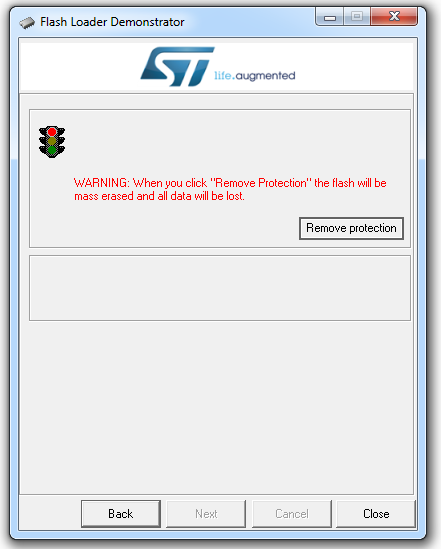
- 01.PNG (27.32 KiB) Viewed 645 times
EDIT:
So I have done that and flashed the original bootloader to it.
I verified its is the original one by flashing the Arduino blink example to it an chose the original bootloader.
I uploaded the sketch of you @viktor but only get this massege again:
**************************************************************************************************
*** This sketch will update the bootloader in the Maple Mini to the STM32duino bootloader ****
*** With this you can use up to 120KB of Flash and 20KB of RAM for a Sketch ****
*** Uploading is also considerably faster on OSX (and possibly faster on Linux) ****
*** ****
*** Only use with Maple mini boards ****
*** ****
*** WARNING. If the update fails your Maple mini may not have a functional bootloder. ****
*** ****
*** YOU UPDATE AT YOUR OWN RISK ****
*** ****
*** ****
*** ****
*** ****
**************************************************************************************************
*** ****
*** ****
*** To confirm and proceed, enter Y ****
*** ****
*** ****
*** WARNING, Update Failed!! It is possible that the flash memory is Write-protected. ****
*** ****
*** We can try clearing the option bytes. ****
*** After that, you will need to do a reset and try again ****
*** ****
**************************************************************************************************
*** ****
*** ****
*** To confirm and proceed, enter Y, to cancel power down now. ****
*** ****
*** The option bytes have been cleared, reboot now and try to update again ****
If I now just reset the board via its button, I cant communicate with it via the serial monitor.
If I unplug and replug the device completely, then I can communicate but it starts from the same point and gives the same messages via the serial monitor…
EDIT:
So I have done that and flashed the original bootloader to it.
I verified its is the original one by flashing the Arduino blink example to it an chose the original bootloader.
I uploaded the sketch of you @viktor but only get this massege again:
**************************************************************************************************
*** This sketch will update the bootloader in the Maple Mini to the STM32duino bootloader ****
*** With this you can use up to 120KB of Flash and 20KB of RAM for a Sketch ****
*** Uploading is also considerably faster on OSX (and possibly faster on Linux) ****
*** ****
*** Only use with Maple mini boards ****
*** ****
*** WARNING. If the update fails your Maple mini may not have a functional bootloder. ****
*** ****
*** YOU UPDATE AT YOUR OWN RISK ****
*** ****
*** ****
*** ****
*** ****
**************************************************************************************************
*** ****
*** ****
*** To confirm and proceed, enter Y ****
*** ****
*** ****
*** WARNING, Update Failed!! It is possible that the flash memory is Write-protected. ****
*** ****
*** We can try clearing the option bytes. ****
*** After that, you will need to do a reset and try again ****
*** ****
**************************************************************************************************
*** ****
*** ****
*** To confirm and proceed, enter Y, to cancel power down now. ****
*** ****
*** The option bytes have been cleared, reboot now and try to update again ****
If I now just reset the board via its button, I cant communicate with it via the serial monitor.
If I unplug and replug the device completely, then I can communicate but it starts from the same point and gives the same messages via the serial monitor…
I thought disabling the read protection was for the whole of flash and also erases it, so the code that was in there could not be read as it had been erased.
I can’t quite see how you could have a system where each page of flash had its own read protection, unless each page could only be read by code running from within that page, and I don’t think the STM32 has a feature quite as complex as that.
Overall, it sounds like the company who is loading the bootloader has no idea what the bootloader does, and that the device should not be read protected.
I thought disabling the read protection was for the whole of flash and also erases it, so the code that was in there could not be read as it had been erased.
I can’t quite see how you could have a system where each page of flash had its own read protection, unless each page could only be read by code running from within that page, and I don’t think the STM32 has a feature quite as complex as that.
Overall, it sounds like the company who is loading the bootloader has no idea what the bootloader does, and that the device should not be read protected.
EDIT:
So I have done that and flashed the original bootloader to it.
I verified its is the original one by flashing the Arduino blink example to it an chose the original bootloader.
I uploaded the sketch of you @viktor but only get this massege again:
**************************************************************************************************
*** This sketch will update the bootloader in the Maple Mini to the STM32duino bootloader ****
*** With this you can use up to 120KB of Flash and 20KB of RAM for a Sketch ****
*** Uploading is also considerably faster on OSX (and possibly faster on Linux) ****
*** ****
*** Only use with Maple mini boards ****
*** ****
*** WARNING. If the update fails your Maple mini may not have a functional bootloder. ****
*** ****
*** YOU UPDATE AT YOUR OWN RISK ****
*** ****
*** ****
*** ****
*** ****
**************************************************************************************************
*** ****
*** ****
*** To confirm and proceed, enter Y ****
*** ****
*** ****
*** WARNING, Update Failed!! It is possible that the flash memory is Write-protected. ****
*** ****
*** We can try clearing the option bytes. ****
*** After that, you will need to do a reset and try again ****
*** ****
**************************************************************************************************
*** ****
*** ****
*** To confirm and proceed, enter Y, to cancel power down now. ****
*** ****
*** The option bytes have been cleared, reboot now and try to update again ****
If I now just reset the board via its button, I cant communicate with it via the serial monitor.
If I unplug and replug the device completely, then I can communicate but it starts from the same point and gives the same messages via the serial monitor…
**************************************************************************************************

*** This sketch will update the bootloader in the Maple Mini to the STM32duino bootloader     ****

*** With this you can use up to 120KB of Flash and 20KB of RAM for a Sketch                   ****

*** Uploading is also considerably faster on OSX (and possibly faster on Linux)               ****

***                                                                                           ****

***                      Only use with Maple mini boards                                      ****

***                                                                                           ****

*** WARNING. If the update fails your Maple mini may not have a functional bootloder.         ****

***                                                                                           ****

***                            YOU UPDATE AT YOUR OWN RISK                                    ****

***                                                                                           ****

***                                                                                           ****

***                                                                                           ****

***                                                                                           ****

**************************************************************************************************

***                                                                                           ****

***                                                                                           ****

***                         To confirm and proceed, enter Y                                   ****

***                                                                                           ****

***                                                                                           ****
***      WARNING, Update Failed!! It is possible that the flash memory is Write-protected.    ****

***                                                                                           ****

***      We can try clearing the option bytes.                                                ****

***      After that, you will need to do a reset and try again.                               ****

***      If it still can not update after Read Protection may be enabled.                     ****

***                                                                                           ****

**************************************************************************************************

***                                                                                           ****

***                                                                                           ****

***              To confirm and proceed, enter Y, to cancel power down now.                   ****

***                                                                                           ****
You have no option but to erase and reflash using a USB to Serial adaptor or a STLink.
The vendor must have bought a blank Maple Mini and flashed and read protected it. (Strange thing to do)
I notice that the aliexpress listing is “no longer available”
@victor
Can the updater check for read protection ?
It seems a bit odd that it was initially possible to upload the updater sketch, but impossible now to overwrite it.
Perhaps the STM32 knows whether a flash page is blank and allows one upload even if read protection is set.
But that sounds like a bit security loophole, as you could upload code to read out the flash into a blank flash page, and then somehow trick the code into running that code.
On a similar subject.
The nRF51 has a bug in its silicon, which allows some GDB functions to work on read protected devices.
In that you can still read and set the contents of registers including the PC.
So you can change the PC and get the code in flash to run any part of the flash, and people have exploited this loophole to find and single step instructions to and managed to read the contents of the protected flash.
I briefly looked at this, but the STM32 does not seem to have that bug.
So I’d be surprised if you could flash a blank page if the device is read protected
I will now go to flash the bootloader 2.0 via the STM-Tool again as viktor seems busy now
I will now go to flash the bootloader 2.0 via the STM-Tool again as viktor seems busy now
I will now go to flash the bootloader 2.0 via the STM-Tool again as viktor seems busy now
I will now go to flash the bootloader 2.0 via the STM-Tool again as viktor seems busy now
Im just glad it worked and I give you at least the feedback back (and the videos) that it works.
And I’m happy that I’m not crazy, cause I was sure I had done exactly the same, but it didnt work before
Thanks a lot guys!

