
Could someone please explain to me how the STM32 works? How many bootloaders do we have? Is the source code avalable and does it compile? Do we have a watchdog? Do we need the bootloader at all?
Could someone please explain to me how the STM32 works? How many bootloaders do we have? Is the source code avalable and does it compile? Do we have a watchdog? Do we need the bootloader at all?
There is masses of information on this forum and elsewhere.
There is a small wiki on github
https://github.com/rogerclarkmelbourne/ … STM32/wiki
Bootloader is here
https://github.com/rogerclarkmelbourne/ … bootloader
i also have video tutorials on youtube
i also have a blog which has stm32 stuff on it
I have some basic questions (distilled I hope)
1) The whole palaver with DFU and Serial stems from the fact the STM32 has in-built USB support and does not need special drivers as they come already with Windows. That statement gives the impression that I can simply plug in the Maple and off I go, which is not true. I still need to download and install (with some hardship) special drivers. If I plug in a memory stick for example I do not need to install anything and no hardships. The question is why mess with DFU and Serial so badly just to say ” I do not need FTDI ” – in the end what you need and what you have arrived to is much worse! I’d rather have the FTDI and allow my scripts to work seamlessly with uploading and serial comms just like the Arduino.
2) It appears that the STM32 has intrinsic support for uploading a binary through the Serial1 just like the Atmega328 has support for uploading a binary through the SPI. Which means we could have a bootloader that ignores the USB and uses Serial 1 or Serial 2 most likely to upload scripts and/or do Serial comms? Then we would not need *any* of the DFU/Serial fuss, we would be able to upload and debug seamlessly.
No. Please read the other responses.
You are not downloading and installing drivers, you are downloading a program that links the USB device to existing drivers that Windows has by default.
It appears that the STM32 has intrinsic support for uploading a binary through the Serial1
You can already upload via serial,
Select any Generic board.
See the Upload menu.
Select Serial.
(You also have the option of STLink upload and also via BlackMagic probe – both of which use SWD)
Its only “Maple” boards that have bootloader (DFU) upload as the only option.
The Serial port was unrecognised before the upload but came up as ttyACM0 after the upload , The problem comes when I modify the sketch and then attempt to upload , says it’s uploading but never completes ! If I reflash the bootloader, the serial port dissapears again and reloading the sketch works ! But I can’t load sketches after this first load after flashing the bootloader .
Any ideas what I’m doing wrong ? I’m running Ubuntu 14.04 and Arduino 1.6.4
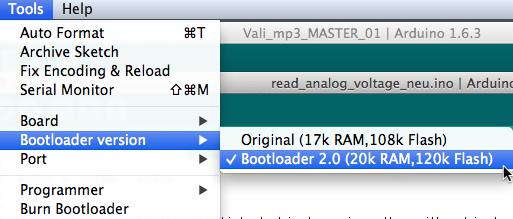

Next step: Does this behavior occurs with the original bootloader also?
You can download it here: http://static.leaflabs.com/pub/leaflabs … i_boot.bin
…and on my MAC I always have to choose the right serial port from the menu before uploading (maybe fixed with the new repo for linux/osx).
Don’y know if that will give you any clues
Apologies for dely in reply , a meal got in the way !!
Regards art
When did you download the repo, I did a fix / enhancement in the last 7 days to add a upload-reset utility for both OSX and linux
Check in tools/linux folder and see if you have a file called upload-reset
If you don’t have this file, please update your copy of the repo
Next. If you are running linux, there is an issue with some versions of linux that the serial port permissions are incorrect
You need to install the udev rules using the install script in the tools linux folder.
Also, I’ve found that you may need to add the current user to the dialout group and the reboot your machine, for this to take effect (you may be able to log out and back in again, but you may as well reboot)
I think it might be best for me to forget about the STM32 boards and stay with the ( horribly more expensive) Teensy 3.1 boards until ( and if ) the ArduinoSTM32 route become more of a public footpath than an intrepid programmer’s exploration into the unknown
Thanks to everyone for the help Regards r4
STM32 does work with Linux, but its hard to know what you exact problem is.
Good luck with Teensy, I hope its easy to use on Linux.
Paul
BTW
i changed the name of the udev script to just be install.sh, as it now also adds the current user to the dialout group.
Also since last week in both Linux and OSX I’m including the dfu binaries as part of the tools, so there is no longer the need to compile dfu-util yourself on Linux (or install Homebrew on OSX to get dfu-util)
Theoretically, if i did a boards manager package, there is supposed to be a way to call a post install script, which could run install.sh on Linux, but I’v been too busy with other projects this week to investigate further.
However i think the Nightly release of the IDE is now supposed to include a change to support evolving cores, so that people can go into the BM and simply press update to download the latest version.
RogerClark wrote:Also since last week in both Linux and OSX I’m including the dfu binaries as part of the tools, so there is no longer the need to compile dfu-util yourself on Linux (or install Homebrew on OSX to get dfu-util)

