
This leads me to a few questions:
1. HardwareTimer::attachInterrupt(int channel, voidFuncPtr handler). This doesn’t actuall seem to be a channel. it appears to be a timer_interrupt_id and the example uses channel 0 but does not use the def in timer.h and seems to discount the value’s importance by stating “channel doesn’t mean much here either.” very confusing. Do the examples need updating? is TIMER_UPDATE_INTERRUPT the only valid id for an encoder?
/**

* @brief Timer interrupt number.

*

* Not all timers support all of these values. All timers support

* TIMER_UPDATE_INTERRUPT. "General purpose" timers can be a special

* nuisance in this regard, as they individually support different

* subsets of the available interupts. Consult your target's reference

* manual for the details.

*/

typedef enum timer_interrupt_id {

TIMER_UPDATE_INTERRUPT,     /**< Update interrupt. */

TIMER_CC1_INTERRUPT,        /**< Capture/compare 1 interrupt. */

TIMER_CC2_INTERRUPT,        /**< Capture/compare 2 interrupt. */

TIMER_CC3_INTERRUPT,        /**< Capture/compare 3 interrupt. */

TIMER_CC4_INTERRUPT,        /**< Capture/compare 4 interrupt. */

TIMER_COM_INTERRUPT,        /**< COM interrupt. */

TIMER_TRG_INTERRUPT,        /**< Trigger interrupt. */

TIMER_BREAK_INTERRUPT,      /**< Break interrupt. */

} timer_interrupt_id;
http://stm32duino.com/viewtopic.php?t=3681#p45739
This approach may be useful:
https://www.stm32duino.com/viewtopic.php?t=15
Or, here is the Google results
I mention in my new-user intro that lots of common issues were addressed in the old Leaflabs forum; for example:
http://forums.leaflabs.com/forums.leafl … tml?id=110
If you are interested in timer training: PDF
The scope of how the internal switching is accomplished inside the uC to I/O is too complex to discuss here. For non-EE folks, it all sounds weird, but I believe this article will be enlightening:
https://itp.nyu.edu/physcomp/lessons/mi … functions/
Every microcontroller has different configurations for its pins, and often one pin will have more than one function. This combining of functions on one pin is called pin multiplexing.
Some microcontroller companies call the I/O matrix “switch(ing) fabric” so you may encounter that term instead of multiplexing. In some microcontrollers such as Cypress PSoC, the flexibility to map pins to function extends to almost all non-power pins.
The PSoC 4 Pioneer Kit is an easy-to-use and inexpensive development platform enabling you to create unique designs with the flexibility of PSoC 4. Featuring the PSoC 4200 device family, this kit gives you the power of an ARM Cortex-M0 combined with the fully customizable analog and digital fabric of the PSoC in the palm of your hands
Ray
My first question is why do you need any interrupt?? Once the timer is setup can’t u just read the TIMx_CNT register anytime you want to know what the current count is? of course you will also have to check for over flow or under flow.
Also with the OP post of a counter not counting down is it possible the timer has been setup to only count on a single pin instead of counting as a quadrature counter on 2 pins, as the single counter will only count up but the quadrature counter will count both up and down.
On STM32F103C8 microcontroller there is also built-in timer that can be used for reading quadrature encoder. This timer acts like a counter. By using these timer, we can count rotary encoder without using external interrupt. Therefore, the cpu will not interrupted every rising and falling edge of the quadrature signal just for incrementing or decrementing the counter. This is the code for quadrature encoder using timer encoder:
More here
-and-
https://electronics.stackexchange.com/q … interrupts

I’ve used multiple encoders on the blue pill in the past but with opto interrupters not mechanical switch encoders. This has worked well and in the application I used them in there was not noticeable issues with bounce.
my current EC12 encoders do seem to have problems with the bounce of the cheap encoders i’m using. I’m going to attempt an RC filter to target the 3MS max bounce from the encoder data sheet. I have optical encoders, and it is fairly easy to make them, so I can fall back to those if the filters do not work well.
Regarding the pin multiplexing. My specific question involves the lack of setup. Does a given hardware encoder timer poll all mapped pins or is there some other setting that dictates how the timer polls the channels? I’m really interested in this single case so I can better understand which pins I can use for GPIO, and TX/RX1..2
A good example is I use quadrature encoders on my motors to create a feed back loop. But I don’t want an interrupt every-time the counter increments. I have seen written by some great PHD robotics guys that win a lot robotics comps that you should not be reading the encoder at a speed any faster that the encoder hasn’t turned at least 10 steps(recommended much higher count than that as it still allows for up to 10% error, i.e if it is at 9.9 ticks it will read 9 or out by 0.9 over 9 ticks). Also generally you want to make sure the reading is no faster than 10Hz(20Hz for a super responsive motor) because in real life it takes time for the motor to change speed, i.e if you read the encoder and it says the motor is turning to slow so u increase the duty to the power supply to the motor then read the encoder straight away the motor will still be spinning at same speed, it needs at least 0.1 sec to start to change speed of the motor unless you have a super high performance motor that can accelerate super fast.
Why can’t I do the same as I do with the external LS7366R counter chip and just poll it when I want instead of having an interrupt every time it increments? With high resolution encoders the interrupt will be firing all the time especially if you have a number of encoders all running at once.
Here’s a cheap motor/gearbox/encoder that I have used https://www.aliexpress.com/item/1-set-2 … a4f9ad2d28 it has a 11 pole quadrature encoder on the motor with a 34:1 gear box to the shaft. Doing the math 11(pole) x 4(quadrature) x 34(gear) x 210(RPM) gives 314,160 ticks/sec, that’s a lot of interrupts fro every motor you add.
[schoch – Mon Dec 03, 2018 3:22 am] –
…
Regarding the pin multiplexing. My specific question involves the lack of setup. Does a given hardware encoder timer poll all mapped pins or is there some other setting that dictates how the timer polls the channels? I’m really interested in this single case so I can better understand which pins I can use for GPIO, and TX/RX1..2
From the WiKi…
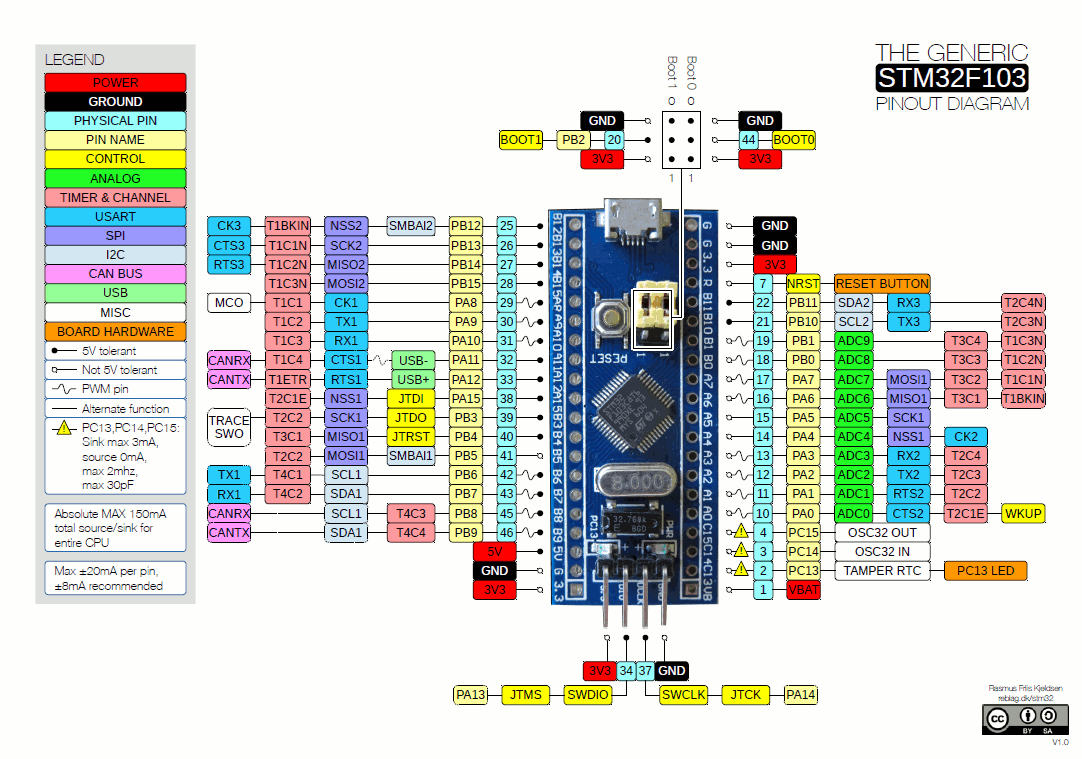
[mrburnette – Mon Dec 03, 2018 3:52 am] –[schoch – Mon Dec 03, 2018 3:22 am] –
…
Regarding the pin multiplexing. My specific question involves the lack of setup. Does a given hardware encoder timer poll all mapped pins or is there some other setting that dictates how the timer polls the channels? I’m really interested in this single case so I can better understand which pins I can use for GPIO, and TX/RX1..2From the WiKi…
// http://wiki.stm32duino.com/images/a/ae/ … pinout.gif
So does T1C1 listen for edge changes on BP12, BA8, PA7?
What are the N/E channels suffixes?
I’m guessing T1C1N is different than T2C1 since “m using T3C2 on PA7 but this overlap is confusing since it does work, perhaps it should work? Are the details burried in Timer.c somewhere that sets up the pins?
I suppose another question I have is if TX1,RX2 are mapped to USBSerial and if they should not be used? I’ve used T4 though and it does work with USBserial seeming to function.
sry lots of questions and lots of missing knowledge to know where to find the answers in the docs.
My code for this project is here btw: https://github.com/jschoch/grbl-MITM-pendant
here again is the RC filter i tried to make work but doesn’t https://easyeda.com/greenail/encoder-with-filter
I brought mine awhile ago but a quick search found these that look the same. https://www.aliexpress.com/item/Rotatin … 49d882338a although the seller calls them a potentiometer they r in fact a encoder.
[schoch – Mon Dec 03, 2018 5:28 am] –So does T1C1 listen for edge changes on BP12, BA8, PA7?
according to this the F1 doesn’t allow multiple mapping but the F4 does
https://electronics.stackexchange.com/q … e-alternat
I’m still not able to find where the timer channel pins get mapped.
[schoch – Mon Dec 03, 2018 5:28 am] –What are the N/E channels suffixes?
I’m guessing T1C1N is different than T2C1 since “m using T3C2 on PA7 but this overlap is confusing since it does work, perhaps it should work? Are the details burried in Timer.c somewhere that sets up the pins?
I suppose another question I have is if TX1,RX2 are mapped to USBSerial and if they should not be used? I’ve used T4 though and it does work with USBserial seeming to function.
it looks like the only hardmapped pins are here
https://github.com/rogerclarkmelbourne/ … rd/board.h
The wiki https://wiki.stm32duino.com/index.php?t … USB_Serial isn’t worded very clearly (the word uploading seems to be throwing me off) and I”m not sure how to interpret it but since it is using “Serial.print” i’m guessing serial communications over usb are also mapped to PA9/PA10.
this would seem to indicate that TX1/RX1 should not be used with T1C1 unless you can remap T1C1 to an alternate pin (which I can’t figure out how to do), but can be used with T4C1 since the board diagram is only listing a possible alternative mapping and not a parallel mapping.
I still don’t know what the N/E suffixes are.
I’m not sure if i’m clarifying or confusing at this point…
I’m still not able to find where the timer channel pins get mapped.
the pins are mapped here in board.cpp
https://github.com/rogerclarkmelbourne/ … /board.cpp
It appears they are singularly mapped and do not have any parallel mappings as seems possible on the F4.
so for the stm32f103c the timer pins applicable for the hardware quadrature encoders are:
Timer, CH1,CH2
TIMER1,PA8,PA9
TIMER2,PA0,PA1
TIMER3,PA6,PA7
TIMER4,PB6,PB7
So what happens when you try to use PA9? if T1C1 timer triggers and you are sending data on TX1 does it confuse the encoder? it seems that since the behavior of peripherals sharing an input is undefined and should be avoided!
Oddly my filter board seems to not work at all. When I test against a non-filtered version of the same encoder I get worse results with the filtered version. When testing not connected to the CNC machine I do not see any issues with direction swaps or missed signals. I can track the values of the encoders with the serial plot function and they are linear and without issue on the unfiltered encoders. I can also test optical encoders with 600PPR and they track without glitch as fast as I turn them. The filtered board will swap direction if I turn it too fast.
When connected to the CNC i get flip flops of direction and I also get a state where the encoder seems to do nothing until I turn it in the opposite direction for a detent or two of travel. It is almost like a “lockup”
Back to pin multiplexing I can’t reproduce any issues. The version on the CNC machine actually will not use the TX1 pin if it is processing an encoder move. The version not connected to the CNC machine does use TX1 but it does not seem to cause any glitches.
I’d love to make a PCB to try to remove the possibility of a loose wire in a breadboard but I’m still not sure about my pin use and moving pins around seems to be a very confusing topic.
hardware sure is fun!
P.S. since my original issue was a typo should I mark this thread solved and create a new one?
P.P.S is it a good time for me to invest in a beginner oscilloscope?
[schoch – Tue Dec 04, 2018 7:34 pm] –
…
hardware sure is fun!P.S. since my original issue was a typo should I mark this thread solved and create a new one?
P.P.S is it a good time for me to invest in a beginner oscilloscope?
Yes, hardware is FUN.
I’ve marked this thread [SOLVED]
In my opinion, a nice scope is not as useful for uC work as is the Saleae 8 port logic analyzer. You will always find AC issues with breadboarding unless you work in a Faraday cage.
If your budget permits, a good scope can also have a logic-analyzer bay.
I strongly recommend you take a few cheap boards Blue_Boards and build some custom, dedicated signal sources… Years ago, when working with GPS algorithms, I built: this Fox gen.
You can then use your new logic analyser to qualify your new test generator.
Ray


