I liked the idea of creating a new arduino core for STM32 micros by using the STM32CubeMX that is currently active and is developed by ST.
-= STM32Cube FW_F0 V1.5.0 =-
I tried to build my own configuration files for supporting the 20-pin STM32F030F4 micro-controller I bought recently that has only 16kB flash and 4kB of RAM.
So far, I managed to use the Serial port at 9600 bps and the digital pins just for blinking a few leds.
Next step is to check the serial port baud rate because the baud rate doesn’t change with Serial.begin(19200).
It is stuck to 9600 bps (the value I initially set to CubeMX configuration).
Me 2 
Keep up the effort… Serial is a big deal IMO.
Ray
So far, I managed to use the Serial port at 9600 bps and the digital pins just for blinking a few leds.
Next step is to check the serial port baud rate because the baud rate doesn’t change with Serial.begin(19200).
It is stuck to 9600 bps (the value I initially set to CubeMX configuration).
Buy you already have to modify main() to add the setup() and loop() calls,( as well as perhaps some other changes)
So what it sounds like would be needed is a more radical modification, to main() so that the serial init was not performed in main(), but in Serial.begin().
Vassilis… I presume you are uploading via STLINK or the hardware Serial bootloader, as the vector offset thing to allow the use of the bootloader, is also a problem with using the files from the Cube, as from what I recall, the offset value is set in a header, deep in the includes.
I briefly took a look at how to make the offset configurable at compile time, but I had to modify one of the Cube generated headers, and add an #ifdef, to a new preprocessor define, that could be added in as a compile time argument ( like is done in the maple core)
(btw. I still didnt get it working with the bootloader, but I was trying to walk before I could run, as I had not got the F103C to work with STLINK first)
IMHO. I think using the Cube to generate files, so we can use the HAL etc is an excellent idea, but I think we are likely to need to modify some of the files generated by the Cube, and not just main.c
So either we’d need a checklist of changes that people would need to perform when they used the Cube to generate a new core, or we’d need to have some clever automated system to patch the files generated by the Cube
(Im sure that this sort of patching has been done by other projects, but Im not sure what tools ( utilities ) would be needed
Yes. I use the STLINK. The vector offset is an issue to must be solved. The most problems have their solutions. Just we must find the easiest solution for that!
So either we’d need a checklist of changes that people would need to perform when they used the Cube to generate a new core, or we’d need to have some clever automated system to patch the files generated by the Cube
You are right about that. Instructions are easy to be written but often hard to be implemented. Some step will be forgotten.
On the other hand, an automated patch is easy to be executed it but very hard to be implemented (created).
I think that issue is a double-edged knife.
On an STM32F4 with 1MB flash, I wrote an “A/B” bootloader. At power up, the vectors in low memory run the code in low memory. I call that the B code. A and B each have their own vectors table and are thus independent of one another.
Normally, B quickly decides to run the A code which is in different sequential sectors of flash. The A code hums along until a user tells the A code to mark a flag in non-volatile memory that a the A code needs to be updated, then A reboots the MCU.
B runs again and sees the update-is-needed flag. B then gets a stream of data from a communications port that is the .hex or .bin for the new A code. B then streams it in, validates on the fly and writes a new version of A to where A lives. No SD memory – streams in directly to the B code which writes flash sectors with a new A. When B successfully gets all of A written, and validates an MD5 checksum for it, B then clears the update pending flag in flash and reboots itself. Now B runs the new A code.
The way I use this is that A and B are identical source code. The linker file for B puts everything based at address 0 in flash (which is actually at 0x08000000 in the MCU’s address space but remapped by hardware. The linker file for B forces the vectors to be at 0x400 offset.
The linker file for A is the same but the base is set to 0x08080000 and the same 0x400 offset for the vectors. The vectors for A and B are in flash, not RAM (safer).
When B runs A it disables interrupts and remaps the vector table to A’s place. So when A runs, that other vector table is used.
This is done with this code
	extern uint32_t __vector_table; // linker generated. when 'B' runs 'A' must code as this..

SCB->VTOR = (uint32_t)&__vector_table; // may be relocated due to linker file

__enable_irq(); // may be off if launched by boot code
1) I tried to make the Serial port work in Interrupt mode. I saw that only the Tx was implemented (not in interrupt mode). Now, both Tx and Rx pins work with interrupts. For that I have made some modifications to the files:
UARTClass.h , UARTClass.cpp, variant.h and variant.cpp
2) I also added the new board to the boards.txt file.
3) Added the Stream.cpp file to the Core folder (it was missing). Now the Serial.find(…) seems to work ok!
4) The Serial.begin( [baudrate] ) works now.
5) I created a batch file (FileRenamer.bat) for renaming the file extension startup_stm32f030x6.s in to startup_stm32f030x6.S
[it changes the s to S]
I have a small experience in HAL + Arduino SAM Core. I don’t know if I modified the above libraries in a wrong way. I think the Sheepdoll could answer that.
I just try to help.
These are great.
If I can help, happy to do so. My current project I/O is setup by the two tools above and includes
CubeMX for pin mapping and automatic code generation for all the I/O libraries and their init code. I needed to write no drivers.
CPU clocks and dividers
Timers – perioic interrupt and capture 3.5MHz period and DMA samples
UARTs (interrupt and DMA
Smartcard reader interface and ISO7816 on my side of the interface (M4)
SDIO (uSD card) with DMA, 25Mbps
SPI
RAMdisk using MCU flash
Bootloader/firmware updater (in-application)
SWD for debugging
I’m happy to accept the PR, but if possible can @sheepdoll and anyone else take a look, as I dont have any experience of the HAL either 
Roger is the ‘owner’ from which I forked. Then it was merged back. When I go into github and click on the pull request I get ‘there isn’t anything to compare. I think this is because my branch and Rogers are identical.
I have actually been working on my branch a bit this week anyway. I am working overnight this week. Do not have net access though.
ST has a new version of CubeMX which is v4.14.0 and comes with a mac installer that makes a STM32CubeMX.app rather than a folder with the java -jar executable. It does say that it needs at least Yosemite to install.
Probably easiest i I just action this PR and then other people can test it
Ideally we need a working F103C build, as thats the hardware most people already have
Probably easiest i I just action this PR and then other people can test it
Ideally we need a working F103C build, as thats the hardware most people already have
I don’t think I will have time to test it on the 103 until the weekend.
As most of the files were new, I couldn’t tell if you’d changed anything in the files generated by the Cube.
I presumed it that the change was just to Uartclass ?
I don’t think I will have time to test it on the 103 until the weekend.
As most of the files were new, I couldn’t tell if you’d changed anything in the files generated by the Cube.
I presumed it that the change was just to Uartclass ?
I just did a pull on the repo, and the only core that compiles is not the F030 
Everything else gets errors like
HALMX_Arduino_STM32\HALMX\cores\mapleMX\UARTClass.cpp: In member function 'void UARTClass::init(uint32_t, uint32_t)':

\HALMX_Arduino_STM32\HALMX\cores\mapleMX\UARTClass.cpp:78:16: error: 'struct UART_InitTypeDef' has no member named 'OneBitSampling'

_pUart->Init.OneBitSampling = UART_ONE_BIT_SAMPLE_ENABLE;
Just so this still compiles on all platforms, I’m putting in an ifdef, but I think we need to work out the structural issues that this has raised, as I know of other places in the HAL where there are differences between the processors
Answering Roger’s question ….
ST’s HAL is all C. No C++. All I/O drivers are in C for compatibility assurance. As I mention below, of course c++ code can call the HAL APIs with today’s file name sensitive compilers (.c versus .cpp).
There are drivers for all the peripherals in the ST32Fxx family. Each driver includes API calls for polled I/O, interrupt driven I/O (ISR is in the HAL driver), and DMA. You can switch between the 3 at run time- no rebuild. Polled, Interrupt and DMA each have a different API call. There are optional user call-backs for I/O complete and I/O error, DMA complete, etc. They use the compiler __weak attribute to allow your program to override the default callbacks with your own. To include Systick callback.
CubeMX allows you to define what ports and pin mapping you need for a specific hardware target board. Example: for two UARTs, you’d tell the GUI in CubeMX to put UART1 on MCU pins x and y and and what baud rate,parity,etc. then the same for UART2. If you will use DMA on this UART you tell CubeMX to enable it and setup the DMA channel that CubeMX recommends – such as DMA priority, address auto-increment, etc. These are GUI actions, not you writing code. That done, and all the rest of the target setup for clocks and I/O, you click Generate Project and for which target IDE. The IDEs are currently, last I looked, GCC/Atollic (free non-comercial), IAR, Keil and ST’s own Eclipse + GCC. The generated code includes a usable project in the chosen IDE with the project’s files including all the HAL library sources that are needed to meet the pin mapping done with CubeMX for the target.
For me, learning the MCU peripherals (using ST’s reference manual) and how to get CubeMX to pin-map those that I want, and configure each, using CubeMX which is not coding, but GUI based, was a new experience.
In most embedded projects, C++ classes for I/O drivers can’t be (shouldn’t be) instanced at run time because of driver to ISR linkages for variables and functions. So HAL has driver C code that uses one table of settings for each instance. Example: if you have 2 UARTs and each can use the same driver code, CubeMX, from your pin mapping, creates two tables and two names for the two UARTs. These are statics. Just like C++ static instances of classes. So UART1 and UART2 exist as handles in C to call the same driver.
A C++ program can call these C APIs since the HAL libraries and generated code from CubeMX are in .c files, not .cpp files. The compilers today auto-recognize that names and functions in a .c file are not to be mangled as they are in a cpp file.
The target is not a board, it’s a chip. Mapping of the MCU pins to board connectors would be done by your code such as Arduino does for board to MCU run time lookup. This mapping is super simple as compared to managing the peripherals to MCU pin mapping which why there’s a GUI for doing it in CuheMX. The legacy Arduino board concept has FIXED mapping for any given board, whereas the CubeMX and HAL concept is you can map as you wish. Then that chip, present on some board, has an MCU to board pin connection in copper traces and that’s your duty, e.g., using Arduino board pin to MCU pin lookups for any given board.
I hope this helps.
I did write cpp to C wrappers and Arduino pin mapping functions for an STM32F4x5 so that existing C/C++ programs for Arduino can compile unchanged but the HAL libraries for I/O are used instead of Arduino libraries. The HAL libraries are a giant superset of what Arduino has, and each includes polled/interrupt/dma APIs.
There is a learning curve. If your project is super simple, the learning curve isn’t worth it.
The older ST Standard Peripheral Libraries (SPL) pre-date CubeMX. They are the same code as in the HAL libraries, essentially, but without the HAL API wrappers to enable CubeMX auto-code-generation. And ST warns that SPL is being phased out.
The HAL libraries have good documentation. I use the HAL mostly by reading the PDF document for the HALs. Almost never do I look at the HAL code.
But the HAL libraries are worth learning how to use and with just a small number of CubexMX sessions, one per MCU/board pairing (since you aren’t doing custom boards as a rule)… a few people with CubeMX experience can do the board setups for a given chip. Then that skeletal project can be used by a larger number of people as a starting point. And ST works at releasing new HAL libs every 6 months or so, and as new chip types emerge.
These complex ARM Cortex MCUs have so many on-board peripherals and the low pin count packages (e.g., 64 pin) can’t map all at once, unlike the legacy of Arduino where an AVR had all of its small set of on-chip peripherals mapped to pins, as a rule. With the Cortex, a GUI tool like CubeMX, once learned, makes it rather easy.
What I didn’t find when I started was a well done set of videos on how to use these tools. It’s improved but “someone” should make such available. Moreover, the hobby folks could have some CubeMX experts produce samples for all the rest to use.
I once read, but cannot now find the reference, that come outfits have a strict no-C++ rule for embedded uC code. I believe it was because of the difficulty to formally profike memory usage … so, maybe I read this in regard to military/space applications.
In the Cypress PSoC environment, C++ is disabled by default. Of course, one can enable it, but Cypress does not recommend that approach.
Ray
Update: I did find several references where ‘suggestions’ about not using C++, but no absolute ban…
C++ software development for DO-178 safety-critical applications
August 1, 2010
Use of the C++ programming language may cause concern, delays, and rework when it comes to DO-178B compliance.
By DAVID BEBERMAN AND JOE WLAD
While use of the C++ programming language has increased in the past decade, choosing this language could hinder efforts to comply with certification standards, such as RTCA/DO-178B, unless developers take great care.
The lack of standard guidance and rules leads many certification representatives to review an applicant closely who is using C++, which can result in project delays or rework.
I need to run some tests to be sure that it works ok.
I once read, but cannot now find the reference, that come outfits have a strict no-C++ rule for embedded uC code. I believe it was because of the difficulty to formally profike memory usage … so, maybe I read this in regard to military/space applications.
In the Cypress PSoC environment, C++ is disabled by default. Of course, one can enable it, but Cypress does not recommend that approach.
Ray
Update: I did find several references where ‘suggestions’ about not using C++, but no absolute ban…
C++ software development for DO-178 safety-critical applications
August 1, 2010
Use of the C++ programming language may cause concern, delays, and rework when it comes to DO-178B compliance.
By DAVID BEBERMAN AND JOE WLAD
While use of the C++ programming language has increased in the past decade, choosing this language could hinder efforts to comply with certification standards, such as RTCA/DO-178B, unless developers take great care.
The lack of standard guidance and rules leads many certification representatives to review an applicant closely who is using C++, which can result in project delays or rework.
<…>
Used correctly, C++ can be OK on embedded.
IMO, correctly means
No run time class instance creation. Only statics.
No use of String and other classes that do dynamic memory allocation and need garbage collection/coalescing.
ISRs in C. Name-mangled C++ functions have a hard time using shared variables.
Best to leave C++ for embedded to be used only with non-I/O things.
And avoid using the heap due to dynamic class or object creation/deletion.
We have a new high end washer/dryer. They have Bluetooth. Oh my. Remote reprogramming and diagnostics.
My Keurig 2.0 coffee maker has a plug to connect a PC for reprogramming or other stuff (future).
– The UARTClass now supports Serial1, Serial2 and Serial3. The SerialUSB (Serial port over USB) is not implemented yet.
– Added the STM32F103C8 variant.
– I removed the additional properties I had put in UARTClass.cpp file because the STM32F030 works ok with or without them.
I accepted the PR.
I’ve pulled the repo to my local machine and it compiles OK for me
As I wanted to test the Serial, I’ve tried to add BlackMagic Probe as an upload method, so I’ve modified my boards.txt so that it had an upload menu for the BluePill board
It looks like this works, however, I’ve not managed to get my BMP to work. I think its either a wiring issue or possibly I’m running a customised version of the BMP I modified to support the nRF51822
So I better download Rick’s original BMP firmware and try that instead of the special version.
But I’ve run out of time today
I was sifting through the 1100 odd pages manual to find the right registers to pull for the IRlib.
And that’s where I realized where the CubeMX adds value.
These STM32 buggers have soo many options that we need to settle for a given set of “defaults” or “alternating defaults”
Actually in a similar way as with the Arduino pin functions have given and limited set of variances.
This is where I’m in Steve’s corner.
Probably there needs to be a group of people making the basic pre-decisions following architectural rules of thumb.
like e.g. how likely is it that a “hobby” project needs 2 I2C busses.
I’m just saying, the STM32 can handle it but should the hobbyist too ?
If you’re a pro you probably are not wanting to go the arduino route, it’s most likely plain HAL work using Keil or some other IDE.
makes sense ?
Cheers,
Paul
This is when a GUI tool makes so much sense. Especially if you work with several boards, several MCUs.
I’m on a project that uses STM32F4’s in die form. No IC package. So I work with a 100 pin CubeMX session even though there is no package when you use a die.
I learned that for any STM32Fn–, say STM32F4xx, all the peripherals that are in the reference manual for the largest package (say, 100 pins), are in the die used on all STM32Fn’s. They just can’t wire up all. They choose which to omit for, say, a 64 pin package.
And for any one package, the on-chip pin mapper multiplexers lead you to a compromise since not all peripheral devices can be simultaneously mapped to relatively few pins (not so, with a die). And again, there are more peripherals on the die than are wired to the pin mapper mux for any given package. Interesting, I had thought they reduced cost by limiting selection of peripherals. Since they don’t have to test those that aren’t wire-bonded to pins, I guess that does reduce cost.
I learned that for any STM32Fn–, say STM32F4xx, all the peripherals that are in the reference manual for the largest package (say, 100 pins), are in the die used on all STM32Fn’s. They just can’t wire up all. They choose which to omit for, say, a 64 pin package.
I tested the blink sketch on the F103 and it works, but I have issues with my STLink not being recognised, but I’m not sure why.
So I’m doing manual uploads
It doesnt seem to work if I copy it to the tools/win/stlink folder.
I need to spend more time working out why this is happening.
I moved to a new Core i7 PC a short while ago, (still running W7), and since then I have had some USB issues. Though in this issue is a wierd one, as the STLink CLI seem to work under some circumstances.
It was getting late the other evening when I tried to use the STLink, so things were not making any sense.
I.e. even when I added the path to where the exe is installed, the stlink-upload.bat failed to get the exe to attach to the stlink hardware.
I guess I can try running the IDE as Administrator, but I dont normally need to do this.
Perhaps some security default setting changed via Windows update when I initially install W7 on this new machine
It’s on my windows toolbar. Just click the icon. No admin.
But I use it more often from within my IDE – where it uses the UI of the IDE, not the standalone you see below.
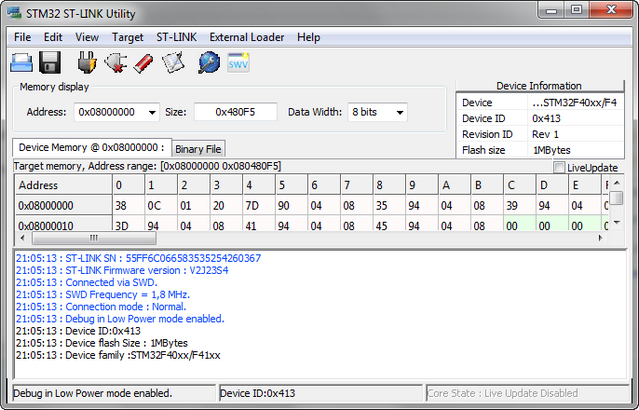
- 2016-04-13_210801.jpg (246.75 KiB) Viewed 1042 times
I worked out what the problem was
The new version of the ST-Link CLI Exe (version 2.4) is not compatible with the stlink_upload.bat command
The new version seems to need the keyboard to be pressed (e.g. return pressed), after the upload if the -Run option is used.
So either we need to bundle version 2.1 of the CLI in the repo or we modify the bat file command line to remove the -Run option
As far as I can tell, the -Run option is not required, as we also use the -Rst (reset) option, and it seems to work fine without the -Run option, so I think we should remove it
I am not a lawyer, but as far as I can tell, the license on the STLink software allows it to be distributed, as the License grants in relation to STLink software ( http://www2.st.com/content/ccc/resource … 217720.pdf)
“(iii) make, have made, use, sell, offer to sell, import and export or otherwise distribute Products also through multiple tiers.”
So for windows users, I think its easier if I add the CLI (Exe) to the repo so that we have a version in the repo which matches the stlink_upload.bat
I’ve had a go at getting the HALMX core to work with the bootloader and I think it almost works, but at the moment I have no way to reset the board (generic STM32F103C) so that the PC spots that the DFU device is now available.
So the only way I can get it to work is if I unplug the board, then press upload, and when its waiting / looking for the DFU device, I plug the board in.
However, its definitely compiling and linking the code to 0x8002000 and the bootloader runs the code from that location
I had to change the linker (.ld) file to specify the flash start address as 0x8002000,
I also had to change
system_stm32f1xx.c
So that it has
#ifndef VECT_TAB_OFFSET

#define VECT_TAB_OFFSET  0x0 /*!< Vector Table base offset field.

This value must be a multiple of 0x200. */

#endif
I worked out what the problem was
The new version of the ST-Link CLI Exe (version 2.4) is not compatible with the stlink_upload.bat command
The new version seems to need the keyboard to be pressed (e.g. return pressed), after the upload if the -Run option is used.
So either we need to bundle version 2.1 of the CLI in the repo or we modify the bat file command line to remove the -Run option
– wiring.h The delayMicroseconds was re-written for STM32. The previous assembly code wasn’t work correct to the tests I had made.
– wiring_digital.c The LOW and HIGH was opposite on digitalRead(…). Fixed!
– SPI library is added. It supports only the basic functions (methods)
-= Functions =-
void begin(void)

uint8_t transfer(uint8_t _data) const

uint16_t transfer16(uint16_t data)

void transfer(uint8_t buf, size_t count)

void setClockDivider(uint8_t clockDiv)

void setBitOrder(uint8_t bitOrder)

void setDataMode(uint8_t dataMode)
I will pull onto my local machine and test it with a ILI9341 display ( when I find the non-dma versions of the LCD libraries)
Can you try this and see if it fixes it?
Because we need to write our own main.c and also it looks like we need to be able to modify the start offset vector (which is hard coded to 0x00)
I don’t think we can use the unix patch command as we the location of the patch may change, we may need to do it via some sort of text search and replace.
Or perhaps the only way to do it is to write instructions that need to be manually implemented. ?
– wiring.h The delayMicroseconds was re-written for STM32. The previous assembly code wasn’t work correct to the tests I had made.
– wiring_digital.c The LOW and HIGH was opposite on digitalRead(…). Fixed!
– SPI library is added. It supports only the basic functions (methods)
-= Functions =-
void begin(void)

uint8_t transfer(uint8_t _data) const

uint16_t transfer16(uint16_t data)

void transfer(uint8_t buf, size_t count)

void setClockDivider(uint8_t clockDiv)

void setBitOrder(uint8_t bitOrder)

void setDataMode(uint8_t dataMode)
I have started to add bootloader support to the Generic STM32F103C8 board (variant)
However at the moment, this variant is not compiling because of issues with Vassili’s SPI code.
But if anyone wants to give it a go e.g. on a Maple mini, you can get the previous commit version (prior to the addition of the SPI code)
https://github.com/rogerclarkmelbourne/ … c0e3a6404f
Select STM32F103C8 (20k ram 64k flash), which now defaults to the bootloader upload
Compile and upload something e.g. blink
Then when the compile has completed and the IDE tries to upload the sketch, press the reset (and release) the reset button on the maple mini, and DFU util should then find the bootloader (DFU device) and upload the sketch
Note. At the moment about the only thing you can test is Blink as we have not got Serial USB working yet.
But its a step in the right direction.
Hi Vassilis
There seems to be a problem with renaming spi.c etc to _spi.c as the Arduino IDE seems to attempt to compile both _spi.c and spi.c
I get the following error messages for the Generic STM32f103C8
C:\Users\rclark\AppData\Local\Temp\build2460407063954389677.tmp\_spi.c.o: In function `MX_SPI2_Init':

D:\Documents\Arduino\hardware\HALMX_Arduino_STM32\HALMX\variants\MXBluePillF103C8\Src/_spi.c:44: multiple definition of `MX_SPI1_Init'
When we reach an acceptable development level (at least the basic interfaces such as Serial, SerialUSB, SPI, I2C and the bootloader) we will pass the final settings to the other variants.
Thanks, I will delete the old spi files.
Re:STM32F103C8
Yes. Its best to focus on that board, as I think 90% of forum members have that board or a Maple mini.
I have a F407 Discovery board and also a F3 Nucleo, I also have a EMW3195 and a Spark photon which I think contain STM devices.
But I only have time to test the F103
I think getting Serial USB working is the next logical step, as although we can now upload via the bootloader, we have to manually reset to upload, and also need an external USB to serial adaptor
I will try to test SPI to LCD screen today
Edit.
I just noticed that the Generic STM32F103C8 variant doesnt have Serial defined.
I will see if I can change the code to make this work, as it appears that Serial1 and Serial2 are defined, but I’m not sure where they point to (probably USART 1 and USART 2, so I may just need to rename the Serial1 object to Serial
FYI
I’ve just noticed that some core features probably need to be done before the libs
e.g. analogRead does not exist yet.
I think getting Serial USB working is the next logical step, as although we can now upload via the bootloader, we have to manually reset to upload, and also need an external USB to serial adaptor
Thanks
At least to start with, perhaps we can just use a global instantiation of Serial USB CDC, like libmaple does.
Though it does sound like spaghetti from you you’ve said.
There are possibly other ways to get a decent USB system using libopencm3, but I don’t know if it really uses the CMSIS / HAL ?
Oh. BTW.
I think we should change the compiler warning level, as currently it compiles without errors even when there are critical link errors like analogRead not being implemented.
I found this http://visualgdb.com/tutorials/arm/stm32/adc/
https://github.com/arduino/Arduino/blob … g_analog.c
I think that probably using the Arduino SAM code as a base is probably the best starting point. We can’t use their CMSIS calls but at least it gives the list of functions
I compared what the CubeMX generates to the CDC standalone, The code looks really similar although formatting and names are different. With CubeMX you set the USB middleware and can use the Configuration tab to set the device descriptors. I left them alone as they generate the same as the CDC example.
I put some breakpoints on the device descriptor endpoints and when I re-connect the cable, they do get hit. I do not have any resistors on the D+ pr D- lines. from what I read, the VBUS is supposed to identify the device speed. Unless I missed something.
Had trouble with the Window Watchdog again. Not sure what I did to get it to work. I changed some of the linker settings in the makefile to be more like what the ardiuin ide puts out. I am not sure that eclipse is respecting the makefile. To get rid of some bogus warnings I had to set one of the compiler directives in the project. Otherwise the eclipse pre-processor does not see the right header file and GDB reports syntax errors on the macros.
I thought I’d just try exporting a project from the Cube which has just USB and just a virtual serial device
But, I immediately have problems as soon as I tick the USB box in the config screen, as it seems to have an issue with Timer 1 and also the clock config screen has unreasonable issues
So I thought I’d try loading an built in board (the Nucleo F103RB), but that has config errors even if I make no changes at all.
The Cube has issues with the SPI for some reason.
I wonder if my installation of the cube is broken somehow – possible as I did an update a few days ago.
(Prior to that I don’t recall these sort of issues, but I never actually use (tried to compile) an source code produced by the Cube)
I guess my best bet is probably to delete the whole installation and try to download it all again
Edit
I thought I’d try to load Vassili’s F103C8 project, but I brings up a popup asking to “migrate” or “continue”, doing either results in errors and it then won’t export the code.
Arrggghhh
I’ll see if I can find a online tutorial that shows how to use the Cube, as at the moment, either its broken or I’m missing something fundamental
I thought I’d just try exporting a project from the Cube which has just USB and just a virtual serial device
But, I immediately have problems as soon as I tick the USB box in the config screen, as it seems to have an issue with Timer 1 and also the clock config screen has unreasonable issues
So I thought I’d try loading an built in board (the Nucleo F103RB), but that has config errors even if I make no changes at all.
The Cube has issues with the SPI for some reason.
I wonder if my installation of the cube is broken somehow – possible as I did an update a few days ago.
(Prior to that I don’t recall these sort of issues, but I never actually use (tried to compile) an source code produced by the Cube)
I guess my best bet is probably to delete the whole installation and try to download it all again
Edit
I thought I’d try to load Vassili’s F103C8 project, but I brings up a popup asking to “migrate” or “continue”, doing either results in errors and it then won’t export the code.
Arrggghhh
I’ll see if I can find a online tutorial that shows how to use the Cube, as at the moment, either its broken or I’m missing something fundamental
It took several attempts to update the Cube.
I also had to run as Administrator, otherwise it fails to install the new files when it finishes downloading them
ummm
20kb for USB Serial is terrible. Perhaps the problem is the –whole-archive flag which was needed to resolve issues in libmaple but may be causing the compiler / linker to link things which are not used.
The HALMX binaries seem to be 2 x as big as lib maple, even without using the virtual com port
I recall a long time ago, we tried to remove the –whole-archive flag and initially it looked like it was OK, but then we had problems with timer callback functions.
https://github.com/rogerclarkmelbourne/ … 960851d64b
But it may be worth trying without –whole-archive for this core
Edit.
I tried removing the –whole-archive flag from the build command, but it doesn’t make the code any smaller, and it also causes a warning about
undefined reference to `_sbrk'
The next thing I plan to attempt is to connect one of my 2X40 LDC displays and see If I can get them to work through the F Malpartida libraries.
As for code bloat, I think that is the way things are done now. I can still write hand tuned clock counted code on my UNO (clones)
In circuits I have used, only D- is pulled high (3.3V) by approx. 1500 Ohms.
delayMicroseconds() is the function I so need the most. Simple to do on the AVR, set a timer and poll on it. I tired to see if I could enable TIM1 in cubeMX but that seemed to lead so the unhandled interrupt vector WWDT exception that hangs things on load.
I think I am going to watch my favorite film tonight _Doctor Strangelove_ Nobody could pull off those camera pointed at the mirror pullbacks like Kubrick could. (Zemekis cheats and uses CGI for the effect.)
delayMicroseconds() is the function I so need the most. Simple to do on the AVR, set a timer and poll on it. I tired to see if I could enable TIM1 in cubeMX but that seemed to lead so the unhandled interrupt vector WWDT exception that hangs things on load.
I think I am going to watch my favorite film tonight _Doctor Strangelove_ Nobody could pull off those camera pointed at the mirror pullbacks like Kubrick could. (Zemekis cheats and uses CGI for the effect.)
I once read, but cannot now find the reference, that come outfits have a strict no-C++ rule for embedded uC code. I believe it was because of the difficulty to formally profike memory usage … so, maybe I read this in regard to military/space applications.
I am using C++ for embedded and some times critical applications without problems. Some strategies can improve stability and size of application:
– no dynamic allocation, define new stub functions for new(), malloc() etc… to be sure that there is no dynamic allocation.
– remove completely rtti support
– remove or replace some standard functions related with constructors etc…
– don’t use, if possible, stl containers or streams or other standard c++ libraries.
In other words use C++ as an enhanced C with classes without bells and whistles and you will be in the safe side.
No heap use.
Operator overloading = unmaintable code (IMO). Same for most function overloads. Same for many forms of virtual functions. Just bad news complexity.
No String and the like class .. uses heap and garbage collector.
Use no exception statements.
Beware linker’s load map will have the name-mangled listing. Yuck.
2-I cannot understand the same – “” There is a new “core” being developed, which should support it, but its early days.Please read the HAL MX Core topic””
How can i add the same?
Please reply and support .
I am planing some project in STM32F0 based controller.It is low cost and support more peripherals.
Regards
Anees PK.
Mail id – [email protected]
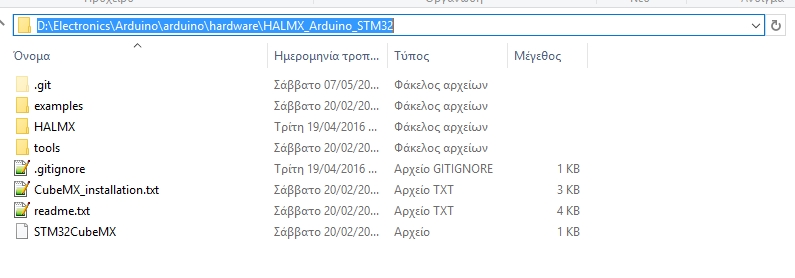
- HALMX_path.jpg (92.63 KiB) Viewed 2454 times
step 1: i download the library in github.
step 2: i put it in C:\Users\Robert\Documents\Arduino\hardware\HALMX_Arduino_STM32-master
then i open Arduino IDE 1.6.9 and i can’t see the Generic STM32F030F…

I’ve received small DevBoard and also Bare chips from eBay.
First digging : SPL is working but take much all resources, simple Blinky with Serial chat take 14K out of 16K Flash.
Second digging : after 2 days of work, getting rid of SPL and going with some merged SPL/LeafLab and other BareMetal, I’ve came to compromise with 5K out of the 16K Flash … A bit better …
PWM blinky led + UART (no optimization besides -Os compiler flag) = 8k flash
If there’s any interest, I can post my setup and code
[RogerClark – Sat Jul 16, 2016 3:51 am] –
All boards except the F103 have been disabled as they need the SPI and USB serial and other updates
then there is still no support for the stm32f0 … or if there is as active