
I would be happy if someone can guide me with the FIRST STM32 board that I got – STM32F030F4P6
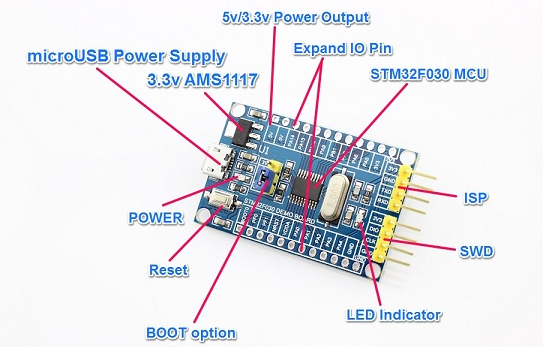
I am using This mini board:
 .
.
I would be happy if you could assist me with several issues that I have – and as I have mentioned I am new and this is My First time even trying – I would like to learn as much as it’s needed to be able to master it (I know that I am far from being that – but I have hopes) 
Several beginners issues that I have:
- 1 – I can’t see it in the device manager – No PORT is being added to the list after I connect it
- 2 – There is a jumper onboard – and I am not sure what it is – assuming that when it is Boot to GND it works regularly with the code uploaded to it and when it is Boot to 3V3 it is waiting to be programmed – Is that correct?
- 3 – Should I be using something to connect it on the ISP or SWD?
- 4 – What should I add to the Arduino IDE hardware folder or a JSON file to be able to see the STM32F030F4P6 Board in Arduino IDE?
My first goal is to be able to run my Double Blink .ino file on this board.
I would be happy to see any kind of schematics that will assist me with connecting the STM32F030F4P6 Mini Board with Arduino IDE.
I am so eager to start working with the STM32 boards and I would be happy to get help as soon as possible.
I am willing to learn as much as I can to be able to work with STM32 boards the same way I do with Arduino’s. I am a beginner and I would be happy if you could assist me with the basics mentioned above.
Thank you!!
Arye
And the second goal is to be able to run a native C code of double blink on it using Atmel Studio – maybe I will open another topic regarding the Atmel studio when the time comes.
Do Not open a topic on Atmel Studio … we cannot support you here.
On your uC … a search reveals little activity:
https://www.google.com/search?q=STM32F0 … 2duino.com
Ray
I do understand that I should have a learning curve in order to be able to learn the Stm32 boards.
I am now learning the “flavors” of all boards that are out there.
I have found out that I have also ordered two from the F103 boards (Still yet to come, hopefully) the “Ugly Board” and STM32 Smart V2.0.
I am still waiting for them to show up.
I know – I have NOT started with the Basic STM32 board – The Blue Pill – and I am even sure that I have ordered it and I have it in my shop somewhere – If I will not find it I will order a new one – This board is really cheap
After looking around I have JST ordered the Mini Maple and hopefully, I will be lucky enough to have more people working with it and will be able to learn the STM32 Family a bit better.
I know that the “Ugly Board” is the black sheep of the Family – But I have already ordered it and I will try to win it as well and work hard for that.
>> Why it called Ugly Board? Maybe I will find out later when I work with it.
Back to the topic:
the STM32F030F4P6 is also a board that I want to work with and I could NOT find it anywhere in the Wiki pages as well I was not able to locate it.
I have already installed several sets of hardware in the Arduino IDE and I have seen so many boards that I can NOT imagine 
I have a VERY long way in order to “master” the STM32
Also, Regarding it not being recognized by the PC USB port and set with a Port – that could be maybe because it is NOT working the same way we used to work with Arduino boards? Meaning that the micro USB is only for Powering up the board and I should be using FTDI board to connect to it using Rx and Tx? Also, I have already ordered STLink V2 that was when I started learning and realized that I might be needed that when the boards will arrive. So, maybe I need to do something with the STLink and set the board up?
I have found this link:
https://github.com/rogerclarkmelbourne/ … from-Linux But it is for Linux and I am using Windows, any idea if that is the same on both OS? or I might be using a different method?
The Board came to me fro AliExpress already uploaded with the Blinky sketch – and I am sure that it is working correctly and that it has the Bootloader installed (that is not 100% sure).
I would be happy if someone can assist me with the STM32F030F4P6 Board :
- How does it connect to the USB? Directly or FTDI/STLink cards?
- Where I can find the Hardware to work with it with Arduino IDE?
I am 100% sure that the answers I can find ONLY here in this forum!!
p.s. I might be looking into buying this board as well – STM32F407VET6 or should I wait? 


Thanks a lot
Arye
https://www.hotmcu.com/stm32f030f4p6-mi … p-208.html
Lower on that page you can find schematic, datasheet and example source code.
It seems that the chip has no USB at all, the connector is just for powering the board with 5V.
I have already seen that page and the code is NOT something I am familiar with – What Software should I use to program this example?
I thought it might be used with a PC to get programming using the ISP connection, using a STLink V2 card of which I have already ordered.
In this link (the one I have sent)
https://github.com/rogerclarkmelbourne/ … from-Linux
You can see that you CAN also program the “Ugly Board” (I hope I had the correct name of that board) using the STLink V2 to USB and by that, it WILL create a PORT on the PC and that way you will be able to connect to it.
It says on that page:
WARNING: When developing, and powering the STM target board from the programmer, if you intend to plug in the USB port at the same time, then remove the power (orange) wire first, and power the board from USB otherwise you may see some magic smoke.
So I am pretty sure that there IS a way to make this STM32F030F4P6 Board work with USB and Port and connected to the Arduino IDE.
The Problem that I might be a bit concern of is – Hardware compatibility – What should I use to make the Arduino IDE recognize it? that is all ONLY if I am right about the STLink connection with Rx Tx to the board.
I hope there is ANOTHER one like me that is seeking to make this board to work and already made it work with Some kind of Software on a Windows PC.
I would be happy to hear from you about what I mentioned above and if there is a possibility to make that STM32F030F4P6 work with Arduino IDE as well.
I wish that there will be a Wiki page on F030 Boards as well and how to support them on Arduino IDE. I am sure that it will happen in the nearby future. There are lots of boards out there and I am sure no one wants them to be missed – I hope that I will be able to make it work and that is WITH your help of course.
thank you!
I also don’t know what you mean by “Port”, if you mean a serial COM port, then it will only show up if the STLink has version V2.2.
Version 2.1 will not enumerate any serial COM port.
The cheap STLink probes from China are all V2.1, so you can have serial COM port only if you use a USB->serial adapter and connect it to the “ISP”.
Yes, it seems that the board supports connection to STLink (via “SWD”). So from upload point of view, Arduino IDE can support it.
The button on the board is a reset button.
The LED will be on when controlling the port pin PA4 to logical high level.
I did not checked the software, so sorry, but you are on your on with that.
I don’t know what you refer to with “ugly board” unless you post a link.
Regarding the “Ugly Board” of which that is NOT a name I chose for it – this is how it was described on the ST32 Wiki page. Here is the Link:
http://wiki.stm32duino.com/index.php?title=Ugly_board IMHO it is not ugly at all
I also don’t know what you mean by “Port”, if you mean a serial COM port, then it will only show up if the STLink has version V2.2.
Yes, I meant Serial PORT that I can use with Arduino IDE to program it. Where can I find information about the STLink versions and maybe I can do a firmware update from 2.1 to 2.2? is that possible? BTW – where I can buy a good (and cheap) STLink V2.2 online? I don’t have a lot to spend if you know what I mean – Electronics Hobby is Expensive
Product Page : 1. Support the full range of STM32 SWD interface debugging, simple interface (including power supply), 4 line speed, stable work;! Interface definition shell directly address Do not need to read instructions!
So, can I use it and get a Serial Port to work with Arduino IDE?
[End Edit]
only if you use a USB->serial adapter and connect it to the “ISP”.
You mean I need to use FTDI? The same one I use with my Arduino boards that does NOT have a USB connection on them? If that is the case I have it in hand and ready to use.
Yes, it seems that the board supports connection to STLink (via “SWD”). So from upload point of view, Arduino IDE can support it.
That is GOOD news, But that also means I need to get the STLink V2.2 for that OR I can do the same using the USB->Serial adapter mentioned above?
Also, that means we CAN upload the sketches to the board as long as we provide it with the correct board and Port and also the Upload method, Correct?
I would be happy if you could assist me and help me move forward with developing this board and maybe we would add a NEW page on the Wiki boards pages to support STM32F030F4P6 as well. that would be great.
Thank You!!!!
Arye
V2.2 STLink chips are only available on some ST official boards.
Yes, an FTDI is needed for serial COM port.
Sorry, but I cannot bring you further on this project, as the Roger’s libmaple core, in which I am interested, does not support this chip.
Maybe the official ST core does support it, we need a reply from Frederik (@fpiSTM) regarding this.
Or check it yourself under: https://github.com/stm32duino/Arduino_Core_STM32.
A general overview of upload capability: http://wiki.stm32duino.com/index.php?ti … g_a_sketch
At present, the Blue Pill is the most common board. I far prefer a newbie with STM32 clones to purchase the Maple Mini and branch-out as familiarity sets in. But, you have a prior Arduino background and are not a true newbie… boards are somewhat inexpensive. But I recommend looking through forum and moving in harmony with the larger populations; support will be better.
I can program a Maple Mini board all day long on Windows or Linux without issue… so I develop in that environment and then swap over to the less expensive Blue Pill to finalize the project. NUCLEO boards have an embedded ST-Link, so use STM’s core and stay happy.
With non-official cores, just look in the platform.txt file to determine how the ArduinoIDE will provide options…
https://github.com/rogerclarkmelbourne/ … atform.txt
Snippet
# Upload using Maple bootloader over DFU

tools.maple_upload.cmd=maple_upload

tools.maple_upload.cmd.windows=maple_upload.bat

tools.maple_upload.path={runtime.hardware.path}/tools/win

tools.maple_upload.path.macosx={runtime.hardware.path}/tools/macosx

tools.maple_upload.path.linux={runtime.hardware.path}/tools/linux

tools.maple_upload.path.linux64={runtime.hardware.path}/tools/linux64

tools.maple_upload.upload.params.verbose=-d

tools.maple_upload.upload.params.quiet=

tools.maple_upload.upload.pattern="{path}/{cmd}" {serial.port.file} {upload.altID} {upload.usbID} "{build.path}/{build.project_name}.bin"
#Added tool for generic STM32 upload via serial to Serial Port 1 (pins PA9 and PA10) - note. Boot0 line needs to high on board reset to enable upload via serial
# at the end up the upload the program is automatically run, without the board being reset
- Steve:
Yes, that STlink stick should work for upload, but not as a serial COM port.
Meaning that I would be able to use it to upload sketches on the STM32F030F4P6 board, Correct? If I had a better STLink Stick that has the version V2.2 and Up – I would be able to use a COM port as well. Since Arduino IDE support several Upload methods – I can use an FTDI for Serial and STlink to use as itself for uploading settings.
BTW, I have found a “Blue Pill” in my stock of boards and I have tested it Just to see if I am in the RIGHT direction with the STM32F030F4P6 Board (I wish it had a more catchy name – like the most common ones). I have managed to upload a simple blinky to the “Blue Pill” using Arduino IDE and a COM Port with FTDI unit on 3.3V. I will continue “Playing” with this board while I discover my way with the STM32F030F4P6 board.
some ST official boards
Where can I get these? Are the reasonably priced? and Should I do that? or use an FTDI with COM?
Sorry, but I cannot bring you further on this project, as Roger’s libmaple core, in which I am interested, does not support this chip.
Since I am new and not familiar with Roger’s libmaple core I would be happy if you could point me to it, Maybe you did already but since I have everything still blurred I would be happy if you could do that again.
Maybe the official ST core does support it
I have already uploaded all STM32 Boards to the Arduino IDE – There are so many that I could not start to imagine. stm32duino has several to offer and I have also found under s32duino (not exactly stm32duino – not sure who this one is?) a support for STM32F030F4 – That it is NOT Complete and I was thinking to test it. I am almost sure that it would support the board I am working with – IF the board configuration from s32duino is in a working stage.
- Ray:
A general overview of upload capability: http://wiki.stm32duino.com/index.php?ti … g_a_sketch
As I have mentioned above, Assuming that I am using the FTDI, the Serial method should suffice – If I will be able to install the FTDI drivers on Windows without a problem.
I have already had a “Blue Pill” as mentioned above – Working with it
I already ordered a Maple Mini board – Hope it will get soon, So I will be able to test it as well. (China can take 4 to 5 weeks at least). the thing that I like with the “Blue Pill” Dev board that I have – WYSIWYG – Just write down the name of the Pin you see on the board and that is it – you don’t need to work around with the names, it is simple when it comes to pins inside your sketches.
But I recommend looking through the forum and moving in harmony with the larger populations; support will be better.
That should be the best case scenario – But, I hope that when I will get more involved with stm32 boards and experienced as well – I will try those “unknown” to the community boards. I believe that the “Blue Pill” and even “Maple mini” once were unknown – and thanks to those who worked hard – We now can use them and even newbies can as well. I hope that I will be able to understand the STM32F030 series enough to be able to build a support page, with help of the experts that are members of this Forum and part of the STM Comunity.
I can program a Maple Mini board all day long on Windows or Linux without issue…
You do that using STLink or Serial? The Maple mini uses the same communication as the Blue Pill? NUCLEO boards have an embedded ST-Link, so use STM’s core and stay happy, Yes I know BUT they are NOT Cheap will eventually try them as well…
With non-official cores, just look in the platform.txt file to determine how the ArduinoIDE will provide options…
You got me on that, at my point right now, I am NOT even sure what I should do here? maybe it is simple and I complicating things – I would be happy if you could explain this a bit more.
Regarding Pinout layout of the KNOWN Boards – is there a place that I can find them online? Like this one below for the STM32F103C8T6 ARM STM32 Cortex-M3

p.s. Just after I posted I was thinking..
Are there pages on this forum that can be used as Pool of interests? i.e. Page on STM32F030F4 Series that members can register to and when the number of members meets a reasonable amount – then a group is created and everyone contribute to the group page with all the knowledge they have and collected so far on that board. that collaborated group page will eventually lead to a Well defined page in STM32 Wiki, and furthermore will let everyone else know more about that board and development will start in an easy way. Hope I make sense and you understand me.
Thank You!!
Arye
Meaning that I would be able to use it to upload sketches on the STM32F030F4P6 board, Correct?
I have been working with this board for a while, and I have followed STM regarding this board – it seems like they are going to add support for this board in version 1.5.0 – that would be great!!
I have learned a lot during my investigation and I have also patched up a borads.txt section that I would be trying it and HOPE it will work.
I am not sure if I need to put:
GenF030.build.vid=0x1EAF

GenF030.build.pid=0x0004

GenF030.vid.0=0x1EAF

GenF030.pid.0=0x0004

Hope it could be of use for reference – I have based the image on the one I used and the link is on the image as well.
There are also two other boards that I would be happy to get my hands on
I am sure that they are out on AliExpress or eBay.This one:
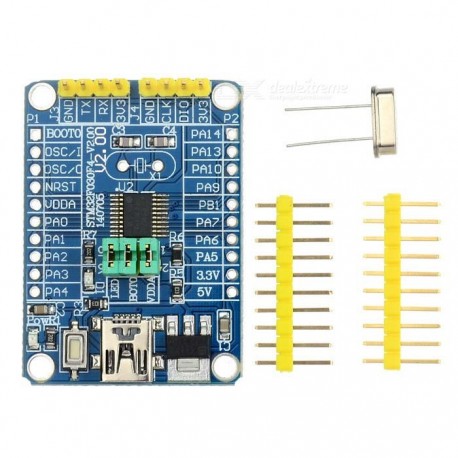
referred as version 2 of the same board.
And this one: referred as BluePill F030
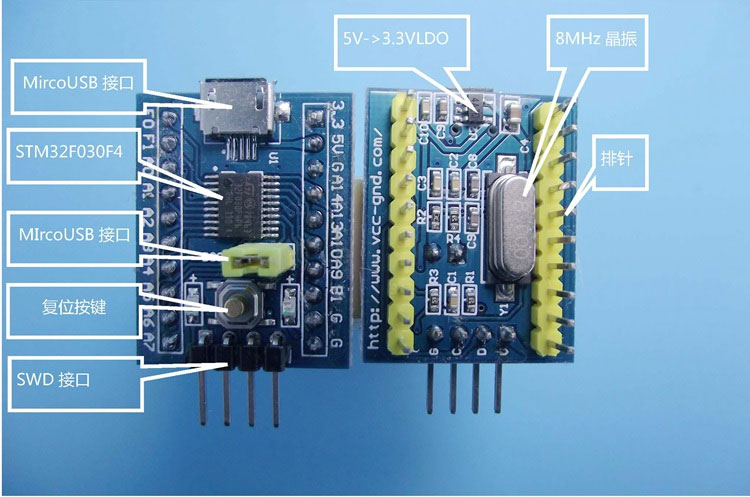
Just I would be happy to learn more by using them as well.
Thanks
Aryeduino
https://github.com/BLavery/STM32F030F4P6-Arduino
It works. From this point, we can now code whatever else we want.
