
// USBSERIAL TX PROBLEM DEMONSTRATION

// Pito 7/2017
#include "Arduino.h"
void setup() {

Serial.begin(115200);

delay(3000);

}
#define TXCHARS 1000000
void loop() {

uint32_t i;

uint8_t x = 85;

uint32_t elapsed = micros();
for (i = 0; i < TXCHARS; i++) {

Serial.write(x);

}
elapsed = micros() - elapsed;

Serial.println("***");

Serial.print("USB TX speed = ");

Serial.print((1000.0 * TXCHARS) / elapsed, 2);

Serial.println(" KBytes/sec");

delay(1000);

}
[Pito – Mon Jul 17, 2017 8:15 am] –
Fixed libmaple:
***

USB TX speed = 213.34 KBytes/sec
Your code gives me:
USB TX speed = 308.41 KBytes/sec
BTW, I’ve compiled the test for Black F407 @168MHz under my old libmaple (patched manually with steve’s patch) and I get 1013-1064kB/sec..
***

USB TX speed = 64.87 KBytes/secAlso CDC_SERIAL_BUFFER_SIZE is still 128 in STM32/cores/arduino/usb/cdc/usbd_cdc_if.h , upping that might help.
DELETED
The standard compiler.
With CDC_SERIAL_BUFFER_SIZE 2048 I get with F407 730-994KB/sec.
DELETED
Update: with maybe more realistic scenario – with 1mil chars sent to TeraTerm terminal (Win7)
#define TXCHARS 1000000

While running the Tek demo against TeraTerm Tek emulator
http://www.stm32duino.com/viewtopic.php … =20#p31835
the buffer sizes larger than 256 bytes show corruptions in the picture..
The libmaple usb works, not sure on the buffer size there.
It could be the TeraTerm is causing that as well..

The Teraterm does not receive all 1mil chars with larger cdc buffer, but a fraction of it.
The larger the buffer in CDC the smaller amount of data I get.
Therefore the total time for TX was smaller and the TX speed was higher.
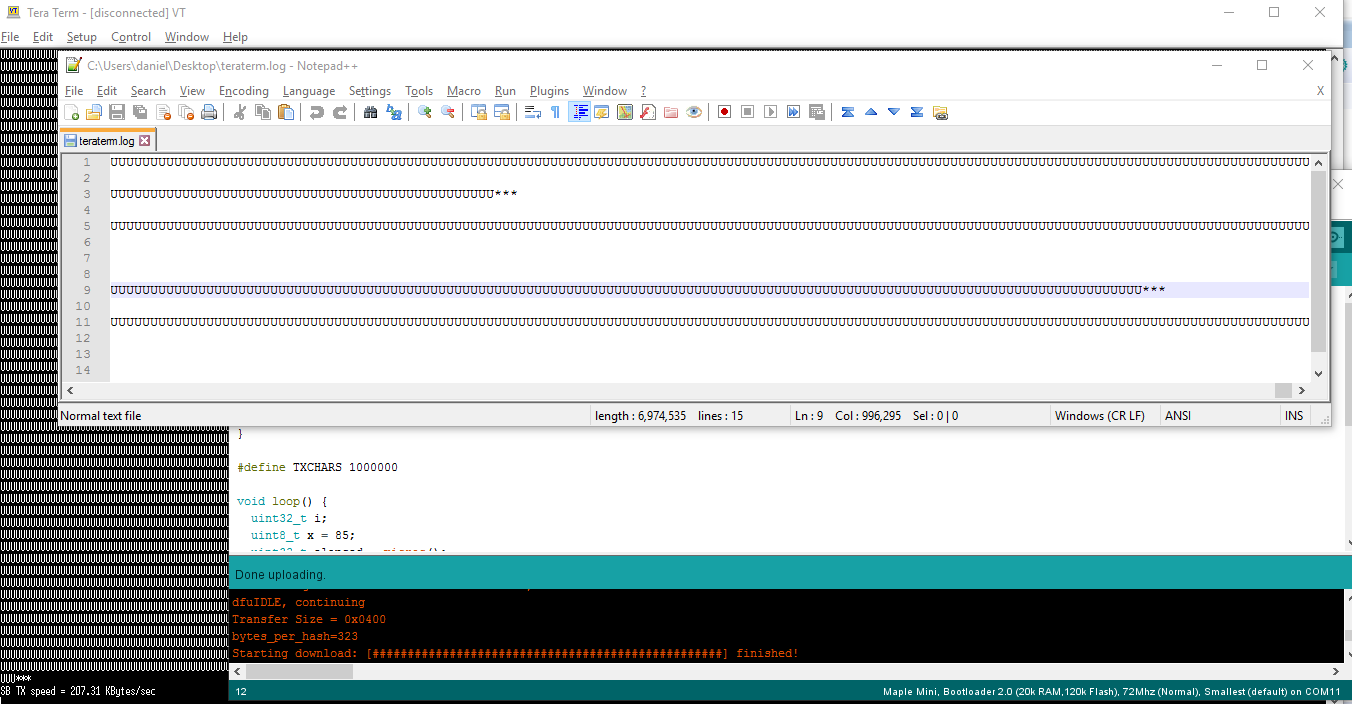
I’ve checked that by logging the incoming bytes into a file.
I get 1mil chars received ONLY with CDC_SERIAL_BUFFER_SIZE=128 (that is TX speed = 64kB/sec).
I’ve deleted the tables.
PS: with libmaple latest and its stock cdc settings I get 1mil chars with TX speed 120-170kB/sec.
Would be great if the larger buffer sizes work..
PS: As Steve wrote his buffer is 2kB.
[Pito – Sat Aug 12, 2017 9:50 am] –
Any thoughts on this?
Would be great if the larger buffer sizes work..
PS: As Steve wrote his buffer is 2kB.
With what cores did you experience bytes loses? I was testing the serial speed in the libmaple F4 and noticed from Host -> MCU it loses bytes if the host sends faster than the sketch can receive.
You see nothing wrong unless you start to log the incoming data into a file (in TeraTerm) and count the bytes in that file.
The test used: http://www.stm32duino.com/viewtopic.php … 354#p31552
Why we need larger buffer? Because the TX is slow – 64kB/sec only with 128bytes.
The libmaple’s TX via USB from F4 to TeraTerm at the stock buffer size (2kB as per Steve’s info) does not show the loss (speed around 150-220kB/sec).
There is an RX USB speed test written by PaulS I tried with the same results (MapleM) as in the following link
https://www.pjrc.com/teensy/benchmark_u … ceive.html
BTW – if there was a talented programmer who can write similar benchmark (see PaulS DOS side source) for TX as well, it would be great!
[Pito – Sat Aug 12, 2017 2:45 pm] –
There is an RX USB speed test written by PaulS I tried with the same results (MapleM) as in the following link
That’s the same test I was doing when I noticed the libmaple F4 would dump incoming bytes if the sketch is not picking them.
If you open the serial port, then don’t care to read, and send with Paul’s command line utility, it will keep going and going even if the sketch doesn’t care to read at all.
A test for TX would be great. Perhaps there is some tool already available somewhere.
On the libmaple F4 I think I have it corrected, at least is not dropping everything, but I need to confirm I’m not missing any byte at all.
I’ll see if I can have a look at the generic TX. What buffer sizes did you test that would drop bytes for sure?
In the libmaple core, because of the way the code is written, the buffer needs to be an exact power of 2.
The CDC_SERIAL_BUFFER_SIZE (in STM32/cores/arduino/usb/cdc/usbd_cdc_if.h) size which works fine is 128.
These I tested with missing bytes: 256, 512, 1024, 2048, 4096, 8k, 16k, 32k on F4, and the same till 16k on F103 (so it is not only about F4).
When talking missing bytes – it is not about a few bytes, but hundreds of kilobytes..
I published the results few weeks back (see my previous posts here in this thread) with speeds up to 1MB/sec for F4 and 450kB/sec for F103, until I started to analyze the amount of data transferred.
It showed the great speeds had been achieved because the transfer did only a fraction of the amount of data and finished smoothly sooner, thus the speeds were such fantastic figures 
Therefore I deleted the results not to evoke false expectations (until fixed).
I discovered that while messing with TEK emulator, where larger pictures I streamed to TEK via USB started to show defects with larger buffer sizes.
[Pito – Sat Aug 12, 2017 4:59 pm] –
I’ll see if I can have a look at the generic TX. What buffer sizes did you test that would drop bytes for sure?
The size which works fine is 128.These I tested with missing bytes: 256, 512, 1024, 2048, 4096, 8k, 16k, 32k on F4, and the same till 16k on F103 (so it is not only about F4).
When talking missing bytes – it is not about a few bytes, but hundreds of kilobytes..I published the results few weeks back (see my previous posts here in this thread) with speeds up to 1MB/sec for F4 and 450kB/sec for F103, until I started to analyze the amount of data transferred.
It showed the great speeds had been achieved because the transfer did only a fraction of the amount of data and finished smoothly sooner, thus the speeds were such fantastic figuresTherefore I deleted the results not to evoke false expectations (until fixed).
I discovered that while messing with TEK emulator, where larger pictures I streamed to TEK via USB started to show defects with larger buffer sizes.
I bet it was nice to see 1MB/s until you found out they were being dropped somewhere 
I just found this tool:
http://www.serialporttool.com/CommEcho.htm
I’m about to test it, I understand it will echo back all it gets, plus it counts, so if we send let’s say 1MB we should receive back 1MB, plus the program should show if Windows received 1MB. Let’s see…
Also that allows me to count both the bytes sent up the pipe and received back.
I ran several test, allowing it to wait for longer at the end to see if it would receive any extra bytes, from some misconnunication somewhere, but did not.
Configured like this it waits until the received ammount is the same as the sent amount and displays the total time and speed. It reports 50KB/s, that’s each way.
Important to note that either because of Windows, or because or the test program in Windows, the last few bytes take a few seconds to be received back, I guess the program waits to see if it can fill a buffer or something. If that wait wasn’t there, the performance would be better. But at least I know at that speed Windows is getting the right amount of bytes, sends them back, and the right amount are received again.
If I raise the TX speed by sending blocks instead of individual bytes (Serial.print (buf, XXXX), at some point I start losing data. But I believe it has more to do with the TX timing out, since there is a max timeout for a transfer and will drop bytes if it takes more than that.
#define TXCHARS 100000
void loop() {
char buf[bufsize];
delay (10000);
uint32_t n = 0;
uint32_t i;
uint8_t x = 85;
uint32_t elapsed = micros();
for (i = 0; i < (TXCHARS); i++) {
Serial.write(x);
n+= Serial.readBytes (buf, bufsize);
}
uint32 endMillis = millis();
while ((n < TXCHARS)){
//while ((n < TXCHARS*2) & ((millis() - endMillis) < 10000)){
n+= Serial.readBytes (buf,bufsize);
}
elapsed = micros() - elapsed;
Serial.println("***");
Serial.print("USB TX speed = ");
Serial.print((1000.0 * TXCHARS) / elapsed, 2);
Serial.println(" KBytes/sec");
Serial.print ("Elapse (us): ");
Serial.println (elapsed,DEC);
Serial.print ("Sent: ");
Serial.println (TXCHARS, DEC);
Serial.print ("Received: ");
Serial.println (n, DEC);
delay(1000);
while (1){
Serial.readBytes (buf,bufsize);
}
}
#include "Arduino.h"
#define TXCHARS 100000

#define bufsize 100
void setup() {

Serial.begin(115200);

delay(2000);

}
void loop() {

uint32_t i;

uint8_t x = 85;

uint32_t elapsed = micros();

uint8_t buf[bufsize];
for (i = 0; i < bufsize; i++) { buf[i] = x; }
while(1)

{

elapsed = micros();

for (i = 0; i < TXCHARS; i++) {

Serial.write(x);

}

elapsed = micros() - elapsed;
Serial.println("***");

Serial.print("USB TX speed = ");

Serial.print((1000.0 * i) / elapsed, 2);

Serial.println(" KBytes/sec");

delay(1000);
elapsed = micros();

for (i = 0; i < TXCHARS; i+=bufsize) {

Serial.write(buf, bufsize);

}

elapsed = micros() - elapsed;
Serial.println("***");

Serial.print("USB buffered TX speed = ");

Serial.print((1000.0 * i) / elapsed, 2);

Serial.println(" KBytes/sec");

delay(1000);

}

}
#define TXCHARS 1000000In SerialUSBClass write, unsigned long timeout=millis()+5;
Try to increase it.
Sorry I was not able to reproduce the error, but do not have time to thoroughly test this.
In libmaple the buffers are defined in another line, but same effect. Those buffers are 2KB each by default in the latest repo. I increased those without much effect, except if I get them really slow.
Playing with the buffers in commecho had a more definitive effect, the best results is when the transmission total, each individual chunk, and the commecho buffers were all multiples. I.E. 1milling total bytes, sent in chunks of 100 at a time, and commecho buffers of 1000 each. Still the speed sending 1 byte at a time to 100 bytes at a time is almost the same overall total speed. I think the bottleneck was in commecho receiving and sending back, but at least confirmed it got everything to Windows and back.
If I try to send 1000 bytes a time, I lose data, because I think it fills the libmaple buffer faster than Windows is taking it, and then the TX timeout quicks in and doesn’t send the total it should.
My F4 libmaple is modified so it does not dump RX bytes evers. The current repo copy will dump RX data if the sketch is not reading it at the same speed that comes from the USB bus, and what’s worse, it does so without properly moving the tail in the RX fifo buffer, so you end up with very corrupted data, not just lost, but bytes received later would be read before the older ones by the application.
I’ll try to compile the sketch like it is with the Generic core and see what it does.
Here it works only with this (Serial.readBytes() timeouts after 1 sec)
  for (i = 0; i < (TXCHARS); i++) {

Serial.write(x);

//n+= Serial.readBytes(buf, bufsize);

while(Serial.available()>0) {

char dummy = Serial.read();

n++;

}

}
EDIT: I’m using default CDC_SERIAL_BUFFER_SIZE
The function is here:
https://github.com/danieleff/STM32GENER … B.cpp#L150
In libmaple F4, it would overwrite what’s in the buffer. In the GENERIC core it will just not save the incoming packet to the buffer if there is no capacity, so if the buffer has let’s say 10 bytes free, and a packet of 40 bytes comes in, it will write the first 10 bytes, and return. The packet will get over written with the next incoming packet since the communication is not stopped with the host and the 30 bytes that did not make it to the buffer will be lost forever.
So this will dump RX if the host sends faster than the sketch reads them.
On TX, it will write until the buffer fills up.
But if the buffer has capacity for only part of what we want to send, I believe it will write that part in the buffer, but not return the correct number of bytes that were buffered, instead return 0.
I.E. We want to send 100 bytes. Buffer has capacity for 40. It will buffer 40, and return 0. It should return 40, so the sketch can know what happened and can continue sending the rest.
That is not according to the Arduino API:
https://www.arduino.cc/en/Serial/Write
write() will return the number of bytes written, though reading that number is optional
So that will cause the sketches to end up sending corrupted data to the host if the buffer ever fills during a transmission.
https://github.com/danieleff/STM32GENER … SB.cpp#L98
This is the part of the function doing that (breaking and returning 0 even if some bytes made it to the buffer):
for(size_t i=0; i < size; i++) {
tx_buffer.buffer[tx_buffer.iHead] = *buffer;
tx_buffer.iHead = (tx_buffer.iHead + 1) % sizeof(tx_buffer.buffer);
buffer++;
while(tx_buffer.iHead == tx_buffer.iTail && millis()<timeout);
if (tx_buffer.iHead == tx_buffer.iTail) break;
}
[victor_pv – Sun Aug 13, 2017 9:05 pm] – …
I think it could be corrected like this:
while(size--) {tx_buffer.buffer[tx_buffer.iHead] = *buffer;
tx_buffer.iHead = (tx_buffer.iHead + 1) % sizeof(tx_buffer.buffer);
buffer++;while(tx_buffer.iHead == tx_buffer.iTail && millis()<timeout);
if (tx_buffer.iHead == tx_buffer.iTail) break;
}
return size;
[vitor_boss – Mon Aug 14, 2017 4:13 am] –
It could be easier like this:
if( i<size) { return i; }

else { return size; }
[victor_pv – Mon Aug 14, 2017 4:30 am] –[vitor_boss – Mon Aug 14, 2017 4:13 am] –
It could be easier like this:
if( i<size) { return i; }

else { return size; }
The USB communication is based on “packets” where the RX/TX control is done via handshaking (ACK/NACK/STALL handshake packets), where packet sizes for control transfer stuff (like command and status) are 8 to 64 bytes in size, and the payload packet size is max 1024 bytes (actually 8, 16, 32, 64, 512, 1023 or 1024 based on the type of a transfer).
There are no bigger packet sizes, afaik (plz correct me).
When we set the RX buffer to 1024 and TX buffer to 1024 (perfectly feasible sizes for any stm32) we must not drop/dump/overwrite any bytes and thus we cannot loose any bytes when doing TX or RX via USB..

[Pito – Mon Aug 14, 2017 5:57 am] –
Frankly, I do not understand how we can “loose” (or we must drop or dump or overwrite) bytes while transmitting or receiving via USB.The USB communication is based on “packets” where the RX/TX control is done via handshaking (ACK/NACK/STALL handshake packets), where packet sizes for control transfer stuff (like command and status) are 8 to 64 bytes in size, and the payload packet size is max 1024 bytes (actually 8, 16, 32, 64, 512, 1023 or 1024 based on the type of a transfer).
There are no bigger packet sizes, afaik (plz correct me).
When we set the RX buffer to 1024 and TX buffer to 1024 (perfectly feasible sizes for any stm32) we must not drop/dump/overwrite any bytes and thus we cannot loose any bytes when doing TX or RX via USB..
You are correct Pito, but that is how it should work, but not always implemented like that. In the Generic core every packet that the host sent is ACKed inmediately even if it doesn’t fit in the buffer. So if the packet doesn’t fit, it stays in the USB device ram to be overwritten by the next packet sent by the host.
The libmaple F1 will stop ACKing packets when the buffer is full, so the host has to hold up. In the libmaple F4 SerialUSB, which is not really libmaple since it was added by AeroQuad from the Standard Peripheral Library, every packet is ACKed whether it fit in the buffer or not.
I have modified that already (libmaple F4) so it does not ACK when the buffer is full, and as soon as the buffer has capacity for 1 more packet, then it ACKs the previous one and the host can continue sending.
TX in all the cores (libmaple F1, F4 and Generic) has a timeout, if the transmission can’t be completed within X mS, it returns. But the behaviour varies on that too. I need to confirm, but I believe is like follows:
Libmaple F1 & F4: Returns the number of bytes correctly queued for send.
Generic F4: Returns 0 even if some bytes were queue. Additionally, it has a “transmission” variable that as I can’t manage to understand what exactly is intended to do. I think the intention is for it to indicate how many bytes are in the out buffer waiting to be sent, but that should rather be calculated with the head and tail of the queue. Also I am not sure that transmission variable gets the correct value depending on that path the code takes. But that may be me not understanding it correctly, although your confirmation that TX is corrupted and missing bytes I think is confirmation that doesn’t work right.
Given that the Generic core is based in the HAL, it may be a good idea to replace the SerialUSB code with the one from STM.
replace the SerialUSB code with the one from STM
SerialUSB sits on top of the whole STM code.
And STM CDC code does not have buffered writes (CDC_Transmit_FS() sends immediately, which was the initial problem), which is why I had to hack in USBSerial_Tx_Handler to the STM CDC code, so when current TX is finished, it checks if there are more things to send, and sends it from the USB interrupt, instead of SerialUSBClass::write (and SerialUSBClass::write will not send it if it knows there is ongoin transmission (the transmission variable) ).
[danieleff – Tue Aug 15, 2017 6:21 am] –
Have anyone actually tried to just up the timeout from milliseconds to seconds?replace the SerialUSB code with the one from STM
SerialUSB sits on top of the whole STM code.
And STM CDC code does not have buffered writes (CDC_Transmit_FS() sends immediately, which was the initial problem), which is why I had to hack in USBSerial_Tx_Handler to the STM CDC code, so when current TX is finished, it checks if there are more things to send, and sends it from the USB interrupt, instead of SerialUSBClass::write (and SerialUSBClass::write will not send it if it knows there is ongoin transmission (the transmission variable) ).
Can’t we use the head and tail to determine if there is more in the buffer rather than the transmission variable?
If we only have 1 function pulling data (TX_Handler) and 1 function adding data (SerialUSB::write), and we don’t allow the head to hit the tail, then we can always know what’s currently in the buffer even if it we have interrupts and whatnot.
About the code, I didn’t know that’s what STM uses since it shows Vassilis as the author, I thought STM had written their own.
My preference:
For TX, should return right away and the return value indicate how many bytes it could queue. If 0 bytes, then return 0. For X bytes, return X. (so this invoves taking out the timeout, leave the timeout or retries for the application).
For RX, if buffer is full, NAK the last host packet so it does not send another one. Once the buffer has enough capacity to receive at least 1 more packet, issue the ACK for the previous packet so the host can send a new one. If the application starts reading bytes from the RX buffer at the point it gets enough space for another packet, then issue the NAK and keep going.
The above is how I have modified Steve’s F4 RX code to work (not the TX as for now).
[victor_pv – Wed Aug 16, 2017 4:46 pm] –
Everyone in this thread, can we first agree what’s the desirable behavior for USB TX and RX in case the buffers fill?
My preference:
For TX, should return right away and the return value indicate how many bytes it could queue. If 0 bytes, then return 0. For X bytes, return X. (so this invoves taking out the timeout, leave the timeout or retries for the application).
The return values are OK, but a small timeout should be there. Nobody will ever ever do retries with Serial.print/write(…).
[victor_pv – Wed Aug 16, 2017 4:46 pm] –
For RX, if buffer is full, NAK the last host packet so it does not send another one. Once the buffer has enough capacity to receive at least 1 more packet, issue the ACK for the previous packet so the host can send a new one. If the application starts reading bytes from the RX buffer at the point it gets enough space for another packet, then issue the NAK and keep going.The above is how I have modified Steve’s F4 RX code to work (not the TX as for now).
You can try to do this, but that is deeply inside STM CDC code. (I think. I did not check actually)
As for the dropped data, at last I was able to setup a test so I can actually see the problem. (Using `for (i = 0; i < TXCHARS; i++) Serial.write(‘0’ + (i % 10));` plus TeraTerm I do not need to log, and can see the 0123456789 pattern get corrupted.)
BTW The problem persists even if I comment out the timeout, so its not that.
// USBSERIAL TX PROBLEM DEMONSTRATION

// Pito 7/2017
#include "Arduino.h"
void setup() {

Serial.begin(115200);

delay(3000);

}
#define TXCHARS 1000000
void loop() {

uint32_t i;

uint32_t elapsed = micros();
for (i = 0; i < TXCHARS; i++) {

Serial.write('0' + (i % 10));

}
elapsed = micros() - elapsed;

Serial.println("***");

Serial.print("USB TX speed = ");

Serial.print((1000.0 * TXCHARS) / elapsed, 2);

Serial.println(" KBytes/sec");

delay(5000);

}
We can add some flag in the TX code to see if the buffer ever gets full.
When using the Arduino IDE, do you ever see byte sequences out of order? (probably just replacing 0123456789 for “” or “ok” and seeing what you have left)
#include "Arduino.h"
char buffer[200];
#define TX 1000
void setup() {

Serial.begin(115200);

delay(3000);
memset(buffer, '.', sizeof(buffer));
for(int i=0; i<sizeof(buffer) / 10; i++) {

buffer[i * 10] = '0' + (i % 10);

}
buffer[sizeof(buffer) - 2] = '\r';

buffer[sizeof(buffer) - 1] = '\n';
}
void loop() {

for(size_t i=0; i<TX; i++) {
sprintf(buffer, "[%6d %10lu]", i, micros());
while(CDC_Transmit_FS((uint8_t*)buffer, 200) != USBD_OK);
USBD_CDC_HandleTypeDef *hcdc = (USBD_CDC_HandleTypeDef*)hUsbDeviceFS.pClassData;

while (hcdc->TxState != 0); // Wait for USB transfer to finish
}
delay(5000);

}
That is I think sending over serial shall be kept as simple as possible, thus be either blocking or not blocking.
The F4 serial USB was originally configured to non-blocking, but I have changed this because I missed some data on the host side. After changing that reception on host side was ok.
The chip should send data as fast as it can.
Also, the host should read that data as fast as it can. Failing to do that will result of course in data loss.
If at least one host application is able to read all data, this means that the chip is working fine.
It looks like teraterm has problems on Win10?
Could you try on your machines – the CommEcho – whether it returns 1mil chars ok, plz?
Update:
with latest libmaple F1 I get 1mil chars from Teraterm when logged into file (217kB/s when not logged, 102kB/s when logged into file).
with latest libmaple F4 I get 1mil chars from Teraterm when logged into file (170kB/s when not logged, 102kB/s when logged into file).
But in USB, if the other end is not receiving it could block forever unless we have the timeout. So larger or smaller, but I think some timeout is needed. We could set the timeout as a multiple of the time per bytes for a certain minimum rate, so the timeout is not same when sending 1 byte as when sending 1000. That would resemble more what the UART driver would do.
On the other hand with the timeout, if the host is slow getting data, we may lose bytes. But I think anyone not wanting to lose bytes should check on the returned value to confirm it was sent. If it is not critical, the ignore the return.
For example if we decide to use a timeout to simulate a minimum 100KB/s rate, then it would be 10uS per byte. If the host is slower than that (or disconnected) then transmissions may timeout, but if the host keeps at least that rate, they will complete within the allowed timeout period.
But on RX unless we stop sending ACKs to the host until there is room in the buffer, is very possible that data will be lost not matter what the application does, since the host is potentially much faster.
The F1 core does that, and in the libmaple F4 I have it modified locally to that, I will send a PR so more people can test that RX.
On Generic TX I will try to repeat some of the tests Pito has done and see if there is any difference, but I am not convinced is just teraterm.
The host is responsible for managing the bandwidth of the bus. This is done at enumeration when configuring Isochronous and Interrupt Endpoints and throughout the operation of the bus.
http://www.beyondlogic.org/usbnutshell/ … sochronous
OUT: When the host wants to send the function a bulk data packet, it issues an OUT token followed by a data packet containing the bulk data. If any part of the OUT token or data packet is corrupt then the function ignores the packet. If the function’s endpoint buffer was empty and it has clocked the data into the endpoint buffer it issues an ACK informing the host it has successfully received the data. If the endpoint buffer is not empty due to processing a previous packet, then the function returns an NAK. However if the endpoint has had an error and its halt bit has been set, it returns a STALL.
Also these I think are important to note:
Bulk Transfers
Used to transfer large bursty data.
Error detection via CRC, with guarantee of delivery.
No guarantee of bandwidth or minimum latency.
Stream Pipe – Unidirectional
Full & high speed modes only.
We are supposed to guarantee delivery with the handshake, but there no guarantee of bandwidth, so we should not drop packets just because the application in the host or the MCU is not as fast the other end.
The libmaple’s USB TX “understood the TeraTerm’s (the Host) handshaking commands”, as it had transferred 1mil chars ok with 102kB/s for both F1 and F4 while TT had logged the data into a file.
It is obvious the libmaple’s TX had been orchestrated by the Host, as the total TX speed achieved is the same for F1 and F4 (the packet’s speed is the same because the usb clock is the same, but the overhead F4/F1 would have made a difference in total TX speed when the packets were not synced by the Host).
With Daniel’s TX we can achieve Nx higher speeds (with larger CDC buffer sizes) but we loose say 70% of data – thus it seems the stm32generic TX ignores the TT Host’s handshake commands..
The Arduino’s serial monitor is perhaps much faster than TT, therefore it captures 1mil chars without proper handshaking, or, it uses a different handshaking model the stm32generic TX understands better..
It has been noted that this differs from the Due which don’t seem to check if the Host is ready for the data
[RogerClark – Sat Aug 19, 2017 1:09 am] –
Libmaple has code that checks one of the handshaking signals (DTR I think), and if it can’t send data to the host, then the code “blocks” in the write() functionIt has been noted that this differs from the Due which don’t seem to check if the Host is ready for the data
Roger, I looked a lot at the F1 code when writing readbytes to try to achieve the max speeds. The Libmaple F1 will work with the host with the ACK and NACK in both TX and RX, so when the buffer in one side is full, the other side will hold on further packets. when the buffer gets space, an ACK is sent to the other end, and continues the transmission, until a buffer fills and that end sends NACK again.
As far as I what I saw with DTR, is used only to detect the reset magic word, but with for normal handshaking, but the handshaking with ACK and NACK is what’s supposed to happen, and seems to be a good implementation.
The F4 in RX did not have that. It would always send ACK, even if a buffer was full. I changed that and works pretty good now. I can get 500KB/s, similar to the F1 (the MCU is faster, but the code is based on the SPL, mush more overhead than libmaple).
The F4 TX did work fine in my tests and I didn’t make any change to it.
I haven’t had a chance to dig deep in the one used by the Generic core to see what exactly does, but I suspect the handshaking is not right as Pito suspects.
Personally I think that an implementation that loses bytes in either direction is just pointless. If I care to send something one way is because I want to receive it in the other end.
I understand for sprinkling serial debug prints here and there may not matter much, but for transfering images, tables, sensor data, whatever else is sent, I wouldn’t want to lose a single byte unless the link is down or one end is not responding for too long.
I’d rather have lossless 100KB/s that 500KB with loses.
...

CDC_Transmit_FS(&tx_buffer.buffer[tx_buffer.iTail], transmitting); //Set buffer and begin tranmission

...
- teraterm3.png (48.29 KiB) Viewed 664 times
Testing via the loop sending “U” (0x55) to TeraTerm (Win7_64b), from Black F407:
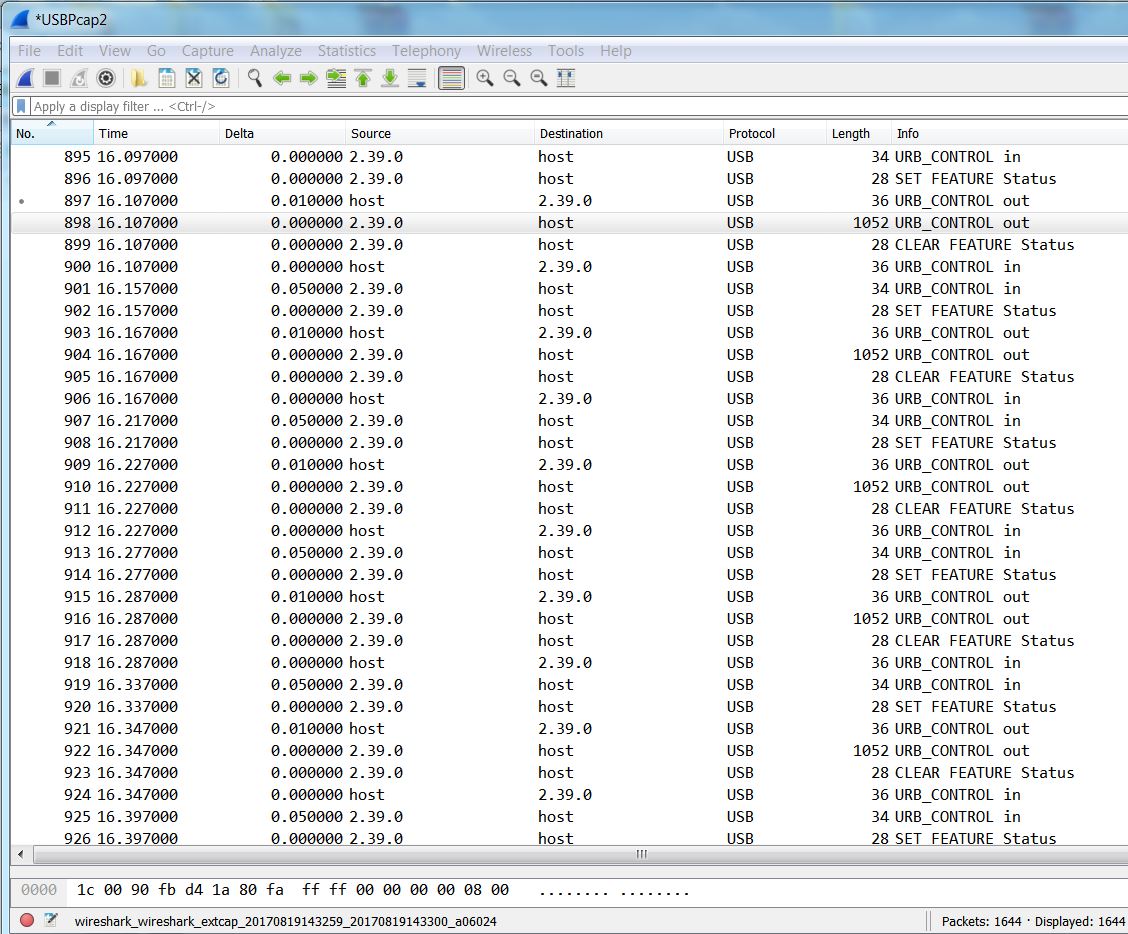
Libmaple F4 – the data packets identified as “5555” and Ethernet II – “‘Malformed packet”, always data packet protocol “5555” with some header data and then containing 2048x “U”, and a small “Ethernet packet” protocol type assigned “28 URB Bulk in Malformed”, containing 1x U in between, no handshake visible (unless the malformed is the handshake packet)
32Generic – the data packets identified as 5555 or ‘Ethernet II”, single packet containing 16-100 “U”s, no handshake visible
As a proof it somehow works I’ve tried for fun:
I saved the file with UUUs to corsair flash drive, and read it into an editor.
It is a different device (mass storage) but – all data packets assigned “Good”, up to 65535 large each, with handshake (2 <-> transactions between Host an device) between the data packets. The packet protocols were USB related.
Libmaple:
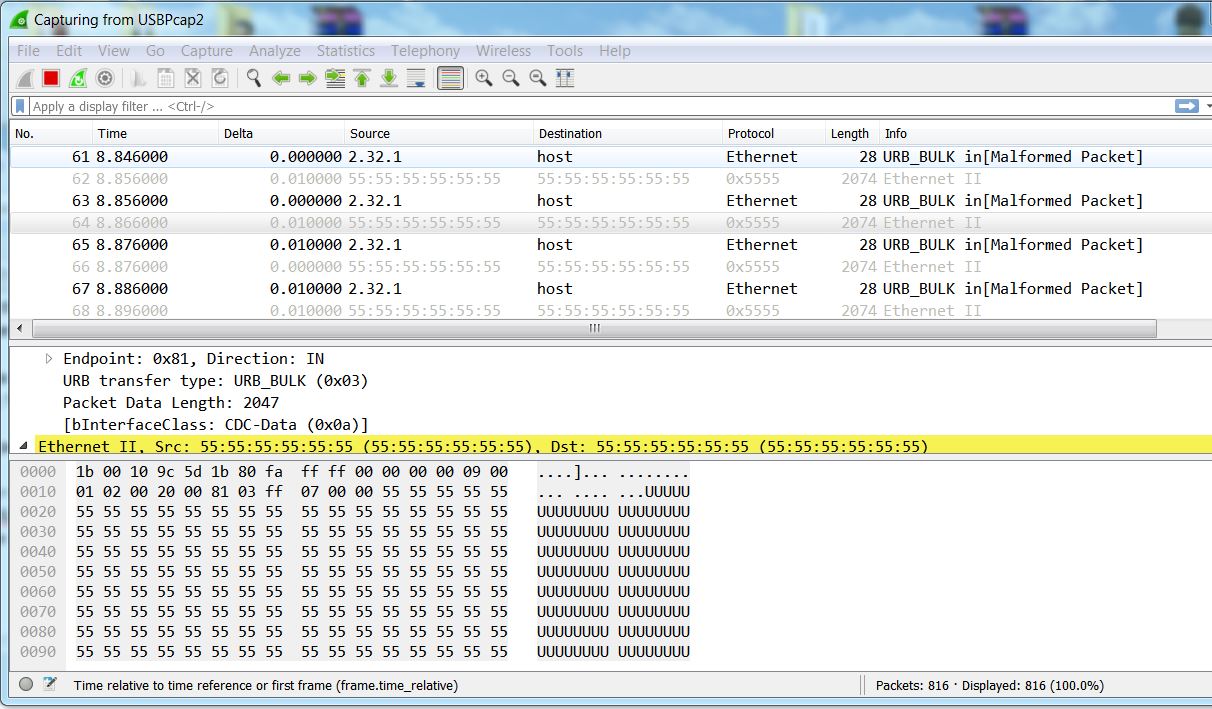
- Libmaple USB capture.JPG (194.53 KiB) Viewed 649 times
The libmaple F4 USB CDC is St SPL based.
Can you please test libmaple F1?
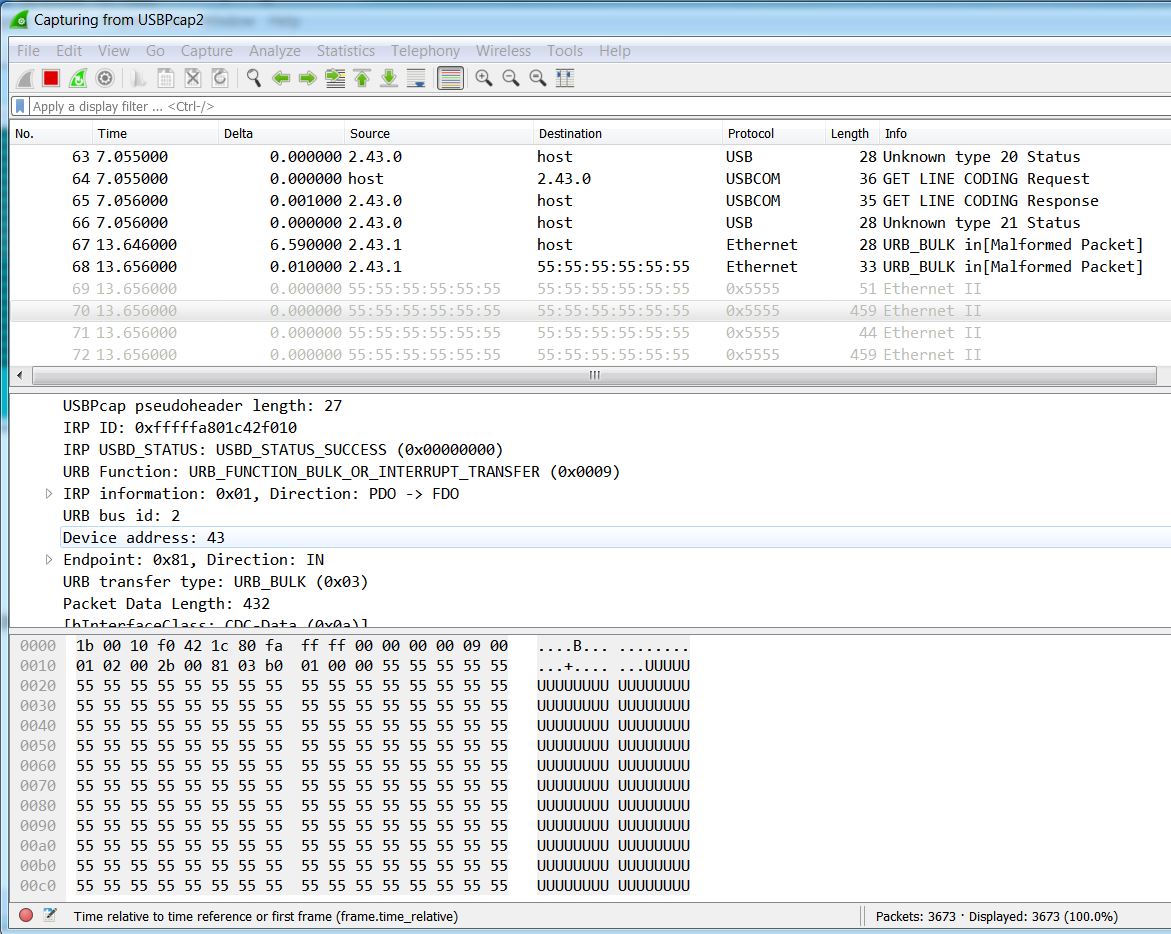
- Libmaple F1 capture.JPG (227.8 KiB) Viewed 371 times
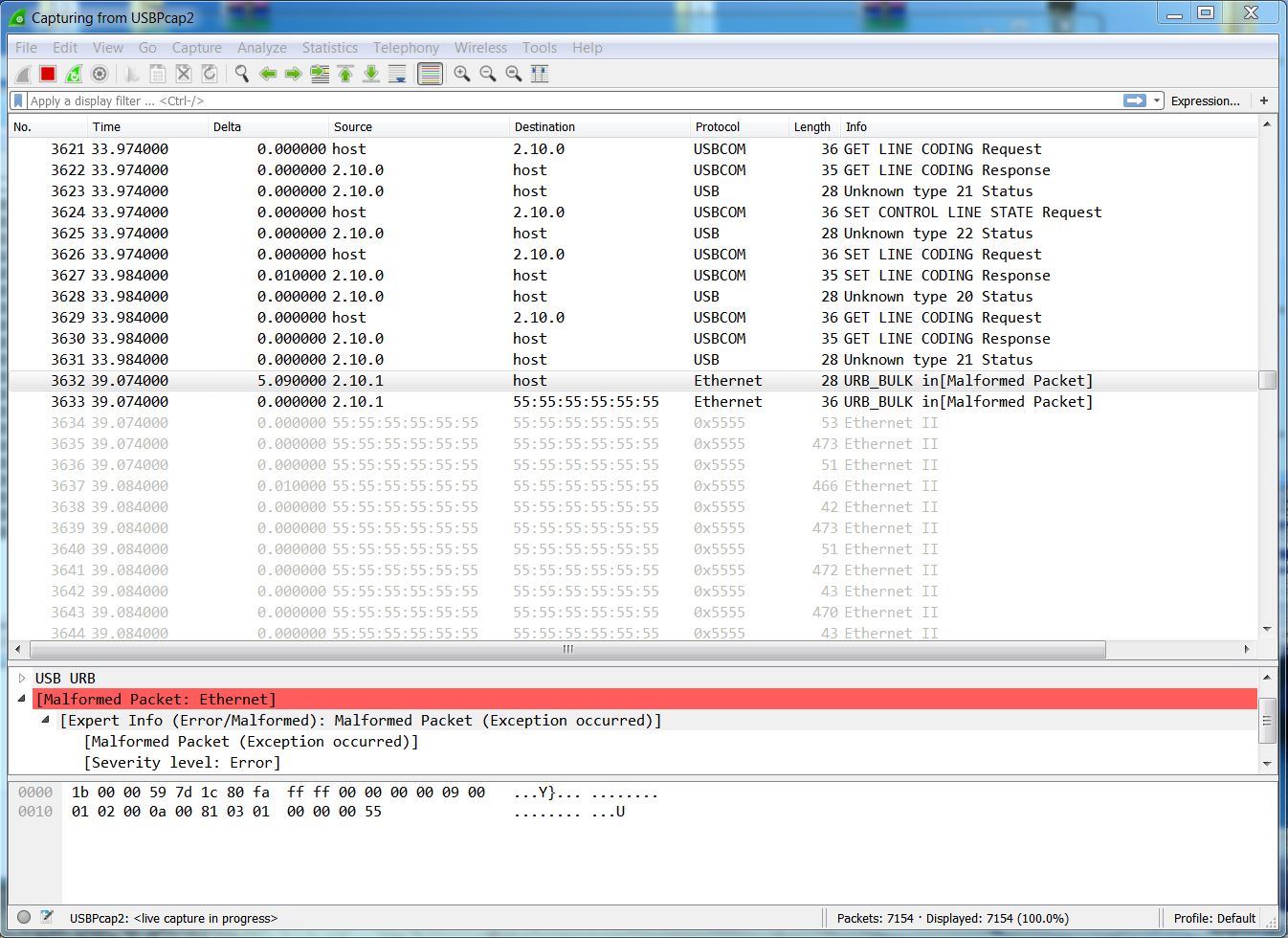
- Libmaple F1 against HyperTerminal.JPG (245.55 KiB) Viewed 350 times
wondering if sending packets all 1 byte below max size would change something ?
srp
- MapleMini DFU BIN UPLOAD.JPG (240.49 KiB) Viewed 328 times
That’s one of the reasons I modified Pito test sketch to send blocks rather than 1 byte write, so I was doing bigger transactions rather than many very small ones.
I think for testing we could comment out the timeout checking on TX, so we know that’s not a factor affecting any packet drop.
EDIT:
I also confirmed that the GENERIC RX code will dump bytes if the sketch doesn’t read them as the same rate as the host is sending. It acknowledge every packet back to the host no matter what.
Easy test:
open the port with Serial.begin();
Then loop never reading from the port.
Then send from the host to the host, the host will never block because the MCU will acknowledge all packets even if not reading them.
You can also test by opening the port with Serial.begin().
Then delay for a long enough time.
Then print what’s read.
Then from the host send anything longer that the GENERIC buffer size. The host will act like everything was sent, but the MCU will only print what fit in the buffer size. Everything else after that was dumped without the host knowledge.
If you are trying to send something large, like an image, as fast as possible, it’s likely that you will lose data unless you sketch can process it faster than the host can send.
From my point of view this is not desirable, since in the host the serial port baud rate has no effect on how fast the application will try to send data, either you implement some handshaking within your applications (in the MCU and the computer) or you never know when the buffer may be full and dumping data.
EDIT2:
I modified the code to behave like libmaple F1, in which if the buffer is full it will not acknowledge packets back to the host. It’s in this branch. Is in sync with Daniel other than those changes.
https://github.com/victorpv/STM32GENERI … imizations
I still need to do further test to confirm there is no corruption with the data anywhere, but I have confirmed that if the sketch is bussy doing something and doesn’t pull data from the buffer, it will pause the host when it’s full, and resume when it has capacity.
[Pito – Sat Aug 19, 2017 6:32 pm] –
TX: What if the Serial.write (and friends) will check whether the Host is NAKing, and it timeouts while returning 0 ??
You mean without buffering even if there is capacity in the buffer?
So the TX code currently is supposed to wait for NAK before pulling more data from the TX buffer and sending it. And the write() function, as it writes to the buffer and not the USB peripheral, will return 0 if the buffer is full, but not until that point.
Whether this ir working right, or the timeout period is long enough, that’s up for debate.
I would favor a timeout that’s proportional to what the app is trying to send. Is not the same waiting for buffer space for 1 byte than for 30 or 300.
I have the Host, which can be unable to receive fast (for any reason).
I do Serial.something (1byte or 1kB or 1MB) from my sketch.
When the Serial.something returns 0, or returns a number which is less than the amount the user has intended to send, it means for the user the data were not “received” by the Host (the other side has not accepted them all, or accepted just a part of it).
Me – the user – I have to care at my sketch level what should happen in such a situation.
In that way you cannot loose any TXed data.
Imagine you are going to upload a picture out of your 100kB array (the array in your sketch, the user_array) via usb Serial to PC Host. It should work such when the PC Host will be able to receive say 1kB per minute via USB you will upload that user_array in 100 minutes successfully to the Host without any data lost..
viewtopic.php?f=51&t=2354&start=30#p33133
The way I see it, we have two options:
1.- Guaranteed delivery with blocking.
2.- Non guaranteed delivery, after a certain timeout fail to send and return the number of bytes that were succesfully sent (or buffered)
But looks like we can’t settle on one of the other.
My opcion is 2, and have the application check the return value. That would resemble what happens with a physical USART. The code will not block and just output the data at the given rate.
Also as more advanced feature, we could use the baud parameter that we currently ignore to manage the timeout.
So if we do a Serial.begin(115200), then the timeout should be around 70uS per byte.
That way if you have a slow application to which you need to send no faster than at a 57kbps, you can set the baud rate to that, and the usb write function will block only for enough time for that rate, and return with the number of bytes actually sent if it takes longer than that.
Without such handshaking it could come to data loss with RX/TX. But that handshaking is usually not used with duinos. So Serial.something can loose data when internal ringbuffers full or slow reading them, or something like that.
SerialUSB uses a sophisticated USB protocol, which inherently includes handshaking. So the handshaking at “packets” level is there. It needs to be used and then you cannot “loose” any information while RX/TX.
The people may discuss what should happen when we use USB layer for “Serial” emulation – whether we shall propagate RTS/CTS or that kind of signals, etc. What I’ve seen in various discussions on this topic – even they say USB CDC includes this kind of flags (OUT command 0x22 (SET_CONTROL_LINE_STATE) RTS/DTR bits in CDC_ACM) – it is not necessary with USB, as you can tell the other side to “stop sending I cannot read the new packet” by NAK’ing, the other side will repeat again till ACKed.
FYI: Similar discussion at PaulS forum – an .ino sketch and Python script for testing and monitoring the CDC serial..
https://forum.pjrc.com/threads/33167-US … -detection
maybe we can reuse that somehow.
About NAK’ing IN/OUT USB packets:
http://nuttx.org/doku.php?id=wiki:nxint … sb-out-nak
The USBlyzer provides huge amount of info, so I had to cut off a small chunk only – which fits as the attachment.
You may see the payload UUUU data are fragmented into 1-16/414-426bytes large chunks. No Idea what “4096 buffer” means.
The transactions are marked successful.
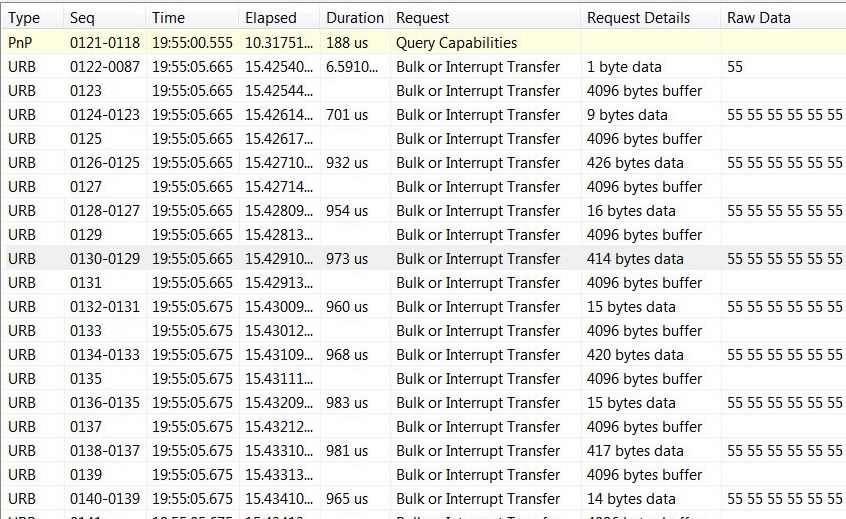
- USBlyzer 3.JPG (136.28 KiB) Viewed 563 times
I wonder is the 4096 is some information the host sends to the board to indicate how much buffer space it currently has.
@Victor: the “4096b buffer” could be some misinterpretation of data by the USBlyzer, or handshake..
UPDATE: it seems the usbser.sys requests 4kB bulk IN..
The Seq. numbers always refer packets like 128-127 where the 127 was the “4096b buffer” packet so it could be the 128th packet responded to the 127th..
What is interesting is the result – the payload chunks sizes – are similar to what I got from Wireshark.
It sends in ~1ms (the packet period) ~16 or ~420bytes (“random size”). That is something which needs to be understood.
While doing Serial.write(‘U’) in a loop you fill in the buffers fast, so I would expect the outgoing payload packets will always contain the amount of UUUs equal to the lowest layer buffer size.
UPDATE: MMini Libmaple against Putty (Win7_64b) – the same results as the above with Wireshark and USblyzer.
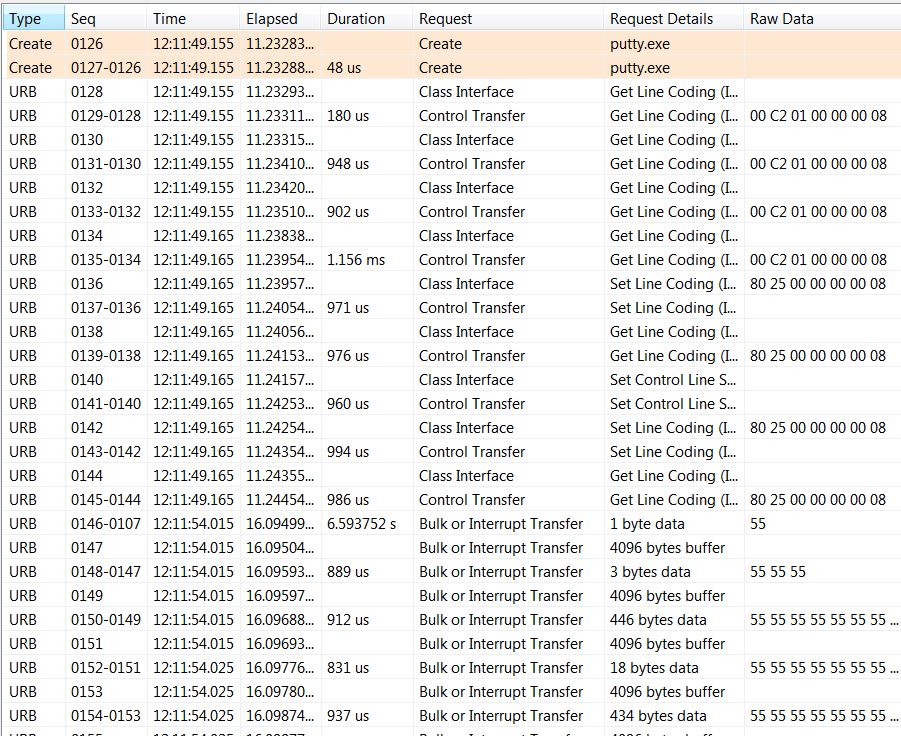
- Putty.JPG (226.03 KiB) Viewed 525 times
void loop() {

uint32_t i;

uint8_t x = 85;

uint32_t elapsed = micros();

uint8_t buf[bufsize];
for (i = 0; i < bufsize; i++) { buf[i] = x; }
elapsed = micros();

for (i = 0; i < TXCHARS; i+=bufsize) {

Serial.write(buf, bufsize);

}

elapsed = micros() - elapsed;
3seconds between packets
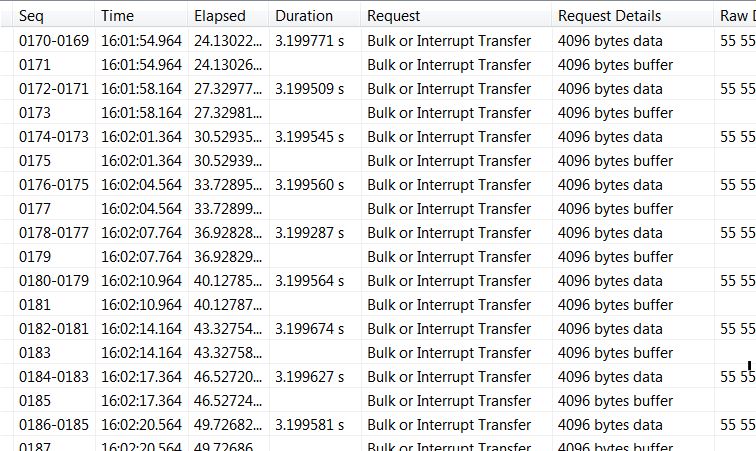
- STM32Generic CDC_BUFF 128 bufsize 256.JPG (134.05 KiB) Viewed 488 times
Problem: STM32Generic with CDC_BUF 128, and bufsize = 256 (speed ???)
3seconds between packets
That is even visible in TT as the 4kB chunks always nap for 3secs..
Another test – counting bytes – logged into TT file.
To make it simple I’ve TXed 1.280.000 bytes
#define bufsize 64

#define TXCHARS bufsize*20000
[Pito – Tue Aug 22, 2017 4:48 pm] –
Libmaple F1, bufsize 64 in sketch, logged 1.280.000 bytes -> OK.
My problem is that I do get losses with libmaple maple mini TeraTerm (4.95 (SVN# 6761) May 31 2017 20:25:51) (Win10, usbser.sys 10.0.14393.0). Data received in log file from 1272912 to 1279552.
Edit: If I run other CPU intensive program simultaneously (https://www.mersenne.org/download/), the problem goes away, and I get all the data from the above test.
* original tight loop: all data received
* `Sleep(10/100/1000)` in the loop: losing same amout(!) of data. (The TX timeout in arduino code is commented out, blocking all the way!)
Code from first post on Tennsy 3.5 in TeraTerm: losing some data.
I start to suspect it is usbser.sys. Are there any alternative drivers? I will need to run a linux live CD on this machine.
(I also get 128/256 buffer 3sec problem, but that will be something else entirely.)
