
in this post i’m going to try showing you how i’ve created a simple remote control (PoC) which allows communication both ways, if you spot anything wrong, have a different approach you’d like to share, or have any questions regarding the implementation, please post, i probably will have something to learn from it.
the practical project i’ll be including this is a rover remote controlled, with telemetry sent from the rover to the control, and from the control to the rover there will be directions/waypoints/gps coordinates for a ‘follow me home’.. the PoC does only include the communication both ways, with some basic display of joystick feedback and led control, using the components listed here:
2x maple mini
2x NRF24L01
2x joystick (thumbsticks)
2x oled display (ssd 1306)
1x INA219 (totally non-necessary for this particular project, but i had it placed on one circuit, might be interesting to see what’s the consumption of it)
the cuircuit is fairly easy to put together, on both sides i used the exact same connections, except for the INA219, as i just have one at the moment:
oled display – connected to I2C1
INA219 – connected to I2C1 (the address is different from the oled display, so, no worries there)
NRF24L01 – connected to SPI1 with: 3 – CE, 7 – CSN, 1 – IRQ
joystick – Z – 9, X – 10, Y – 11 (in my case i switched x by y, as the orientation of my joysticks led to this orientation)
LED – well, that’s on board, pin 33.
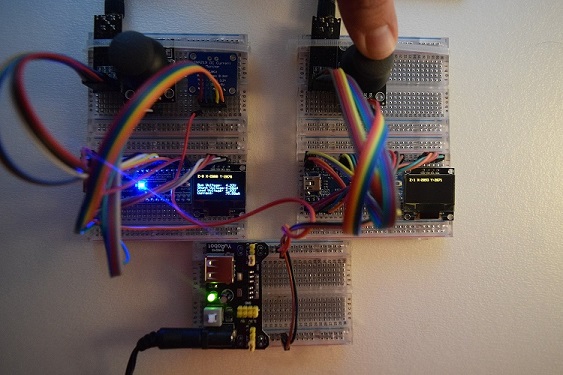
- DSC_0004.jpg (108.08 KiB) Viewed 1125 times
[zoomx – Wed Mar 21, 2018 1:36 pm] –
Thanks for sharing!
 welcome
[zoomx – Wed Mar 21, 2018 1:36 pm] –
Thanks for sharing!
+1
[stevestrong – Wed Mar 21, 2018 2:01 pm] –[zoomx – Wed Mar 21, 2018 1:36 pm] –
Thanks for sharing!+1
+ ++1
[ricardo-reis – Thu Mar 22, 2018 12:55 am] –
i wonder if any of you guys using these modules have seen any library for them that actually implements pipes so we could send more than 32bytes of data.. the modules seem to suport 6 pipes, and, if i’m not wrong, the enrf lib doesn’t have anything on that.
This Instructables covers the basics, I do not know how much effort will be required to port this to STM32.
http://www.instructables.com/id/NRF24L0 … r-Network/
A Google search shows little hard results. https://www.google.com/search?&q=arduin … ulti+pipes
Ray
[ricardo-reis – Thu Mar 22, 2018 12:55 am] –
i wonder if any of you guys using these modules have seen any library for them that actually implements pipes so we could send more than 32bytes of data.. the modules seem to suport 6 pipes, and, if i’m not wrong, the enrf lib doesn’t have anything on that.
Among the libraries made by RF24 (it’s an username!) on GitHub for NRF24L01 modules there is one RF24Audio, that stream data/audio between two modules. I believe that it can be useful.
https://github.com/nRF24/RF24Audio
The others libraries are interesting too.
On Arduino forum instead there is a starting post examples made by Robin2
https://forum.arduino.cc/index.php?topic=421081.0
@zoomx, those are things i’ve tried before with arduino, in different projects, and yes, super interesting stuff.. there’s tons of cool stuff one can do with these modules.. i’ll eventually revisit those projects for the MM, if i get it to work just right..
found here on the forum another approach on the rf24 modules, which has sort of a ported and renamed library, which might lead me to something..
went to bed again super late, just right after managing to slice through the code used on this post ( viewtopic.php?f=15&t=317&hilit=rf24&start=40 ) and getting the modules to communicate one way.. that’s promising, as the lib is ported from the nrf24 lib that i knew and used before for arduino. it also implements pipes which will be very useful for this project..
(btw, when i say project, these are just hobby projects that i work on)
status update: using the library that was linked on the post above, i’m now able to communicate both ways, using pipes, in the example i’m about to show you, i’m using 3 pipes, and a single program to handle both sender&receiver, for simplicity, but once it grows, i’m probably separating both, to avoid the load of useless code on each end.
one thing i kept noticing was that the modules keep dropping connection, but i narrowed that down to two things: 100uF capacitor between vcc/gnd on the modules, and the wiring – if i touch the wires, the connection is reestablished and all works well.
this time, on the circuits, i opted to use two joysticks, oled and nrf24l01 at one end, and just oled and nrf24l01 at the other. still maple mini on both sides.
now the code (feel free to add suggestions if you spot me doing anything wrong in it – i’d really appreciate):
#include <SPI.h>

#include <RF24_STM32.h>

#include <Adafruit_SSD1306.h>
#define OLED_RESET 4
Adafruit_SSD1306 display(OLED_RESET);
const uint64_t pipes[3] = { 0xF0F0F0F0E1LL, 0xF0F0F0F0D2LL, 0xF0F0F0F0D4LL };
RF24 radio(3, 7);
boolean isRC = true; // true for one end, false for the other - THIS MUST BE CHANGED OTHERWISE THEY'RE BOTH SET TO DO THE SAME!
// Structure for the joysticks
struct joystick {
int x;
int y;
bool z;
};
joystick right;
joystick left;
/**************************************************/
void setup(){
// zz pins from joysticks
pinMode(12, INPUT_PULLUP);
pinMode(13, INPUT_PULLUP);
// initialize display
display.begin(SSD1306_SWITCHCAPVCC, 0x3C);
display.clearDisplay();
display.display();
display.setTextColor(WHITE);
display.setTextSize(1);
// Set up radio module
radio.begin();
radio.setDataRate(RF24_1MBPS); // Both endpoints must have this set the same
radio.setAutoAck(false); // Either endpoint can set to false to disable ACKs
radio.setPALevel(RF24_PA_MAX); // Power amplifier level. Also LOW,MED,HIGH (default is HIGH)
radio.printDetails();
}
/**************************************************/
void handleRC(){
char test[32]="";
radio.openReadingPipe(1,pipes[2]);
radio.startListening();
if ( radio.available() ) {
radio.read(&test, sizeof(test));
}
radio.stopListening();
display.println("");
display.print("-> P1:"); display.print(sizeof(right));
display.print(" P2:"); display.println(sizeof(left));
right.x = analogRead(8);
right.y = analogRead(9);
right.z = digitalRead(12);
left.x = analogRead(10);
left.y = analogRead(11);
left.z = digitalRead(13);
radio.openWritingPipe(pipes[0]);
radio.write(&right, sizeof(right));
display.print("-> X:"); display.print(right.x);
display.print(" Y:"); display.print(right.y);
display.print(" Z:"); display.println(right.z);
radio.openWritingPipe(pipes[1]);
radio.write(&left, sizeof(left));
display.print("-> X:"); display.print(left.x);
display.print(" Y:"); display.print(left.y);
display.print(" Z:"); display.println(left.z);
display.print("<- P1:"); display.println(sizeof(test));
display.print("<- MSG:"); display.println(test);
radio.startListening();
}
/**************************************************/
void handleRover(){
radio.openReadingPipe(1,pipes[0]);
radio.openReadingPipe(2,pipes[1]);
radio.startListening();
if ( radio.available() ) {
radio.read(&right, sizeof(right));
radio.read(&left, sizeof(left));
display.println("");
display.print("<- P1:"); display.print(sizeof(right));
display.print(" P2:"); display.println(sizeof(left));
display.print("<- X:"); display.print(right.x);
display.print(" Y:"); display.print(right.y);
display.print(" Z:"); display.println(right.z);
display.print("<- X:"); display.print(left.x);
display.print(" Y:"); display.print(left.y);
display.print(" Z:"); display.println(left.z);
}
radio.stopListening();
char test[]="TEST!";
radio.openWritingPipe(pipes[2]);
radio.write(&test, sizeof(test));
display.print("-> P1:"); display.println(sizeof(test));
display.print("-> MSG:"); display.println(test);
radio.startListening();
}
/**************************************************/
void loop(){
display.clearDisplay();
display.setCursor(0,0);
display.print("This is the ");
if(isRC){
display.println("RC!");
handleRC();
}
else {
display.println("Rover!");
handleRover();
}
display.display();
}
[ricardo-reis – Fri Mar 23, 2018 2:30 pm] –
hello!
status update: using the library that was linked on the post above, i’m now able to communicate both ways, using pipes, in the example i’m about to show you, i’m using 3 pipes, and a single program to handle both sender&receiver, for simplicity, but once it grows, i’m probably separating both, to avoid the load of useless code on each end.
oh! forgot to mention, but it’s easy to spot that from the code – i also am using structs to handle the joysticks data. very useful when writing/reading the data to the pipes..
I think you may underestimate your ability to author library code.
Ray
[mrburnette – Fri Mar 23, 2018 4:04 pm] –
Very nice evolution.
I think you may underestimate your ability to author library code.Ray
Thanks, Ray.
with mentoring/guidance i’d be ok with it.. but on my own, it’s like being in the dark wihtout a lantern.. i can see little bits, but not clear on what to do.. 
i wonder if there’s a more recent port.. i see this lib keeps getting updates, but not sure there is anything for the MM:
https://github.com/nRF24/RF24
the documentation here was good guidance:
http://tmrh20.github.io/RF24/
[ricardo-reis – Thu Mar 22, 2018 2:26 pm] –
@mrbrunette, i’ve been on that first link countless times.. it sure is enlightning, but what i’ve been looking for is a lib that has these things implemented, just like the nrf24 lib for arduino. – i know you’re not keen on that approach, but it’s the one that suits my limitations, as i’m not able to create libs on my own. maybe something for me to work on.
<…>
I think my “likes and dislikes” are completely irrelevant to a hobby project. My thinking is more toward designing and coding from the “ground up” for potential commercial projects; thus avoiding any license issues and ensuring that the library provides clean and clearly understood functions and is lean without lots of “fluff.” Then that library of function(s) are incorporated directly into the sketch folder. One now has decoupled the Arduino sketch code from 3rd party library(ies) dependencies. It’s just smart since the ArduinoIDE is always complaining about updating libraries.
IMO, even if you use a 3rd party lib in a hobby project, the library should be absorbed into the sketch folder for isolation … effectively creating a snapshot of the entire project in one place … very easy to use ZIP to archive the project folder for the purposes of roll-back and back-up. Since I publish silly little projects, this is also a great way to distribute code since I do not have to explain to the reader that they must install this library or that library version, etc.
Ray
[mrburnette – Fri Mar 23, 2018 4:29 pm] –
I think my “likes and dislikes” are completely irrelevant to a hobby project. My thinking is more toward designing and coding from the “ground up” for potential commercial projects; thus avoiding any license issues and ensuring that the library provides clean and clearly understood functions and is lean without lots of “fluff.” Then that library of function(s) are incorporated directly into the sketch folder. One now has decoupled the Arduino sketch code from 3rd party library(ies) dependencies. It’s just smart since the ArduinoIDE is always complaining about updating libraries.IMO, even if you use a 3rd party lib in a hobby project, the library should be absorbed into the sketch folder for isolation … effectively creating a snapshot of the entire project in one place … very easy to use ZIP to archive the project folder for the purposes of roll-back and back-up. Since I publish silly little projects, this is also a great way to distribute code since I do not have to explain to the reader that they must install this library or that library version, etc.
they sure are relevant. some libs are so packed with so much stuff that i don’t even use, and in those cases, it sure makes sense (even to me) to look at what can be taken away, making them cleaner and lighter. for smaller micros it is sometimes essential to be able to even fit the code in the little space they have (arduino, for instance – oled and gps libs and you barely can move to do anything else). but that was, for me, one of the reasons to try out the MM.
the idea of keeping the ZIP of the whole project+lib is very useful – been using it for a long while. even have some of the alfa versions of arduino IDE, and it came in handy quite a few times.
basically for the #include <library.h> just change to #include “library.h”
For example:
#include "RF24_STM32.h"

#include "Adafruit_SSD1306.h"
[mrburnette – Fri Mar 23, 2018 6:50 pm] –
Just for the fun-of-it …
(…)
Now you are in position to hack as you will with any/all of the files in the project.
it seems i’ll have to give it a try.. there’s no way i can say no after a push like this..
![[Pending Enhancement] RTC values resetting](https://sparklogic.ru/wp-content/uploads/2019/11/nucleo-l476rg-zestaw-startowy-z-mikrokontrolerem-z-rodziny-stm32-stm32l476-90x90.jpg)
