

Introduction
Edit: The project has been named as MENTOL
I have been dreaming a smart watch project. I decided to start prototyping and actually this is my first project with STM32. I liked STM32F103 boards very much! It’s just enough with 72mHz crystal, 3.3V voltage, 128kb flash, lots of IO pins, RTC capability, low power consumption, low amount of peripheral components, ready libraries …
I already have 3 kinds of STM32F103 development boards. I have built a prototyping system and started programming. My plan is to share everything with the community to get benefit and to encourage others to build one. I am going to publish all of the photos, videos and other files day by day. You can follow more photos and videos on my webpage (In Turkish for now). Below the page are some details:
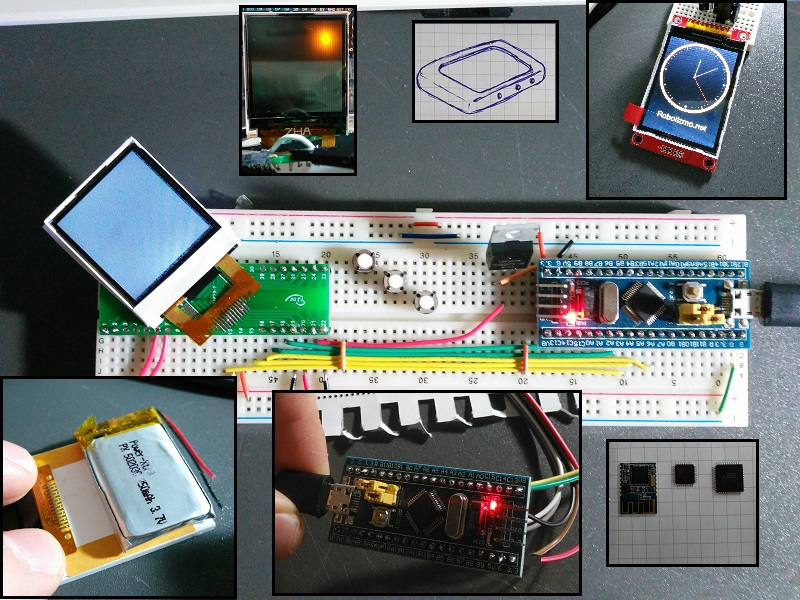
Display Screen
I have considered 2.2 inch LCD with ILI9340 driver(since a library is ready) but it is really big for a watch.
LCD screens with ST7735 driver comes in two dimensions; 1.8 inch and 1.44 inch with resolution of 128×160 and 128×128 respectively. I prefered to use 1.44′ (the red pill, you know) which will lead me for a more compact design but a better looking watch at the end.
I have managed to run it (Yes, took days) by searching, combining and merging codes from already built libraries (community owes to Adafruit and Henning Karlsen for lcd stuff they generously published). I have learnt many things about SPI and It is very fast refreshing with DMA support! Right now, I have a carefully written clear sketch without library system (since I have one lcd, no Class and Object system is needed). By other words, all functions are embeded in .ino file. It’s great to have a long code when you know what is where and how it handles the job behind the scene!
I don’t have a touchscreen for now. I am planning to use 3 buttons as common for the first product.
Other Details
– Backlight of the LCD will be set by PWM. Needs some components on PCB. Currently using IRF540N which will be changed in future with a power saver transistor.
– CC2541 BLE module will be used on the watch. It is very compact module with many advantages. Smartphone software development will be focused later on.
– An RGB Led will be used just behind the LCD! It shines great! Its a power saver way of giving alerts and feedbacks to user instead of turning the lcd on while it looks very futuristic. I loved it! I’m planning to use the one Lillypad set has instead of something like WS2812.
– SMD package of a LDR (probably TEMT6000) will be used to sense the light intensity behing the lcd. Yeah, it works great for adjusting the backlight of the watch according to environment before it’s turned on. I saw the method on Pebble watch, it works!
– 250mAh LiPo battery just fits on the half of the lcd panel. The rest of the panel will be used for PCB. The PCB is going to have components on its both sides. However, lipo charging chips are not going to be inside the watch due to the small area. Instead, I will design a charging dock station and 2 pins of battery will be used to charge it. (more details will come!)
– Very small battery is required ,I think, for RTC. Or I will connect it to LiPo which will be enough for keeping the RTC alive even it has very low voltage (Am I wrong with that?)
– An IMU module will be integrated inside either a good one like MPU6050 or a simpler one like ADXL335(it would be great to use Tap Tap gesture!)
– Heart Rate sensor, Hand gesture sensor (like APDS-9960), Vibrating motor, Mini Buzzer, Lipo Level measuring chip, Amper sensor, temperature sensor and more can be considered to include in the project!
Guys, I am so curious about what you think about this thing I am building. I have analysed many DIY smart watches however I can’t fully estimate how many feature I can add on it. Even without any smartness, I can use it just as a watch at the end! I just want to build… 
Lipo also won’t be replaceable.
I will follow you, google translator is great.
I have the same board, some LCDs and one OLED unfortunately only one color.

I will prepare a better page in English with more project details. Whoow, I prepared GitHub repository and uploaded almost everything including PCB Designs, 3D Models of parts, Rendered images and the whole code!
https://github.com/CetinFurkan
Check it when you have a time!
Thanks for all followers!

You can check my code, change Parameters.h file and initialization code. The rest of the code is almost same.
About TFT: Dont forget the ILI9163C (128×160) which is well supported in STM32duino (SPI with DMA transfer). A really beautiful fast and small display!
Thanks madias!
I have found 2 different type of ST7735 LCD Panels; 1.44′ with 128×128 px resolution and a larger one with 1.8′ 128×160 px resolution.
As madias mentioned, there are ILI9163C LCD Panels with exactly same specifications of those two.
However, I noticed there are ILI9163C Lcd panels with TOUCHSCREEN. I must order some right now! 
http://www.alibaba.com/product-detail/F … 88267.html
http://www.alibaba.com/product-detail/m … 81322.html
http://www.alibaba.com/product-detail/I … 91523.html
I use the standard STM32_adafruit ILI9341 library and the Utouch library, see my post (second or third) : http://www.stm32duino.com/viewtopic.php … ilit=touch
I updated my personal webpage and created a page for my project. Here is the link for English version:
http://www.furkancetin.com/mentol-smart-watch.html
By the way, this is my design for now:
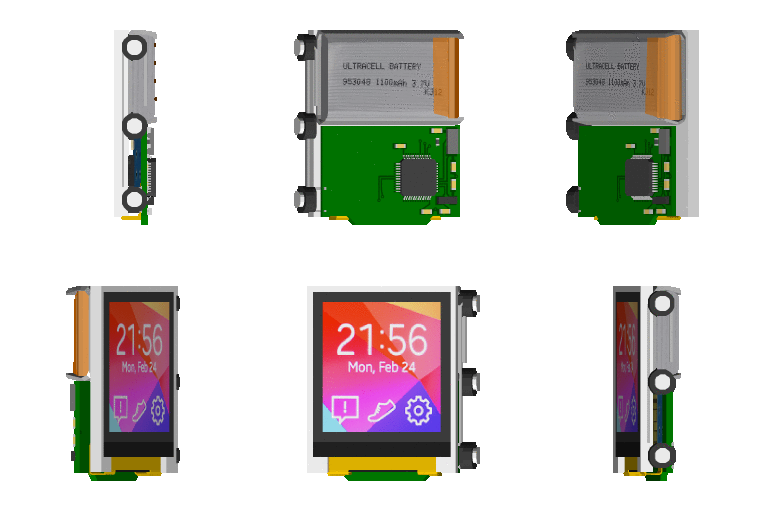
Ray
What kind of CAD software are you using ?
However I like low poly modelling with Model Creator software made for Game Maker. I used to do modelling and create 3D games.
I will take a look when I get chance.
Just a thought on the Display: im trying to use the 1.5″ oled with ssd1351 Driver (http://www.adafruit.com/product/1431) and it seems to be pretty good 
~Straw
I have considered that little thing but I have realized that;
…small boost converter (required for providing 12V to the OLED)
 I thought using this OLED could be
– more power consuming (because of this boost up converter to 12V but I may be wrong)
– more expensive (like 13$ vs 3$)
– requiring some components which would take some area on my small PCB (ST7735 needs none!)
I will be glad if you make a similar prototype platform of mine and contribute to code with changes for SSD1351.
My code is so far very easy to understand and upgrade. I am sure you can handle.
Also this e-ink screen is suitable for future:
http://www.adafruit.com/products/1393
Furkan
 ) Also its bit smaller.
In terms of e-ink, i would really love to see something similar used in the pebble time (which is also rokin’ an stm32f4 inside) but that will take some time i guess, as colors are bit better that monochrome IMO.
~Straw
These are really interesting displays (super wide viewing angle) with extrem low power consumption. They are available for 19.99USD (I don’t know the actual shipping costs!) —> https://store.ti.com/430boost-sharp96.aspx and http://www.ti.com/tool/430boost-sharp96
I think, I should continue with 1.4′ ST7735 display for now and focus on the general design. It is very easy to move to another screen later.
Second prototype probably will include ILI9341 with touchscreen. However anyone can work with alternative screens with my code.
Until now, coding is going very neat and fast. I recommend you to check the current firmware on GitHub.
I am very satisfied with the speed of STM32, refreshing screen at monster speed!
Test results and screen videos will come soon!
Furkan
~Straw
I have listed all of the possibilities of LCD modules that I can use. I have found ST7735 is so commonly used, easy to find, cheap and library ready. ILI9163 has almost same but it has a little bigger white frame around it!
I have just finished performance test video. You can check it on my webpage: http://www.furkancetin.com/mentol-smart-watch.html
Thanks
Furkan
Btw, are you using Adafruit_GFX or Adafruit_GFX_AS?
~Straw
They are very similar but Adafruit_GFX_AS is STM32 compatible, I think.
I have picked functions and embedded in my code for efficiency and being neat. I don’t take any piece of code without understanding how it works. Some of functions I picked are below:
– drawBitmap() from UTFT (the website has a utility to convert images into arrays and this function is very efficient!)
– drawLine() from Adafruit_GFX (neat and very generalized)
– colorWheel() from Adafruit_NeoPixel (good when blending colors from one to another)
– drawText() from UTFT (again the website has many fonts and a font maker utility!)
Moreover, I have implemented a bunch of lines for detecting Button states, Animated Particles, drawing Numbers by using lines (instead of a font), moving menus…
Here is a new video of the final version of the software. I decided to go only with the SPACE Theme. It has now futuristic menus and bars.
I promise you a better looking GUI with animations when compared to other “Arduino with LCD” stuffs 
You can see the video on the project’s page: http://www.furkancetin.com/mentol-smart-watch.html
Furkan
) for nearly a year, I’m a little bit proud that people use this platform and are doing really cool stuff with it! So with other words: Cool project!
I was an Arduino-ist for many years. I have been looking for moving with smooth transition to a higher clocked and richer controller platform where I still would create projects in a fast and neat way.
I have some other projects to do later. But need to finish that guy first. It’s going fast, neat and great as planned!
I have seen some Arduino, PIC and Teensy based DIY smartwatch projects (Pebble uses STM32 but not considering him as DIY) Mine must be one of rare STM32 based watches.
Follow me for more
Maybe an alternative solution is to use some OLED based LCD like this one.
The oled lcds have many advantages
– low power consumption
– more vivid colours
– the screen content is visible in daylight
and more
One disadvantage: higher price than the conventional TFT lcds we usually use.
I consider that OLED displays, they really look great. Another disadvantage of them is that they need 12V booster on PCB it means extra cost, area and workload.
However, I will continue programming with ST7735. I am planning to create a cheap version (Many people are curious about the watch and ask for one! ) and another with OLED screen! ILI9341 lcd with touchscreen is another alternative to use.
By the way, I prepared a quick drawing of new name and logo. It will keep continue to develop in time…

After being absent for a long time, I could just say that I have ordered 3 of 1.5′ lcd modules with touchscreen. I am designing the PCB accordingly.
I will definitely go with them for the first prototype (without buttons on side and no OLED for now)
I am also currently developing the software and Bluetooth connection. New updates with some video and photos will come hopefully.
No giving up!
Furkan
After being absent for a long time, I could just say that I have ordered 3 of 1.5′ lcd modules with touchscreen. I am designing the PCB accordingly.
I will definitely go with them for the first prototype (without buttons on side and no OLED for now)
I am also currently developing the software and Bluetooth connection. New updates with some video and photos will come hopefully.
No giving up!
Furkan
Touchscreen is a must for me. I am looking forward to getting them…
Sorry for not writing for a long time. I have been working on new improvements. The most important one is that new LCD displays with touchscreen are finally arrived! I will share some photos soon hopefully.
However, 1.44′ TFT LCD displays (using ILI9163C) with touchscreen panel is my favorite for now. I will test them and then continue my pcb design. There are some photos here:
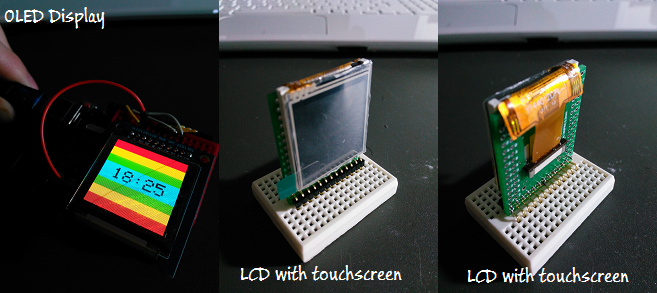
I have searched for it and got in contact with Kingtech Displays from China. They have great variety of LCD displays if anyone is interested in.
http://www.ebay.co.uk/itm/131625218909? … EBIDX%3AIT
ordered 25/10/15; their packaging took me 5mins to get into, you could have launched an egg in it:-)
stephen
just wondering why you chose that specific mcu?
for example, if you were going for a STM32L4 you’d save more power, smaller package (smallest: qfn32), 64k ram, 256k flash
for example, this can allow a offscreen framebuffer of 32k (128*128 bytes*2 (16bit)) example usages: antialias, alpha blending
anyhow, enough about my mcu preference xD
i really like your project! can’t wait till you make these in production, as i’d love to order some
offtopic: seems like you’re more experienced than i am in the graphical design ^^;
this is like the best i can do: https://www.youtube.com/watch?v=JX3dZQy8–Y
(yes, it’s a freescale based system, and it uses a framebuffer  )
)
but i really want to make the step to stm32 for my project, as it simply is more capable, and stm32f4 supports native external flash (same goes for ram), making it possible to get a similar thing as a pebble based system.
swo this project could be a good start for me
yours, ramon

I just ordered some of these http://www.ebay.com.au/itm/381730512549 as they seem to use the nRF51822 MCU which can be programmed using the Arduino IDE
But i have never had advertising spam directed at any other subject
![[Pending Enhancement] RTC values resetting](https://sparklogic.ru/wp-content/uploads/2019/11/nucleo-l476rg-zestaw-startowy-z-mikrokontrolerem-z-rodziny-stm32-stm32l476-90x90.jpg)