
I could’nt accept that a device still in order with USB, 8 ports 4IN – 4 OUT goes directly in the garbage. Nothing to loose, I opened the box, and inside I discovered that the microcontroller was a STMF103RC. Here start the idea of a possible hack with STM32DUINO !
I have a board available with a programmable and powerful chip, native USB, plus all the circuitry for 4 MIDI IN / 4OUT. Why not rewriting a new firmware from scratch as I did for other uC of the AVR family ? I could even extend that firmware to enable a merge mode, thru mode, specific routing and filtering modes. So, building an ultimate USB MIDI interface better than the original, and stackable with my existing one…
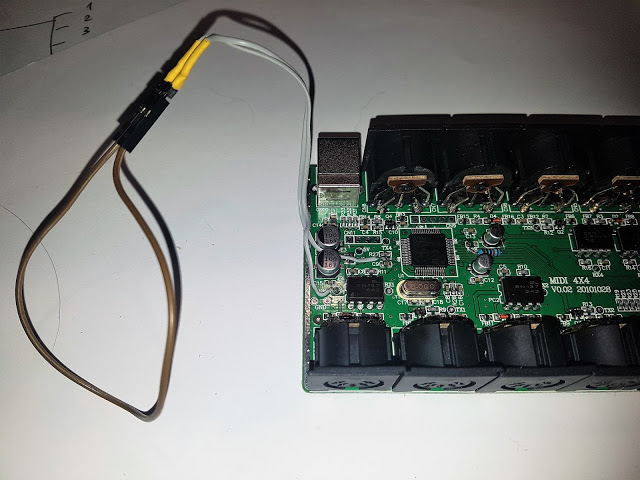
I was successful in activating the internal bootloader by maintaining the Boot0 pin to HIGH and the Boot1 pin to LOW. I had to desolder 2 resistors on the board because they were disabling that . I also connected TX and RX of the serial 1 to an USB Serial TTL, and 2 hours later, I was ready to upload a new firmware in the thing with the STMFlash tool.
The original Miditech / Midiplus firmware was protected against read. I had to accept the “The chip will be entirely erased if you continue..” warning.
Not a problem as hacking the original firmware was not my goal.
Then, I started with a basic firmware sending a “note on/off” to the serial port. And guess what : that worked at the first time !
Then I uploaded a generic STMDuino bootloader2.0 to the board again with STMFLASH, and tested the 4×4 board as a generic STMF103RC in the Arduino IDE..with the demo midi sketch. Again, that worked at the first compilation…And I can address the 4 serial port connected to the 4 midi jacks with the board variant.
For people interested in that project, it is here : https://github.com/TheKikGen/USBMidiKliK4x4.
I will push the source and instructions later….
I think the device could be expanded via some “soft-serial” ports and you have plenty of free pins for building a midi-CV expansion for vintage synths

About Sysex:
I dont know how about the status of the sysex implementation. Some time ago, I rewrote some MIDI USB HID code from the original leaflabs forum, this code went into the libarra USB-HID functionality and now we use the arpuss implementation.
For short: There was some quirks with the original Sysex code, I can’t remember if I fixed that and it seems that the original code (or my rewritten code?) is now be present in the arpuss HID-library.
So dont be suprised if sysex is not working as expected!
—> https://github.com/arpruss/USBHID_stm32f1 (all Midi related stuff)

second – wow – nice one
srp
I already have an ALPHA version able to send from 4 X USB to 4X MIDI OUT serial…
I had to fight with the code of the usb_midi lib… not very clean.
So, I think I will have a working IN/OUT version this week….
As I can see @ https://github.com/arpruss/USBHID_stm32 … SBMIDI.cpp
All “handle” (incoming messages) are not subclassed at the moment.
This was a basic code of mine from the “old” MIDI-USB-HID, for sure there are many differences, but I think the structure might to be the same:
// ACHTUNG:

// für Midi Eingang die voids von usb_midi.cpp übernehmen -> siehe unten (sind auskommentiert im cpp file)

// gadget: Name des USB-Device: usb_midi_device.c --> ab 285 ändern

#include <usb_midi.h>

#include "MidiSpecs.h"

#define ledpiny   PC9

boolean flip=0;

long sendtimer=millis();

void setup() {

pinMode(ledpiny, OUTPUT);

MidiUSB.begin();

//  Serial2.begin(9600);

}
void loop() {
// digitalWrite(ledpiny, MidiUSB.isConnected() );
/*
void sendNoteOff(unsigned int channel, unsigned int note, unsigned int velocity);
void sendNoteOn(unsigned int channel, unsigned int note, unsigned int velocity);
*/
if (millis()-sendtimer>=500)
{
if (flip==0)
MidiUSB.sendNoteOn(1, 64, 127);
else
MidiUSB.sendNoteOff(1, 64, 0);
flip=!flip;
sendtimer=millis();
}
MidiUSB.poll();
}
void USBMidi::handleNoteOff(unsigned int channel, unsigned int note, unsigned int velocity) {
digitalWrite(ledpiny,0);
}
void USBMidi::handleNoteOn(unsigned int channel, unsigned int note, unsigned int velocity) {
if (velocity>=0)
digitalWrite(ledpiny,1);
}
//void USBMidi::handleSysex(uint8_t cin, uint8_t midi0, uint8_t midi1, uint8_t midi2) {}
void USBMidi::handleVelocityChange(unsigned int channel, unsigned int note, unsigned int velocity) {}
void USBMidi::handleControlChange(unsigned int channel, unsigned int controller, unsigned int value) {}
void USBMidi::handleProgramChange(unsigned int channel, unsigned int program) {}
void USBMidi::handleAfterTouch(unsigned int channel, unsigned int velocity) {}
void USBMidi::handlePitchChange(unsigned int pitch) {}
void USBMidi::handleSongPosition(unsigned int position) {}
void USBMidi::handleSongSelect(unsigned int song) {}
void USBMidi::handleTuneRequest(void) {}
void USBMidi::handleSync(void) {}
void USBMidi::handleStart(void) {}
void USBMidi::handleContinue(void) {}
void USBMidi::handleStop(void) {}
void USBMidi::handleActiveSense(void) {}
void USBMidi::handleReset(void) {}
I made a big cleanup of the midi_usb code.
5 files only to get MIDI USB working are now necessary. I added a lot of comments in.
You can check that on my git.
https://github.com/TheKikGen/USBMidiKliK4x4
I have implemented my own midiXparser class (already used in my single USB midi Arduino interface) and removed all the dead code.
Everything works at the moment, including SYSEX, with the exact same behaviour of my other 4X4 (not the car ) unit having the original firmware.
I have tested a 250K bytes sysex dump in a looped connection (out 1 to IN2). I sent and received successfully the sysex file…
Sysex processing is not buffered : it is transmitted “on the fly”, the size limit is more on the host side now…
So, the code is ready for a BETA1 tag…
Currently, i’m working on the routing feature. It will be possible to route one IN (USB or Serial MIDI) to 8 OUT targets : 4 USB IN, 4 serial OUT.
For example, if I need a MIDI merge, I will set Serial midi in 1/2/3/4 to usb in1/serial midi out1…
I want that to be possibly changed by a proprietary sysex.
The STM32F103 is so fast comparing to ATMEGA328P…absolutely no lag even at 300 BPM….
But: Congrats hacking your device
The price for the midi-interface is about 50 Euro (in Germany), would be interesting in doing a 8in-8out interface on the sketch. Problem: Even the biggest STM32F103 has only 4 “real” Serial interfaces (maybe this is the reason why the 8×8 from the same producer costs much more)Thanks for your feedback.
You are right concerning handlers. As I use my own parser class, i only need the USB midi packet management in the MidiUsb class.
I cleaned up everything in the midi usb files that was not utile for my project.
Much code was dead like the sysex part. And I think we could clean more again…
Anyway probably better to make a new implementation with a better architecture approach.
For example using a Sethandlerxxx method rather than inheritance.
What do you think ?
About the project itself : Sysex commands are implemented to configure the routing.
I have documented that on the github. For sure that project can be adapted to make any USB interface based on the STM32F family.
And we can do very reliable 8×8 with 2 4×4 for less money than one commercial 8×8 !!
I’m thinking starting a hack on the midi PRODIPE 4I4O. This unit has a lot of problem : poor firmware, bad midi parsing, bad sysex support, lag…
A lot of users are complaining in music gears forums.
I don’t know what’s in , but I suppose something like the Miditech 
[TheKikGen – Sat Mar 31, 2018 2:55 am] –
Anyway probably better to make a new implementation with a better architecture approach.
For example using a Sethandlerxxx method rather than inheritance.
What do you think ?
Sounds good to me!
[TheKikGen – Sat Mar 31, 2018 2:55 am] –
I’m thinking starting a hack on the midi PRODIPE 4I4O. This unit has a lot of problem : poor firmware, bad midi parsing, bad sysex support, lag…
A lot of users are complaining in music gears forums.
I don’t know what’s in , but I suppose something like the Miditech
I could bet that the interface uses the wrong optocoupler and/or the wrong circuit too. This mistake was done by MANY interfaces in the past, cause companies want to save a few cents or just ignorant. https://www.midi.org/specifications/ite … cification.
Update: https://mitxela.com/other/ca33.pdf
The best working interface I ever own(ed) is the “Emagic mt4” (and for sure the bigger brother MT8, AMT8), they are the only ones working without problems with a Clavia Nord Modular (was a synth in the 2000’s with real time sysex).
It works nicely in my setup.
My second Miditech 4×4 is now also flashed with my own firmware. I have changed their names with Midi1 and Midi2 (via SYSEX implementation), so it is easy to know what gears are connected to midi applications. Configurations are stored in flash memory.
Simply to let you know that I have adapted the code of my other project “Miditech hack” to allow compilation for a “BluePill” board, so it is not only a “hack” anymore !!
I have successfully tested it with those chinese 2$ boards well known here, and it works quite good, allowing a 3×3 USB MIDI ports interface .
The firmware is now “dual” : with a specific MIDI sysex message, you can reboot the interface in USB serial (CDC) mode, and then connect a terminal to the virtual Com port to gain access to a user-friendly configuration menu.
STM32DUINO rocks !
It sounds great (because of the French Dream chip SAM5400 GM synth) but they have limited the alternate instruments (i.e. there are none) and if there is a program change message on the percussion channel (10) the drums become a piano permanently requiring a factory reset to fix.
Sloppy programming!
I had to find out what was in there so after a tear down found the STM32F405 and it seems the MIDI is funneling through there before it hits the Dream Chip (because of a USB / TRS merge and the OLED display I assume)
So in the near future I plan to re-write the STM with something better, and possibly put the standard FW into the Dream Chip although I suspect it’s already there…
Has anyone else embarked on this idea?

