
Relative newbie here …
Managed to get my F103VE setup as a game controller as per this thread http://www.stm32duino.com/viewtopic.php … 699#p21699
How do I go about changing the controller name from “STM32DUINO” to something else?
You can change the name in system/staticlibstm32f1/source/usbd_desc.c on line `#define USBD_PRODUCT_STRING_FS`
After that, you must run `make` inside system/staticlibstm32f1/build_gcc/
So I looked at “Makefile” in “system/staticlibstm32f1/build_gcc/” however it appears to be a batch (.bat) file, there’s no “make”.
So how does one run “make” – Is this done via command prompt or an IDE?
If you are on linux, it already has make.
If on windows, I used mingw (or msys), rarely use it, and not at home right now, so don’t remember. Compiling with makefiles on windows is a pain.
Yeah I’m running Windows 10, I’ll start here http://www.mingw.org/
All I see in /system/staticlibstm32f1/build_gcc/ is more make files, so I don’t completely understand what the end result is here.
Is this process to re-build the driver or something that Arduino will use?
Forgive me if these are really stupid questions, I’m very new to all this. I’ve only written small standalone desktop applications (.exe) and I mostly code in SQL (I know it’s a completely different realm to this), but I’ve never delved into programming hardware like this before.
This is to speed up compilation in arduino IDE, so the rarely changing files are precompiled ahead of time.
I do this by installing MinGW (so long time ago), running `<MinGW>\msys\1.0\msys.bat` (this opens a command line), cd into …/system/staticlibstm32f1/build_gcc/ , type make, hit enter. I do not know if there is a better way.
Another question I have is: Are there any limitations I need to cater for since the library is for a C8 but I’m running it on a F103VET6, do I loose access to any features on my board like the number of analogue pins, memory space etc?
But no matter how many times I “remove” it from the device manager on my desktop it still displays “STM32DUINO”. I tried completely removing all the STM32 files from Arduino/Hardware folder and reinstalled from your GitHib repository and re-made the files but it’s still the same. One interesting change is the number of axis and buttons has reduced as well, but I’m not too concerned about that at this time.
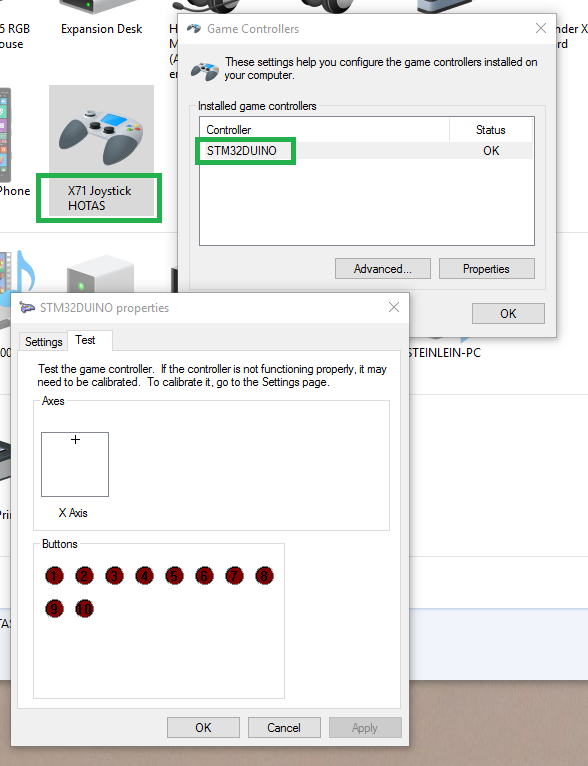
- STM32_USB_Joystick_2.png (59.58 KiB) Viewed 281 times


