
I’m trying to use OBD and ILI9341 libraries at the same time but ran out of code memory.
Using only ILI9341 I’m using about 40kB but it’s normal because of the fonts and stuff.
But OBD library alone is also using more than 40kB and I found it a bit overkill considering it’s only using serial port and some string manipulation.
So I went in a search to find who was the guilty.
While stripping the OBD library code I found the culprit! sprintf!!!! 
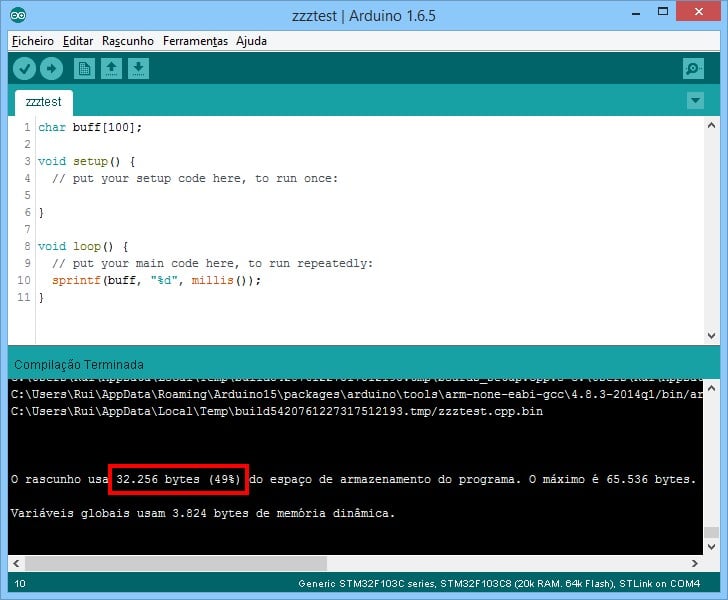
- sketch_sprintf.jpg (83.05 KiB) Viewed 1532 times
You can do a local libc-replacement, a bit like it has been done for other MCUs, even avr-libc, in such way that if floats printf are not needed, it will be quite small.
You can do a local libc-replacement, a bit like it has been done for other MCUs, even avr-libc, in such way that if floats printf are not needed, it will be quite small.
I’ll have to recompile the whole toolchain for that, right? I think maybe it will be a bit overkill…
A couple months ago I made a research about small printf functions and this implementation is the most lean with full support of integers (8/16/32bit), width specifiers and strings (no fp). The discussion was about Serial.printf but inside there is a custom sprintf (in the first version). It is very small, a bit larger than 1KB.
I found out that other functions also make the same “enlargement” effect, atof().
I’ll try to find an alternative for this one also.
It is better to adopt the sprintf function from SDCC compiler (compiler for small 8bit MCUs like 8051, Microchip, STM8 etc). Look the source of their “standard C library” for printf. As I remember, it is possible to support floating point with 1.5-2 KB more code memory.
I’ve managed to get one version of sprintf compiling in a sketch. I’m still to test it to see if it works properly but seems ok in terms of space (12kB is only 1kB more  ).
).
But how can I get the libraries I use to use this version? I can get the loop() function to use it but externally how can it be done?
I’m not very familiar still with the Arduino code architecture. Can I add this new code into the Print class and make a “sprintf2” function that the libraries can use instead?
I’ve tried to implement the “lean Serial.print()” but I think the Arduino “IDE” its not compiling the Print.cpp… And if it includes an external .c file, it should also compile it, but noting…
I saw the rules.mk file and it should do that but something is missing…at least to my eyes
I’ve created sprintf2.c and .h and placed them on STM32F1/cores/maple and it compiles, but I get the warning:
C:\Users\Rui\AppData\Local\Temp\build5420264372001361322.tmp\zzztest.cpp.o: In function `loop()’:
G:\User\Downloads\arduino-1.6.5-r5/zzztest.ino:196: warning: undefined reference to `sprintf2(char*, char const*, …)’
I’ve added the #include “sprintf2.h” in the sketch so it shouldn’t be doing this…
Code size got reduced so I’m gessing the .o file wasn’t added to the binary, although it compiled and .o was generated…
The sketch:
#include "sprintf2.h"
char buff[100];
void setup() {
// put your setup code here, to run once:
Serial.begin(9600);
}
void loop() {
// put your main code here, to run repeatedly:
sprintf2(buff, "%d", millis());
//char *p = strstr(buff, "0: 49 02");
//atof(buff);
Serial.print(buff);
delay(1000);
}
extern "C" {

#include "sprintf2.h"

}
extern "C" {

#include "sprintf2.h"

}
I’m trying to use OBD and ILI9341 libraries at the same time but ran out of code memory.
Using only ILI9341 I’m using about 40kB but it’s normal because of the fonts and stuff.
But OBD library alone is also using more than 40kB and I found it a bit overkill considering it’s only using serial port and some string manipulation.
So I went in a search to find who was the guilty.
While stripping the OBD library code I found the culprit! sprintf!!!!
Removing the single line where sprintf is called and the size of the code drops by around 20kB!!!
sketch_blank.jpg
omit floating point
omit 64 bit integers
omit some obscure format specifier options
use minimal, e.g., char, int, signed and unsigned.
These are precompiled .a files libraries; so too, Arduino, if they do offer choices as above, as they surely do, else small MCUs would choke.
Also same concept, but for scanf() and vscanf()
Arduino Zero uses –specs=nano.specs for recipe.c.combine.pattern in platforms.txt. This will use newlib-nano, which in turn has a default optimized printf/scanf implementation that gets rid of floats and other less needed cruft. As a side-effect it also reduces the RAM foot print substantially by using less memory for impure data.
Arduino Zero uses –specs=nano.specs for recipe.c.combine.pattern in platforms.txt. This will use newlib-nano, which in turn has a default optimized printf/scanf implementation that gets rid of floats and other less needed cruft. As a side-effect it also reduces the RAM foot print substantially by using less memory for impure data.
I am building the programs with makefiles and the code is about 2K-3K smaller (GrumpyOldPizza is correct) and the printf family routines are also smaller (about 10KB smaller) but not like a custom printf/sprintf. Some programs have problems with nano.specs but generally is OK.
I can’t see a reason for using printf from library (either normal or nano), you can use a custom version with much smaller footprint dedicated to your application.
For example, when playing with F401RE, with 512KB flash, there is no need to strip down anything (in 99.9% of cases), but in a project with small TSSOP mcus (eg. STM32F031F4P7) every byte counts.
Anyway, the code memory is cheap these days, specially with ARM mcus.
For example, when playing with F401RE, with 512KB flash, there is no need to strip down anything (in 99.9% of cases), but in a project with small TSSOP mcus (eg. STM32F031F4P7) every byte counts.
Anyway, the code memory is cheap these days, specially with ARM mcus.
For example, when playing with F401RE, with 512KB flash, there is no need to strip down anything (in 99.9% of cases), but in a project with small TSSOP mcus (eg. STM32F031F4P7) every byte counts.
Anyway, the code memory is cheap these days, specially with ARM mcus.
Just like any hobby is more fun with good tools and equipment. Better as time goes by.
Trying to get crap-China down to $5-10 is sheer masochism when you try to USE the junk, to include no documentations.
If I were a university student now, not knowing any better, I’d appreciate being told that for less than the price of a pizza, the risk and difficulty of using a $20 board instead of a $5 will likely help me me get an A and turn project in on time. And make me a hero to the project team. Same principle applies to hobby work.
Sadly, all too often, the professors have nada experience in industry and the real world outside the bubble of academia where time is valuable.
I agree with you, a “big” MCU with correct documentation is the best way for someone to start, the big nucleo boards offer exceptional value.
Just like any hobby is more fun with good tools and equipment. Better as time goes by.
Trying to get crap-China down to $5-10 is sheer masochism when you try to USE the junk, to include no documentations.
<…>
Spend $5 and buy a Maple mini.
These boards are much higher quality than the the $2 or $3 Blue Pill boards and have less problems with USB
@stevech
The whole point of this forum is for people who want to use Arduino on STM32. There are other forums for people who want to use other tools.
Although I’m in favor of free speech, your appear to be trying to drive people off the forum and away from the Arduino ethos
(Although not fully supported if I got it right from what I read)
@stevech has got some point on Arduino IDE, it a big piece of… I only use it to compile and send the code to the STM32. Other than that even notepad++ is far more usefull than it! I don’t know how they call it “IDE”… 
But even with F1’s we can still make stuff work and at a fraction of the price, which is very good when making lots of different projects.
I use Notepad++ on Windows as my editor, as it is a much better editor than the IDE.
I view Arduino as the whole ecosystem, e.g. IDE as compile and upload tool, Core API and Core libs (SPI I2C etc), and the masses of third party libs and other code e.g. display driver libs, as well as whole suites of code like Arduino JSON, and Open Energy Monitor etc etc etc
Even if I’m not developing for Arduino, I often find that there is an open source Arduino lib that has code that I can use.
I realise that not all Arduino code libs are good quality, but my code is a buggy as the next person’s, and getting pier reviewed and corrected code libs from github, is on balance, normally going to be more stable less buggy, than me trying to write code from scratch based on device data sheets
But, I always look at how active a github repo is, and how recently its been updated and how many forks its has, to get a feel for what the stability etc is likely to be.
As on the flip side, in my day job, we have bought in various pre-written closed source packages of code (albeit small and cheap packages), and the code quality is highly variable. (this is often as the code has been written for a specific project then resold as general purpose, and its hard to re-purpose to make small changes).
Sometimes the code is just poor quality, but thats the luck of the draw when buying in closed source code, with no way to see it all before you pay for it.
<…>
As on the flip side, in my day job, we have bought in various pre-written closed source packages of code (albeit small and cheap packages), and the code quality is highly variable. (this is often as the code has been written for a specific project then resold as general purpose, and its hard to re-purpose to make small changes).
Sometimes the code is just poor quality, but thats the luck of the draw when buying in closed source code, with no way to see it all before you pay for it.
Arduino Zero uses –specs=nano.specs for recipe.c.combine.pattern in platforms.txt. This will use newlib-nano, which in turn has a default optimized printf/scanf implementation that gets rid of floats and other less needed cruft. As a side-effect it also reduces the RAM foot print substantially by using less memory for impure data.
The whole point of this forum is for people who want to use Arduino on STM32. There are other forums for people who want to use other tools.
Although I’m in favor of free speech, your appear to be trying to drive people off the forum and away from the Arduino ethos
