
There is a wiki on github https://github.com/rogerclarkmelbourne/ … STM32/wiki
However its not the easiest thing to read.
I also did some videos on how to install the repo (2 videos as there is the original and an update)
https://www.youtube.com/channel/UCZkTQA … Naj6YdImIA
However I was not focusing on the Maple mini.
Therefore, is there a set of Windows 7 drivers that I can use?
There is a special driver installer you need to use
You need to run the batch file install_drivers.bat in the drivers/win folder
https://github.com/rogerclarkmelbourne/ … rivers/win
This is actually a very clever and complex work around for the driver signing problem in Windows 7 (and newer), thankfully we are not the only project that has this problem with Windows driver signing so there is a solution
Some questions:
1) How do you download a file or a whole folder from github? Seriously.
2) Upon inspecting the .inf file, it appears this has been hacked out of a “Microsoft XBox Controller Type S” but installs libusb – I need to read more on libusb there seem to be one million versions of it flying around
Just press on the file name and then choose Raw on the edit bar.
Just run the bat file.
The drivers that are needed are included by Windows. What the bat file and the other software does is associate the USB VID and PID numbers enumerated by the firmware in the board, with the Windows Virtual serial driver and the WIndows DFU driver.
However its not as easy as it used to be, because Windows 7 requires even this linkage to be digitally signed by a manufacturer – but this is not possible for open source projects.
So the work around is to generate your own personal digital self signed certificate and install it for each of the USB VID PID to driver associations.
Fortunately libwdi does all the hard work of creating and installing these certificates.
So you can do this manually yourself if you want, however you’d need to find the documentation on how to do it manually.
1) How do you download a file or a whole folder from github? Seriously.
Essentially, you can view the Raw file if ASCII and then cut & paste as suggested by zoomx; or work your way to the root of the folder:
Example, you are here:
https://github.com/rogerclarkmelbourne/ … er/STM32F1
But, you need to be here:
https://github.com/rogerclarkmelbourne/Arduino_STM32
At that time, you will see Download Zip button:
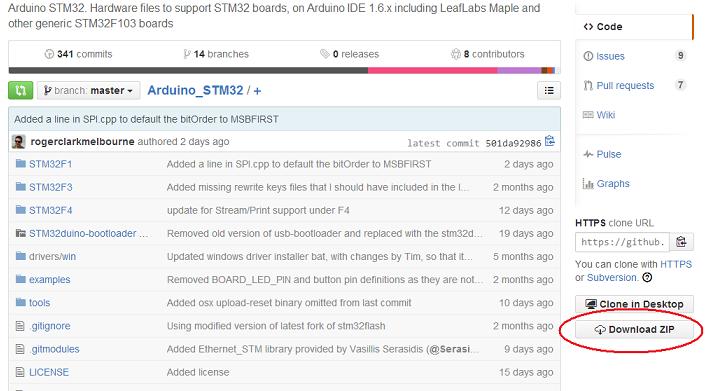
- Github.jpg (50.43 KiB) Viewed 831 times
Therefore, is there a set of Windows 7 drivers that I can use?
As a result there is no COM port active to communicate with the Maple Mini.
I know the Maple Mini is OK because I programmed it from XP – but because XP was running inside a virtual machine, everything had to go through Windows 7 which put a lot of obstacles in the way.
https://github.com/rogerclarkmelbourne/ … rivers/win
I believe that is all I had to do in Windows 8 to get the drivers installed.
However. I went back into the Windows XP virtual machine, uploaded a “blink LED” program, and amazingly after I pressed the reset button, Windows 7 said “discovered new hardware” and proceeded to auto-install the same “Maple Serial” driver, only now it did not have a yellow exclamation mark.
I now have two of those Maple Serial drivers, one works the other does not…
The Maple Serial and DFU drivers are mutually exclusive for us.
Its only a DFU device while its running code in the bootloader and only a serial device when running a sketch.
Yes on the high level I understand this, it is also mentioned on the leaflabs webpage under the Windows installation instructions where they prompt you to press the reset and user buttons in some order to force this and that …
If you hold the “button” down while pressing and releasing the reset, the processor actually goes into its internal Serial bootloader mode.
But there is a small problem in the maple hardware (boot1 is floating), which means this is intermittent.
So if you want to reflash the bootloader via Serial upload, you need to pull boot1 low when you do this sequence.
Also on windows, all you need to do if you can’t upload is wait for the compile to complete, and press reset as soon as dfu-util is looking for the board.
On Windows DFU util seems to have a long enough timeout such that you can press reset and the USB bus can re-enumerate before DFU has timed out, and it then recognises the board as a DFU device and uploads
