
The code needed turned out to be simple:
  //void pwm_start(PinName pin, uint32_t clock_freq, uint32_t period, uint32_t value, uint8_t do_init)

// set pwm frequency to 60.0 khz at 50% duty cycle on PA_6

pwm_start(PA_6, F_CPU, 1200, 600, 1);
//pinMode(PA6, PWM);

//void pwm_start(PinName pin, uint32_t clock_freq, uint32_t period, uint32_t value, uint8_t do_init)

// set pwm frequency to 60.0 khz at 50% duty cycle on PA_6

//void  pwm_start(PA_6, F_CPU, 1200, 600, 1);

pwm_start(PA_6, F_CPU, 1200, 600, 1);

void setup()

{

pinMode(PA6, PWM);

}HardwareTimer pwmtimer(3);
setup() {
pinMode(PA6,PWM );
pwmtimer.pause();
pwmtimer.setPrescaleFactor(1);
pwmtimer.setOverflow(1200 - 1); // 72MHZ / 1200 = 60KHZ
pwmtimer.setCompare(TIMER_CH1, 600 - 1); // 50% duty cycle
pwmtimer.refresh();
pwmtimer.resume();
}Build options changed, rebuilding all
exec: “C:\\Users\\ted\\AppData\\Local\\Arduino15\\packages\\STM32\\tools\\arm-none-eabi-gcc\\6-2017-q2-update/bin/arm-none-eabi-g++”: file does not exist
Error compiling for board Generic STM32F103 series.
[ted – Wed Feb 20, 2019 5:27 pm] –
exec: “C:\\Users\\ted\\AppData\\Local\\Arduino15\\packages\\STM32\\tools\\arm-none-eabi-gcc\\6-2017-q2-update/bin/arm-none-eabi-g++”: file does not exist
This looks like a mixture of windows path with linux path together … 
void setup()

{

// pinMode(PA6, PWM);  // this line isn't needed

pwm_start(PA_6, F_CPU, 1200, 600, 1);   // this line goes in setup()

}int (PA_6);
//int (pwm_start);
//pinMode(PA6, PWM);
//pwm_start(PA_6, F_CPU, 1200, 600, 1);
void setup()
{
pinMode(PA_6, PWM);
//void pwm_start(PinName pin, uint32_t clock_freq, uint32_t period, uint32_t value, uint8_t do_init)
//pwm_start(PA_6, uint32_t 72000000, uint32_t 1200, uint32_t 600, uint8_t 1);
// set pwm frequency to 60.0 khz at 50% duty cycle on PA_6
//void pwm_start(PA_6, F_CPU, 1200, 600, 1);
pwm_start(PA_6, F_CPU, 1200, 600, 1);
}
void loop()
{}
int (PA_6);

int (pwm_start);

//pinMode(PA6, PWM);

//pwm_start(PA_6, F_CPU, 1200, 600, 1);void setup() {
pwm_start(PA_6, F_CPU, 1200, 600, 1);
}
void loop() {
}https://www.st.com/content/st_com/en/search.html#q=stm32f103 board-t=tools-page=1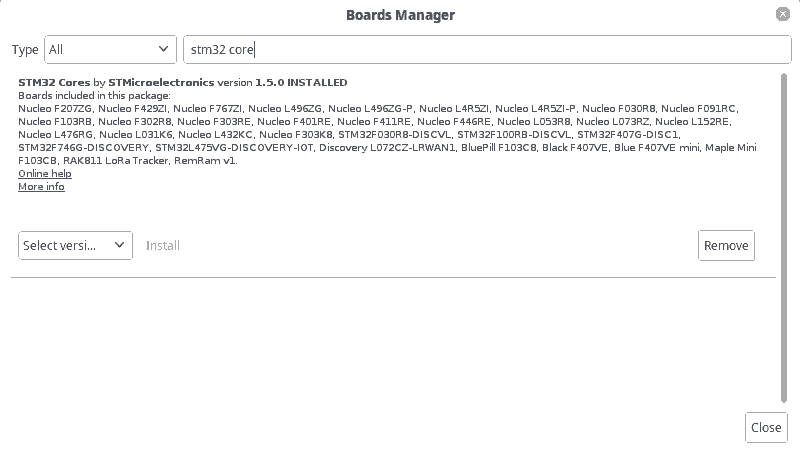
- stm32bm.png (4.73 KiB) Viewed 249 times
I remember this board, but is not on the list now
even if i type only stm32
See https://github.com/stm32duino/Arduino_Core_STM32
Getting Started
This repo is available as a package usable with Arduino Boards Manager.
Use this link in the “Additional Boards Managers URLs” field:
https://github.com/stm32duino/BoardMana … index.json
I update from 1.4 to 1.5
No blue pill on the list – yet
Blue pill still not on the list and the new error confirmed that, what to do ?
Arduino: 1.8.8 (Windows Vista), Board: “Generic STM32F1 series, BluePill F103C6 (32K), STLink, Enabled (generic ‘Serial’), None, Low/Full Speed, Smallest (-Os default), Newlib Nano (default)”
exec: “C:\\Users\\ted\\AppData\\Local\\Arduino15\\packages\\STM32\\tools\\arm-none-eabi-gcc\\6-2017-q2-update/bin/arm-none-eabi-g++”: file does not exist
Error compiling for board Generic STM32F1 series.
This report would have more information with
“Show verbose output during compilation”
option enabled in File -> Preferences.
https://github.com/stm32duino/wiki/wiki … repository
The error ;
Arduino: 1.8.8 (Windows Vista), Board: “Generic STM32F1 series, BluePill F103C6 (32K), STLink, Enabled (generic ‘Serial’), None, Low/Full Speed, Smallest (-Os default), Newlib Nano (default)”
Build options changed, rebuilding all
exec: “C:\\Users\\ted\\AppData\\Local\\Arduino15\\packages\\STM32\\tools\\arm-none-eabi-gcc\\6-2017-q2-update/bin/arm-none-eabi-g++”: file does not exist
Is explained here
So install it from the board manager then it will install all required dependencies (tools, arm gcc and CMSIS).
[ted – Fri Feb 22, 2019 5:53 am] –
Should I have here listed – blue pill ?
The menu section you posted is not STM’s core, it’s Roger’s.
I think you need to start afresh and follow the instructions linked by fpistm.
I suspect the folder ‘maple’ in your hardware folder is Roger’s – to save yourself confusion you should remove it.
This is what you should see from the official core:
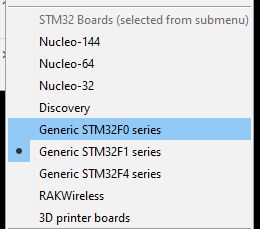
- STMmenu.jpg (11.01 KiB) Viewed 160 times


A subdirectory or file sketch already exists.
Sketch uses 11348 bytes (34%) of program storage space. Maximum is 32768 bytes.
Global variables use 856 bytes (8%) of dynamic memory, leaving 9384 bytes for local variables. Maximum is 10240 bytes.
STM32 ST-LINK CLI v3.2.0.0
STM32 ST-LINK Command Line Interface
ST-LINK SN : 48FF6E065067545651410687
ST-LINK Firmware version : V2J32S7
Connected via SWD.
SWD Frequency = 4000K.
Target voltage = 3.2 V.
Connection mode : Normal.
Device ID:0x410
Device flash Size : 64 Kbytes
Device family :STM32F10xx Medium-density
Loading file…
Unable to open file!
MCU Reset.
run application to exit
Application started.
An error occurred while uploading the sketch
On my fresh W10 install, I get an error about two missing DLLs. There are probably MSVC runtime files that need to be installed.
From Arduino, I see the same error message.
https://www.stm32duino.com/viewtopic.php?f=19&t=4523
Thanks for your support, letter I will work on st link, I saw that some guys have a problem to make it working with W10
https://github.com/rogerclarkmelbourne/ … stallation
may be you have similar problem.
Your code allows to make the simplest program for 3 phase generator with 120 deg. shift using only one timer = unique

