
nrf24l01 wiring (I use SPI2) :
CE -> PA8
CSN -> PB12
SCK -> PB13
MOSI -> PB15
MISO -> PB14
and SDCard adapter (I use SPI1) :
CS -> PA4
MOSI -> PA7
SCK -> PA5
MISO -> PA6
For nrf24l01 library, I use this library :
https://github.com/spirilis/Enrf24
And for SDCard adapter, I use Greiman SDFat library :
https://github.com/greiman/SdFat
If I separate nrf24l01 and SDCard, each one of them works perfectly, and if I combine in one bluepill, nrf24l01 can’t receive message from another device..
this is my code :
#include <SPI.h>

#include <Enrf24.h>

#include <nRF24L01.h>

#include <string.h>

#include "SdFat.h"
SPIClass _SPI(2);
#define ce_nrf PA8
#define csn_nrf PB12
#define irq_nrf PA0
#define cs_sd PA4
#define lmp_hijau PA2
#define lmp_merah PA3
Enrf24 radio(ce_nrf, csn_nrf, irq_nrf);
const uint8_t node[] = { 0xF0F0F0F0E1LL };
//const uint64_t node[] = {0xF0F0F0F0E1LL, 0xF0F0F0F0E2LL};
SdFat SD;
File file;
void setup() {
Serial1.begin(9600);
_SPI.begin();
_SPI.setDataMode(SPI_MODE0);
_SPI.setBitOrder(MSBFIRST);
pinMode(lmp_hijau, OUTPUT);
pinMode(lmp_merah, OUTPUT);
Serial1.print("Initializing SD card...");
if (!SD.begin(cs_sd)) {
Serial1.println("initialization failed!");
return;
}
Serial1.println("Initializing SD card done.");
radio.setSPI(&_SPI);
radio.begin(); // Defaults 1Mbps, channel 0, max TX power
radio.setRXaddress((void*)node);
radio.enableRX();
}
void loop() {
char uid[] = "";
radio_state(radio.radioState());
while (!radio.available(true));
if (radio.read(uid))
{
Serial1.print("Received packet: ");
Serial1.println(uid);
file = SD.open("18042018.txt", FILE_WRITE);
if (file)
{
file.println(uid);
file.close();
Serial1.println("done.");
digitalWrite(lmp_hijau, HIGH);
delay(200);
digitalWrite(lmp_hijau, LOW);
}
else
{
Serial1.println("error opening file");
digitalWrite(lmp_merah, HIGH);
delay(200);
digitalWrite(lmp_merah, LOW);
}
}
}
void radio_state(uint8_t status)
{
Serial1.print("Enrf24 radio transceiver status: ");
switch (status) {
case ENRF24_STATE_NOTPRESENT:
Serial1.println("NO TRANSCEIVER PRESENT");
break;
case ENRF24_STATE_DEEPSLEEP:
Serial1.println("DEEP SLEEP <1uA power consumption");
break;
case ENRF24_STATE_IDLE:
Serial1.println("IDLE module powered up w/ oscillators running");
break;
case ENRF24_STATE_PTX:
Serial1.println("Actively Transmitting");
break;
case ENRF24_STATE_PRX:
Serial1.println("Receive Mode");
break;
default:
Serial1.println("UNKNOWN STATUS CODE");
}
}
Don’t you have some warnings at compile time?
#include <SPI.h>

#include <Enrf24.h>

#include <nRF24L01.h>

#include <string.h>

#include "SdFat.h"
SPIClass _SPI(2);
#define ce_nrf PA8
#define csn_nrf PB12
#define irq_nrf PA0
//#define cs_sd PA4
const uint8_t cs_sd = PA4; // chip select for sd
#define lmp_hijau PA2
#define lmp_merah PA3
Enrf24 radio(ce_nrf, csn_nrf, irq_nrf);
//const uint8_t node[] = { 0xF0F0F0F0E1LL };
const uint64_t node[] = {0xF0F0F0F0E1LL, 0xF0F0F0F0E2LL};
SdFat SD(1); // Edit Use SPI1
File file;
void setup() {
Serial1.begin(9600);
_SPI.begin();
_SPI.setDataMode(SPI_MODE0);
_SPI.setBitOrder(MSBFIRST);
pinMode(lmp_hijau, OUTPUT);
pinMode(lmp_merah, OUTPUT);
Serial1.print("Initializing SD card...");
if (!SD.begin(cs_sd)) {
Serial1.println("initialization failed!");
return;
}
Serial1.println("Initializing SD card done.");
radio.setSPI(&_SPI);
radio.begin(); // Defaults 1Mbps, channel 0, max TX power
radio.setRXaddress((void*)node);
radio.enableRX();
}
void loop() {
char uid[] = "";
radio_state(radio.radioState());
while (!radio.available(true));
if (radio.read(uid))
{
Serial1.print("Received packet: ");
Serial1.println(uid);
file = SD.open("18042018.txt", FILE_WRITE);
if (file)
{
file.println(uid);
file.close();
Serial1.println("done.");
digitalWrite(lmp_hijau, HIGH);
delay(200);
digitalWrite(lmp_hijau, LOW);
}
else
{
Serial1.println("error opening file");
digitalWrite(lmp_merah, HIGH);
delay(200);
digitalWrite(lmp_merah, LOW);
}
}
}
void radio_state(uint8_t status)
{
Serial1.print("Enrf24 radio transceiver status: ");
switch (status) {
case ENRF24_STATE_NOTPRESENT:
Serial1.println("NO TRANSCEIVER PRESENT");
break;
case ENRF24_STATE_DEEPSLEEP:
Serial1.println("DEEP SLEEP <1uA power consumption");
break;
case ENRF24_STATE_IDLE:
Serial1.println("IDLE module powered up w/ oscillators running");
break;
case ENRF24_STATE_PTX:
Serial1.println("Actively Transmitting");
break;
case ENRF24_STATE_PRX:
Serial1.println("Receive Mode");
break;
default:
Serial1.println("UNKNOWN STATUS CODE");
}
}
[stevestrong – Mon Apr 23, 2018 7:08 pm] –
Which IDE do you use? Which core do you use?
Don’t you have some warnings at compile time?
I use arduino IDE, core, sorry I don’t know, I still learning, I compile it with STLink, no error, no warning, but still not work..
still same, cannot receive data :
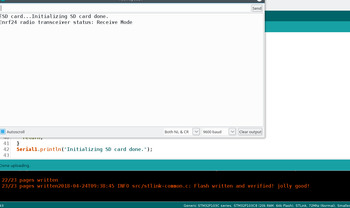
this is what happen when I delete SDCard initialization, it works :
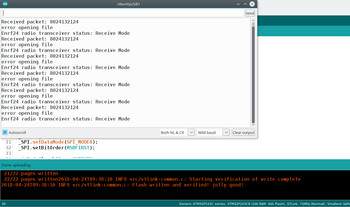
its strange, no error, no warning..
I also test with arduino SDCard library, but same, still not work..
Try using SPI port 2 with the SDcard, and port 1 with the NRF.
Greimans SDFat latest SD Fat library let’s you use either port. I forgot how to select the port, but you can see it somewhere either in the documentation or in the sdspi code.
[biladina – Tue Apr 24, 2018 2:49 am] –
@Manny, I change with your code, but still not work..still same, cannot receive data :
this is what happen when I delete SDCard initialization, it works :
its strange, no error, no warning..
I also test with arduino SDCard library, but same, still not work..
I have used a SD card and a nrf24 on different SPI ports before but not that particular radio library.
You could give this one a try viewtopic.php?p=20500#p20500
[Manny – Tue Apr 24, 2018 9:33 am] –
I have used a SD card and a nrf24 on different SPI ports before but not that particular radio library.You could give this one a try viewtopic.php?p=20500#p20500
before I use this library and buy SDCard module, I try any library at that thread, just to make sure the device can run, including your library, but no one can work, then I found this library and work in my bluepill. I will put the problem in that thread later.
this final code :
#include <SPI.h>

#include <Enrf24.h>

#include <nRF24L01.h>

#include <string.h>

#include "SdFat.h"
SPIClass _SPI(2);
#define ce_nrf PA8
#define csn_nrf PB12
#define irq_nrf PA0
#define cs_sd PA4
#define lmp_hijau PA2
#define lmp_merah PA3
Enrf24 radio(ce_nrf, csn_nrf, irq_nrf);
const uint8_t node[] = { 0xF0F0F0F0E1LL };
//const uint64_t node[] = {0xF0F0F0F0E1LL, 0xF0F0F0F0E2LL};
SdFat SD(1); // This is from @Manny code
File file;
void setup() {
Serial1.begin(9600);
_SPI.begin();
_SPI.setDataMode(SPI_MODE0);
_SPI.setBitOrder(MSBFIRST);
pinMode(lmp_hijau, OUTPUT);
pinMode(lmp_merah, OUTPUT);
radio.setSPI(&_SPI);
radio.begin(); // Defaults 1Mbps, channel 0, max TX power
radio.setRXaddress((void*)node);
radio.enableRX();
}
void loop()
{
char uid[33];
radio_state(radio.radioState());
while (!radio.available(true));
if (radio.read(uid))
{
Serial1.print("Received packet: ");
Serial1.println(uid);
SD.begin(cs_sd); // Initialized sdcard when needed
file = SD.open("18042018.txt", FILE_WRITE);
if (file)
{
file.println(uid);
file.close();
Serial1.println("done.");
digitalWrite(lmp_hijau, HIGH);
delay(200);
digitalWrite(lmp_hijau, LOW);
}
else
{
Serial1.println("error opening file");
digitalWrite(lmp_merah, HIGH);
delay(200);
digitalWrite(lmp_merah, LOW);
}
}
}
void radio_state(uint8_t status)
{
Serial1.print("Enrf24 radio transceiver status: ");
switch (status) {
case ENRF24_STATE_NOTPRESENT:
Serial1.println("NO TRANSCEIVER PRESENT");
break;
case ENRF24_STATE_DEEPSLEEP:
Serial1.println("DEEP SLEEP <1uA power consumption");
break;
case ENRF24_STATE_IDLE:
Serial1.println("IDLE module powered up w/ oscillators running");
break;
case ENRF24_STATE_PTX:
Serial1.println("Actively Transmitting");
break;
case ENRF24_STATE_PRX:
Serial1.println("Receive Mode");
break;
default:
Serial1.println("UNKNOWN STATUS CODE");
}
}

