

I got one of these boards from eBay, its a Diymore STM32F407VGT6
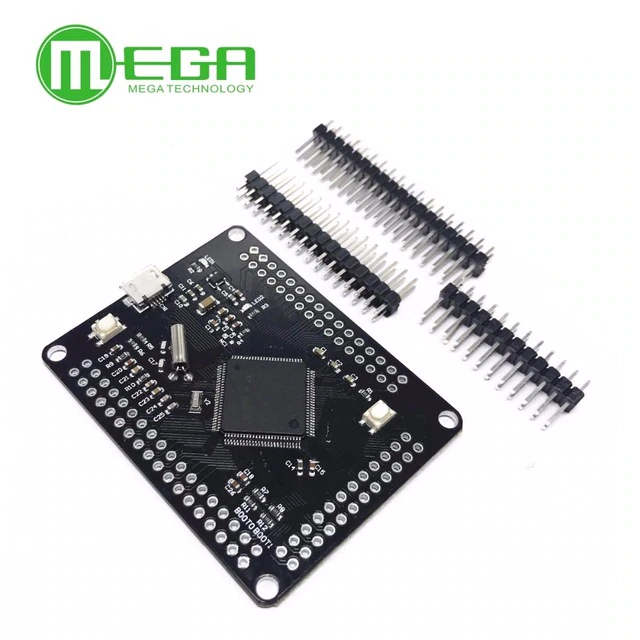
I”m doing a project which requires programming a .hex file. The project is on github and the user provides a .hex file.
So first thing I put a jumper on BOOT1, power up and under Linux I can see the board detected:
[25494.572667] usb 7-1: New USB device found, idVendor=0483, idProduct=df11
[25494.572669] usb 7-1: New USB device strings: Mfr=1, Product=2, SerialNumber=3
[25494.572671] usb 7-1: Product: STM32 BOOTLOADER
[25494.572672] usb 7-1: Manufacturer: STMicroelectronics
[25494.572673] usb 7-1: SerialNumber: xxxxxxxxxxxx
Then tried ST-LINK utility under windows. Loaded the drivers, run ST-Link, select connect and it fails to connect to the board. 
I then tried dfu-util and managed to program a precompiled .bin file. Perfect, its now blinking.
I can’t seem to find a way to program the .HEX file so thought I’d try my hand at the Arduino. From what I’ve read you can upload a .hex file.
Fire up Arduino IDE 1.8.8 under Linux, load board manager and install Arduino SAM boards. Problem is now under port I do not see the port. Only /dev/ttyS0. Also tried Arduino under Windows, same issue. Only thing I see is “STM device in DFU mode”
Can someone help and put my out of my misery. Does it need a different bootloader or something?
I’m not sure if the hex upload will be available via st-link, but st-link is definitely the correct way to go to program that board – I assume you connected the jumpers from the stlink dongle to the correct pins on the board: it doesn’t connect to the board via USB.
You can test the connection with ST’s own st-link software. This is in fact probably the simplest way to actually upload the hex too.
Also, do you have a link to the project that you are trying to flash to the board, presumably the .hex was compiled for this specific device?
PS, this post by mrburnette is very useful for people trying to get started -> http://stm32duino.com/viewtopic.php?f=2&t=3111
Here’s the link the to the .HEX
https://github.com/robinhedwards/UnoCar … rt.elf.hex
I assume you connected the jumpers from the stlink dongle to the correct pins on the board: it doesn’t connect to the board via USB.
I think that’s my problem. I connected to the board using a USB cable and shorted BOOT1. Is there a special stlink dongle I should be using?
[gmc – Tue Dec 18, 2018 9:02 am] –
I think that’s my problem. I connected to the board using a USB cable and shorted BOOT1. Is there a special stlink dongle I should be using?
Yes 
Go to ebay (or ali-express, or your choice of hardware vendor), and search for ‘st-link v2’ – clones are available for very reasonable prices – be sure it comes with some dupont style jumper wires with the correct gender ends for your setup (usually female to female is what you will need).
this thread is useful
viewtopic.php?f=39&t=1976
and this is how i installed my sketch on my board over dfu, just a normal usb cable installing over dfu,
no additional dongle needed
viewtopic.php?f=39&t=1976&start=10#p26203
when you want to run the sketch itself you need to clear both boot0 and boot1 and reset then it would run your sketch.
if you set boot0 the on-chip dfu boot loader runs hence you see the stm32 dfu device in the logs
but st-link could be more convenient
be sure you are using a valid core and compiling for the valid board e.g. stm32f407*
for libmaple core the tool dfu-util is bundled in the core
https://github.com/rogerclarkmelbourne/Arduino_STM32
https://github.com/rogerclarkmelbourne/ … stallation
you would find it in tools/win
but i’d suggest to get the latest dfu-util from the origin
http://dfu-util.sourceforge.net/
for windows you would need to install the driver stack so that dfu-util would work, that’s part of the Arduino_STM32 core installation
The board he suggests on the linked pdf is a discovery board, those use the same device but also have an st-link built into them.
You may need to replicate some of the discovery circuitry if the project relies on buttons/led’s etc – but worth a punt for sure.
[ag123 – Tue Dec 18, 2018 9:13 am] –
and this is how i installed my sketch on my board over dfu, just a normal usb cable installing over dfu,
no additional dongle needed
viewtopic.php?f=39&t=1976&start=10#p26203
This is really useful, I hadn’t even thought about using the tools directly outside of the IDE.
do review steve’s thread in detail
viewtopic.php?f=39&t=1976
and review threads in the section on stm32 f4 boards
viewforum.php?f=39
i’ve not played with my f407 boards in a while, my my initial touches with those boards, the feel is that they are of far more performance compared to the simple maple mini or blue pills (stm32f103)
I’ll have a look at dfi-util. I programmed a blink bin file I found on the net which worked.
Issue now is how do I convert the hex file to bin. Will do some reading up but this is looking promising.
It is a interesting project, no buttons are required so I should be ok using this clone.

http://hex2bin.sourceforge.net/
the other thing is to look at the call for objcopy
arm-none-eabi-objcopy -O binary file.elf
makes bin files
arm-none-eabi-objcopy -O ihex file.elf
makes hex files
the stm32 on-chip boot loader only runs on *only one* of the usb port (i think it is the non-OTG port)
viewtopic.php?f=39&t=1976&start=10#p26203
[ag123 – Tue Dec 18, 2018 9:32 am] –
i think there are some additional catches about those stm32f407* boards, find the schematic if possible, the external crystal HSE may be running at a speed that is not default in the core (e.g. some boards use a 25 mhz crystal instead of a 16 mhz crystal)
I had a dip into the source code -> https://github.com/robinhedwards/UnoCar … tm32f4xx.c
And it looks like it’s using defaults… 168mhz & 25mhz HSE, but I may be reading it wrong…
my guess about a ‘wrong’ HSE crystal speed may possibly reflect as a usb-serial that ‘won’t work’ but that a led blinks
well i’ve not really meddled with it, but that there are some ‘mini’ f407vet and f407zet boards that shipped with different HSE crystal speeds from that of the stm32f407 vet black boards

blinker bin file still works so at least nothing is fried. Will wait for my st link v2 and try again and report back.
I suspect you are going to have to carefully examine the differences between a 407 DISCOVERY and your DIYMORE, ie trace each pin back to see if there is some extra implied required hardware on the DISCOVERY.
https://www.st.com/en/development-tools … eprog.html
STM32CubeProgrammer (STM32CubeProg) is an all-in-one multi-OS software tool for programming STM32 microcontrollers.
It provides an easy-to-use and efficient environment for reading, writing and verifying device memory through both the debug interface (JTAG and SWD) and the bootloader interface (UART and USB).
FWIW: I just successfully tested with both a .hex and .bin file on a NUCLEO-F103 board using its STLINK-V2.1 .
Perfect, STM32CubeProg installed, connected via USB and programmed successfully within a few mins. Took me about 10 hours to get there
 Connected up to the Atari and can see the menu.
All Comments