
My friend @TFTLCDCyg, and I we have modified library based James Bowman
Library GD23STM32 for STM32F103x
To work well FT81X screens of FTDI EVE 
Lack of fine tune this library. Run, believe with all STM32 boards, test in series F103ZET6 and F103FC8T6
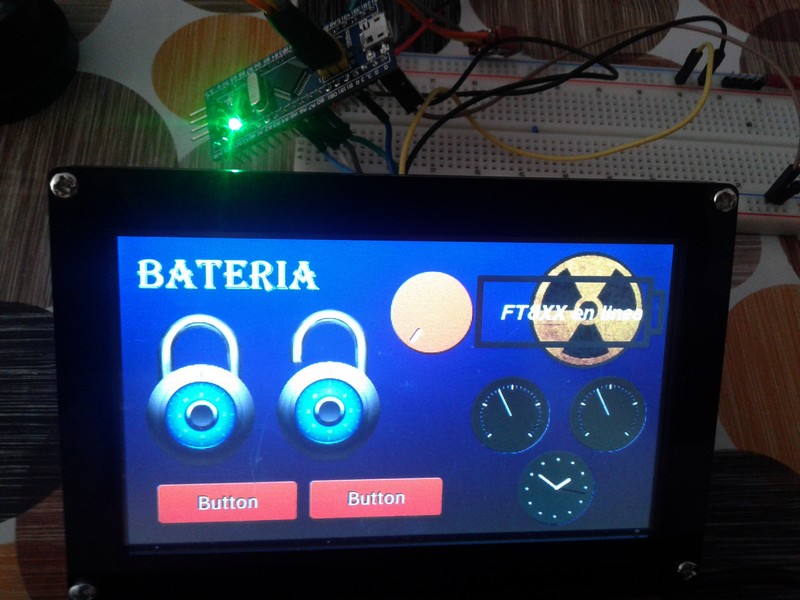
Show a video screen 5 inches FT800 (480x272px);
https://www.youtube.com/watch?v=JROL8ReRy3Q
Show a video screen 5 inches FT810 (800x480px);
https://www.youtube.com/watch?v=b0LLHY_8Zww
You can see documentation book on library in this link this link
This screens to buy on http://www.hotmcu.com/
We also operate in other MCU ‘s; Teensy, Arduino and now playing in STM32. The library is very easy for codes, multiple widgets, color, text, buttons, sliders etc. Only missing SD reader for assets and images.
For example another video with gauge transformed code from the original FTDI library;
https://www.youtube.com/watch?v=ckye3X-xI2w
Spectrum based on assets for audio;
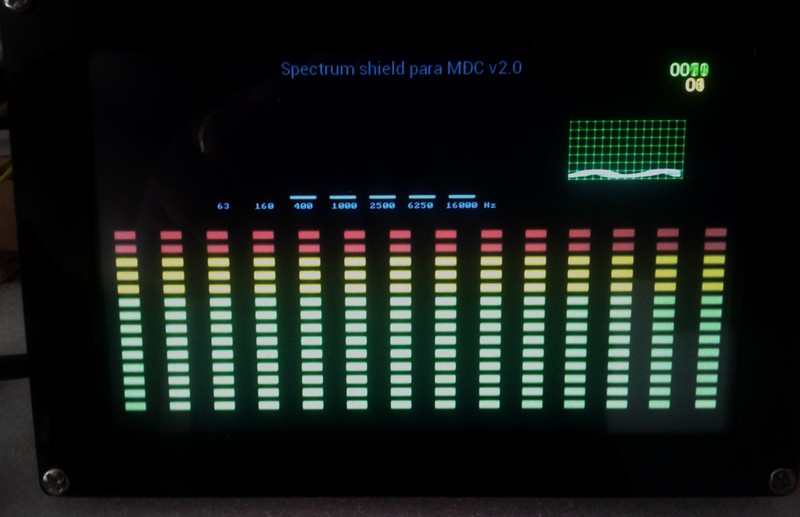
A few days go up library for everyone to enjoy. Regards!
This library to have small problem with registers of FT810Q chip. FT800 screen not problem. Only FT81x.
Solve incidence today.
Show new video demonstrate work perfect;
https://www.youtube.com/watch?v=YEgvkpNQOjA
Long time to realize these small plates with FTDI EVE
Im trying to build my display design in EVE Screen Designer 3, base FT81* HAL stuff…
How hard would it be to port this to stm32? I assume the Hal is Arduino based?
I have no real issues with Gameduino it looks great and far more user friendly than ftdis base stuff… But… It does lack a dedicated UI builder.
Im trying to build a complex UI with graphic assets. Its far too much to try and code placements directly.
While I get Gameduino is mainly built to make programming simple games easy and fun, I think it really needs a UI designer…
[lightcalamar – Fri Jun 23, 2017 3:53 pm] –
A few days go up library for everyone to enjoy. Regards!
Exact, screen FTDI’ s have 3 solution; FT800, FT81x and new generation FT900. This library for STM32 only work on FT800 and FT81x. For example Riverdi 7 inch screens based TFT FT813 chip. You can have UI graphical For design and export to GD2 library.
This example of the video previous;
//prog_uchar         IDE version anterior, generada por EVE editor  V1.17

//unsigned char     IDE nuevas versiones

//http://forum.arduino.cc/index.php?topic=261093.0
#include <SPI.h>

#include <GD23STM32.h>
#define RAM_STM32A 0
// #define PDNPin PB1 // Señal P.O.R. TFT FT800
static const prog_uchar STM32a[] PROGMEM = {
#include "STM32a.h"
};
#include "color.h"
int minX = 135, minY = 15;
//int maxX = 480 - minX, maxY = 272 - minY; //FT80X
int maxX = 800 - minX, maxY = 480 - minY; //FT81X
int startX = maxX / 2, startY = maxY / 2;
int deltaX = 2, deltaY = 2;
void setup() {
GD.begin();
// GD.cmd_calibrate();
EntornoMP();
}
void EntornoMP()
{
GD.cmd_inflate(RAM_STM32A);
GD.copy(STM32a, sizeof(STM32a));
GD.BitmapHandle(0);
GD.BitmapSource(0);
GD.BitmapLayout(ARGB1555, 960, 175);
GD.BitmapSize(NEAREST, BORDER, BORDER, 480, 175);
}
void loop()
{
GD.ClearColorRGB(0, 0, 0);
GD.Clear();
GD.SaveContext();
GD.Begin(BITMAPS);
GD.Vertex2ii(200, 120, 0, 0);
GD.RestoreContext();
GD.Begin(BITMAPS);
GD.Begin(LINES);
GD.SaveContext();
GD.Vertex2ii(0, 70, 20, 0); // DOS LINEAS DEBAJO DEL MENU SUPERIOR
GD.Vertex2ii(480, 70, 20, 0);
GD.VertexTranslateX(16*320); GD.Vertex2ii(480, 70, 20, 0);
GD.VertexTranslateX(16*320); GD.Vertex2ii(0, 70, 20, 0);
GD.RestoreContext();
GD.SaveContext();
GD.Vertex2ii(0, 65, 20, 0);
GD.Vertex2ii(480, 65, 20, 0);
GD.VertexTranslateX(16*320); GD.Vertex2ii(480, 65, 20, 0);
GD.VertexTranslateX(16*320); GD.Vertex2ii(0, 65, 20, 0);
GD.RestoreContext();
GD.SaveContext();
GD.Vertex2ii(0, 478, 20, 0); // LINEA INFERIOR DE LA PANTALLA
GD.Vertex2ii(478, 478, 20, 0);
GD.VertexTranslateX(16*320); GD.Vertex2ii(0, 478, 20, 0);
GD.VertexTranslateX(16*320); GD.Vertex2ii(478, 478, 20, 0);
GD.RestoreContext();
GD.SaveContext();
GD.Vertex2ii(0, 480, 20, 0); // LINEA LATERAL IZQUIERDA
GD.Vertex2ii(0, 65, 20, 0);
GD.RestoreContext();
// LINEA LATERAL DERECHA
GD.SaveContext();
GD.VertexTranslateX(16*318); GD.Vertex2ii(480, 65, 20, 0);
GD.VertexTranslateX(8*636); GD.Vertex2ii(480, 480, 20, 0);
GD.RestoreContext();
GD.End();
GD.cmd_fgcolor(VERDEOS);
GD.ColorRGB(WHITE);
GD.cmd_romfont(1, 32);
GD.cmd_button(0, 0, 800, 62, 1, 0, "Multi Data Center");
GD.cmd_fgcolor(CHERRY);
GD.ColorRGB(YELLOW);
GD.cmd_button(30, 100, 210, 75, 31, 0, "BUS I2C");
GD.ColorRGB(WHITE);
GD.cmd_gauge(120, 380, 90, OPT_NOBACK, 4, 8, 7, 12);
// GD.ColorRGB(0x00,0xff,0x00); GD.cmd_text(startX, startY, 31, OPT_CENTER, "FT81X on line");
GD.ColorRGB(0x00,0xf8,0x00); GD.cmd_text(startX, startY, 31, OPT_CENTER, "STM32F103C8T6");
startX = startX + deltaX; startY = startY + deltaY;
if (startX >= maxX)
deltaX = -deltaX;
if (startX <= minX)
deltaX = abs(deltaX);
if (startY >= maxY)
deltaY = -deltaY;
if (startY <= minY)
deltaY = abs(deltaY);
GD.SaveContext();
GD.ColorRGB(0xfff800);
GD.cmd_text(610, 450, 24, OPT_CENTER, "@TFTLCDCyg & lightcalamar");
GD.swap();
}
[lightcalamar – Fri Jun 23, 2017 3:53 pm] –
The EVE Screen Designer 3 is for EVE2 FT900 inteface UI, for previous UI FT8xx use this release 1.17 (more stable) FTDI+EVE+Screen+Editor+V1.17.zip this UI export code real to Arduino or case STM32 Also be able to convert images sources etc.
EVE Screen Designer 3 does not support the FT800 so you’d have to use a previous version.
If you want something that’s simpler than FTDI/EVE you could check out the Nextion displays.
[Nutsy – Tue Jun 27, 2017 11:31 am] –
Just so i understand this is the GameDuino library ported to stm32?Im trying to build my display design in EVE Screen Designer 3, base FT81* HAL stuff…
How hard would it be to port this to stm32? I assume the Hal is Arduino based?
I have no real issues with Gameduino it looks great and far more user friendly than ftdis base stuff… But… It does lack a dedicated UI builder.
Im trying to build a complex UI with graphic assets. Its far too much to try and code placements directly.
While I get Gameduino is mainly built to make programming simple games easy and fun, I think it really needs a UI designer…
[michael_l – Tue Jun 27, 2017 7:51 pm] –
Looks quite nice ! How much FPS can FT8xx displays achieve with STM32F103C8 ? And communications is done via SPI ?
Yes, via SPI communications. See;
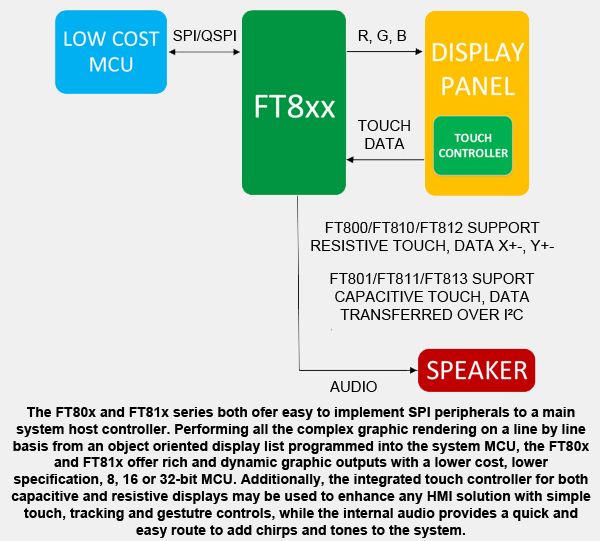
More documentation on PDF; http://www.ftdichip.com/Support/Documen … _FT81x.pdf
With ESE1(or 2) can i build custom widgets? Like With ESD3?
Other video comparison different MCU.
Case Teensy 3.6 @240MHz on video to left, to right STM32F103ZET6 @72MHz.
Me and my friends we do more tests on this NEW library.
This being the test of today ;
We test with STM32 boards to this day F103 family. Not having others. We from our efforts have the whole family of FT8xx screens and be waiting Of STM32F4 boards to do more work.
In representation of our team called “Team FT8XX” inviting our money and time want to give more opportunity to these screens and we hope to obtain many results in STM32 to every family.
With Teensy 3.6 our @RndMnkIII integrator to make running .avi videos with support of SDIO library, but be with MCU Teensy.
This video is an example; https://www.youtube.com/watch?v=l81p2ExXThA, library support; at https://github.com/RndMnkIII/GD3_SDIO
Be waiting to do more tests with different families STM32, case of series F4
[stevestrong – Fri Jun 30, 2017 8:08 am] –
Can you please give a link to the used JPG decoder?
The FT81x series GPU itself decodes jpg images, also supports png images. The documentation can be read on its datasheet, this be the link ;
http://www.ftdichip.com/Support/Documen … _FT81x.pdf
If you see also Support playback of motion JPEG encoded AVI videos
We have migrated libraries based on a shield called “Gameduino2” to our needs, also no longer currently available this shield, but if you find other MCU borders and get very good results. Got to see videos on these screens, of course with very fast MCU! As Teensy …
I repeat, now we go for the STM32 boards in all their families and this has a cost. Economical and working.
The “FT8XX Team” invites you all to participate in our project. I do not go, nor are we going to tell the time where everything is finished, but we are very clear that it is a better option to all the screens that you have read is intended to make it work.
For starters, any MCU, whether from this forum, most have to have their library or else you crash into a wall, and as a representative of my Team, I warn you very much of friends.
We have the whole family of FT8xx screens, then we lack MCU as I wrote earlier of the STM32Fx family.
We are in to buy many and to say of almost the whole series. A team is done or not.
We are aware that our project may not work. However we have managed to see our fruits in plate STM32F103 and this is for us a breakthrough.
Believing time will take away or give us reason. All in good time. Regards!
========================================================
Team FT81X ( @TFTLCDCyg, @lightcalamar and @RndMnkIII )
========================================================
Some days of test and other test with this amazing MCU´s family. Soon some demos to show the potential of this library.
Be this result; FT810 with MCU STM32F103C8T6 Assets images menu . Code is very simple and easy, example of the main menu;
#include <SPI.h>
#include <GD23STM32.h>
#include "master.h"
#include "color.h"
#include "menus.h"
void setup() {
GD.begin();
GD.wr(REG_PWM_DUTY, 90);
inicio();
}
void loop() { }
void inicio() {
LOAD_ASSETS();
GD.BitmapHandle(MASTER_HANDLE);
GD.BitmapLayout(ARGB4, 2 * 100, 100);
while(1){
GD.ClearColorRGB(BLACK);
GD.Clear();
GD.get_inputs();
GD.cmd_fgcolor(BLUEDARK);
GD.ColorRGB(WHITE);
GD.cmd_romfont(1, 32);
GD.Tag(100);
GD.cmd_button(0, 0, 800, 62, 1, 0, "Next page"); GD.Tag(255);
if (GD.inputs.tag==100){delay(135);
//GD.cmd_spinner(420, 250, 0, 1) ;
Aviso1(); delay(300); MP();}
GD.ColorRGB(WHITE);
GD.cmd_text( 55, 210, 24, 0, "La Radio");
GD.cmd_text( 230, 210, 24, 0, "GPS");
GD.cmd_text( 345, 210, 24, 0, "El Tiempo");
GD.cmd_text( 495, 210, 24, 0, "Horarios");
GD.cmd_text( 665, 210, 24, 0, "Tools");
GD.cmd_text( 60, 380, 24, 0, "Carpetas");
GD.cmd_text( 235, 380, 24, 0, "Ayuda");
GD.cmd_text( 375, 380, 24, 0, "Brillo");
GD.cmd_text( 490, 380, 24, 0, "Spectrum");
GD.cmd_text( 645, 380, 24, 0, "Audio_in");
GD.Begin(BITMAPS);
GD.Vertex2ii(50, 95, 0, 7);
GD.Vertex2ii(220, 95, 0, 8);
GD.Vertex2ii(360, 95, 0, 9);
GD.Vertex2ii(500, 95, 0, 3);
GD.Vertex2ii(50, 265, 0, 2);
GD.Vertex2ii(220, 265, 0, 0);
GD.Vertex2ii(360, 265, 0, 1);
GD.Vertex2ii(500, 265, 0, 4);
GD.VertexTranslateX(16*150);
GD.Vertex2ii(500, 95, 0, 6);
GD.Vertex2ii(500, 265, 0, 5);
GD.swap();
}
}
We wish all interested patients to be patient until the page achieved. This being our space; Team FT8XX
Give solutions with tools for these screens, be aware of it we offer our advances and codes free.
Reach new STM32 boards 48 hours ago and run our library.
Work very hard, especially @TFTLCDCyg my friend. And by the way, sleep very little …
We be very proud of new success, to think that STM32 be very good candidate as MCU, low cost for these, perhaps the best screens on the market. We do not sell screens, we our hobby is to achieve many successes say before with MCU’s STM32 family.
To our library, it is lacking access to SD reader, either SDIO or SDFat and believe that soon arrive solution. Be working very hard even if you do not believe. For this we be a Team.
This being last video this case with verification of compilation in STM32F407VET6; FT810 with STM32F407VET6 or ZGT6
Until the next message from the Team, greetings to all!
P.S. We do not know if you understand that these FTDI screens, FT8xx case have audio output, ie have internal instrument ROMs and play audio in ADCPM
Our team member FT81x soon when your account is active write the important changes made in a week, our friend @RndMnkIII FT81x Team will give this forum very important news.
Player video on. Awesome !!!! on simple STM32F103C8T6  link; https://www.youtube.com/watch?v=b4WuedK … e=youtu.be
Can someone give more? viewtopic.php?f=44&t=2356
It’s been a hard day but we’ve got it and working well.
In representation of the FT81x Team, our library is in this link;
Modify the first link in this thread. Put a new video demonstration of it soon.
Past this border, we go to get library for MCUś STM32F407 soon …
But look, not be important in your forum, we Spanish Team.
We have managed to make it work in any F103 family, the FTDI FT8XX screens with SD reader.
On the other hand your forum will only focus on ILI9341 and / or ILI9325 screens that will make the Team laugh. to us to produce much laughter, you do not know or deepen, but be the forum system. We respect. . . .
In first mesaje in representation of the Team FT81x say us to interest boards or CPU F103, and to obtain success. We go for the GREAT F407 and almost get the goal.
Team FT81x be raising, and thanks for this forum, do not pubricate our next advances, in the near future (days, or weeks) at least in the family STM32F407xxxx
However we publish, we entrust this public library, the future, possibly not.
I am from Canada. I downloaded your latest library GD23STM32_F103x from your github page. But when I tried to compile any example, I use to get some errors. Some of them are as per the followings:
In HelloWorld example:
————————————–
Arduino: 1.6.5 (Windows 8.1), Board: “Generic STM32F103C series, STM32F103CB (20k RAM. 128k Flash), Serial, 72Mhz (Normal)”
Build options changed, rebuilding all
Using library SPI in folder: C:\Rauf\development\Arduino\arduino-1.6.5\hardware\Arduino_STM32\STM32F1\libraries\SPI
Using library GD23STM32_F103x in folder: C:\Rauf\development\Arduino\arduino-1.6.5\libraries\GD23STM32_F103x (legacy)
In file included from Helloworld.ino:3:0:
C:\Rauf\development\Arduino\arduino-1.6.5\libraries\GD23STM32_F103x/GD23STM32.h:650:18: error: ‘File’ has not been declared
byte loadSdFat(File& archive, void (*progress)(long, long) = NULL);
^
C:\Rauf\development\Arduino\arduino-1.6.5\libraries\GD23STM32_F103x/GD23STM32.h:654:22: error: ‘File’ has not been declared
void safeloadSdFat(File& archive);
^
C:\Rauf\development\Arduino\arduino-1.6.5\libraries\GD23STM32_F103x/GD23STM32.h:1196:3: error: ‘File’ does not name a type
File archive;
^
C:\Rauf\development\Arduino\arduino-1.6.5\libraries\GD23STM32_F103x/GD23STM32.h: In member function ‘void StreamerSdFat::begin(const char*, uint16_t, byte, uint32_t, uint16_t)’:
C:\Rauf\development\Arduino\arduino-1.6.5\libraries\GD23STM32_F103x/GD23STM32.h:1144:2: error: ‘archive’ was not declared in this scope
archive.open(rawsamples, O_RDONLY);
^
C:\Rauf\development\Arduino\arduino-1.6.5\libraries\GD23STM32_F103x/GD23STM32.h: In member function ‘int StreamerSdFat::feed()’:
C:\Rauf\development\Arduino\arduino-1.6.5\libraries\GD23STM32_F103x/GD23STM32.h:1173:7: error: ‘archive’ was not declared in this scope
archive.read(buf,512);
^
C:\Rauf\development\Arduino\arduino-1.6.5\libraries\GD23STM32_F103x/GD23STM32.h:1181:9: error: ‘archive’ was not declared in this scope
return archive.position() – archive.size();
^
C:\Rauf\development\Arduino\arduino-1.6.5\libraries\GD23STM32_F103x/GD23STM32.h: In member function ‘void StreamerSdFat::progress(uint16_t&, uint16_t&)’:
C:\Rauf\development\Arduino\arduino-1.6.5\libraries\GD23STM32_F103x/GD23STM32.h:1185:15: error: ‘archive’ was not declared in this scope
uint32_t m = archive.size();
^
Multiple libraries were found for “SPI.h”
Used: C:\Rauf\development\Arduino\arduino-1.6.5\hardware\Arduino_STM32\STM32F1\libraries\SPI
Not used: C:\Rauf\development\Arduino\arduino-1.6.5\libraries\SparkFun_MPU-9250_Breakout_Arduino_Library-master
Error compiling.
I am using HOTMCU 4.3″ with FT800 board. And am using STM32F103 blue pill generic board with arduino 1.6.5.
Any idea?
Thank you,
Rauf
[lightcalamar – Mon Jul 31, 2017 10:51 pm] –
Team FT81x work hard on getting library.
Good job porting the library. You could improve the performance of your library with a few small changes, and perhaps be able to play the jpgs with a frame rate more similar to teensy.
You have a lot block reads and transfers in loops sending 1 byte at a time repeatedly. The SPI library has functions to read and write a buffer of X bytes all at once, and on top there are functions to do so with DMA transfers that speed it up even a bit more.
Functions like this:
https://github.com/lightcalamar/GD23STM … ing.h#L139
Or this:
https://github.com/lightcalamar/GD23STM … ing.h#L228
Could be much faster sending a buffer at once rather than byte by byte.
Also seems like you may have a bug in this line:
https://github.com/lightcalamar/GD23STM … ring.h#L46
The text says you are adjusting to 10.5Mhz, but the number is actually 105 000 000, so 105Mhz.
CoreSTM: Core generic of danieleff
SdFat library: present in the core generic of danieleff
EEPROM library: AT24Cxx to manage calibration of the tactil screen
This is a work in progress. Enthusiasts of the FT8XX screens can follow us on our page and forum: http://ft81xmania.com/comunidad/
You can download the library (that we calling GD2UB) and the additional libraries.
We appreciated any suggestions to improve the library.
At this moment our team has been work hard in order to make that the library can be 100% functional on boards like F103X, F407X and in the last week on the F429ZI-DISCO.
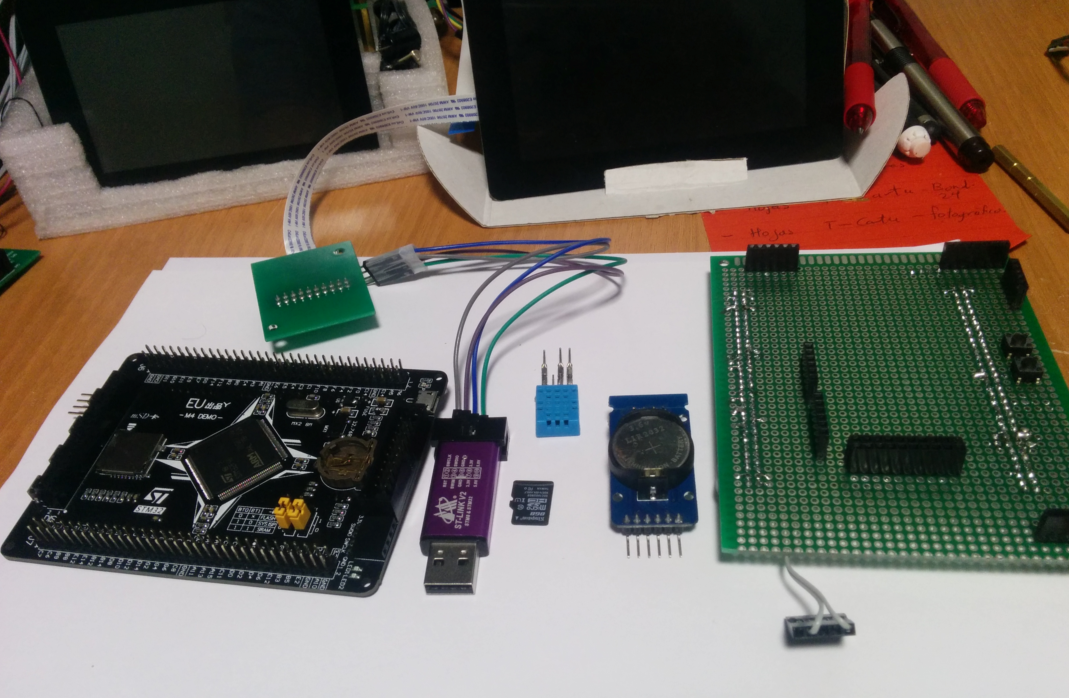
This is an example with FT813 of 5″ and M4-DEMO board
https://www.youtube.com/watch?v=JjzhNjXjwrU
Thanks to RogerClark and danieleff for your great effort in this amazing forum.
Best Regards from México
The FF81x Team is working very hard and already have a new library from this previous. We have created a space where we already have everything prepared and many new features.
Be correcting error and more functions. We have managed to operate all family FTDI screens and used various core for example STM32_duino and STM32GENERIC and adapt the families STM32 F103, F407 and F429 and future F7xx
Ask for a little patience. Our new generation library name GD2UB, have same feature as predecessor GD23STM32
In our forum are working for these improvements. Link; https://ft81xmania.com/
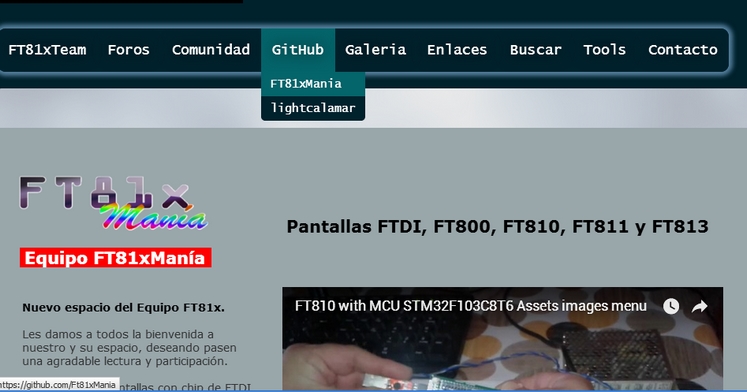
New github for library GD2UB; https://github.com/Ft81xMania
Forum; https://foro.ft81xmania.com/
Channel YouTube; Movies FT81xMania
https://ft81xmania.com/comunidad
[victor_pv – Wed Sep 20, 2017 5:16 am] –
Also seems like you may have a bug in this line:
https://github.com/lightcalamar/GD23STM … ring.h#L46
The text says you are adjusting to 10.5Mhz, but the number is actually 105 000 000, so 105Mhz.
Thank you. for reporting, we have modified this error. Thank you
If I understand correctly, the best library for the job is the GD23Z library, available here: https://github.com/lightcalamar/GD23Z
I’ve also downloaded the AT24Cxx library from ft81xmania.com
In order for it to compile I understand that I need to use the STM32GENERIC core.
So I’ve installed this core to my Arduino IDE (1.8.7), selected the BluePill F103CB from the boards manager, loaded the helloworld example and hit Compile.
The result was this:
In file included from C:\Users\Dimitris\Documents\Arduino\libraries\AT24Cxx\AT24Cxx.cpp:8:0:
C:\Users\Dimitris\Documents\Arduino\hardware\STM32GENERIC-master\STM32\libraries\Wire\src/Wire.h: In member function 'uint8_t AT24Cxx::read(uint16_t)':
C:\Users\Dimitris\Documents\Arduino\hardware\STM32GENERIC-master\STM32\libraries\Wire\src/Wire.h:77:13: note: candidate 1: uint8_t TwoWire::requestFrom(int, int)
uint8_t requestFrom(int, int);
^
C:\Users\Dimitris\Documents\Arduino\hardware\STM32GENERIC-master\STM32\libraries\Wire\src/Wire.h:74:13: note: candidate 2: uint8_t TwoWire::requestFrom(uint8_t, uint8_t)
uint8_t requestFrom(uint8_t, uint8_t);
^
C:\Users\Dimitris\Documents\Arduino\hardware\STM32GENERIC-master\STM32\libraries\Wire\src/Wire.h: In member function 'void AT24Cxx::update(uint16_t, uint8_t)':
C:\Users\Dimitris\Documents\Arduino\hardware\STM32GENERIC-master\STM32\libraries\Wire\src/Wire.h:77:13: note: candidate 1: uint8_t TwoWire::requestFrom(int, int)
uint8_t requestFrom(int, int);
^
C:\Users\Dimitris\Documents\Arduino\hardware\STM32GENERIC-master\STM32\libraries\Wire\src/Wire.h:74:13: note: candidate 2: uint8_t TwoWire::requestFrom(uint8_t, uint8_t)
uint8_t requestFrom(uint8_t, uint8_t);
^
In file included from C:\Users\Dimitris\Documents\Arduino\hardware\STM32GENERIC-master\STM32\libraries\stm32_dma\src\stm32_dma.c:29:0:
C:\Users\Dimitris\Documents\Arduino\hardware\STM32GENERIC-master\STM32\libraries\stm32_dma\src\stm32_dma_F0F1F3L1.h:10:28: error: 'DMA1_Channel2_3_IRQn' undeclared here (not in a function)
#define DMA1_Channel3_IRQn DMA1_Channel2_3_IRQn
^
C:\Users\Dimitris\Documents\Arduino\hardware\STM32GENERIC-master\STM32\libraries\stm32_dma\src\stm32_dma_F0F1F3L1.h:31:38: note: in expansion of macro 'DMA1_Channel3_IRQn'
{SPI1, SPI_TX, DMA1_Channel3, 3, DMA1_Channel3_IRQn},
^
C:\Users\Dimitris\Documents\Arduino\hardware\STM32GENERIC-master\STM32\libraries\stm32_dma\src\stm32_dma_F0F1F3L1.h:15:28: error: 'DMA1_Channel4_5_6_7_IRQn' undeclared here (not in a function)
#define DMA1_Channel5_IRQn DMA1_Channel4_5_6_7_IRQn
^
C:\Users\Dimitris\Documents\Arduino\hardware\STM32GENERIC-master\STM32\libraries\stm32_dma\src\stm32_dma_F0F1F3L1.h:35:38: note: in expansion of macro 'DMA1_Channel5_IRQn'
{SPI2, SPI_TX, DMA1_Channel5, 5, DMA1_Channel5_IRQn},
^
exit status 1
Error compiling for board BluePill F103CB.
![[Pending Enhancement] RTC values resetting](https://sparklogic.ru/wp-content/uploads/2019/11/nucleo-l476rg-zestaw-startowy-z-mikrokontrolerem-z-rodziny-stm32-stm32l476-90x90.jpg)
