
have LCD project ongoing but is time crucial and I need clear 1us delay but on sample I have on LED if I put delayMicroseconds(1) in reality is bit different
Here is LogicAnalyzer image
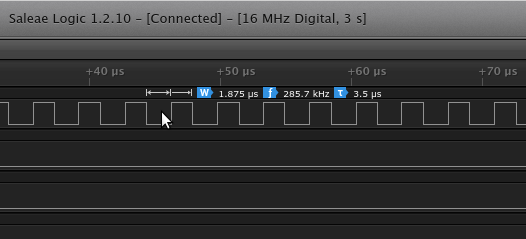
How can this be done to get normal 1us delay ???
P.S.
delay in ms works fine
-rick

small difference shouldn’t effect a lot (on 100us got 100.1us)
but it is working nice 
Thx a lot for help
here is output and it looks OK

Does anybody knows what is so special/different in Arduino code that works normally but on SW4STM32 and ST libs I can’t get same timings
but if I run _delay_us(1) I get strange value (2.25us) and that is lowest value I can get

P.S. (with GPIO_SetBits/GPIO_ResetBits that same value is 2.625us)
Do I need to configure clocks/interupts or what to get same timing like STMduino???
Where did I make mistake? Anyone faced similar issue?
#include "stm32f10x.h"
void _delay_us(uint32_t us);
void _delay_ms(uint32_t ms);
void InitGPIO();
int main(void) {
InitGPIO();
while (1) {
GPIOC->ODR = 1<<13;
_delay_ms(1);
GPIOC->ODR = 0<<13;
_delay_ms(1);
}
}
void InitGPIO() {
//def port C (LED)
RCC_APB2PeriphClockCmd(RCC_APB2Periph_GPIOC, ENABLE);
GPIO_InitTypeDef GPIO_InitStructureC;
GPIO_InitStructureC.GPIO_Pin = GPIO_Pin_13;
GPIO_InitStructureC.GPIO_Mode = GPIO_Mode_Out_PP;
GPIO_InitStructureC.GPIO_Speed = GPIO_Speed_50MHz;
GPIO_Init(GPIOC, &GPIO_InitStructureC);
}
void _delay_us(uint32_t nus) {
u32 temp;
SysTick->LOAD = 8 * nus;
SysTick->VAL = 0X00;
SysTick->CTRL = 0X01;
do {
temp = SysTick->CTRL;
} while ((temp & 0x01) && (!(temp & (1 << 16))));
SysTick->CTRL = 0x00;
SysTick->VAL = 0X00;
}
void _delay_ms(uint32_t nms) {
u32 temp;
SysTick->LOAD = 9000 * nms;
SysTick->VAL = 0X00;
SysTick->CTRL = 0X01;
do {
temp = SysTick->CTRL;
} while ((temp & 0x01) && (!(temp & (1 << 16))));
SysTick->CTRL = 0x00;
SysTick->VAL = 0X00;
}

