
im sorry for my bad English
I ‘m trying to fix a very long time to work SD Card module.
i have a STM32F103C8
and SD card module with SPI interface.
On my arduino nano Sd card module works very well, but on my STM32F103C8 not work at all 
i dont understand where is problem, because i use SdFat.h, SD.h and nothing works.
there is code example:
#include <SPI.h>

#include <SdFat.h>

/*

* SD chip select pin.  Common values are:

*

* Arduino Ethernet shield, pin 4.

* SparkFun SD shield, pin 8.

* Adafruit SD shields and modules, pin 10.

* Default SD chip select is the SPI SS pin.

*/

const uint8_t SD_CHIP_SELECT = SS;

/*

* Set DISABLE_CHIP_SELECT to disable a second SPI device.

* For example, with the Ethernet shield, set DISABLE_CHIP_SELECT

* to 10 to disable the Ethernet controller.

*/

const int8_t DISABLE_CHIP_SELECT = -1;

SdFat sd;
// serial output steam
ArduinoOutStream cout(Serial);
// global for card size
uint32_t cardSize;
// global for card erase size
uint32_t eraseSize;
//------------------------------------------------------------------------------
// store error strings in flash
#define sdErrorMsg(msg) sdErrorMsg_F(F(msg));
void sdErrorMsg_F(const __FlashStringHelper* str) {
cout << str << endl;
if (sd.card()->errorCode()) {
cout << F("SD errorCode: ");
cout << hex << int(sd.card()->errorCode()) << endl;
cout << F("SD errorData: ");
cout << int(sd.card()->errorData()) << dec << endl;
}
}
//------------------------------------------------------------------------------
uint8_t cidDmp() {
cid_t cid;
if (!sd.card()->readCID(&cid)) {
sdErrorMsg("readCID failed");
return false;
}
cout << F("\nManufacturer ID: ");
cout << hex << int(cid.mid) << dec << endl;
cout << F("OEM ID: ") << cid.oid[0] << cid.oid[1] << endl;
cout << F("Product: ");
for (uint8_t i = 0; i < 5; i++) {
cout << cid.pnm[i];
}
cout << F("\nVersion: ");
cout << int(cid.prv_n) << '.' << int(cid.prv_m) << endl;
cout << F("Serial number: ") << hex << cid.psn << dec << endl;
cout << F("Manufacturing date: ");
cout << int(cid.mdt_month) << '/';
cout << (2000 + cid.mdt_year_low + 10 * cid.mdt_year_high) << endl;
cout << endl;
return true;
}
//------------------------------------------------------------------------------
uint8_t csdDmp() {
csd_t csd;
uint8_t eraseSingleBlock;
if (!sd.card()->readCSD(&csd)) {
sdErrorMsg("readCSD failed");
return false;
}
if (csd.v1.csd_ver == 0) {
eraseSingleBlock = csd.v1.erase_blk_en;
eraseSize = (csd.v1.sector_size_high << 1) | csd.v1.sector_size_low;
} else if (csd.v2.csd_ver == 1) {
eraseSingleBlock = csd.v2.erase_blk_en;
eraseSize = (csd.v2.sector_size_high << 1) | csd.v2.sector_size_low;
} else {
cout << F("csd version error\n");
return false;
}
eraseSize++;
cout << F("cardSize: ") << 0.000512*cardSize;
cout << F(" MB (MB = 1,000,000 bytes)\n");
cout << F("flashEraseSize: ") << int(eraseSize) << F(" blocks\n");
cout << F("eraseSingleBlock: ");
if (eraseSingleBlock) {
cout << F("true\n");
} else {
cout << F("false\n");
}
return true;
}
//------------------------------------------------------------------------------
// print partition table
uint8_t partDmp() {
cache_t *p = sd.vol()->cacheClear();
if (!p) {
sdErrorMsg("cacheClear failed");
return false;
}
if (!sd.card()->readBlock(0, p->data)) {
sdErrorMsg("read MBR failed");
return false;
}
for (uint8_t ip = 1; ip < 5; ip++) {
part_t *pt = &p->mbr.part[ip - 1];
if ((pt->boot & 0X7F) != 0 || pt->firstSector > cardSize) {
cout << F("\nNo MBR. Assuming Super Floppy format.\n");
return true;
}
}
cout << F("\nSD Partition Table\n");
cout << F("part,boot,type,start,length\n");
for (uint8_t ip = 1; ip < 5; ip++) {
part_t *pt = &p->mbr.part[ip - 1];
cout << int(ip) << ',' << hex << int(pt->boot) << ',' << int(pt->type);
cout << dec << ',' << pt->firstSector <<',' << pt->totalSectors << endl;
}
return true;
}
//------------------------------------------------------------------------------
void volDmp() {
cout << F("\nVolume is FAT") << int(sd.vol()->fatType()) << endl;
cout << F("blocksPerCluster: ") << int(sd.vol()->blocksPerCluster()) << endl;
cout << F("clusterCount: ") << sd.vol()->clusterCount() << endl;
cout << F("freeClusters: ");
uint32_t volFree = sd.vol()->freeClusterCount();
cout << volFree << endl;
float fs = 0.000512*volFree*sd.vol()->blocksPerCluster();
cout << F("freeSpace: ") << fs << F(" MB (MB = 1,000,000 bytes)\n");
cout << F("fatStartBlock: ") << sd.vol()->fatStartBlock() << endl;
cout << F("fatCount: ") << int(sd.vol()->fatCount()) << endl;
cout << F("blocksPerFat: ") << sd.vol()->blocksPerFat() << endl;
cout << F("rootDirStart: ") << sd.vol()->rootDirStart() << endl;
cout << F("dataStartBlock: ") << sd.vol()->dataStartBlock() << endl;
if (sd.vol()->dataStartBlock() % eraseSize) {
cout << F("Data area is not aligned on flash erase boundaries!\n");
cout << F("Download and use formatter from www.sdsd.card()->org/consumer!\n");
}
}
//------------------------------------------------------------------------------
void setup() {
Serial.begin(9600);
while(!Serial) {} // wait for Leonardo
delay (5000);
// use uppercase in hex and use 0X base prefix
cout << uppercase << showbase << endl;
// pstr stores strings in flash to save RAM
cout << F("SdFat version: ") << SD_FAT_VERSION << endl;
if (DISABLE_CHIP_SELECT < 0) {
cout << F(
"\nAssuming the SD is the only SPI device.\n"
"Edit DISABLE_CHIP_SELECT to disable another device.\n");
} else {
cout << F("\nDisabling SPI device on pin ");
cout << int(DISABLE_CHIP_SELECT) << endl;
pinMode(DISABLE_CHIP_SELECT, OUTPUT);
digitalWrite(DISABLE_CHIP_SELECT, HIGH);
}
cout << F("\nAssuming the SD chip select pin is: ") <<int(SD_CHIP_SELECT);
cout << F("\nEdit SD_CHIP_SELECT to change the SD chip select pin.\n");
}
//------------------------------------------------------------------------------
void loop() {
// read any existing Serial data
while (Serial.read() >= 0) {}
// pstr stores strings in flash to save RAM
cout << F("\ntype any character to start\n");
while (Serial.read() <= 0) {}
delay(400); // catch Due reset problem
uint32_t t = millis();
// initialize the SD card at SPI_HALF_SPEED to avoid bus errors with
// breadboards. use SPI_FULL_SPEED for better performance.
if (!sd.cardBegin(SD_CHIP_SELECT, SPI_CLOCK_DIV4)) {
sdErrorMsg("\ncardBegin failed");
return;
}
t = millis() - t;
cardSize = sd.card()->cardSize();
if (cardSize == 0) {
sdErrorMsg("cardSize failed");
return;
}
cout << F("\ninit time: ") << t << " ms" << endl;
cout << F("\nCard type: ");
switch (sd.card()->type()) {
case SD_CARD_TYPE_SD1:
cout << F("SD1\n");
break;
case SD_CARD_TYPE_SD2:
cout << F("SD2\n");
break;
case SD_CARD_TYPE_SDHC:
if (cardSize < 70000000) {
cout << F("SDHC\n");
} else {
cout << F("SDXC\n");
}
break;
default:
cout << F("Unknown\n");
}
if (!cidDmp()) {
return;
}
if (!csdDmp()) {
return;
}
uint32_t ocr;
if (!sd.card()->readOCR(&ocr)) {
sdErrorMsg("\nreadOCR failed");
return;
}
cout << F("OCR: ") << hex << ocr << dec << endl;
if (!partDmp()) {
return;
}
if (!sd.fsBegin()) {
sdErrorMsg("\nFile System initialization failed.\n");
return;
}
volDmp();
}
Do you supply the module with additional 5V or only the 3.3V from STM32 board?
I am using an SD card module without a 5V->3.3V converter, and it works OK.
but thanks for reply. I still need help.
No needs for voltage level-shifters because SDCards use 3V logic.
So, check your wiring again, and make sure proper pins are selected for SPI.
Using an STM32 you need only the adapter without any resistor or converter of any type.
I am not sure but maybe removing R1 to R4 and solderings the pads toghether, in other words substituting the resistors with solder, it will work. Maybe.
Instead I bought the SD->microSD adapter for the old RaspberryPi

Then I soldered a strip line to it on the pads. I got this idea from the Cave Pearl blog were it was used to build a datalogger with an Arduino micro 8MHz 3.3V.
(it can even run directly from 3V power supply if the ASM1117 output pin is disconnected/unsoldered)
recognizes Sdcard :/
now i solder pins like a 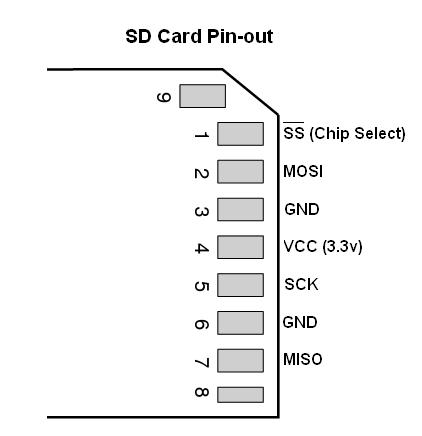 and still nothing works
I dont understand, maybe bad stm32?
 )
)
Thanks for help guys i love you ))
 (especially that having shorted SPI lines to VCC earlier could have destroyed your SPI port)
You have two choices :
– one is to copy the library and modify all references to SPI to SPI2.
– try to use the SPI.setModule(2) before doing any calls to SD or SdFat.
SdInfo:6: error: 'SPI' does not name a type

'SPI' does not name a type