
I was just browsing and saw a complete Android Tablet for less than an Arduino Mega.
Repeat… an Android tablet for less than an Arduino Mega Tablet $40.99 vs Arduino Mega $45.95 (Adafruit)
http://www.amazon.com/gp/product/B00S5Q2XG0
This got me thinking…
We jump for joy at a $5 rPi Zero but the real bargans on complete LCD touch displays and dual processors and Android (Linux) is sitting in the distribution channel for a very small price, under $41 U.S.D. delivered.
… and …
The LiOn batteryv& AC adapter is included.
Perhaps we have entered the time where moving “hached” consumer electronics into our more complex projects has begun?
Specification:
Google Android 4.4 OS 7 inch Capacitive TFT Display, 1024*600 Resolution Quad core Mail 400 GPU
Dual Camera: Front 0.3MP Back camera for 2.0MP)
Wireless WiFi: 802.11b/g /n, support 3G
8GB Storage (Supports Micro SD card extention)
Package: 1x iRULU Android 4.4 Qual Core Tablet, 1x English User’s Manual, 1x USB Cable, 1x Keyboard Case
Just a little more for more sensors.
http://www.amazon.com/dp/B00KC6I06S/ref … D28_unrec1
Sensors Accelerometer, gyroscope
I am thinking that what we are missing here is just a standardized way to bring out the hardware bi-directional signaling through a USB port… or, build an interface directly to the main bus. Then, hack the Android to provide a custom “project” menu system that is adaptable to projects.
Just too much hardware at a rediculous low price to not bring this stuff into the hobby-project area.
Ray
1. too many proprietary binary blobs and too much work required to get anything other than Android up and running
2. hardware is not designed to be expansible
3. Android was not designed for interfacing other hardware than built-in (unless tty is all you need)
4. cheap hardware often uses undocumented hardware (did you know that there are several “AT070TN92 compatible” LCD panels which require different timings? )
it would be very nice to be able to hack on them, a few minor problems
primary: you’ll need to figure out which ones will here in 1,2,5,10yrs
compare with arduino, all atmel(almost all?) based, well(?) documented hardware and software(?)
will it or some variant be here in 1,2,5,10yrs
they’re trying to hookup with 32bit, other manufacturers …
they allow support of other platforms to be developed, esp8266 and stm32
ok ‘allow’ might not be the correct word.
all the right sort of things to do if you’re aiming to be around for a while.
if everyone on this list went off to buy one:
how many models would that be? what chance of n==1
how many different chips of a hackable nature?
how many chips needing reverse engineering to even begin hacking on them?
how many of use are capable or have the resources to reverse engineer?
how many of us could contribute code?
how many of us would be able undertake any part of it?
20-25-30yrs back, i would like to think i would/could be ticking a couple or three of those, now it’s rather debatable for any.
oops part of that pre-dates when i started coding?
stephen
I have an old tablet too but now I have decided another use it decided not to turno on at all. The battery is ok but someting went bad.
The big advantage is that you can reuse different hardware with the same apps.
I agree that with Android you don’t have the sources of all binaries like the drivers but the same happens for RaspberryPi sinche you don’t have the sources of some part of the firmware, some drivers are binary only. RaspberryPi is not totally open source. Usually this happens with all products with Broadcom chips.
I figured at a push the easiest thing would be to put it in Kiosk mode and run a browser to something like an esp or pi with a timer refresh on the page.
I’ve just ordered the 8.9″ version of this to play with. But $75 for a windows controller for the brains that can be programmed in Free visual studio, dosn’t seem bad. I can communicate with the sensors I have via bluetooth so will work for me. I can also run a website on it so I can access my stuff remotely.
I’m not even sure if I can root it because there is no info on it due to being generic. I’m a bit afraid to try and root it without any sort of recovery option.
It sounds like the newer ones are a bit better specs-wise though. If it could be rooted and has a better battery, there are some options. Oh yeah, mine doesn’t have any bluetooth either which was a big letdown.
Although they don’t quote this in the spec on the tablets I bought, the USB charging / data connection to a PC, can double up as a USB OTG port, and you can buy converter cables for less than a dollar.
Which means you can connect a usb client device to the tablet.
I think at the time, it was in the pre STM32 days, so I used and Arduino Pro Micro as it has usb serial.
Getting Android Apps to talk to a serial device was a bit tricky, but there is library which I eventually got to work after some modifications ( as it didn’t like the vid pid of the Pro Mini)
However in the end, i got a bit fed up with the lack of responsiveness of the Android OS on what is now 2 or 3 year old hardware.
The other day, I nearly bought a slightly better tablet for the same purpose from ALDI.
They were selling tablets for kids, that appeared to be preloaded with games.
I looked at one of them in the shop, and it was far more responsive than the tablets I bought last year, however it looked like it was heavily locked down, and I would not even get to the home screen until you had connected it to wifi and I suspect, had created an account at some online games download service.
So I decided to give that one a miss in case i could not install any new apps on the device.
But Im sure there are other cheap tablets out there which are just as good and are not locked down.
I have also been thinking about alternative comms methods between the tablet and the MCU, and some slightly more expensive tablets come with BLE, so interfacing to the nRF 51 may be possible.
Of just use an ESP8266 as a AP and connect via wifi all tablets now come with wifi
Although they don’t quote this in the spec on the tablets I bought, the USB charging / data connection to a PC, can double up as a USB OTG port, and you can buy converter cables for less than a dollar.
Which means you can connect a usb client device to the tablet.
I recall the issue I had was that the VID and PID of an Arduino Pro Micro were not recognized as a valid USB serial device.
But perhaps the App you have, includes a wide range of VID/ PIDs
I wonder if it would see a Maple mini etc on Serial (I suspect not), but perhaps there is some other way the App can tell what is connected via serial ?
I did a bit of research and found this
https://github.com/YuuichiAkagawa/STM32F4_ADK
It seems that the best way to attach hardware over usb is to use the ” Android open accessory mode”
FTDI do an expensive chip to handle this, but the same thing can be done in software e.g. on a F4, and it could be done on a F103 etc
e.g.
https://code.google.com/p/stm32-adk/
However I suspect its a considerable amount of work
I did a bit of research and found this
https://github.com/YuuichiAkagawa/STM32F4_ADK
<…>
However I suspect its a considerable amount of work
I’m not sure if you’d definitely need to root the tablet to do what you want to do, but I’m sure it would make things easier.
I totally agree about the price and performance of these devices, its surprising that there isn’t a lot more information and hacks about doing this.
I have read some information about people somehow mapping peripherals as memory above or below the device’s real memory, but I’m not sure how they did that and it sounds complicated.
I think a Maple mini running the USB code to make it an Android Accessory would be the way to go. I know this adds $5 to the total cost, but it also offloads any high speed operations to the STM32 which Android is not necessarily going to be good at handling
Thanks
Roger
http://www.amazon.co.uk/Google-Android- … D5UBP21Q1V
Not quite the same spec as the one Ray posted, but it looked the best option on the UK site. UK buyers don’t get the case/keyboard for some reason, and can’t even buy it as an accessory. However, there is a very similar third party case/keyboard on offer from another supplier, so it looks like its just a generic item if I decide I need one.
On the UK listings there is no mention of OTG support, so I am hoping this is just an oversight. I have ordered one of the USB adapter cables on ebay.
http://www.ebay.co.uk/itm/381442039108? … EBIDX%3AIT
This will be my first skirmish with Android, so expect it to be a steep learning experience. A Windows tablet may have been an easier option for me for the reasons simonf gave as I have Visual Studio experience , but I felt like a challenge!
<…>
EDIT:
Qucik search says that iRulu x1s is based on Allwinner A33. I suggest checking linux-sunxi identification guide. If it’s really Allwinner SoC then Android may be prerooted out-of-the-box
Quite slow, but usable
Quite slow, but usable
I’ve already rooted the tablet, but I’d love to run Debian on it if possible
Can you post a link about script.bin
I’ve already rooted the tablet, but I’d love to run Debian on it if possible
Can you post a link about script.bin
Thankyou
I will look tomorrow, as its getting too late today (21:30) to start something new

I’m getting quite adapt at doing this, and I find nowadays a lot of things are just clipped together (to reduce cost of manufacturing — no glue required)
Comment:
This is a cheap tablet, but the overall build quality is rather good, the case is snug and the unit is very light. The cost is low for a variety of reasons, but screen resolution is one – although I found the screen refresh and capacitive touch adequate. Once inside the unit, it is obvious that the device could utilize a larger capacity battery, there is ample room as the pictures show. Also, the circuit board appears to be capable of adding a few extra chips to enhance the baseline functionality. The unit does ship with a microUSB cable for charging but does not ship with the AC-5VUSB adapter: Just plug into a PC USB to charge. The keyboard is not bluetooth, rather it is USB.
http://www.flickr.com/photos/rayburnett … ed-public/
http://www.flickr.com/photos/rayburnett … ed-public/
http://www.flickr.com/photos/rayburnett … ed-public/
Tear down:
https://www.flickr.com/photos/rayburnette/22889376443/
http://www.flickr.com/photos/rayburnette/23490407106/
http://www.flickr.com/photos/rayburnette/23434051671/
Main (only) board:
http://www.flickr.com/photos/rayburnette/23408013912/
http://www.flickr.com/photos/rayburnette/23516518545/
http://www.flickr.com/photos/rayburnette/23408015562/
Chips:
uC:A33 ALLWINNER/F4063AA/6681
NAND: SKhynix / H27UCG8T2ETR / BC437A
PowerMgmt: PDF warning
SDRAM:PDF warning: SKhynix HT5Q4663AFR
Wireless: Realtek RT8709
It may be the weekend before I know if the unit is pre-rooted… busy day. But maybe the pics will be helpful.
Ray
Update 1: Device is not pre-rooted!
Success.
I had a couple of failures, but this package when placed on a microSD card did the trick:
NewKingrootV4.62_C133_B233_xda_release_2015_11_24_105243.apk
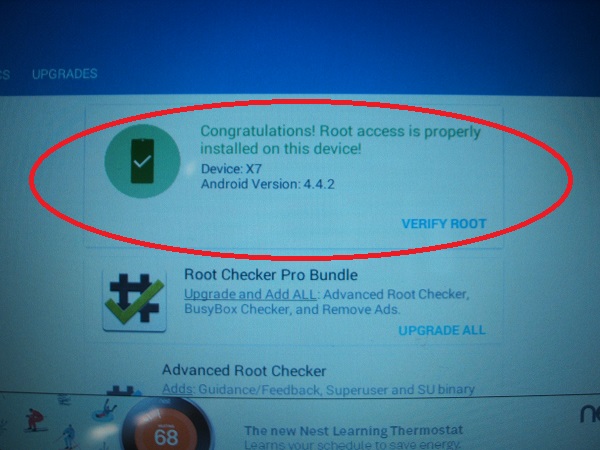
- RootSuccessful_Android_4.4.2.JPG (82.04 KiB) Viewed 818 times
Worst, Busybox installed but did not work – had to use ADB on PC to chmod the right permissions and creat the proper symlink. There were other quirks that consumed far too much time. Lots of weird crap. Maybe it is normal stuff for Android developers, but it is worst crap than Micro$oft… and like Micro$oft, every hardware vendor puts loads of custom things on the hardware.
But, I can install apps requiring root and all is well with them. App Superuser installed and functions OK (allows apps to secure root permissions.) And, I can now write to my SD card from an app.
I am waiting on Amazon 3rd party to ship my USB OTG cables before I go much further. I have installed a serial terminal and look forward to using that and the unit has Bluetooth, so I need to find that Bluetooth serial adapter that keeps moving around my bench for the past 2 years.
Android 4.4.2 seems lively ’nuff on the $40 unit snd the WiFi locks on my router (G/N) with no issues – and quickly, too. There is a 3-axis sensor as well as a temp sensor, but no GPS.
More after OTG cable received.
Ray
I am waiting on Amazon 3rd party to ship my USB OTG cables before I go much further. I have installed a serial terminal and look forward to using that and the unit has Bluetooth, so I need to find that Bluetooth serial adapter that keeps moving around my bench for the past 2 years.
Ray
<…>
That’s not normal.
Which busybox installer did you use? Some of installers available on Play Store never should have been made in the first place or were not updated for a long time.
I strongly recommend Stericson’s installer (AFAIK he ported Busybox to Android)
http://www.hackster.io/rayburne/arduino … sing-v-usb
http://forum.arduino.cc/index.php?topic=195003.0
http://forum.arduino.cc/index.php?topic=135623.0
all a lots of fun. Then I forgot about it for the most part.
I now have the OTG cable for the $40 Android tablet and I pulled out one of the old VUSB built around a Nano-clone. I opened up a text note processor on the Android, connected the USB and the silly thing started working as a HID keyboard. I must admit, I was surprised.
Flicker higher-resolution pixs:
https://www.flickr.com/photos/rayburnet … ed-public/
https://www.flickr.com/photos/rayburnet … ed-public/
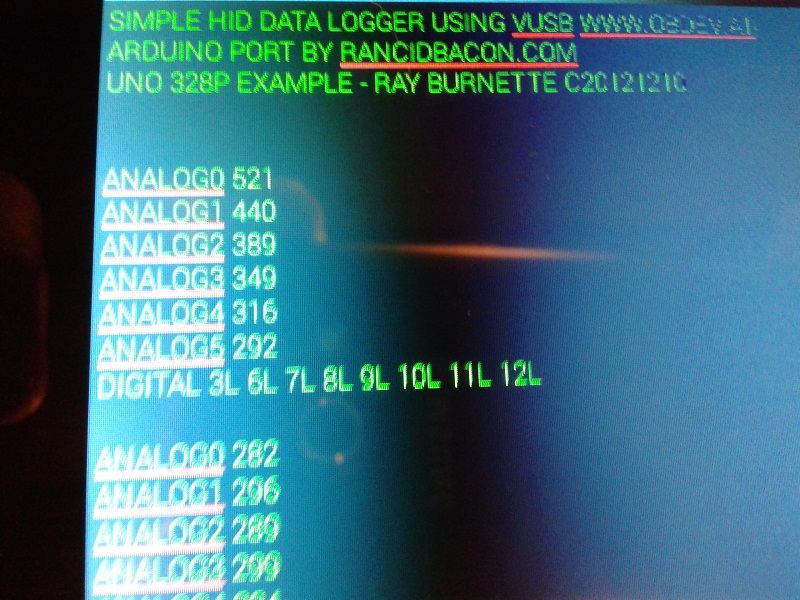
- VUSB HID on Android via OTG.jpg (215.4 KiB) Viewed 701 times
Also, I cant remember its name, but there is a library to send and receive data via serial, i.e. that handles all the low level traffic, and allows you to send structs etc ( as long as the receiving end has the same understanding of the struct)
I vaguely recall looking into this with Arduino to Android, but it was several years ago, and I’m not sure I still have the code. Its probably on one of my old PCs which I recently decommissioned.
I need to backup its HD so I will power it up and see if I can find the project in question
PS.
I think I may be doing it today as our weather forecast is for 38 deg C (100 F), so I will most likely be staying indoors in the cool
…
PS.
I think I may be doing it today as our weather forecast is for 38 deg C (100 F), so I will most likely be staying indoors in the cool
Yes. I heard from the rellies in the UK about balmy temperatures.
I have a physiological thing when it gets above 30 deg outside. Which is probably irrational, but 29 is find 31 seems too hot to be working outside.
We got 13oC few days ago, we still waiting for snow.
From the current state, we will probably have a “brown Christmas” …

California been already in big troubles, how the whole planet will be soon ?
(I’ve seen a reportage recently, and it doesn’t look good …
)Ray
wasn’t genuine ftdi.
try a google with ‘ftdi drivers fake’
srp
Ray
In the case of FTDI they write the driver, so other companies who make hardware that behaves the same as the FTDI device will be using the diver without paying for its development.
But for devices that use a built in driver on Windows, and OSX and Linux, things are are not so clear cut.
Notes:
1) The Atmega328P-PU device is running the Adafruit “Pro Trinket” firmware.
Users wishing to know more about the build are referred to my project link here.
2) The tiny85-PU is running Adafruit “Trinket” firmware.
Users wishing to know more about the build are referred to my project link here.
3) Trinket firmware is the handiwork of Frank Zhao, creator of the USnooBie.
4) Of course, credit must be given to the developers of V-USB on which Trinket, Pro Trinket, and the Digispark are based!
Trinket —> Digispark Conversion
Pictures:
tiny85 USB HID sender
tiny85 output on Android tablet
Grant Permission?
Android prompt for selecting USB device
Atmega328P faux Pro Trinket connected via OTG USB cable to Android
Faux Pro Trinket closeup – Front
Faux Pro Trinket closeup – Bottom
/*

Works on 3.3V Trinket with 16MHz hardware profile
HID_NTC_Temp (Arduino 1.0.5) Adafruit Trinket 5V 16MHz
Illustrates measuring temperature using an NTC thermistor in
a voltage divider configuration. An Arduino Playbround Example:
http://playground.arduino.cc//ComponentLib/Thermistor2
Port for Adafruit Trinket by M. Ray Burnette 20130924
Sourcecode in Public Domain; No licenses or rights of use transferred
Binary sketch size: 5,046 bytes (of a 5,372 byte maximum) w/ Clock Check
Binary sketch size: 4,998 bytes (of a 5,372 byte maximum) standard compile
// Schematic:
// [Ground] ---- [10k-Resister] -------|------- [Thermistor] ---- [+5v]
// |
// Analog Pin 1
*/
#include <avr/power.h>
#include "DigiKeyboard.h"
#include <Streaming.h>
#include <avr/boot.h>
// For the Trinket, A1 is physical pin #7 (PB2)
int ThermistorPin = 1 ;
int tCorrect = -5 ; // 4.5F too high reading
// http://digistump.com/wiki/digispark/tricks
byte read_factory_calibration(void) {
byte SIGRD = 5; // for some reason this isn't defined...
byte value = boot_signature_byte_get(1);
return value;
}
boolean is_clock_calibrated(void) {
return read_factory_calibration() != OSCCAL;
}
// function follow
double Thermistor(int RawADC) {
double Temp;
Temp = log(((10240000/RawADC) - 10000));
Temp = 1 / (0.001129148 + (0.000234125 + (0.0000000876741 * Temp * Temp ))* Temp );
Temp = Temp - 273.15; // Convert Kelvin to Celcius
Temp = (Temp * 9.0)/ 5.0 + 32.0; // Convert Celcius to Fahrenheit
return Temp ;
}
// Beginning of Arduino Stuff
void setup()
{
if (F_CPU == 16000000) clock_prescale_set(clock_div_1) ;
DigiKeyboard.sendKeyStroke(0) ;
DigiKeyboard.delay(3000) ; // Give Windoz time to initialize HID device - EXPERIMENT
DigiKeyboard << (F("Trinket HID Temp Example \n \r")) ;
// Uncomment next line if you want to verify the OSCCAL freq to factory calibration
// if (is_clock_calibrated()) DigiKeyboard << (F("System Clock is OK \r \n \r \n")) ;
}
void loop()
{
int AnaRead ;
DigiKeyboard.sendKeyStroke(0);
AnaRead = analogRead(ThermistorPin) ; // Read port
DigiKeyboard << (F("RawADC = ")) << AnaRead << " = " << (int(Thermistor(analogRead(ThermistorPin)) + tCorrect)) << (F(" Fahrenheit \n \r")) ;
DigiKeyboard.delay(2000);
}
Ray
Also, the paid-for version of DroidTerm Pro has a VT100 capability, so it should be very easy to format output to the terminal screen.
Anyway, this pix below shows the tablet displaying the 9600 BAUD (default for sketch) running on my faux Maple Mini. A generic OTG cable is being utilized and the Maple Mini is powered by the tablet USB port. A full-def version of the Pix is here.
The sketch is here.
Ray
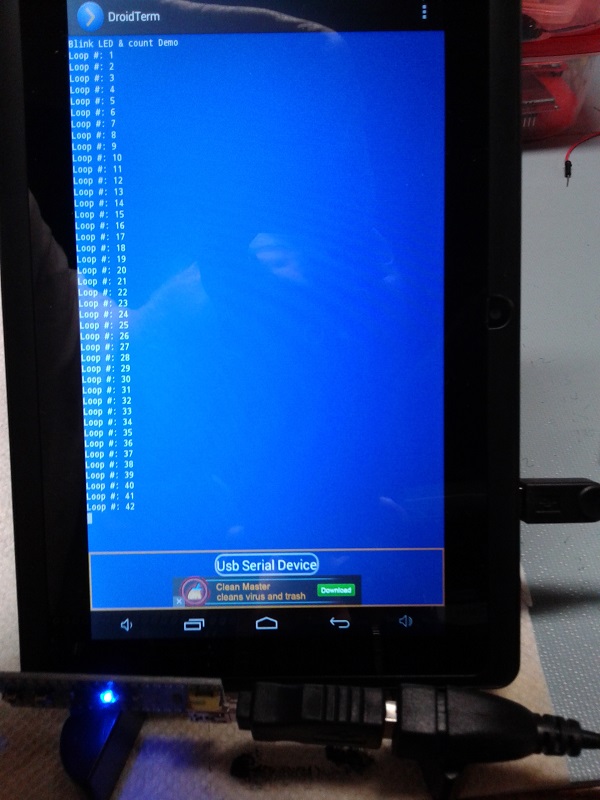
- Android-_STM32F103Web.jpg (119.08 KiB) Viewed 606 times
In my many years of USB/Serial work, FTDI’s Windows driver is the only one that just works.
Runner-up Prolific’s driver is a distant second and I’ve found some versions unreliable and a great time-waster.
And Prolific’s not in Microsoft’s distribution collection.
Works great.
YouTube: https://youtu.be/tazu6BC8A3g
Note: mute volume, there is nothing to hear but noise.
The “jerky” nature of the image is that Google Sheets has the input focus at the bottom of the document, so the screen is constantly being updated as the Nano sends the keyboard characters into the text input cell.
Ray
All the analog and digital pins are floating – results are random:
Project write-up here with a copy of the Excel document


