
viewtopic.php?f=20&t=1234#p15835
I’ve been playing around with “driverless” devices lately, with the end goal of making my debugger firmware usable on recent versions of Windows without installing drivers, including the firmware upgrade.
My understanding is that LeafLabs had two obstacles to implementing the bootloader with a composite runtime DFU + CDC-ACM device:
- Composite USB devices used different custom descriptors on Windows, Mac OSX, and Linux
- On Windows, the DFU and CDC-ACM functions had no native Windows driver. Even where there were existing kernel drivers, they had to be bound to the USB device in a separate installation step.
Point 1 isn’t an issue anymore, since I think all three major OSes accept the standardized interface association descriptors.
Point 2 remains, but isn’t as bad on Windows 10 (and maybe Windows 8, I haven’t tried it). On Windows 10, it will load the default CDC-ACM driver as long as your interface class/subclass/protocol codes match, even if it’s embedded in a composite device with other functions that it doesn’t understand, like DFU.
For DFU, the end goal is to bind the interface to WinUSB or LibUSB, as the Zadig installer does so that dfu-util can access it. It’s possible to do this with Microsoft’s custom OS descriptors and the compatible ID descriptor.
As a proof of concept, I’ve built a proof of concept USB-serial adapter for the bluepill:
- At boot, the DFU bootloader checks if the flash is empty or if a magic flag is set (in an RTC backup register, which survives reset)
- The rest of the time, the main application runs a composite DFU + CDC-ACM device on PA2/PA3
- When the runtime DFU interface receives a detach request, it writes to the RTC backup register and resets so that the main bootloader runs.
I’ve confirmed that I can load firmware with dfu-util in a Windows 10 VM (with manual intervention to connect the device after it switches to the bootloader and back) and that loopback with a jumper works from PuTTY.
The forum doesn’t seem to like .bin attachments (virus risk, probably), so here’s a DropBox link to the combined bootloader + usb-serial firmware that can be flashed directly with no offset (ie, address 0x08000000).
https://dl.dropboxusercontent.com/u/193 … loader.bin
If you want to test that dfu-util works, I have an alternative application-only image with a slightly different product string (“TERMLINK103-2” instead of “TERMLINK103”):
https://dl.dropboxusercontent.com/u/193 … link-2.bin
The source isn’t really documented yet, but it’s up on GitHub under the winusb branch:
https://github.com/devanlai/termlink/tree/winusb
As Roger mentioned in the original thread, it would still be a bit of work to integrate a DFU runtime into the libmaple core proper – my code is using libopencm3’s USB stack – but on the Windows side of things at least, things don’t seem too bad.
As for older versions of Windows – well, the LeafLabs bootloader seems to work okay for most people anyways  .
.
Thanks
Thats very interesting. I’ll need to flash it onto one of my boards
What USB VID / PID addreses are you using so that you don’t need to install drivers on Windows?
Also, rather than using DFU for upload, you could use either USB mass storage or just use the serial USB (and use a different protocol)
Leaflabs did originally start writing a bootloader that accepted serial uploads in the same format that the STM Flash program sends.
https://github.com/leaflabs/maple-bootl … erial-boot
I did briefly look at it, but I don’t know if it even compiles or works at all
However it may be worth flashing to a board just in case it does work.
I will also contact @jcw to find out how he got on with his bootloader
I have emailed @jcw, but I don’t know if I have offended him in some way, because he has not been on the forum for ages.
But I hope he will reply even if I have somehow unintentionally offended him
I got a reply from @jcw, he is fine.
His bootloader code is here https://github.com/jeelabs/embello/tree … s/usbserup
Cheers
Roger
EDIT.
Fixed the link
What hardware does the bootloader work with? Is it just the Maple mini, i.e what does it use to reset the USB ?
I just tried it on a generic F103TB board, but it doesn’t appear on USB at all. I guess I need to dig out a Maple mini that I’m not using and flash it with this code.
PS. If you want to attach file to the forum, you could just zip them as it accepts zips. I could change the bbs to accept bin, but it may be a security problem to some users, so its probably best to just use zip
Edit.
Something is wrong with my F103TB board.
I’ll try another board tomorrow
—_> https://github.com/jeelabs/embello/tree/master/tools/
Thats odd
I pasted it, perhaps I accidentally deleted the last character
Try this link
What USB VID / PID addreses are you using so that you don’t need to install drivers on Windows?
It doesn’t use any special VID/PID pair – actually, right now it’s just using a VID/PID that’s meant for testing.
On newer versions of Windows, it looks at the class and subclass codes in the USB interface descriptors to determine if it has a generic class driver for the standard USB class. So a CDC-ACM USB-serial class device should automagically use the USB serial driver, just like on Mac OSX/Linux.
For device classes that aren’t standardized, or that Microsoft didn’t develop a class driver for (i.e. DFU), Microsoft queries a special “compatible ID descriptor” the first time the device is plugged in, which can be used to instruct Windows to load certain drivers like WinUSB/LibUSB/MTP, etc.
The libwdi wiki has a very helpful page that goes over the ins and outs of making it work:
https://github.com/pbatard/libwdi/wiki/WCID-Devices.
I got a reply from @jcw, he is fine.
His bootloader code is here https://github.com/jeelabs/embello/tree … s/usbserup
The usbserup bootloader looks pretty neat – I thought about writing a high memory bootloader after reading a forum post by… jcw. I guess that explains why the approach sounded so familiar.
I was actually aiming for the approach LeafLabs described for the original Maple Rev 1:
http://docs.leaflabs.com/static.leaflab … aple-rev-1
It uses the standard DFU detach/reset sequence that dfu-util understands, instead of using the serial port secret-knock reset sequence. From the IDE, it probably doesn’t make much of a difference (though now that I think about it, maybe the reason I always had to use the perpetual bootloader mode on the Maple was because I opened the serial port from outside of the IDE…). It does make it directly usable with dfu-util, though.
I will try my blue pill board
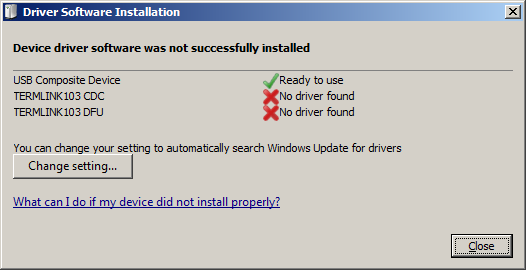
I tried loading the new bootloader, but W7
- bootloader_error.png (15.61 KiB) Viewed 1340 times
Edit: I just noticed that you have installing drivers through Windows Update disabled in that screenshot. I know I said it’s driverless, but I think you have to install the WinUSB driver through Windows Update at least once.
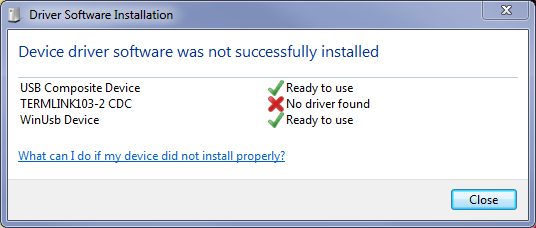
Extra edit: apparently I swapped the order of the screenshots originally.
Here’s what showed up when I plugged mine in. Note: the name is slightly different because I tweaked to product string so I could verify that it loaded the new application over DFU. The part where the DFU interface gets renamed to “WinUsb device” is a limitation for Windows 7 and earlier, according to the libwdi wiki.
- driver_install_status.png (21.27 KiB) Viewed 1116 times
Edit.
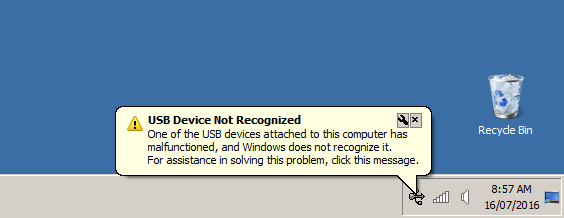
Tried on 2 more W7 machines and they both are worse as all I get is to bubble in the notifications tray
- unrecognised.png (15.43 KiB) Viewed 1110 times
I tried this twice and on both occasions the driver update seemed to crash and I had to kill it in the task manager.
I’m trying to figure out a work-around for USB 3.0 issue, but USB 3.0 tracing with logman doesn’t seem to work on my machine, so I’m stuck with applying fixes based on other diagnoses I can find online.
As for the other two machines, I’ve only seen the “USB Device Not Recognized” error when sending bad descriptors back – I’m not sure why it would be different on those machines versus the first one.
I guess WinUSB/WCID is not as simple to work with as I thought. Hopefully when I get my hands on a native Windows 10 machine, I can verify if it works as well on real hardware as it does in the VM…
I tried culling all unused items from the device manager, by running as admin, but again, it didnt make any difference.
I read yesterday that when Windows had a new VID/PID of unknown manufacturer device plugged in, it tries to load the device driver for the device class, but it then associates the driver with the VID / PID, so next time you plug the same VID/PID it loads the driver it loaded for the same VID/PID the last time it was inserted.
So, I presume that somehow Windows has now got its self screwed up and my only option is probably to go though the registry and try to remove this association.
But I’d need to try it on a machine I don’t care about. As the worst case is that I break Windows
From what I’ve seen, the device manager can be used to delete some of those cached registry entries. For example, after plugging it into the USB 3.0 port and failing to install drivers, I can get it to install successfully on the USB 2.0 port if I first uninstall the device from the device manager.
For any machines where it doesn’t think that the device is malfunctioning, could you try looking at the registry entries as I described here?
viewtopic.php?f=10&t=1242&start=10#p15985
Short of getting an actual USB event trace, that would probably be the most useful debugging information I could get.
I can also build a new image that uses a different PID, if you want to try fresh without hunting down more clean Windows installs.
HKEY_LOCAL_MACHINE\SYSTEM\CurrentControlSet\Enum\USB\VID_1209
does not exist at all.
This way it will trigger a new driver search, and will look again for VID/PID.

I finally installed Windows 10 on a used laptop. It takes a very long time to auto-install the WinUSB driver when plugging it in the first time, but it seems to eventually work. The CDC-ACM class works out of the box, as expected.
If you want to try again, I’ve built new firmware images for the bluepill and the Maple Mini with a test VID/PID of 1209:0003 instead of 1209:0002, which should force it to go through the installation process from scratch.
Windows now completely hangs while looking for drivers for this, so I suspect its a bug in Windows
W7 often takes a very long time looking for drivers, but in this case it really does hang, as I can’t close the dialog without killing it in the task manager.
Because W7 takes so long to automatically look for drivers, even for drivers its already got installed, I often just hit cancel if its looking for drivers because I’ve plugged the same device into a different USB port. It usually then realises that its really got a local copy of the driver and installs instantly.
With the Maple Serial and Maple DFU drivers – whatever libwdi does, seems to prevent Windows from looking online for the driver.
If you build onto a different VID/PID I can try it again, and perhaps be more patient, however I suspect most people would give up long before I do, as we have had numerous USB issues reported.
I now understand why Arduino.cc mainly for separate dedicated USB to serial ics on their boards, as they are far more reliable than using bootloaders and you don’t need to worry about your own drivers.
