

While in libmaple era I set heap in ld file as :
    __bss_end__ = _ebss;

} >RAM
PROVIDE ( _end = . );
PROVIDE(_lm_heap_start = 0x68000000);

PROVIDE(_lm_heap_end = ALIGN(0x68000000 + 0x00080000 - 8 ,8));
/* Remove information from the standard libraries */

/DISCARD/ :

{

libc.a ( * )
I found this in system_stm32f4xx.c:
#if defined (DATA_IN_ExtSRAM) && defined (DATA_IN_ExtSDRAM)

#if defined(STM32F427xx) || defined(STM32F437xx) || defined(STM32F429xx) || defined(STM32F439xx) ||\

defined(STM32F469xx) || defined(STM32F479xx)

/**

* @brief  Setup the external memory controller.

*         Called in startup_stm32f4xx.s before jump to main.

*         This function configures the external memories (SRAM/SDRAM)

*         This SRAM/SDRAM will be used as program data memory (including heap and stack).

* @param  None

* @retval None

*/

...
It does not create linker file, though.. EDIT: it does, I had missed some parts of the CubeMX..
For F103 it creates the basic config for gpios and fsmc and a bunch of functions to access the external sram.
That functions is something I do not need, I need to tell compiler/linker the malloc() and friends shall use the heap which is placed in the external sram.
Easy as pie..
For example an array is created:
uint32_t* EXRAM32 = (uint32_t*) malloc(n * sizeof(uint32_t));It does not create linker file, though.. EDIT: it does, I had missed some parts of the CubeMX..
For F103 it creates the basic config for gpios and fsmc and a bunch of functions to access the external sram.
That functions is something I do not need, I need to tell compiler/linker the malloc() and friends shall use the heap which is placed in the external sram.
Easy as pie..
For example an array is created:
uint32_t* EXRAM32 = (uint32_t*) malloc(n * sizeof(uint32_t));This would be the easiest way that people can use it


What I have got is the 512kB sram soldered on a Blue F103ZET6 board, with NE3 chipselect, address 0x68000000, worked in past. It was much easier with the F1 libmaple stuff, though..
The easiest way is to use the external Sram as the Heap. It is also the fastest variant, as the speed penalty is about x2.5 max.
The Bank1 Region 3 with Blue ZET6 is 3, so you use NE3, that is the 0x68000000 base address.
The CubeMX creates for you 3 functions (CS=NE3, SRAM, data 16bits, addr 18bits, wait disable, byte enable):
static void MX_GPIO_Init(void);

static void MX_FSMC_Init(void);

HAL_SRAM_MspInit(SRAM_HandleTypeDef* hsram);
The CubeMX creates also the system_stm32f1xx.c file which includes the FSMC init equivalent to the libmaple start_c.c one above.
I do not know how/where to integrate it safely within the Daniel’s core, so a hint would be welcomed..
SystemInit is called from _startup, and with this define SystemInit_ExtMemCtl.
/*----------------------------------------------------------------------------

*        Exported variables

*----------------------------------------------------------------------------*/
#undef errno
extern int errno ;
extern int _end ;
/* If CONFIG_HEAP_START (or CONFIG_HEAP_END) isn't defined, then
* assume _lm_heap_start (resp. _lm_heap_end) is appropriately set by
* the linker */
#ifndef CONFIG_HEAP_START
extern unsigned int _lm_heap_start;
#define CONFIG_HEAP_START ((void *)&_lm_heap_start)
#endif
#ifndef CONFIG_HEAP_END
extern unsigned int _lm_heap_end;
#define CONFIG_HEAP_END ((void *)&_lm_heap_end)
#endif
/*----------------------------------------------------------------------------
* Exported functions
*----------------------------------------------------------------------------*/
extern void _exit( int status ) ;
extern void _kill( int pid, int sig ) ;
extern int _getpid ( void ) ;
extern caddr_t _sbrk(int incr) {
static void * pbreak = NULL; /* current program break */
void * ret;
if (pbreak == NULL) {
pbreak = CONFIG_HEAP_START;
}
if ((CONFIG_HEAP_END - pbreak < incr) ||
(pbreak - CONFIG_HEAP_START < -incr)) {
// errno = ENOMEM; <<< commented out by Pito as it throws it is not defined
return (void *)-1;
}
ret = pbreak;
pbreak += incr;
return ret;
}
/** ORIGINAL _sbrk
*extern caddr_t _sbrk ( int incr )
*{
* static unsigned char *heap = NULL ;
* unsigned char *prev_heap ;
*
* if ( heap == NULL )
* {
* heap = (unsigned char *)&_end ;
* }
* prev_heap = heap;
*
* heap += incr ;
*
* return (caddr_t) prev_heap ;
*}
*/
Arrays located in the Heap in the internal Sram:
Generating 3000 8bit uints:

Checksum: 383933

BubbleSorting 8bit uints:

Elapsed: 1189  msecs

Generating 3000 16bit uints:

Checksum: 99006717

BubbleSorting 16bit uints:

Elapsed: 940  msecs

Generating 3000 32bit uints:

Checksum: 2798690133398

BubbleSorting 32bit uints:

Elapsed: 1190  msecs
Allocating EXRAM8, EXRAM16, EXRAM32, EXRAM64 memory..

********

Generating 20000 8bit uints:

Checksum: 2556578

BubbleSorting 8bit uints:

Elapsed: 106900  msecs

2x compare count: 0

2x rd and 2x wr count: 0

Checksum: 2556578

Sorted last 10 in ascending order:

19990 255

19991 255

19992 255

19993 255

19994 255

19995 255

19996 255

19997 255

19998 255

19999 255

********

Generating 20000 16bit uints:

Checksum: 656944195

BubbleSorting 16bit uints:

Elapsed: 109857  msecs

2x compare count: 0

2x rd and 2x wr count: 0

Checksum: 656944195

Sorted last 10 in ascending order:

19990 65510

19991 65515

19992 65517

19993 65522

19994 65522

19995 65523

19996 65524

19997 65529

19998 65531

19999 65531

********

Generating 20000 32bit uints:

Checksum: 18681914029997

BubbleSorting 32bit uints:

Elapsed: 146438  msecs

2x compare count: 0

2x rd and 2x wr count: 0

Checksum: 18681914029997

Sorted last 10 in ascending order:

19990 1999238604

19991 1999306563

19992 1999424184

19993 1999451338

19994 1999457766

19995 1999465354

19996 1999558287

19997 1999650861

19998 1999652871

19999 1999901586

********

Generating 20000 64bit uints:

Checksum: 111575624063623152

BubbleSorting 64bit uints:

Elapsed: 236449  msecs

2x compare count: 0

2x rd and 2x wr count: 0

Checksum: 111575624063623152

Sorted last 10 in ascending order:

19990 11868698567724

19991 11868882412866

19992 11869207321128

19993 11869235688114

19994 11871884373798

19995 11872081464387

19996 11872393614036

19997 11873118183327

19998 11873121418992

19999 11873209577505UPDATE 10.6.2017
UPDATE 15.8.2017 – comment out LED, print the EXRAM32 start address
// Bubble Sort Demo in Heap

// Pito c 5/2017, 6/2017, 8/2017

// Adjust the Array size such it fits into your Heap
//#include <stdio.h>

//#include <stddef.h>

#include "Arduino.h"
void setup() {

delay(4000);  // wait on USB
// pinMode(PF9, OUTPUT);

// digitalWrite(PF9, LOW);
Serial.begin(115200);
uint32_t n = 4000; // Number of uint32 elements
uint32_t c, d, tmp, swap32, elapsed, i;

uint64_t sum, sum1;
Serial.println("Allocating EXRAM32 memory..");
/* EXRAM32 Initial memory allocation */

uint32_t* EXRAM32 =  (uint32_t*) malloc(n * sizeof(uint32_t));

if (NULL == EXRAM32) {

Serial.println("      ############### EXRAM32 MALLOC FAILED..");

//return -1;

}

Serial.println((uint32_t)EXRAM32);
// 32bit

sum = 0;

sum1 = 0;

randomSeed(3864);

Serial.println("********");

Serial.print("Generating ");

Serial.print(n);

Serial.println(" 32bit uints:");

for (uint32_t i=0; i<n; i++){

tmp = random(1999999999);

EXRAM32[i] = tmp;

sum1 = sum1 + tmp;

sum = sum + EXRAM32[i];

}

Serial.print("Checksum of generated random numbers: ");

Serial.println(sum1);

Serial.print("Checksum of unsorted EXRAM32 content: ");

Serial.println(sum);

Serial.println("BubbleSorting 32bit uints:");

elapsed = millis();
for (c = 0 ; c < ( n - 1 ); c++)

{

if ( (c % 1000) == 0) {

Serial.print("Wait while BubbleSorting.. Loops "); Serial.print(c);

Serial.print(" out of "); Serial.println(n);

}

for (d = 0 ; d < n - c - 1; d++)

{

if (EXRAM32[d] > EXRAM32[d+1]) /* For decreasing order use < */

{

swap32       = EXRAM32[d];

EXRAM32[d]   = EXRAM32[d+1];

EXRAM32[d+1] = swap32;

}

}

}
elapsed = millis() - elapsed;

Serial.print("Elapsed: ");

Serial.print(elapsed);

Serial.print(" ");

Serial.println(" msecs");
sum = 0;

for (uint32_t i=0; i<n; i++){

sum = sum + EXRAM32[i];

}

Serial.print("Checksum of sorted numbers: ");

Serial.println(sum);
Serial.println("Sorted last 10 in ascending order:");
for ( c = n-10 ; c < n ; c++ ) {

Serial.print(c);

Serial.print(" ");

Serial.println(EXRAM32[c]);

}
// digitalWrite(PF9, HIGH);

delay(2000);

free(EXRAM32);

}
void loop() {

}
I added weak preinitVariant() to system_stm32xxx.c that is called before constructor initialization, so variants can fiddle with ram before any real stuff is called. Here it is possible to move heap (using previous function), or initialize data / bss in CCM ram, SRAM, and other things later.
With these enabling for F7 is basically this: https://github.com/danieleff/STM32GENER … 0b85341f63
- Add DATA_IN_ExtSDRAM to boards.txt. You need to check STM32/system/STM32xx/HAL_Src/system_stm32xxxx.c what to define
- Add preinitVariant() to variant.cpp to move heap. If you don’t like the default SystemInit_ExtMemCtl(), you can put your extram init here. Later this can be used to initialize extra ram data/bss with ldscript also.
I put an example sketch also. AFAIK the only other board with external ram currently is Discovery F429ZI. I do not have it.
NOTE: There is also a stm32xxxx_hal_sdram.c if one does not want to work with registers.
Seems I have found the right topic for the following simple question:
Is there an example how to initialize FSMC for use with 1: SRAM, 2: FSMC TFT connector in an Arduino program or C++ library class?
I have a STMF32F407ZET6 board with a 1MB static ram chip on board (e-paper demo board).
And I have black STM32F407VET6 and STM32F407ZET6 boards with FSMC TFT connector (I use bit-bang so far).
This topic indicates the answer is there somewhere, but you might help me with some links, thank you.
Jean-Marc Zingg
For SRAM, if you add -DDATA_IN_ExtSRAM to boards.txt, it should initialize to bank1 which starts at 0x60000000(?). Check with a pointer if you can write/read. (Do you have a link to the board?)
For TFT, its best to ask STM32CubeMX to generate the setup code. If you still want to go down this way I can give more pointers.
I had no Idea how this [STM32GENERIC] section is related to the 2 STM32 Arduino packages I know.
I had just searched for FSMC.
In a post above I found an example of FSMC initialization using direct register access. This is what I am looking for. I will try that way.
My question is related to my recent post about memory available for Arduino on STM32F707ZET6; in it there is a link to the DESTM32-L board.
Check here the benchmark.
Check here the benchmark.
For STM32GENERIC, I added an example to board examples/blackf407/lowlevelhal/fsmclcd
Pin setup and initialization settings needs to be adapted to the board.
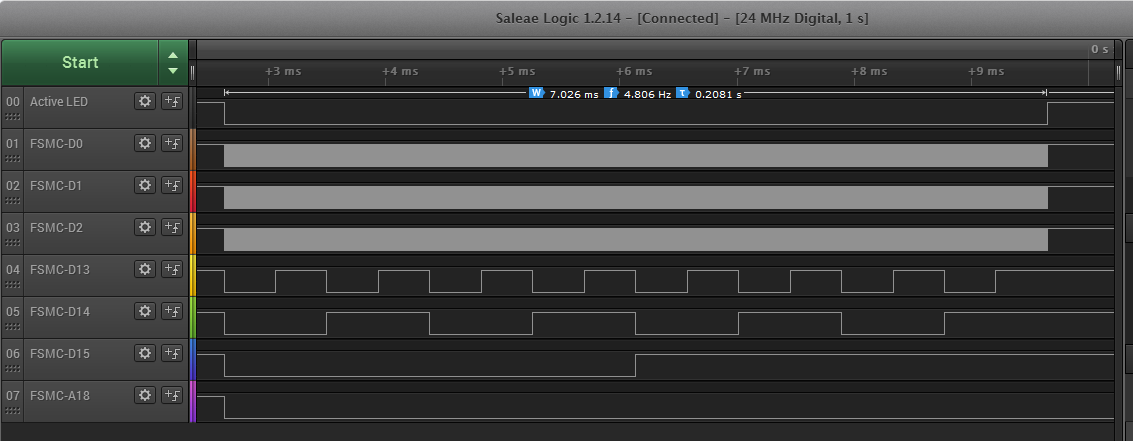
Sending 65536 values takes 7 ms (I guess FIFO helps the loop). Timing values can be adjusted using FSMC_NORSRAM_TimingTypeDef to match the peripheral.
- fsmc.png (54.19 KiB) Viewed 524 times
I first had to resolve my STM32 packages confusion once more: http://www.stm32duino.com/viewtopic.php … 401#p29401
Now I see a good chance to get started using FSMC.
It seems we have to introduce a parameter, for example
#define SRAM_SUBBANK x#define ADDSET 5
#define DATAST 5Update: in variant.cpp I put
#include <Arduino.h>
#include "stm32_gpio.h"
#include "syscalls.h"
extern "C" void preinitVariant() {
//Set heap to external SRAM
setHeap((unsigned char*)0x68000000, (unsigned char*)(0x68000000 + 512 * 1024));
}
#define ADDSET 1
#define DATAST 3#define ADDSET 1
#define DATAST 4Thank you for the tips how and where to enable FSMC SRAM on STM32F407ZET6. I am trying to get it working on DESTM32-L demo board.
I have 2 questions:
1. so far I get strange results (see below), could this be a timing issue?
2. I ordered a “black” STM32F407ZET6 board, it has solder pads on the back side for SRAM. Did you find such a board with soldered SRAM?
Thank you.
// FMSC_SRAM_TEST
#define FSMC_BANK1 ((void*)0x60000000)
#define FSMC_NOR_PSRAM_REGION1 ((void*)0x60000000) // NE1
#define FSMC_NOR_PSRAM_REGION2 ((void*)0x64000000) // NE2
#define FSMC_NOR_PSRAM_REGION3 ((void*)0x68000000) // NE3
#define FSMC_NOR_PSRAM_REGION4 ((void*)0x6C000000) // NE4
#define FSMC_BANK2 ((void*)0x70000000)
#define FSMC_BANK3 ((void*)0x80000000)
#define FSMC_BANK4 ((void*)0x90000000)
struct fmsc_sram_type
{
uint8_t test_buffer8[1000];
uint16_t test_buffer16[1000];
uint16_t test_buffer32[1000];
};
#define FMSC_SRAM ((fmsc_sram_type*)0x68000000) // NE3 PG10 on DESTM32-L
void setup()
{
bool ok = true;
Serial1.begin(115200);
Serial1.println();
Serial1.println("FMSC_SRAM_TEST");
for (uint8_t i = 0; i < 100; i++)
{
FMSC_SRAM->test_buffer8[i] = i;
FMSC_SRAM->test_buffer16[i] = i;
FMSC_SRAM->test_buffer32[i] = i;
}
for (uint8_t i = 0; i < 100; i++)
{
ok = ok && (FMSC_SRAM->test_buffer8[i] == i);
if (FMSC_SRAM->test_buffer8[i] != i)
{
uint8_t v = FMSC_SRAM->test_buffer8[i];
uint8_t v2 = FMSC_SRAM->test_buffer8[i];
Serial1.print("(8) ? "); Serial1.print(i); Serial1.print(" : "); Serial1.print(v); Serial1.print(" : "); Serial1.println(v2);
}
}
Serial1.println(ok ? "ok" : "not ok");
for (uint8_t i = 0; i < 100; i++)
{
ok = ok && (FMSC_SRAM->test_buffer16[i] == i);
if (FMSC_SRAM->test_buffer16[i] != i)
{
uint16_t v = FMSC_SRAM->test_buffer16[i];
uint16_t v2 = FMSC_SRAM->test_buffer16[i];
Serial1.print("(16) ? "); Serial1.print(i); Serial1.print(" : "); Serial1.print(v); Serial1.print(" : "); Serial1.println(v2);
}
}
Serial1.println(ok ? "ok" : "not ok");
for (uint8_t i = 0; i < 100; i++)
{
ok = ok && (FMSC_SRAM->test_buffer32[i] == i);
if (FMSC_SRAM->test_buffer32[i] != i)
{
uint16_t v = FMSC_SRAM->test_buffer32[i];
uint16_t v2 = FMSC_SRAM->test_buffer32[i];
Serial1.print("(32) ? "); Serial1.print(i); Serial1.print(" : "); Serial1.print(v); Serial1.print(" : "); Serial1.println(v2);
}
}
Serial1.println(ok ? "ok" : "not ok");
}
void loop()
{
}
http://www.stm32duino.com/viewtopic.php?f=3&t=2159
no, i’ve not seen a black vet/zet/zgt with sram fitted as yet
srp
1. so far I get strange results (see below), could this be a timing issue?
2. I ordered a “black” STM32F407ZET6 board, it has solder pads on the back side for SRAM. Did you find such a board with soldered SRAM?
1. what is your timing setting?
2. No, I got the black board 407ZET6 and soldered in the sram (256kx16, 10ns part), it works fine.
You have to solder 2x 100n 0603 smd ceramic capacitors and 10k resistor on the pads there as well..
Excellent, thank you, now it works!
I just changed to:
#define ADDSET 5

#define DATAST 5
I will look at the specs of my SRAM and the meaning (register bits) of these values later. Execution speed is not an issue for my e-paper.
Jean-Marc
For 55ns Sram you have to experiment, I would start with A=15, D=15 and then go lower till problems occur.
You may use the Buble Sort demo in this thread for experiments.
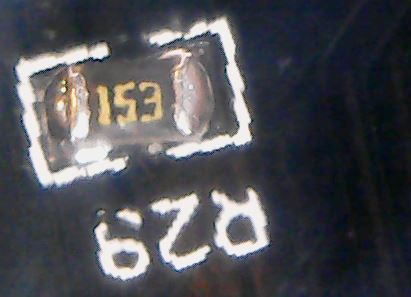
You have to solder 2x 100n 0603 smd ceramic capacitors and 10k resistor on the pads there as well..
- 15k.JPG (25.13 KiB) Viewed 396 times
you did make my day with the pictures though
stephen
does help to know the consistency of the original on receipt.
youtube on ‘smd soldering tutorials’ has this guy, i’m already subscribed
quite a few about drag soldering
https://www.youtube.com/user/jkgamm041/ … ity_view=3
stephen
Would it be possible to make the
void SystemInit_ExtMemCtl(void)If DATA_IN_ExtSRAM is not defined, SystemInit_ExtMemCtl() is not even compiled in.
variant.c
#include "stm32_build_defines.h"

#include "stm32_def.h"
#define DATA_IN_ExtSRAM

#define ADDSET 0   //

#define DATAST 1   //
extern void preinitVariant() {

//Set heap to external SRAM

setHeap((unsigned char*)0x68000000, (unsigned char*)(0x68000000 + 512 * 1024));

}
void SystemInit_ExtMemCtl(void) {

__IO uint32_t tmpreg;

/* FSMC Bank1 NOR/SRAM3 is used for Blue F103ZET and Black F407ZET  */

blah blah blah

}
void SystemClock_Config(void) {

RCC_OscInitTypeDef RCC_OscInitStruct;

RCC_ClkInitTypeDef RCC_ClkInitStruct;

RCC_PeriphCLKInitTypeDef PeriphClkInit;
RCC_OscInitStruct.OscillatorType = RCC_OSCILLATORTYPE_HSE;

RCC_OscInitStruct.HSEState = RCC_HSE_ON;

RCC_OscInitStruct.LSEState = RCC_LSE_OFF;

....
[Zingg_JM – Mon Jun 05, 2017 5:26 pm] –
Hi all,Seems I have found the right topic for the following simple question:
Is there an example how to initialize FSMC for use with 1: SRAM, 2: FSMC TFT connector in an Arduino program or C++ library class?
I have a STMF32F407ZET6 board with a 1MB static ram chip on board (e-paper demo board).
And I have black STM32F407VET6 and STM32F407ZET6 boards with FSMC TFT connector (I use bit-bang so far).This topic indicates the answer is there somewhere, but you might help me with some links, thank you.
Jean-Marc Zingg
Hi STM32 Friends,
Now I have solved also #2, FSMC TFT connection. I have added FSMC IO classes to my GxTFT Arduino library, for both STM32 packages STM32GENERIC and STM32DUINO.
https://github.com/ZinggJM/GxTFT http://forum.arduino.cc/index.php?topic=488605.0
Jean-Marc
[stevestrong – Tue Jul 11, 2017 8:39 am] –
Jean-Mark, do you use the libmaple FSMC (viewtopic.php?f=39&t=1976&p=26166#p26166)?
I do not fully understand your question, but try to give some answer.
The board I use is a black STM32F407VET6 from ACELEC:
https://www.aliexpress.com/item/Free-sh … 22721.html
the links are also in the headings of my library sources.
I have 2 versions:
// this version is for use with Arduino package STM32GENERIC, board "BLACK F407VE/ZE/ZG boards".

// https://github.com/danieleff/STM32GENERIC
I just wanted to point out that for the libmaple core (https://github.com/rogerclarkmelbourne/Arduino_STM32) there is already included FSMC support for LCD.
[stevestrong – Tue Jul 11, 2017 1:34 pm] –
Hopefully you will not mix up these two different cores.I just wanted to point out that for the libmaple core (https://github.com/rogerclarkmelbourne/Arduino_STM32) there is already included FSMC support for LCD.
Great, thanks, my confusion about the different STM32 packages is resolved, mostly.
The packages are in constant evolution, e.g. I just had to revert to an older STM32DUINO package, aka Arduino_STM32 (different names in different places used, not easy for users), because of compilation issues (for F1 as far as I remember).
I add here the link to your library: https://github.com/stevstrong/Adafruit_ … 6bit_STM32, so others have less of an issue to find out what you are writing about.
I will try your library with my board and display. Do you know of other displays with the same connector and pinout?
Thank you
Jean-Marc
[danieleff – Wed Jun 07, 2017 5:22 am] –
Steves version is this I guess: https://github.com/stevstrong/Arduino_S … ple/fsmc.h
…
Or is it this link that does not work (anymore)?
[stevestrong – Tue Jul 11, 2017 3:38 pm] –
I am not paying attention to connectors to be compatible with controller boards because I don’t use Arduino “standard” boards, just using wires to connect my STM32 boards to the LCD boards.
I have some experience with DuPont wires to parallel interface TFTs. Debugging wiring is harder for me than debugging SW, unless the wiring is straight parallel.
The FSMC TFT connector on the black boards is such a welcome connection; its unfortunate there seems to be just one directly matching TFT.
For general development information for libmaple F4 check this post: http://www.stm32duino.com/viewtopic.php?f=39&t=1976
You could make easily an adapter board for any LCD board, using an additional strip-board and some connectors.
“//github.com/ZinggJM/GxTFT/blob/master/GxIO/STM32GENERIC/GxIO_STM32F4_FSMC/GxIO_STM32F4_FSMC.cpp”
https://github.com/ZinggJM/GxTFT/blob/m … 4_FSMC.cpp
“//github.com/ZinggJM/GxTFT/blob/master/GxIO/STM32DUINO/GxIO_STM32F4_FSMC/GxIO_STM32F4_FSMC.cpp”
https://github.com/ZinggJM/GxTFT/blob/m … 4_FSMC.cpp
“//github.com/ZinggJM/GxTFT/blob/master/GxIO/STM32GENERIC/GxIO_STM32F1_FSMC/GxIO_STM32F1_FSMC.cpp”
https://github.com/ZinggJM/GxTFT/blob/m … 1_FSMC.cpp
“//github.com/ZinggJM/GxTFT/blob/master/GxIO/STM32DUINO/GxIO_STM32F1_FSMC/GxIO_STM32F1_FSMC.cpp”
https://github.com/ZinggJM/GxTFT/blob/m … 1_FSMC.cpp
may not be relevant, but shows the low level access I use.
each of those is a standard for someone, they are made intending to fit something, just not necessarily your something.
the cz_mini series of blue boards come in about 3 maybe 4 versions, with sd/without, with db9/without, with/without display connector, mainly header(mostly for me) or socket(1 i think).
what i have found is that some displays i purchased awhile back, thinking they’re ok for the blue cz; and that subsequently i could never spot a compatible board to use them on, match up brilliantly with the black ze.
i had to physically offer up one to the other, with a flip to point the pins into the socket and a rotate to line up pin one; then i could ‘see’ the control connection names actually matched, then i looked up the rest to check.
i found the idea of an aliexpress store expressly advertising a compatible display within the details of black board itself, quite refreshingly smart.
even better when you find the black ve/ze/zgt are not so subtly different, header v socket, 32 way v 34 way, fsmc a10 / a18; ne1 v ne4 and the rest ??
it wouldn’t surprise me if it was actually the chips pin connections driving those changes though.
the silk screening is also annoying, typically the board will have the PAnn – PGnn pin names and the displays will have the fsmc designations, RD, RS, WR, NWE, DB0..DB15
if you look at the black zg schematic, they have both listed in the DISP section. only time i’ve seen that (thinking go check the ve/ze scematics)
of course, then there can be NE1 .. NE4, and sram, lcd etc modes, and all the other permutations make
‘templates’ / ‘standardising’ them something of a nightmare, actually just figuring out what connects to what also seems to be one as well.
stephen
[stevestrong – Tue Jul 11, 2017 5:58 pm] –
My version is available from: https://github.com/stevstrong/Arduino_STM32/
For general development information for libmaple F4 check this post: http://www.stm32duino.com/viewtopic.php?f=39&t=1976You could make easily an adapter board for any LCD board, using an additional strip-board and some connectors.
Thank you. Combined with the content of danieleff’s link I found the info I was looking for:
https://github.com/stevstrong/Arduino_S … ple/fsmc.h
https://github.com/stevstrong/Arduino_S … ple/fsmc.c
