
I have come here from the arduino forum – looking to get deeper into the Maple Mini
today i got my first boards in the post and have sucessfully programmed them using the Maple IDE
i followed the ibnstruction here — viewtopic.php?f=20&t=32
but the Arduino IDE does not want to play ball
this is thew error message i got below
————————————————————————————————————————————
Arduino: 1.6.4 (Windows 7), Board: “LeafLabs Maple Mini Rev 2 to Flash, Bootloader 2.0 (20k RAM,120k Flash)”
Sketch uses 12,564 bytes (10%) of program storage space. Maximum is 122,880 bytes.
Global variables use 3,104 bytes of dynamic memory.
java.lang.UnsupportedClassVersionError: CliTemplate/CliMain (Unsupported major.minor version 51.0)
at java.lang.ClassLoader.defineClass0(Native Method)
at java.lang.ClassLoader.defineClass(Unknown Source)
at java.security.SecureClassLoader.defineClass(Unknown Source)
at java.net.URLClassLoader.defineClass(Unknown Source)
at java.net.URLClassLoader.access$1(Unknown Source)
at java.net.URLClassLoader$1.run(Unknown Source)
at java.security.AccessController.doPrivileged(Native Method)
at java.net.URLClassLoader.findClass(Unknown Source)
at java.lang.ClassLoader.loadClass(Unknown Source)
at sun.misc.Launcher$AppClassLoader.loadClass(Unknown Source)
at java.lang.ClassLoader.loadClass(Unknown Source)
the selected serial port at java.lang.ClassLoader.loadClass(Unknown Source)
does not exist or your board is not connected
Exception in thread “main”
This report would have more information with
“Show verbose output during compilation”
enabled in File > Preferences.
—————————————————————————–
the boards i ordered look the same as this
http://www.ebay.co.uk/itm/New-1pc-ARM-C … 46331b4798
Any suggestions ?
Start here to verify you installed the core correctly in the \Arduino\hardware directory:
viewtopic.php?f=20&t=32
Your board is a Maple Mini clone from Baite. You must select the Maple Mini as your board type.
You must have 1st installed the Windows drivers.
You Must close All Arduino GUI sessions and then reopen for the STM32 supported boards to appear in the boards menu.
Ray
Sketch|Include library|Manage libraries…
is throwing up some odd complaints about the way stm32 is installed under hardware (it’s not finding boards.txt files where it expects them).
Also, it’s complaining it can’t find a build.board entry in the boards.txt files it does find.
I’m not sure what the build.board definition is used for. A new 1.6.x thing obviously.
For 1.6.x, it seems that the preferred directory tree under hardware/ includes the main subfolder (e.g. Arduino, Teensy, Arduino_STM32), followed by the architecture subfolder(s) (eg. AVR, ARM, STM32F1 etc.), and then boards.txt under each architecture sub-directory.
Anything else in the main subfolder that’s not an “architecture” subfolder seems to cause confusion for the poor IDE.
Not sure where the other stuff is supposed to go if you want to avoid the warning messages — somewhere under hardware/tools perhaps?
-Mark
Could not find boards.txt in C:\arduino\arduino-1.6.3\hardware\Arduino_STM32\drivers. Is it pre-1.5?

Could not find boards.txt in C:\arduino\arduino-1.6.3\hardware\Arduino_STM32\examples. Is it pre-1.5?

Could not find boards.txt in C:\arduino\arduino-1.6.3\hardware\Arduino_STM32\other. Is it pre-1.5?

Board Arduino_STM32-master:STM32F1:MapleMiniGeneric doesn't define a 'build.board' preference. Auto-set to: STM32F1_MAPLEMINIGENERIC

Board Arduino_STM32-master:STM32F1:maple doesn't define a 'build.board' preference. Auto-set to: STM32F1_MAPLE

Board Arduino_STM32-master:STM32F1:genericSTM32F103Rxx doesn't define a 'build.board' preference. Auto-set to: STM32F1_GENERICSTM32F103RXX

Board Arduino_STM32-master:STM32F1:maple_mini doesn't define a 'build.board' preference. Auto-set to: STM32F1_MAPLE_MINI

Board Arduino_STM32-master:STM32F1:genericSTM32 doesn't define a 'build.board' preference. Auto-set to: STM32F1_GENERICSTM32

Board Arduino_STM32-master:STM32F1:microduino32_flash doesn't define a 'build.board' preference. Auto-set to: STM32F1_MICRODUINO32_FLASH

Board Arduino_STM32-master:STM32F1:nucleo_f103rb doesn't define a 'build.board' preference. Auto-set to: STM32F1_NUCLEO_F103RB

Board Arduino_STM32-master:STM32F3:discovery_f3 doesn't define a 'build.board' preference. Auto-set to: STM32F3_DISCOVERY_F3

Board Arduino_STM32-master:STM32F4:discovery_f407 doesn't define a 'build.board' preference. Auto-set to: STM32F4_DISCOVERY_F407

Could not find boards.txt in C:\arduino\arduino-1.6.3\hardware\Arduino_STM32\tools. Is it pre-1.5?
Could not find boards.txt in C:\arduino\arduino-1.6.3\hardware\Arduino_STM32\examples.
This is a very strange path. THe 3rd party cores sre installed in the USER directory… your documents directory. So,
<yourUserName>\Documents\Arduino\hardware\STM….
Your Arduino 1.6.x application files should be in C:\Program Files\Arduino6.n.n\
Ray
Could not find boards.txt in C:\arduino\arduino-1.6.3\hardware\Arduino_STM32\drivers. Is it pre-1.5?

Could not find boards.txt in C:\arduino\arduino-1.6.3\hardware\Arduino_STM32\examples. Is it pre-1.5?

Could not find boards.txt in C:\arduino\arduino-1.6.3\hardware\Arduino_STM32\other. Is it pre-1.5?

Could not find boards.txt in C:\arduino\arduino-1.6.3\hardware\Arduino_STM32\tools. Is it pre-1.5?
Could not find boards.txt in C:\arduino\arduino-1.6.3\hardware\Arduino_STM32\examples.
This is a very strange path. THe 3rd party cores sre installed in the USER directory… your documents directory. So,
<yourUserName>\Documents\Arduino\hardware\STM….
Your Arduino 1.6.x application files should be in C:\Program Files\Arduino6.n.n\
Ray
Arduino IDE 1.6.4
the folder structure is
libaries\documents\Arduino\Hardware\Arduino_STM32-master
please can you confirm I have the folder above correct
i have followed everything in the instructions
—————————————————————————————————————————
p.s The board did not appear as COM5 until i programmed it using the Maple IDE
Arduino IDE 1.6.4
the folder structure is
libaries\documents\Arduino\Hardware\Arduino_STM32-master
please can you confirm I have the folder above correct
i have followed everything in the instructions
—————————————————————————————————————————
p.s The board did not appear as COM5 until i programmed it using the Maple IDE
This is what I did to combine the Arduino IDE 1.6.3 with STM32duino (now I use 1.6.4):
1. Download the Arduino IDE 1.6.4 (just the zip file = ~143MB)
2. Extract it on your Hard drive (ex c:\arduino)
3. Download the STM32Duino.
4. Extract the master.zip file.
5. You will see a folder named Arduino_STM32-master. Rename it to Arduino_STM32
6. Copy that folder in to c:\arduino\hardware folder.
7. Run the arduino.exe from your c:\arduino folder (c:\arduino\arduino.exe)
8. Go to Tools -> Board -> Boards Manager and click on Arduino SAM Boards (32-bits ARM Cortex-M3)
9. Cick on Install.
10. Wait some time until the package is downloaded and installed.
11. Restart your arduino IDE.
I hope it will help
the Duo Board was already installed and i did not need to use the board manager
the zip was unpacked to
c:\Users\User1\MyDocuments\Arduino\Hardware\Arduino_STM32-master
(it appears to be the same directory as libaries\documents\Arduino\Hardware\Arduino_STM32-master)
still no change 
—————————————
so the Maple IDE works but not the Arduino IDE
the selected Board is a Leaflabs Maple Mini Rev 2 to flash
i have tried both versions of the bootloader
the error messages are
Arduino: 1.7.4 (Windows 7), Board: “LeafLabs Maple Mini Rev 2 to Flash, Original (17k RAM,108k Flash)”
Sketch uses 12,100 bytes (10%) of program storage space. Maximum is 110,592 bytes.
Global variables use 3,104 bytes of dynamic memory.
java.lang.UnsupportedClassVersionError: CliTemplate/CliMain (Unsupported major.minor version 51.0)
at java.lang.ClassLoader.defineClass0(Native Method)
at java.lang.ClassLoader.defineClass(Unknown Source)
at java.security.SecureClassLoader.defineClass(Unknown Source)
at java.net.URLClassLoader.defineClass(Unknown Source)
at java.net.URLClassLoader.access$1(Unknown Source)
at java.net.URLClassLoader$1.run(Unknown Source)
at java.security.AccessController.doPrivileged(Native Method)
at java.net.URLClassLoader.findClass(Unknown Source)
at java.lang.ClassLoader.loadClass(Unknown Source)
at sun.misc.Launcher$AppClassLoader.loadClass(Unknown Source)
at java.lang.ClassLoader.loadClass(Unknown Source)
the selected serial port at java.lang.ClassLoader.loadClass(Unknown Source)
does not exist or your board is not connected
Exception in thread “main”
This report would have more information with
“Show verbose output during compilation”
enabled in File > Preferences.
thanks for your suggestions
unfortunately the same problem
I will try installing in on a different computer (win 8 ) and see if i can move this forwards
thank you everyone for the suggestions – i am sure it will be something simple
i installed the STM32 onto my laptop (win 8) as per the instructions and it seems ot write to the board
however it seems to fail when it tries to write and the board is left unprogrammed
the error is :-
Build options changed, rebuilding all
Sketch uses 12,564 bytes (11%) of program storage space. Maximum is 110,592 bytes.
Global variables use 3,104 bytes of dynamic memory.
maple_loader v0.1
Resetting to bootloader via DTR pulse
Searching for DFU device [1EAF:0003]…
Found it!
Opening USB Device 0x1eaf:0x0003…
Found Runtime: [0x1eaf:0x0003] devnum=1, cfg=0, intf=0, alt=1, name=”DFU Program FLASH 0x08005000″
Setting Configuration 1…
Claiming USB DFU Interface…
Setting Alternate Setting …
Determining device status: state = dfuIDLE, status = 0
dfuIDLE, continuing
Transfer Size = 0x0400
bytes_per_hash=251
Starting download: [##################################################] finished!
error resetting after download: usb_reset: could not reset device, win error: The system cannot find the file specified.
state(8) = dfuMANIFEST-WAIT-RESET, status(0) = No error condition is present
Done!
Resetting USB to switch back to runtime mode
i am going to try upgrading the arduino version – currently 1.6.3
I think your should try to see if your sketch is running properly, even if you have this error “could not reset device, win error” …
everything is working on my laptop 
i was using the blink example and of course i was using the wrong pin ! 13 instead of 33 
i am very pleased i have got it working and wanted to thank you all for helping me get there
i have no idea why it wont’ work on my desktop pc
does anyone make shields for the maple mini ? its such a neat product i can see it challenging anything that arduino bring out with a arm processor
time to play 
<…>
does anyone make shields for the maple mini ? its such a neat product i can see it challenging anything that arduino bring out with a arm processor time to play
i can’t believe that the original maple did not take off in a big way
what do you think is going to happen to Arduino ? the Duo is too expensive and they dont have a small board like the maple mini
the only advantage is shields you can buy off the shelf that are prebuilt and the olimex you showed me can work with them
what do you think is going to happen to Arduino ? the Duo is too expensive and they dont have a small board like the maple mini … the only advantage is shields you can buy off the shelf that are prebuilt and the olimex you showed me can work with them
http://www.ebay.com/itm/Leaf-Maple-Deve … 27fb78ee7c
I have one of these and its well made, but the processor is almost identical to the one in the Maple mini, so you’re paying over twice the price to get the pin headers etc.
The problem with shields, is likely to be that they are designed to run on 5V Uno’s and not 3.3V Maple boards, so its debatable how many of the shields would work.
I’ve never really used shields, as I’ve always found them quite limiting and you pay for the ease of use.
The best thing to do is buy separate modules e.g. SD and either use a solderless breadboard for testing, or wire things together using female to female connector wires

I cant see any reason why you would buy an AVR Uno over that one
linking boards and sensors together with patch cables is a neat solution
I cant see any reason why you would buy an AVR Uno over that one
linking boards and sensors together with patch cables is a neat solution
some of us need help to get us started – if the help is not there, then you cant get started !
so you drop the product and go elsewhere
earlier this year i did try a pcduino
the product is good – it can boot into android or unbuntu and has a lot to offer
the support is terrible – i decided to drop it as a potential product because i could not get answers to the questions i had
i was really after a faster arduino and that is exactly what the stm32 will do 
i would love to see Maple revisit the product and develop it further
As being a pessimist: I don’t see that any developer will bring out a “commercial” maple or “STM32duino powered” STM32xxx board anymore, because:
The real potential is the price: You can grab a mini for 4USD, no industry would make profit (not only selling the boards, but development, support… )
next hurdle is the competition:
-) Microchip is good with digilent (chipkit) almost (if not more) powerful as STM32 and you can build your own “real” through hole breadboard PIC32MX250 for a few dollar
-) People who wanna be “state of the art” grab a teensy, a nice, little niche in the *duino world.
least but not last STM themselves has done everything false with the nucleo (in relation to arduino). Ok, they are cheap and powerful boards, but only putting some “arduino headers” on it (and praise it in their ads) without any further support, this is nothing more than a marketing gag if not a real sham package.
We are the waste collectors of the industries and buy their surpluses as a bargain on ebay/ali (all those STM32 dev-boards)
The economics simply don’t work.
Of all the boards that I have, only the Maple Mini seems to be specifically targeted at Arduino users.
The other boards as sold as minimum system development boards, and I suspect a lot of them are used in industry inside other equipment
So we are just taking advantage of boards that are manufactured in bulk for another purpose.
Actually, looking at my F103CVET and F103ZET boards, and they don’t look like they’d get used in industry as there is no way to bolt the to a chassis.
So its hard to know why they exist. But I’m glad they do.
Actually, looking at my F103CVET and F103ZET boards, and they don’t look like they’d get used in industry as there is no way to bolt the to a chassis.
So its hard to know why they exist. But I’m glad they do.
where do you get those boards from ?
will it work with the Arduino IDE ?
where do you get those boards from ?
will it work with the Arduino IDE ?
thank you for the links – that is a very impressive prototyping board !
will this board program using the arduino IDE ?
thank you for the links – that is a very impressive prototyping board !
will this board program using the arduino IDE ?
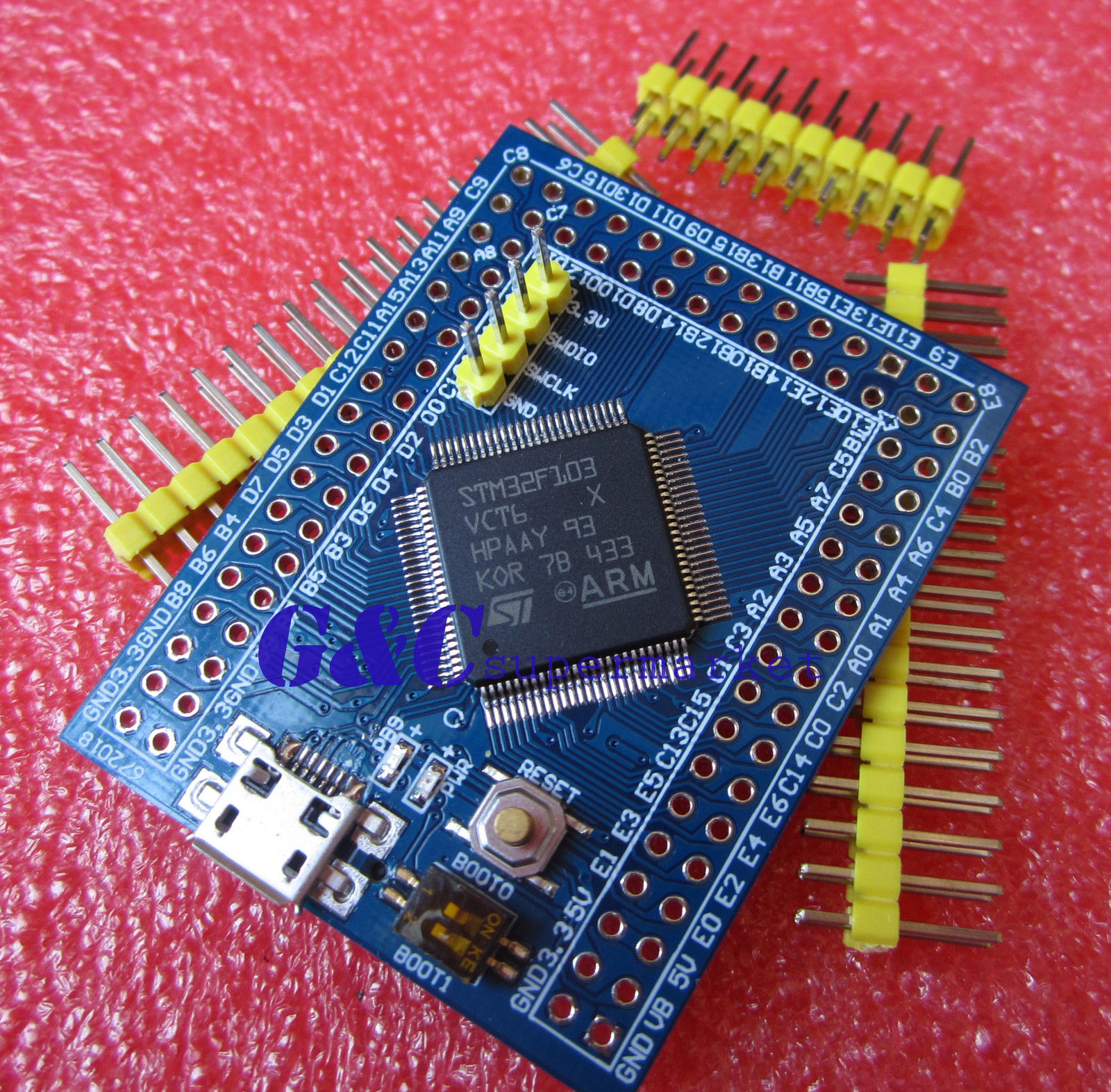
and here.. ebay item 291305557264 This is a ZET6
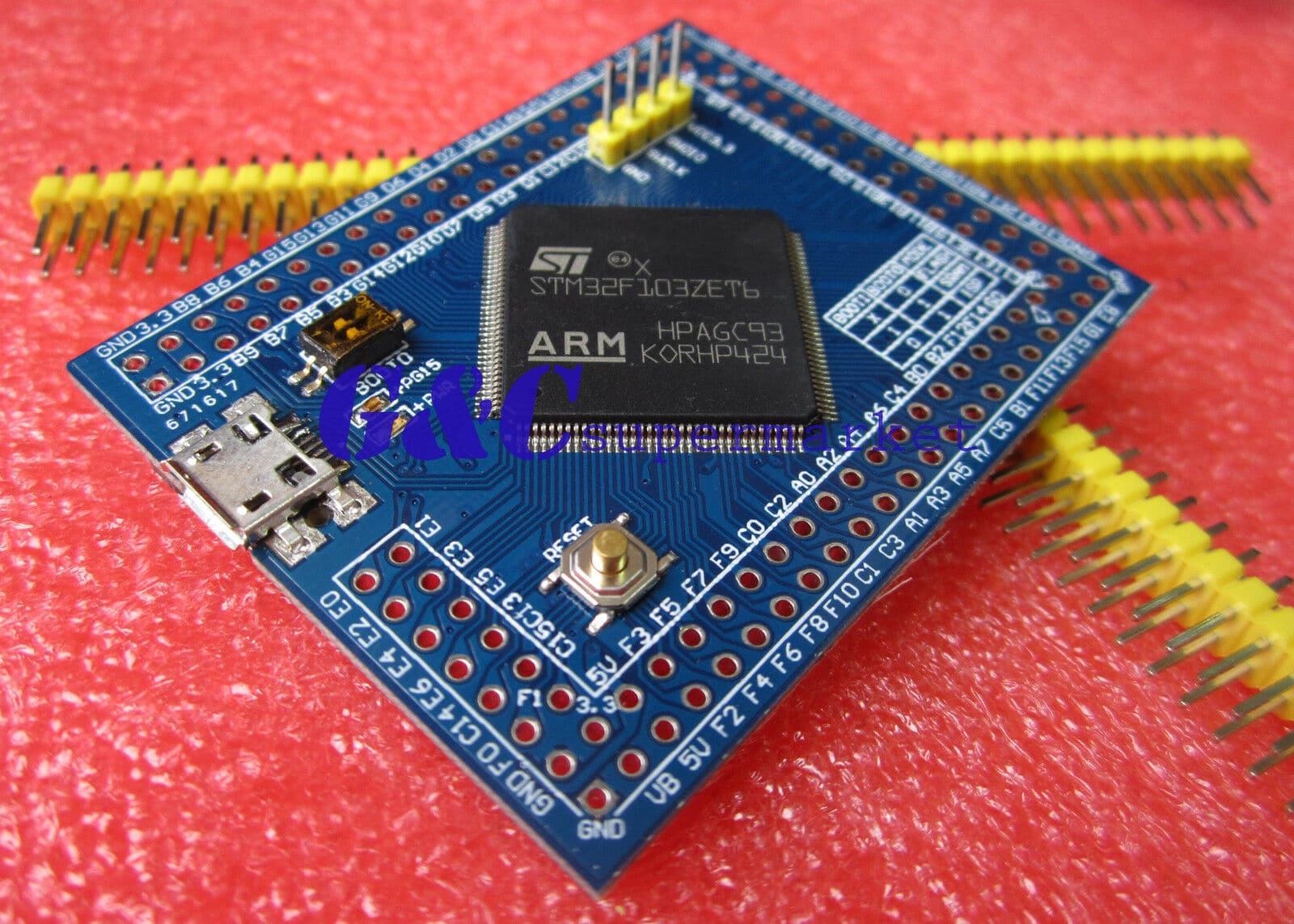
NOTE they also appear to offer the VET6 very similar to the one Jens and Roger used.
.. and others. it might be worth PM’ing them to see if they will source all those other crazy boards for you.
It definitely works with the ZET board.
Those boards are not quite the same.
One has dip switches for Boot 0 and Boot1 rather than the jump links, and the other has the SWD (STLink) connector (pins) vertically upwards on the top of the board, rather than sticking out from the edge.
Also, the LED on one board is connected to PB9 rather than PC13.
Also. One board has a SD card slot on the back, but the other doesnt, and I’m not sure if they both have I2C EEPROM
It amazes me why they bother to make 2 different PCBs. I could understand omitting the SD card and the EEPROM i.e have them on the PCB but not install them.
I wouldnt make sense for the same company to be making both of them, would it ???
I’ve just pushed an update to https://github.com/rogerclarkmelbourne/ … bootloader for the board with an LED on PB9.
I’ve tested on my STM32F103VET board and the bootloader seems to work fine.
I’ll sync the main repo later
What is also doesn’t make sense, is that the vendor as 2 offerings :
The link Andy provided and the one I provided are the same boards, although they name them differently, M74 and M77, but 2 different offerings, with $0.50 difference
(or maybe we need to take a magnifier to find out differences)
http://www.ebay.com/itm/301408798477
http://www.ebay.com/itm/301433302819
Personally, I like those, since they have the MicroSD.
The one with the SD is actually cheaper than the one that doesn’t have the SD.
However I suspect the SD is connected to SDIO and not SPI.I have asked GCSupermarket if they have a schematic, but didn’t get a reply (yet)
I suspect the SD may be connected via SDIO , which would make more sense to anyone starting from scratch than the Arduino / legacy approach of using SPI.
But I’ve not had time to test my board yet to see whats connected to what.
I suspect the SD may be connected via SDIO , which would make more sense to anyone starting from scratch than the Arduino / legacy approach of using SPI.
But I’ve not had time to test my board yet to see whats connected to what.
What is also doesn’t make sense, is that the vendor as 2 offerings :
The link Andy provided and the one I provided are the same boards, although they name them differently, M74 and M77, but 2 different offerings, with $0.50 difference
(or maybe we need to take a magnifier to find out differences)
http://www.ebay.com/itm/301408798477
http://www.ebay.com/itm/301433302819
Personally, I like those, since they have the MicroSD.
Is the cheaper one not a VCT6 and the extra $0.50 buys you a VET6 ? Worth the extra I think.
1) unzip Arduino IDE in C:\arduino, eg C:\arduino\arduino-1.6.5-r2
2) unzip the Arduino_STM32 into “C:\arduino\arduino-1.6.5-r2\hardware”, so: C:\arduino\arduino-1.6.5-r2\hardware\Arduino_STM32
at this stage the IDE now knows of all the STM32 boards but it cannot yet compile anything.
3) run the IDE and from the boards manager click Install on the SAM boards and wait until it downloads 588MB of data
unfortunately this download goes to AppData\Roaming. Crazy. This is where it went: C:\Users\akis\AppData\Roaming\Arduino15
4) close and re-run the IDE. Now you can compile the sketches.
I do not understand why it downloads 588MB into Roaming, at least it could ask me, and I’d have put it somewhere under C:\Arduino along with the rest of it…
-rick
I am still not sure how the IDE “points” to the AppData\Roaming directory, there must be a link somewhere that I have not yet found. I have multiple ” platform.txt” files but I cannot see any references to the AppData\Roaming directory, or to AppData\Roaming\Arduino15 which is where the ARM compilers are.
unfortunately this download goes to AppData\Roaming. Crazy. This is where it went: C:\Users\akis\AppData\Roaming\Arduino15
<…>
I do not understand why it downloads 588MB into Roaming, at least it could ask me, and I’d have put it somewhere under C:\Arduino along with the rest of it…
I am still not sure how the IDE “points” to the AppData\Roaming directory, there must be a link somewhere that I have not yet found. I have multiple ” platform.txt” files but I cannot see any references to the AppData\Roaming directory, or to AppData\Roaming\Arduino15 which is where the ARM compilers are.
I really did not find an obvious link in the various platform.txt files when I looked last night. Is there a link in there? If yes, can we not simply change the platform.txt file if yes before we use the BM?
The only thing you must do, is install the Due board, as this installs the ARM compiler.
