
I put together our stm32duino core as an importable eclipse project. It is based on using the http://www.openstm32.org System Workbench eclipse plugin. My approach is different than what most people do, this setup isn’t using the Arduino Plugin. The required defines, and include paths, and executable paths are just set in the eclipse project properties. This project configuration might give you a quick start template for using a bluepill board and an stlink dongle with bare metal eclipse using the stm32duino arduino core. I’ve included a recent snapshot of the master github tree and made a few source code tweaks. The example “sketch” is in src/asciitable.cpp.
I’ve made a few assumptions. I assume you are using linux. I expect you to have a working Arduino 1.6.x with the arm-none-eabi-gcc installed. I assume you have eclipse mars installed along with the System Workbench for STM32 from the openstm32.org website. I assume you are using a red or blue pill stm32f103 board that uses the PA12 1.5k pull up resistor. I’m assuming you are going to program it using an Stlink V2 dongle, either the ebay clone, a real one stlink, or a discovery board wired to program an external board (the bluepill).
Just use the menu File/Import… select the General tab and the second selection item named “Existing Project into Workspace”. On the Import Dialog, click the “Select archive file:” radio button and select the bluepill.zip from the directory where you saved the file below
Then a quick build and debug should get you going.
If this get sufficient interest I’ll write more about it.
I put the archived project in bluepill.zip in a gist as it is too big to attach directly here:
https://gist.github.com/RickKimball/aa7 … uepill.zip
https://gist.github.com/RickKimball/aa7 … 0b8f92eba9
-rick
Running Debug and looking at the GPIO registers:
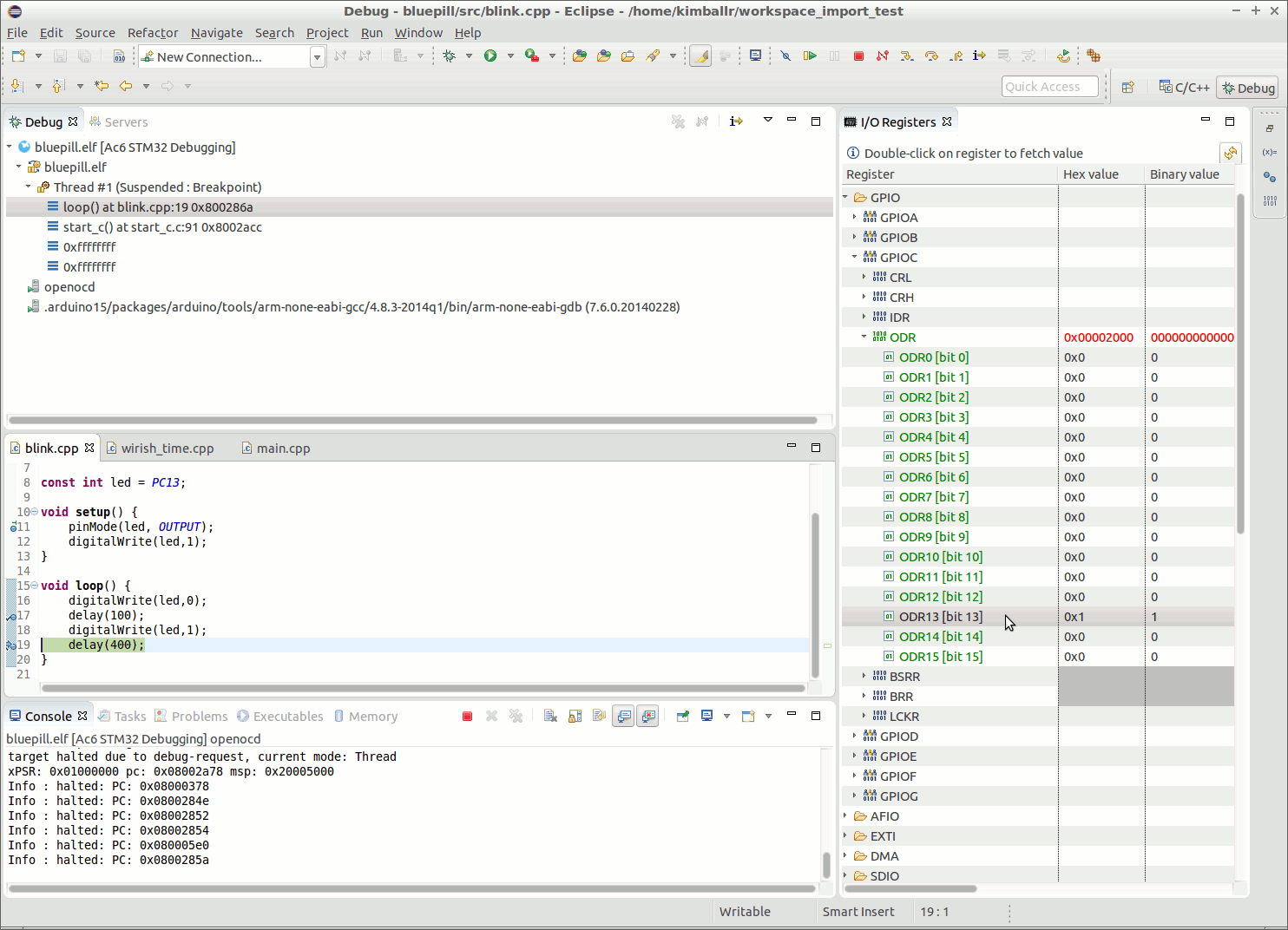
- debug_01.gif (113.7 KiB) Viewed 3691 times
I like this way of development!
The build is OK but when I am trying to Debug the program I have the following error:
Error: timed out while waiting for target halted

TARGET: stm32f1x.cpu - Not halted

in procedure 'program'

in procedure 'reset' called at file "embedded:startup.tcl", line 478

in procedure 'ocd_bouncer'You can force the bluepill to work with the stlink by switching the boot0 jumper from the default position of ‘0’ to the boot0 ‘1’. Then press reset so the chip can see the new boot0 configuration and then try again. Make sure you kill the stalled debug session in eclipse. If that works and you can successfully upload, you can switch the boot0 jumper back to ‘0’.
-rick
i pulled the bluepill.zip
i’m as usual for me, missing something.
i can select the bluepill.zip file, but i can’t seem to set the directory for the archive import destination. it has a browse button that just give 3 i assume grayed out very small home, up and into buttons???
i then tried creating an empty bluepill project, now it allows selection of workspace/bluepill as a destination folder,
but i now have a project top dir bluepill with a child dir bluepill holding the rest.
i’m not totally convinced i have the correct bluepill.zip, mainly because i can’t find the blink sketch and it looks more like the jc66_coreboard directory structure and files.
if you could confirm the following?
stephen@i7:~$ ls -l bluepill.zip

-rw-r--r-- 1 stephen stephen 3841736 Apr 28 20:20 bluepill.zip

stephen@i7:~$

stephen@i7:~$ md5sum bluepill.zip

f2fdced2541e91604b28d85ff44aaa45  bluepill.zip

stephen@i7:~$

stephen@i7:~$ cd Workspace/bluepill/bluepill/src

stephen@i7:~/Workspace/bluepill/bluepill/src$ ls -l

total 12

-rw-r--r-- 1 stephen stephen 1070 Apr 28 13:05 asciitable.cpp

-rw-r--r-- 1 stephen stephen   65 Apr 28 12:30 extra.c

-rw-r--r-- 1 stephen stephen 2727 Apr 28 08:06 streaming.h

stephen@i7:~/Workspace/bluepill/bluepill/src$

- import_sequence.gif (109.19 KiB) Viewed 3664 times

- debugsession.gif (224.16 KiB) Viewed 3658 times

Anyway I am making some more tests to see what is different….
I am trying to make the HALMX version now….
[Desktop Entry]
Type=Application

Version=0.9.4

Name=Eclipse

Comment=Eclipse Mars 2

Icon=/home/kimballr/opt/eclipse/icon.xpm

Exec=env SWT_GTK3=0 UBUNTU_MENUPROXY=0 /home/kimballr/opt64/eclipse/eclipse -showlocation

Terminal=false

Path=/home/kimballr/

Name[en_US]=Eclipse-Mars2(64bit)
any recommendation on following the ‘updates are available’ pop-up?
i was seeing a message related to MaxPermSize as an unrecognized switch, eclipse.ini was modified deleting lines with XXMaxPermSize and the following line for each.
could you detail anywhere string *kimbal* needs to be edited away? i’m a stephen 
in openocd path as well???
i use a modified 1.6.5r5 where it’s dot dir is arduino165r5, similar for 1.78 etc etc
i ended up using a soft link to my arduino installed arm files and adding ~/stephen/arm to the path in eclipse.
i’m wondering will happen after the updates have installed?
i’m playing with nRF24’s at the moment, adding in their includes as a see what happens, yields ‘not found’ messages.
where/how would i add local user libraries? is there a search path to be amended as well?
the libraries entry under the project lists the standard arduino_stm32 ones.
any tips on how i’d use a maple mini in this setup?
i suppose that using a bluepill programmed as a bmp might prove to be interesting?
you mentioned doing a write up somewhen? yes please.
stephen
any recommendation on following the ‘updates are available’ pop-up?
ok i’ll go off and firtle a bit with this … … …
stephen
http://www.stm32.eu/sites/default/files … ench_0.pdf
-rick
For this, I read about eclipse and I though I will try it out.
Well, it is not that simple because I am working on a Win10 computer.
First, I read about the Eclipse plugin for Arduino. After several unsuccessful tries and errors (two days of pain..) I wanted to give a try to Rick’s project.
@Rick,
After I import the project and adapted the PATH variable to find the “make.exe” now I get the error message:
“make: no rule to make the target”.
Which path should I include now?
You could load linux in a VM.
I know that means doing another install and setup of Eclipse, which can be a pain, but the VM installation of Linux would be simple and quite quick
thanks a lot, I finally managed to successfully build the project on my Win10 machine, without Linux VM.
What I did is:
– I followed the steps recommended to install SW4STM32, onto the existing Eclipse installation,
– adapted the paths for GCC (from Arduino directory) and make.exe (from Ac6 plugin directory of Eclipse)
Now I will try to debug…
ps: I know that USB2Serial does not support debugging but at the moment I don’t have a ST-Link device and I just need the upload feature..
Thanks in advance and best, E.
Interesting thing: I tried to compile the bluepill project with the default SW compiler (gcc 5.2.1) and I get error: “conflicting declaration of C function ‘char* utoa(long unsigned int, char*, int)’” on file “itoa.h” where utoa is defined as:
extern char* utoa( unsigned long value, char *string, int radix ) ;
Interesting thing: I tried to compile the bluepill project with the default SW compiler (gcc 5.2.1) and I get error: “conflicting declaration of C function ‘char* utoa(long unsigned int, char*, int)’” on file “itoa.h” where utoa is defined as:
extern char* utoa( unsigned long value, char *string, int radix ) ;
'Building file: ../cores/maple/WString.cpp'

'Invoking: MCU G++ Compiler'

C:\EDOGALDO\STM32\RickKimball_bluepill\bluepill\Debug

arm-none-eabi-g++ -mcpu=cortex-m3 -mthumb -mfloat-abi=soft -DSTM32F103C8Tx -DDEBUG -DVECT_TAB_ADDR=0x8000000 -DGENERIC_STM32F103C -DF_CPU=72000000L -DBOARD_GENERIC_STM32F103C -DCONFIG_MAPLE_MINI_NO_DISABLE_DEBUG -DSERIAL_USB -D__STM32F1__ -DARDUINO=10605 -DBOARD_generic_stm32f103c -DMCU_STM32F103CB -DGENERIC_BOOTLOADER -DARDUINO_ARCH_STM32F1 -DERROR_LED_PORT=GPIOB -DERROR_LED_PIN=1 -I"C:/EDOGALDO/STM32/RickKimball_bluepill/bluepill/system/libmaple" -I"C:/EDOGALDO/STM32/RickKimball_bluepill/bluepill/system/libmaple/include" -I"C:/EDOGALDO/STM32/RickKimball_bluepill/bluepill/system/libmaple/stm32f1/include" -I"C:/EDOGALDO/STM32/RickKimball_bluepill/bluepill/system/libmaple/usb/stm32f1" -I"C:/EDOGALDO/STM32/RickKimball_bluepill/bluepill/system/libmaple/usb/usb_lib" -I"C:/EDOGALDO/STM32/RickKimball_bluepill/bluepill/cores/maple" -I"C:/EDOGALDO/STM32/RickKimball_bluepill/bluepill/variants/generic_stm32f103c"  -Os -g3 -Wall -fmessage-length=0 --param max-inline-insns-single=500 -nostdlib -ffunction-sections -c -fno-exceptions -fno-rtti -MMD -MP -MF"cores/maple/WString.d" -MT"cores/maple/WString.o" -o "cores/maple/WString.o" "../cores/maple/WString.cpp"

In file included from ../cores/maple/WString.cpp:23:0:

../cores/maple/itoa.h:34:65: error: conflicting declaration of C function 'char* utoa(long unsigned int, char*, int)'

extern char* utoa( unsigned long value, char *string, int radix ) ;

^

In file included from c:\users\EDOGALDO\.p2\pool\plugins\fr.ac6.mcu.externaltools.arm-none.win32_1.7.0.201602121829\tools\compiler\arm-none-eabi\include\stdlib.h:11:0,

from ../cores/maple/WString.h:26,

from ../cores/maple/WString.cpp:22:

c:\users\EDOGALDO\.p2\pool\plugins\fr.ac6.mcu.externaltools.arm-none.win32_1.7.0.201602121829\tools\compiler\arm-none-eabi\include\stdlib.h:185:8: note: previous declaration 'char* utoa(unsigned int, char*, int)'

char * _EXFUN(utoa,(unsigned, char *, int));

^

../cores/maple/WString.cpp: In constructor 'String::String(unsigned char, unsigned char)':

../cores/maple/WString.cpp:74:23: error: call of overloaded 'utoa(unsigned char&, char [9], unsigned char&)' is ambiguous

utoa(value, buf, base);

^

In file included from c:\users\EDOGALDO\.p2\pool\plugins\fr.ac6.mcu.externaltools.arm-none.win32_1.7.0.201602121829\tools\compiler\arm-none-eabi\include\stdlib.h:11:0,

from ../cores/maple/WString.h:26,

from ../cores/maple/WString.cpp:22:

c:\users\EDOGALDO\.p2\pool\plugins\fr.ac6.mcu.externaltools.arm-none.win32_1.7.0.201602121829\tools\compiler\arm-none-eabi\include\stdlib.h:185:8: note: candidate: char* utoa(unsigned int, char*, int)

char * _EXFUN(utoa,(unsigned, char *, int));

^

In file included from ../cores/maple/WString.cpp:23:0:

../cores/maple/itoa.h:34:14: note: candidate: char* utoa(long unsigned int, char*, int)

extern char* utoa( unsigned long value, char *string, int radix ) ;

^

make: *** [cores/maple/WString.o] Error 1
This is the relevant section of the makefile that is working for me on the Nucleo (I do not have a blue pill.) I am using BSD under OSX.
# compile gcc flags

ASFLAGS =  -MMD -mcpu=cortex-m3 -DF_CPU=72000000L -DARDUINO=10604 -DARDUINO_STM_NUCLEO_F103RE -DARDUINO_ARCH_HALMX -DSTM32F103xE -DSTM32_MEDIUM_DENSITY -DSTM32F1 -DBOARD_NUCLEO_F103RE -mthumb -D__STM32F1__

ASFLAGS += $(AS_INCLUDES) -fdata-sections -ffunction-sections

CFLAGS = -g -Os -w -DDEBUG_LEVEL=DEBUG_NONE -MMD -ffunction-sections -fdata-sections -nostdlib --param max-inline-insns-single=500

CFLAGS += -DBOARD_MXNucleoF103 -mcpu=cortex-m3 -DF_CPU=72000000L -DARDUINO=10604 -DARDUINO_STM_NUCLEO_F103RE

CFLAGS += -DARDUINO_ARCH_HALMX -DSTM32F103xE -DSTM32_MEDIUM_DENSITY -DSTM32F1 -DBOARD_NUCLEO_F103RE -mthumb -D__STM32F1__ $(C_INCLUDES)

ifeq ($(DEBUG), 1)

CFLAGS += -g -gdwarf-2

endif

# Generate dependency information

CPPFLAGS = -g -Os -w -DDEBUG_LEVEL=DEBUG_NONE -MMD -ffunction-sections -fdata-sections -nostdlib --param max-inline-insns-single=500

CPPFLAGS += -fno-rtti -fno-exceptions -DBOARD_MXNucleoF103 -mcpu=cortex-m3 -DF_CPU=72000000L -DARDUINO=10604 -DARDUINO_STM_NUCLEO_F103RE

CPPFLAGS += -DARDUINO_ARCH_HALMX -DSTM32F103xE -DSTM32_MEDIUM_DENSITY -DSTM32F1 -DBOARD_NUCLEO_F103RE -mthumb -D__STM32F1__ $(C_INCLUDES)
At present my code compiles. Hangs with a nill pointer exception somewhere in the startup static allocation code relating to USB/CDC or I2C.
[…]
Interesting thing: I tried to compile the bluepill project with the default SW compiler (gcc 5.2.1) and I get error: “conflicting declaration of C function ‘char* utoa(long unsigned int, char*, int)’” on file “itoa.h” where utoa is defined as:
extern char* utoa( unsigned long value, char *string, int radix ) ;
man libstd says:
…
Non-standard (i.e. non-ISO C) functions.
char * ltoa (long val, char *s, int radix)
char * utoa (unsigned int val, char *s, int radix)
char * ultoa (unsigned long val, char *s, int radix)
long random (void)
void srandom (unsigned long __seed)
long random_r (unsigned long *__ctx)
char * itoa (int val, char *s, int radix)
#define RANDOM_MAX 0x7FFFFFFF
..
so you just want to change utoa not ultoa .
-rick
'Building file: ../cores/maple/WString.cpp'

'Invoking: MCU G++ Compiler'

...
I am happy to add that change for utoi etc and the platform.txt fix,
can you check it works with the proposed changes to platform.txt and post the few lines that need changing, or just tell me what to remove ?
The utoi issue is already hitting me as some other cores have updated to require gcc 5.x I and I get issues if I add the compiler to the IDEs hidden gcc toolchain folder
I really appreciate your work.
Oh, and i also have the system workbench plugin, these 2 plugins seem to coexist peaceful 
Which one is your personal preference ?
The reason: no file copy is needed, the user is flexible by choosing either Arduino IDE or Eclipse IDE without any additional effort.
It work with the nucelo64 board with the st-link onboard
The reason: no file copy is needed, the user is flexible by choosing either Arduino IDE or Eclipse IDE without any additional effort.
Very interesting project (bluepill). I used your project files with the latest System Workbench (Nov 2016) and although it compiled and linked (after the utoa issue) the board (a jc66_coreboard) would not enumerate under USB (“device not recognised ….”).
I thought this might be down to using fairly old ArduinoSTM32 bluepill files with the newer System Workbench so I created a new bluepill_2 directory structure using your existing bluepill layout and followed it exactly but using the lastest ArduioSTM32 files. This failed to build with two issues which I have now resolved:
1) The usual utoa
2) unresolved reference to _init
The 2nd issue turned out to be located in a startup file (start_c.c if I remember correctly). Your bluepill startup file had a dummy _init() {asm NOP} but mine, copied from lastest ArduinoSTM32, did not. My question is : Did you create this dummy _init function in the startup file OR was it always in the original ArduinoSTM32 files and has since been removed. If the latter do you know why it was removed ?
And finally, although your bluepill project successfully finds the openocd cfg file (jc66_coreboard.cfg) in the bluepill project directory mine does not. I’ve checked the file exists and in System Workbench I’ve selected “local script” and checked the name is correct but it always returns to “SCRIPT NOT FOUND”. When I start openocd the error message displays the AC6-plugin-stboard-scripts directory and if I copy jc66_coreboard.cfg to this directory everything works as it should. But I can’t get it to work from the local project directory.
What was the purpose of copying over the Platform.txt and Boards.txt files. Are not these redundant in System Workbench?
Anyway, great work, I’m indebted.
0800328c <_init>:

800328c:       b5f8            push    {r3, r4, r5, r6, r7, lr}

800328e:       bf00            nop

8003290:       bcf8            pop     {r3, r4, r5, r6, r7}

8003292:       bc08            pop     {r3}

8003294:       469e            mov     lr, r3

8003296:       4770            bx      lr
Yes, I was running the System Workbench compiler. So, as usual, most of my problems were self inflicted.
Point also taken about the openocd cfg file. I had searched the project files (the xml) and puzzled as to why there were no mention of debugging tools and settings. Assume they are setup via eclipse plugins.
i’m using eclipse (actually without Sloeber) i’m setting the defines by manually defining them using platforms.txt and boards.txt as a reference. tedious but it works.
ot: >> it isn’t system workbench either it is gnu arm eclipse http://gnuarmeclipse.github.io. looking at the first post, i think system workbench is literally a better setup to work in and after all that is created by ST itself if i’m right about it. gnu arm eclipse is in perspective a ‘public 3rd party effort’, the environment is possibly similar to system workbench, the developer(s) of gnu arm eclipse developed several stm32 code ‘generators’ for creating blinky projects for some non st boards, notably from olimex, has a qemu emulator that sport several boards some from olimex and targets stm32 f1 and f4 targets but the features are incomplete (e.g. i think interrupt priorities currently won’t work) and hence only basic emulation functionality) and segger j-link and openocd connectivity <<
here is how i’ve tixed the issues
utoa() issue
as mentioned by rick
https://github.com/arduino/Arduino/pull/4830/files
this is simply because the later gcc versions delivered a utoa() function that has a somewhat different declaration
in my local copy of STM32F1/cores/maple/itoa.h
#define GCC_VERSION (__GNUC__ * 10000 \

+ __GNUC_MINOR__ * 100 \

+ __GNUC_PATCHLEVEL__)
#if !(GCC_VERSION > 40902)
extern char* utoa( unsigned long value, char *string, int radix ) ;
#endif
the only trouble is that this is part of the variant start up codes, hence, we’d need to patch every variant if we want to fix the missing _init()
i did find init() in STM32F1/variants/maple_mini/wirish/boards.cpp
i.e. it is part of the variant
however, i can’t figure out how premain() which calls init()
gets patched into __preinit_array
apparently in the newlib code the function __libc_init_array()
https://github.com/eblot/newlib/blob/ma … isc/init.c
is defined as such:
/* Handle ELF .{pre_init,init,fini}_array sections.  */

#include <sys/types.h>
#ifdef HAVE_INITFINI_ARRAY
/* These magic symbols are provided by the linker. */
extern void (*__preinit_array_start []) (void) __attribute__((weak));
extern void (*__preinit_array_end []) (void) __attribute__((weak));
extern void (*__init_array_start []) (void) __attribute__((weak));
extern void (*__init_array_end []) (void) __attribute__((weak));
extern void _init (void);
/* Iterate over all the init routines. */
void
__libc_init_array (void)
{
size_t count;
size_t i;
count = __preinit_array_end - __preinit_array_start;
for (i = 0; i < count; i++)
__preinit_array_start[i] ();
_init ();
count = __init_array_end - __init_array_start;
for (i = 0; i < count; i++)
__init_array_start[i] ();
}
#endi
missing _init()
it turns out _init() is possibly intended for shared library initialization (e.g. in linux) and newlib does not ship with that,
http://dbp-consulting.com/tutorials/deb … artup.html
i noted that newlib provides void __libc_init_array() but does not provide _init()
i discussed it in some details here http://www.stm32duino.com/viewtopic.php … =80#p25978
gets patched into __preinit_array
wow, i’ve been tracing and tracing and i simply couldn’t figure out where in the ld scripts, assembler files or c functions that premain() somehow gets into init_array
–nostdlib no standard lib
-Xlinker –gc-sections remove unused sections
–specs=nano.specs use newlib-nano
i’m actually building using gcc-arm-none-eabi-6-2017-q1-update, so far it works
however, i get the error _init() is not defined if the above ld options are set
my guess is that –nostdlib overrides –specs=nano.specs and hence _init() is no longer included
however, without –nostdlib the binary size is considerably fatter even if –specs=nano.specs is stated
http://www.stm32duino.com/viewtopic.php … =80#p25978
ok i discovered something about my gcc installation gcc-arm-none-eabi-6-2017-q1-update (this is actually 6.3.1 going by the path names i see)
in the installation folder gcc-arm-none-eabi-6-2017-q1-update/lib/gcc/arm-none-eabi/6.3.1
there are 2 crt*.o files: crti.o and crtn.o
nm crti.o

00000000 T _fini

00000000 T _init
-nostartfiles lets you provide your own startup code but lets you link with the nano.specs libc stuff.
As far as code bloat goes, you need to spend some time with arm-none-eabi-objdump -CS yoursketch.ino.cpp.elf | less to see what is causing your code to bloat.
gcc is interesting, with so many obscure/often ignored features in elf sections
http://www.cs.stevens.edu/~jschauma/810/elf.html
http://refspecs.linuxbase.org/LSB_3.0.0 … tions.html
I’m just newbie with eclipse software. I try to make several parameters adjustment and but finally, I’ve got error message. Does it look like fake ST-Link error?
Please give some suggestion.
pak
VID/PID 0x0483 0x3748 for ST-Link/V2
VID/PID 0x0483 0x374b for ST-Link/V2-1
I setup the project expecting an stlink-v2 … if you are using a “nucleo like” device you could change:
source [find interface/stlink-v2.cfg]
to
source [find interface/stlink-v2-1.cfg]
This was the openocd.cfg I used.
# An openocd config for the jc66_coreboard board with a single STM32F103C8Tx chip.

source [find interface/stlink-v2.cfg]
set WORKAREASIZE 0x4000

transport select hla_swd

source [find target/stm32f1x_stlink.cfg]
adapter_khz 950

# use software reset

reset_config none
# This is an bluepill board with a single STM32F103CBTx chip
#
# Generated by System Workbench for STM32
# Take care that such file, as generated, may be overridden without any early notice. Please have a look to debug launch configuration setup(s)
source [find interface/stlink.cfg]
set WORKAREASIZE 0x5000
transport select “hla_swd”
set CHIPNAME STM32F103CBTx
# Enable debug when in low power modes
set ENABLE_LOW_POWER 1
# Stop Watchdog counters when halt
set STOP_WATCHDOG 1
# STlink Debug clock frequency
set CLOCK_FREQ 4000
# use hardware reset, connect under reset
# connect_assert_srst needed if low power mode application running (WFI…)
reset_config srst_only srst_nogate connect_assert_srst
set CONNECT_UNDER_RESET 1
source [find target/stm32f1x.cfg]
Searching in my Ac6 directory I find stlink.cfg .. has this:
$ find . -iname ‘stlink.cfg’
./SystemWorkbench/plugins/fr.ac6.mcu.debug_2.1.3.201710251246/resources/openocd/st_scripts/interface/stlink.cfg
$ vi $(find . -iname ‘stlink.cfg’)
…
#
# STMicroelectronics ST-LINK in-circuit debugger/programmer
#
interface hla
hla_layout stlink
hla_device_desc “ST-LINK/V2-1”
hla_vid_pid 0x0483 0x374b
You are going to have to use a custom openocd.cfg file you can’t use the auto generated one any more.
Note: It is a constant struggle to keep things working that once worked. Vendors upgrade their “features” and usually the people who are doing the changes don’t care about maintaining things working with previous versions. … I think Raul Julia got them started on this path:
https://my.st.com/content/my_st_com/en/ … erver.html
You might want to check that out.
You should probably create a new test project using System Workbench without using my project configuration. Verify that you can compile and debug on windows. It looks like you are specifying the wrong stlink device, based on the vid/pid mismatch.
I created new project with the code generated by STMCubeMx.
It works, now I need to replace CMSIS with stm32duino core. Could you please give some guidelines for porting stm32duino core?
pak
![[Pending Enhancement] RTC values resetting](https://sparklogic.ru/wp-content/uploads/2019/11/nucleo-l476rg-zestaw-startowy-z-mikrokontrolerem-z-rodziny-stm32-stm32l476-90x90.jpg)