
Several days now I am struggling getting the upload to a bluepill here working smoothly.
– I modified my bluepill board with a 1.5k resistor on R10.
– Checked the USB connector on the board. (Cut a USB cable and measured trough to R9 and R10 on the board. ~ 0.6 Ohms. So should be OK!)
– Hassled with that post here http://stm32duino.com/viewtopic.php?t=2755 Took me some time, to realise, that it is NOT PB14, but PC14!
(But that is sorted out, fitted a button and resistor and now switching modes seem to work.)
I have here a machine with double boot. Linux Mint 18.2 64bit Xfce and WIN 7 64 bit. A second “obsolete” machine with Linux Mint 18.2 64 bit Xfce on stand-by. Arduino on all is 1.8.5. Bootloader generic_boot20_pc13.bin with FTDI on the bluepill from here https://github.com/rogerclarkmelbourne/ … r/binaries
Installation on both Linux machines:
– Board manager: install DUE package, download Arduino_STM32-master.zip and unpack to ~/Arduino/hardware/
Change to ~/Arduino/hardware/Arduino_STM32-master/tools/linux64/ and run install.sh from terminal as root. Reboot!
Installation on WIN 7:
– Board manager: install DUE package, download Arduino_STM32-master.zip and unpack to ~/Arduino/hardware/
Changed to ~/Arduino/hardware/Arduino_STM32-master/drivers/win/ and run install_drivers.bat from terminal as admin. Reboot.
Checking WIN 7 device manager as shown in youtube video https://www.youtube.com/watch?v=0jdJp3TQuJY
Behaviour under WIN 7 with BLINK sketch:
No problem switching modes in uploading. ONLY sometimes I see the message “stm32 arduino error resetting after download: usb_reset could not
reset device, win error:” But as I learned from searching the forum, that is common and can be ignored.
Behaviour under Linux with BLINK sketch:
Switching modes in uploading not reliable. In most cases not working.
dfu-util 0.8

dfu-util: Invalid DFU suffix signature

dfu-util: A valid DFU suffix will be required in a future dfu-util release!!!
Copyright 2005-2009 Weston Schmidt, Harald Welte and OpenMoko Inc.
Copyright 2010-2014 Tormod Volden and Stefan Schmidt
This program is Free Software and has ABSOLUTELY NO WARRANTY
Please report bugs to [email protected]
dfu-util: Cannot open DFU device 1eaf:0003
dfu-util: No DFU capable USB device available
Waiting for /dev/ttyACM0 serial...Done
Always I have problem with downloading under linux through USB. Sometimes is working but most of times fails.
Sometimes changing the timeout value (upload-reset argument in maple_upload script) helps but not on all machines (my laptop has better success rate). It is working much better if you press the reset button at the correct time just before upload.
Finally I was tired about this issue and I am using only the stlink….
PS: I assume that you have changed the USB resistor with the correct value.
[Slammer – Mon Apr 02, 2018 8:00 pm] –
PS: I assume that you have changed the USB resistor with the correct value.
[kh123 – Mon Apr 02, 2018 1:51 pm] –
– I modified my bluepill board with a 1.5k resistor on R10.
Yes, I did.
[Slammer – Mon Apr 02, 2018 8:00 pm] –
Finally I was tired about this issue and I am using only the stlink….
But I think, it is not the idea behind the project.
Could be a timing issue (I changed the value in maple_upload script) or something with the udev rules.
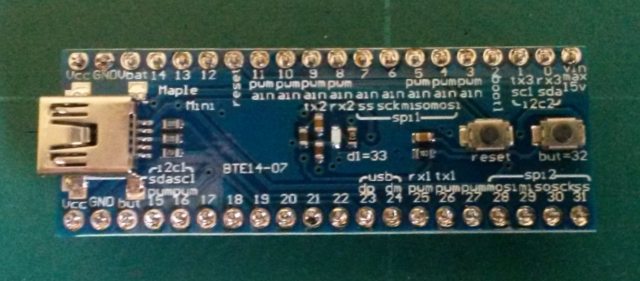
That is the board, I have here.

Pressing RESET and directly afterwards the button for perpetual mode the upload works.
But I don’t have to do that under WIN 7. There those additional activities (pressing buttons) are not required.
I dont know if the problem is on upload-reset program inside tools directory or because the udev/usb system of linux is working differently. Some time ago I tried to change some aspects of upload-reset without success. I tried also alternative methods of usb reset but the result was more or less the same.
A small patch in bootloader by hanyazou improves greatly the success rate of autoreset-uploading process. Here is the fork:
https://github.com/hanyazou/STM32duino- … et_Timeout
I have attached a “fresh” binary of bootloader for bluepill. Please try it and report back your results.
PS. Dont change anything in upload_maple script, I am using the latest version 2018.4.2
One question. At the moment, I have only that bluepill board on my desk. But more is on the way (Aliexpress).
Does the same problem also exists with the maple mini?
About myself. I am a retired mechanical engineer, so my abilities in electronics are limited. I did small projects for my hobby (rc-modelling) with Arduinos like RPM meter or rudder angle measurement with ADXL345 or centre of gravity scale with HX711. But I know, that 8bit is getting a bit obsolete, so I am looking into the 32bit world. Have some Teensys here, which work fine (projects done by others) and also ordered some ESP8266
Linux – same as before. Sometimes mode change. most times not.
WIN7 – mode change always working.
I am using the command “watch -n 1 lsusb” to see when the usb appears as dfu/serial device. After a hardware reset by button always the dfu enumerates and after 1-1.5 second the ttyACM0 is appearing.
The problem is that autoreset is not successful always. For example, I upload the simple blink program, sometimes if I try to upload a new program the CPU fails to reset and the led stays either on or off,there is no reset but the program is freezed. The failure is more often when there is usb serial activity.
PS: autoreset is working correctly in Maple board. Maple has correct usb disconnect circuit driven by PB9 through two transistors.
Look the schematic: https://github.com/leaflabs/maplemini/b … lemini.pdf
[Slammer – Tue Apr 03, 2018 8:33 pm] –
PS: autoreset is working correctly in Maple board. Maple has correct usb disconnect circuit driven by PB9 through two transistors.
Look the schematic: https://github.com/leaflabs/maplemini/b … lemini.pdf
Thank you Slammer, that was the answer, I hoped for. Maple board are under way. Somewhere in die Indian ocean on some container ship ….
Besides, did some short tests yesterday evening with a “sniffer” on the USB cable, when trying to do an upload.
The first 4 pics are failed uploads, the last 3 successful uploads. I think, the shots are very clear and could be a base, to clear, what is happening there …
Under WIN7 no issue. Automatically switching modes, when uploading.
Under Linux, same hassle like with the bluepill board here. Have to push buttons to get into perpetual bootloader to be able to upload …

I am trying to isolate the problem, I have an open console with “watch -n 1 lsusb” to monitor the usb state, in another console I just send the command “upload-reset /dev/ttyACM0”. The bluepill is loaded with a plain Blink program.
After hard reset or poweron, the first time, almost always the upload-reset working correctly, but fails after 2-3 times and the board is freezed (led stays either on or off)
//             _________________________

// DTR XXXX|__|                         |______________________________________

//                          _____________________________________

// RTS XXXX|_______________|                                     |_____________

//         ^  ^            ^            ^            ^           ^           ^

//         |  |    Delay   |    Delay   |    Delay   |   Delay   |           |

//         |  Raise DTR    Raise RTS    Drop DTR     Send 1EAF   Drop RTS    Close Serial

//       Open                           (1)          (2)
Just see, that you posted your new finding here. I’ll have a look later.
But let me post my latest status with the bluepill and the maple mini first please.
That is the content of my /etc/udev/rules.d/45-maple.rules at the moment
ATTRS{idProduct}=="1001", ATTRS{idVendor}=="0110", MODE="664", GROUP="plugdev"

ATTRS{idProduct}=="1002", ATTRS{idVendor}=="0110", MODE="664", GROUP="plugdev"

ATTRS{idProduct}=="0003", ATTRS{idVendor}=="1eaf", MODE="664", GROUP="plugdev" SYMLINK+="maple", ENV{ID_MM_DEVICE_IGNORE}="1"

ATTRS{idProduct}=="0004", ATTRS{idVendor}=="1eaf", MODE="664", GROUP="plugdev" SYMLINK+="maple", ENV{ID_MM_DEVICE_IGNORE}="1"
ATTRS{idVendor}=="1eaf", ATTRS{idProduct}=="0004", ENV{ID_MM_DEVICE_IGNORE}="1"
ATTRS{idVendor}=="1eaf", ATTRS{idProduct}=="0004", ENV{MTP_NO_PROBE}="1"
SUBSYSTEMS=="usb", ATTRS{idVendor}=="1eaf", ATTRS{idProduct}=="0004", MODE:="0664"
KERNEL=="ttyACM*", ATTRS{idVendor}=="1eaf", ATTRS{idProduct}=="0004", MODE:="0664"
Replace the upload-reset program in tools directory (rename the existing file to upload-reset.orig for example) with the attachment. Change also the delay time in maple_upload program from 750 msec to 1200 msec (the argument of upload-reset). Disable also (if is enabled in your system) the modemmanager. For me the success rate of automatic reset is better than 9/10. I have some fails when the program on the board is using the serial usb intensively, but generally is working (I think that the reset detection by USB in the core is not very reliable, but this is not the main problem).
I think that the problem with linux has something to do with the different timing of I/O commands to serial port.
PS: Your rules are a workaround for modemmanager and are OK to use them.
I am only user and not a specialist for things like that, but I got the impression, that the issue we face must have a simple cause …
A simple blink sketch using delay can usually be uploaded 10 times in a row without pressing reset or using perpetual bootloader mode.
Here is a variation of blink that uses the systick interrupt. I can upload using the bootloader once. After that I have to press reset each time before upload. The blue pill and the Maple Mini both act the same. It is probably some simple mistake on my part.
/*

*   blink using the systick interrupt

*/

#define LED_RATE 500    // milliseconds;

void setup()

{

pinMode(LED_BUILTIN, OUTPUT);

systick_attach_callback(&blink_led_systick);

}

void loop()

{

// nothing to do - blink is handled by systick

}

void blink_led(void) {

static uint8_t led_state = 0;

digitalWrite(LED_BUILTIN, led_state);

led_state = 1 - led_state;

}

void blink_led_systick(void)

{

// this is called 1000 times per second

static volatile uint32_t counter = 0;

counter++;

if (counter >= LED_RATE)

{

counter = 0;

blink_led();

}

}
Unpacked “upload-reset” (10.4k) and replaced it in ~/Arduino/hardware/Arduino_STM32-master/tools/linux64/
Original “upload-reset” is 7.9k here.
But sorry to say, now success.
What is working here with both version – RESET and then UPLOAD.
