
So I had two possibilities:
The “hard” way: Android Studio. (I do not like java)
The “lazy” way: MIT app inventor 2
The app inventor 2 is preconfigured to use with BT and there are many arduino BT / android examples out there. So I decided to go the lazy way….BUT:
The “IDE” uses “building blocks” instead of programming code. So after a week i have given up. Even implimenting a simple array ended up in dozents of colorful puzzle blocks and a confused code layout.
Example:
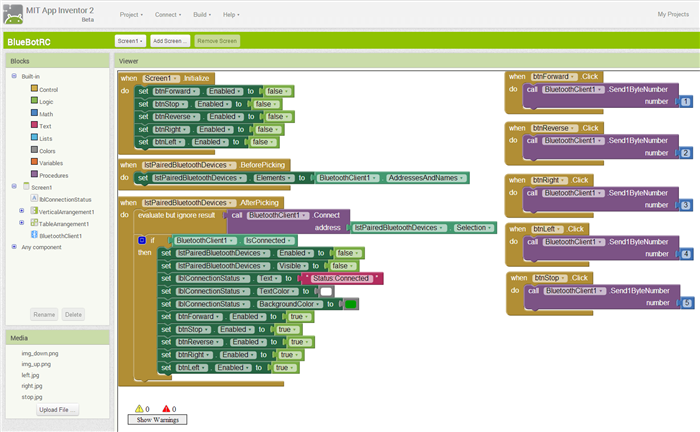
So in my view the whole project lost the overall potential, caused by this silly block-code model. Building blocks are good for teaching basic programming visually, but with semi-complex programs you lose the overview completely (especially if you do not own a 60′ monitor).
So: Lost one week and goto—> “the hard way”
We have an overblown example of “easy programming”.
Michael
What I found interesting after 90 days of cursing the IDE is that there is a way to impose the programmer’s will on every object but it all must be done with assembler or C as C++ is not naively supported (but there is a work-around.)
So, a multidimensional array could be created in C or C++ and provided with an API which would then become a custom object that could be dragged-n-dropped into the larger logic design. The second 90 days of playing with the IDE was actually a joy but one does need to develop a good understanding of the basics and become extremely aware of property sheets and hooks. Not a weekend toe-in-the-water experiment.
Ray
I believe that it is a tool like the old Visual Basic (not VB.NET): you put elements and code for them. It is a programming based on events. What happens if you push buttons, what happens if data arrive, what happens if some sensor get some values and so on.
My pourpose was to write a simple app to take photos and some data as a datalogger. I discovered that AppInventor was not capable to take pictures, it simply start the camera and then you have to shoot manually. AppInventor2 is not cabaple too to shoot a picture.
I don’t believe that this one is a tool for kids but is a tool for simple applications, you can fond some of them in the Google Store.
I remember that there is a Basic (a modern basic not the old one with line numbers) compiler but I don’t remember the name.
On a project I made before – analyzing MIDI Waldorf-Sysex strings, with a totally strange data(type) structure (signed 12bit (or24?, can’t remember) +chunks in byte packages) – it was done on STM32duino side within minutes, on Processing (java…) I got grey hairs.
On app “inventor” you won’t even thing about such things: You only have floats…
So I would need a C++ android dev tool

I remember that there is a Basic (a modern basic not the old one with line numbers) compiler but I don’t remember the name.
Some things that could be done fairly easily and concisely in a non Block language, require crazy workarounds in Block languages ( ending up with huge amount of duplicated blocks.
I don’t think PSoC Creator is the same sort of tool at all. I thought with PSoC, basically used a graphical UI to a code generator, and that on the whole, the final step was either to modify the code by hand ( unless what you wanted to build didn’t really require and branching type functionality)
PSoC Creator is more like the STM Cube in steroids.
PS. I am likely to need to use my PSoC soon, as I need to accurately measure some millivolt outputs from a thermopile sensor, and the in built OpAmps in the PSoC make it an ideal device for this task
PSoC Creator is more like the STM Cube in steroids.
But they seem to have now fixed this as the snap off part contains a full programmer rather than simply a USB to serial converter
I managed to get a free new PSoC at Maker Faire but have not had time to play with it ;-(
In a traditional STM development you pull out the data sheets find a processor that’s got all the peripherals you need. In PSOC you just add the peripherals you need.
PS I read some ware that people were using the snap off bit as a second PSOC kit but you need a separate programmer to utilize it. Also you can debug with the snap if bit as its not just a serial converter.
<…>
I don’t think PSoC Creator is the same sort of tool at all. I thought with PSoC, basically used a graphical UI to a code generator, and that on the whole, the final step was either to modify the code by hand ( unless what you wanted to build didn’t really require and branching type functionality)
<…>
I vaguely remember software blocks in PSoC creator and I understand that the hardware and software connections (wiring) can be done in the graphical tool
I am really not diss’ing PSoC creator, I think its a great tool, but its not at all like App Inventor.
I thought in PSoC the coding is done in C by typing the syntax not by dragging coding elements e.g. To make the led blink you have to type the code or the for loop
e.g. in their video https://youtu.be/9NZe7yhPYuo?t=255
Where as with the graphical programming languages e.g. like in App Inventor, that Matthias was trying to use, the for loop looks like a U shape thing on its side, which you drag onto the screen (no minimal typing if at all)

