
*cough*
*cough*
*cough*
I ended up ordering one from Pimoroni
Shipping is the bulk of the cost for me, but thats what you have to pay for something when it first comes out
I ended up ordering one from Pimoroni
Shipping is the bulk of the cost for me, but thats what you have to pay for something when it first comes out
I had assumed most were simply for small linux system cross compilation. The Pi’s I have here are all running cut down debian and media centre applications.
I had assumed most were simply for small linux system cross compilation. The Pi’s I have here are all running cut down debian and media centre applications.
Found that RiscOS, originally of Acorn fame is ported to the RPi & alive and kicking.
I spent a lot of time working with RiscOs in the very early 90’s in my first job after Uni 
It is not fully open source because there is a Broadcom binary that it is not open source.
I have the original RPi Zero, but you have to connect it to a USB hub and use external Wifi etc, and it also needs an adaptor to plug into a HDMI monitor.
I dont see the RPi Zero replacing the Arduino MCU for small projects, e.g. over the years I have use Arduinos to fix my automatic garage door opener, build a new charge controller for my electric drill, build a new thermocouple interface to my (useless / cheap / chinese) reflow oven, build multiple Open Power Meter systems, build systems to control those 433mhz mains socket switches etc etc etc
IMHO using a MCU is a better solution for many things, and something like a RPi only if you need a lot of processing power or a lot of RAM , or both etc.
And over time things seem to be converging, with the MCUs getting faster and more Flash and RAM and the Linux boards getting cheaper and gaining GPIO capabilities
I have the original RPi Zero, but you have to connect it to a USB hub and use external Wifi etc, and it also needs an adaptor to plug into a HDMI monitor.
I dont see the RPi Zero replacing the Arduino MCU for small projects, e.g. over the years I have use Arduinos to fix my automatic garage door opener, build a new charge controller for my electric drill, build a new thermocouple interface to my (useless / cheap / chinese) reflow oven, build multiple Open Power Meter systems, build systems to control those 433mhz mains socket switches etc etc etc
IMHO using a MCU is a better solution for many things, and something like a RPi only if you need a lot of processing power or a lot of RAM , or both etc.
And over time things seem to be converging, with the MCUs getting faster and more Flash and RAM and the Linux boards getting cheaper and gaining GPIO capabilities
I find the Nordic nRF5 series of Bluetooth MCUs the best approach if you need BLE. They are amazingly low power, and now have a powerful 64Mhz cortex M4F processor, and have ADC PWM and even a separate sub section they call PPI which can handle simple sub tasks related GPIO.
BTW. We forgot to mention readback security being excellent on MCUs in general.
I tear up an estimote sticker months ago – they use Nordic nRF5 series as well with external accelerometers.
They claim 2-5 years of battery life with CR2477 coin batteries (1000mAh)
You may consider that using a Node.js server on a Linux-based distro for blinking a LED is like firing a bazooka to kill a fly compared to plain old bare-metal C firmware.
But remember when Arduino was introduced, or C++, or even plain C… Newer tools, same debate.
These developers are the RPi audience.
RPi is certainly not the most cost, energy or size effective computer, but it is by far the easiest to master for this new generation of programmers.
Not a problem if it drives more people into real embedded programming.
Not a problem if it drives more people into real embedded programming.
But its just not the optimal device for my projects
Re: nRF52
Depends on how often the device advertises and whether it does anything else
I have the Nordic Power Profiler Kit, and analysed the power consumption on a project I’m working on, and I think I’ll get 18 months battery life with my current config, as it advertises once per second and measures its sensors and battery voltage etc ever 15 secs
I need to optimise the code as I only really need to read the ADC for the battery every hour not on the same ISR as the other sensors, but in the long term I also need to read some accelerometers and the lowest refresh rate I can use is for the processor to wake every 3.2 secs to read the accelerometer FIFO of samples
Nordic are IMHO the best provider of BLE solutions for small developers, as they provide GCC makefiles for all their examples, (as well as Keil and IAR)
They have a github account where they post lots of source code, they also have an excellent developer forum and staff to monitor and answer questions, as well as relying on community support.
They also have a private online support system and will even review your hardware design, and apparently (not tried this myself), they will critique your hardware if you send it to them.
the trouble with integrated MCUs is the very small amount of ram available, though flash seem quite accomodating
it severely limits what’s possible e.g. to make a smart watch 16k sram & 128k flash and one wants to drive an lcd, drive the bluetooth & wifi stack & do all the fancy apps (e.g. pedometer etc), 1’d run out of options pretty quickly before it is even possible
i’m thinking there is a ‘convergence point’ where cortex-m start to ship in bigger ram and flash sizes which cortex-a with beefy ram and flash tries to reduce the physical footprint and in addition to all that add that 2.4ghz radio for bluetooth & wifi
this seemed to be getting a lot of momentum i.e. mcu + bluetooth or/and wifi in an integrated all-in-one soc
Going well beyond just people wanting Wifi, as they have loads of Flash and RAM and a relatively fast processor, and are cheap.
Looking at the AliExpress listings, I think tens of thousands of them have been sold.
They are however very power hungry, which may or may not be an issue.
The ESP32 may take over from the ESP8266 when the prices come down and there is greater availability and the Arduino core stabilises.
The Nordic devices still seem very niche. I’m not sure why that is. Possibly just because no one in China brought out a simple to use module e.g. Blue Pill format using them. Price is also not as competitive as the ESP8266 or STM32, which seems mainly because companies (even in China) are trying to get the maximum price they can for them, probably as a premium product.
Going well beyond just people wanting Wifi, as they have loads of Flash and RAM and a relatively fast processor, and are cheap.
Looking at the AliExpress listings, I think tens of thousands of them have been sold.
ESP8266 has been around in many forms for qyite a long time. I still have some ESP01 modules, but I may as well through them away as I have loads of ESP12 and ESP12E.
78uA is very good for a Wifi device. Not as good as Bluetooth devices, which have sleep currents much lower, without even needing to use “deep sleep”
BLE 5.0 has long range modes, but its going to be a while before many devices support them, and the data rate is low in those modes.
Going well beyond just people wanting Wifi, as they have loads of Flash and RAM and a relatively fast processor, and are cheap.
Looking at the AliExpress listings, I think tens of thousands of them have been sold.
They are however very power hungry, which may or may not be an issue.
The ESP32 may take over from the ESP8266 when the prices come down and there is greater availability and the Arduino core stabilises.
The Nordic devices still seem very niche. I’m not sure why that is. Possibly just because no one in China brought out a simple to use module e.g. Blue Pill format using them. Price is also not as competitive as the ESP8266 or STM32, which seems mainly because companies (even in China) are trying to get the maximum price they can for them, probably as a premium product.
I’ve not heard of anyone doing Wifi on the Nordic devices. From what I understand there are some technical limitations to their 2.4GHz hardware which prevent it being used for some applications.
However, it looks like the nRF52840 is less limited, as apparently its likely to be able to operate as a ZigBee, as soon as someone ports the Zigbee stack (and I’m sure there would be a lot of other work)
The amount of RAM on these MCU’s is going up all the time, the nRF52840 has 256k RAM and 1M flash (but the current nRF52832 only has 64k RAM)
With the ESP8266, the external flash is somewhat of a security weakness. I think anyone could clone a product developed using an ESP8266, and also reverse engineer the binaries and look for keys or any other security weaknesses.
http://www.ebay.com/sch/i.html?_from=R4 … 40&_sop=15
http://www.ti.com/product/CC2540
i’d imagine in the not too distant future (in fact today) we’d be *flooded* with ton’s of ‘incompatible’ BLE devices/sensors since all developers just make do with the ‘raw’ BLE stack & do advertising/broadcast, or custom connectivity (not even att/gatt). it is already happening – if you buy 10 different BLE fitness trackers, you need 10 different apps on your android phone / iphone 
btw it still amaze me on how to do BLE and app in 8k of ram on CC2540 
Bluetooth / BLE is okay if you are in the same room, but not much beyond. Again, this is merely a range vs. power consumption problem.
The ESP8266 does need an external SPI Flash, but the ESP8285 doesn’t. But I don’t count internal Flash as a security feature. Of course, unsolder a Flash chip and read it back is well within the reach of any script kiddie, but it is relatively easy too to have a lab decap a chip and bypass fuses for < $1500.
If you want a 100% secure device, don’t release it
The problem with the TI BLE devices, is you cant compile code to run on it, because TI only release binary library files compatible with the IAR 8051 compiler.
And IAR costs $$$$
Plus you need a specialised programmer, as they are not SWD compatible.
You are better off paying the extra $2 and getting a nRF51.
Re: One App per device type of fitness tracker
From what I have read, the operation of the phone app linked to storage and analysis of data ( done by the server), is a key factor people use when choosing these things.
Hence all the manufacturers use their own private data formats, so you cant use a good app with someone elses cheaper hardware.
I dont think Bluetooth.org are helping this, because they charge $$$ per to be part of their private club, and use the Bluetooth brand on your product, and be involved with standardisation.
A lot companies in China are not members, and dont bother with bluetooth.orgs standard device types and protocols etc
My initial, day 1, work with the W was very frustrating and carried over to day 2 and day 3. Normally, Google is your friend, but there is a tremendous quantity of just-wrong-information out in the Ether. Now, I am no stranger to UNIX or Linux but Raspbian Jessie is “cooked: just for the Pi’s so one must understand that they are working with a streamlined Linux and that the SD card supports two (2) partitions, one dedicated to boot. Worst, the damn(able) Jessie boots initially to GUI which means you must rig up a serial console or you must have an HDMI monitor with corrects cables and a USB-micro hub for that keyboard and mouse! If you find yourself without all those cables, the Zero/Zero-W supports USB gadget mode to a hosting PC.
Having the user file system on flash is a real P.I.T.A. Many configuration files require “sudo” to edit… but, not all. Some configuration can be done through the utility raspi-config of which there is a GUI version and a CLI version, very similar but not 100% exact. Even the devout will learn to curse.
For all of your troubles, you get a remarkably powerful 32-bit Linux SoC with over 300MB of free RAM with X, VNC, and SSH all running. There is an Arduino core available or you can elect to write pure C/C++ and compile directly on the device… Geany is a decent enough IDE that runs nicely on the RPi Zero. From my article here.
C code to blink an RGB LED (common anode.)
// blink3.c

//

// Example program for bcm2835 library

// Blinks a tricolor LED on an off every 0.5 secs (editable)

//

// Or you can test it before installing with:

// gcc -o blink -I ../../src ../../src/bcm2835.c blink3.c

// sudo ./blink3
// For Geany GUI IDE:
// Compile switches: gcc -Wall -c "%f" -l bcm2835
// Build switches: gcc -Wall -o "%e" "%f" -l bcm2835
// Execute switches: sudo "./%e"
// YouTube vid: https://www.youtube.com/watch?v=jlM9KoWyPv0&index=5&list=PL-6WIzdGN7xQdIvyCtQUhmflKNsidxfwX
#include <bcm2835.h>
#include <stdio.h>
// modified mrb 20170419 for RPi Zero
// LED between common anode to +3.3 and Pin 12, 16, 18 to 330 Ohm to RGB of LED
// RPi P1_pin_12 == GPIO_18
// RPi P1_pin_16 == GPIO_23
// RPi P1_pin_18 == GPIO_24
#define RED RPI_GPIO_P1_12 // SAME RESULTS AS #define PIN 18
#define GRN RPI_GPIO_P1_16
#define BLU RPI_GPIO_P1_18
#define t_On 10
#define t_Off 300
#define Led_Off HIGH
#define Led_On LOW
int main(int argc, char **argv)
{
if (!bcm2835_init() ) return 1 ;
// Set the pin to be an output
bcm2835_gpio_fsel(RED, BCM2835_GPIO_FSEL_OUTP) ;
bcm2835_gpio_fsel(GRN, BCM2835_GPIO_FSEL_OUTP) ;
bcm2835_gpio_fsel(BLU, BCM2835_GPIO_FSEL_OUTP) ;
// LED used is a RGB with a common anode which connects to 3.3V
// Therefore, any LED is OFF when the port pin is HIGH
bcm2835_gpio_write(RED, Led_Off);
bcm2835_gpio_write(GRN, Led_Off);
bcm2835_gpio_write(BLU, Led_Off);
while (1) // Function same as loop() in Arduino
{
// LEDs illuminate when cathode is connected by output buffer to ground (sink)
// ***WARNING*** a suitable current limiting resistor must be used (~330 Ohm)
// RED LED on, wait, off, wait ... next color, repeat
bcm2835_gpio_write(RED, Led_On);
bcm2835_delay(t_On);
bcm2835_gpio_write(RED, Led_Off);
bcm2835_delay(t_Off);
// Repeat for Green
bcm2835_gpio_write(GRN, Led_On);
bcm2835_delay(t_On);
bcm2835_gpio_write(GRN, Led_Off);
bcm2835_delay(t_Off);
// Repeat for Blue
bcm2835_gpio_write(BLU, Led_On);
bcm2835_delay(t_On);
bcm2835_gpio_write(BLU, Led_Off);
bcm2835_delay(t_Off);
}
// Unless program responds to a Ctrl+C (break), the above loops forever
bcm2835_close(); // housecleaning
return 0;
}
Last month I got a 7″ display and a Model3-B. I thought the display would be HDMI. It only connects to the larger Pis. Was at the local makerspace rasp pi meetup last night. I connected the display up and it worked for the most part. Had to get a mouse out as the touchscreen was hard to use. Needed a keyboard to type commands in. I was able to run a java app.
Now if only there was a way to run similar stuff on my STMF746G-Disco. ST did release a Java Games demo for the STM32f4-discovery that I downloaded. The full java engine dev system is quite a few $$$ which makes no sense what so ever given all the open source stuff out there.
Been there! Having a USB mouse and USB keyboard within reasonable reach is absolutely necessary with the Raspberry line. For days, I would go in the junk closet, grab the mouse and keyboard, take it down to the lab, fix an issue, take the keyboard and mouse back to storage… repeat the next day or day after! Today the keyboard and mouse are thrown upon an already overloaded workbench.
The 3.5 HDMI HD screen for RPi 3 is currently on sale @ Amazon … about 50% off and can be used independently for any HDMI input. Setting up the digitizer however was a P.I.T.A. When all was done, it all works as expected… but the 1920×1080 resolution with the RPi is just too small (cute, but small) … young eyes may however work well with the HiRes.
RPi Zero W test board for GPIO
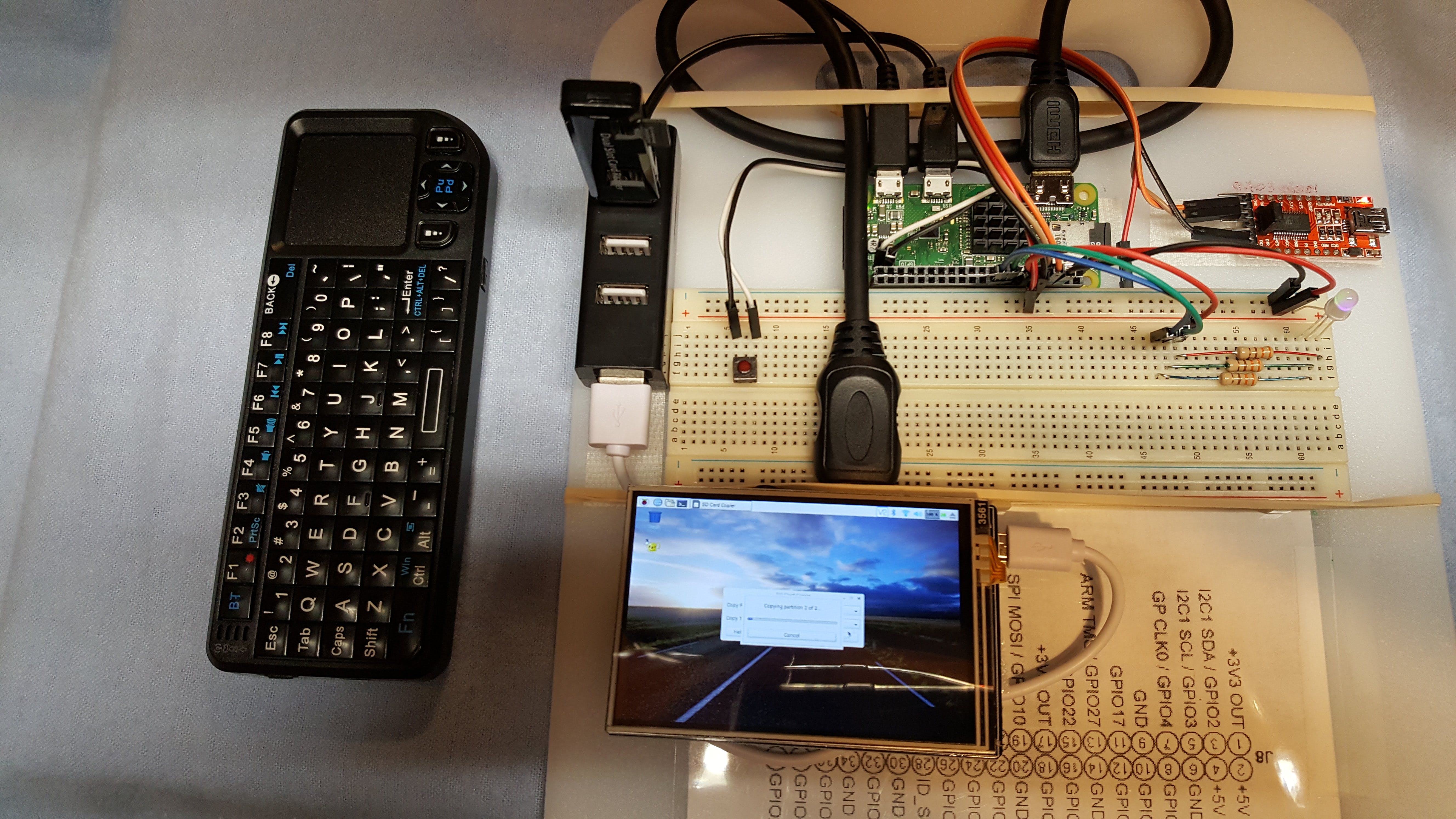
Note: RPi Jessie initializes GPIO to input with pull-down (sink) resistors active; so observers noting the faint glow of the tri-color LED before activating the sketch will note the current is because of a common anode LED to Vcc.
However, when all is said and done … the RPi 3 @ the $29.99 current MicroCenter price is a good buy and the RPi Zero-W is definitely a recommended buy IMO provided one is aware (acutely aware) that unless one uses the RPi headless, the cost just keeps climbing … starting with a Class 10 SD card, then cables, then USB hub, then …
Ray
Ray
I also notcied that Google themselves have a ROM download for the RPI 3 from their “Android Things” site.
However I think its binaries only.
From what I recall the Raspberian linux was the same ROM files for both the RPi 3 and the Zero W.
So when I get time I will probably try both the LineageOS and Android Things , ROMs , on the Zero W.
I am however, skeptical of how useful “Android Things” would be for anyone. IMHO opinion, it looks like another of the myriad of Glogle projects which Google briefly toys with, before abandoning.
But I suppose some companies may be heavily linked to the Android ecostructure and have a niche for this.
LinegeOS is probably not well suited to the RPi platform either, however as the sucessor to Cyanogen / Cyanogenmod, Its definitely worth a look if you have an Android phone or tablet, and would prefer a more open source alternative to the usual manufacturer’s bloatware laden offernings.
However thats another story, and completely off topic 
Edit.
I just did some research, and its not a dead cert that Android Things would run on the Zero W, because its based on Android 7, which is supposed to need an ARMv7 CPU, but the Zero W uses a ARMv6
However, I suspect this is just a compile switch, in the Android build, so I will give it a try and see if it boots (when I get a spare moment)
The same potentially applies to LineageOS, but I don’t think I’m going to have time to try it on the Zero W, as I suspect its a waste of time because it will run too slow to be that useful
Edit 2.
Just tried Android Things on the RPi Zero W, but it didnt boot at all, so it looks like, its not currently compatible.
<…>
The founder of the local makerspace Arron Newcomb just wrote a book for Arduino users who want to use Linux on single board computers such as the Raspberry pi.
It is called Make: Linux for makers ISBN 9781680451832
http://shop.oreilly.com/product/0636920031338.do
Roger,
I’m sure you know that the Raspberry line of boards are quasi-Open Source; that is, the Broadcom low-level firmware is not (as far as I can determine) open: https://github.com/raspberrypi/firmware
firmware
This repository contains pre-compiled binaries of the current Raspberry Pi kernel and modules, userspace libraries, and bootloader/GPU firmware.
……
Depending upon the spirit of the Open Source target you are shooting for, this simply could be a brick wall
….
http://bbbandroid.sourceforge.net/
https://www.raspberrypi.org/magpi/android-raspberry-pi/
beaglebone bone black is somewhat slower in performance than raspberry pi 3 but is considered more ‘open’. beagle bone black is pretty much open sources for much of TI’s 3358 processor and the debian distributions. the other good thing about beagle bone black is that more gpio’s pins are broken out and that it has an on chip ‘PRU’ (real time unit) processor that could take up tasks delegated from the cpu. hence beagle bone black i’d guess would be more targetted towards control apps.
while on raspberry pi 3, the processor is quite well understood but the specs isn’t actually released and the high speed DSI video, and possibly the HDMI interface and MIPI camera interfaces which is very popular are pretty much closed sourced and few specs if at all is known about them. but the raspberry pi 3 with quad core A53 processors and possibly hardware video acceleration is considerably more performant than beaglebone black
on intel Edison , some people are trying to run android on intel Edison
https://communities.intel.com/message/258700#258700
accordingly it is quite possible to run android on intel compute stick
http://www.linuxium.com.au/how-tos/andr … erlingcity
then there are also Allwinner boards with android ported
https://www.olimex.com/Products/OLinuXi … e-hardware
beyond ‘android’ i’m quite used to the de-facto linux (debian) installations on beaglebone black and raspberry pi, i’d think the ‘ordinary’ linux offers more flexibility in terms of various app scenarios, e.g. it is pretty possible to run openoffice with a keyboard on it if one is determined to. and linux is more suited to the work in serial terminal scenario, while android offers much more apps designed for the ‘touch screen’ variety
Thanks…
I just thought I would try Android on the RPI 3 as I had one sitting around doing nothing, but either its not fast enough or the current proprietary binaries are not optimised enough for it to work that well as an Android machine
Better off just to load Raspberian or one one of the many other linux distro’s
but the moment you wanted to interface a ‘non standard’ peripheral, you are pretty much ‘stuck’ with the ‘completeness’ of the device. it is all it is no add-ons, hence arduino start to come into the picture
apart from the ever popular wifi and bluetooth, my thoughts are that a most straight forward way to connect android and stm32 duino is none other than usb otg on the android and usb-serial on stm32,i’d think it is possible to dfu a sketch that way as well
https://github.com/UmbrelaSmart/android … programmer
The phones are very affordable – under $40. Last week I got new Moto G4 Play phones for $50 from Amazon. Beaglebone and RPI cannot beat that price.
Lessons learned: the USB cable between phone and I/O modules has been very fragile. With MRI, there was an USB bridge to connect all modules to the phone. That caused a lot of headache for the teams. With RevRobotics, there is USB connection only to one module and all other connections from there are with UART.
I bought some cheap 7 inch tablets for $15 each,a few years ago, hoping to use them as displays and input devices for my projects.
But At the time, USB OTG via serial was the only thing I could use to interface to the Arduino, but finding a USB serial driver for the tablet was difficult.
And unfortunately, the tablets did not have any community support on XDA, so loading a replacement ROM was not an option
Things are a bit different now.
If you are using the Moto G4 Play, you may be able to unlock the bootloader ( but possibly not if bought as an Amazon version).
(My wife has a Moto G4 and we have unlocked the bootloader, and installed installed the Xposed framework so she can run Xprivacy)
If you can unlock the bootloader on those G4 Plays, You can imstall TWRP recovery and also install LimeageOS
You could in theory then compile and install additional drivers.
Or course Bluetooth is probably a much easier option to interface to phone nowadays.
nRF51822 based BLE boards can be picked up for $5 and they can be programmed using gcc and even the Arduino IDE, but you need a Blackmagic probe or other SWD programmer.
The user interface with two game-pads that are connected to another phone. The two phones are connected together with WiFi direct. I have already done basic reverse engineering of the application interface to USB. My next step during the coming months is to analyze the message details between the phone and the I/O devices. It will be less effort to develop compatible STM32duino devices than to create the whole new application architecture.
In that light, it will be way easier for us to connect the display panels with SPI, UART, and I2C at H/W level than to go through the S/W layers in tablets and phones. Perhaps there will be an easy to use an efficient way for user interface development using JavaScript, Python, Dart, Processing, or something similar against data models in STM32duino.
usb serial for android
https://github.com/mik3y/usb-serial-for-android
for the desktop, i’d think processing made a pretty good pair with arduino
just that processing has a rather large bulk some 100 megs for its distribution and some 200-300 megs uncompressed
http://www.stm32duino.com/viewtopic.php?f=19&t=1973
usb serial for android
https://github.com/mik3y/usb-serial-for-android
for the desktop, i’d think processing made a pretty good pair with arduino
just that processing has a rather large bulk some 100 megs for its distribution and some 200-300 megs uncompressed
http://www.stm32duino.com/viewtopic.php?f=19&t=1973

