
I have an existing device you can buy commercially, which mostly works. It looks like this:
http://www.dfrobot.com/index.php?route= … 5f9Bfl96kw
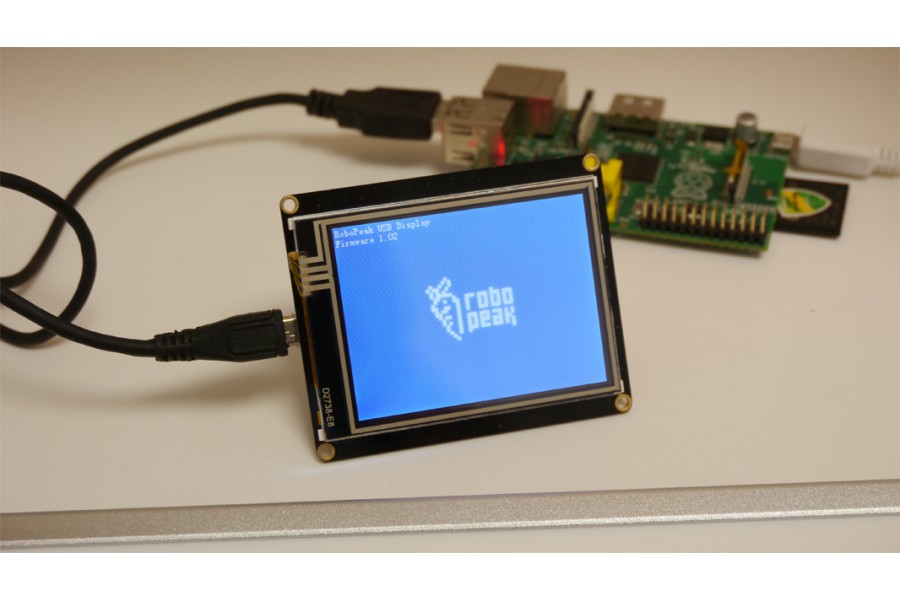
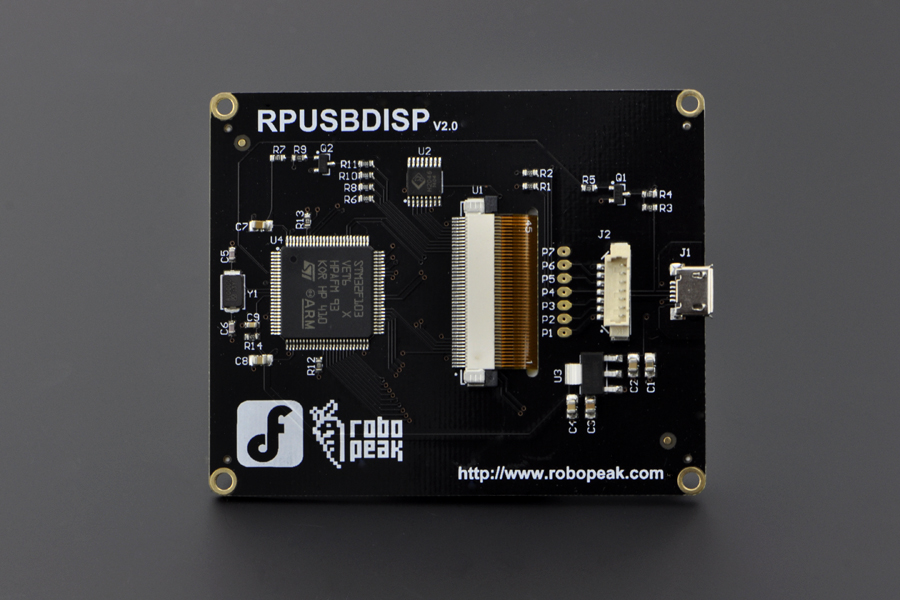
It has an open source linux driver here:
https://github.com/robopeak/rpusbdisp
Along with schematic of the board:
http://www.robopeak.com/data/doc/rpusbd … al.1.0.pdf
And description of the USB protocol:
http://www.robopeak.com/data/doc/rpusbd … US.1.0.pdf
I also have the outline of a DIY project for STM32 which does the same thing (and I have a sneaky suspicion the commercial product is based on the code in that blog, though I have no proof). Its in Russian but translates acceptably with google translate. Blog posts here:
https://habrahabr.ru/post/139601/
https://habrahabr.ru/post/163689/
https://habrahabr.ru/post/163861/
https://habrahabr.ru/post/164635/
Essentially its an STM32 (F103VET6 for both) which receives pixel data over usb and blits it to a 320×240 TFT via 16-bit parallel interface. From my limited understanding the linux framebuffer driver provides a ‘window’ of pixels to be updated, and then that data is sent to the screen to be rewritten (this means you are only rewriting sections of the screen as required).
My reason behind this investigation is that have a few ideas for a product I would like to develop (which I am prototyping with the Robopeak display). Unfortunately the Robopeak display is somewhat expensive and has a number of annoying ‘features’ like a hardcoded splash screen and serious issues with some USB hubs which I would love to be able to improve on. It is no longer developed (no major github updates in 2 years), and the STM32 source is not available.
So my question at this stage is, could something like this be ported to STM32duino? I know we have the TFT library pretty well nailed already. Is the USB side of it unreasonably hard? Does anyone here have any knowledge about how one might start?

You could make something fairly similar yourself.
I think the trick is to connect via 16bit data path, as the ILI9341 is going to be much slower as it uses SPI.
I depends if speed is that important to you.
If not, you could build something using an ILI9341 + Blue Pill for under $10.
However, you could need to write your own custom USB system to send the data. We have Serial, HID and Mini USB that works fine, and I think there is a USB Mass storage demo kicking around somewhere.
I’ve no idea however what USB device that board would show up as ??
Edit. I see the usb protocol
Did they write their own driver for this,?
You would need to write your own USB code if you wanted your board to exactly the same.

I believe both the Russian guy and the Robopeak display are using their own linux drivers. Given that I have no idea how to write a linux driver I would probably want to use one of their drivers and just replicate their firmware on the STM32?
The Robopeak display requires a driver to be compiled into the kernel, though I have all the source code for it. Heres what it shows when you connect it:
[    4.488307] usb 1-1.4: new full-speed USB device number 6 using dwc_otg

[    4.590147] usb 1-1.4: New USB device found, idVendor=fccf, idProduct=a001

[    4.598525] usb 1-1.4: New USB device strings: Mfr=1, Product=2, SerialNumber=3

[    4.607774] usb 1-1.4: Product: rp-usbdisp

[    4.613226] usb 1-1.4: Manufacturer: RoboPeak

[    4.618954] usb 1-1.4: SerialNumber: 48FA716D3432

[    5.538485] rp-usbdisp 1-1.4:1.0: allocated ticket c646e140 with urb c652be00

[    5.577310] rp-usbdisp 1-1.4:1.0: allocated ticket c66626c0 with urb c64dfc00

[    5.608426] rp-usbdisp 1-1.4:1.0: allocated ticket c6694380 with urb c652bc80

[    5.628315] rp-usbdisp 1-1.4:1.0: allocated ticket c665bcc0 with urb c652bc00

[    5.648441] rp-usbdisp 1-1.4:1.0: allocated ticket c665bd40 with urb c652bb00

[    5.668808] rp-usbdisp 1-1.4:1.0: allocated ticket c665bca0 with urb c652bb80

[    5.668969] rp-usbdisp 1-1.4:1.0: allocated ticket c665b240 with urb c652be80

[    5.669147] rp-usbdisp 1-1.4:1.0: allocated ticket c665bba0 with urb c652a200

[    5.669287] rp-usbdisp 1-1.4:1.0: allocated ticket c665bbe0 with urb c64dfe80

[    5.669733] rp-usbdisp 1-1.4:1.0: allocated ticket c665b200 with urb c73ddf80

[    5.669752] rp-usbdisp 1-1.4:1.0: allocated 10 urb tickets for transfering display data. 65024 size each

[    5.669767] rp-usbdisp 1-1.4:1.0: RP USB Display found (#1), Firmware Version: 1.05, S/N: 48FA716D3432

[    5.688599] usbcore: registered new interface driver rp-usbdisp
http://www.aliexpress.com/item/Best-Pri … 51978.html
These take the framebuffer and mirror them via SPI.
I have a samsung digital picture frame that can be used as a monitor using the same system (USB) but only works for windows. I managed to write some software on a pi to use is as a data display by sending it jpegs it was quite effective until the data card on my pi got corrupted.
The other alternative depending on the usage may be a Nextion Display, if you just want to design /display a gui. I would not mind developing a open source version of that.
https://www.itead.cc/display/nextion.html
Re: Compiling drivers into the Linux kernel
Wow, that sounds rather hard core. Isn’t there a simpler way to do it ?
Wow, that sounds rather hard core. Isn’t there a simpler way to do it ?
• The application requires varied mounting arrangements potentially a few meters away from the main computer. Long distance SPI in noisy environments is just asking for trouble.
• I wanted to keep my options open regarding the main computer. I am using a Raspberry Pi at present, but I didn’t want to lock myself into anything. If further down the line theres a new BeagleBone or an Odroid or a ??? that is more cost effective or has better features i’m not tied to an interface which the alternative board may not have (I assume USB is going to be around for a while longer).
• There are other USB devices (wifi dongle, bluetooth dongle etc.) it seemed logical to use common bus for everything.
• Some of the reports I’ve seen of those SPI displays suggest they dont refresh very fast, SPI seems to be a bit of a bottleneck. I was hoping USB would give me more data throughput (though I dont actually know if thats true or not).
Making the screen a serial device is an interesting idea. Will you be able to transfer enough data through USB CDC to keep up with the display?
If CDC is sufficient for transferring the data could you write software to forward the linux framebuffer to the CDC device? I guess that’s a driver really isn’t it, but maybe you could do it in userspace code not at kernel level?
I actually have a few 16bit parallel screens handy already and plenty of blue pill boards. If it looks like there’s an idea worth trialing I can rig something up pretty quickly.
http://www.aliexpress.com/item/5-Inch-8 … 75543.html
Of this http://www.aliexpress.com/item/800-480- … 12688.html HDMI and USB Touch. This will work with anything with a hdmi and usb.
As for USBCDC you should get around 200KB /s on a good day. A full screen Uncompressed is 320*240*2 bytes = 153K ****. If you are only sending the changes (like mpeg) and you do some crude compression you should be ok as long as you don’t want to display full motion video.
**** I haven’t checked the pixel depth on that display
The Nextion is good if you dont want to display the frame buffer you just design your own gui.
simonf wrote:5 ” is the smallest HDMI you seem to be able to get
simonf wrote:As for USBCDC you should get around 200KB /s on a good day. A full screen Uncompressed is 320*240*2 bytes = 153K ****.
Now the original fbcp program was written by this guy: https://github.com/tasanakorn/rpi-fbcp and theres a slightly better version (works better with the Robopeak driver at least) here: https://github.com/AndrewFromMelbourne/raspi2fb
So where was I heading with this. Since we are already snapshotting fb0 and copying it, would it be possible to use a similar program to look at fb0, compress and encode it, and stream it to our CDC device? We wouldn’t need any kind of kernel driver at all. As far as the RPi is concerned it is just outputting to a very small HDMI monitor, and then our user space program is just replicating that info and passing it to our external display.
Thoughts?
I’m going to dig out one of my 16-bit parallel screens and see if I can get it working with a blue-pill board. Quite looking forward to see what I can do with all this.
Also you could go down the jpeg route and use this to decode it straight to the display. I haven’t tried that routine myself it says it can decode from a stream and output to a bitmap device.
The quality wont be too compromised and the average frame should be about 15K.
Also, I think I have realised why the RoboPeak display uses a compiled in kernel driver. This is very similar to the method used by the DisplayLink USB displays who’s driver is in the mainline kernel already. I bet they are making use of some modules already in place for driving that display. This might make it much easier to get X to output a desktop to the screen, which would be what the majority of end users want to achieve.

