
I am new in this forum, I hope the subject is in the right topic.
Behind my project: I want to upgrade my robot from Tianchen with new software using ardumower-code (arduino) and the original STM32 CPU on the main board of the robot. The MCU is a STM32F103VBT6.
I ordered allread a developer ARM Cortex-M3 STM32F103VBT6 STM32 development board but I will get it next week. So I decided to start setting up arduino and the STM32hardware library from Roger Clark and tried to download the “Hello world” code to the MCU via USB directly to the robot-PCB.
#define pinLED PC13
void setup() {
Serial.begin(9600);
pinMode(pinLED, OUTPUT);
Serial.println("START");
}
void loop() {
digitalWrite(pinLED, HIGH);
delay(1000);
digitalWrite(pinLED, LOW);
Serial.println("Hello World");
}
And what if you put a serial print in the loop?
Background: the PC re-enumerates the USB ports ~5 seconds after reset. So either you print only after this time elapsed or insert to setup:
while ( !Serial.isConnected() ) ;there was a Serial.println(“Hello World”); in the code sorry I changed it now;
(I tried also Serial1.println(“Hello World 1”); Serial2.println(“Hello World 2”); with init in the Setup() )
The led is now not on the main robot-PCB and I did not measure directly on the MCU! So I don’t know if it is working. So I don’t know if the code is running on the MCU.
Does it even have one ?
Its possible to upload vi serial with no external clock oscillator, but the code wont run without a 8 MHz crystal
i didnt know STM made a F103VBT, seems a strange combination. Lots of pins but not much flash or RAM.
Using the F103R should work, but you wont have access to all the pins or all the Serial devices etc
I don’t think the robot PCB has an osscillator there is just one 12Mhz on board.
The software update for the robot (*.hex files) can be downloaded by a free software Free STM32 ISP software “FlyMcu” or “mcuisp.exe” http://www.mcuisp.com/English%20mcuisp% … nglish.htm
I tried to use this programm for flashing the compiled source file (example4 ‘Hello world’) + libary from the phoenix-project see http://www.instructables.com/id/STM32F1 … nviroment/
/***************************************************************************

*

* Test program for "STM32F103RBT6".

* After program start will send 'Hello world!' string to USART1.

*

*************************************************************************/

#include "..\LIB\STMF10X\stm32f10x.h"

#include "..\LIB\STMF10X\core_cm3.h"

#include "stm32f10x_conf.h"
//---------------------------------------------------
//---------------------------------------------------
void Delay(__IO uint32_t nCount);
void RCC_Configuration(void);
void GPIO_Configuration(void);
void USART_Configuration(void);
uint8_t Message1[] = "Hello world!\r\n";
int main(int argc, char *argv[])
{
RCC_Configuration();
GPIO_Configuration();
USART_Configuration();
int i = 0;
while (1)
{
// Wait until end of transmit
while(USART_GetFlagStatus(USART1, USART_FLAG_TXE) == RESET)
{
}
//USART_SendData(USART1, TxBuffer[10]);
if (Message1[i]==0)
{
i=0;
Delay(100);
}
else
{
USART_SendData(USART1, Message1[i++]);
}
}
}
void Delay(__IO uint32_t num)
{
__IO uint32_t index = 0;
/* default system clock is 72MHz */
for(index = (72000 * num); index != 0; index--)
{
}
}
void RCC_Configuration(void)
{
/* Enable GPIO clock */
RCC_APB2PeriphClockCmd(RCC_APB2Periph_GPIOA | RCC_APB2Periph_AFIO, ENABLE);
/* Enable UART clock */
RCC_APB2PeriphClockCmd(RCC_APB2Periph_USART1, ENABLE);
}
void GPIO_Configuration(void)
{
GPIO_InitTypeDef GPIO_InitStructure;
/* Configure USART Tx as alternate function push-pull */
GPIO_InitStructure.GPIO_Mode = GPIO_Mode_AF_PP;
GPIO_InitStructure.GPIO_Pin = GPIO_Pin_9;
GPIO_InitStructure.GPIO_Speed = GPIO_Speed_50MHz;
GPIO_Init(GPIOA, &GPIO_InitStructure);
/* Configure USART Rx as input floating */
GPIO_InitStructure.GPIO_Mode = GPIO_Mode_IN_FLOATING;
GPIO_InitStructure.GPIO_Pin = GPIO_Pin_10;
GPIO_Init(GPIOA, &GPIO_InitStructure);
}
void USART_Configuration(void)
{
/* USARTy and USARTz configuration -------------------------------------------*/
/* USART1 configured as follow:
- BaudRate = 115200 baud
- Word Length = 8 Bits
- One Stop Bit
- No parity
- Hardware flow control disabled (RTS and CTS signals)
- Receive and transmit enabled
*/
USART_InitTypeDef USART_InitStructure;
USART_InitStructure.USART_BaudRate = 115200;
USART_InitStructure.USART_WordLength = USART_WordLength_8b;
USART_InitStructure.USART_StopBits = USART_StopBits_1;
USART_InitStructure.USART_Parity = USART_Parity_No;
USART_InitStructure.USART_HardwareFlowControl = USART_HardwareFlowControl_None;
USART_InitStructure.USART_Mode = USART_Mode_Rx | USART_Mode_Tx;
/* Configure USART1 */
USART_Init(USART1, &USART_InitStructure);
/* Enable the USART1 */
USART_Cmd(USART1, ENABLE);
/* Enable USART1 Half Duplex Mode*/
//USART_HalfDuplexCmd(USART1, ENABLE);
}
Back to basics…
Why are you using a STM32F103VB ?
Whats wrong with getting a Blue Pill (STM32F103C8) or Maple mini (STM32F103CB), they are both sub $5 and work fine.
I guess you managed to get that F103VB board working, but you seem to be making life difficult for yourself by starting with a board no one else has tried to use as an Arduino device
My goal is to use Arduino (ArduMower http://www.ardumower.de/index.php/de/forum/ardumower) and the original main board.
Hope now is clear why price and power is not an important issue!
I do not know why this phoenix-project is working; maybe it’s just ab problem I am using the standard bootloader 2.2?
Background info: I tried serial connection (‘Hello World’) with Keil µVision program and this is also working!
Its got the same RAM and Flash size as the F103CB, it just has more pins and also a few extra things (It may have DAC – but I can’t remember)
If you want more performance you would need to go for a F4 board (There is a $10 F407VET board on Aliexpress)
Note. Our support for the F4 series is not as strong as for the F103, but it may be getting better as STM are supposed to be writing a version of their core to support the F4
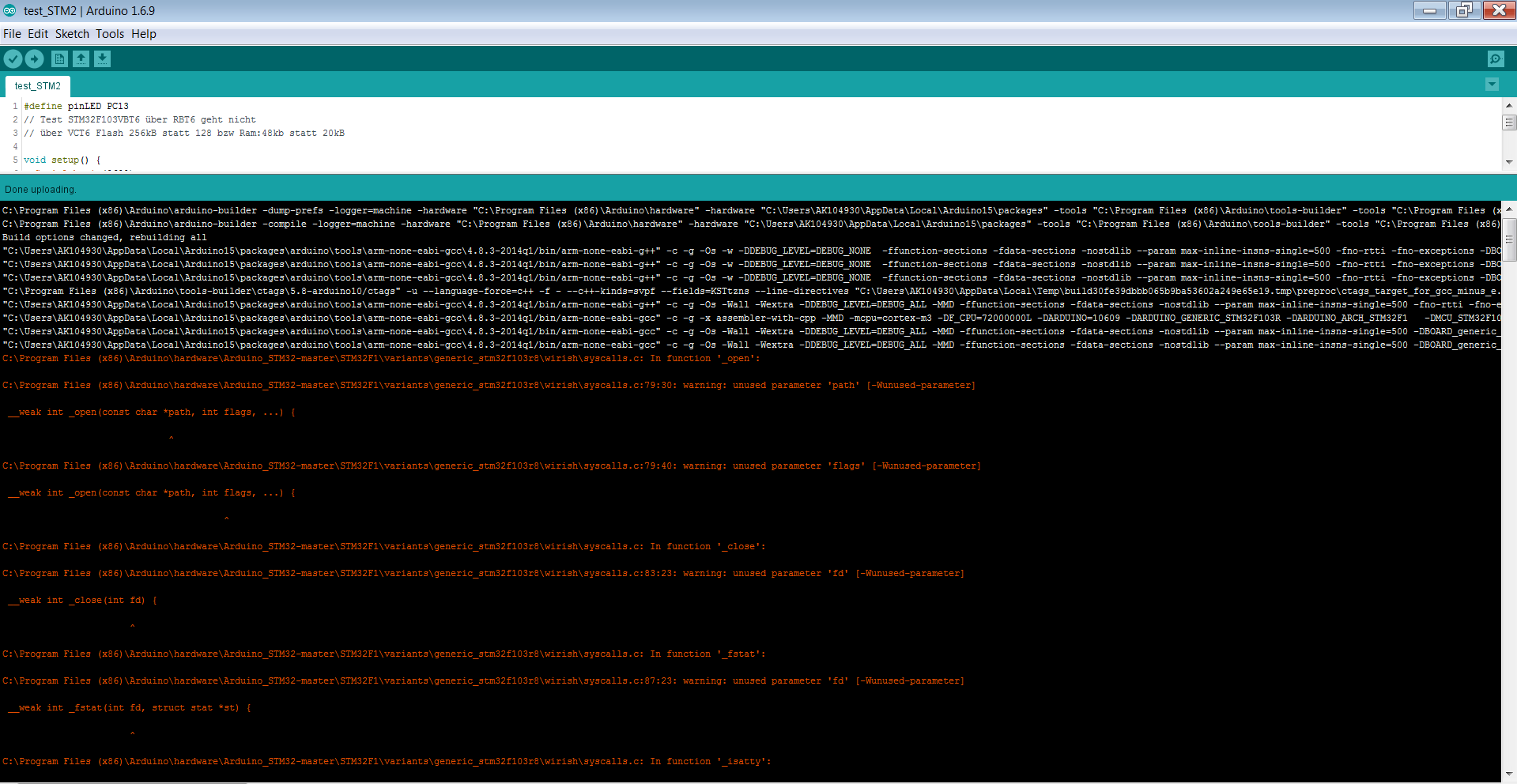
- warning_during_build.PNG (112.17 KiB) Viewed 992 times
1. What version of the IDE are you using. I’m now using 1.6.13 (but 1.6.12 was also OK)
2. How did you install, by downloading the repo or by @ddrowns unofficial JSON package ?
3. Does a blank sketch compile OK
3. Does a Blink sketch compile OK
4. Do you have some non-standard install of the IDE e.g. portable version
-> IDE version 1.6.9 on a windows7
2. How did you install, by downloading the repo or by @ddrowns unofficial JSON package ?
-> your version from git download 23.11.2016 https://github.com/rogerclarkmelbourne/Arduino_STM32
3. Does a blank sketch compile OK
-> no same warnings
3. Does a Blink sketch compile OK
-> no
4. Do you have some non-standard install of the IDE e.g. portable version
-> no standard version of 1.6.9 installed in C:\Program Files (x86)\Arduino
-> IDE version 1.6.9 on a windows7
2. How did you install, by downloading the repo or by @ddrowns unofficial JSON package ?
-> your version from git download 23.11.2016 https://github.com/rogerclarkmelbourne/Arduino_STM32
3. Does a blank sketch compile OK
-> no same warnings
3. Does a Blink sketch compile OK
-> no
4. Do you have some non-standard install of the IDE e.g. portable version
-> no standard version of 1.6.9 installed in C:\Program Files (x86)\Arduino
C:\Program Files (x86)\Arduino\arduino-builder -dump-prefs -logger=machine -hardware "C:\Program Files (x86)\Arduino\hardware" -hardware "C:\Users\AK104930\AppData\Local\Arduino15\packages" -tools "C:\Program Files (x86)\Arduino\tools-builder" -tools "C:\Program Files (x86)\Arduino\hardware\tools\avr" -tools "C:\Users\AK104930\AppData\Local\Arduino15\packages" -built-in-libraries "C:\Program Files (x86)\Arduino\libraries" -libraries "C:\Users\AK104930\Documents\Arduino\libraries" -fqbn=Arduino_STM32-master:STM32F1:genericSTM32F103R:device_variant=STM32F103RB,upload_method=serialMethod -ide-version=10609 -build-path "C:\Users\AK104930\AppData\Local\Temp\build30fe39dbbb065b9ba53602a249e65e19.tmp" -warnings=all -prefs=build.warn_data_percentage=75 -verbose "C:\Users\AK104930\Documents\Arduino\test_STM2\test_STM2.ino"

C:\Program Files (x86)\Arduino\arduino-builder -compile -logger=machine -hardware "C:\Program Files (x86)\Arduino\hardware" -hardware "C:\Users\AK104930\AppData\Local\Arduino15\packages" -tools "C:\Program Files (x86)\Arduino\tools-builder" -tools "C:\Program Files (x86)\Arduino\hardware\tools\avr" -tools "C:\Users\AK104930\AppData\Local\Arduino15\packages" -built-in-libraries "C:\Program Files (x86)\Arduino\libraries" -libraries "C:\Users\AK104930\Documents\Arduino\libraries" -fqbn=Arduino_STM32-master:STM32F1:genericSTM32F103R:device_variant=STM32F103RB,upload_method=serialMethod -ide-version=10609 -build-path "C:\Users\AK104930\AppData\Local\Temp\build30fe39dbbb065b9ba53602a249e65e19.tmp" -warnings=all -prefs=build.warn_data_percentage=75 -verbose "C:\Users\AK104930\Documents\Arduino\test_STM2\test_STM2.ino"

Build options changed, rebuilding all

"C:\Users\AK104930\AppData\Local\Arduino15\packages\arduino\tools\arm-none-eabi-gcc\4.8.3-2014q1/bin/arm-none-eabi-g++" -c -g -Os -w -DDEBUG_LEVEL=DEBUG_NONE  -ffunction-sections -fdata-sections -nostdlib --param max-inline-insns-single=500 -fno-rtti -fno-exceptions -DBOARD_generic_stm32f103r8 -DVECT_TAB_ADDR=0x8000000 -DERROR_LED_PORT=GPIOB -DERROR_LED_PIN=1 -w -x c++ -E -CC -mcpu=cortex-m3 -DF_CPU=72000000L -DARDUINO=10609 -DARDUINO_GENERIC_STM32F103R -DARDUINO_ARCH_STM32F1   -DMCU_STM32F103RB  -mthumb  -march=armv7-m -D__STM32F1__ -DMCU_STM32F103RB  -mthumb  -march=armv7-m -D__STM32F1__ "-IC:\Program Files (x86)\Arduino\hardware\Arduino_STM32-master\STM32F1\system/libmaple" "-IC:\Program Files (x86)\Arduino\hardware\Arduino_STM32-master\STM32F1\system/libmaple/include" "-IC:\Program Files (x86)\Arduino\hardware\Arduino_STM32-master\STM32F1\system/libmaple/stm32f1/include"                                                           "-IC:\Program Files (x86)\Arduino\hardware\Arduino_STM32-master\STM32F1\system/libmaple/usb/stm32f1" "-IC:\Program Files (x86)\Arduino\hardware\Arduino_STM32-master\STM32F1\system/libmaple/usb/usb_lib" "-IC:\Program Files (x86)\Arduino\hardware\Arduino_STM32-master\STM32F1\cores\maple" "-IC:\Program Files (x86)\Arduino\hardware\Arduino_STM32-master\STM32F1\variants\generic_stm32f103r8" "C:\Users\AK104930\AppData\Local\Temp\build30fe39dbbb065b9ba53602a249e65e19.tmp\sketch\test_STM2.ino.cpp" -o "nul"

"C:\Users\AK104930\AppData\Local\Arduino15\packages\arduino\tools\arm-none-eabi-gcc\4.8.3-2014q1/bin/arm-none-eabi-g++" -c -g -Os -w -DDEBUG_LEVEL=DEBUG_NONE  -ffunction-sections -fdata-sections -nostdlib --param max-inline-insns-single=500 -fno-rtti -fno-exceptions -DBOARD_generic_stm32f103r8 -DVECT_TAB_ADDR=0x8000000 -DERROR_LED_PORT=GPIOB -DERROR_LED_PIN=1 -w -x c++ -E -CC -mcpu=cortex-m3 -DF_CPU=72000000L -DARDUINO=10609 -DARDUINO_GENERIC_STM32F103R -DARDUINO_ARCH_STM32F1   -DMCU_STM32F103RB  -mthumb  -march=armv7-m -D__STM32F1__ -DMCU_STM32F103RB  -mthumb  -march=armv7-m -D__STM32F1__ "-IC:\Program Files (x86)\Arduino\hardware\Arduino_STM32-master\STM32F1\system/libmaple" "-IC:\Program Files (x86)\Arduino\hardware\Arduino_STM32-master\STM32F1\system/libmaple/include" "-IC:\Program Files (x86)\Arduino\hardware\Arduino_STM32-master\STM32F1\system/libmaple/stm32f1/include"                                                           "-IC:\Program Files (x86)\Arduino\hardware\Arduino_STM32-master\STM32F1\system/libmaple/usb/stm32f1" "-IC:\Program Files (x86)\Arduino\hardware\Arduino_STM32-master\STM32F1\system/libmaple/usb/usb_lib" "-IC:\Program Files (x86)\Arduino\hardware\Arduino_STM32-master\STM32F1\cores\maple" "-IC:\Program Files (x86)\Arduino\hardware\Arduino_STM32-master\STM32F1\variants\generic_stm32f103r8" "C:\Users\AK104930\AppData\Local\Temp\build30fe39dbbb065b9ba53602a249e65e19.tmp\sketch\test_STM2.ino.cpp" -o "nul"

"C:\Users\AK104930\AppData\Local\Arduino15\packages\arduino\tools\arm-none-eabi-gcc\4.8.3-2014q1/bin/arm-none-eabi-g++" -c -g -Os -w -DDEBUG_LEVEL=DEBUG_NONE  -ffunction-sections -fdata-sections -nostdlib --param max-inline-insns-single=500 -fno-rtti -fno-exceptions -DBOARD_generic_stm32f103r8 -DVECT_TAB_ADDR=0x8000000 -DERROR_LED_PORT=GPIOB -DERROR_LED_PIN=1 -w -x c++ -E -CC -mcpu=cortex-m3 -DF_CPU=72000000L -DARDUINO=10609 -DARDUINO_GENERIC_STM32F103R -DARDUINO_ARCH_STM32F1   -DMCU_STM32F103RB  -mthumb  -march=armv7-m -D__STM32F1__ -DMCU_STM32F103RB  -mthumb  -march=armv7-m -D__STM32F1__ "-IC:\Program Files (x86)\Arduino\hardware\Arduino_STM32-master\STM32F1\system/libmaple" "-IC:\Program Files (x86)\Arduino\hardware\Arduino_STM32-master\STM32F1\system/libmaple/include" "-IC:\Program Files (x86)\Arduino\hardware\Arduino_STM32-master\STM32F1\system/libmaple/stm32f1/include"                                                           "-IC:\Program Files (x86)\Arduino\hardware\Arduino_STM32-master\STM32F1\system/libmaple/usb/stm32f1" "-IC:\Program Files (x86)\Arduino\hardware\Arduino_STM32-master\STM32F1\system/libmaple/usb/usb_lib" "-IC:\Program Files (x86)\Arduino\hardware\Arduino_STM32-master\STM32F1\cores\maple" "-IC:\Program Files (x86)\Arduino\hardware\Arduino_STM32-master\STM32F1\variants\generic_stm32f103r8" "C:\Users\AK104930\AppData\Local\Temp\build30fe39dbbb065b9ba53602a249e65e19.tmp\sketch\test_STM2.ino.cpp" -o "C:\Users\AK104930\AppData\Local\Temp\build30fe39dbbb065b9ba53602a249e65e19.tmp\preproc\ctags_target_for_gcc_minus_e.cpp"

"C:\Program Files (x86)\Arduino\tools-builder\ctags\5.8-arduino10/ctags" -u --language-force=c++ -f - --c++-kinds=svpf --fields=KSTtzns --line-directives "C:\Users\AK104930\AppData\Local\Temp\build30fe39dbbb065b9ba53602a249e65e19.tmp\preproc\ctags_target_for_gcc_minus_e.cpp"

"C:\Users\AK104930\AppData\Local\Arduino15\packages\arduino\tools\arm-none-eabi-gcc\4.8.3-2014q1/bin/arm-none-eabi-g++" -c -g -Os -Wall -Wextra -DDEBUG_LEVEL=DEBUG_ALL -MMD -ffunction-sections -fdata-sections -nostdlib --param max-inline-insns-single=500 -fno-rtti -fno-exceptions -DBOARD_generic_stm32f103r8 -DVECT_TAB_ADDR=0x8000000 -DERROR_LED_PORT=GPIOB -DERROR_LED_PIN=1 -mcpu=cortex-m3 -DF_CPU=72000000L -DARDUINO=10609 -DARDUINO_GENERIC_STM32F103R -DARDUINO_ARCH_STM32F1   -DMCU_STM32F103RB  -mthumb  -march=armv7-m -D__STM32F1__ -DMCU_STM32F103RB  -mthumb  -march=armv7-m -D__STM32F1__ "-IC:\Program Files (x86)\Arduino\hardware\Arduino_STM32-master\STM32F1\system/libmaple" "-IC:\Program Files (x86)\Arduino\hardware\Arduino_STM32-master\STM32F1\system/libmaple/include" "-IC:\Program Files (x86)\Arduino\hardware\Arduino_STM32-master\STM32F1\system/libmaple/stm32f1/include"                                                           "-IC:\Program Files (x86)\Arduino\hardware\Arduino_STM32-master\STM32F1\system/libmaple/usb/stm32f1" "-IC:\Program Files (x86)\Arduino\hardware\Arduino_STM32-master\STM32F1\system/libmaple/usb/usb_lib" "-IC:\Program Files (x86)\Arduino\hardware\Arduino_STM32-master\STM32F1\cores\maple" "-IC:\Program Files (x86)\Arduino\hardware\Arduino_STM32-master\STM32F1\variants\generic_stm32f103r8" "C:\Users\AK104930\AppData\Local\Temp\build30fe39dbbb065b9ba53602a249e65e19.tmp\sketch\test_STM2.ino.cpp" -o "C:\Users\AK104930\AppData\Local\Temp\build30fe39dbbb065b9ba53602a249e65e19.tmp\sketch\test_STM2.ino.cpp.o"

"C:\Users\AK104930\AppData\Local\Arduino15\packages\arduino\tools\arm-none-eabi-gcc\4.8.3-2014q1/bin/arm-none-eabi-gcc" -c -g -x assembler-with-cpp -MMD -mcpu=cortex-m3 -DF_CPU=72000000L -DARDUINO=10609 -DARDUINO_GENERIC_STM32F103R -DARDUINO_ARCH_STM32F1   -DMCU_STM32F103RB  -mthumb  -march=armv7-m -D__STM32F1__ -DMCU_STM32F103RB  -mthumb  -march=armv7-m -D__STM32F1__ "-IC:\Program Files (x86)\Arduino\hardware\Arduino_STM32-master\STM32F1\system/libmaple" "-IC:\Program Files (x86)\Arduino\hardware\Arduino_STM32-master\STM32F1\system/libmaple/include" "-IC:\Program Files (x86)\Arduino\hardware\Arduino_STM32-master\STM32F1\system/libmaple/stm32f1/include"                                                           "-IC:\Program Files (x86)\Arduino\hardware\Arduino_STM32-master\STM32F1\system/libmaple/usb/stm32f1" "-IC:\Program Files (x86)\Arduino\hardware\Arduino_STM32-master\STM32F1\system/libmaple/usb/usb_lib" "-IC:\Program Files (x86)\Arduino\hardware\Arduino_STM32-master\STM32F1\cores\maple" "-IC:\Program Files (x86)\Arduino\hardware\Arduino_STM32-master\STM32F1\variants\generic_stm32f103r8" "C:\Program Files (x86)\Arduino\hardware\Arduino_STM32-master\STM32F1\variants\generic_stm32f103r8\wirish\start.S" -o "C:\Users\AK104930\AppData\Local\Temp\build30fe39dbbb065b9ba53602a249e65e19.tmp\core\wirish\start.S.o"

"C:\Users\AK104930\AppData\Local\Arduino15\packages\arduino\tools\arm-none-eabi-gcc\4.8.3-2014q1/bin/arm-none-eabi-gcc" -c -g -Os -Wall -Wextra -DDEBUG_LEVEL=DEBUG_ALL -MMD -ffunction-sections -fdata-sections -nostdlib --param max-inline-insns-single=500 -DBOARD_generic_stm32f103r8 -DVECT_TAB_ADDR=0x8000000 -DERROR_LED_PORT=GPIOB -DERROR_LED_PIN=1 -mcpu=cortex-m3 -DF_CPU=72000000L -DARDUINO=10609 -DARDUINO_GENERIC_STM32F103R -DARDUINO_ARCH_STM32F1   -DMCU_STM32F103RB  -mthumb  -march=armv7-m -D__STM32F1__ "-IC:\Program Files (x86)\Arduino\hardware\Arduino_STM32-master\STM32F1\system/libmaple" "-IC:\Program Files (x86)\Arduino\hardware\Arduino_STM32-master\STM32F1\system/libmaple/include" "-IC:\Program Files (x86)\Arduino\hardware\Arduino_STM32-master\STM32F1\system/libmaple/stm32f1/include"                                                           "-IC:\Program Files (x86)\Arduino\hardware\Arduino_STM32-master\STM32F1\system/libmaple/usb/stm32f1" "-IC:\Program Files (x86)\Arduino\hardware\Arduino_STM32-master\STM32F1\system/libmaple/usb/usb_lib" "-IC:\Program Files (x86)\Arduino\hardware\Arduino_STM32-master\STM32F1\cores\maple" "-IC:\Program Files (x86)\Arduino\hardware\Arduino_STM32-master\STM32F1\variants\generic_stm32f103r8" "C:\Program Files (x86)\Arduino\hardware\Arduino_STM32-master\STM32F1\variants\generic_stm32f103r8\wirish\start_c.c" -o "C:\Users\AK104930\AppData\Local\Temp\build30fe39dbbb065b9ba53602a249e65e19.tmp\core\wirish\start_c.c.o"

"C:\Users\AK104930\AppData\Local\Arduino15\packages\arduino\tools\arm-none-eabi-gcc\4.8.3-2014q1/bin/arm-none-eabi-gcc" -c -g -Os -Wall -Wextra -DDEBUG_LEVEL=DEBUG_ALL -MMD -ffunction-sections -fdata-sections -nostdlib --param max-inline-insns-single=500 -DBOARD_generic_stm32f103r8 -DVECT_TAB_ADDR=0x8000000 -DERROR_LED_PORT=GPIOB -DERROR_LED_PIN=1 -mcpu=cortex-m3 -DF_CPU=72000000L -DARDUINO=10609 -DARDUINO_GENERIC_STM32F103R -DARDUINO_ARCH_STM32F1   -DMCU_STM32F103RB  -mthumb  -march=armv7-m -D__STM32F1__ "-IC:\Program Files (x86)\Arduino\hardware\Arduino_STM32-master\STM32F1\system/libmaple" "-IC:\Program Files (x86)\Arduino\hardware\Arduino_STM32-master\STM32F1\system/libmaple/include" "-IC:\Program Files (x86)\Arduino\hardware\Arduino_STM32-master\STM32F1\system/libmaple/stm32f1/include"                                                           "-IC:\Program Files (x86)\Arduino\hardware\Arduino_STM32-master\STM32F1\system/libmaple/usb/stm32f1" "-IC:\Program Files (x86)\Arduino\hardware\Arduino_STM32-master\STM32F1\system/libmaple/usb/usb_lib" "-IC:\Program Files (x86)\Arduino\hardware\Arduino_STM32-master\STM32F1\cores\maple" "-IC:\Program Files (x86)\Arduino\hardware\Arduino_STM32-master\STM32F1\variants\generic_stm32f103r8" "C:\Program Files (x86)\Arduino\hardware\Arduino_STM32-master\STM32F1\variants\generic_stm32f103r8\wirish\syscalls.c" -o "C:\Users\AK104930\AppData\Local\Temp\build30fe39dbbb065b9ba53602a249e65e19.tmp\core\wirish\syscalls.c.o"

C:\Program Files (x86)\Arduino\hardware\Arduino_STM32-master\STM32F1\variants\generic_stm32f103r8\wirish\syscalls.c: In function '_open':
C:\Program Files (x86)\Arduino\hardware\Arduino_STM32-master\STM32F1\variants\generic_stm32f103r8\wirish\syscalls.c:79:30: warning: unused parameter 'path' [-Wunused-parameter]
__weak int _open(const char *path, int flags, ...) {
^
C:\Program Files (x86)\Arduino\hardware\Arduino_STM32-master\STM32F1\variants\generic_stm32f103r8\wirish\syscalls.c:79:40: warning: unused parameter 'flags' [-Wunused-parameter]
__weak int _open(const char *path, int flags, ...) {
^
C:\Program Files (x86)\Arduino\hardware\Arduino_STM32-master\STM32F1\variants\generic_stm32f103r8\wirish\syscalls.c: In function '_close':
C:\Program Files (x86)\Arduino\hardware\Arduino_STM32-master\STM32F1\variants\generic_stm32f103r8\wirish\syscalls.c:83:23: warning: unused parameter 'fd' [-Wunused-parameter]
__weak int _close(int fd) {
^
C:\Program Files (x86)\Arduino\hardware\Arduino_STM32-master\STM32F1\variants\generic_stm32f103r8\wirish\syscalls.c: In function '_fstat':
C:\Program Files (x86)\Arduino\hardware\Arduino_STM32-master\STM32F1\variants\generic_stm32f103r8\wirish\syscalls.c:87:23: warning: unused parameter 'fd' [-Wunused-parameter]
__weak int _fstat(int fd, struct stat *st) {
^
C:\Program Files (x86)\Arduino\hardware\Arduino_STM32-master\STM32F1\variants\generic_stm32f103r8\wirish\syscalls.c: In function '_isatty':
C:\Program Files (x86)\Arduino\hardware\Arduino_STM32-master\STM32F1\variants\generic_stm32f103r8\wirish\syscalls.c:92:24: warning: unused parameter 'fd' [-Wunused-parameter]
__weak int _isatty(int fd) {
^
C:\Program Files (x86)\Arduino\hardware\Arduino_STM32-master\STM32F1\variants\generic_stm32f103r8\wirish\syscalls.c: In function 'isatty':
C:\Program Files (x86)\Arduino\hardware\Arduino_STM32-master\STM32F1\variants\generic_stm32f103r8\wirish\syscalls.c:96:23: warning: unused parameter 'fd' [-Wunused-parameter]
__weak int isatty(int fd) {
^
C:\Program Files (x86)\Arduino\hardware\Arduino_STM32-master\STM32F1\variants\generic_stm32f103r8\wirish\syscalls.c: In function '_lseek':
C:\Program Files (x86)\Arduino\hardware\Arduino_STM32-master\STM32F1\variants\generic_stm32f103r8\wirish\syscalls.c:100:23: warning: unused parameter 'fd' [-Wunused-parameter]
__weak int _lseek(int fd, off_t pos, int whence) {
^
C:\Program Files (x86)\Arduino\hardware\Arduino_STM32-master\STM32F1\variants\generic_stm32f103r8\wirish\syscalls.c:100:33: warning: unused parameter 'pos' [-Wunused-parameter]
__weak int _lseek(int fd, off_t pos, int whence) {
^
C:\Program Files (x86)\Arduino\hardware\Arduino_STM32-master\STM32F1\variants\generic_stm32f103r8\wirish\syscalls.c:100:42: warning: unused parameter 'whence' [-Wunused-parameter]
__weak int _lseek(int fd, off_t pos, int whence) {
^
C:\Program Files (x86)\Arduino\hardware\Arduino_STM32-master\STM32F1\variants\generic_stm32f103r8\wirish\syscalls.c: In function '_read':
C:\Program Files (x86)\Arduino\hardware\Arduino_STM32-master\STM32F1\variants\generic_stm32f103r8\wirish\syscalls.c:109:22: warning: unused parameter 'fd' [-Wunused-parameter]
__weak int _read(int fd, char *buf, size_t cnt) {
^
C:\Program Files (x86)\Arduino\hardware\Arduino_STM32-master\STM32F1\variants\generic_stm32f103r8\wirish\syscalls.c:109:44: warning: unused parameter 'cnt' [-Wunused-parameter]
__weak int _read(int fd, char *buf, size_t cnt) {
^
C:\Program Files (x86)\Arduino\hardware\Arduino_STM32-master\STM32F1\variants\generic_stm32f103r8\wirish\syscalls.c: In function 'putch':
C:\Program Files (x86)\Arduino\hardware\Arduino_STM32-master\STM32F1\variants\generic_stm32f103r8\wirish\syscalls.c:115:33: warning: unused parameter 'c' [-Wunused-parameter]
__weak void putch(unsigned char c) {
^
C:\Program Files (x86)\Arduino\hardware\Arduino_STM32-master\STM32F1\variants\generic_stm32f103r8\wirish\syscalls.c: In function '_write':
C:\Program Files (x86)\Arduino\hardware\Arduino_STM32-master\STM32F1\variants\generic_stm32f103r8\wirish\syscalls.c:161:19: warning: comparison between signed and unsigned integer expressions [-Wsign-compare]
for (i = 0; i < cnt; i++)
^
C:\Program Files (x86)\Arduino\hardware\Arduino_STM32-master\STM32F1\variants\generic_stm32f103r8\wirish\syscalls.c:158:23: warning: unused parameter 'fd' [-Wunused-parameter]
__weak int _write(int fd, const char *buf, size_t cnt) {
^
C:\Program Files (x86)\Arduino\hardware\Arduino_STM32-master\STM32F1\variants\generic_stm32f103r8\wirish\syscalls.c: In function 'fgets':
C:\Program Files (x86)\Arduino\hardware\Arduino_STM32-master\STM32F1\variants\generic_stm32f103r8\wirish\syscalls.c:168:48: warning: unused parameter 'f' [-Wunused-parameter]
__weak char *fgets(char *s, int bufsize, void *f) {
......
\Temp\build30fe39dbbb065b9ba53602a249e65e19.tmp\core\wirish\boards_setup.cpp.o" "C:\Users\andy\AppData\Local\Temp\build30fe39dbbb065b9ba53602a249e65e19.tmp/core\core.a" -Wl,--end-group
"C:\Users\andy\AppData\Local\Arduino15\packages\arduino\tools\arm-none-eabi-gcc\4.8.3-2014q1/bin/arm-none-eabi-objcopy" -O binary "C:\Users\andy\AppData\Local\Temp\build30fe39dbbb065b9ba53602a249e65e19.tmp/test_STM2.ino.elf" "C:\Users\andy\AppData\Local\Temp\build30fe39dbbb065b9ba53602a249e65e19.tmp/test_STM2.ino.bin"
Sketch uses 9,092 bytes (6%) of program storage space. Maximum is 131,072 bytes.
Global variables use 1,984 bytes of dynamic memory.
Reading data from C:\Users\andy\AppData\Local\Temp\build30fe39dbbb065b9ba53602a249e65e19.tmp\test_STM2.ino.bin
Running from address
Bootloader version 0x22
Chip id 0x410, STM32F1, performance, medium-density
Writing 9092 bytes to start address 0x8000000
Write 256 bytes at 0x8000000
Write 256 bytes at 0x8000100
Write 256 bytes at 0x8000200
Write 256 bytes at 0x8000300
Write 256 bytes at 0x8000400
Write 256 bytes at 0x8000500
Write 256 bytes at 0x8000600
Write 256 bytes at 0x8000700
Write 256 bytes at 0x8000800
Write 256 bytes at 0x8000900
Write 256 bytes at 0x8000A00
Write 256 bytes at 0x8000B00
Write 256 bytes at 0x8000C00
Write 256 bytes at 0x8000D00
Write 256 bytes at 0x8000E00
Write 256 bytes at 0x8000F00
Write 256 bytes at 0x8001000
Write 256 bytes at 0x8001100
Write 256 bytes at 0x8001200
Write 256 bytes at 0x8001300
Write 256 bytes at 0x8001400
Write 256 bytes at 0x8001500
Write 256 bytes at 0x8001600
Write 256 bytes at 0x8001700
Write 256 bytes at 0x8001800
Write 256 bytes at 0x8001900
Write 256 bytes at 0x8001A00
Write 256 bytes at 0x8001B00
Write 256 bytes at 0x8001C00
Write 256 bytes at 0x8001D00
Write 256 bytes at 0x8001E00
Write 256 bytes at 0x8001F00
Write 256 bytes at 0x8002000
Write 256 bytes at 0x8002100
Write 256 bytes at 0x8002200
Write 256 bytes at 0x8002300
– arduino IDE 1.6.13
– boards: arduino AVR Boards built-in ver 1.6.15 and arduino SAMD boards (32 bits ARM Cortex-M0+) ver 1.6.8
-> not working – same warnings as on IDE version 1.6.9 on a windows7
Maybe a problem of building on windows machine??
I simply don’t understand why this is missing since it should be used as upload flags (for all upload methods except “Serial”) as written in the boards.txt file…
You should use “STM32duino bootloader” as upload method in Arduino menu.
The “Serial” upload method is only usable if you have an extra USB to serial converter board and upload over serial 1. This method is rather appropriate for uploading the bootloader only, but not for normal sw development.
It may be a little bit confusing that the “Serial” upload is not “the” upload method over USB serial…
I can’t see any compiler option “-DSERIAL_USB”, so it may has to do again with the missing define for serial USB…
I simply don’t understand why this is missing since it should be used as upload flags (for all upload methods except “Serial”) as written in the boards.txt file…
You should use “STM32duino bootloader” as upload method in Arduino menu.
The “Serial” upload method is only usable if you have an extra USB to serial converter board and upload over serial 1. This method is rather appropriate for uploading the bootloader only, but not for normal sw development.
It may be a little bit confusing that the “Serial” upload is not “the” upload method over USB serial…
I am using the STMF103VBT6 on an existing lawn mower robot board. So this hardware has an serial converter which uses RTS and CTS Signals to boot in flashing modus. That is the reason why I am using the download method “Serial”.
Downloading is working maybe some problems with the adsress?!
I checked other settings with other download options or other boards (all STM32 boards STM32duino.com) and I am getting all the time the same warnings! 
If you only have access to PA9/PA10, this is serial 1. So in your code you should use Serial1.begin and so on.
Re: Uploading
Just select the Serial upload option, but you need to set Boot0 on the board and reset it each time prior to upload (but I guess you already do that)
If you select the Serial upload option then the Arduino “Serial” is USART1 (PA9/PA10) so you should see output via your usb to serial adaptor
Also try blinking a LED or toggle a GPIO port.
If nothing works, I suspect a clock issue, but you said it has a 8Mhz external clock crystal / resonator, so that should be OK.
There its easier to check serial and other GPIOs (e.g. with blinky)
The only thing I do not understand is why the example4 ‘Hello world’ + library from the phoenix-project see http://www.instructables.com/id/STM32F1 … nviroment/ is working
The only thing I do not understand is why the example4 ‘Hello world’ + library from the phoenix-project see http://www.instructables.com/id/STM32F1 … nviroment/ is working
Dependent on that, the software should be configured accordingly.
its a robot board Tianchen S510
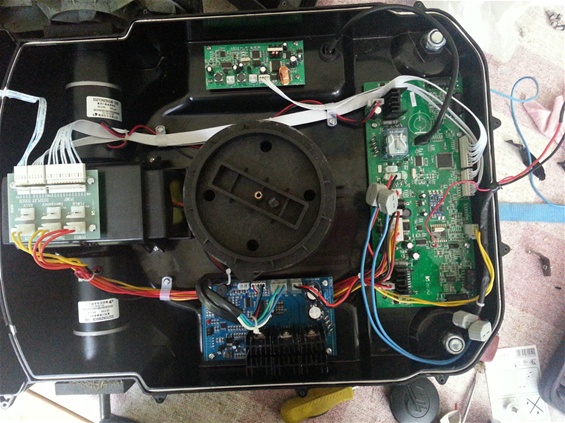
- offen_i75680322._szw565h2600_.jpg (122.31 KiB) Viewed 796 times
1. Why you get any compile warnings. This is not normal. I’d recommend you do a clean install of the repo and perhaps a clean install of the IDE
When you’ve done that, just compile a blank sketch for the generic F103C8 and confirm you get no warnings
Then select the F103RB and try again
2. When you have no warnings, write a simple sketch the counts up and sends the count via serial.
Under the Sketch menu, you can export the compiled binary and then “show sketch folder”
Then manually run the python script and get it to send the file to the board, and confirm that the python script seems to be uploading
3. Finally check if you see anything via the USB to serial. (note you many need to manually reset the board in your case)
If Serial is not working, see if you can find an LED or just some test point on the board that you can attach a volt meter and toggle that pin e.g. using a blink sketch
Basically, as far as I can tell you should be able to reprogram this mower very easily, but you do need to confirm it has a 8mhz clock crystal, as serial uploads work even if thats not functioning but our code does not run.
Failing all of that, you’d probably have to resort to installing STM’s own STM32CubeMx to generate some boiler plate code and use True Studio (or similar) to compile it. (and get blink working). as you can configure the clock in the cube to use the internal RC osc all the time
1. I made a complete new installation with Arduino IDE1.6.13 -> no warnigs are comming now
2. downloading is working via python and modifications written in fist post (USB -> PL2303Hx with RTS/CTS )
To be able to do the download automatically I had to some changes (Windows):
1. Change in Arduino download via serial
2. In ..\hardware\Arduino_STM32-master\tools\winserial_upload.bat change to download via python
rem: stm32flash -g 0x8000000 -b 230400 -w %str% %1
C:\Python27\python.exe stm32loader.py -e -w -p %1 -g -b 115200 %str%
3. Install Python2.7 + serial package
4. enable dts&rts in stm32loader.py (rtscts=1, # disable RTS/CTS flow control)
3. is not working I think the problem is the missing 8Mhz oscillator on Pin12 (OSC_IN) and Pin13 (OSC_OUT) of STM32F103VBT6
There is only one 12Mhz oszillator on Pin 8 (PC14-OSC32_IN) and Pin9 (PC15-OSC32_OUT)
It seems that serial is working with code generated by STM32CubeMx+Keil or in the Phoenix Project due to the fact that the internal oscillator is usd!
I found in stm32f1xx_hal_rcc.c generated with STM32CubeMx:
stm32f1xx_hal_rcc.c
==============================================================================
##### RCC specific features #####
==============================================================================
[..]
After reset the device is running from Internal High Speed oscillator
(HSI 8MHz) with Flash 0 wait state, Flash prefetch buffer is enabled,
and all peripherals are off except internal SRAM, Flash and JTAG.
(+) There is no prescaler on High speed (AHB) and Low speed (APB) busses;
all peripherals mapped on these busses are running at HSI speed.
Is there any chance to use you STM32F103 with Arduino without 8Mhz oscillator on Pin12/13? As I mentioned I want to use the Ardumower Code and I don’t want to write the whole code in C!
I changed the robot PCB! It was already prepared for external oscillator.
I used a 8Mhz quartz and two capacitors on postiton C26 and C27 with 22pF
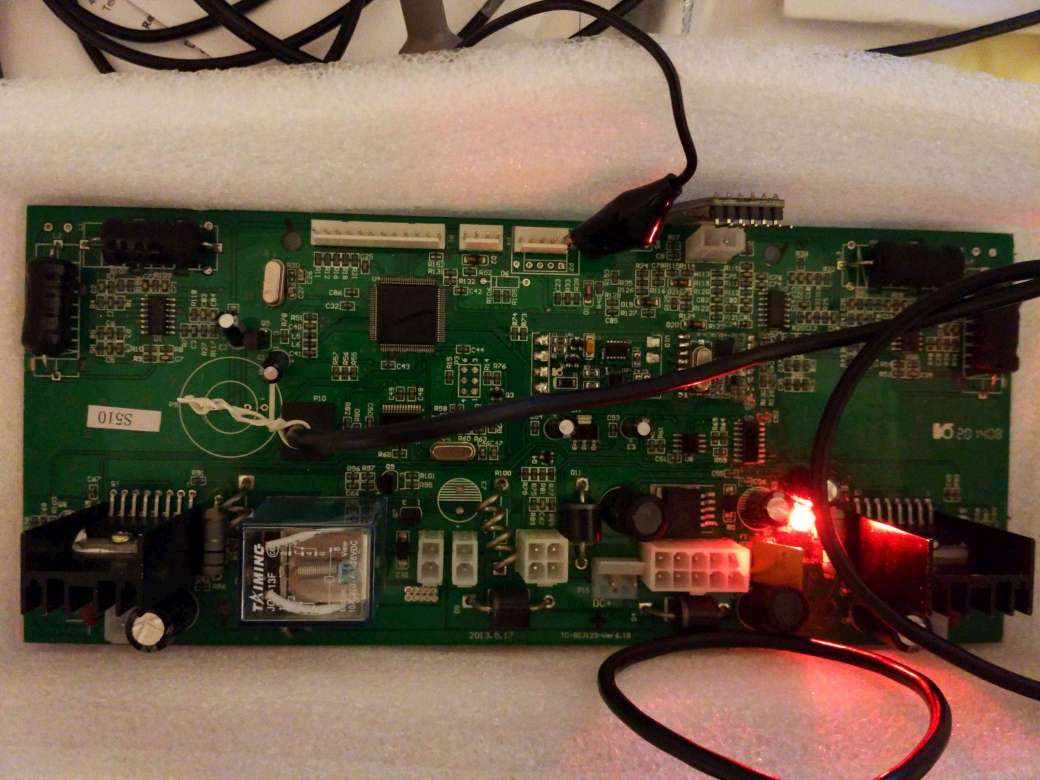
- S510_S520_board .jpg (85.97 KiB) Viewed 756 times
That seems a little strange… I would have thought that would have been a 32768 Hz watch type crystal (hence OSC32).
They may be doing something cunning (or stupid) with the LSE. Did you scope those pins to confirm that you have 12Mhz on them?
The 8Mhz quartz is oscillating correct.
First digital inputs are working now, but when PWM output for L298 on PC7 or PC8 is set eg. pwmWrite(outPWM_L, 0) MCU is stopping  -> no serial no PWM on the PWM pins.
// Test STM32F103VBT6
// RBT6 Flash 128kB Ram48kB -> Hello World ins working!
// VCT6 Flash 256kB statt 128 bzw Ram:48kb statt 20kB -> Hello World ins not working :-((((((
const int outPWM_L = PC8; // PC8 out PWM L298 left motor problem when writing pwmWrite(outPWM_L, 0)
const int outPWM_R = PC7; // PC7 out PWM L298 right motor
const int pinLiftSensor = PB4; //working
const int pinPressureSensor = PB5; //working
const int pinRightBump= PB6; //working
const int pinLeftBump = PB7;//working
void setup() {
Serial.begin(9600);
//pinMode(pinLED, OUTPUT);
Serial.println("START");
pinMode(outPWM_L, PWM);
pinMode(outPWM_R, PWM);
pinMode(pinLiftSensor, INPUT);
pinMode(pinPressureSensor, INPUT);
pinMode(pinRightBump, INPUT);
pinMode(pinLeftBump, INPUT);
}
void loop() {
//digitalWrite(pinLED, HIGH);
delay(1000);
// digitalWrite(pinLED, LOW);
Serial.println("Hello World working (SM32F103VBT with STM32F103RBT6 setting) - jippie yeah!!");
Serial.print("\t pinLiftSensor = " );
Serial.print(digitalRead(pinLiftSensor));
Serial.print("\t pinPressureSensor = " );
Serial.print(digitalRead(pinPressureSensor));
Serial.print("\t pinRightBump = " );
Serial.print(digitalRead(pinRightBump));
Serial.print("\t pinLeftBump = " );
Serial.println(digitalRead(pinLeftBump));
pwmWrite(outPWM_L, 0); // problem not working!
//pwmWrite(outPWM_R, 100);
delay(2000);
//pwmWrite(outPWM_L, 200);
//pwmWrite(outPWM_R, 250);
}
Try seeming is analogWrite on PB0 works, as that doesnt crash for me on a Maple mini
PWM on PC7 uses Timer8 instead of Timer3 so there may be a bug using a different timer
Re: STM32F103VBT6 Arduino download problem – solved
Report this post
Quote
Postby RogerClark » Sun Dec 04, 2016 10:01 pm
Umm
Try seeming is analogWrite on PB0 works, as that doesnt crash for me on a Maple mini
PWM on PC7 uses Timer8 instead of Timer3 so there may be a bug using a different timer
MCU is STM32F103VBT and I use generic_STM32F103r8. Both have only 4 timers and timer4 is used for PWM PB6 to PB9 (see board.cpp for generic_STM32F103r8).
board.cpp for generic_STM32F103r8
/******************************************************************************
* The MIT License
*
* Copyright (c) 2011 LeafLabs, LLC.
*
* Permission is hereby granted, free of charge, to any person
* obtaining a copy of this software and associated documentation
* files (the "Software"), to deal in the Software without
* restriction, including without limitation the rights to use, copy,
* modify, merge, publish, distribute, sublicense, and/or sell copies
* of the Software, and to permit persons to whom the Software is
* furnished to do so, subject to the following conditions:
*
* The above copyright notice and this permission notice shall be
* included in all copies or substantial portions of the Software.
*
* THE SOFTWARE IS PROVIDED "AS IS", WITHOUT WARRANTY OF ANY KIND,
* EXPRESS OR IMPLIED, INCLUDING BUT NOT LIMITED TO THE WARRANTIES OF
* MERCHANTABILITY, FITNESS FOR A PARTICULAR PURPOSE AND
* NONINFRINGEMENT. IN NO EVENT SHALL THE AUTHORS OR COPYRIGHT HOLDERS
* BE LIABLE FOR ANY CLAIM, DAMAGES OR OTHER LIABILITY, WHETHER IN AN
* ACTION OF CONTRACT, TORT OR OTHERWISE, ARISING FROM, OUT OF OR IN
* CONNECTION WITH THE SOFTWARE OR THE USE OR OTHER DEALINGS IN THE
* SOFTWARE.
*****************************************************************************/
/**
* @file wirish/boards/maple_mini/board.cpp
* @author Marti Bolivar <[email protected]>
* @brief Maple Mini board file.
*/
#include <board/board.h>
#include <libmaple/gpio.h>
#include <libmaple/timer.h>
/* Roger Clark. Added next to includes for changes to Serial */
#include <libmaple/usart.h>
#include <HardwareSerial.h>
#include <wirish_debug.h>
#include <wirish_types.h>
/* Since we want the Serial Wire/JTAG pins as GPIOs, disable both SW
* and JTAG debug support, unless configured otherwise. */
void boardInit(void) {
#ifndef CONFIG_MAPLE_MINI_NO_DISABLE_DEBUG
disableDebugPorts();
#endif
}
// Note. See the enum of pin names in board.h
extern const stm32_pin_info PIN_MAP[BOARD_NR_GPIO_PINS] = {
{&gpioa, &timer2, &adc1, 0, 1, 0}, /* PA0 */
{&gpioa, &timer2, &adc1, 1, 2, 1}, /* PA1 */
{&gpioa, &timer2, &adc1, 2, 3, 2}, /* PA2 */
{&gpioa, &timer2, &adc1, 3, 4, 3}, /* PA3 */
{&gpioa, NULL, &adc1, 4, 0, 4}, /* PA4 */
{&gpioa, NULL, &adc1, 5, 0, 5}, /* PA5 */
{&gpioa, &timer3, &adc1, 6, 1, 6}, /* PA6 */
{&gpioa, &timer3, &adc1, 7, 2, 7}, /* PA7 */
{&gpioa, &timer1, NULL, 8, 1, ADCx}, /* PA8 */
{&gpioa, &timer1, NULL, 9, 2, ADCx}, /* PA9 */
{&gpioa, &timer1, NULL, 10, 3, ADCx}, /* PA10 */
{&gpioa, &timer1, NULL, 11, 4, ADCx}, /* PA11 */
{&gpioa, NULL, NULL, 12, 0, ADCx}, /* PA12 */
{&gpioa, NULL, NULL, 13, 0, ADCx}, /* PA13 */
{&gpioa, NULL, NULL, 14, 0, ADCx}, /* PA14 */
{&gpioa, NULL, NULL, 15, 0, ADCx}, /* PA15 */
{&gpiob, &timer3, &adc1, 0, 3, 8}, /* PB0 */
{&gpiob, &timer3, &adc1, 1, 4, 9}, /* PB1 */
{&gpiob, NULL, NULL, 2, 0, ADCx}, /* PB2 */
{&gpiob, NULL, NULL, 3, 0, ADCx}, /* PB3 */
{&gpiob, NULL, NULL, 4, 0, ADCx}, /* PB4 */
{&gpiob, NULL, NULL, 5, 0, ADCx}, /* PB5 */
{&gpiob, &timer4, NULL, 6, 1, ADCx}, /* PB6 */
{&gpiob, &timer4, NULL, 7, 2, ADCx}, /* PB7 */
{&gpiob, &timer4, NULL, 8, 3, ADCx}, /* PB8 */
{&gpiob, &timer4, NULL, 9, 4, ADCx}, /* PB9 */
{&gpiob, NULL, NULL, 10, 0, ADCx}, /* PB10 */
{&gpiob, NULL, NULL, 11, 0, ADCx}, /* PB11 */
{&gpiob, NULL, NULL, 12, 0, ADCx}, /* PB12 */
{&gpiob, NULL, NULL, 13, 0, ADCx}, /* PB13 */
{&gpiob, NULL, NULL, 14, 0, ADCx}, /* PB14 */
{&gpiob, NULL, NULL, 15, 0, ADCx}, /* PB15 */
/* Andy Hull - the R8 is similar to the C8 but exposes more GPIO as follows */
{&gpioc, NULL, &adc1, 0, 0, 10}, /* PC0 */
{&gpioc, NULL, &adc1, 1, 0, 11}, /* PC1 */
{&gpioc, NULL, &adc1, 2, 0, 12}, /* PC2 */
{&gpioc, NULL, &adc1, 3, 0, 13}, /* PC3 */
{&gpioc, NULL, &adc1, 4, 0, 14}, /* PC4 */
{&gpioc, NULL, &adc1, 5, 0, 15}, /* PC5 */
{&gpioc, NULL, NULL, 6, 0, ADCx}, /* PC6 */
{&gpioc, NULL, NULL, 7, 0, ADCx}, /* PC7 */
{&gpioc, NULL, NULL, 8, 0, ADCx}, /* PC8 */
{&gpioc, NULL, NULL, 9, 0, ADCx}, /* PC9 */
{&gpioc, NULL, NULL, 10, 0, ADCx}, /* PC10 */
{&gpioc, NULL, NULL, 11, 0, ADCx}, /* PC11 */
{&gpioc, NULL, NULL, 12, 0, ADCx}, /* PC12 */
{&gpioc, NULL, NULL, 13, 0, ADCx}, /* PC13 */
{&gpioc, NULL, NULL, 14, 0, ADCx}, /* PC14 */
{&gpioc, NULL, NULL, 15, 0, ADCx}, /* PC15 */
{&gpiod, NULL, NULL, 2, 0, ADCx}, /* PD2 */
};
extern const uint8 boardPWMPins[BOARD_NR_PWM_PINS] __FLASH__ = {
PB0, PA7, PA6, PA3, PA2, PA1, PA0, PB7, PB6, PA10, PA9, PA8, PC6, PC7, PC8, PC9
};
extern const uint8 boardADCPins[BOARD_NR_ADC_PINS] __FLASH__ = {
PB0, PA7, PA6 , PA5 , PA4 , PA3 , PA2 , PA1 , PA0 , PC0, PC1, PC2, PC3, PC4, PC5
};
// Note. These defines are not really used by generic boards. They are for Maple Serial USB
#define USB_DP PA12
#define USB_DM PA11
// NOte. These definitions are not really used for generic boards, they only relate to boards modified to behave like Maple boards
extern const uint8 boardUsedPins[BOARD_NR_USED_PINS] __FLASH__ = {
USB_DP, USB_DM
};
/*
* Roger Clark
*
* 2015/05/28
*
* Moved definitions for Hardware Serial devices from HardwareSerial.cpp so that each board can define which Arduino "Serial" instance
* Maps to which hardware serial port on the microprocessor
*/
#ifdef SERIAL_USB
DEFINE_HWSERIAL(Serial1, 1);
DEFINE_HWSERIAL(Serial2, 2);
DEFINE_HWSERIAL(Serial3, 3);
#else
DEFINE_HWSERIAL(Serial, 1);
DEFINE_HWSERIAL(Serial1, 2);
DEFINE_HWSERIAL(Serial2, 3);
#endif
yes that’s true, and PC7 and PC8 has no timer because all 4 timers are used!
Reconfiguration possible?
