
Today I am going to test my Maple Mini a little with my oscilloscope with the Arduino IDE.
If I want to check the fastes rate this device can give out HIGH and LOW levels, how can I do it?
I know of the delayMicroseconds() function but is there something faster like delayNanoseconds() or something similar that I can use ?
As output I want to use Pin3 / PB0 as this is able to generate PWM and should be fast enough using something like this:
void setup()

{

pinMode(3, OUTPUT);

}
void loop()
{
//some delay here
gpio_write_bit(GPIOB,0,HIGH); // D3 HIGH
//some delay here
gpio_write_bit(GPIOB,0,LOW); // D3 LOW
}

If I want to check the fastest rate this device can give out HIGH and LOW levels, how can I do it?
 (abusing the mosi pin for this purpose ). then comes the port manipulation via the registers & memory to memory dma as mentioned in that thread
 So I just need one pin to change at a variable time but as fast as possible.
As far as I understand I can use something like this:
void setup()

{

RCC_BASE->APB2ENR |= 0x10; // enable GPIOC clock

GPIOB->regs->CRL = (GPIOB->regs->CRL & 0xFFFFFFF0) | 0x00000003; //set PB0/Pin3 as output (max speed 50MHz)

}
void loop()
{
//Set Pin3 (HIGH)
GPIOB->regs->BSRR = 0b0000000000000001; //lower 16 bits
//Clear Pin3 (LOW)
GPIOB->regs->BRR = 0b0000000000000001; //lower 16 bits
}
you can insert some NOP instructions in between to slow it down:
__NOP ();
I tested my code above and got a speed of ~36,2MHz.
Is anything faster possible?
I will attach a screenshot of it (I know my oscilloscope is overshooting but hey… it was just 200€ )
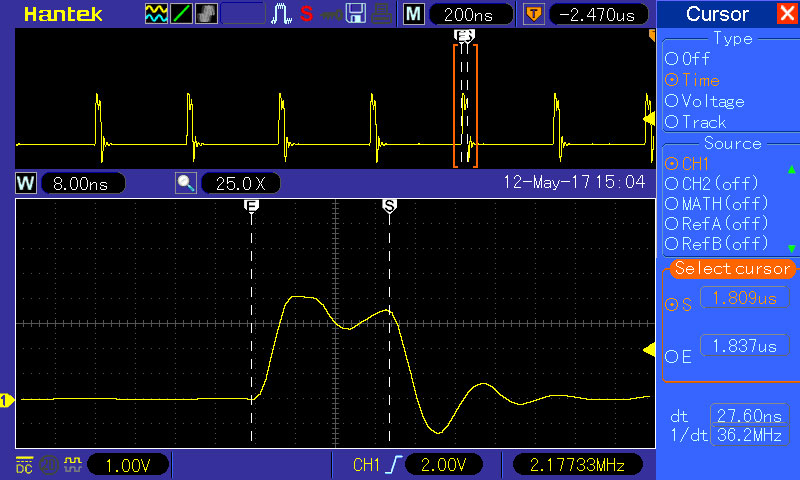
- pic_25_1.jpg (100.56 KiB) Viewed 2293 times
. search the forum a bit on how to get the NOP instruction working .
if it’s already doing 36Mhz, then that’s pretty nice, the long delay between is the jump that’s being done for the loop.
faster than 36 Mhz is not possible, as your processor is running @72Mhz, and will need 1 clockcycle to turn the pin on, and one cycle to turn it off again .
If you want a continuous pulse as someone mentioned, have a go at using a timer to toggle the pin and see how fast that can go .

void loop()

{

while(1) {

//Set Pin0 (HIGH)

GPIOB->regs->BSRR = 0b0000000000000001; //lower 16 bits

//Clear Pin0 (LOW)

GPIOB->regs->BRR = 0b0000000000000001; //lower 16 bits

}

}
void loop()

{

//Set Pin3 (HIGH)

GPIOB->regs->BSRR = 0b0000000000000001; //lower 16 bits

//Clear Pin3 (LOW)

GPIOB->regs->BRR = 0b0000000000000001; //lower 16 bits

}
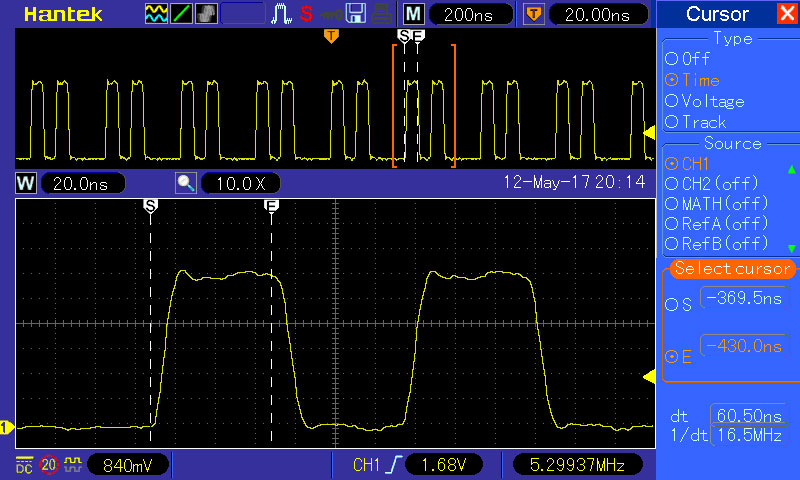
- 0001.jpg (115.24 KiB) Viewed 431 times
the other way is unroll the loops e.g. but u’d get fast and slow spikes, and if u combine with -O2 the end result may be unpredictable, e.g. the compiler may ‘decide’ to do both 1’s first then do both 0’s. of course u could also unroll the loop many times, but u’d get fast, fast, fast, fast … slow (at the loop)
then there are shrewd gcc tricks to tweak branch prediction
http://blog.man7.org/2012/10/how-much-d … y-and.html
the ultimate optimization that gcc / g++ may do is that it ‘decides’ that all those things that you re doing make no sense and *remove* them
void loop()

{

while(1) {

//Set Pin0 (HIGH)

GPIOB->regs->BSRR = 0b0000000000000001; //lower 16 bits

//Clear Pin0 (LOW)

GPIOB->regs->BRR = 0b0000000000000001; //lower 16 bits

//Set Pin0 (HIGH)

GPIOB->regs->BSRR = 0b0000000000000001; //lower 16 bits

//Clear Pin0 (LOW)

GPIOB->regs->BRR = 0b0000000000000001; //lower 16 bits

}

}
Ollie is active here..