
#include <ArduinoJson.h>
void setup() {
Serial.begin(9600);
Serial.println(“You know I’m fat, I’m fat, you know it”);
StaticJsonBuffer<200> jsonBuffer;
char json[] =
“{\”sensor\”:\”gps\”,\”time\”:1351824120,\”data\”:[48.756080,2.302038]}”;
//JsonObject& root = jsonBuffer.parseObject(json);
}
void loop() { }
This genrates 12kB file. If I uncomment the line with ‘parseObject’ the size is ~75kB.
Attached is diff from cmdline:
C:\Users\michael\.platformio\packages\toolchain-gccarmnoneeabi\bin>arm-none-eabi-nm.exe --size-sort -C -r C:\Users\mika\AppData\Local\Temp\build6e0206c4052a2b088e47e64ac9275fbc.tmp\arduino_json_EEPROM.ino.elf
Could you try something: put this
--specs=nano.specs
I’ll try to do that today.
I’ve added new.cpp from the Arduino SAMD
It seems to reduce flash use a lot when using the “new” operator
However I don’t have any code to test it with.
Just tried it like this
Adafruit_PCD8544 *display = new Adafruit_PCD8544(27, 28, 29);
I’ve added new.cpp from the Arduino SAMD
It seems to reduce flash use a lot when using the “new” operator
However I don’t have any code to test it with.
void *operator new(size_t n, JsonBuffer *jsonBuffer) throw() {

...

List.hpp: new (_buffer) node_type();
Re: new.cpp
I’m using the one from the Arduino SAM core, so I suspect that the JSON lib would have similar issues with flash usage on that core as well.
Apart from the time taken to upload, 75k is probably OK, because even the Blue Pill normally has 120k available (8k is taken by the bootloader)
BTW.
I will leave the new new.cpp in place as for most things its probably better than nothing.
Anyway.. Pasting some more info about that –specs=nano.spec I found here:
http://pabigot.github.io/bspacm/newlib.html
Seems there are different variants of newlib and if we instruct to use “nano” a smaller libc is linked in. Didn’t know about this until now. I’ll report if I find some strange behaviour using this
Space Optimization with newlib-nano
Although newlib was designed for embedded systems, it has historically been unusable on microcontrollers due to its relatively large memory requirements, e.g. 1 kiB SRAM to support malloc, 25 kiB FLASH to support printf, etc.
With the addition of a variant called newlib-nano, this is no longer the case. newlib-nano was implemented specifically for ARM within the GNU Tools for ARM Embedded Processors, and some of its enhancements have been merged upstream.
By adding -specs=nano.specs to the gcc link command, a reduced-size libc is linked in. The effect of this is significant. The size of the classic “hello” program compiled for the EFM32GG-STK3700 kit with traditional newlib under 4_8-2013q4 is:
llc[56]$ rm app.axf ; make WITH_NANO=0 app.axf
arm-none-eabi-gcc -o app.axf -L/prj/arm/bspacm//board/efm32gg-stk3700 -ggdb -Wl,-gc-sections -Wl,-T,/prj/arm/bspacm//toolchain/GCC/gcc_arm.ld -L/prj/arm/bspacm//device/efm32/efm32gg/efm32gg990f1024 -mthumb -mcpu=cortex-m3 system_efm32gg.o main.o startup_ARMCM3.o periph_config.o -Wl,–start-group -lc -lemlib -lbspacm-fdops -lbspacm -Wl,–end-group
arm-none-eabi-size app.axf
text data bss dec hex filename
27832 2340 116 30288 7650 app.axf
The same program linked with newlib-nano is one third the FLASH, and one tenth the SRAM:
llc[57]$ rm app.axf ; make WITH_NANO=1 app.axf
arm-none-eabi-gcc -o app.axf -L/prj/arm/bspacm//board/efm32gg-stk3700 -ggdb -Wl,-gc-sections -Wl,-T,/prj/arm/bspacm//toolchain/GCC/gcc_arm.ld -L/prj/arm/bspacm//device/efm32/efm32gg/efm32gg990f1024 -specs=nano.specs -mthumb -mcpu=cortex-m3 system_efm32gg.o main.o startup_ARMCM3.o periph_config.o -Wl,–start-group -lc_s -lemlib -lbspacm-fdops -lbspacm -Wl,–end-group
arm-none-eabi-size app.axf
text data bss dec hex filename
8720 232 72 9024 2340 app.axf
OK.
Most people only end up using 20 to 30k so adding 50k still isnt a problem, but I appreciate you need to use the flash as well.
You could try using STM’s own official core (which we modified to support the F103 Blue Pill)
(See the post in the announcements thread) – but I suspect it would have the same problem
Did you try compiling the same code for the Arduino Zero or Arduino Due, or even for AVR. It would be interesting to know how those cores compare.
You could also try downloading the Teensy core (not sure if its still a separate IDE or an installable core) as Paul puts a lot of effort into supporting the Teensy ecosystem
You could try using STM’s own official core (which we modified to support the F103 Blue Pill)
(See the post in the announcements thread) – but I suspect it would have the same problem
You could try using STM’s own official core (which we modified to support the F103 Blue Pill)
(See the post in the announcements thread) – but I suspect it would have the same problem
https://github.com/greiman/RamDisk
Could be used with SPI FRAM/MRAM/SRAM and maybe with flash (after some changes).
I did not test it.
https://github.com/greiman/RamDisk
Could be used with SPI FRAM/MRAM/SRAM and maybe with flash (after some changes).
I did not test it.
OK.
Most people only end up using 20 to 30k so adding 50k still isnt a problem, but I appreciate you need to use the flash as well.
You could try using STM’s own official core (which we modified to support the F103 Blue Pill)
(See the post in the announcements thread) – but I suspect it would have the same problem
Did you try compiling the same code for the Arduino Zero or Arduino Due, or even for AVR. It would be interesting to know how those cores compare.
You could also try downloading the Teensy core (not sure if its still a separate IDE or an installable core) as Paul puts a lot of effort into supporting the Teensy ecosystem
I am using Arduino 1.6.13, i have installed ‘Arduino Zero’ from ‘Boards Manager’
and github.com/rogerclarkmelbourne/Arduino_STM32 in Ubuntu 16.04 64bit.
– Program A:
void setup() {}
void loop() {}
– Program B:
int main() {}
Adding –specs=nano.specs in ‘STM32F1/platform.txt’ at the end of line starting with:
recipe.c.combine.pattern= … –specs=nano.specs
=== Ubuntu 16.04 64bit (no nano.specs)
A
Sketch uses 12,428 bytes (18%) of program storage space. Maximum is 65,536 bytes.
Global variables use 2,816 bytes of dynamic memory.
B
Sketch uses 9,468 bytes (14%) of program storage space. Maximum is 65,536 bytes.
Global variables use 2,632 bytes of dynamic memory.
=== Ubuntu 16.04 64bit (with nano.specs)
A
Sketch uses 10,892 bytes (16%) of program storage space. Maximum is 65,536 bytes.
Global variables use 1,848 bytes of dynamic memory.
B
Sketch uses 7,932 bytes (12%) of program storage space. Maximum is 65,536 bytes.
Global variables use 1,664 bytes of dynamic memory.
Before nano.specs
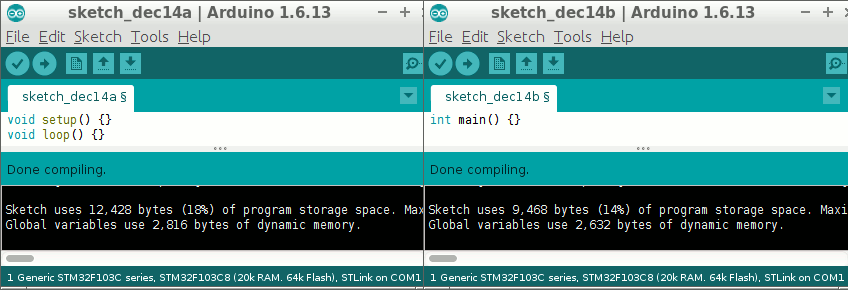
- 2016-12-14-181059_848x290.png (9.86 KiB) Viewed 531 times
Anyway – NOTHING comes for free:
https://www.community.arm.com/iot/embed … bedded-4-7
You are trading speed for size optimization as well as some features. Likely this will not affect novice programmers, IMO.
However, if one has 128K of flash and 20K SRAM and and the program run properly when compiled without the nano flag, there is no necessity to reduce the flash footprint… It’s not like you are going to receive a check in the mail from ST for not using all the flash!
Kind of one of those “whatever” movements to me.
FYI … Cypress PSoC automatically defaults to nano… But then Cypress pushes for a C only source although C++ can be configured.
Ray
..usage analyzer..
I did the same steps (described before), the same day(equally updated), to install all tools in both systems.
I have attached the 4 map files in a zip, all compiled with nano.specs.
sketch_dec14x was compiled in ubuntu16.04_64bit, where ‘x’ is ‘a’ or ‘b’
sketch_dec15x was compiled in ubuntu14.04_32bit
=== Ubuntu 14.04 32bit (no nano.specs)
A
Sketch uses 6,132 bytes (9%) of program storage space. Maximum is 65,536 bytes.
Global variables use 1,984 bytes of dynamic memory.
B
Sketch uses 4,604 bytes (7%) of program storage space. Maximum is 65,536 bytes.
Global variables use 1,896 bytes of dynamic memory.
=== Ubuntu 14.04 32bit (with nano.specs)
A
Sketch uses 4,676 bytes (7%) of program storage space. Maximum is 65,536 bytes.
Global variables use 1,016 bytes of dynamic memory.
B
Sketch uses 3,148 bytes (4%) of program storage space. Maximum is 65,536 bytes.
Global variables use 928 bytes of dynamic memory.
danieleff, thank you for the Analyzer.
RogerClark, thank you for the Arduino_STM32.
The difference between “dec1Xa” and “dec1Xb” is that “dec1Xa” contains main.cpp but has not discarded some sections related to ADC, NVIC and RCC stuff which “dec1Xb” does have discarded.
How do you determine that? and more important, where/how do i tweak these options?
To summarize the results.
| _____ | _ | _______ | ______ | _ | _______ | ______ | _ | ______ | ______ |
| │ | Upload | STLink | │ | Upload | Serial | │ | ˙Diff | (ST-Se) | |
| specs | │ | ˙˙˙A | ˙˙B | │ | ˙˙A | ˙˙B | │ | ˙˙A | ˙˙B |
| – | │ | 12,428 | 9,468 | │ | 6,132 | 4,604 | │ | 6,296 | 4,864 |
| nano | │ | 10,892 | 7,932 | │ | 4,676 | 3,148 | │ | 6,216 | 4,784 |
| ˙diff | │ | ˙1,536 | 1,536 | │ | 1,456 | 1,456 |
Edited after danieleff reply.
Double check that on both computers you selected the same boards and upload methods.
![[SOLVED] Discovery STM32F100RB — Trouble with timers and library structure](https://sparklogic.ru/wp-content/uploads/2019/11/st-stm32vl-discovery-90x90.jpg)
