
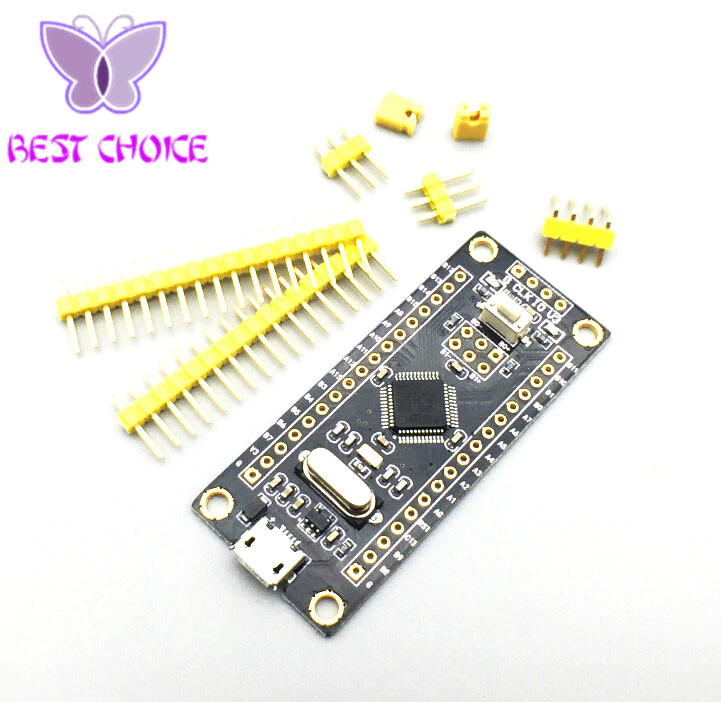
It has a different layout from the ones that are commonly used in the tutorials I’ve been trying to follow. I cannot for the life of me get it to upload from the Arduino IDE. I have followed the instructions from this site and have tired various different things. These are the settings I’m trying :
Board : “Generic STM32F103 Series”
Varient : “STM32F103C8 20k RAM. 64k Flash”
CPU Speed(MHz) : “72Mhz (Norma)”
Upload Method : “Serial”
Optimize : “Smallest (Default)”
Port : “/dev/cu.wchusbserial640”
Programmer : “AVRISP mkll”
The jumper pins are in a different place on this board but I’m just assuming the arrangement of the pins for program mode is the same as the others because when I set the jumpers and reset the default blink that came on the board stops.
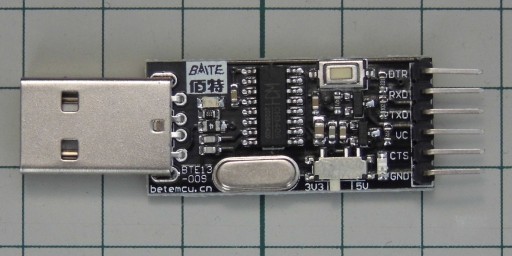
I am using this USB to Serial with the following connections …
RXD > A9
TXD > A10
VC > 3V ( on the four pins at the end of the STM32 board )
GND > G ( on the four pins at the end of the STM32 board )
I’m using Arduino 1.8.3 and I get the following error in the Arduino IDE console
Failed to init device.

stm32flash Arduino_STM32_0.9

http://github.com/rogerclarkmelbourne/arduino_stm32

Using Parser : Raw BINARY

Interface serial_posix: 230400 8E1
[juliusbangert – Wed Aug 02, 2017 11:04 am] –
I recently ordered and received this generic STM32 development board from aliexpress…
<…>
Can anyone please please help me?
Maybe: http://wiki.stm32duino.com/index.php?title=Black_Pill
[mrburnette – Wed Aug 02, 2017 11:48 am] –
Maybe: http://wiki.stm32duino.com/index.php?title=Black_Pill
Thank you. This is the one… I just didn’t know what to search for but I’m really pleased there is some documentation on this board.
I’m now trying to burn the bootloader but the instructions are for windows and linux. Any suggestions for doing this on a mac?
A good move.
PS: there is none “5V” output pin.
cd ~/Documents/Arduino/hardware/Arduino_STM32/tools/macosx/stm32flash
./stm32flash -w ~/Downloads/generic_boot20_pb12.bin -v -g 0x0 /dev/cu.wchusbserial410
Make sure Boot0=1 and Boot1=0 before you try to upload the bootloader. There was/is an issue with some serial drivers not supporting parity.
The Black Pill is the board I use for nearly all my projects as it has mounting holes that make it easy to mount in an enclosure.
[fredbox – Wed Aug 02, 2017 4:12 pm] –
You may need a different USB serial adapter.
Thanks fredbox, I don’t have another USB Serial here right now but I’ll order one, but I don’t reckon that’s the problem because it works just fine with the pro mini.
So After doing a whole load of pip and python serial install crap; I finally got some kind of response from my terminal window from running the bootloader install…
stm32flash Arduino_STM32_0.9
http://github.com/rogerclarkmelbourne/arduino_stm32
Using Parser : Raw BINARY
Interface serial_posix: 57600 8E1
Version : 0x22
Option 1 : 0x00
Option 2 : 0x00
Device ID : 0x0410 (Medium-density)
- RAM : 20KiB (512b reserved by bootloader)
- Flash : 128KiB (sector size: 4x1024)
- Option RAM : 16b
- System RAM : 2KiB
Write to memory
Erasing memory
Wrote and verified address 0x080052a4 (100.00%) Done.
Starting execution at address 0x08000000... done.
Certainly one thing I changed in my setup was going from a CH341 to FTDI USB to serial device, so that may have been it, but I got this normally works.
But also I had to press the reset just a second after I started the bootloader upload, so maybe there’s a timeout that was cutting it off before(?)
Either way I am now able to see “/dev/cu.usbmodem411 (Maple Mini)” in my port list and can switch upload method over to “STMduino bootloader”.
I would like to know exactly which thing I changed caused it to work so next time I get a board like this I can avoid the headache.
Thanks everyone.
The problem is new people come here .. each one hasn’t read the wiki or done any research…. they start a new thread thinking they are unique in having usb / bootloader / serial issues … they start a new thread and then we end up with another solution making it harder for the next person to find the answer.
I don’t know the answer to this problem except to try and ignore these threads
[Rick Kimball – Thu Aug 03, 2017 5:33 pm] –
Maybe you should google this site:stm32duino.com and look for usb serial not working…The problem is new people come here .. each one hasn’t read the wiki or done any research…. they start a new thread thinking they are unique in having usb / bootloader / serial issues … they start a new thread and then we end up with another solution making it harder for the next person to find the answer.
I don’t know the answer to this problem except to try and ignore these threads
A solution could be to delete threads that don’t get anywhere, so people doing a search has a higher likelihood of landing in a thread with an actual solution.
This is why sometimes I revive an old thread is the new post is directly related to it, to reduce the number of short threads with little actual content or context on them
It means you can’t running longtime by battery to keep the data of RTC register.
[csnol – Wed Aug 30, 2017 2:53 pm] –
Attention: Black Pill’s VBAT pin be connected to Vcc – 3.3V.
It means you can’t running longtime by battery to keep the data of RTC register.
Interesting… Thanks
