
I got “No target connected” error.
I removed the ST-Link jumpers and connected:
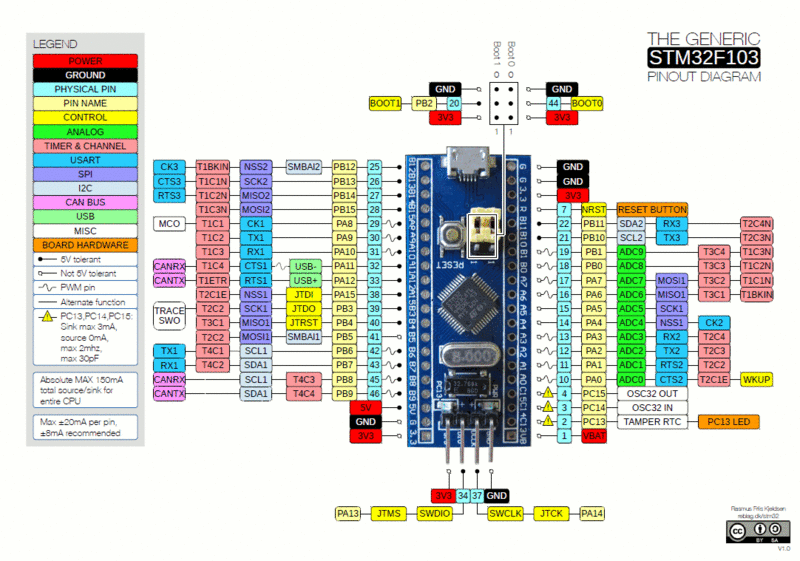
PA13 (BluePill) -> SWDIO (STM32F4)
PA14 (BluePill) -> SWCLK (STM32F4)
3.3V (BluePill) -> 3.3V (STM32F4)
GND (BluePill) -> GND (STM32F4)
the STM32 ST-Link Utility gives the following output:

I also tried the “Connect Under Reset” mode by holding RESET on my board, but no luck either.
[stevestrong – Fri Apr 20, 2018 11:50 am] –
https://www.youtube.com/watch?v=8qevASRjjEs
I did as told in the video but it still doesn’t work? Do I have a faulty board then?
I’m sure STLINK works on the Nucleo board because everything works fine
when I reconnect the jumpers and try to download to the Nucleo board.
The second method using a FTDI works, but I keep wondering why the STLINK method doesn’t.

[GianniDPC – Fri Apr 20, 2018 1:03 pm] – Do I have a faulty board then?
Quite possible. It would be a good idea to verify that by other means, such as a serial upload. Edit – I assume you have no second Blue Pill to try…
[electrobling – Fri Apr 20, 2018 1:13 pm] –[GianniDPC – Fri Apr 20, 2018 1:03 pm] – Do I have a faulty board then?Quite possible. It would be a good idea to verify that by other means, such as a serial upload. Edit – I assume you have no second Blue Pill to try…
No unfortunately, I do not have a second Blue Pill to test.
Move the jump link on Boot0 to the other position as this prevents the existing firmware running when the MCU starts (as its waiting for upload via serial if you do that)
If STLink still won’t connect, either the board is broken or you have not connected it correctly
[RogerClark – Fri Apr 20, 2018 10:46 pm] –
Its possible that whatever firmware is already in the BluePill has disabled the SWD pinsMove the jump link on Boot0 to the other position as this prevents the existing firmware running when the MCU starts (as its waiting for upload via serial if you do that)
If STLink still won’t connect, either the board is broken or you have not connected it correctly
I wonder what’s wrong with it, I moved boot0 over to high state but I got the same result. Upload over UART with the Demonstrator app works though but STLINK doesn’t which is unfortunate because I can’t debug without it.
I didn’t connect the pins upside down on the Nucleo bord didn’t I?

Error message in settings of the ST-LINK Utility (It says old ST-Link but that isn’t true because I have the lastest version). Also if I reconnect the jumpers to the Nucleo board it detects it. But not the BluePill board.

[edogaldo – Sat Apr 21, 2018 10:59 am] –
Try powering the bp via st-link instead of usb.
+1 to that, and also try a different USB lead, some of my cheap ones simply don’t work when asked to power the BP.
Don’t try powering from both the ST-Link AND the USB at the same time, that may cause problems. Magic smoke problems 
[ahull – Sat Apr 21, 2018 11:27 am] –[edogaldo – Sat Apr 21, 2018 10:59 am] –
Try powering the bp via st-link instead of usb.+1 to that, and also try a different USB lead, some of my cheap ones simply don’t work when asked to power the BP.
Don’t try powering from both the ST-Link AND the USB at the same time, that may cause problems. Magic smoke problems
I tried that also same results.. Thats why I wonder what’s wrong with it.
[ahull – Sat Apr 21, 2018 2:12 pm] –
Doesn’t sound right. Break out the magnifier and check the soldering.
Connected a wire in between and it works! I guess I’ll need to find out where the bad contact is as there seems to be nothing wrong with the solder joint on the microchip

Glad you got it working.
I already tried to remove all types of protection, enabling the SWD with CH430 adapter, but still were not able to start it with ST-Link.
After post from TS about bad wiring I also tested them on my board, but they are fine, no broken connections.
Meanwhile, I noticed there is a “short circuit” between GND and IO pins at SWD pins. I don’t see it but I found it with Ohm-meter. The resistance is about 0.2 Ohm.
Does it supposed to be like that?
Examine the board very carefully with a magnifier, there is probably a “tin whisker” somewhere due to poor soldering.
I made a “tin whisker” to a ground polygon around SWD pins header when I soldered it.
Re-soldering revealed the broken silk screening on ground polygon that I didn’t noticed first time.
Thanks!
